-
Generation 8 Advantages?
Daz had overtaken (overtook?) my life, so I took an 18 month break. Now I'm a full-on addict again. When I returned about six weeks ago, I saw that G8 had come out. So I have dropped about $1,000 bucks on all things G8 (between this and other Daz content sites), assuming I needed the latest and greatest.
But my question is....apart from better poses/expressions, etc., do you all think renders of G8 characters look more realistic than, say, Victoria 7 or Michael 7? Am I wasting money?
Transfer utility for generation 4 CharactersLets not forget Michael 4 and Victoria 4. Everything seems to fit and transfer back and forth with genesis Characters but not generation charcters.
Generation 8 Advantages?I love G8 for all the above-stated reasons. As for content, with all the tools available I use V4, genesis, G2 G3 poses, skins morphs hair clothes, you name it, the works, all on G8. In fact, there is a sale on Godin's V4 figures at Rendo and I picked up about 10 to use on G8.
I would love to know how you use V4's textures on Gen 8!! That's the one thing I REALLY want. Since some of my favorite textures were made by Surreality for V4.
https://www.daz3d.com/legacy-uvs-for-genesis-8-victoria-4
Cayman Studios has a lot of these UV sets.
Awesome! Thanks again, agent!
 Generation 8 Advantages?
I love G8 for all the above-stated reasons. As for content, with all the tools available I use V4, genesis, G2 G3 poses, skins morphs hair clothes, you name it, the works, all on G8. In fact, there is a sale on Godin's V4 figures at Rendo and I picked up about 10 to use on G8.
I would love to know how you use V4's textures on Gen 8!! That's the one thing I REALLY want. Since some of my favorite textures were made by Surreality for V4.
https://www.daz3d.com/legacy-uvs-for-genesis-8-victoria-4
Cayman Studios has a lot of these UV sets.
The Girl - Sci-Fi GearWhich version of "The Girl", MJ? (Also...long time, good to see you)
The original Girl or Girl 3? If I recall, there wasn't much available for the original Girl, even when I was new. (Which was back when V4 was new). Even 3rd party venders didn't have much for her, but most of those places are gone forever, now. Wish I could offer more to help.
My understanding is The Girl and Girl 3 are the same. Im referring to this figure:
https://www.daz3d.com/the-girl-starter-kit
And long time no see to you too... been uber busy with my webcomic, but i pop in and out from time to time.
-MJIt could have been. Though I thought there was a "The Girl" that came out when Victoria 2 was a thing before Victoria 2 became Victoria 3... LOL.
I could be wrong. Either way, Cross Dresser is probably your only solution. Good Luck!
Plugin for Easy Rigging of Clothing?Does anybody know if there is a plugin to allow for quick and easy rigging of clothing onto any figure (Victoria 4, Genesis 3, Michael 4, etc.)?
If this thread is in the wrong forum, please move it to the right forum.
Underbreast T-shirt glitchHi. I have a problem fitting clothes to Genesis 3. I make clothes with Marvelous Designer and modify them with Blender. Then I import them in Daz Studio and fit to Genesis 3, which is the model I used in Marvelous. The shirts and top of dresses, etc, look fine with that, but when I morph Genesis 3 (Victoria 7, e.g.) appears that glitches underbreast. I tried to fix it with weight map, but don't fix anything. I tried modify the cloth, making it more large in the underbreast zone, but neither fix it.
Maybe the solution is very simple, but I don't know Daz Studio very well and I've been working with it a little time. I will appreciate any help.
3rd Annual It's Raining Men Picture Thread -- Entries and NAE PicturesEntry #2: Hijra, South Asia's 'third gender'
Repurposed items: Saree for Genesis 8 Female and Victoria 8, Krayon Hair for Genesis 3 Female(s), French Twist Hair for Genesis 3 Female(s)
Description: Hijras is a term given to a social group of born male transgenders and transvestites, who live in India, Nepal, Pakistan, and Bangladesh. Hijras behave and dress like women, but no physical transition or change is required to be inducted into the Hijra community. Most of them identify themselves as neither men nor women, but as 'third gender'. Most hijras live in the cities and they often work as prostitutes or as entertainers.
 how do you use "Veils for Victoria 8"Compatible figures and required products. How restrictive are these?
Don't want to start a new topic, because my problem is kinda related to the one of the OP:
There are quite a few Characters for DazStudio available. Some can be applied to the basic G3F figure. Others ask for Victoria 7 (= the Victoria for the G3F figure) or other "named" figures.
If I would now apply one of these characters, which require Victoria 7 to the basic G3F figure, what would be the outcome?
- it won't work at all?
- it will work, but the result will be buggy (= textures out of place or similiar graphic problems)?
- it will work, but it will not look like shown in the examples of the download, due to the needed figure's special textures not being available?
- none of the above but... (additional details needed)
I'm asking, because I'm on a limited budget and right now I would prefer to work with the G3F figure and already got some stuff for her (Body and Head mod plugin and "anatomical parts" *cough*) which I (probably?) can't use on the Victoria 7 model, which would mean a further investment in stuff I kinda already have...
The shape will certainbly be differenct, in most cases for Genesis 3 (the 7 characters) the materials will work correctly. With the previous generations (Genesis and Genesis 2) add-ons were much more likely to use the custom UVs for the named character, and in those cases the materials would not work correctly without the character.
how do you use "Veils for Victoria 8"i purchased the "Veils for Victoria 8, but i cannot seem to get the material to automaticaly fit onto the my posed image.
where can i buy this tank top in the picture shown?It might be one of these:
https://www.daz3d.com/tres-chic-for-victoria-4-elite-and-aiko-4
Easiest way to rig a new characterWhile on the topic of rigging, I am wondering if there is a very easy way to rig clothing items or hair onto a Genesis 3, Victoria, Michael, etc. figure? Are there any step-by-step instructions on how this could be accomplished, even if there are tutorials in the form of YouTube videos?
dForce Verified Functional Clothing [Out of the Box]Ok, here's a quick step by step. This is just how I do, there might be better ways to do it, but this is just how I, personally, do it. In this walkthrough I'll be using Victoria 6, but you can probably use any Genesis figure. I've not tried it with Victoria 4, I think, but I've heard some have had trouble using dForce with her. I don't think I've tried it with her though, so for now I'm just using Genesis 2 for this.
- Load your figure.
- Go to the Parameters tab and turn the "Resolution Level" to "Base".
- Create a Plane Primitive for the ground plane (Create >> New Primitive >> Plane) - I set it at 2 M and 125 Divisions.
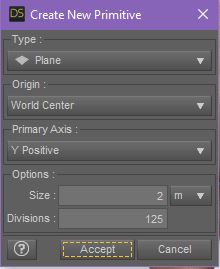
- Select the Plane in the Scene tab then make it a dForce Static Surface (Edit >> Object >> Geometry >> Add dForce Modifier: Static Surface).
- Pose your figure.
- Load the clothing item to your figure. For this wallkthrough I'm using the Morphing Fantasy Dress for G2F.
- Add the dForce Modifier "Dynamic Surface" to the clothing item (Edit >> Object >> Geometry >> Add dForce Modifier: Dynamic Surface).
- With the clothing item selected, go to the Surfaces tab and turn Self Collide to Off.
- Use smoothing and shaping morphs to make sure that the clothing is completely OUTSIDE the figure (no poke-through) and that the clothing item is 100% ABOVE the Primitive Ground Plane (look under the plane to make sure none of the cloth is poking through it).
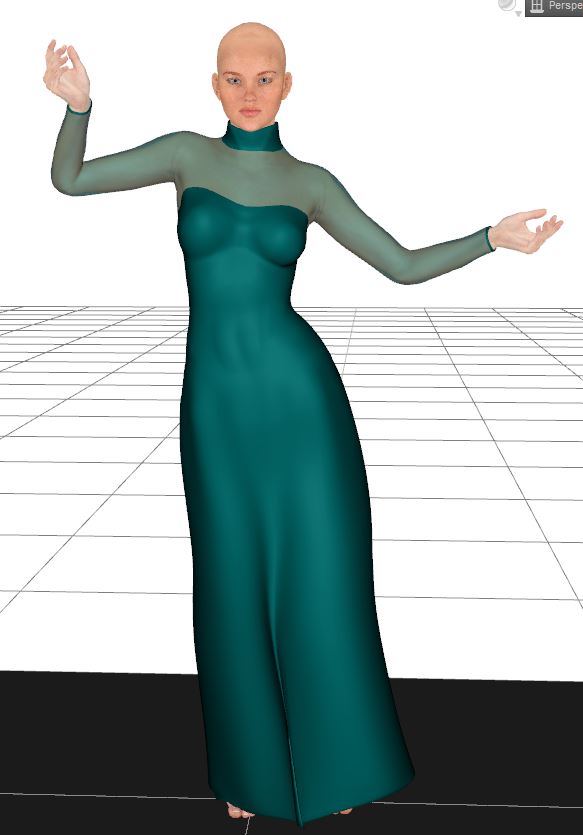
- Go to the Simulation Settings and turn Start From Memorized Pose to Off.
- Turn Frames to Simulate to "Current Frame".
- Run the Simulation.
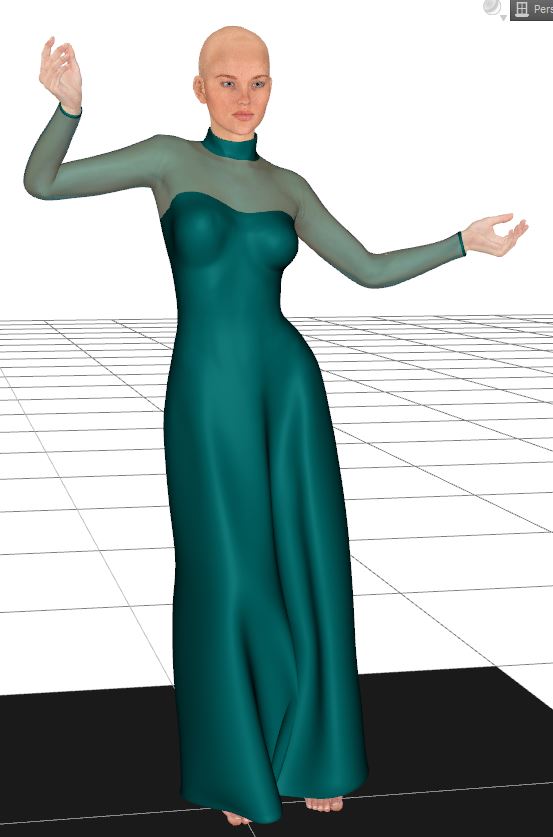
See if that works for you. Once you get the steps down you can do more complex things like using the Time Line and/or using the "Start Bones from Memorized Posed". Both of which require a bit more thought in the pose and making sure that at no time during the simulation the clothing drops below the primitive plane and that the figure's fingers or feet don't collide too much with the cloth (which can cause clothing explosions). But like I said, once you get a feel for it and doing the static pose simulations, you can branch off into the more complex simulations.
aaaaa HAAAAAAAAAA... I knew I was missing something.. NO where did anyone mention Item #10 in your instructions... So I have to shape the dress around the mannequin BEFORE i simulate! I'm so excited.. gonna try that now... I have G2 and the MFD for her.. Brb.. lol. Now I can't sleep... lol
I hope it works for you. Let me know how it goes! :) The key is to make sure that the cloth is outside and above anything that it's going to collide with. Make sure it's not touching the floor plane and that it's not poking through the body.
Got'cha... running simulation now... I'm gonna copy and paste your steps into a notecard for future reference.. I'll post resultas as soon as the simulation is finished (crosses fingers)
dForce Verified Functional Clothing [Out of the Box]Ok, here's a quick step by step. This is just how I do, there might be better ways to do it, but this is just how I, personally, do it. In this walkthrough I'll be using Victoria 6, but you can probably use any Genesis figure. I've not tried it with Victoria 4, I think, but I've heard some have had trouble using dForce with her. I don't think I've tried it with her though, so for now I'm just using Genesis 2 for this.
- Load your figure.
- Go to the Parameters tab and turn the "Resolution Level" to "Base".
- Create a Plane Primitive for the ground plane (Create >> New Primitive >> Plane) - I set it at 2 M and 125 Divisions.
- Select the Plane in the Scene tab then make it a dForce Static Surface (Edit >> Object >> Geometry >> Add dForce Modifier: Static Surface).
- Pose your figure.
- Load the clothing item to your figure. For this wallkthrough I'm using the Morphing Fantasy Dress for G2F.
- Add the dForce Modifier "Dynamic Surface" to the clothing item (Edit >> Object >> Geometry >> Add dForce Modifier: Dynamic Surface).
- With the clothing item selected, go to the Surfaces tab and turn Self Collide to Off.
- Use smoothing and shaping morphs to make sure that the clothing is completely OUTSIDE the figure (no poke-through) and that the clothing item is 100% ABOVE the Primitive Ground Plane (look under the plane to make sure none of the cloth is poking through it).
- Go to the Simulation Settings and turn Start From Memorized Pose to Off.
- Turn Frames to Simulate to "Current Frame".
- Run the Simulation.
See if that works for you. Once you get the steps down you can do more complex things like using the Time Line and/or using the "Start Bones from Memorized Posed". Both of which require a bit more thought in the pose and making sure that at no time during the simulation the clothing drops below the primitive plane and that the figure's fingers or feet don't collide too much with the cloth (which can cause clothing explosions). But like I said, once you get a feel for it and doing the static pose simulations, you can branch off into the more complex simulations.
aaaaa HAAAAAAAAAA... I knew I was missing something.. NO where did anyone mention Item #10 in your instructions... So I have to shape the dress around the mannequin BEFORE i simulate! I'm so excited.. gonna try that now... I have G2 and the MFD for her.. Brb.. lol. Now I can't sleep... lol
I hope it works for you. Let me know how it goes! :) The key is to make sure that the cloth is outside and above anything that it's going to collide with. Make sure it's not touching the floor plane and that it's not poking through the body.
dForce Verified Functional Clothing [Out of the Box]Ok, here's a quick step by step. This is just how I do, there might be better ways to do it, but this is just how I, personally, do it. In this walkthrough I'll be using Victoria 6, but you can probably use any Genesis figure. I've not tried it with Victoria 4, I think, but I've heard some have had trouble using dForce with her. I don't think I've tried it with her though, so for now I'm just using Genesis 2 for this.
- Load your figure.
- Go to the Parameters tab and turn the "Resolution Level" to "Base".
- Create a Plane Primitive for the ground plane (Create >> New Primitive >> Plane) - I set it at 2 M and 125 Divisions.
- Select the Plane in the Scene tab then make it a dForce Static Surface (Edit >> Object >> Geometry >> Add dForce Modifier: Static Surface).
- Pose your figure.
- Load the clothing item to your figure. For this wallkthrough I'm using the Morphing Fantasy Dress for G2F.
- Add the dForce Modifier "Dynamic Surface" to the clothing item (Edit >> Object >> Geometry >> Add dForce Modifier: Dynamic Surface).
- With the clothing item selected, go to the Surfaces tab and turn Self Collide to Off.
- Use smoothing and shaping morphs to make sure that the clothing is completely OUTSIDE the figure (no poke-through) and that the clothing item is 100% ABOVE the Primitive Ground Plane (look under the plane to make sure none of the cloth is poking through it).
- Go to the Simulation Settings and turn Start From Memorized Pose to Off.
- Turn Frames to Simulate to "Current Frame".
- Run the Simulation.
See if that works for you. Once you get the steps down you can do more complex things like using the Time Line and/or using the "Start Bones from Memorized Posed". Both of which require a bit more thought in the pose and making sure that at no time during the simulation the clothing drops below the primitive plane and that the figure's fingers or feet don't collide too much with the cloth (which can cause clothing explosions). But like I said, once you get a feel for it and doing the static pose simulations, you can branch off into the more complex simulations.
aaaaa HAAAAAAAAAA... I knew I was missing something.. NO where did anyone mention Item #10 in your instructions... So I have to shape the dress around the mannequin BEFORE i simulate! I'm so excited.. gonna try that now... I have G2 and the MFD for her.. Brb.. lol. Now I can't sleep... lol
dForce Verified Functional Clothing [Out of the Box]Ok, here's a quick step by step. This is just how I do, there might be better ways to do it, but this is just how I, personally, do it. In this walkthrough I'll be using Victoria 6, but you can probably use any Genesis figure. I've not tried it with Victoria 4, I think, but I've heard some have had trouble using dForce with her. I don't think I've tried it with her though, so for now I'm just using Genesis 2 for this.
- Load your figure.
- Go to the Parameters tab and turn the "Resolution Level" to "Base".
- Create a Plane Primitive for the ground plane (Create >> New Primitive >> Plane) - I set it at 2 M and 125 Divisions.
- Select the Plane in the Scene tab then make it a dForce Static Surface (Edit >> Object >> Geometry >> Add dForce Modifier: Static Surface).
- Pose your figure.
- Load the clothing item to your figure. For this wallkthrough I'm using the Morphing Fantasy Dress for G2F.
- Add the dForce Modifier "Dynamic Surface" to the clothing item (Edit >> Object >> Geometry >> Add dForce Modifier: Dynamic Surface).
- With the clothing item selected, go to the Surfaces tab and turn Self Collide to Off.
- Use smoothing and shaping morphs to make sure that the clothing is completely OUTSIDE the figure (no poke-through) and that the clothing item is 100% ABOVE the Primitive Ground Plane (look under the plane to make sure none of the cloth is poking through it).
- Go to the Simulation Settings and turn Start From Memorized Pose to Off.
- Turn Frames to Simulate to "Current Frame".
- Run the Simulation.
- I like to convert the clothing item to Sub D when it's done, as it often helps to smooth out the cloth (Edit >> Object >> Geometry >> Convert to SubD). It's optional though, I think.
See if that works for you. Once you get the steps down you can do more complex things like using the Time Line and/or using the "Start Bones from Memorized Posed". Both of which require a bit more thought in the pose and making sure that at no time during the simulation the clothing drops below the primitive plane and that the figure's fingers or feet don't collide too much with the cloth (which can cause clothing explosions). But like I said, once you get a feel for it and doing the static pose simulations, you can branch off into the more complex simulations.
Character skin textures & M4/V4 to G2As I recall both Genesis 2 figures have the same mesh, so the Victoria 4 UV set for Genesis 2 Female should work. I can't, however, recall if it will just call the UV set from the Genesis 2 Female Data folder or if it has to be manually copied over to the Genesis 2 Male folder in Data.
The UV file has to be manually copied over. Studio doesn't read across genders that way.
Slosh has a freebie at ShareCG to make it work automatically: http://www.sharecg.com/v/73633/gallery/21/DAZ-Studio/UVSetterGen2-Revised-10-2014
hurray! Slosh's awesome preset pack freebie did the trick! my G2M figure is now proudly featuring Logan's shape AND the "Angel" V4 free skin by Ravensdream! so glad it worked! (without having to buy V4 for G2F, which i wouldn't have used, leaving $$ for a more useful item).
thanks Richard & vwrangler for the great help! and happy holidays :)
Compatible figures and required products. How restrictive are these?Don't want to start a new topic, because my problem is kinda related to the one of the OP:
There are quite a few Characters for DazStudio available. Some can be applied to the basic G3F figure. Others ask for Victoria 7 (= the Victoria for the G3F figure) or other "named" figures.
If I would now apply one of these characters, which require Victoria 7 to the basic G3F figure, what would be the outcome?
- it won't work at all?
- it will work, but the result will be buggy (= textures out of place or similiar graphic problems)?
- it will work, but it will not look like shown in the examples of the download, due to the needed figure's special textures not being available?
- none of the above but... (additional details needed)
I'm asking, because I'm on a limited budget and right now I would prefer to work with the G3F figure and already got some stuff for her (Body and Head mod plugin and "anatomical parts" *cough*) which I (probably?) can't use on the Victoria 7 model, which would mean a further investment in stuff I kinda already have...
Character skin textures & M4/V4 to G2As I recall both Genesis 2 figures have the same mesh, so the Victoria 4 UV set for Genesis 2 Female should work. I can't, however, recall if it will just call the UV set from the Genesis 2 Female Data folder or if it has to be manually copied over to the Genesis 2 Male folder in Data.
The UV file has to be manually copied over. Studio doesn't read across genders that way.
Slosh has a freebie at ShareCG to make it work automatically: http://www.sharecg.com/v/73633/gallery/21/DAZ-Studio/UVSetterGen2-Revised-10-2014
Daz 3D is part of

Connect
DAZ Productions, Inc.
7533 S Center View Ct #4664
West Jordan, UT 84084Licensing Agreement | Terms of Service | Privacy Policy | EULA
© 2026 Daz Productions Inc. All Rights Reserved.