-
What products do I need to achieve this type of result?
The looks you are going to try and emulate are going to depend on what generation you are willing to work with. You'll have more options for Genesis and Genesis 2, at this point, because there have been more shaders made for them. It will be nice when Genesis 3 catches up, but I'm not sure it's there yet. You might want to take a look at some toon shaders like these:
DestinysGarden's DG Iray Toon Style Shaders, DG Toon Style Hair Shaders
Age of Armour's Subsurface Toon Shaders
Those in combination with other shaders might help. It is something you are going to have to do a lot of experimenting with in order to figure out how to get where you are going. The people over in the NPR group should probably be able to help answer any questions you have, too. Especially when it comes to the NPR style and using products like Toony Cam and PWtoon. There is a wealth of information over there and some very friendly people.
The Streets Of Old London (commercial preview)It looks great, Greg! I love the painted effect!
Thanks, Knittingmommy - it's getting there slowly but surely.
that looks good.
I used a fog pane when i used Street of London set at the 4 minute mark in this animation for the fog volume , I used fog panes because it help speed up rendering the scenes for animation. and gave me the foggy haze look i was looking for, maybe something like a fog pane would work for you?
Thanks, Ivy, and thanks for the link - I hadn't seen this animation yet! Love the Indiana Jones map/plane transition.
I've used multiple planes for ground fog with success, but I've been struggling for a general volumetric solution that includes stuff like god rays, etc. for a long time now. I've got the shaders for DS written - it's the translation to both paint styles and more sketchy line art styles that has me stumped.
- Greg
You might try using a geometry pane or cone with transparency maps, it might give you a god rays effect with Iray. I had seen one somewhere for free the other day. I thought it was at sharecg.com but i be darn if i could find it for you tonight. . My experience has been that PW toon shaders works pretty good. for sketching effects in daz with 3dl when applied to panes for props. though i have never tried creating light or fog volume effects with this shader. I am usually just lzy and post work in my effects..lol
Non-photorealistic Renders (NPR)PWToon + Photoshop again.
I found this work to be very soothing, which is nice, considering what a train wreck this year has been. (not personally, just generally)
Non-photorealistic Renders (NPR)Another pencil and pen style render (PWToon + Photoshop)
Non-photorealistic Renders (NPR)More experiments. Again, this is PWToon + Photoshop.
Non-photorealistic Renders (NPR)Still playing around with PWToon here... heh. I'm trying to get a sketchy pencil-like style. I'm thinking it might be impossible to do just what I want without some way to guide the pencil strokes or something. Sounds like Inkscape should do that, but I have a little trouble understanding it.
Anyway, the first is the result I was mostly intending. The second was a happy accident that I find very appealing. Combination of PWToon and FilterForge and a few other things.
Very nice! As a comic creator, I find the first one really appealing. I like that some of the texture is preserved a bit, and the lighting is great! :)
Non-photorealistic Renders (NPR)Still playing around with PWToon here... heh. I'm trying to get a sketchy pencil-like style. I'm thinking it might be impossible to do just what I want without some way to guide the pencil strokes or something. Sounds like Inkscape should do that, but I have a little trouble understanding it.
Anyway, the first is the result I was mostly intending. The second was a happy accident that I find very appealing. Combination of PWToon and FilterForge and a few other things.
Will's TipsNow that I'm keeping all my tips in one place, maybe I'll get around to making summaries for people to more easily keep track. Mmm.
PWToon tip:
I've finally figured out how to simply and reliably handle things like hair, maille, and similar -- simply shut off interior lines. Before I had been fixated on trying to adjust outline width, but... no, easy peasy. Just turn off interior line for anything that's too 'busy' or has an existing pattern that's getting too filled in.
I've found this helps enormously for hair, chain armors, ferns, moss, and similar.
LineRender9000 [Commercial]So, I recently got Visual Style Shaders but haven't had a chance to use it yet. How is this product different from that? I might be up for trying to return that one for this instead.
The TL;DR is that if you're going for a cartoon style you'll probably want something like LineRender9000 (for the line work) as well as a toon surface shader such as Visual Style Shaders, PwToon, or the shader I plan to release (for the image colors). With LineRender9000 I think you can get by with the 3Delight shaders that come with Daz Studio by using the standard surface with Ambient Strength set to 100%, or with the standard Toon Matte shader with outlines turned off. The real trick to get the cartoon look is to use solid colors instead of image maps (that's the part people seem to miss). It eventually comes down to what style you're after. If you want to simulate the retro-print look, there are several shaders out there that do that. I like the clean solid color look, so I prefer an ambient looking shader with a little bit of blending between two colors.
Visual Style Shaders is a surface shader and will give variable-thickness lines. I own and used to use Visual Style Shaders for the colors in my graphic novel style, but have recently switched to my own toon shader which I plan to release soon. The reason I created my own shader is because the toon shaders out there try to create lines along with the main image and as a result are way more complex with too many parameters (in my opinion). LineRender9000 generates the lines separately, so I wanted a shader that was way simpler and supported tiling (which Visual Style Shaders does not). Visual Style Shaders also has ambient occlusion built in, so can render slower.
LineRender9000 is a set of tools that provides a lot more flexibility for line work, but it pretty much only gives the line work (but to be fair, that's the hard part). As the creator, of course I'm biased, but first and foremost, I made this tool to support my art. I wouldn't have created LineRender9000 if the existing products in the Daz store did what I needed. I tried very hard to get Visual Style Shaders (and ToonyCam Pro, if you care) to give the look I was after, but there were certain parts of the outlines that were just too hard to control and eventually I took matters into my own hands and ended up with LineRender9000.
Tell me why 3Delight is awesome, please?3DL shaders are capable of doing FAR more different stuff than Iray ones. There are shaders that procedurally generate dirty edges/corners ( http://www.daz3d.com/daz-studio-dirt-shaders ), there are shaders that can create big fields of grass ( http://www.daz3d.com/grass-shader-for-daz-studio ), ground textures and patterns. There are shaders that adjust the texture to 'face the camera' ( http://www.daz3d.com/shades-of-life-nature ). http://www.daz3d.com/pweffect has a bunch of ghost and other weird cool effects.
PWToon and ToonyCam Pro do really nifty cartoon-style rendering effects; I use PWToon a LOT.
Here are examples of what I've done with 3DL:
http://willbear.deviantart.com/art/Undying-Oned-636152957
http://willbear.deviantart.com/art/KappaToon-635854571
http://willbear.deviantart.com/art/Yarnhills2-635223774
http://willbear.deviantart.com/art/TD3-3DL-Grasslands-631478443 (uses Grass shader and LAMH)
http://willbear.deviantart.com/art/BW-spacehunter-624717577
http://willbear.deviantart.com/art/Flameskull-BW-621491986
http://willbear.deviantart.com/art/Patrol-592103749 (realistic 3DL)
LineRender9000 [Commercial]djigneo: At the very very worst, I could do a PWToon and LineRender9000 pass. I'm hopeful. ;)
I'm hopeful too. I'm certainly happy to talk shop and advise techniques based on what I know. The advantage of LR9k's structure is that it divides the problem of "cartoon style" down into smaller and more solvable problems. If LineRender9000 out-of-the-box generates acceptable line work for your process, then you just need to dial in something else that gives the detail effect you're after. The distinct advantage is that you don't have to worry about lines at the same time since they're separate, so the effect is way simpler (and easier) to achieve.
available "toon shaders" (or pester me to release mine).Yes, please!!!! :)
My shader is fairly simple overall. Since it's meant to compliment LineRender, it doesn't try to provide outlines at all. It has the "standard" Diffuse and Specular colors, but portrays them in an ambient way. There's a way to control Specular strength, and it supports tiling. I mainly wanted lights to matter, but to give a more ambient color look (without shadows). The work at this point is updating the supporting scripts (getting them to be product-ready). In my workflow, I have a "Convert to toon" script that I use all the time that applies my shader with some built-in conversions:
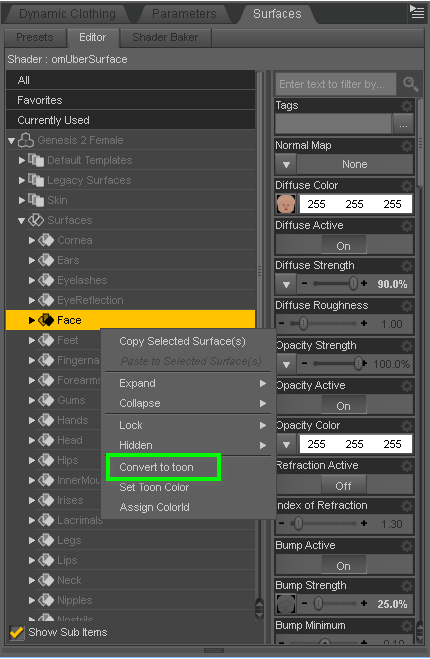
And the "Set Toon Color" script sets the Diffuse and Specular colors based on an offset, since I typically set them a fixed "distance" apart from each other.
LineRender9000 [Commercial]djigneo: At the very very worst, I could do a PWToon and LineRender9000 pass. I'm hopeful. ;)
LineRender9000 [Commercial]I love PWToon but one problem I ran into is that while having seperate settings for line width per surface can be useful, it's frustrating when, say, you are changing render scale (because the line widths are absolute).
Like, I have a scene where most of the outlines are 96, but certain things are 32. If I want to double the render scale, I can't simply double outline size... I have to go through and distinguish the 96 from 32 surfaces and so on. ugh
For a while I was using ToonyCam because it's better about that, but it's also a little unstable in 4.9 and it seems to not capture the fine details PWToon does.
Yes, I recently ran into a similar issue with absolute line thickness, though it's much less pronounced in LineRender9000. In this case, you'd have to update all of the render pass settings, which amounts to changing 3 or so values. The issue for me is that I'd rather just specify the relative line thickness based on a set image size so that way small renders will look the same as large ones.
The way LineRender9000 attempts to handle the "fine details" issue is that you could get the "ColorId" and "Normal" lines a la ToonyCam Pro, but then add one or more additional passes that draw the details you want, or just use a surface shader that portrays them the way you want on the "main" image. ToonyCam Pro has a Toon shader baked in, so I could see how details could get lost in the final image, since the colors get blurred and clamped.
LineRender9000 [Commercial]I love PWToon but one problem I ran into is that while having seperate settings for line width per surface can be useful, it's frustrating when, say, you are changing render scale (because the line widths are absolute).
Like, I have a scene where most of the outlines are 96, but certain things are 32. If I want to double the render scale, I can't simply double outline size... I have to go through and distinguish the 96 from 32 surfaces and so on. ugh
For a while I was using ToonyCam because it's better about that, but it's also a little unstable in 4.9 and it seems to not capture the fine details PWToon does.
LineRender9000 [Commercial]I look forward to playing with it!
The Normals thing is that one outlining method is simply to use a Normal to draw a line where a surface is perpendicular to the camera. For most stuff, this is great, that surface is basically the 'outer edges' of the figure/object in question.
But if the entire object is close to edge on to the camera, then lots of the surface, possibly all of it, 'counts' as outline. And you get a big black blob.
There's a Geoshells outliner shader thingie that has that problem, PWToon, and one of the outlining modes of ToonyCam (which supports outlining by Normals or Material ID)
LineRender9000 [Commercial]Does linerender have the same Normals issue where flat surfaces almost perpendicular to the camera end up solid black?
That's my one big struggle with PWToon
No, it does not, although I'm not familiar with pwToon, so I can't comment further on the "why". I do recall having similar issues with trying to control outlining on surface shaders (such as Visual Style Shaders and DAZ Toon surface) where sometimes the outline would be much too large in certain areas, which is part of the reason I pursued getting outlines out as separate, more controllable passes.
Knowing you tinker a bit with shaders, I can tell you that the variety of line output you can get from LineRender9000 is largely dependent one one's creativity with shader cameras.
LineRender9000 [Commercial]Does linerender have the same Normals issue where flat surfaces almost perpendicular to the camera end up solid black?
That's my one big struggle with PWToon
How to save the outline of a modelSomething like this:
- http://www.daz3d.com/manga-style-shaders
- http://www.daz3d.com/pwtoon
- http://www.daz3d.com/visual-style-shaders
- http://www.daz3d.com/mephistopolis-noir-shaders
- http://www.daz3d.com/skunkville-noir
My personal favorite: http://www.daz3d.com/camera-magic-toonycam-pro
Will's TipsJust copying and pasting a tip that Will posted over on a discussion I started about pwToon. Heres the link. http://www.daz3d.com/forums/discussion/113521/instructions-for-pw-toon/p1
"Ah, time for Unca Will's tips! Wrinkles and internal details, if that's what you mean, are driven heavily by a combination of Outline Width and Bump/Displacement. Increasing Outline Width will thicken lines and make more details come out, but you then increase how much glancing surfaces will 'bleed' together into solid black.
The best method, IMO, is to get outline width up to a point where it looks good without big blocks of black, and then fine-tune Bump and/or Displacement. I've found different items might have to be tweaked differently until you get either a consistent look or an inconcistent look you like".
Will, have you ever considered compiling your K,nowledge into .pdf format? You might even be able to do some tutorial work and sell them$$$. Of course, its cool that you like to share what you know. Very appreciated. Its just difficult to poor through all the comments trying to look for information.
You dig?

 Non-photorealistic Renders (NPR)
@AnotherUserName Thanks. He was kind of fun to do and I'm surprised at how well he turned out considering I was just fooling around. :)
I like your old man. It kind of reminds me of the art in a few books I had gotten the kids when they were younger. The Japanese flavor of the image is really great!
Thanks Knittingmommy. It was my first attempt with pwToon. I honestly think that the best part of the render is his feet and legs. They turned out really well. The children turned out pretty descently. They are Mei Lin 6 and Lee 6 with Growing Up applied. In order to have there expresions show up wiath any amount of detail I had to set there dials at rediculous perameters like plus or minus 300%. Ill post their straight iray, up-close renders because they are super goofy looking.
The old man turned out well. He to has generous perameters using Aging Morphs 3. The base character is Tween Ryan 7.

Daz 3D is part of

Connect
DAZ Productions, Inc.
7533 S Center View Ct #4664
West Jordan, UT 84084Licensing Agreement | Terms of Service | Privacy Policy | EULA
© 2026 Daz Productions Inc. All Rights Reserved.