-
Anime Toons and Filatoon Shader Q&A
Elor said:
I know I won't be able to render it on my Mac, but I wanted to try it to build and scene before opening it on a Windows machine to render it there, but for a reason I don't understand, the character and the clothes are all black in the viewport while the hair is not (I'm only using the default ressources).
Is there something I did wrong or is it the intended look ?
FilaToon Shaders are for Filament.
You can still use them in other views, but you'd have to turn off the "Toon Outline"
If I remember correctly, a single base figure only loads in with one. Find it in the scene pane - it's a GeoShell applied to the figure.
Just so you know - when we apply a Filatoon Shader Preset to something, it will load a Toon Outline GeoShell onto it as well. So for viewing in anything other than Filament, find them (easy - open the hierarchy of anything we apply the shader too) and make Toon Outline invisible and you'll be good to go
Anime Toons and Filatoon Shader Q&AMada said:
Mark_e593e0a5 said:
If I undrestand this correctly, the shaders only work in Filament render mode - which is not available at all on Mac up until current 4.22 version. Mac users have been instructed NOT to upgrade to 4.23, so I cannot check if it has been made avilable - suppose it isn't. I really like the look of the shaders, but they seem to be not useable for me. Please tell me I am wrong.
Unfortunately you are correct - but there are work going on behind the scenes to get it out to mac users as soon as possible. The shader relies on filament to work properly.
Roll on Daz3D 5! The list of promises for Mac users is getting rather long now :|
Anime Toons and Filatoon Shader Q&ASay, I've enhanced my light rig a little and now it's like the best thing since... well... since a long time ago!
Like I've said,
- Distant Light (for overall illumination that evens out the character)
- Key Light (Spot)
- Rim Light (Spot)
- Fill Light (Spot)
And they're all parented inside a Null that is in the center of the scene (Ground Zero - same as Base Figure Origin)
I call this Null: "Lighting for Anime" and save it out as a scene subset with the same name.
Well I found myself trying to aim one of them and it's really difficult while it's parented to the null. So I made new nulls - one for each light. Key Null, Rim Null and Fill Null, and aprented the corresponding lights withint their nulls and those nulls are parented inside the first null.
So now I can rotate the whole rig, each light individually around the figure's base, and I can use the dials to rotate the cameras themselves for aiming, etc.,
This has made a Major difference in the ease of getting great shadows, highlights and spread fills. Very nice results!
The best part is that it's saved as a scene subset after I have them all aimed up how I like them at my owm default taste. So every time I load a figure, I just load this and my Filament Draw Options Node is also a scene subset saved right next to it in the same spot. So I can just load either or both without even a thought.
As I've said before, the Filament Draw Options Node is saved with default settings except that I've set the Headlamp to 0.00 so it's ready for my light rig.
Thought I'd share that. have fun with it!
Anime Toons and Filatoon Shader Q&ASapphireBlue said:
Thank you Mada and Dartanbeck and everyone else offering information on how to use these shaders, and also those sharing your renders. It's really helpful!

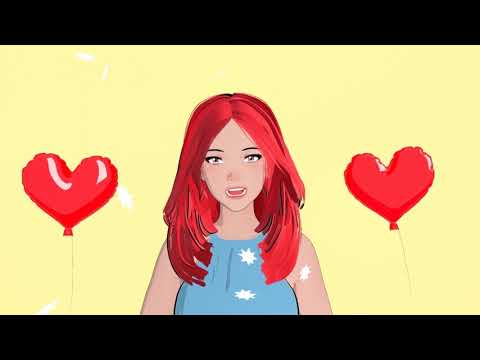
These shaders are super fun! And with filament, rendering is so fast. I thought I'd try the shaders on a G9 toon morph and test out a little animation to see how it fares. I was too tired to sync it to the original song audio, but wow, each frame rendered in under a second. I'm going to enjoy playing with this!
I also tested a couple of environments, but I couldn't get those to look that good yet. Have to experiment some more.
G9 Toon Animation Test
Very Nice! :)
pre-paid Daz membership taken away!
More accurate to say that it's the removal of tools from the market - that were available under perpetual license for a fair price - and the moving of those tools to an expensive subscription/rental model. It does actually detract from the base version of Studio as users can no longer purchase those tools if needed.Richard Haseltine said:Ron Knights said:
So now again, we have a paid version of DAZ Studio. Many years ago I paid extra for DAZ Studio Advanced (was that the name?). Right after that, DAZ Studio went free.
I just don't see any compelling new features for the paid version of DAZ Studio. It's nothing that interest me. And all those sale prices and coupons continue to confuse me.
I can't help wonder if this new paid version is a step toward DAZ Studio version 5. Will DS v5 be a subscription only version?
It isn't a paid (subscription) version of daz Studio - it is a subscription set of additional plug-ins, and content, and possibly other things on top of the standard daz Studio - which has had updates in the latest build and has just gained a Filament-based toon shader, so clearly not being neglected in favour of the subscription strand.
Anime Toons and Filatoon Shader Q&AThank you Mada and Dartanbeck and everyone else offering information on how to use these shaders, and also those sharing your renders. It's really helpful!
These shaders are super fun! And with filament, rendering is so fast. I thought I'd try the shaders on a G9 toon morph and test out a little animation to see how it fares. I was too tired to sync it to the original song audio, but wow, each frame rendered in under a second. I'm going to enjoy playing with this!
I also tested a couple of environments, but I couldn't get those to look that good yet. Have to experiment some more.
G9 Toon Animation Test
Let's appreciate/discuss today's new releases - more ongoinger threadOrangeFalcon said:
I picked up the new bundles today and have been very impressed with them. The cell shading style works with other assets and it's great to have a different style. The anime morphs are well done and can be used with other models, even Face Transfers.
The best part? Because you need to render the filament style in your active viewport, the renders are instant!
dont want to derail, but how do you keep a new window from popping up. My side view does render, but so does a new window. The main viewport isn;t rendering.
Anime Toons and Filatoon Shader Q&AThis FilaToon shader will be a big boon to those porting over models like MMD or game assets for fan art. It has made those ported models look so much better and removes those ugly seams from the render.
Still, there are lingering gotchas in Filament to be aware of:
- Emissives do not light up objects around it (is this a limitation within Filament or has not been fully implemented in DAZ?)
- Point lights still do not support shadows
- Cutout Opacity is not two sided
- Opacity issues still persist due to it being not two sided (likely)Anime Toons and Filatoon Shader Q&AArtsyDragon said:
Okay, I'm slowly getting it. Here is the question:
When I go to render, I get a warning message that says WARNING! Obscuring the viewport during an OpenGL render may corrupt the final image.
How do I render without this error? Am I doing something wrong? I have never used Filament before so please educate me. I am dull witted.
I didn't see this answered so:
It's more a warning than an error - you can happily click 'ok' and it'll render. If you don't want to see the warning every time, just click the select box for "don't show this again" . It's just letting you know that if you open a bunch of stuff over your render area while rendering in OpenGL, it might muck up your render. So...don't do that ;)Edit: It'll give that warning whether you have the viewport obscured at the time or not. It's not something you did wrong.
MANGA STYLE & VISUAL STYLE topic - Update Sept 23rd 2017: Fixed Dropbox links! [Commercial]GRFK DSGN Unlimited said:
I'm still voting for a Filament version, though not as popular it seems.
FilaToon is now a thing, so someone must have been listening! lol
Anime Toons and Filatoon Shader Q&A3Diva said:
rokkr said:
Ghosty12 said:
rokkr said:
Ghosty12 said:
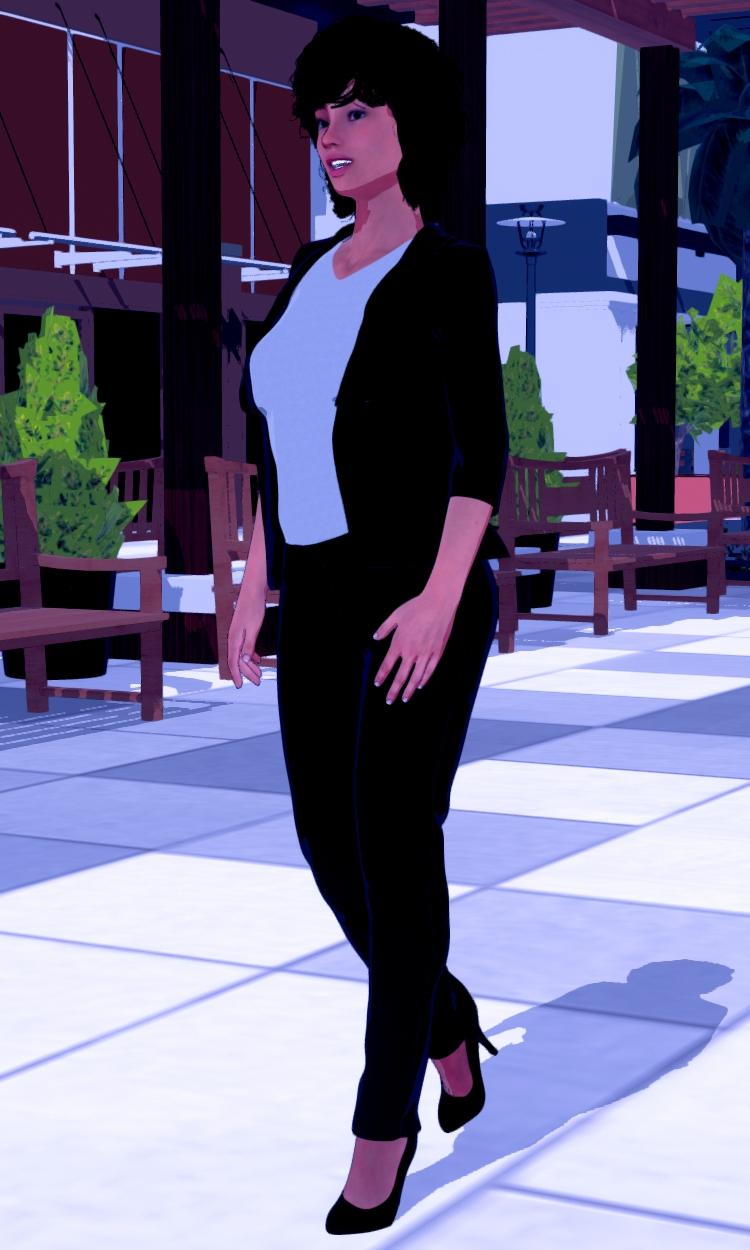
Just my test of an outdoor scene playing aroound with the night time setting still trying to work it out. Also Genesis 8 using the characters texture, just added Filatoon to it. Did find the setting to make the character shadow more pronounced.
Cool! How did you make the shadow?
Thank you.
 The initial shadow is a distant light, then add in the Filament Draw Options in there you will find three shadow options, Shadow Type, Shadow Map Size and Shadow Cascades. Setting the Shadow Map Size to 2048 or higher and Shadow Cascades to 4 will give a very good looking figure shadow.
Thank you! I'm still learning to use those "regular" lights (you know, distant, spot, point) since, most of the time, I just use an HDRI with some ghost lights. But I'm making some progress and, thanks to you and other people here, I've learned a lot today!
Also, make sure on your Light's settings the "Shadow Type" is set to "Deep Shadow Map" or "Raytraced" - anything but "None".
Yeah forgot about that bit.
 The light I used was from Riversoft Arts 3Delight to Iray To Filament converter plugin, so had the shadow was preset to Raytraced.Anime Toons and Filatoon Shader Q&A
rokkr said:
Ghosty12 said:
rokkr said:
Ghosty12 said:
Just my test of an outdoor scene playing aroound with the night time setting still trying to work it out. Also Genesis 8 using the characters texture, just added Filatoon to it. Did find the setting to make the character shadow more pronounced.
Cool! How did you make the shadow?
Thank you.
The initial shadow is a distant light, then add in the Filament Draw Options in there you will find three shadow options, Shadow Type, Shadow Map Size and Shadow Cascades. Setting the Shadow Map Size to 2048 or higher and Shadow Cascades to 4 will give a very good looking figure shadow.Thank you! I'm still learning to use those "regular" lights (you know, distant, spot, point) since, most of the time, I just use an HDRI with some ghost lights. But I'm making some progress and, thanks to you and other people here, I've learned a lot today!
Also, make sure on your Light's settings the "Shadow Type" is set to "Deep Shadow Map" or "Raytraced" - anything but "None".
Anime Toons and Filatoon Shader Q&A3Diva said:
crosswind said:
Mada said:
crosswind said:
- Q3: as for Outline shell, why I cannot see outline in some area... like the outline on the hoodies body, on the hair sides... (ss5) And the outline is not so smooth, like sort of dot lines ( in the render...).
@crosswind
A couple of reasons and fixes there - the outline shell needs to have a bit of thickness and if the outfit just have a thin mesh it loses the line. But first thing you can try to improve it is to use the expand all on the clothing item, the geoshell sometimes get hidden by the body if its tight fitting, so looser is better in this case. That should fix the dot lines.Wow ! That worked like a charm ! And I used a thickened garment by using Thickener plugin in the previous post, the result was not good... lack of outline. This time I used the original hoodies, and tweak the setting, it's much better. Thank you very much Mada !
I'm sorry but I still have another question: How to make a surface looks metalic with FilaToon and Filament drawstyle ? There's a Metallicity property on Filatoon shader but it seems no change after dialing it ...
I'm not sure, but there should be a metallic shader for FilaToon under:
Shader Presets >> FilaToon >> Presets >> FilaToon - MetallicYou can also just apply a regular Iray Metal shader to whatever you want to turn metal and it should look semi-metallic in Filament.
Yeah, I missed that shader preset ! Then with Iray Uber, it seems even better... I didn't thought of that. Nice ! Thank you very much !
 Anime Toons and Filatoon Shader Q&A
Mada said:
I'm sorry but I still have another question: How to make a surface looks metalic with FilaToon and Filament drawstyle ? There's a Metallicity property on Filatoon shader but it seems no change after dialing it ...
Apply the metallic preset to your item, then find the environment weight on the shader (last one on the list)... slide it from 0 until you get the effect you wanted.
Good to know the settings ! Now it looks shinny... I don't expect it to be like the effect in Iray. Thank you very much !
FilaToon / Cell shaded rendering with Filament...Cool! Where is it? I was looking for some template and couldn't find it.
Templates are all in the Default Resources for DAZ Studio. Filament env. light preset is in G9 Starter Essentials.
Anime Toons and Filatoon Shader Q&Acrosswind said:
Mada said:
crosswind said:
- Q3: as for Outline shell, why I cannot see outline in some area... like the outline on the hoodies body, on the hair sides... (ss5) And the outline is not so smooth, like sort of dot lines ( in the render...).
@crosswind
A couple of reasons and fixes there - the outline shell needs to have a bit of thickness and if the outfit just have a thin mesh it loses the line. But first thing you can try to improve it is to use the expand all on the clothing item, the geoshell sometimes get hidden by the body if its tight fitting, so looser is better in this case. That should fix the dot lines.Wow ! That worked like a charm ! And I used a thickened garment by using Thickener plugin in the previous post, the result was not good... lack of outline. This time I used the original hoodies, and tweak the setting, it's much better. Thank you very much Mada !
I'm sorry but I still have another question: How to make a surface looks metalic with FilaToon and Filament drawstyle ? There's a Metallicity property on Filatoon shader but it seems no change after dialing it ...
I'm not sure, but there should be a metallic shader for FilaToon under:
Shader Presets >> FilaToon >> Presets >> FilaToon - MetallicYou can also just apply a regular Iray Metal shader to whatever you want to turn metal and it should look semi-metallic in Filament.
Anime Toons and Filatoon Shader Q&AI'm sorry but I still have another question: How to make a surface looks metalic with FilaToon and Filament drawstyle ? There's a Metallicity property on Filatoon shader but it seems no change after dialing it ...
@crosswind
Apply the metallic preset to your item, then find the environment weight on the shader (last one on the list)... slide it from 0 until you get the effect you wanted.Anime Toons and Filatoon Shader Q&AWonderland said:
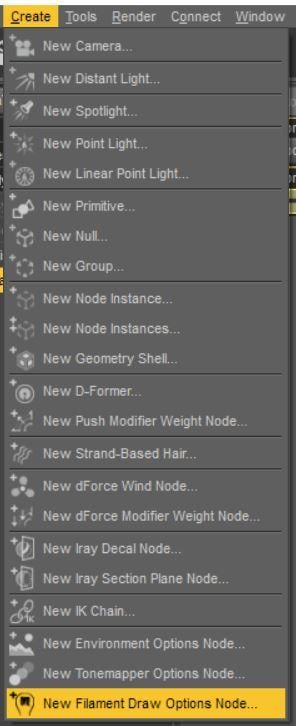
OK stupid question, where are the filament draw settings? I just loaded the set icon that says Basic Filatoon Environment and that set up the scene with distant lights and already in the filament renderer. Under the render setting, there's no adjustments. Where are these setting for shadows and things?
"Create" >> "New Filament Draw Options Node..."
 Anime Toons and Filatoon Shader Q&A
Mada said:
crosswind said:
- Q3: as for Outline shell, why I cannot see outline in some area... like the outline on the hoodies body, on the hair sides... (ss5) And the outline is not so smooth, like sort of dot lines ( in the render...).
@crosswind
A couple of reasons and fixes there - the outline shell needs to have a bit of thickness and if the outfit just have a thin mesh it loses the line. But first thing you can try to improve it is to use the expand all on the clothing item, the geoshell sometimes get hidden by the body if its tight fitting, so looser is better in this case. That should fix the dot lines.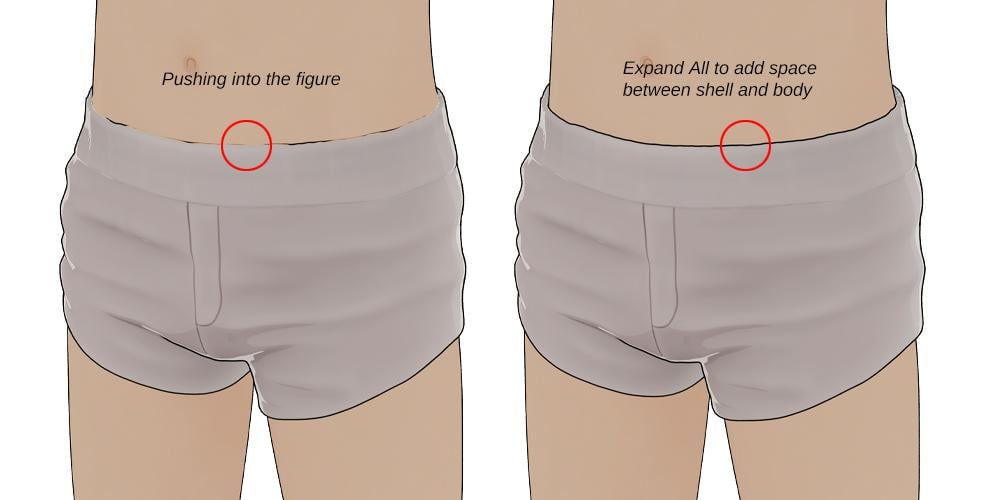
Wow ! That worked like a charm ! And I used a thickened garment by using Thickener plugin in the previous post, the result was not good... lack of outline. This time I used the original hoodies, and tweak the setting, it's much better. Thank you very much Mada !
I'm sorry but I still have another question: How to make a surface looks metalic with FilaToon and Filament drawstyle ? There's a Metallicity property on Filatoon shader but it seems no change after dialing it ...
Anime Toons and Filatoon Shader Q&AOK stupid question, where are the filament draw settings? I just loaded the set icon that says Basic Filatoon Environment and that set up the scene with distant lights and already in the filament renderer. Under the render setting, there's no adjustments. Where are these setting for shadows and things?
Daz 3D is part of

Connect
DAZ Productions, Inc.
7533 S Center View Ct #4664
West Jordan, UT 84084Licensing Agreement | Terms of Service | Privacy Policy | EULA
© 2026 Daz Productions Inc. All Rights Reserved.