-
The I Miss the Old Days Complaint Thread
For the cheese and lunchmeat packages, I just cut them open with scissors, then transfer the food to some refridgerator bags with the zipper tabs. I don't even try to reseal the regular zip lock type bags.
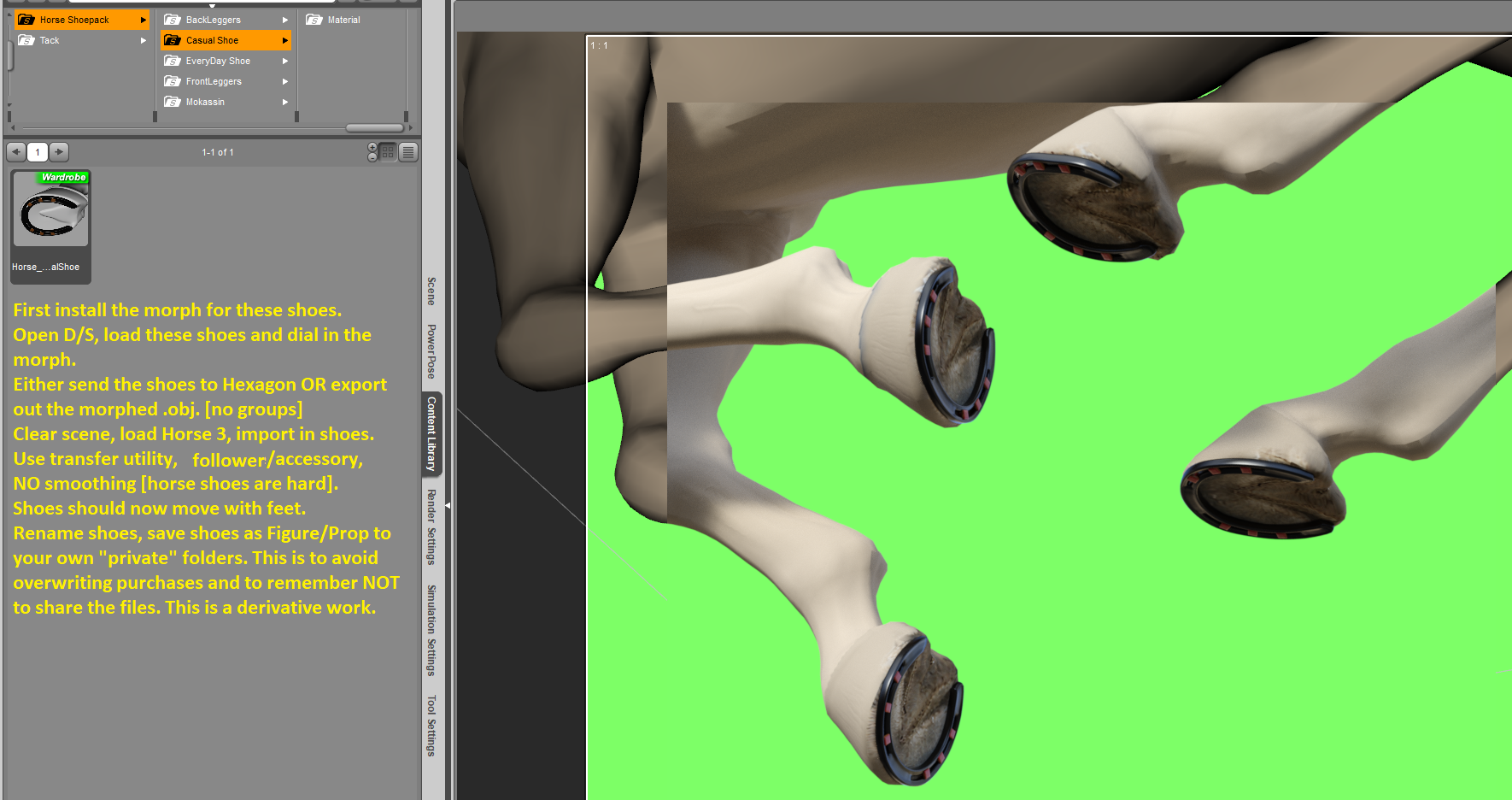
Horse 3 stuff - pose presets, pose control presets ...Required product: https://www.daz3d.com/horse-shoepack
I made a morph for the casual shoe for Horse 3. Now, in order to make these shoes work on Horse 3 read the instructions!
After you have made your derivative product and saved it; it is safe to close D/S and then to find and delete this morph which is no longer required ;-)
Zip should be attached to this post.

 How to export Daz Studio file with all textures for sale on marketplace?
57331.fury said:
Quite a bit of mis-information here I see. There are many merchant resources that do NOT require the the buyer of your content to own the original merchant resources, infact that would negate the whole idea of merchant resources.
Many Merchant resources to, however, place limits so they can't be taken as read. I did mention them in my original reply.
Many morph resources state that they can be used in your own creations, but require them to be baked into a single character morph slider. Likewise there are many texture merchant resources that can be packaged into your product without the buyer needing to own the original resource.
I would say a few rather than many, but they do exist.
Just make sure you read all the licence information for anything you may be including, to make sure it is allowed.
Yes.
How to export Daz Studio file with all textures for sale on marketplace?Quite a bit of mis-information here I see. There are many merchant resources that do NOT require the the buyer of your content to own the original merchant resources, infact that would negate the whole idea of merchant resources. Many morph resources state that they can be used in your own creations, but require them to be baked into a single character morph slider. Likewise there are many texture merchant resources that can be packaged into your product without the buyer needing to own the original resource. Just make sure you read all the licence information for anything you may be including, to make sure it is allowed.
Help with character id in new promo image.Could anyone suggest a possible id for the face morph used in this promo image for WildDesigns new Trixie Spings outfit? I thought it might be a mix of a Mousso morph with something else, but I'm not really sure if that's right.Thanks!
 RELEASED: Next Generation Strand Hair. dforce Feisty Feather Bun *Commercial*
chevybabe25 said:
"Let's keep the momentum going! What's next chevybabe? I need more great dforce G9 hair! LOL"
The hair Im currently working on is a messy-ish sexy bob, that at the moment is really giving me a hard time. I have to like it as a static object, but I also have to like how it simulates. Simulation always proves to be the most difficult. It's getting there though.
OOO very nice Barbult!!!
"Blonde with a few hair morphs dialed in. There is a "rogue" morph called Left Ear CleanA in a Morphs path. Does that belong there?"
Well thats an interesting surprise. Is the Left Ear Clean also under the Shaping tab?
Yes, but there is no corresponding Right Ear Clean.
RELEASED: Next Generation Strand Hair. dforce Feisty Feather Bun *Commercial*"Let's keep the momentum going! What's next chevybabe? I need more great dforce G9 hair! LOL"
The hair Im currently working on is a messy-ish sexy bob, that at the moment is really giving me a hard time. I have to like it as a static object, but I also have to like how it simulates. Simulation always proves to be the most difficult. It's getting there though.
OOO very nice Barbult!!!
"Blonde with a few hair morphs dialed in. There is a "rogue" morph called Left Ear CleanA in a Morphs path. Does that belong there?"
Well thats an interesting surprise. Is the Left Ear Clean also under the Shaping tab?
How to export Daz Studio file with all textures for sale on marketplace?You can use Content Gatherer. Search store for this software. Store your product as a scene. Load these scene into Content Gatherer, resolve and validate all items.
Thje programm can export a list of alle files used in the scene as well as a zip file containing all those files.Used this to transfer selected work with modified textures / own meshes from my old pc to the new.
make a beautiful girl and boy, toddler baby. - Genesis 8 - 9sterlenejc said:
ha! You wish. Should you requested a beautiful white female, this thread would be booming with ideas, and store would get spammed with 10 new characters. you'll achieve better results creating the morph yourself, or finding it in a different store.
yeah admin, delete my post, because truth hurts
I have several models, do I need some of them? create a model for Genesis 8. but they have no texture, no rig. if necessary, can they be edited a little?
animation on Gen8.0/8.1 is unbearably slow now but was ok 2 years ago?I'm talking about the slowness when load/play a single aniblock just on stock figure with 0 morph in viewport(gen8/8.1 stock figures can hardly replay any anilock properly) or tried to editing or adjust character's pose from single keyframe, on gen8/8.1 it's completely unbearably slow on my i9 10900k/RTX4090/64G ram/SSD. it's so slow on a single character let along doing 2-3 characters at once, but it wasn't like this before, funny that gen3 or gen9 have no problem whatsoever, especially gen 9 it's faster than gen 3 even for doing animation
I remember well when i 1st started using Daz studio 3 years ago, among 1st few things I did was jumped into animation tab and played around with the animation system, as annoying as the UI was, the whole thing was still relatively easy to work with and I did all my animation on gen8, handled 2 -3 characters with no problem whatsoever, back then I had a much slower computer... now with multiply Daz update, hardware upgrade, now gen8/8.1 animation is so slow to the point that is completely uneditable in viewport.... many may say, well then just using gen 9, yea I'd love too, but most of my gen8's morph doesn't exist on gen 9 yet and probably won't be anytime soon.
So what happened? anyone constantly doing animation on DAZ found this same problem and how do you overcome it?
Question about adjusting character's heightI always use the morph 'Height' from https://www.daz3d.com/genesis-8-female-body-morphs, proportional and accurate...
Cthuloid tentacle posing dials?nemesis10 said:
I looked in the wiki for the product and it lists the tentacle shaping as a morph rather than a pose so go to the Shaping Tab, search for G8MCthuloid and see if you see the morphs:
-
/data/RawArt/G8MCthuloid/Cthuloid Tentacles/Morphs/RawArt/G8MCthuloid/All_Curl_Side/Side.dsf
-
/data/RawArt/G8MCthuloid/Cthuloid Tentacles/Morphs/RawArt/G8MCthuloid/All_Curl_Up/Down.dsf
-
/data/RawArt/G8MCthuloid/Cthuloid Tentacles/Morphs/RawArt/G8MCthuloid/All_Hang_Down.dsf
-
/data/RawArt/G8MCthuloid/Cthuloid Tentacles/Morphs/RawArt/G8MCthuloid/All_Twist.dsf
-
/data/RawArt/G8MCthuloid/Cthuloid Tentacles/Morphs/RawArt/G8MCthuloid/L1Curl_Side/Side.dsf
-
/data/RawArt/G8MCthuloid/Cthuloid Tentacles/Morphs/RawArt/G8MCthuloid/L1Curl_Up/Down.dsf
-
/data/RawArt/G8MCthuloid/Cthuloid Tentacles/Morphs/RawArt/G8MCthuloid/L1Hang_Down.dsf
-
/data/RawArt/G8MCthuloid/Cthuloid Tentacles/Morphs/RawArt/G8MCthuloid/L1Twist.dsf
-
/data/RawArt/G8MCthuloid/Cthuloid Tentacles/Morphs/RawArt/G8MCthuloid/L2Curl_Side/Side.dsf
-
/data/RawArt/G8MCthuloid/Cthuloid Tentacles/Morphs/RawArt/G8MCthuloid/L2Curl_Up/Down.dsf
-
/data/RawArt/G8MCthuloid/Cthuloid Tentacles/Morphs/RawArt/G8MCthuloid/L2Hang_Down.dsf
-
/data/RawArt/G8MCthuloid/Cthuloid Tentacles/Morphs/RawArt/G8MCthuloid/L2Twist.dsf
-
/data/RawArt/G8MCthuloid/Cthuloid Tentacles/Morphs/RawArt/G8MCthuloid/L3Curl_Side/Side.dsf
-
/data/RawArt/G8MCthuloid/Cthuloid Tentacles/Morphs/RawArt/G8MCthuloid/L3Curl_Up/Down.dsf
-
/data/RawArt/G8MCthuloid/Cthuloid Tentacles/Morphs/RawArt/G8MCthuloid/L3Hang_Down.dsf
-
/data/RawArt/G8MCthuloid/Cthuloid Tentacles/Morphs/RawArt/G8MCthuloid/L3Twist.dsf
-
/data/RawArt/G8MCthuloid/Cthuloid Tentacles/Morphs/RawArt/G8MCthuloid/L4Curl_Side/Side.dsf
-
/data/RawArt/G8MCthuloid/Cthuloid Tentacles/Morphs/RawArt/G8MCthuloid/L4Curl_Up/Down.dsf
-
/data/RawArt/G8MCthuloid/Cthuloid Tentacles/Morphs/RawArt/G8MCthuloid/L4Hang_Down.dsf
-
/data/RawArt/G8MCthuloid/Cthuloid Tentacles/Morphs/RawArt/G8MCthuloid/L4Twist.dsf
-
/data/RawArt/G8MCthuloid/Cthuloid Tentacles/Morphs/RawArt/G8MCthuloid/R1Curl_Side/Side.dsf
-
/data/RawArt/G8MCthuloid/Cthuloid Tentacles/Morphs/RawArt/G8MCthuloid/R1Curl_Up/Down.dsf
-
/data/RawArt/G8MCthuloid/Cthuloid Tentacles/Morphs/RawArt/G8MCthuloid/R1Hang_Down.dsf
-
/data/RawArt/G8MCthuloid/Cthuloid Tentacles/Morphs/RawArt/G8MCthuloid/R1Twist.dsf
-
/data/RawArt/G8MCthuloid/Cthuloid Tentacles/Morphs/RawArt/G8MCthuloid/R2Curl_Side/Side.dsf
-
/data/RawArt/G8MCthuloid/Cthuloid Tentacles/Morphs/RawArt/G8MCthuloid/R2Curl_Up/Down.dsf
-
/data/RawArt/G8MCthuloid/Cthuloid Tentacles/Morphs/RawArt/G8MCthuloid/R2Hang_Down.dsf
-
/data/RawArt/G8MCthuloid/Cthuloid Tentacles/Morphs/RawArt/G8MCthuloid/R2Twist.dsf
-
/data/RawArt/G8MCthuloid/Cthuloid Tentacles/Morphs/RawArt/G8MCthuloid/R3Curl_Side/Side.dsf
-
/data/RawArt/G8MCthuloid/Cthuloid Tentacles/Morphs/RawArt/G8MCthuloid/R3Curl_Up/Down.dsf
-
/data/RawArt/G8MCthuloid/Cthuloid Tentacles/Morphs/RawArt/G8MCthuloid/R3Hang_Down.dsf
-
/data/RawArt/G8MCthuloid/Cthuloid Tentacles/Morphs/RawArt/G8MCthuloid/R3Twist.dsf
-
/data/RawArt/G8MCthuloid/Cthuloid Tentacles/Morphs/RawArt/G8MCthuloid/R4Curl_Side/Side.dsf
-
/data/RawArt/G8MCthuloid/Cthuloid Tentacles/Morphs/RawArt/G8MCthuloid/R4Curl_Up/Down.dsf
-
/data/RawArt/G8MCthuloid/Cthuloid Tentacles/Morphs/RawArt/G8MCthuloid/R4Hang_Down.dsf
-
/data/RawArt/G8MCthuloid/Cthuloid Tentacles/Morphs/RawArt/G8MCthuloid/R4Twist.dsf
-
/data/RawArt/G8MCthuloid/Cthuloid Tentacles/Morphs/RawArt/G8MCthuloid/Raw Cthuloid-HD.dhdm
-
/data/RawArt/G8MCthuloid/Cthuloid Tentacles/Morphs/RawArt/G8MCthuloid/Raw Cthuloid-HD.dsf
Thank you! Yes, I did find them (see above comment).
Cthuloid tentacle posing dials?I looked in the wiki for the product and it lists the tentacle shaping as a morph rather than a pose so go to the Shaping Tab, search for G8MCthuloid and see if you see the morphs:
-
/data/RawArt/G8MCthuloid/Cthuloid Tentacles/Morphs/RawArt/G8MCthuloid/All_Curl_Side/Side.dsf
-
/data/RawArt/G8MCthuloid/Cthuloid Tentacles/Morphs/RawArt/G8MCthuloid/All_Curl_Up/Down.dsf
-
/data/RawArt/G8MCthuloid/Cthuloid Tentacles/Morphs/RawArt/G8MCthuloid/All_Hang_Down.dsf
-
/data/RawArt/G8MCthuloid/Cthuloid Tentacles/Morphs/RawArt/G8MCthuloid/All_Twist.dsf
-
/data/RawArt/G8MCthuloid/Cthuloid Tentacles/Morphs/RawArt/G8MCthuloid/L1Curl_Side/Side.dsf
-
/data/RawArt/G8MCthuloid/Cthuloid Tentacles/Morphs/RawArt/G8MCthuloid/L1Curl_Up/Down.dsf
-
/data/RawArt/G8MCthuloid/Cthuloid Tentacles/Morphs/RawArt/G8MCthuloid/L1Hang_Down.dsf
-
/data/RawArt/G8MCthuloid/Cthuloid Tentacles/Morphs/RawArt/G8MCthuloid/L1Twist.dsf
-
/data/RawArt/G8MCthuloid/Cthuloid Tentacles/Morphs/RawArt/G8MCthuloid/L2Curl_Side/Side.dsf
-
/data/RawArt/G8MCthuloid/Cthuloid Tentacles/Morphs/RawArt/G8MCthuloid/L2Curl_Up/Down.dsf
-
/data/RawArt/G8MCthuloid/Cthuloid Tentacles/Morphs/RawArt/G8MCthuloid/L2Hang_Down.dsf
-
/data/RawArt/G8MCthuloid/Cthuloid Tentacles/Morphs/RawArt/G8MCthuloid/L2Twist.dsf
-
/data/RawArt/G8MCthuloid/Cthuloid Tentacles/Morphs/RawArt/G8MCthuloid/L3Curl_Side/Side.dsf
-
/data/RawArt/G8MCthuloid/Cthuloid Tentacles/Morphs/RawArt/G8MCthuloid/L3Curl_Up/Down.dsf
-
/data/RawArt/G8MCthuloid/Cthuloid Tentacles/Morphs/RawArt/G8MCthuloid/L3Hang_Down.dsf
-
/data/RawArt/G8MCthuloid/Cthuloid Tentacles/Morphs/RawArt/G8MCthuloid/L3Twist.dsf
-
/data/RawArt/G8MCthuloid/Cthuloid Tentacles/Morphs/RawArt/G8MCthuloid/L4Curl_Side/Side.dsf
-
/data/RawArt/G8MCthuloid/Cthuloid Tentacles/Morphs/RawArt/G8MCthuloid/L4Curl_Up/Down.dsf
-
/data/RawArt/G8MCthuloid/Cthuloid Tentacles/Morphs/RawArt/G8MCthuloid/L4Hang_Down.dsf
-
/data/RawArt/G8MCthuloid/Cthuloid Tentacles/Morphs/RawArt/G8MCthuloid/L4Twist.dsf
-
/data/RawArt/G8MCthuloid/Cthuloid Tentacles/Morphs/RawArt/G8MCthuloid/R1Curl_Side/Side.dsf
-
/data/RawArt/G8MCthuloid/Cthuloid Tentacles/Morphs/RawArt/G8MCthuloid/R1Curl_Up/Down.dsf
-
/data/RawArt/G8MCthuloid/Cthuloid Tentacles/Morphs/RawArt/G8MCthuloid/R1Hang_Down.dsf
-
/data/RawArt/G8MCthuloid/Cthuloid Tentacles/Morphs/RawArt/G8MCthuloid/R1Twist.dsf
-
/data/RawArt/G8MCthuloid/Cthuloid Tentacles/Morphs/RawArt/G8MCthuloid/R2Curl_Side/Side.dsf
-
/data/RawArt/G8MCthuloid/Cthuloid Tentacles/Morphs/RawArt/G8MCthuloid/R2Curl_Up/Down.dsf
-
/data/RawArt/G8MCthuloid/Cthuloid Tentacles/Morphs/RawArt/G8MCthuloid/R2Hang_Down.dsf
-
/data/RawArt/G8MCthuloid/Cthuloid Tentacles/Morphs/RawArt/G8MCthuloid/R2Twist.dsf
-
/data/RawArt/G8MCthuloid/Cthuloid Tentacles/Morphs/RawArt/G8MCthuloid/R3Curl_Side/Side.dsf
-
/data/RawArt/G8MCthuloid/Cthuloid Tentacles/Morphs/RawArt/G8MCthuloid/R3Curl_Up/Down.dsf
-
/data/RawArt/G8MCthuloid/Cthuloid Tentacles/Morphs/RawArt/G8MCthuloid/R3Hang_Down.dsf
-
/data/RawArt/G8MCthuloid/Cthuloid Tentacles/Morphs/RawArt/G8MCthuloid/R3Twist.dsf
-
/data/RawArt/G8MCthuloid/Cthuloid Tentacles/Morphs/RawArt/G8MCthuloid/R4Curl_Side/Side.dsf
-
/data/RawArt/G8MCthuloid/Cthuloid Tentacles/Morphs/RawArt/G8MCthuloid/R4Curl_Up/Down.dsf
-
/data/RawArt/G8MCthuloid/Cthuloid Tentacles/Morphs/RawArt/G8MCthuloid/R4Hang_Down.dsf
-
/data/RawArt/G8MCthuloid/Cthuloid Tentacles/Morphs/RawArt/G8MCthuloid/R4Twist.dsf
-
/data/RawArt/G8MCthuloid/Cthuloid Tentacles/Morphs/RawArt/G8MCthuloid/Raw Cthuloid-HD.dhdm
-
/data/RawArt/G8MCthuloid/Cthuloid Tentacles/Morphs/RawArt/G8MCthuloid/Raw Cthuloid-HD.dsf
anyone ever used Branchdur The Tree on DS? [solved]mding said:
usually poser items (apart from some materials types/files types) work fine in DS, albeit with some easy tweaking, but sometimes everything morph etc just doesn't budge at all. didn't happen very often to me, but when it does it's annoying..
I didn't know you already had experience with old poser stuff, that is why i wanted to show that with .cr2 it is at least possible this information is included and transferable to daz. Now I see you need somebody who really owns this product to be sure...
it's ok now, i ended up messaging the person who commented, as there was this review i missed, and apparently the trees works perfectly in DS morph-wise. should have changed the title here, fell asleep ^^. thx again for looking out! ^^
Question about adjusting character's heightHi everyone, I have a quick question about adjusting my character's height. Right now she's about 5 feet 6 or so and I'd like her to be 6 feet tall. I'm not exactly going for realism here, a bit more of a stylized approach so I have two options here, one of them is a morph called, "9foot11" which works to increase her height but it also seems to adjust the rest of the proportions on her body too such as the arms and torso etc.
The second option I have is to simply increase the length of her legs until she meets the height requirement as well, which simply extends her legs but keeps the rest of her body's proportions intact. Now I'm not sure what might be the better solution here, I'm wondering if anyone has any thoughts on this or how they might approach this scenario? Thanks!
RELEASED: Next Generation Strand Hair. dforce Feisty Feather Bun *Commercial*Blonde with a few hair morphs dialed in. There is a "rogue" morph called Left Ear CleanA in a Morphs path. Does that belong there?
Export a figure covered in hair as an OBJ (with hair included)You can't. Why the obj file format nominally includes line objects that can be used for hairs no program actually implements it in a way that allows you to transfer hair (if it is implemented at all)
Daz crashing - Solved!THAT WAS THE CULPRIT! I thought I had deleted that folder, but evidently I had deleted the main XTransfer folder. Opened a generic G8F asset, no prob. Opened one of my character assets, no prob. It did reference not finding something in the XTransfer folder, but that morph was never used in this file. Who cares! It works!
I would buy y'all many beers if you were close by.
I was about to write off over a year of learning Daz, hundreds of dollars of assets, hundreds of hours of character and scene development and switch to Blender. Y'all rock!
Daz crashing - Solved!Uninstalling XTransfer is not enough. The morph folder for XTransfer is still there.
For Genesis 8 Female, the location is "...\Data\DAZ 3D\Genesis 8\Female\Morphs\XTransfer\", you need to remove that folder and everything in it.
You can make a zip-file of the folder and contents before deleting it, so you can get it back if you want.anyone ever used Branchdur The Tree on DS? [solved]usually poser items (apart from some materials types/files types) work fine in DS, albeit with some easy tweaking, but sometimes everything morph etc just doesn't budge at all. didn't happen very often to me, but when it does it's annoying..
I didn't know you already had experience with old poser stuff, that is why i wanted to show that with .cr2 it is at least possible this information is included and transferable to daz. Now I see you need somebody who really owns this product to be sure...
Daz 3D is part of

Connect
DAZ Productions, Inc.
7533 S Center View Ct #4664
West Jordan, UT 84084Licensing Agreement | Terms of Service | Privacy Policy | EULA
© 2026 Daz Productions Inc. All Rights Reserved.