-
[Released] Character Converter from Genesis 3 Female to Genesis 8 Female(Now Conv JCMs) [Commercial]
jdavison67 said:
RiverSoft Art said:
jdavison67 said:
I have a few questions about restore vs zero
1. Which is prefered for transfering a custome character, one with morphs from multiple base characters. I assume restore, but I'm trying to grasp this...
I don't really see the point in having a zero option, as restore would keep this value if it was already set at such.
This was a change that Daz made to the Zero Action. I need to update all my scripts to get rid of the stupid dialog. It should be ZERO. However, with custom scene characters, as long as you loaded a vanilla G3F before customization, restore will work too. Restore resets a character to its loaded defaults (i.e., if you loaded Victoria 7 with the Victoria 7 head and body, it would reset to that). That is NOT what the script is trying to do. It is trying to turn off all morphs on the character.
2. Can we get a "do this for all selected" check box ? So we don't have to make this choice for every character one at a time. That way we don't have to sit by the computer while a batch of these is going.
Talk to Daz about the Zero action. This was their backward breaking change. I will eventually get rid of the dialog because I won't call the Zero action anymore.
3. If you have not already transfered all your base characters from G3 to G8 can you transfer a custom character. My experience says no. the results are not correct in every attempt I've made. Horrific results.
Yes, you can convert a custom character before transferring ANY base characters. For bad results, what were they? what morphs did you use? What does the Daz log say? Can we see images?
JD
OKAY, I'm not sure I understand what restore is, but I have been choosing the RESTORE option every time, which has resulted in me getting the base character as a result every time... not my custom character.
So does restore erase all the morphs, except the base morph? This would explain why none of this has been working for me.... If so, you definately need to remove that dialog.
I thought restore ment that it was copying the cusom character exactly and not making changes to the morphs, but is seems like its the same as the restore figure option in daz where it eliminates custom figure morphs, which is never what I wanted.
It looks like i Need to delete everything and start again choosing ZERO when this pops up.
JD
The script uses the Daz Zero Action to zero out the morphs (to 0, not to the loaded defaults) during the conversion process. This has worked perfectly in my scripts for years. Daz changed the behavior relatively recently so that Zero now pops up that annoying dialog.
[Released] Character Converter from Genesis 3 Female to Genesis 8 Female(Now Conv JCMs) [Commercial]RiverSoft Art said:
jdavison67 said:
I have a few questions about restore vs zero
1. Which is prefered for transfering a custome character, one with morphs from multiple base characters. I assume restore, but I'm trying to grasp this...
I don't really see the point in having a zero option, as restore would keep this value if it was already set at such.
This was a change that Daz made to the Zero Action. I need to update all my scripts to get rid of the stupid dialog. It should be ZERO. However, with custom scene characters, as long as you loaded a vanilla G3F before customization, restore will work too. Restore resets a character to its loaded defaults (i.e., if you loaded Victoria 7 with the Victoria 7 head and body, it would reset to that). That is NOT what the script is trying to do. It is trying to turn off all morphs on the character.
2. Can we get a "do this for all selected" check box ? So we don't have to make this choice for every character one at a time. That way we don't have to sit by the computer while a batch of these is going.
Talk to Daz about the Zero action. This was their backward breaking change. I will eventually get rid of the dialog because I won't call the Zero action anymore.
3. If you have not already transfered all your base characters from G3 to G8 can you transfer a custom character. My experience says no. the results are not correct in every attempt I've made. Horrific results.
Yes, you can convert a custom character before transferring ANY base characters. For bad results, what were they? what morphs did you use? What does the Daz log say? Can we see images?
JD
OKAY, I'm not sure I understand what restore is, but I have been choosing the RESTORE option every time, which has resulted in me getting the base character as a result every time... not my custom character.
So does restore erase all the morphs, except the base morph? This would explain why none of this has been working for me.... If so, you definately need to remove that dialog.
I thought restore ment that it was copying the cusom character exactly and not making changes to the morphs, but is seems like its the same as the restore figure option in daz where it eliminates custom figure morphs, which is never what I wanted.
It looks like i Need to delete everything and start again choosing ZERO when this pops up.
JD
Joey and Donnie 9 bundlesluci45 said:
I was shocked at these new figures and really didn't want to look at them, especially the swim trunk one. Yikes.
 But the modeling is good, getting a good resemblance to both and the hair is great! I can't say that I am actually offended, this being our present reality in the US. With the generous discounts, I couldn't resist. Like SnowSultan I like the release. I will try to make something I can post here that won't be removed. Challenging.
Yes, and people can always put on different hair or turn dials and combine the textures and/or morphs to make different characters. I made an Obama a few years ago using Edward 8's texture as a base. Just like nothing said that Victoria has to be deaf or Michael can only be rendered in a wheelchair, these figures do not absolutely need to be used either as their real-life counterparts, or in any sort of political situation. Be creative, people, we're artists. :)
I of course will certainly be creating images with these characters that I cannot post here, but that is what deviantArt is for. ;)
[Released] Character Converter from Genesis 3 Female to Genesis 8 Female(Now Conv JCMs) [Commercial]jdavison67 said:
I have a few questions about restore vs zero
1. Which is prefered for transfering a custome character, one with morphs from multiple base characters. I assume restore, but I'm trying to grasp this...
I don't really see the point in having a zero option, as restore would keep this value if it was already set at such.
This was a change that Daz made to the Zero Action. I need to update all my scripts to get rid of the stupid dialog. It should be ZERO. However, with custom scene characters, as long as you loaded a vanilla G3F before customization, restore will work too. Restore resets a character to its loaded defaults (i.e., if you loaded Victoria 7 with the Victoria 7 head and body, it would reset to that). That is NOT what the script is trying to do. It is trying to turn off all morphs on the character.
2. Can we get a "do this for all selected" check box ? So we don't have to make this choice for every character one at a time. That way we don't have to sit by the computer while a batch of these is going.
Talk to Daz about the Zero action. This was their backward breaking change. I will eventually get rid of the dialog because I won't call the Zero action anymore.
3. If you have not already transfered all your base characters from G3 to G8 can you transfer a custom character. My experience says no. the results are not correct in every attempt I've made. Horrific results.
Yes, you can convert a custom character before transferring ANY base characters. For bad results, what were they? what morphs did you use? What does the Daz log say? Can we see images?
JD
Anyone know the name of the figure used in this promo imageAlly 9 with Victoria 9's skin texture
[Released] Prop Minion [Commercial]Eboshijaana said:
So I decided to have fun and applied (nearly) all generations onto this figure;

The Staff is from Victoria 4
The Cigar from Genesis
The Shield from Genesis 2
And the Monocle from Genesis 8.
All were applied in one session without issue.Nice!!! Thank you for sharing!
 Let's appreciate/discuss today's new releases - ongoing thread
ArtAngel said:
Love Elis Hair for Genesis 9 hair.
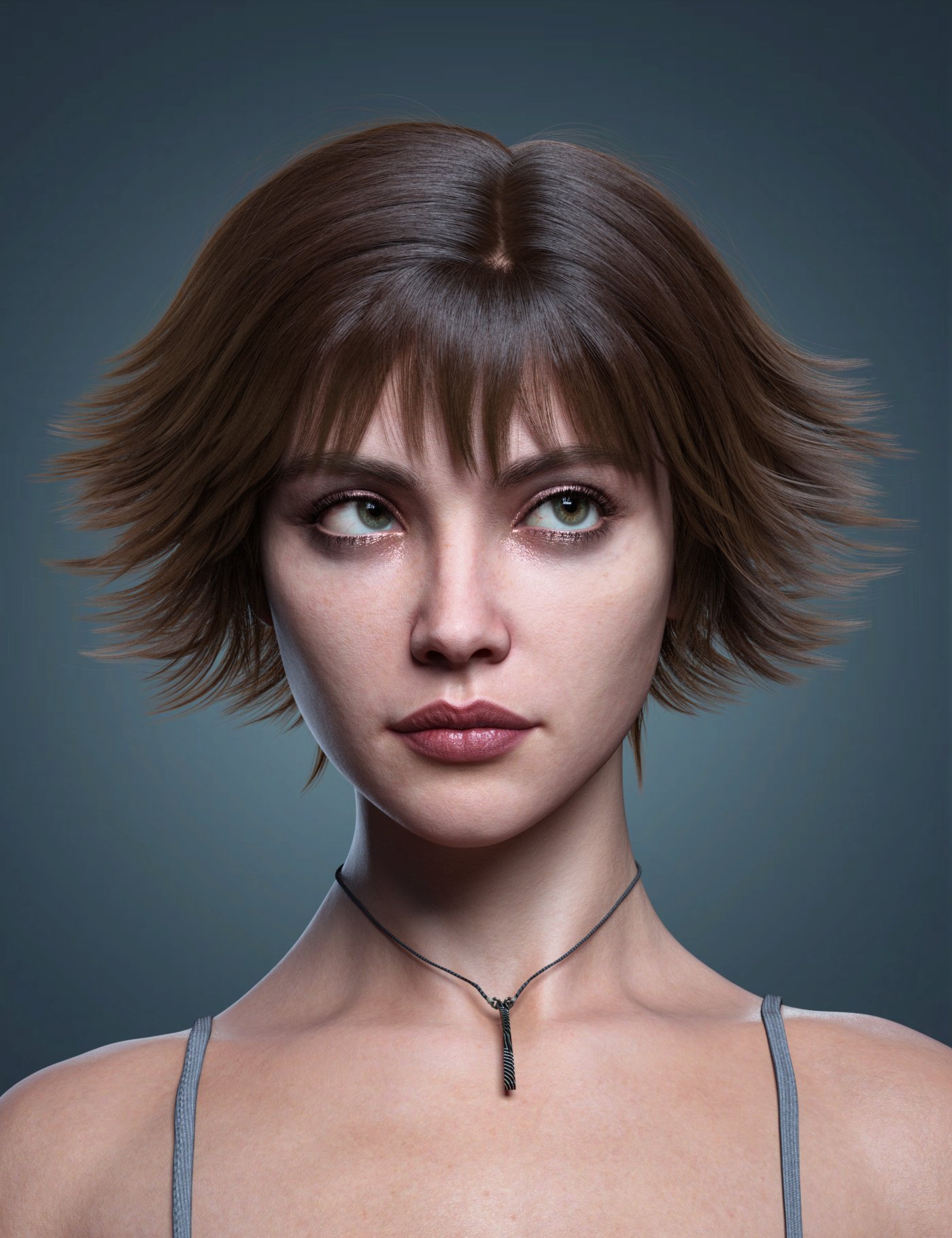
It really reminds me of Alice Cullen's hairdo (Twilight Series)
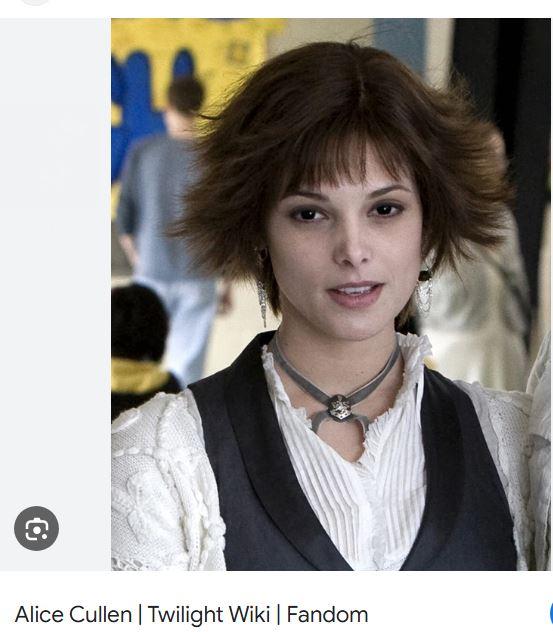
I also like it but only wishlisted for the moment. Reminded me a bit of
https://www.daz3d.com/tammy-hair-for-genesis-3-female-s-genesis-2-female-s-and-victoria-4
but it is of course quite different and seems to be very versatile.
[Released] Prop Minion [Commercial]So I decided to have fun and applied (nearly) all generations onto this figure;
The Staff is from Victoria 4
The Cigar from Genesis
The Shield from Genesis 2
And the Monocle from Genesis 8.
All were applied in one session without issue.There's Always Another Sale Thread -- Discussions Only Pt 3
don't have it yet, but it is in my wishlist. There really are so many things in my wishlist, I need to trim out many of the old characters since I am mostly using gen 9 now. Currently I have over 2k items in my wishlist. Lol Since I first started with Daz I have narrowed my focus mostly towards specific artist who allign with a realistic focus, the pro bundles, and tools. At first, my purchases were a bit more all over the place.memcneil70 said:XiousDs said:
memcneil70 said:
For everyone who has been upset by G9's breast areas, especially the males', what do you think about https://www.daz3d.com/sfd-breast-and-chest-morph-kit-for-genesis-9--merchant-resource?
I ask because I am not a male and have not had issues with G9's breasts.
There are quite a few different tools for making different adjustments, but that one (to me) looks like it could simplify some adjustments folks would want to make. I have not bought it, but I was interested enough to add it to my wish list. I like making characters like this. If Victoria and Harlow had a kid, as an adult what would he/she look like? I then mix the morphs leaning heavy towards the gender the kid is, then use other morphs to make corrections pushing back towards masculine or feminine. Then for the character as a kid, leverage the youth morph sets, and make adjustments. I wish instead of just head and body morphs they were broken down into regions like eyes, nose, jawline, ears, etc so it would be easier to do something like he has mostly his father's features, but his mom's nose and ears.Thank you @XiousDs. I have it in my cart.
Have you bought or looked at Code66's https://www.daz3d.com/shapes-randomizer-for-genesis-9? It has the option to morphs from both male and female shapes together. Or with using on your parents, maybe adjust them with morph packages, save and then use the Base 9 shape and merge the shapes manually together. And of course, some features jump generations, so a child may have something that harkens back to something neither parent shows. And of course there is always the 'milkman' to explain away weirdness.
There's Always Another Sale Thread -- Discussions Only Pt 3XiousDs said:
memcneil70 said:
For everyone who has been upset by G9's breast areas, especially the males', what do you think about https://www.daz3d.com/sfd-breast-and-chest-morph-kit-for-genesis-9--merchant-resource?
I ask because I am not a male and have not had issues with G9's breasts.
There are quite a few different tools for making different adjustments, but that one (to me) looks like it could simplify some adjustments folks would want to make. I have not bought it, but I was interested enough to add it to my wish list. I like making characters like this. If Victoria and Harlow had a kid, as an adult what would he/she look like? I then mix the morphs leaning heavy towards the gender the kid is, then use other morphs to make corrections pushing back towards masculine or feminine. Then for the character as a kid, leverage the youth morph sets, and make adjustments. I wish instead of just head and body morphs they were broken down into regions like eyes, nose, jawline, ears, etc so it would be easier to do something like he has mostly his father's features, but his mom's nose and ears.Thank you @XiousDs. I have it in my cart.
Have you bought or looked at Code66's https://www.daz3d.com/shapes-randomizer-for-genesis-9? It has the option to morphs from both male and female shapes together. Or with using on your parents, maybe adjust them with morph packages, save and then use the Base 9 shape and merge the shapes manually together. And of course, some features jump generations, so a child may have something that harkens back to something neither parent shows. And of course there is always the 'milkman' to explain away weirdness.
There's Always Another Sale Thread -- Discussions Only Pt 3
There are quite a few different tools for making different adjustments, but that one (to me) looks like it could simplify some adjustments folks would want to make. I have not bought it, but I was interested enough to add it to my wish list. I like making characters like this. If Victoria and Harlow had a kid, as an adult what would he/she look like? I then mix the morphs leaning heavy towards the gender the kid is, then use other morphs to make corrections pushing back towards masculine or feminine. Then for the character as a kid, leverage the youth morph sets, and make adjustments. I wish instead of just head and body morphs they were broken down into regions like eyes, nose, jawline, ears, etc so it would be easier to do something like he has mostly his father's features, but his mom's nose and ears.memcneil70 said:For everyone who has been upset by G9's breast areas, especially the males', what do you think about https://www.daz3d.com/sfd-breast-and-chest-morph-kit-for-genesis-9--merchant-resource?
I ask because I am not a male and have not had issues with G9's breasts.
Decimator worked only once??jjoyner said:
crosswind said:
So the problem is how to make it really work .... especially with the OBJ generated by Decimator plugin. And to me, even if the LoD OBJ could be loaded into Resolution Level and shown with no issue, the result still cannot be saved into DSF / DUF files... then it'll be still useless at the end of the day...
So many forums … so little memory. :( It turns out that I had this conversation with Jay in Patreon in May and with you and others in May also in the Decimator for Daz Studio forum thread (https://www.daz3d.com/forums/discussion/comment/8734986#Comment_8734986). Jay had replied to me in Patreon saying:
- I don't think you're doing anything wrong, I get the same behaviour. I have a feeling Decimator has a bug and no longer works as it once did. I remember the Victoria 4 figure came with a series of LODs that could be loaded with a script and Daz Studio would pick a LOD depending on far away from the camera the figure was - but of course that's all been close to 20 years ago, and I have a feeling the code hasn't been amended since. While it still works for decimations, the actual LOD functionality inside of Daz Studio seems to have broken.
In my last post in the Decimator for Daz Studio thread, I stated:
- So, I loaded the G8M Grelien Greylien HD alien (more than 1 million quad faces) that I bought last night, Decimated it, and saved the decimated version (16K quad faces) as a Character preset. I can load the decimated G8M Grelien Greylien HD alien now when desired.
Okay, same result from Jay... as we had... but I don't think any post load will work for this case. And I also responded to your last point: the Character Preset was just saved with Base Resolution rather than any LoD...
Anyway, I'll submit a ticket to see what will happen...
 Decimator worked only once??
crosswind said:
So the problem is how to make it really work .... especially with the OBJ generated by Decimator plugin. And to me, even if the LoD OBJ could be loaded into Resolution Level and shown with no issue, the result still cannot be saved into DSF / DUF files... then it'll be still useless at the end of the day...
So many forums … so little memory. :( It turns out that I had this conversation with Jay in Patreon in May and with you and others in May also in the Decimator for Daz Studio forum thread (https://www.daz3d.com/forums/discussion/comment/8734986#Comment_8734986). Jay had replied to me in Patreon saying:
- I don't think you're doing anything wrong, I get the same behaviour. I have a feeling Decimator has a bug and no longer works as it once did. I remember the Victoria 4 figure came with a series of LODs that could be loaded with a script and Daz Studio would pick a LOD depending on far away from the camera the figure was - but of course that's all been close to 20 years ago, and I have a feeling the code hasn't been amended since. While it still works for decimations, the actual LOD functionality inside of Daz Studio seems to have broken.
In my last post in the Decimator for Daz Studio thread, I stated:
- So, I loaded the G8M Grelien Greylien HD alien (more than 1 million quad faces) that I bought last night, Decimated it, and saved the decimated version (16K quad faces) as a Character preset. I can load the decimated G8M Grelien Greylien HD alien now when desired.
#2 Oldie But GoodieElectro-Elvis said:
One of the first objects I bought was "Under The Bridge". Previously, I had only bought Victoria 3.0 and 4.2 and Perfect Shoes and Stockings. But I could not find any pictures made with them.
The link to my old file
https://www.daz3d.com/gallery/user/5060841598615552#image=12966
And here the new one
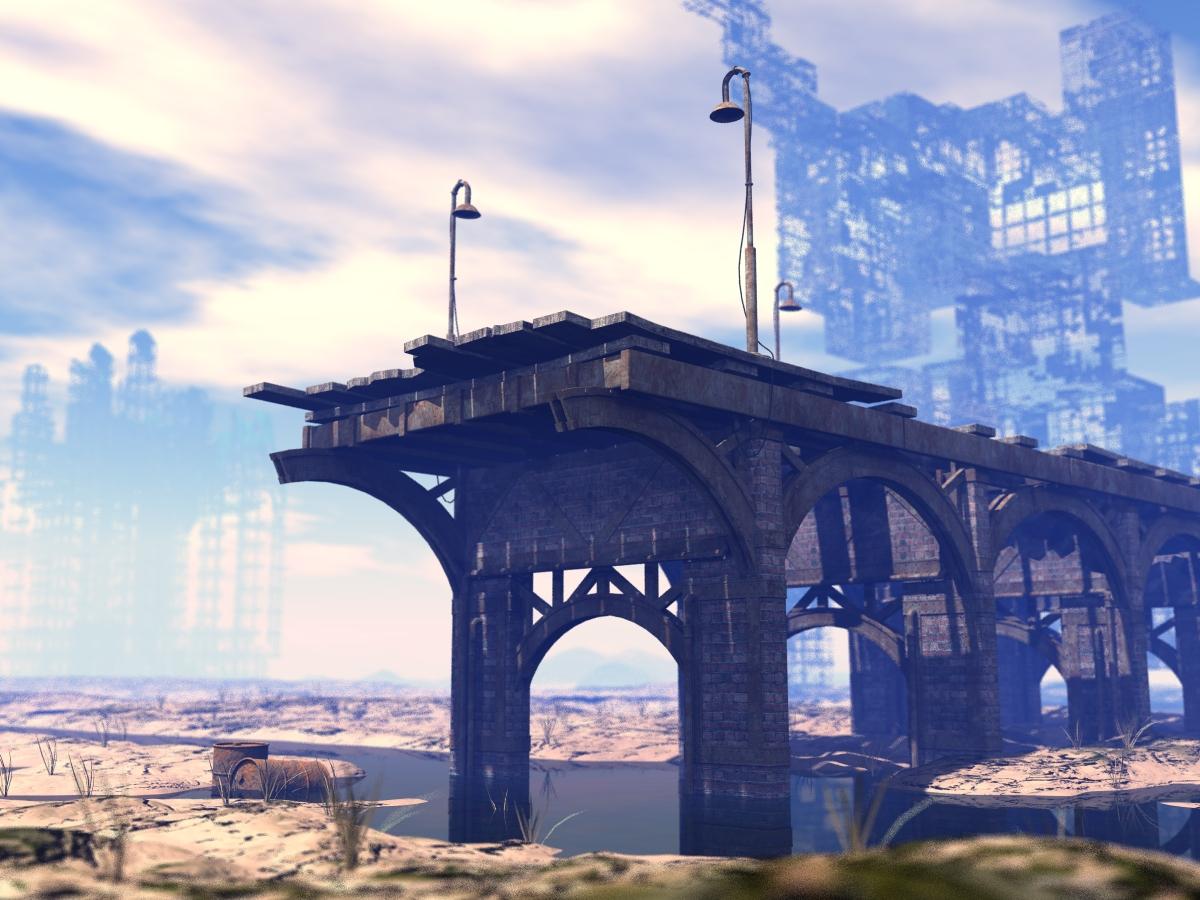
great color grading here
I like it
it has cinenatic quality
keep up the good work
#2 Oldie But GoodieOne of the first objects I bought was "Under The Bridge". Previously, I had only bought Victoria 3.0 and 4.2 and Perfect Shoes and Stockings. But I could not find any pictures made with them.
The link to my old file
https://www.daz3d.com/gallery/user/5060841598615552#image=12966
And here the new one
Can no longer select & pose figureI am new to DAZ Studio, and still figuring everything out. I opened up DAZ Studio today for the first time in about a week, and attempting to create a figure and put it in a scene. Out of the clear blue sky, and for no reason I can discover, I have lost the ability to select the character, and the specific body parts. Previously, you could click on a specific body part -- head, torso segments, upper arm, right down to individual finger digits -- that ability is now gone. Clicking on any part of a hand or arm selects both arms. Any part of leg or foot selects both legs. Previously, right clicking on Victoria 8 offered an option to select Victoria 8, the entire figure. That is gone. Now the options are all to select surfaces only -- select surface: "Torso" Or select surface: "Arms" and so on, whatever the cursor is on.
I am new at all this, so I am completely lost as to what changed, and how to change it back. Can someone point me in the right direction?
"Wear Them All" Product's Promo Picture looks awkwardOh, you meant the undies in the main product image (the one where she's wearing a tank-top saying "INNOCENT"), I was actually more curious what that cresent-shaped skirt is in the image third from last. That is, in the picture where there's a mention of a PDF guide. Lower right, with the brown leather belt, in that image, where it says Victoria 4 Skirt Fit.
Will iRay rendering in Daz Studio work good with this laptop w. nVidia Card.Good day, about 7 years ago I started into Daz and had a laptop with an nvidia 960M with 4GB RAM ... Genesis 3 was just coming out. It did quite well for the older stuff (Victoria and Michael 4 era) ... but as it gets increasingly new (with larger models and maps),, it would get bogged down or not be able to handle it at all.
The system you describe will not get you much as far as Iray rendering goes. It would probably be hopeless on Genesis 8 and 9.
Also, if you do not have a good cooling fan, the long intense rendering that Iray can produce can sometimes be too much for laptops.
Converting Vellus hairMasterstroke said:
joanna said:
I don't know the answer, but maybe knowing that there's a similar product for G8F will help?
Thanks, the reason I ask is, that there is no similar product.
There are dforce vellus face and body hairs that come with Victoria 8.1 and Michael 8.1, although I had to double-check because only Victoria's shows up in the product library as 'Vellus Hair' (says it's bundled with V8.1) and Michael's are, apparently, female according to his product page (the joys of copy and paste I guess).
They're listed under:
Other Improvements (Read More)
Fine, short hairs are added to the female face and body, male anatomical elements are available on females and vice versa, and the Facial Control Rig and Power Pose Panel for Face are enhanced.
(Edit: I mention the native versions mostly because any autofit hairs have a high chance of being badly mangled not when you first do them, but when you save, close, then re-open the scene.)
Victoria 4 Figures in Newer DAZ Versionsthe_dude135_5a9cf14330 said:
I was wondering if the Victoria 4 and Michael 4 figures are still usable in the newer versions of DAZ. I've got so many things for the them that I don't want to start over.
V4 in DS 4.21
Daz 3D is part of

Connect
DAZ Productions, Inc.
7533 S Center View Ct #4664
West Jordan, UT 84084Licensing Agreement | Terms of Service | Privacy Policy | EULA
© 2026 Daz Productions Inc. All Rights Reserved.