-
A special tattoo...
The example I posted is copyrighted so I wouldn't use that. I have already searched the internet of images and haven't found the right match, or I would need to be able to draw well.... Plus positioning the paw and tail in the manner I've described... you have to know how to make that so it sits well on a character. I don't. That's what this forum is for. I've seen some wonderful members out there who offer to draw/create assets, so I'm crossing my fingers... Is anyone up for the challenge? I know it's not as complex as creating hair.
If you search for school sports team logos those are usually public domain as they all just copied them off one another way, way back...
You could also buy one of the Tiger / Lion / Jaguar cats from the DAZ Store and render it using the pwToon or LineRender9000 shaders.
Dear content authors: Please continue to support 3delightAlso is there a light in DS 3delight that does more than one bounce of light? I swear I've done it before but I just tested and couldnt find anything
Like, indirect diffuse light type of bounce? In non-point-cloud mode, UberEnvironment2 will do any number of bounces, but it's really become virtually unusable a few 3Delight builds ago (it was written using very old Renderman concepts).
I've done more testing, because honestly, I love testing (I also honestly sort of like rigging too, maybe I should learn coding)
I must have had some weird setting in my render settings, so I loaded up a saved scene with my favorite 3delight lighting it was indeed UE2 with multiple bounces, better yet, some of the energy conservation problems it had (in the original scene as you upped light bounces via raytrace depth, the whole image got progressively whiter and whiter, until at 5 bounces it was just all white) were actually a product of gamma correction being off, yay learning things! Render speed is straight up apalling though,. And it really reminded my how I dont miss finding the balance of shading rate and samples, to not have errors but also actually render.
Its still pretty though, and if it were faster it would have some definite advantages (like being able to easily turn up the indirect lighting without affecting the rest of the lighting)
Yeah, that's the thing. If Daz doesn't encourage/drive some sort of core standard of shaders and language, they've _functionally_ contributed to a barrier preventing most people from making use of those functions.
It needs to be accessible, standardized, and promoted, or it's just an odd one-off. And the very nature of what we're talking about CAN'T be done as a one-off and make any headway.
Like, ToonyCam, PWToon, and LineRender9000, each of those can exist in isolation. You use it, or you don't.
But if you are expecting most vendors to start using a shader, it can't be some buy-in shader that might disappear if the vendor changes their mind a few years from now.
I agree here wholeheartedly, Although I am less certain that its a problem that Daz can fully solve, the proliferation of different shaders does lead to a certain amount of market fracture, and unless Daz can somehow buy every shader and then bundle it for free, its always going to remain to an extent. Way back most skins at the store used the Human Surface Shader, Then things switched over to the AOA Subsurface shader, why? because these are the ones that come bundled with studio, so everyone has them. I dont think Daz actually mandates that you need to use these shaders either, but everyone does. Now, personally, I have always prefered Ubershader2 for skin I have a better handle on sss for it, and I think its faster than AOA, since its not shader mixer based. However if I were selling a character, I probably wouldnt use it, for the resons you mentioned, and man would that be frustrating, since that would mean I was selling a product I knew wasnt the best it could be, because I had to balance appearence with utility.
Dear content authors: Please continue to support 3delightYeah, that's the thing. If Daz doesn't encourage/drive some sort of core standard of shaders and language, they've _functionally_ contributed to a barrier preventing most people from making use of those functions.
It needs to be accessible, standardized, and promoted, or it's just an odd one-off. And the very nature of what we're talking about CAN'T be done as a one-off and make any headway.
Like, ToonyCam, PWToon, and LineRender9000, each of those can exist in isolation. You use it, or you don't.
But if you are expecting most vendors to start using a shader, it can't be some buy-in shader that might disappear if the vendor changes their mind a few years from now.
Dear content authors: Please continue to support 3delightIt should be noted that all my problems with 3DL come from attempts at photorealism. 3DL CAN do photorealism (or close), but in Daz's implementation of 3DL there are numerous significant hurdles.
When it comes to _anything else_, 3DL is far superior.
(See all the not-photorealistic stuff in my DA gallery, using PWToon and Linerender)
Dear content authors: Please continue to support 3delightThe nice thing about PWToon and LineRender9k is that they are fairly self-contained. You don't have a lot of other content contingent on them, so they 'sell' better than, say, trying to release new content using Mustakettu shaders.
Though if you could figure out a way to make really good shaders that convert from Daz original or US, that would be an achievement.
Dear content authors: Please continue to support 3delightThat's the thing. To have a viable competitive market, it NEEDS to originate from Daz. This hands off, roll your own approach pretty much forces 3DL into a subservient position, at least in terms of photorealism (again, for other stuff, 3DL can't be beat).
So any time folks get angry at vendors... it's really not their fault.
For the NPR looks, we should be thankful that first we had pwToon and then LineRender9K. Again, these are vendor add-ons, it's not what DAZ did.
Maybe, if I weren´t Russian, I could try and become a vendor, too, and then my stuff could be considered "semi-official". But alas.
LineRender9000 [Commercial]Finally started playing with this. I REALLY like the fresnel output. I will probably end up using a combination of PWToon, for shading, and this product for lines.
This particular early experiment uses fresnel output. The regular output was inverted and put through a Photoshop filter, then line output overlaid, and a number of minor adjustments.
Will's renders always make me wish I'd bought the product.
It's in my wishlist, so sooner or later.
LineRender9000 [Commercial]Finally started playing with this. I REALLY like the fresnel output. I will probably end up using a combination of PWToon, for shading, and this product for lines.
This particular early experiment uses fresnel output. The regular output was inverted and put through a Photoshop filter, then line output overlaid, and a number of minor adjustments.
Is DazStudio able to create stylized 3D cartoon characters?The Star 2.0 uses similar shading and textures so you could buy it or one of it's texture expansion packs and deconstruct how the textures & shaders are constructed. Also the forth coming Toon Generations 2.0 will have a good variety of Toon style textures and caricatures.
As far as the caricatures you'll note two things: the young are flawless in their lack of wrinkles and the old are given wrinkles that as often more reflective of a 20 or 30 year old as on the old. Really wrinkled characters is usually saved for characters with extra power like wizards and witches - to reflect their extra knowledge. Or the really old gurus and such.
Also DAZ has Girl 7 and Guy 7 and these are toon style too although some aspects are more realistic than your examples.
To convert a character to Toon style renders without have available a toon style texture buy PWToon to render the character. However, if the character looks realistic and is not caricaturized then the toon style render will look like a real character rendered toon style.
Cartoon shaded imagesThere is a Cartoon mode, a hidden property in Render Settings (click the lined button in the top corner or right-click the tab to get the option menu and enable Show Hidden Parameters). However it is just a toggle controlling which shader code is sued by the Daz Default Shader - anything which uses a different shader, as many newer items do, will not be affected. pwToon (for 3Delight) is the most common tool for getting a cell-shaded look but there are other toon sahders (again for 3delight rather than Iray) such as http://www.daz3d.com/skunkville-noir or http://www.daz3d.com/linerender9000 offering different effects.
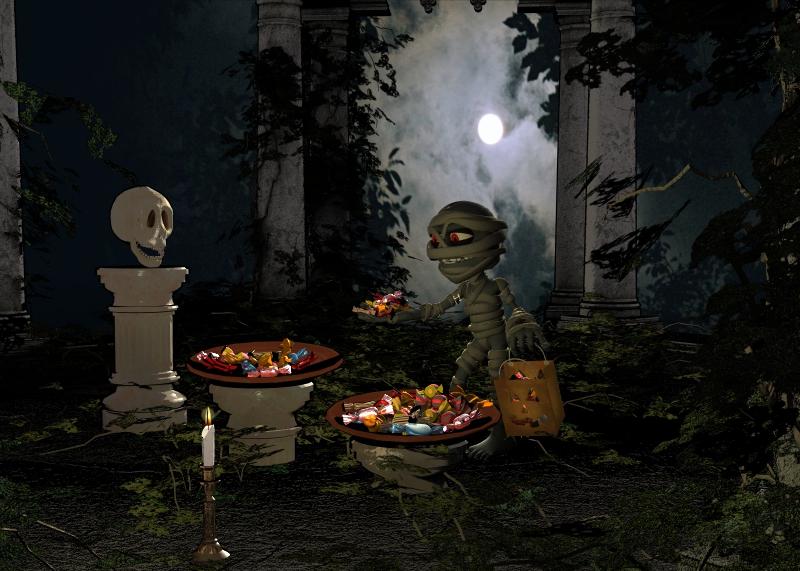
October 2016 New User Contest - Atmosphere (WIP Thread)This was my first toon render. I didn't use any toon setting, in fact, I wasn't aware of one built into D/S.
I had received both Skully and Little Mummy free from Runtime DNA, which is what prompted this pic.
All the candy was done from one model which is morphable and I tweaked the surfaces and reflection settings. It came with Community Candy Bag, which is also free on Daz. You will need to go to Runtime to get Little Mummy. All three are free.
http://www.daz3d.com/community-candy-bag
https://www.daz3d.com/downloader/customer/files#prod_28295
Here's the final render which I have already posted. I didn't like the glaring white moon so I replaced it. Looks much better.
Thanks for the links, and it does look better with the new moon.
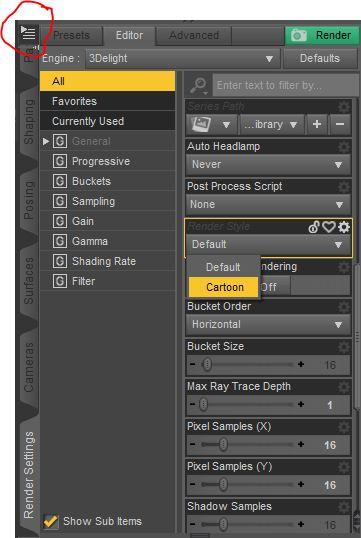
The Cartoon style is hidden in render settings, so click on the menu icon (shown circled in red) and select Show Hidden Properties.
Then the Render Style dropdown appears, with Cartoon as an option. And...that's all I know.
 Hopefully someone can chime in who has actually tried it out.
I think PWToon is used more, but here's a forum post on Cartoon Rendering if you're interested.
So I tried it and here's the result. It's interesting, but Skully's detail is washed out. It's good to know that D/S has this, thanks.
If I decide to pursue cartoon renders, I will probably use Filter Forge or Toony Cam for more control.
Also the props under the candy bowls got washed out... you likely already notice them also. I like the previous version much better.
Folks, Excellent work on your renders. I'm surprised at how good they look.
October 2016 New User Contest - Atmosphere (WIP Thread)This was my first toon render. I didn't use any toon setting, in fact, I wasn't aware of one built into D/S.
I had received both Skully and Little Mummy free from Runtime DNA, which is what prompted this pic.
All the candy was done from one model which is morphable and I tweaked the surfaces and reflection settings. It came with Community Candy Bag, which is also free on Daz. You will need to go to Runtime to get Little Mummy. All three are free.
http://www.daz3d.com/community-candy-bag
https://www.daz3d.com/downloader/customer/files#prod_28295
Here's the final render which I have already posted. I didn't like the glaring white moon so I replaced it. Looks much better.
Thanks for the links, and it does look better with the new moon.
The Cartoon style is hidden in render settings, so click on the menu icon (shown circled in red) and select Show Hidden Properties.
Then the Render Style dropdown appears, with Cartoon as an option. And...that's all I know.
Hopefully someone can chime in who has actually tried it out.I think PWToon is used more, but here's a forum post on Cartoon Rendering if you're interested.
So I tried it and here's the result. It's interesting, but Skully's detail is washed out. It's good to know that D/S has this, thanks.
If I decide to pursue cartoon renders, I will probably use Filter Forge or Toony Cam for more control.
 October 2016 New User Contest - Atmosphere (WIP Thread)
This was my first toon render. I didn't use any toon setting, in fact, I wasn't aware of one built into D/S.
I had received both Skully and Little Mummy free from Runtime DNA, which is what prompted this pic.
All the candy was done from one model which is morphable and I tweaked the surfaces and reflection settings. It came with Community Candy Bag, which is also free on Daz. You will need to go to Runtime to get Little Mummy. All three are free.
http://www.daz3d.com/community-candy-bag
https://www.daz3d.com/downloader/customer/files#prod_28295
Here's the final render which I have already posted. I didn't like the glaring white moon so I replaced it. Looks much better.
Thanks for the links, and it does look better with the new moon.
The Cartoon style is hidden in render settings, so click on the menu icon (shown circled in red) and select Show Hidden Properties.
Then the Render Style dropdown appears, with Cartoon as an option. And...that's all I know.
Hopefully someone can chime in who has actually tried it out.I think PWToon is used more, but here's a forum post on Cartoon Rendering if you're interested.
Better anime look for Iray?My recommendation is to do at least two passes -- one for color, another for shading. The color pass might be best in Interactive Iray, to get a mostly uniform ambient/environment light (I haven't played with it extensively, but this seems to have tools that might help).
Then, if you want outlines, either do a third pass in 3DL for outlines with PWToon or similar. If you have a pressing need to use Iray for all things, you can, laboriously, set material ID and do a material ID canvas, that you can then do 'find edges' with in Photoshop or similar. Only problem with this step is that translucencies don't work properly, so this requires a few extra steps for transmap hair and similar.
I've occasionally done a mixed thing -- color/shading in Iray, then outlines with PWToon. Then I can do funky filters with the first pass to make it look artistic, and carefully blend in the outlines. If you do this right, and have appropriate hardware, it can actually be faster than doing it all in 3DL, because with Iray you can more easily get a uniform image that you can stop rendering whenever it's good enough -- and with a lot of the filters, there's no point doing a 'complete' 3DL render or a high quality Iray render.
Is there anyway to use Visual Style Shaders and pwToon together?I don't know, but I will comment about the layering... I've had a lot of fun with doing multiple PWToon passes and layering/compositing. Sometimes I combine Iray + PWToon, too!
Having a 'juicy' layer of color or shading that you can filter, then gently add in some outlines or light shaded/line layers ... fun stuff!
(Check out my DA account in sig for some recent examples)
Is there anyway to use Visual Style Shaders and pwToon together?I posted this earlier, but I think I posted it in the wrong place so I'll post here. I'd like to be able to use pwToon and Visual Style Shaders together but I'm not sure if that's possible and if so, how would you do it?
Is this possible?Hi, I've got a question. I'm trying to make cartoons in Daz. I purchased the Visual Style Shaders and the CameraMagic Toony cam to try and accomplish this. I didn't really like the Toonycam because it was hard for me to control what it was that I was doing. I ended up returning the Toonycam and the VS shaders. I just purchased pwToon today and like that a lot better than the ToonyCam because I have a lot more control over what types of outlines you get. The only thing I dislike about it is that there aren't many color presets for pwToon like there was with the Visual Style Shaders (such as Peach Skin for example). I am considering repurchasing the Visual Style Shaders but only if I am able to use them in conjunction with pwToon. Is it possible to use these two shaders at the same time?
Novica & Forum Members Tips & Product Reviews Pt 7Okay, pwToon, I DID adjust the render so far as intensity and contrast to show the effect at its best. I won't be using some of these but showing them anyway.
If you can't see the difference, I would suggest downloading them then clicking back and forth. I'll do that (I have Corel Photo Paint open) and tell you what I'm seeing, that should make it easier for you. Some are pretty subtle. I'm adding more, keep checking back. I'm listing one at a time so I can make sure I've got them all.
First is the PinUp Jeans. Note the funky windows- they filled in, and the floor and how the blue squares blend with the walls. This one is a lot more "faded" than Cartoon Classic and the two following it.
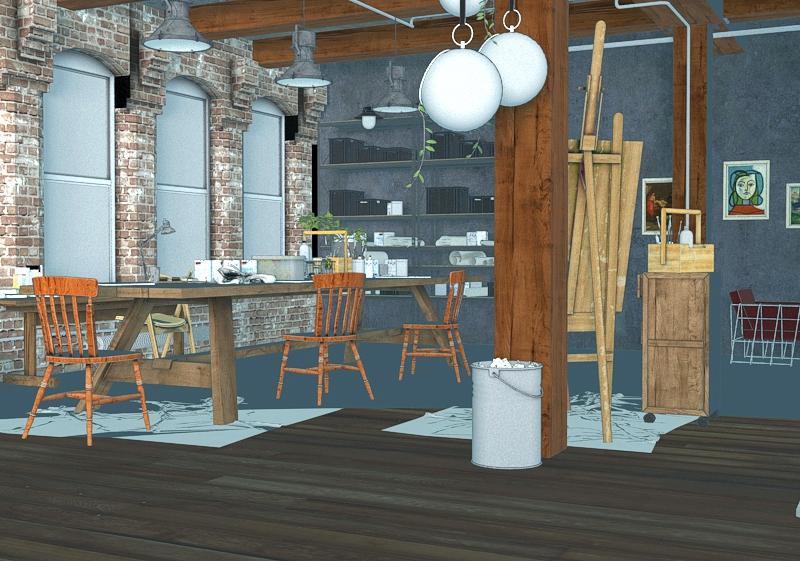
Toon Noir Much darker overall.
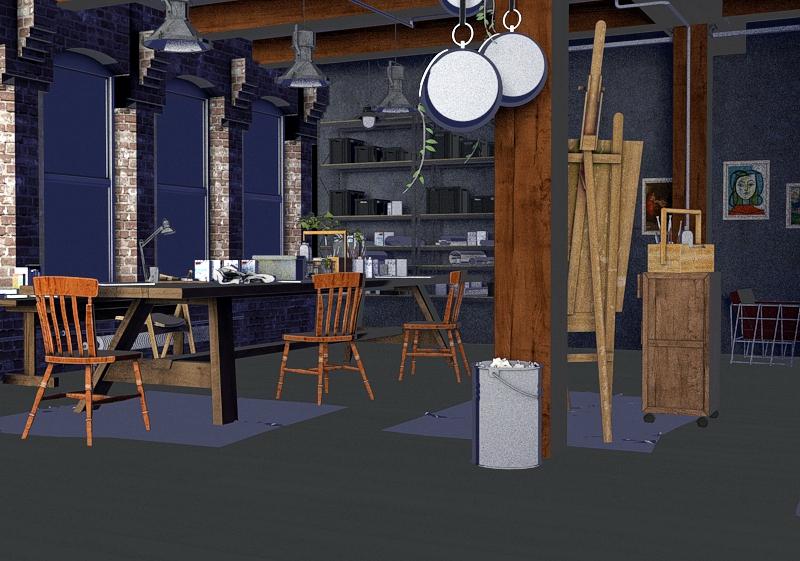
Now, the real comparison begins with these next three. Cartoon Classic is going to keep the floor stabilized with one dark color, I find this shader less distracting, it evens out larger planes of shadows. The grout on the bricks is not as thick as the upcoming one, the midtones are darker so again, there's less recognition by the shader of tones. (the end of the table, keep an eye on that leg and the bar that goes across.)
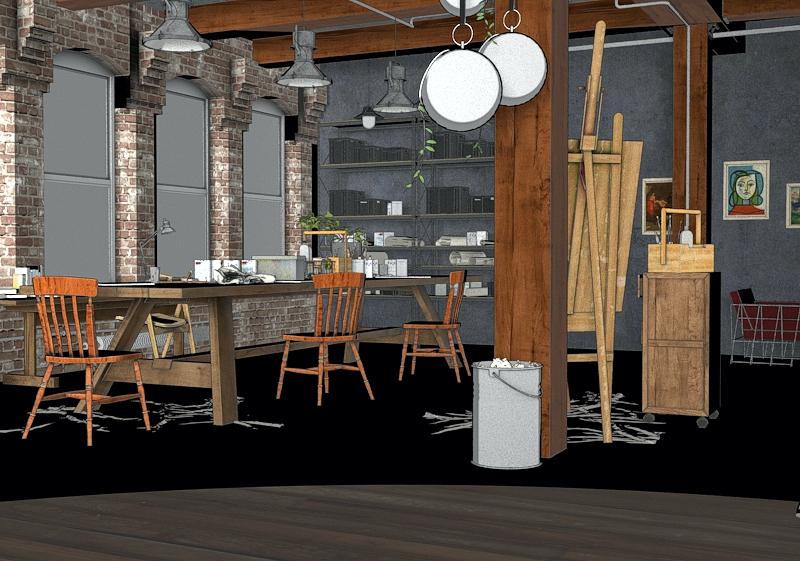
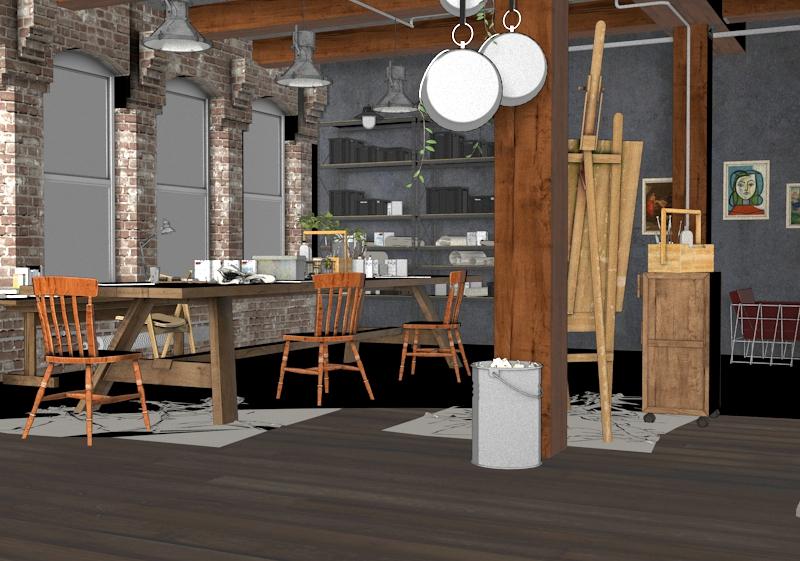
We'll compare 1. the chair seat by the window, you'll see big differences in how these shaders do shadows 2. the files/ books on the shelf by the window 3. The items on the floor and the floor itself. The shadows will be very easy to see the difference.
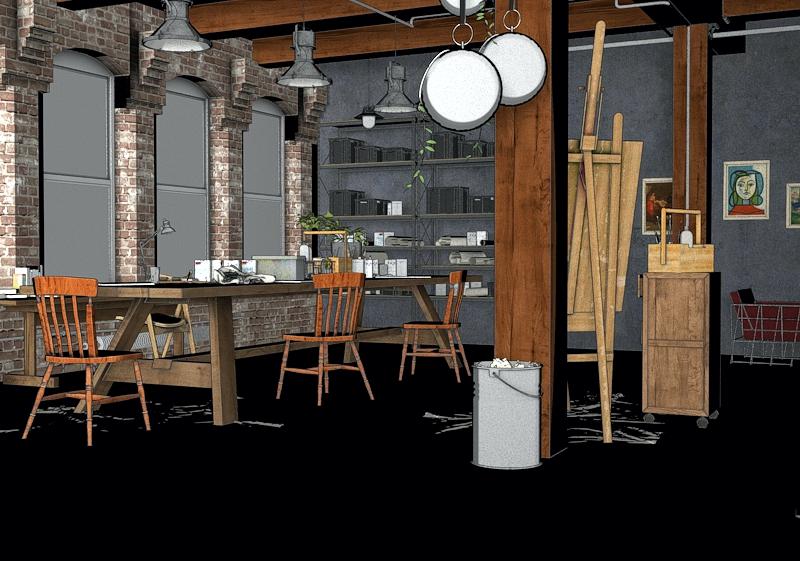
Clean Drawing hardened/compacted shadows (see chair seat) but Classic Cartoon (above) put bars of shadows on the books/files on the shelves- clearly differentiates light and dark, but Clean Drawing took away the shadows on the books/files on the shelves. So your Classic is going to shadow more things in a bold way.
Looking at the floor- what a difference! The rags on the floor have more showing with the Clean Drawing (below) as again, less black shadows.
Snazzy Toon is going to show more light areas. It put a bar of shadows back into the folders/books on the shelves, but the things on the floor really went more into squares (perhaps light from the window) so details got obliterated there. More of the wood floor is shown. Check out the chair seat by the window, very little shadow left.
 Novica & Forum Members Tips & Product Reviews Pt 7
I'm testing all the PWToon shaders on it, will have those in a few minutes. Some are really interesting, some have subtle differences from one to another.
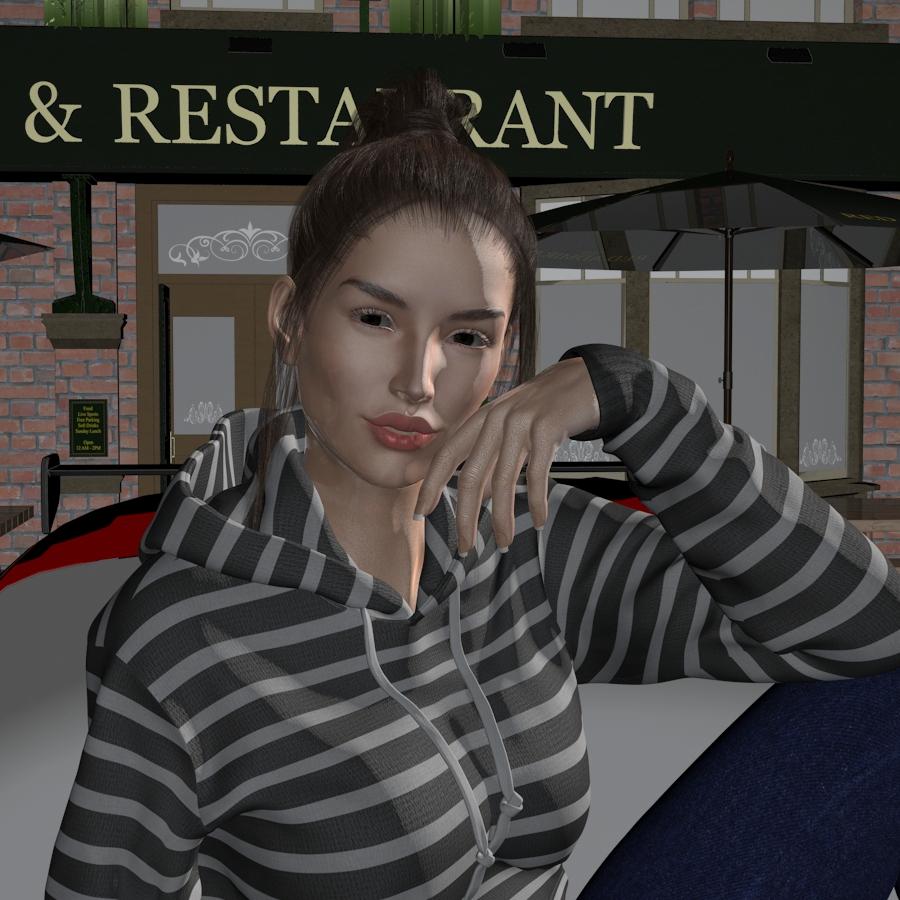
Novica & Forum Members Tips & Product Reviews Pt 7Interesting. I've had PWToon for years and never tried it. Tested it on a previous render. It is for 3DL. But what I found (rendering in 3DL) for this particular character (Marina) and scene:
1. Iray hair is awful, no surprise. 2. Iray skin is better at showing variation. Surprise. I didn't think it would work at all. 3. 3DL eyes are better. Expected.
So I used Iray Skin, but 3DL hair and eyes. I just used two test Spotlights, nothing fancy. Needs more lighting tweaking but I'm just testing various things and wanted to share. (no postwork such as brightening, midtones, shadows, etc.) The 3DL is much darker than the Iray skin.EDIT: I don't know which mouth I like better, after looking at both. Just a matter of preferences.
So have you done/tested Iray in PWToon?
EDIT: This was just one front spotlight, one side spotlight.
3DL: Skin is creamier
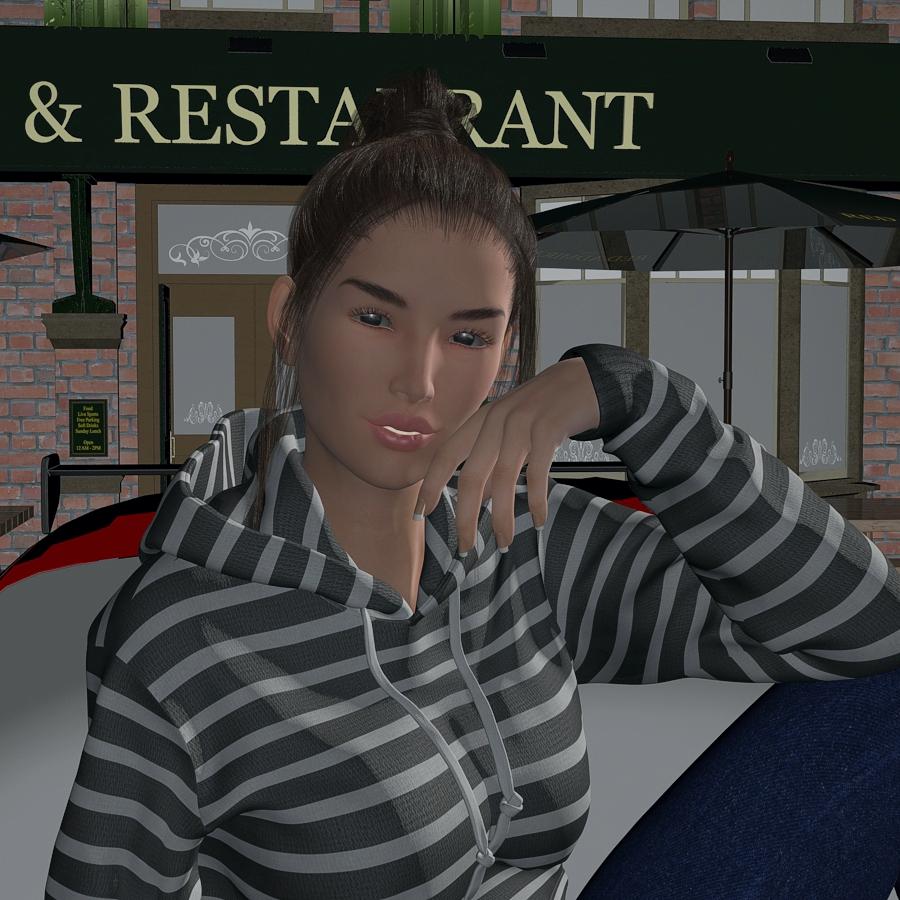
Iray: eyes lose the reflection, skin has more variation, mouth renders quite differently.
Daz 3D is part of

Connect
DAZ Productions, Inc.
7533 S Center View Ct #4664
West Jordan, UT 84084Licensing Agreement | Terms of Service | Privacy Policy | EULA
© 2026 Daz Productions Inc. All Rights Reserved.