-
Daz loading new installs into Lost and Found, Why? and How to fix?
Sounds like I'm one of the few that use the drag and drop method?
One can simply drag stuff from the "Dumb" content library to the "smart" content and drop it in the appropriate category.
for example if I have a shirt for G8M that doesn't have metadata. I select him in the scene then drag the shirt from the dumb library to the smart library and drop it under "Default>Wardrobe>Shirts". Then export user data followed by re-import userdata to save the changes and apply them.
After that the shirt I added will show up every time I select a g8M in a scene under shirts.
For things like scenes and props it's much easier because you don't need to have a character selected first.
Just drag and drop it to the appropriate category in smart content.
I've been using the drag and drop method for years. I thought everyone was because it's so much easier than mucking about trying to edit things by hand.
No, this won't fix inaccurate metadata in store products that come with metadata. I ran into this recently myself. For those products I had to edit the files in notepad, not hard, just a nuisance.
DIM operationThank you Richard,
Is there anyway to modify the drive letter in the DIM mainifests so that I could assign a common higher drive letter designation to a removeable drive on both systems I want to access the content on? Also, you mentioned reimporting the metadata. Is that basically downloading metadata from DAZ for the products on the machine? i.e. the database gets rebuilt on each machine with drive letters appropriate for that machine?
Daz loading new installs into Lost and Found, Why? and How to fix?danmast94 said:
People talking about "sudden influx" and "new products" as if this is a recent issue and not a problem that's existed for a long time. Items constantly end up in the Lost and Found. Metadata is constantly missing (including it disappearing from items that used to have it, thus moving stuff into Lost and Found that had previously been correctly tagged). Daz is responsible for making sure the things they sell work correctly and are managed properly. If one PA mislabels an item or does something wrong, then there's possibly an argument for shifitng the blame to them. When it's a widespread issue that has been constant for years, then it's no longer reasonable to think it's a PA issue and not a Daz issue.
The main topic is the large tranches of content brought over from Renderosity - in some cases there were hundreds of items and Daz simply wasn't able to process all of those to generate metadata. Gicwn that it is starting from scratch there is nothing to stop members from generating product data and posting it themselves - I have already done a few of Lully's products that I purchased from Renderosity, they would just need the store ID and SKU updating to reflect the current Daz store status - if/when I get around to that I start a thread.
While (generally much) older products may lack metadata, and some others may too, it is not common - if this is happening a lot I would suspect it is an instalaltion issue (for example, if you close DS and start DIM immediately it is possible for PostgreSQL to shut down on DS exit and not restart on DIM start, meaning that the metadata won't be added to the database).
Daz loading new installs into Lost and Found, Why? and How to fix?barbult said:
nemesis10 said:
Yep, the PA's I communicate with create their own metadata. This comes up occasionally when two PA's create assets with the same name and create a conflict or when a PA creates a strange new folder for their products such as "Praps" rather than Props. Customers complain and it must be explained that Daz3d didn't name the character or decide where products go and what the folders are called. So Daz3d has to go to the artist and ask them to change it.
PAs create their folder structure and content filenames, morph names, etc. File and folder names and morph names are not metadata, though.
Metadata is database information, like asset type, category, compatibility base, compatibility, etc.Two PAs have already responded to my question, and have confirmed that Daz (QA) creates the metadata for their products. That is consistent with what I have been told in the past.
Edit: Third PA chimed in and confirmed that he has never created metadata for his products himself. Daz does it.Yes, this is correct.
Daz loading new installs into Lost and Found, Why? and How to fix?People talking about "sudden influx" and "new products" as if this is a recent issue and not a problem that's existed for a long time. Items constantly end up in the Lost and Found. Metadata is constantly missing (including it disappearing from items that used to have it, thus moving stuff into Lost and Found that had previously been correctly tagged). Daz is responsible for making sure the things they sell work correctly and are managed properly. If one PA mislabels an item or does something wrong, then there's possibly an argument for shifitng the blame to them. When it's a widespread issue that has been constant for years, then it's no longer reasonable to think it's a PA issue and not a Daz issue.
Daz loading new installs into Lost and Found, Why? and How to fix?Oh.... but actually I meant : Are there any so-called "third-party creators and vendors" in this Daz3D store. The vendors selling products in this store should be all registered Published Artists, so to me they're native. Usually we call those who sell products in other stores as "3rd-party vendors". Make sense ?
Oh, yes. The daz store is partly a brokerage so that Sickleyield, for example is a 3rd-party creator and sells other products in FlippedNormal, 3dshards, and other stores. Pretty much all the software like Filterforge which you can buy in this store is made by software manufactors who would amused and puzzled if described as part of Daz3d or "native". Filterforge is sold in a lot of places. Daz3d is a creator in its own right with products such as Daz Studio, those core characters such as Victoria 9, assets commisioned by Daz3d such as the the matching products that go into a core character's bundle. Thus if you made a pirate core character with a bundle, you might commission pirate themed products like hair, clothes, and weapons, along with textures, and maybe a special edition character for the Premier members. In general, the PA's here are sort of free agents i.e. 3rd party vendors who sell their specific wares here exclusively for a period but can leave if they want to and remove their products. They aren't "native" or more specifically not traditional Daz3d employees who might have their own lockers at the headquarters. This whole metadat crunch happened because a bunch of vendors of another store who you might perceive as being "native" left at the same time and came here to become "native" i.e. and expected 3rd party vendor or PA but they never needed metadata because the store was geared more towards Poser users and there was no time to make metadata for the new products.
Daz loading new installs into Lost and Found, Why? and How to fix?....Who provides the metadata:
-
Third-party creators and vendors:
When you purchase an asset (like a character, clothing, or prop) from a vendor other than Daz 3D, they are responsible for creating the metadata that describes the asset and integrates it into your Daz Studio library.
-
Daz 3D:
For products sold directly by Daz 3D, the company itself is the provider of the metadata.
These info. are confusing me. Are there any so-called "third-party creators and vendors" in this Daz3D store ?
As far as I understand and exp., we purchase products from Vendors, aka PAs from this store. Products from "Daz 3D", or if you mean products from Daz Originals... were also made by PAs rather than Daz themselves. They just bought the products from PAs then marked them as Daz Originals.
So, Daz3d does create the metadata for its own products as Barbuilt says.
And I got the very same info. from my PA friends as what @barbult just did : PAs who sell products in this store create no metadata but just asset files as well as content folders. Daz is responsible for creating metadata of the products and creating IM packages accordingly.
Besides, I personally don't think they create metadata by using Content DB Editor... which turns out to be cumbersome. There might be a tool or script, like RiverSoftArt's Content Wizard that can scan / analyze the product package and auto-generate metadata ~~
Daz loading new installs into Lost and Found, Why? and How to fix?nemesis10 said:
Yep, the PA's I communicate with create their own metadata. This comes up occasionally when two PA's create assets with the same name and create a conflict or when a PA creates a strange new folder for their products such as "Praps" rather than Props. Customers complain and it must be explained that Daz3d didn't name the character or decide where products go and what the folders are called. So Daz3d has to go to the artist and ask them to change it.
PAs create their folder structure and content filenames, morph names, etc. File and folder names and morph names are not metadata, though.
Metadata is database information, like asset type, category, compatibility base, compatibility, etc.Two PAs have already responded to my question, and have confirmed that Daz (QA) creates the metadata for their products. That is consistent with what I have been told in the past.
Edit: Third PA chimed in and confirmed that he has never created metadata for his products himself. Daz does it.Daz loading new installs into Lost and Found, Why? and How to fix?Yep, the PA's I communicate with create their own metadata. This comes up occasionally when two PA's create assets with the same name and create a conflict or when a PA creates a strange new folder for their products such as "Praps" rather than Props. Customers complain and it must be explained that Daz3d didn't name the character or decide where products go and what the folders are called. So Daz3d has to go to the artist and ask them to change it.
Daz loading new installs into Lost and Found, Why? and How to fix?That's not the way PAs have described the metadata process to me. But it could have changed. I have direct connection to a few. I'll ask who creates their metadata now. I'm assuming that when you say third party providers in the Daz store. you mean PAs, not Daz employees.Daz loading new installs into Lost and Found, Why? and How to fix?barbult said:
Metadata is created by Daz, not by the artist. Please don't blame the artist for the lack of metadata in their products, or for metadata errors in their products. All the blame for metadata issues should go to Daz. Daz just chose not to make metadata for the imported products, because there were so many and it would take a lot of resources to make it. It was a choice Daz made, and so we suffer from that choice they made.
Well sort of... If you have ever had a product with bad metadata or other problems from a third party in the store, you have had to wait until the creator is contacted by Daz3d and they reply since the third party does the metadata and packaging. If it is a Daz product like the core figures then, yes, Daz3d does the packaging. I believe Sickleyield goes into detail about this in her DeviantArt page.
More formally:Metadata for Daz Studio is primarily created and provided by the third-party sellers and creators who develop and sell the assets (models, figures, environments, etc.) that are used within the Daz Studio software. These creators include Daz 3D themselves, as well as many other independent vendors. Users can also update and maintain the metadata using Daz Studio's built-in Content DB Maintenance tool, which processes the metadata queue and reimports metadata for the installed assets.
Who provides the metadata:
-
Third-party creators and vendors:
When you purchase an asset (like a character, clothing, or prop) from a vendor other than Daz 3D, they are responsible for creating the metadata that describes the asset and integrates it into your Daz Studio library.
-
Daz 3D:
For products sold directly by Daz 3D, the company itself is the provider of the metadata.
How metadata is processed:
-
Daz Studio's Content DB Maintenance:
This feature within Daz Studio allows users to manage and update the metadata for their installed assets.
-
Process:
You can right-click on the Content Library or Smart Content tab and select "Content DB maintenance" to access a pop-up window. From there, you can "Process the metadata queue" and "Reimport metadata" to update your library.
In essence, Daz Studio itself provides the tools to manage and update metadata, but the original metadata is created by the individual content creators and sellers.
So, Daz3d does create the metadata for its own products as Barbuilt says.
Daz Studio 6 Beta - version 6.25.2026.19821! (Updated July 23, 2026)Richard Haseltine said:
gelstat said:
It is impossible to delete a material. Well, I managed to do it once, but I can't remember how.
Have you selected its polygons ((clicked the + next to the anme, for example)?
+ , - , selected, unselected, export/import. You cannot delete a material with or without polygons.
A dialog box does appear when you try to delete it, but the tab remains.
You can create a new one, but you can't delete it.
Daz loading new installs into Lost and Found, Why? and How to fix?Metadata is created by Daz, not by the artist. Please don't blame the artist for the lack of metadata in their products, or for metadata errors in their products. All the blame for metadata issues should go to Daz. Daz just chose not to make metadata for the imported products, because there were so many and it would take a lot of resources to make it. It was a choice Daz made, and so we suffer from that choice they made.
Daz loading new installs into Lost and Found, Why? and How to fix?How to know if a product doesn't have metadata ?
- Install Daz-Deals extension to your internet browser. Then on the product page, you'll see a ReadMe link which directs to product's ReadMe page (screenshot 1). Click it.
- If you see Page Not Found or find no DSX file in runtime/support folder after clicking File List, that usually means the product has no product data.How to quickly and correctly install a product with no metadata if you are a user who much rely on Smart Content ?
- Don't bother installing them from L&F manually, cumbersome and tedious. Install the products with Content Wizard
- You can install a single product or multiple products by batch. I myself much rely on Content Wizard to install 3rd-parties products as well as the products with no metadata...Daz loading new installs into Lost and Found, Why? and How to fix?jukingeo said:
Elor said:
On top of @barbult's explanations, a product will appear in Lost and Founds when one or two of its elements don't have a category set. In such case, the good new is that it's relatively easy to fix it yourself using the UI provided with Daz Studio.
A short video explaining how to create metadata:
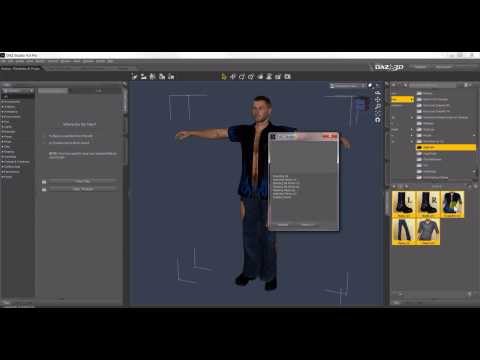
It's old, but the basics have not changed since it was published.
ecks201 said:
Do you log in to Daz Studio?
Doing that will trigger a metadata update.Which won't solve the problem with most of if not all the products listed on the screenshot: like @barbult said, when many artists moved their products from other stores to Daz3D.com, they didn't have metadata and Daz didn't create them (to be fair, while for some products, it will only take a couple of minutes to create them, for some, it can easily require an hour to create the metadata).
It also won't solve the problem I spoke about, because the problem, as in the examples from barbult, is that they are simply no metadata available to fix the problem.
Doing so could apparently mess things up, so I would avoid doing so.
It takes an hour to create metadata?!?! Yeah, I don't have that time, especially if it was something that was supposed to have been done by the PA and watched by Daz. As I mentioned in my other reply to Barbult, isn't there an easy way to just assign it to the Smart Content folder so it shows up there?
Also, I have noticed a bigger problem. Not all of the content is showing up in the Lost and Found. In the case of outfits, I can't find the wearable. Please see attached example. As you can see, there is no wearable. If I click on an item, I get an error message, which you see on the screen. Now, what do I do?
Thanks to all for your help!
Geo
What you bought is a texture add-on. Do you have its Base product ? : https://www.renderosity.com/marketplace/products/162668 ;
Daz loading new installs into Lost and Found, Why? and How to fix?The reason they don't show up in Smart Content is they have no metadata; the metadata tags the product (clothing in this case) as a product and associated with a certain class of characters. If the metadata is absent then the asset is placed into lost and found. There is an alternative way to see the assets which is the Library as opposed to Smart Content. If you want to, you can select each product, and create metadata. Just in case, it might be worth rebuilding the database to make sure that the product is missing metadata rather than having corrupted metadata. It is a mess but other stores and Poser use different systems.
Daz loading new installs into Lost and Found, Why? and How to fix?nemesis10 said:
Technically, it is something the artist is supposed to do. Daz3d had a sudden influx of new artists leaving another store and was stuck with the choice of absorbing them with their products without metadata or turning down the artist and their products and perhaps everyone losing them forever. It is a useful skill for Daz Studio artists to know how to create metadata; if you Google 'how to create metadata for Daz Studio", you will find endless tutorials. Nonetheless, these artists were brought in in an emergency so there you are.
To create metadata for a product in Daz Studio, load the object into the scene, go to Edit > Scene ID Editor, and then click Compatibility Base to associate it with a suitable base asset, linking it to compatible products and presets. For general assets, you can add descriptive metadata within the product packaging or during the import process to enhance discoverability and categorization.
Adding Compatibility Metadata
This is essential for creating your own products that work with existing Daz Studio figures.- Load your asset: into the Daz Studio scene.
- Select the asset: in the scene.
- In the top menu bar, click Edit > Scene ID Editor.
- In the Scene ID Editor dialog box, select Compatibility Base.
- Choose the appropriate base that your asset is designed for from the dropdown list and click OK.
- Other Metadata Considerations
While the "Scene ID Editor" is for creating new Daz products, you can also use metadata to organize your content and enhance its searchability:
- Content Library/Smart Content Tab: Use the Content Library or Smart Content tab to browse and organize your assets. Right-click on an asset or folder to view its metadata and add or edit properties.
- Content DB Maintenance: If you're having trouble finding a product, use "Content DB Maintenance" (accessible by right-clicking on the Content Library or Smart Content tab) to update your metadata queue and re-import metadata, which can help new products appear in the Smart Content view.
- Metadata in Smart Content: When you add products to Daz Studio, they will often come with pre-existing metadata. You can view and sometimes edit this information in the Smart Content tab to better categorize and search for your assets.
What about the items that are missing items, such as the wearables I mentioned above. I looked in Smart Content and it isn't there. It only comes up in the Lost and Found, but it is missing files. Not all of the products are missing files, but a good number of the newer installs are.
I did a quick calculation and I found there is about 385 items in the Lost and Found. Last year, I had updated Windows from 7 to 10 and Daz to 4.24. Last year, I had about 75 to 100 items in lost lost and found. In less than a year this bloomed to 385. Something is seriously wrong with that. Or at least I think so.
Thanks,
Geo
Daz loading new installs into Lost and Found, Why? and How to fix?jukingeo said:
barbult said:
Daz brought a lot of products from other stores into the Daz Store. Daz didn't bother to make metadata for those transferred products.
That's rich, is it something they are supposed to do?
They will all go into lost and found. The only thing you can do about it is create your own metadata, buy a product to install and create metadata for you,
return the products that have no metadata, stop buying those products.
Isn't there an easier way to just put the "Lost" items into Smart Content? Also, how would I know if a product doesn't have metadata to stop buying it?
Technically, it is something the artist is supposed to do. Daz3d had a sudden influx of new artists leaving another store and was stuck with the choice of absorbing them with their products without metadata or turning down the artist and their products and perhaps everyone losing them forever. It is a useful skill for Daz Studio artists to know how to create metadata; if you Google 'how to create metadata for Daz Studio", you will find endless tutorials. Nonetheless, these artists were brought in in an emergency so there you are.
To create metadata for a product in Daz Studio, load the object into the scene, go to Edit > Scene ID Editor, and then click Compatibility Base to associate it with a suitable base asset, linking it to compatible products and presets. For general assets, you can add descriptive metadata within the product packaging or during the import process to enhance discoverability and categorization.
Adding Compatibility Metadata
This is essential for creating your own products that work with existing Daz Studio figures.- Load your asset: into the Daz Studio scene.
- Select the asset: in the scene.
- In the top menu bar, click Edit > Scene ID Editor.
- In the Scene ID Editor dialog box, select Compatibility Base.
- Choose the appropriate base that your asset is designed for from the dropdown list and click OK.
- Other Metadata Considerations
While the "Scene ID Editor" is for creating new Daz products, you can also use metadata to organize your content and enhance its searchability:
- Content Library/Smart Content Tab: Use the Content Library or Smart Content tab to browse and organize your assets. Right-click on an asset or folder to view its metadata and add or edit properties.
- Content DB Maintenance: If you're having trouble finding a product, use "Content DB Maintenance" (accessible by right-clicking on the Content Library or Smart Content tab) to update your metadata queue and re-import metadata, which can help new products appear in the Smart Content view.
- Metadata in Smart Content: When you add products to Daz Studio, they will often come with pre-existing metadata. You can view and sometimes edit this information in the Smart Content tab to better categorize and search for your assets.
Daz loading new installs into Lost and Found, Why? and How to fix?Elor said:
On top of @barbult's explanations, a product will appear in Lost and Founds when one or two of its elements don't have a category set. In such case, the good new is that it's relatively easy to fix it yourself using the UI provided with Daz Studio.
A short video explaining how to create metadata:
It's old, but the basics have not changed since it was published.
ecks201 said:
Do you log in to Daz Studio?
Doing that will trigger a metadata update.Which won't solve the problem with most of if not all the products listed on the screenshot: like @barbult said, when many artists moved their products from other stores to Daz3D.com, they didn't have metadata and Daz didn't create them (to be fair, while for some products, it will only take a couple of minutes to create them, for some, it can easily require an hour to create the metadata).
It also won't solve the problem I spoke about, because the problem, as in the examples from barbult, is that they are simply no metadata available to fix the problem.
Doing so could apparently mess things up, so I would avoid doing so.
It takes an hour to create metadata?!?! Yeah, I don't have that time, especially if it was something that was supposed to have been done by the PA and watched by Daz. As I mentioned in my other reply to Barbult, isn't there an easy way to just assign it to the Smart Content folder so it shows up there?
Also, I have noticed a bigger problem. Not all of the content is showing up in the Lost and Found. In the case of outfits, I can't find the wearable. Please see attached example. As you can see, there is no wearable. If I click on an item, I get an error message, which you see on the screen. Now, what do I do?
Thanks to all for your help!
Geo
Prohibit the reordering of ContentDirectoryManager.dsx
Sorry, I didn't get to the main point. What I mean is that after I find the model I want, I will arrange their paths in the order I need. For example, first is the scene, then the clothes, and then the character. When I import this path into the dsx file, if it can be arranged in this order, I will easily find what I need. I even added some fake paths to the list of folder paths. The final folder names of these fake videos are some symbols or prompts to remind me what the following folders are about. If my plan goes smoothly and the folder path order is not disrupted, the final effect should be like this. First are several scene models, then an empty path to remind me that the next ones are character models. Then the next few are character models. Then another empty path to remind me that the next ones are clothes models. The following few are indeed clothes models, and so on.crosswind said:I'm sorry... I'm quite familiar with how tags work but how could you see the tagged assets in a certain order in Daz Studio ?
Daz 3D is part of

Connect
DAZ Productions, Inc.
7533 S Center View Ct #4664
West Jordan, UT 84084Licensing Agreement | Terms of Service | Privacy Policy | EULA
© 2026 Daz Productions Inc. All Rights Reserved.