-
Anime Toons and Filatoon Shader Q&A
ArtsyDragon said:
For the first question answered with screenshots 1,2,3.... YAY, Thank you
For the second question answered with screenshot 4 ... yikes, I don't have the purple stuff except when I click on the anime boy or animae girl. If that's what is to be expected, then I'm all set. If it's supposed to be around for other things (like clothing I've applied the filatoon general shader to it's not.
Depend on the case you're work on. For instance, if you're converting Iray Uber shader to Filatoon shader. Check screenshot 1 ~ 3
For the last question answered with screenshot 5 ... yikes. Daz Studio returns nothing when I'm doing a Surface search for Filatoon. It doesn't matter what I have selected in the scene (either clothing or the anime figure itself.)
If you could get shader presets by going for Option 1 in above screenshot 5, you could've got them under Surfaces pane > Preset tab. Post me a screenshot...
Here is a basic question: How does one go about converting an Iray item to Filament? I have been applying the Filatoon shader to an object thinking that's all I had to do.. Now I'm wondering if I'm doing something wrong.
You must select a surface or surfaces in Surfaces pane before applying Filatoon shader. Be noted, a Shader or Shader Preset can only be applied on selected surface(s). Also check below screenshot 1 ~ 3.
I'm sorry for all the questions. I'm just trying to learn this and I'm a bit on the dim side.
pre-paid Daz membership taken away!doubledeviant said:
Richard Haseltine said:
Ron Knights said:
So now again, we have a paid version of DAZ Studio. Many years ago I paid extra for DAZ Studio Advanced (was that the name?). Right after that, DAZ Studio went free.
I just don't see any compelling new features for the paid version of DAZ Studio. It's nothing that interest me. And all those sale prices and coupons continue to confuse me.
I can't help wonder if this new paid version is a step toward DAZ Studio version 5. Will DS v5 be a subscription only version?
It isn't a paid (subscription) version of daz Studio - it is a subscription set of additional plug-ins, and content, and possibly other things on top of the standard daz Studio - which has had updates in the latest build and has just gained a Filament-based toon shader, so clearly not being neglected in favour of the subscription strand.
More accurate to say that it's the removal of tools from the market - that were available under perpetual license for a fair price - and the moving of those tools to an expensive subscription/rental model. It does actually detract from the base version of Studio as users can no longer purchase those tools if needed.The subscription does, of course, include far more than just the plug-ins - though equally obviously not everyone is going to have use for more than one of the benefits.
Anime Toons and Filatoon Shader Q&Acrosswind said:
ainm.sloinneadh said:
crosswind said:
ainm.sloinneadh said:
I'm not quite grasping how to overcome the optical illusion eyes. With filament rendering from the viewport, I can't figure out how to change what is seen in the render. There are no sliders to change the direction the eyes point in - only how well they stick together in the same direction. I've been mostly using them on the G9 mesh (not the anime G9 mesh). I wonder if that's why I'm missing something here.
If you don't own Look At Me II scripts... https://www.daz3d.com/look-at-me-ii-pose-control you either can tweak eyes rotation by using Point At to a Camera or a Null node. Or, tweak eyes rotation by using Eye Look... Pose Control properties.
Thank you kindly! Seems I can only get them to work when I load a new figure. The posing controls don''t do anything if I add the toon socket and iris onto an existing genesis 9 save, which was what I was trying to do.
I checked... it works on my side with adding socket / floating iris to the existing G9 figure. And you also need to delete Genesis 9 Eyes node ~~ as below SS.
Ugh. I think it was because I was being lazy and just hiding the eyes. At this rate, I'll owe you a salary! Thanks (yet) again
 Anime Toons and Filatoon Shader Q&A
For the first question answered with screenshots 1,2,3.... YAY, Thank you
For the second question answered with screenshot 4 ... yikes, I don't have the purple stuff except when I click on the anime boy or animae girl. If that's what is to be expected, then I'm all set. If it's supposed to be around for other things (like clothing I've applied the filatoon general shader to it's not.
For the last question answered with screenshot 5 ... yikes. Daz Studio returns nothing when I'm doing a Surface search for Filatoon. It doesn't matter what I have selected in the scene (either clothing or the anime figure itself.)
Here is a basic question: How does one go about converting an Iray item to Filament? I have been applying the Filatoon shader to an object thinking that's all I had to do.. Now I'm wondering if I'm doing something wrong.
I'm sorry for all the questions. I'm just trying to learn this and I'm a bit on the dim side.
Anime Toons and Filatoon Shader Q&AFinding the right hair is going to be the trick with Filament. Transmapped surfaces and Filament go together like chocolate and creamed spinach.
MANGA STYLE & VISUAL STYLE topic - Update Sept 23rd 2017: Fixed Dropbox links! [Commercial]Seeing as Filament is on its way to becoming the defacto alternative for NPR rendering, more solutions that use it will be welcome.
Anime Toons and Filatoon Shader Q&AArtsyDragon said:
Hello Everyone! I'm back with a couple of questions after reviewing the FAQ post at the beginning of this thread.
Mada said:
You will find a new folder called Genesis 9 Toon with 2 figures - Genesis 9 Base Anime Feminine and Genesis 9 Base Masculine. MallenLane did an absolutely amazing job on sculpting and rigging the toons, everytime I use them I smile because its such a pleasure to work with :)
I don't know where to look for this folder called G9 Toon. The only place I have the anime feminine and male figures is within the group called "Genesis 9 Starter Essentials." In the figures filter, I get 12 figures, 2 of wich are the G9 Anime male and female. If there is another place where I can find them faster, I'd love it.
Check screenshot 1 ~ 3
The Filatoon shader is used in combination with Filament’s fast rendering. The toon outline is accomplished by creating a geometry shell and applying a special shader to it.
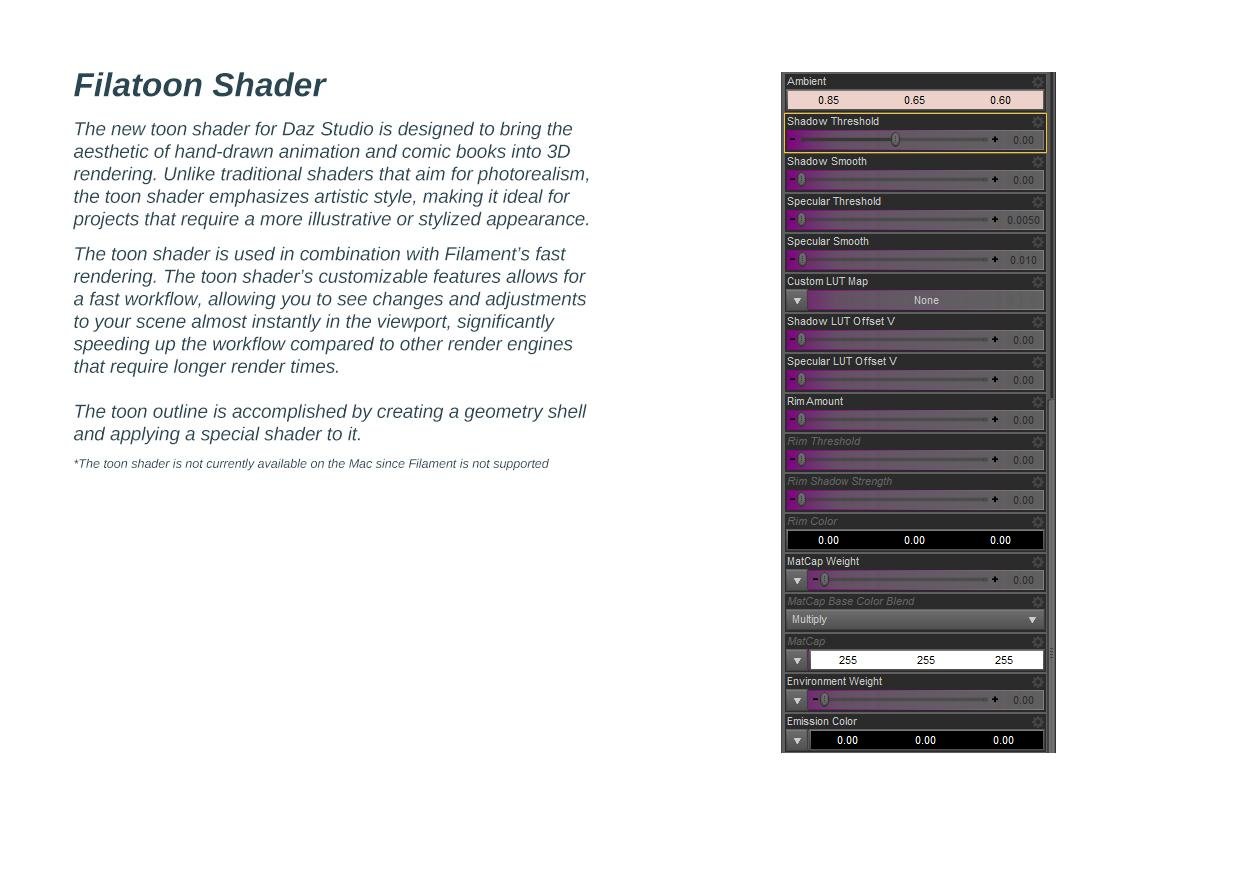
I found the outline geometry shell (or rather how to get it into the scene) but my question is about the purple list below in the next image. I don't know where to find that particular goodie.
Check screenshot 4
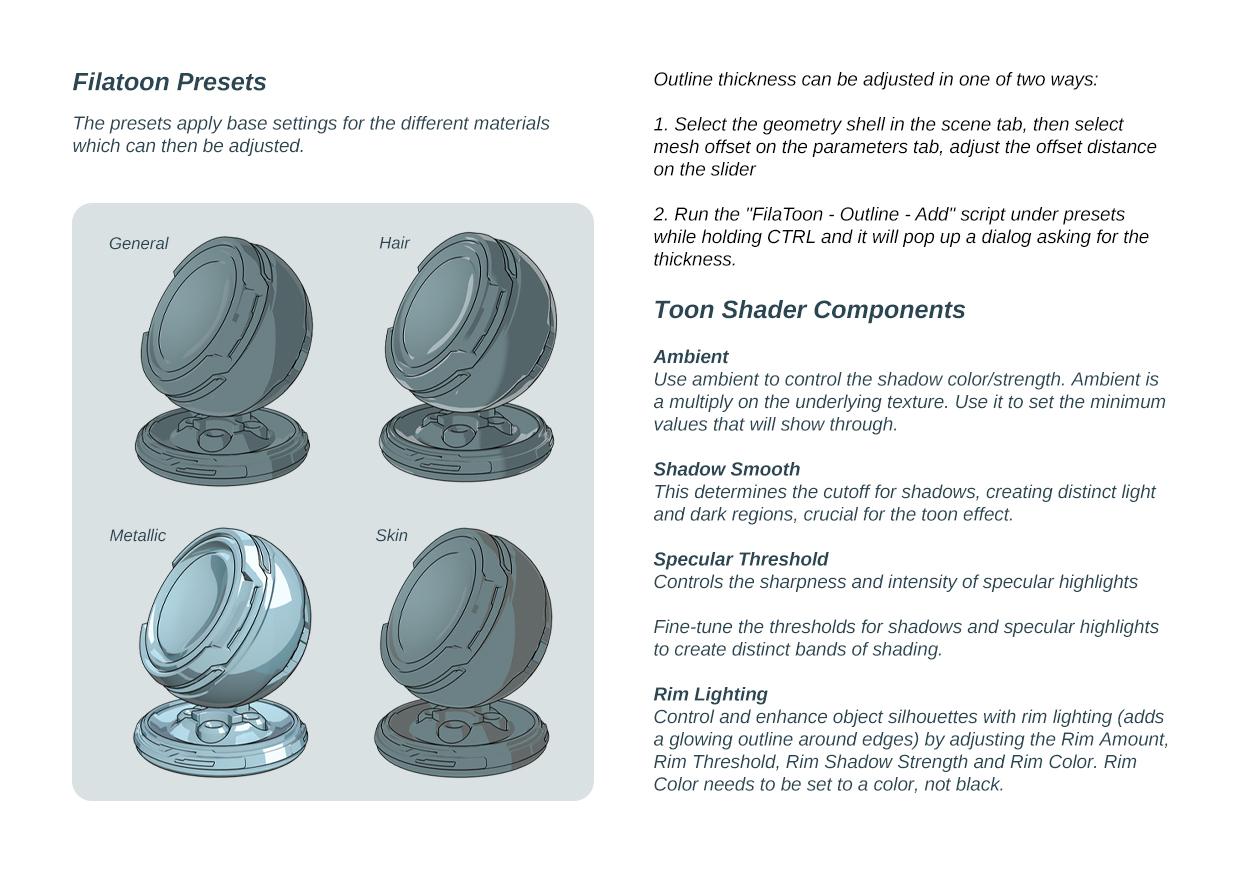
Under Filatoon Presets, the guide says there are two ways to adjust the outline thickness. I cannot find option 2 anywhere. No preset filter I found had the mentioned 'Filatoon > Outline > Add' Script. Please let me know what I'm doing wrong in searching for this preset folder.
Check screenshot 5.
Q : Where can I find the FilaToon shader scripts
A : My DAZ 3D Library > Shader Presets > Filatoon. Under that you will find FilaToon - Base and Filatoon - Outline. You can also apply any of the presets and it will create the outline geoshell if it doesn't exist (except for FilaToon - Constant, it will apply the shader without the outline). If everything is black after you apply the preset make sure you're in the Filatoon renderer, and either turn on Auto Headlamp or add some lights.On my machine, I find the filatoon shaders by being in my Smart Content panel and selecting Shaders > Filament > Default Resources. I assume not all machines are the same so I just wanted to mention my peculiar machine's set up in case anyone else was scratching their head because they don't have the other folder.
I really sincerely appreciate all those who have been digging into this product and helping the community by posting this knowledge. Thank you Thank you!
Anime Toons and Filatoon Shader Q&AHello Everyone! I'm back with a couple of questions after reviewing the FAQ post at the beginning of this thread.
Mada said:
You will find a new folder called Genesis 9 Toon with 2 figures - Genesis 9 Base Anime Feminine and Genesis 9 Base Masculine. MallenLane did an absolutely amazing job on sculpting and rigging the toons, everytime I use them I smile because its such a pleasure to work with :)
I don't know where to look for this folder called G9 Toon. The only place I have the anime feminine and male figures is within the group called "Genesis 9 Starter Essentials." In the figures filter, I get 12 figures, 2 of wich are the G9 Anime male and female. If there is another place where I can find them faster, I'd love it.
The Filatoon shader is used in combination with Filament’s fast rendering. The toon outline is accomplished by creating a geometry shell and applying a special shader to it.
I found the outline geometry shell (or rather how to get it into the scene) but my question is about the purple list below in the next image. I don't know where to find that particular goodie.
Under Filatoon Presets, the guide says there are two ways to adjust the outline thickness. I cannot find option 2 anywhere. No preset filter I found had the mentioned 'Filatoon > Outline > Add' Script. Please let me know what I'm doing wrong in searching for this preset folder.
Q : Where can I find the FilaToon shader scripts
A : My DAZ 3D Library > Shader Presets > Filatoon. Under that you will find FilaToon - Base and Filatoon - Outline. You can also apply any of the presets and it will create the outline geoshell if it doesn't exist (except for FilaToon - Constant, it will apply the shader without the outline). If everything is black after you apply the preset make sure you're in the Filatoon renderer, and either turn on Auto Headlamp or add some lights.On my machine, I find the filatoon shaders by being in my Smart Content panel and selecting Shaders > Filament > Default Resources. I assume not all machines are the same so I just wanted to mention my peculiar machine's set up in case anyone else was scratching their head because they don't have the other folder.
I really sincerely appreciate all those who have been digging into this product and helping the community by posting this knowledge. Thank you Thank you!
Question regarding updates in DIM and DS 4.23Faeryl Womyn said:
You can install the latest essentials and default resources, the only thing is that you won't be able to use the new filament options without 4.23 if I understood it correctly.
With the essentials and defualt updates you have more morphs and shapes and other things you can use with 4.22
i've never really understood filament... just doesn't look right to me but if they ever nail down the anime angle they've taken i'll reconsider.
But i've lost trust in Daz at the moment so i'm gonna take steps to protect my (substantial) investment that is preserving everything pre 4.23.
i must have literally thousands (if not tens of thousands) of morphs and shapes that will work just fine for now.
Thanks for replying.
Anime Toons and Filatoon Shader Q&AMada said:
scorpio said:
Is this an actual Shader - ie it can be applied to anything?
Does the latest version of DS 4.23 work in windows 10, I've got the impression that it needs windows 11?
Yes it is an actual shader and it can be applied to anything - and then use Filament to render it out. The scripts supplied will create an outline and set up the shader in your surfaces tab, then you can tweak till its how you like it.
I prefer to disconnect all the other maps and only use a base map, and then tweak the rim lighting.I am not sure about the windows 10 question, I will ask. I however don't think that's the case. Edit to add - yes it works fine on Windows 10
This is really great news to hear. I have some old Toon characters I made for Dawn and Dusk 1 (Tina and Tommy) and I might just see how they look with the new shader and render options.
Filatoon tips and tricksI think a tips and tricks thread is a great idea. I've never used filament, so something like this for using the toon shader is great.
What About G8 Essentials and Dforce Essentials ???Richard Haseltine said:
Faeryl Womyn said:
Ok will grab them as well and I've been reading and seeing the filatoon renders and people's opinions about it, it's very much loved right now lol
I'm wondering if you can use dforce with this new filament?
Filament is just a name, it has nothing to do with being made of strands.
I'm not understanding your answer, what strands are you talking about? I was asking if dforce works with and looks good in filament, as well as filatoon.
Anime Toons and Filatoon Shader Q&Aainm.sloinneadh said:
crosswind said:
ainm.sloinneadh said:
I'm not quite grasping how to overcome the optical illusion eyes. With filament rendering from the viewport, I can't figure out how to change what is seen in the render. There are no sliders to change the direction the eyes point in - only how well they stick together in the same direction. I've been mostly using them on the G9 mesh (not the anime G9 mesh). I wonder if that's why I'm missing something here.
If you don't own Look At Me II scripts... https://www.daz3d.com/look-at-me-ii-pose-control you either can tweak eyes rotation by using Point At to a Camera or a Null node. Or, tweak eyes rotation by using Eye Look... Pose Control properties.
Thank you kindly! Seems I can only get them to work when I load a new figure. The posing controls don''t do anything if I add the toon socket and iris onto an existing genesis 9 save, which was what I was trying to do.
I checked... it works on my side with adding socket / floating iris to the existing G9 figure. And you also need to delete Genesis 9 Eyes node ~~ as below SS.
Anime Toons and Filatoon Shader Q&Acrosswind said:
ainm.sloinneadh said:
I'm not quite grasping how to overcome the optical illusion eyes. With filament rendering from the viewport, I can't figure out how to change what is seen in the render. There are no sliders to change the direction the eyes point in - only how well they stick together in the same direction. I've been mostly using them on the G9 mesh (not the anime G9 mesh). I wonder if that's why I'm missing something here.
If you don't own Look At Me II scripts... https://www.daz3d.com/look-at-me-ii-pose-control you either can tweak eyes rotation by using Point At to a Camera or a Null node. Or, tweak eyes rotation by using Eye Look... Pose Control properties.
Thank you kindly! Seems I can only get them to work when I load a new figure. The posing controls don''t do anything if I add the toon socket and iris onto an existing genesis 9 save, which was what I was trying to do.
FilaToon / Cell shaded rendering with FilamentI will say that it was uncharacteristically generous of Daz3d to just give away the base set for the anime morphs and textures.
From what I can tell this shader replicates a lot of the looks you could get with PWToon.
The one major failing the Filament engine has is with transmapped hair. Some hair looks alright with the transmaps turned off, others not so much. So, there's gonna be a some trial and error there. My suggestion: Go digging through your older hair collection.
Overexposed, No Lights In SceneElor said:
Another possibility: if you're using a recent version of Daz Studio (a recent beta for Daz 4.22 or the last release, Daz 4.23), Daz changed the default value for Burn Highlights and Crush Black in Tonemapper Options (before, they were set at 0.25 and 0.2, now they are at 1 and 0 (it was done to get Iray closer to Filament, I suppose in preparation for Fila-toon)) which will change how a scene look (at least with scenes created with a version with these changes active: they should not apply retro-actively).
Oh! Is that why it happened? I thought I'd accidentally messed something up when I noticed that :/ I guess I need to pay more attention to the changelogs!
Anime Toons and Filatoon Shader Q&Aainm.sloinneadh said:
I'm not quite grasping how to overcome the optical illusion eyes. With filament rendering from the viewport, I can't figure out how to change what is seen in the render. There are no sliders to change the direction the eyes point in - only how well they stick together in the same direction. I've been mostly using them on the G9 mesh (not the anime G9 mesh). I wonder if that's why I'm missing something here.
If you don't own Look At Me II scripts... https://www.daz3d.com/look-at-me-ii-pose-control you either can tweak eyes rotation by using Point At to a Camera or a Null node. Or, tweak eyes rotation by using Eye Look... Pose Control properties.
Anime Toons and Filatoon Shader Q&AI'm not quite grasping how to overcome the optical illusion eyes. With filament rendering from the viewport, I can't figure out how to change what is seen in the render. There are no sliders to change the direction the eyes point in - only how well they stick together in the same direction. I've been mostly using them on the G9 mesh (not the anime G9 mesh). I wonder if that's why I'm missing something here.
Anime Toons and Filatoon Shader Q&ASilent Winter said:
ArtsyDragon said:
Okay, I'm slowly getting it. Here is the question:
When I go to render, I get a warning message that says WARNING! Obscuring the viewport during an OpenGL render may corrupt the final image.
How do I render without this error? Am I doing something wrong? I have never used Filament before so please educate me. I am dull witted.
I didn't see this answered so:
It's more a warning than an error - you can happily click 'ok' and it'll render. If you don't want to see the warning every time, just click the select box for "don't show this again" . It's just letting you know that if you open a bunch of stuff over your render area while rendering in OpenGL, it might muck up your render. So...don't do that ;)Edit: It'll give that warning whether you have the viewport obscured at the time or not. It's not something you did wrong.
Thank you @Silent Winter I was worried I wasn't rendering right. :)
Overexposed, No Lights In SceneAnother possibility: if you're using a recent version of Daz Studio (a recent beta for Daz 4.22 or the last release, Daz 4.23), Daz changed the default value for Burn Highlights and Crush Black in Tonemapper Options (before, they were set at 0.25 and 0.2, now they are at 1 and 0 (it was done to get Iray closer to Filament, I suppose in preparation for Fila-toon)) which will change how a scene look (at least with scenes created with a version with these changes active: they should not apply retro-actively).
Daz 3D is part of

Connect
DAZ Productions, Inc.
7533 S Center View Ct #4664
West Jordan, UT 84084Licensing Agreement | Terms of Service | Privacy Policy | EULA
© 2026 Daz Productions Inc. All Rights Reserved.