-
outoftouch Hair update galore
barbult said:
NorthOf45 said:
barbult said:
Have I said recently that I hate Daz Connect?
Not today, no...

I hate Daz Connect.
Wouldn't touch it with a ten foot pole. I don't hate it but I feel pity for the new users that fall into that trap because there are no warnings about logging in to DS when one uses DAZ Central or DIM to install ones content.
Loving Daz Studio!My working habits probably differ from many other folks. It's fun to see how everybody sets up their interface to best fit their flow.
After watching Jen Greenlees' Learning Daz Studio - Basics (which I really like!) I've learned a lot about Studio's interface. I always knew how to dock and rearrange, but she has some other really useful ideas, tips and tricks in there that really helped me get myself set up how I like to work. Thanks Jen! You ROCK!!!
For example, some tools for me are just fine left behind the Window > Panes menu. Just open them when I need them and close them back down. Other things that I'm using all the time, I like to have docked. I also enjoy how easily we can resize certain aspects of our docked panes, like divide the vertical area in two to have separate toolboxes, arrange the tabs on the top instead of the side... all kinds of possibilities that are fun to play around with.
I used to have GenX2 docked at the bottom with the Timeline and aniMate 2+, and just drag that whole panel up when I'm using it.
But I realized that:
- I don't need the window to be that wide
- I only use it once in a while because after that the job is done and I'm free to use my new morphs!!!
Same with Alberto's ABAS (animated textures system)(Love this thing!!!)(used in the demo image) - I find it to be a nice, smooth workflow to simply open it through Window > Panes, use it, then close the window until next time.
On the right (image) we can see a very small portion of my Anim + dials. This image shows only a few of the main body Anim + options that I like to keep together in this large category, then I also have Anim + menus within Hands, Head and Legs sections (within the Pose parameters menu) for more options related just to those parts. Some Hand, Head, Leg and Foot dials also reside in this main group - I set it up for what was convenient for my workflow.
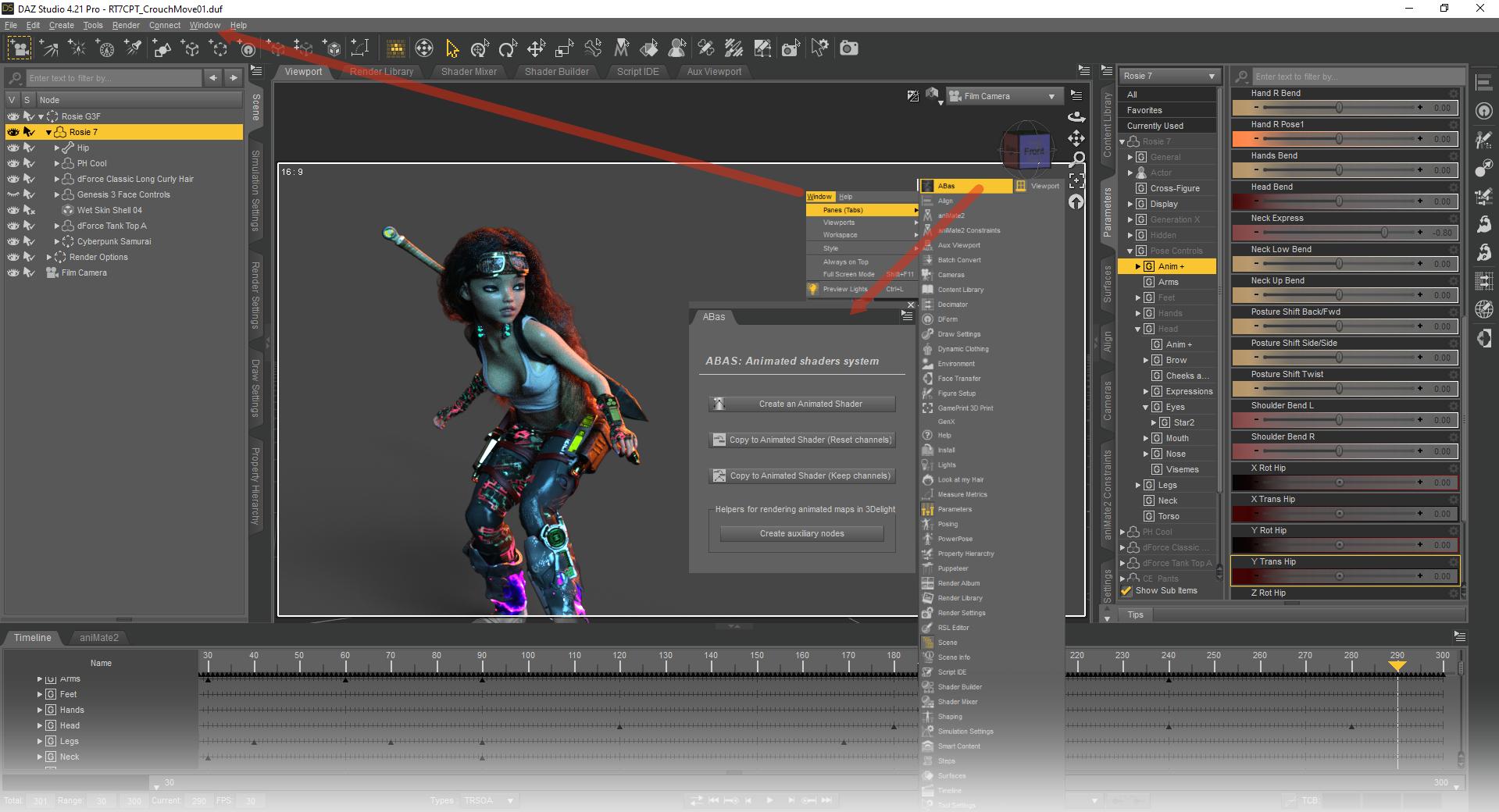
The Hip rotation dials were a recent addition to set the facing of Rosie at the beginning of the actual animation for simulation purposes. I rarely need those but when I do they're really quite handy and quick to use. The "Posture Shift" controls adjust the rotations of the central rig between the head and hip. With these the head and hip parrallel relationship in space doesn't change, though translation along X and Z do occur. In better terms, if she's looking at something, no matter how we dial any or all three of these postures, she'll still be looking at what she was before. Also the hip remains completely unaffected, so they work across walk cycles nicely. I made these first to correct joint rotations that look great on, let's say Victoria 4, but not on Rosie 7, for example. But I've discovered since then that they are incredibly useful for many things, like shift a car, getting the right 'sit' in a chair or simply adding a bit more movement.
The Hand poses we see in this image are not the hand controls I normally use. These result in a simple, quick hand pose to remedy having no joint rotations on the fingers at all. But the Hands section has a much more robust hand animation system.
On the left we can see the structure of Rosie 7 Cyberpunk's stored base file.
"Cyberpunk Samurai" is the name I've given the costume. That listing in the Scene is a group containing all of the conforming clothing and the bits that are attached. Since conforming cloth has the same rigging structure as the figure it's conformed to, I was able to attach the Sword Node from Aeon Soul's The Legend to the harness clothing item she's wearing. This makes it easier to disable things for simulations and other situations when needed. We can also see that the Tank Top shirt isn't in that group. It is included in the Wearable file but is kept out of that group to be more efficient when I run it through dForce. The Face Controls are part of Rosie 7, so that's not even part of the Cyberpunk Samurai at all. Nor is the hair or headband.
External hard drive and daz library?You can definitely have one (or multiple) library on an external drive as well as one on your main drive, as long as you add them all as content directory in DS preferences.
I don't think you can install to multiple directories with Daz central though, DIM would be better for that.Does Anyone Have the Intrepid Explorer Phoenix Spaceship? SOLVEDRichard Haseltine said:
If you don't have the circled triangle icon on the product and daz Studio is online, or has been since you purchased the product, then the system shows it as being installed through Daz Connect (the content panes in Daz Studio itself). If that is the case then an installation through DIM or Daz Central will be ignored. If you don't want to install content through Daz Studio it doesn't need to be online, and in this case I would try a right-click on the product and select uninstall (which will remove the Connect files, which are probably missing anyway, and use the DIM files instead).
Thanks Richard. I clicked uninstall on the product and the product came back, which is the opposite of what one would expect!! Now scenes and subsets in which I have the IEP load as they should.
Does Anyone Have the Intrepid Explorer Phoenix Spaceship? SOLVEDIf you don't have the circled triangle icon on the product and daz Studio is online, or has been since you purchased the product, then the system shows it as being installed through Daz Connect (the content panes in Daz Studio itself). If that is the case then an installation through DIM or Daz Central will be ignored. If you don't want to install content through Daz Studio it doesn't need to be online, and in this case I would try a right-click on the product and select uninstall (which will remove the Connect files, which are probably missing anyway, and use the DIM files instead).
DAZ3d customlayout saving issueUninstalling will not remove user-content or settings, by design (this should be true of most software, though some may have an option for a factory reset).
You can clear out the DIM/Daz Central list of installed content by deleting the Manifests files (check the location from DIM's settings) - just be aware that if a file exists already next time it is installed DIM/Daz Central will note that mark it as not to be deleted on uninstalling, so you want to be reinstalling to a new location or make sure the actual files are gone. DIM has an option to reset paths to defaults by right-click menu in Advanced settings.
You can reset the database inside Daz Studio before uninstalling that, or after installing a fresh version - Content Library option menu (the lined/hamburger button in the top corner or right-click the tab)>Content DB Maintenance>Reset DB. You can, I think, reset the content directories to defaults in DS by deleting all of the existing ones in Edit>Preferences>Content tab>Content Directory Manager (some, at least, will revert to their default if there are none explicitly set but I haven't tried it in geenral).
How do you get your library to a new computerI've had a most frustrating time trying to move my content to a new computer. I spent a lot of money on a new laptop in the hopes that I would be able to run Daz much faster. I have tried all of the ways that evryone has been kind enough to suggest, but nothing has worked. I copied my libraries, making sure the paths were correct, that allowed me to actully see my content in the Content Library but nothing I did could get me to be able to find anything in Smart Content. I then uninstalled Daz and installed it again, this time using Daz Central to reinstall each item I had previously purchased. After hours of work I discovered that some of the items worked and many others simply responded with 'file does not exist'.I've spent days trying to make this work and I'm about to conclude that Daz can't be moved to a new computer. It would be nice if Daz wants to encourage us to keep upgrading and purcahse more products that they would provide some clear and simple way that something as common as buying a new computer didn't cuase such frustration!
DAZ3d customlayout saving issueDaz Central installs a lot of add-ons as well as Daz Studio itself, the DIM uninstallers will go item by item.
DIM won't install contentmichaellegge52 said:
Using the Mac DIM I can download content, but it just won't install any of them. I have an M1 Mac, Monteray. I've deleted and re-installed several times, used DAZ central, which is even more useless, because Central stalls at 50%. I have submitted a ticket to the staff, but I think a lot of us are having a lot of problems. Anyone have any suggestions for alternatives to DAZ. Right now, it's pretty useless?
I guess the issue is that you need to tell macOS that DIM really is allowed disk access. Got to System Settings -> Security & Integrity -> Integrity Tab. Find Full Disk Access in the list and allow com.DAZ.DAZ3DIMHelper
Piercings Pack for Genesis 9 missing files?Well, it's a pretty new product so perhaps others who bought it have not got round to trying to use it in a product yet. Also, it may only be an issue with the combination of that product and DIM so anyone using Central or Connect may not have any trouble and as you have seen the manual zip seems fine so those that like to install stuff manually would not have noticed.
I'm interested to know what does DIM show if you right click on the product and select "Show Installed Files" - this should give you a list of all the files that it has installed and a hyperlink to them in the filesystem. If the files should be there but are not they will be "greyed-out". How does this list of files compare to the ones in the wiki link? Also is it the same (possibly truncated) list of files that DIM shows in the "Show Package Files" option. It does seem odd that it's downloading a file that is much smaller but still more than an empty file would be and is seemingly installing what it has without error. Due to the difference in filesize I would guess that perhaps all the images are missing from that zip - but then if it is downloading the full 22mb it seems odd that it is not "seeing" it all.
DIM won't install contentUsing the Mac DIM I can download content, but it just won't install any of them. I have an M1 Mac, Monteray. I've deleted and re-installed several times, used DAZ central, which is even more useless, because Central stalls at 50%. I have submitted a ticket to the staff, but I think a lot of us are having a lot of problems. Anyone have any suggestions for alternatives to DAZ. Right now, it's pretty useless?
Icons on installed content (Smart Content view)deleted original reply as it isn't needed anymore.
Update: I first uninstalled Isae through DAZ Central. Then in DAZ Studio I went under Content Library\Products\I and deleted the Isae entry. After reinstalling Isae via DAZ Central, the picture is displayed properly in DAZ Studio. I did this same fix for another product (dforce breezy day outfit textures), but now it isn't showing up in Smart Content. When I search for other products that have texture addons, they show up in Smart Content searches. This breezy day outfit addon does not and I do not see it listed as a separate item in Content Library. Any idea how to restore that?
Icons on installed content (Smart Content view)I upgraded DAZ Studio from 4.15 to version 4.21 and afterwards I re-imported the metadata for all content. I had issues in the past where characters with the same name didn't show up with the right picture in smart content. So I wanted to start as fresh as possible in this new version.
Anyway, after doing that the icons don't reflect the current status of the installed content. For example, Zsazsa is currently installed (confirmed through DAZ Central), but the icon in studio indicates it's not installed. I also can right click it and select install, but I have not done that yet. It's clearly installed though as I can open the figure and load her into the scene. (there are multiple characters/items with this install icon, this is just one example)

The other issue is Isae. She was the only character that didn't get a picture loaded for her figure. I uninstalled her via DAZ Central and reinstalled the next day, but now she has a different icon. Any idea what this means or how to resolve it? I am not logged in to DAZ Studio - I think I had done that as part of the metadata process, but it is not auto logging me in per the settings.
Login issueTry going to (for Windows)
%appdata%/daz 3d/installmanager/useraccounts/
and removing the .ini file for your account, then restart Daz Central and see if you can log in (or if you don't have an InstallManager folder try the one for Daz Central).
Login issueI can't login to my Daz Central download. I have tried everything. What can I do?
Forest house - two questionsIt seems to be based on the historic Edith Farnsworth House, designed by Mies van der Rohe. It's a US National Historic Landmark. https://edithfarnsworthhouse.org/ There are two bathrooms in the real house, located in the central module that has the kitchen on one side and fireplace on the other.Cant see send to C4DHey! .. I am strugling here ;) --- Every tut I see it seemes very strait forward, but no matter what I do the send option dosnt appear in DAZ
I try to install it from DAZ central, DAZ install manager and even the github version... Everything seemes cool appart from the fact that the export option is showned! (I even reinstall the whole daz)
Any idea what the issue could be??
How can I do a COMPLETE uninstall do DazCentral and Daz3D Studio...Delete the .dsx files in the Manifests folder in the folder Daz Central writes to to clear its list, in Daz Studio open the Content Library option menu (the lined button in the top corner orr ight-click the tab), select Content DB Maintenance, check Reset Database, adn click Accept - note that if Daz Studio is allowed to go online it will rdownload your product list and show everything greyed out.
I need a super simple way to install zip filesgecko89 said:
I HAD to select the Manual Install Option because that was the only download option which worked.
What else did you try as you do not appear to have explained any of that? You still have not mentioned which of the three Daz-supplied installers that you use. How did you even get Daz Studio installed on your machine?
I use DIM and so I can just click on the "Install Manager Ready" button and that will open DIM and offer up the product for installation (if not already installed). Even if I don't do that I can just run DIM directly and it will go look for any purchased products that are not installed and offer to install them with a click or two. I believe Daz Central would be similar in that it would offer a way to install the product for you if you tried. For Daz Connect, if you use that, I think you could just search for it in Daz Studio and it should show it as a greyed-out icon and double-clicking it would install it.
I need a super simple way to install zip filesgecko89 said:
I had no choice but to use the manually install option. That's the only way it would download.
Now I don't know what to do with it.
Actually, I think that's not right. I have to download a zipl file and figure out how to install it in order to install zip files. Huh?
If you select the manual install option then you MUST manually install it. In which case please refer to the instructions previously posted in the thread which do work.
If you do not want to manually install it then you can use one of the three installation methods already mentioned. I prefer to use DIM (Daz install Manager) and have used this to install every one of my daz-store purchased products with minimal issues. Other people prefer Daz Central and there are others that prefer Daz Connect (the one that is in-built into Daz itself). Pretty sure any of these three would install Content Wizard for you so I have no idea why you keep downloading the zip file.
Daz 3D is part of

Connect
DAZ Productions, Inc.
7533 S Center View Ct #4664
West Jordan, UT 84084Licensing Agreement | Terms of Service | Privacy Policy | EULA
© 2026 Daz Productions Inc. All Rights Reserved.