-
[Released] RSSY Character And Material Conversion Bundle Genesis 8 to Genesis 9 [Commercial]
w_r_brook_ec9f3e956e said:
Ok, so the distorted body shape appears to be what happens by default if you run the same script multiple times on the same character, which I did in exploring the material issue I had assumed that as I didn't hit 'save' the morphs would be removed, but not only are they not removed, they seem to 'multiply' so that every time the script is re-run against the identical same character, the body shape becomes more and more extreme. That's pretty odd behaviour...
Update: cleared out the Miley morphs and started again. The reason for this problem appears to be that this character has a Miley Head and Miley Body morph. When you do the conversion, both the Miley Body and Miley Head morph contain the entire morph (for both body and head) so that by default, when the Miley CHARACTER morph is set to 100%, it applies both the head and body morphs and you essentially get the character morph applied twice over, resulting in extreme distortions.
[Released] RSSY Character And Material Conversion Bundle Genesis 8 to Genesis 9 [Commercial]w_r_brook_ec9f3e956e said:
Looks like there are some problems withe material stuff. I'm trying to convert MSO Miley G8F and it comes up with some errors, which are kinda weird, claiming not to be able to find files which are clearly present for the material skin. They relate to the eyes and mouth. I get no materials copied. Also, the body shape seems pretty weird. I'm running on macos Ventura. Have I done something stupid here?
For the installation, is the file in the location? How did you install?
For the other question, in the manual it states:
The Converted Character’s Body is wrinkled. Because of the way that morphs must be converted, a morph that on Genesis 8 appears to only touch a small part of the head can affect the whole body on Genesis 9. You need to show Currently Used parameters to show all morphs on the converted character. Then, one by one, dial in the morphs to find the offending morph(s). Once you find them, delete the morphs from your HD (click the Gear icon, Parameter Settings, and look at File Path for the asset to figure out where the morph is and what it is called). You should also resave the character with the offending morph(s) dialed out (set to 0).
[Released] dForce Assistant [Commercial]Eboshijaana said:
RiverSoftArt said:
Eboshijaana said:
RiverSoftArt said:
Eboshijaana said:
Something I've been struggling with; If you have two (or more) figures in the scene that need simulation, how does one do that? I've tried using the script separately on both, but one always ends up with a messed up timeline.
How do you mean messed up timeline? I would hide the first character, simulate and freeze the results on the second character, hide the second character, and show, simulate and freeze the results on the first character.
It is hard to explain, but basically, instead of the script making the character's morphs default to 0 in the timeline spot 0, it adds the second character's zero morphs in the middle of the simulation.
As you can see, the second figure starts with all the morphs active, then turns to default and THEN the morph change happens.
The second character's dforce helper script is activated at the end of the timeline,too.I am still not entirely sure but I will try and recreate the issue. In the meantime, I think you could always simulate one character in a different scene and pull it in as a scene subset (frozen). So you only execute dForce Assistant on one character/scene.
To help you recreate it, here is my workflow;
1. After using dForce helper, bring the timeline to frame 02. Simulate the character one's clothing/fur.
3. Once character one's simulation has run, freeze the dforce parts
4. Hide the first character
5. Use the dforce helper script on the second character6. Put the timeline once more on frame 0.
7. Simulate the second character.Thanks for the steps.
Mesh deformation caused by transfer utilityFinally found an acceptable fix. After texturing it's almost unnoticeable.
- In Transfer Utility, I've used the dress loose template + distance tolerance at 0.11. The big edge deformation is gone.
Inserting a prop's shape into a garmentWhat do you want to use it for?
I would take the objects into a modeller and create a morph.
You could use Mesh Grabber for a quick solution, but it is more limited in use.
And of course there need to be enough mesh geometry to make the morph.
Is there a way to unwelded edges/vertices in daz3d?James said:
what if I only want to make like a papper get teared halfway....?
Yes, almost the same, just manipulate the relevant part (to be torn), plus Mesh Grabber to bend it or even go for rigging it... But still, it's much better to use modeling / sculpting software to make the morph...
How to make a character undressgfdamron1 said:
Could you explain the Transfer Utility a bit, please? Is it an additonal product or is it already in DAZ?
Yes, a tool in DS... I roughly made an example as below. And yea, using dFormer is also an option but it'll take some time for making complex undressed shapes, as you have to tweak the influence weight area and move the dFormer from time to time, or add multiple dformers. So it's all up to you to go for a proper way you can well handle...
How to make a real brow squeeze on genesis 8 and 8.1?James said:
the wrinkles that I envision are between the brows, though not on the forehead..
I'm going to take on this "challenge". No promises (!), as I mentioned this hack already took me some time, but I see opportunities for me to learn new stuff. ... no to mention that I found the most awesome Z brush to make this work (SO much pun intended!). I'll get back at most upcoming Monday but please: don't get your hopes up and don't expect results. But I am going to give this a solid attempt.
Secret little bird told me I can probably even share morph files as an attachment here so... yah ;)
How to make a character undressCould you explain the Transfer Utility a bit, please? Is it an additonal product or is it already in DAZ?
OK, fine, I guess I'll make some DAZ stuff after all.Holy frack!!!! love me some old school BSG and Buck Rodgers!!!! Need a Wilma Deering morph for that Buck Rodgers outfit!!
How to make a character undressUsually you may try:
1. to use some products with undressed morphs like above mentioned;
2. to make undressed morphs by yourself with modeling / sculpting software, blender, ZBrush, etc. and import back to the garment;
3. or another trick is: you seek the garment (A) (having some undressed morphs) that is similar to the one (B) you use, and use Transfer Utility to transfer the undressed morph targets from (A) to (B) and finetune it with blender / ZB. In most case, it might be faster... even without tweaking sometimes denpending on the garments...How to make a real brow squeeze on genesis 8 and 8.1?You may try to use some expression morphs from Daz.com, for instance: Compression HD + Brow Squeeze, uncheck Use Limits and increase the values a litttle bit. Then, use GoZ or blender etc. to make some crease in between the inner brows then import as a delta morph, so as to make some subtle change. (I made one with blender...) You even can mix the expression with other brows related morphs and create a unique single dial.
PS: Normally we won't separately bake normal or displacement maps for expressions, but you can do it if you'd like...
How to make a real brow squeeze on genesis 8 and 8.1?Now, important disclaimer: I'm not a professional sculpter but rather a (very) enthusiastic artist.
Having that out of the way: @Felis : I'm not too sure I agree with your base geometry comment, but I cannot rule out the option that I'm overlooking something.
As mentioned I'm not an avid sculpter (getting better though) and this morph itself took me a while to "perfect" (and it's still quite the hack) but if you look at the result... I think that if I shorten it (maybe break it up in 2 sets?), maybe increase the Z intensity just a little bit more?... then this should be doable. ... or so I believe.
For the record: yes, I somewhat "cheated" by sub-dividing the mesh in ZBrush and you shouldn't focus on that wrt the geometry, but still, there is room to wrinkle parts of the forehead. ... or so I think.
How to manually install GoZ for DAZ Studio on Mac?Richard Haseltine said:
GoZ doesn't need the path to ZBrush, it uses an intermediate location (in the Public/shared user profile) which has the transfer files and the settings needed - this is how the ZBrush developers set it to work. If it were a missing path then there would be an alert to say so, which there isn't (presumably) here.
Thanks for the feedback and yups: I stand corrected on this. I figured that DIM would provide content based on those settings, but now that I checked my settings some more... sure enough: "Photoshop 3D Bridge for Daz Studio" (I forgot that I hid this), and yah: I don't have Photoshop. Only Photoshop Elements, but that's not specified in DIM :)
How to manually install GoZ for DAZ Studio on Mac?ShelLuser said:
I'm not 100% sure if this applies but GoZ isn't generally supported, in some cases it's only supported on Windows and not Mac. I base this on this Pixologic knowledge base article. I don't know if this applies here (I'm on Windows myself)
Some possible causes: did you point DIM to your ZBrush installation? Also: did you enable the required application tags? I'd assume that in this case: 'software' and 'plugin' are relevant, as well as your platform type but it probably set that automatically. To check these settings open your advanced settings and check the 'Downloads' and 'Applications' tabs accordingly.
Hope this can help!
GoZ doesn't need the path to ZBrush, it uses an intermediate location (in the Public/shared user profile) which has the transfer files and the settings needed - this is how the ZBrush developers set it to work. If it were a missing path then there would be an alert to say so, which there isn't (presumably) here.
Freebie Challenge May 2023 - "Sweet Music" - Entries Thread Only3D Art Freebie Challenge May 2023 "Sweet Music"
"Music, sweet music
I wish I could caress, and kiss, kiss"
(Lyrics from Manic Depression by The Jimi Hendrix Experience © 1968, Source: https://genius.com)Music is magic! ;)
So it is completely inconceivable that I would not submit a render this month, not with this theme. :)[Best watched at full size for details.]
"Music connects"
Starring: Linda and Walther (2.0)The tale: (Entirely fictional)
Walther "The Ridge" Byruslanomar, lead guitarist of the world famous punkrock band Dead Grants softly played the first tones of the next song and said: "She has been one of my best friends for a long time and of course needs no further introduction due to her own world fame. Ladies and gentlemen, please give a warm round of applause to miss Whitney Spiers!"
By the way, the neck of Walther's guitar is the original neck of a 1967 Fender Stratocaster that rock legend Jimi Hendrix burned on stage!
Non-motion Picture Soundtrack:Marty Friedman featuring +a/Alfakyun - The Perfect World (© 2018)
https://www.youtube.com/watch?v=pq3MqusXS-I&t=215s (at 3:35)
COUNTABLE FREEBIES: (Alphabetic order)#01! Bear Ring by kalhh
https://www.deviantart.com/kalhh/art/Bear-Ring-853733610 **#02! Beer Bottle for Daz Studio by forged3DX
https://www.deviantart.com/forged3dx/art/Beer-Bottle-for-Daz-Studio-608260601 **#03! BNJ TankTop G8M - FREE by SdeB
https://www.sdebstore.com/collections/free-stuff/products/bnj-tanktop-g8m-free **#04! Cargo Short G8M - FREE by SdeB
https://www.sdebstore.com/collections/free-stuff/products/cargo-short-g8m_free **#05! Chameleon ROse2 for Genesis 8 Female by zoro_d
https://www.renderosity.com/freestuff/items/85859/chameleon-rose2-for-genesis-8-female **
[Lashes morph used]#06! DaisyTop for Daz Genesis 8 Female by Digi-Dotz
https://www.digi-dotz.com/index.php/clothing/daisytop-for-daz-genesis-8-female#07! Dante DMC5 Free Stubble for Genesis 8 Male by InTheFlesh
https://sharecg.com/v/94752/gallery/21/DAZ-Studio/Dante-DMC5-Free-Stubble-for-Genesis-8-Male **#08! Delsin Beanie and Hair for G8M by InTheFlesh
https://sharecg.com/v/92677/browse/21/DAZ-Studio/FINAL-Delsin-Beanie-and-Hair-for-G8M **#09! Drinks by klausdbg
https://www.sharecg.com/v/74240/gallery/5/3D-Model/Summer-IV-Drinks **#10! ED's Brick Shader (Iray) by Edheldil3D
https://www.deviantart.com/edheldil3d/art/Freebie-ED-s-Brick-Shader-Iray-788871766 **#11! Effector by Laboratory108 (Zippo)
http://www.lab108.x0.com/lab108/inst.html (item 1)#12! G8M Walther 2.0 by Ruslanomar
https://sharecg.com/v/97276/gallery/21/DAZ-Studio/G8M-Walther-2.0 **#13! Guitar Pick by Laboratory108 (Zippo)
http://www.lab108.x0.com/lab108/inst.html (item 20)#14! Iray car related shader presets 'megapack' by Tom2099
https://www.deviantart.com/tom2099/art/Iray-car-related-shader-presets-megapack-539622361 **#15! Iray Jewelry Shaders by AllenArt
https://sharecg.com/v/95893/gallery/21/DAZ-Studio/Iray-Jewelry-Shaders **#16! Kiara Interior HDRI by Poly Haven
https://polyhaven.com/a/kiara_interior#17! Koelle Alaaf! by klausdbg
https://www.sharecg.com/v/79631/gallery/5/3D-Model/Koelle-Alaaf%21 **
[Crowncork used, customized texture]#18! Linda - Character for G3F with texture maps by Edelzwicker
https://www.sharecg.com/v/89731/related/21/DAZ-Studio/Linda-Character-for-G3F-with-texture-maps **#19! Little Flower Studs for Genesis 8 and/or 8.1 Female by AllenArt
https://sharecg.com/v/98499/gallery/21/DAZ-Studio/Little-Flower-Studs **#20! Lights for Daz Studio w/ Iray by DrBoots
https://www.deviantart.com/drboots/art/Freebie-Lights-for-Daz-Studio-w-Iray-579993105 **#21! Lunafreya for G8F by Shinteo
https://www.patreon.com/posts/lunafreya-for-40600356#22! Lunafreya Summoner Outfit For Daz by Shinteo
https://www.patreon.com/posts/lunafreya-outfit-67676433
[Hair, Add-on to the previous pack]#23! Maddy for GF8 Charakter Shape by MysticArtDesign
https://sharecg.com/v/98461/browse/21/DAZ-Studio/Maddy-for-GF8-Charakter-Shape **
[LIE Blush Make up & freckles, customized, also used on G8M]#24! mcjNewStrat by mCasual Jacques
https://sites.google.com/site/mcasualsdazscripts2/mcj-1#25! mcjStack by mCasual Jacques
https://sites.google.com/site/mcasualsdazscripts2/mcjstack#26! My Heart Necklace for Genesis 8 Female by Amy Aimei
https://www.deviantart.com/amyaimei/art/My-Heart-Necklace-for-Genesis-8-Female-729010047 **#27! Mystics Floor & Backplanes by MysticArtDesign
https://sharecg.com/v/94620/browse/21/DAZ-Studio/Mystics-Floor-Backplanes **#28! New Walther 2.0 tanned skin + hair system by Ruslanomar
https://sharecg.com/v/98463/browse/21/DAZ-Studio/New-Walther-2.0-tanned-skin-%2B-hair-system **#29! Nike Air Zoom for G1 by Tranquil
https://sharecg.com/v/97066/browse/21/DAZ-Studio/Nike-Air-Zoom-for-G1 **#30! Pd-Soft Leather Daz Studio Shaders for Iray by Parrotdolphin (Janet)
https://sharecg.com/v/80223/gallery/7/Material-and-Shader/Pd-Soft-Leather-Daz-Studio-Shaders-for-Iray **#31! Piercing Gaze for Genesis 8 Females by SWTrium
https://www.renderosity.com/freestuff/items/83703/piercing-gaze-for-genesis-8-females **#32! RAV Hayajuku Real Tattoos FOUR for Genesis 8.1 Females by Ravenstone
https://www.renderosity.com/freestuff/items/89767/rav-hayajuku-real-tattoos-four-for-genesis-81-females **#33! REAL Hairy for Genesis 2 Male ***FREE*** by MikeyFTL
https://www.deviantart.com/mikeyftl/art/REAL-Hairy-for-Genesis-2-Male-FREE-859328094 **#34! Realistic Curtains by Cherubit
https://www.renderosity.com/freestuff/items/83637/realistic-curtains **#35! Rimless Sunglasses G8F-FREE by SdeB
https://www.sdebstore.com/collections/free-stuff/products/rimless-sunglasses-g8f-free **#36! Shimmery Sheer Fabrics II by AllenArt
https://sharecg.com/v/95898/gallery/21/DAZ-Studio/Shimmery-Sheer-Fabrics-II **#37! SoulTrain Pants G8F_FREE by SdeB
https://www.sdebstore.com/collections/free-stuff/products/soultrain-pants-g8f_free **#38! Speaker and Amplifers by woodkz71
https://www.renderosity.com/freestuff/items/78126/speaker-and-amplifers **#39! Spotlight Prop by DrBoots
https://www.deviantart.com/drboots/art/Freebie-Daz-3D-Studio-Iray-Spotlight-Prop-582958157 **#40! Stage Speaker by woodkz71
https://www.renderosity.com/freestuff/items/78116/stage-speaker **#41! Storage Box with Foam contents by woodkz71
https://www.renderosity.com/freestuff/items/78164/storage-box-with-foam-contents **#42! "STRONG" for G8M Character Morph & Pose by Mar3D
https://www.renderosity.com/mod/freestuff/strong-for-g8m-character-morph-amp-pose/82833 **#43! SuitWell Watch G8M - FREE by SdeB
https://www.sdebstore.com/collections/free-stuff/products/suitwell-watch-g8m-free **#44! SY 200 Morphs for Genesis 8 Head and Body by SickleYield
https://sharecg.com/v/91888/view/21/DAZ-Studio/SY-200-Morphs-for-Genesis-8-Head-and-Body **#45! Wooden Beads Necklace G8M-FREE by SdeB
https://www.sdebstore.com/collections/free-stuff/products/wooden-beads-necklace-g8m-free **
NO-COUNT ITEMS:--- 33 Eyes Materials for the Genesis 8 + 8.1 people by LevKornowska
++ Bardot Oufit G8F Sandals by Mada
--- Casual Outfit 2 for G3M by Tab [Bracelet]
--- Genesis 2 Male Beard 03 by Laticis Imagery
--- MIC Set, MicCable Set and MicStand Set by MDP_MI
--- Nose Ring 01 for G2F, G3F and/or G8F by AllenArt
--- Scene Lights for Iray by Lali Kamala (Holiday Loyalty Sale 2021 Free Item)PURCHASED/PAID FOR ITEMS: None 100% Freebies
*1 E-mail address required
** Registration required
#x! Countable Items (Bold ones are used by me for the first time I think.)
--- No longer available freebies
++ Free with DAZ Studio (or the Essentials)
$x. Purchased/Paid For Item
Rendered with DAZ Studio 4.10.0.123 (nVidia Iray®)Other free software used: GIMP v2.10.32 and Irfanview 4.60
Postwork: Used some filters that come with GIMP. Also used mcjLut by mcasual https://sites.google.com/site/mcasualsdazscripts9/mcjlut with the free FilterGrade Cinematic LUTs Pack https://filtergrade.com/free-cinematic-luts-video-editing/ and the Vintage-Look Photoshop Effects Pack/Light Leaks Effect Pack by Michael Jarrott https://creativecloud.adobe.com/discover/article/vintage-look-photoshop-effects-pack.
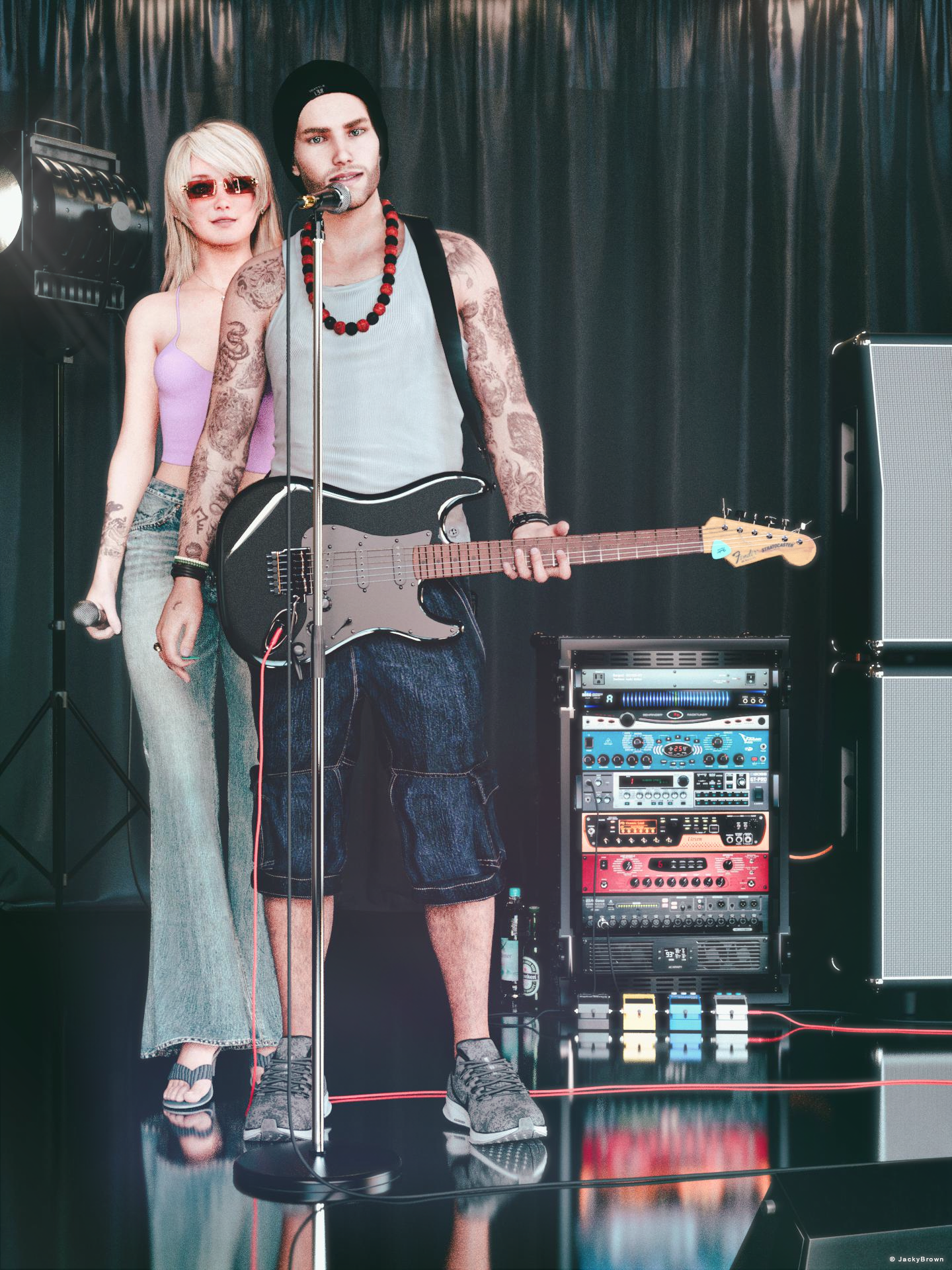
"Music connects"
Making Clones of G9 - TutorialCatherine3678ab said:
Yes, and there's also another method which is shown in a video on YouTube
I have tried this some months ago, but it turned to a nightmare.
The shape of G9 is very different from G8F, the figure is shorter and smaller and so when I clean the morph
from the head, I get a really long giraffe neck, it's hillarius! [Released] RSSY Character And Material Conversion Bundle Genesis 8 to Genesis 9 [Commercial]
RiverSoftArt said:
Eboshijaana said:
RiverSoftArt said:
Eboshijaana said:
RiverSoftArt said:
Eboshijaana said:
Yess, I'm eager to use this ^^
Thank you! I hope you will like it. It was the most difficult script we have done for Daz Studio.
I assume eyes and teeth are a no-go for transfer.
No, you can transfer. It is finicky with extreme eyes but with the material suit, you are able to do it
Excuse me, I meant the morphs for eyes and teeth, not the materials.
That is what I meant: the morphs. However, I think it is a combination of the mat suit and the CC that makes it work. You would have to ask @Sickleyield as quite frankly I don't understand all of her wizardly; I just script it.

Damn, gotta ask then O.O
[Released] dForce Assistant [Commercial]RiverSoftArt said:
Eboshijaana said:
RiverSoftArt said:
Eboshijaana said:
Something I've been struggling with; If you have two (or more) figures in the scene that need simulation, how does one do that? I've tried using the script separately on both, but one always ends up with a messed up timeline.
How do you mean messed up timeline? I would hide the first character, simulate and freeze the results on the second character, hide the second character, and show, simulate and freeze the results on the first character.
It is hard to explain, but basically, instead of the script making the character's morphs default to 0 in the timeline spot 0, it adds the second character's zero morphs in the middle of the simulation.
As you can see, the second figure starts with all the morphs active, then turns to default and THEN the morph change happens.
The second character's dforce helper script is activated at the end of the timeline,too.I am still not entirely sure but I will try and recreate the issue. In the meantime, I think you could always simulate one character in a different scene and pull it in as a scene subset (frozen). So you only execute dForce Assistant on one character/scene.
To help you recreate it, here is my workflow;
1. After using dForce helper, bring the timeline to frame 02. Simulate the character one's clothing/fur.
3. Once character one's simulation has run, freeze the dforce parts
4. Hide the first character
5. Use the dforce helper script on the second character6. Put the timeline once more on frame 0.
7. Simulate the second character.Mesh deformation caused by transfer utilityarthenics said:
re-import a delta?
Yea, like this:
PS: For this case, re-importing the original obj file to overwrite bs morph will be fine.
Daz 3D is part of

Connect
DAZ Productions, Inc.
7533 S Center View Ct #4664
West Jordan, UT 84084Licensing Agreement | Terms of Service | Privacy Policy | EULA
© 2026 Daz Productions Inc. All Rights Reserved.