-
Lady Goo
Here's a quick demo of Lady Goo shape adjusting and materials mixing, to make her more human
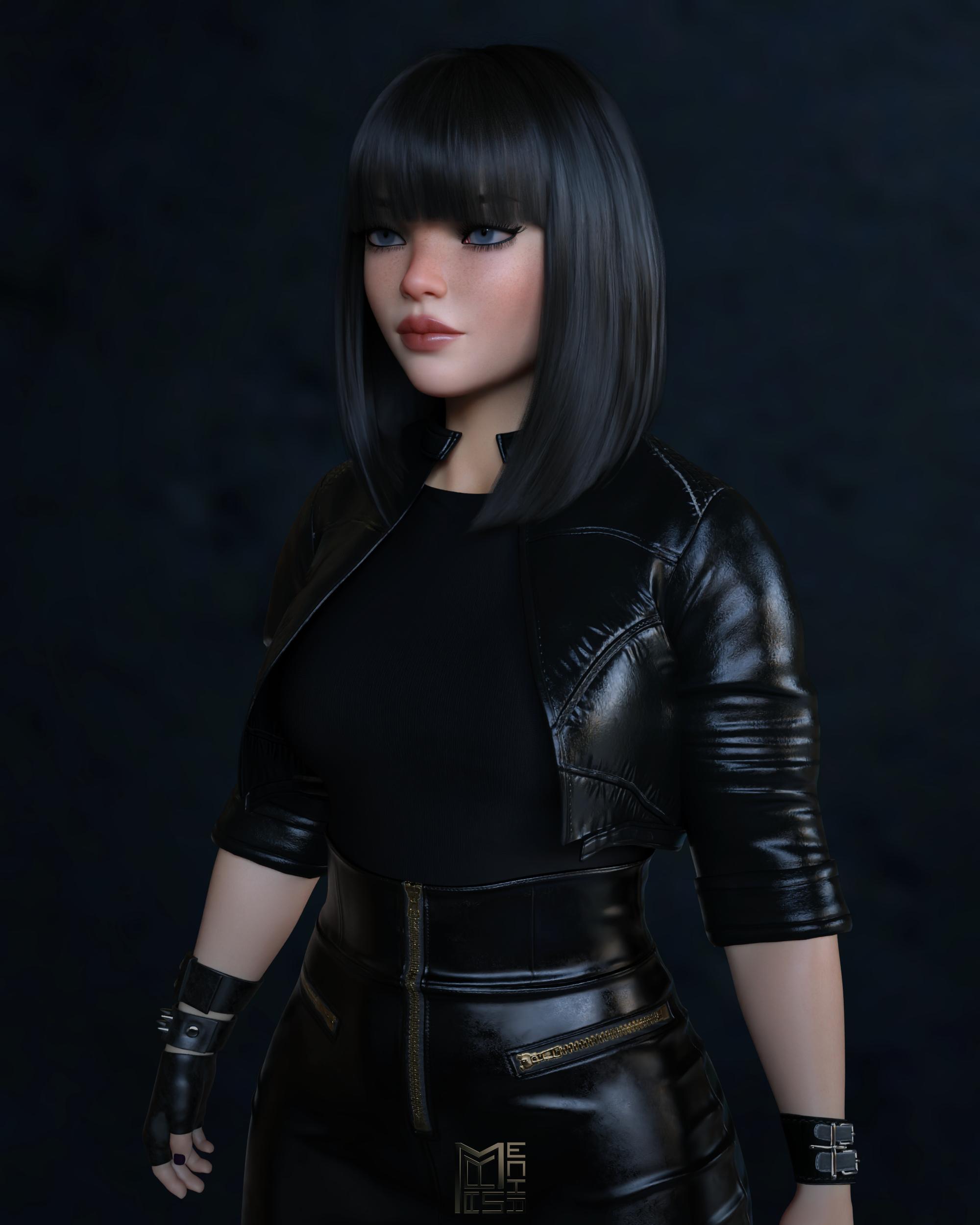
Shape:
- Lady Goo Body = 85%
- Lady Goo Head = 50%
- Lady Goo Breast Smaller = 55%
- Head Propagating Scale = -1.5%
- Iris Size = -43%
- Pupil Dilate = -40%
Materials:
- Gladys the Gamer full body maps / Remove make up
- Yvalanore Eyedarker (Overlay Map)
- Victoria 8.1 Blue Eyes
Product used in the picture:
https://www.daz3d.com/matilda-hair-for-genesis-8-females
https://www.daz3d.com/x-fashion-intrigue-outfit-for-genesis-8-females
https://www.daz3d.com/genesis-8-female-mega-wardrobe
https://www.daz3d.com/dforce-cog-crop-top-with-leather-skirt-for-genesis-8-and-81-females
https://www.daz3d.com/dforce-augmentation-outfit-for-genesis-8-females
https://www.daz3d.com/dforce-walking-dangerously-outfit-for-genesis-8-females
hi guys, I am having problems with Anatomical ElementsHalcon Bluesky said:
Hello, I have a similar problem.
After loading a G8F figure into the scene, I applied the Anatomical elements to that figure.
Applied the Genesis 8 default texture with no avail.
Previously I did that with no problems.
The anatomical Elements comes with the Victoria 8 Pro Bundle.
Now I am not sure if something is causing the problem.
I have reset Daz Studio to the Default as if installed for the first time.
I want to avert to uninstalling everything and start again, I leave this as a last resort option.
Thanks beforehand for anyone that may come to assist me.
There is no textures for anatomical elements for the base characters, and never has been.
Victoria 8 has materials, so if you apply her skin it should work.
For characters without genital textures, there is a kind of workaround where you apply the torso surface material, and then change the UV.
hi guys, I am having problems with Anatomical ElementsHello, I have a similar problem.
After loading a G8F figure into the scene, I applied the Anatomical elements to that figure.
Applied the Genesis 8 default texture with no avail.
Previously I did that with no problems.
The anatomical Elements comes with the Victoria 8 Pro Bundle.
Now I am not sure if something is causing the problem.
I have reset Daz Studio to the Default as if installed for the first time.
I want to avert to uninstalling everything and start again, I leave this as a last resort option.
Thanks beforehand for anyone that may come to assist me.
Please ID this propIt does look like this one:
https://www.daz3d.com/outdoor-pool-and-poses-for-victoria-8-and-michael-8
Clarification on Commercial UseRichardC said:
Thanks for the speedy reply, much appreciated!
If you want to do with your created AI renders what you want and know for certain that you are allowed to do so, my advice would be to use an AI image generator where it says clearly what you are allowed like Stable Diffusion 1.5. With Daz AI we don't know what they use or what Checkpoint Models, LoRAs or Wildcards. They don't say. But I assume they didn't do AI Studio from scratch. My bet is on Stable Diffusion 1.5 and a knock-off based on something like Vision FX but as Web-GUI. It looks all very rushed out and sold as "Beta". Nothing wrong with that I suppose. But the only thing Beta is probably the Web GUI and their own LoRAs which they call Products (Victoria, Michael etc.) . Anyways, for fairness this has to be said.
Daz AI
the Prompts
Luxury interior design, Spacestation, corridor, huge, indoors, photorealistic green plants, cinematic, warm colors, teal theme, equipment, scenery, sunshine,
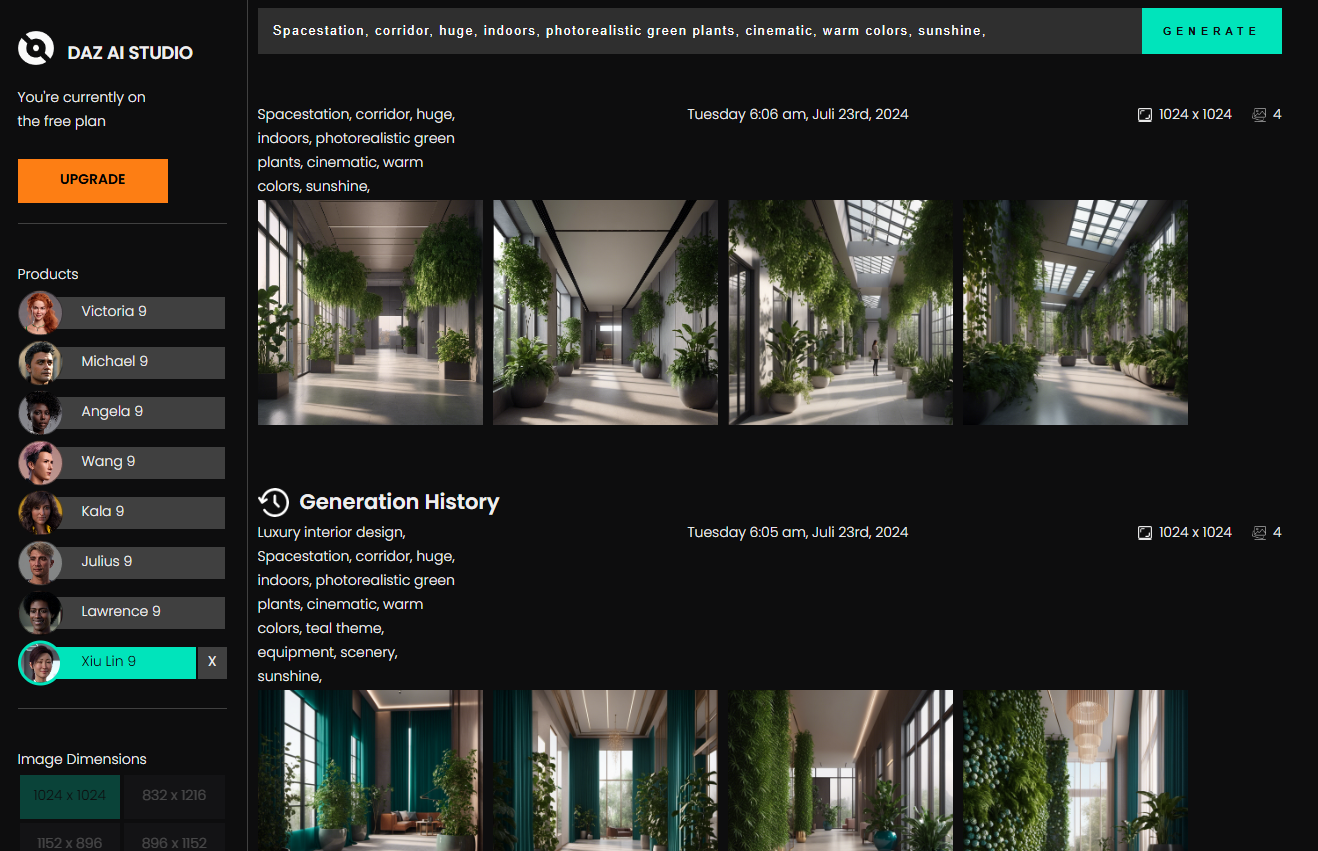
other AI generator with Stable Diffusion 1.5
 Message in a bottle for xtrart-3d: Which model are you using?
The textures look like a FWArt, Emrys, Fred Winkler Art character (same PA diff names over the years). I'm hunting through my back catalog to see if I can find her but I'd agree with Richard that elbow is a ringer for V3. I'll holler back when/if I find her!
These are the closest I could find to her:
Tara 2 for Victoria 7 & 8 - Human Version by Kayleyss
FW Brooke HD for Victoria 7 - Fred Winkler Art
FW Hillary HD for Genesis 3 Female - Fred Winkler ArtHow Do I Make Character Models?kamas-u-r said:
Hello,
Excluding the 1st option to sculpt your own mesh from scratch that it is obvious you are the owner, are the second or even the third option legit in order to own the end result of that character?In order to use it commercially as you like. As an example to sell the 3d printed files etc. Having in mind that you are using the default Daz figure as a base.
Anything that isn't subject to the Editirial License and that doesn't have additional restrictions listed on the Product page (e.g.the old Anne Marie Goddard Digitial Clone for Victoria 3) can be used commercially, subject to the license terms - and those terms alsdo cover the bsae figure, so sculpting your own character would have no bearing. To seel 3D pronts you would need the 3D printing license for the base and any morphs/characters used.
I am looking fot this 3D modelHi there! I'm glad you liked the promo for Lyra Hair. The character is a blend of several figures from Daz 3D store. The breakdown is as follows: Angela 9 (5%), Calypso 9 Human (10%), Kara 9 (20%), MSO Tao (5%), Mira 9 (20%), Olympia 9 (10%), TMA Olivia (20%) and Victoria 9 contributes the remaining 10%. The skin textures are from Mira 9, while the eye texture is "G9 Iris 10 Blue" from the Genesis 9 Starter Essentials Expansion. If you'd like to recreate her look, you could just use the same values in the above characters. The background was made just for the promo. If you're interested, I'd be happy to share the background, so it's attached. Have fun creating!
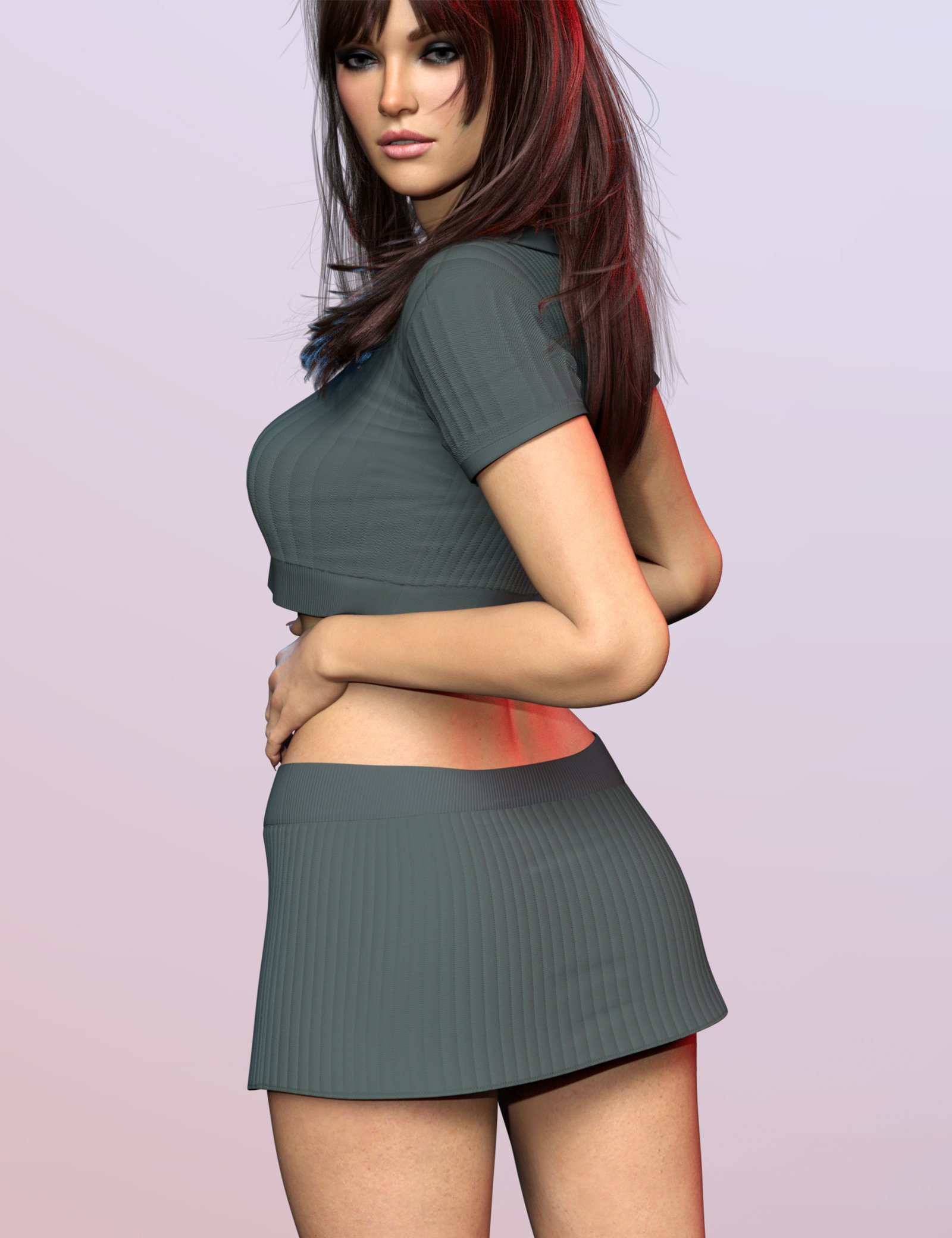
Message in a bottle for xtrart-3d: Which model are you using?By the looks of the elbows in the promo image below, it's a Victoria 3 based character, as that's pretty much the same shape of elbow bulge I get when bending a V3 character's elbow that much:
Regards,
Richard.
Llola Lane’s RENDER A MONTH Challenge 2024 (ALL are welcome to join) (CLOSED)Elor said:
Llola Lane said:
Oh Stezza... you always make me smile with your artwork...
Likewise

Carrara Pro 8.5 appeared in my LD during last week-end big sale and your renders are one of the reasons I bought it (the other is the price was so low that even if I never use Carrara, it was worth it for a couple of outfits included in Victoria 5 and Michael 5 respectives Pro Bundles).
sweet, I hope you'll be able to knock out a render or two or maybe some modelling

lot's of stuff has been taken out of the Daz Store for Carrara but don't be daunted.... render away....
 How to save new character morphs?
Thank you very much!
 But I am not sure to understand everything yet...
Richard Haseltine said:
In general I would say, for the last, use the one that has your files and that you back up - that way you won't lose your work. DS doesn't mind loading Genesis X morphs across different content directories (morphs for the older figures, certainly the ExP system used in the fourth generation Daz figures, such as Victoria 4, do have to be in the same content directory).
In fact, it's the first time that I try to create content, so I don't understand the difference between the two folder directories... (I even don't know why there are two folder directories, maybe I created one by mistake?)
If by "the one that has your files" you mean where I saved the file in which I shaped my character, it's an external file in my documents, not one of the two folders on the Base Data Folder tab... Maybe I shouldn't save my works in an external directory?You select your new morphs, not any thrid-party morphs or properties. So, your head morph and any new CBS/JCM shapes you cretaed to use with it but not the standard body morphs you used.
If you want separate head and body morphs then that is what you must create - you can't split them at the saving stage.
If I understand well, I have first to save a morph for the full body, and to separate hand and the body later, is it that? How could I to separate them? Since I just created a head orph, and used existing morphs to shape the body, how can I save a full body morph? Have I to save my shaped character as an obj file, and reimport it into a full body morph?
crosswind said:
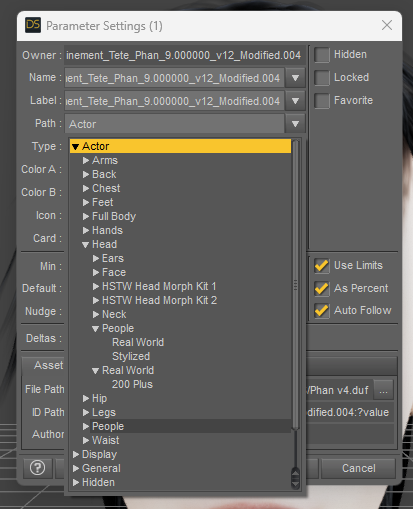
Give a Path to the morph before saving morph asset.. don't leave it in the path or Morph Loader. Then it'll be easy to locate and manage the morphs you made.
In "People", I have just "Real World" and "Stylized". Have I to create a folder with my name before choosing the path, or can I just write my name and the folder will be automatically created? (If I understand well, here, I have to give my name to the folder, right? Not the name of my character?)
Thank you in advance for your answers!
DAZ database gone?Thank you for the clarification. What I have looked at is the Installation folder. In my example " C:\Users\Public\Documents\DAZ 3D\InstallManager\ManifestFiles ". The .dsx files in my runtime/support seems to be there as they should. It is the installation data that is missing.
A typical .dsx file that I want to recreate contains:
<?xml version="1.0" encoding="UTF-8"?>
<DAZInstallManifest VERSION="0.1">
<GlobalID VALUE="feb069b9-33ed-4723-bd3c-a9f59761784a"/>
<ProductName VALUE="Victoria 6"/>
<ProductStoreIDX VALUE="16281-1"/>
<ProductFileGuid VALUE="50b019d1-8c04-1e81-9bf6-4f9364e2f475"/>
<InstallTypes VALUE="Content"/>
<ProductTags VALUE="CloudAvailable"/>
<ArchiveDate VALUE="2013-11-22T20:28:36Z"/>
<InstallerDate VALUE="2013-11-22T20:28:36Z"/>
<UserInstallAccount VALUE="Account"/>
<UserOrderId VALUE="11221984"/>
<UserOrderDate VALUE="2015-02-21T14:43:43Z"/>
<UserInstallDate VALUE="2019-04-14T11:48:07Z"/>
<InstalledSize VALUE="226171677"/>
<UserInstallPath VALUE="C:/Users/Public/Documents/My DAZ 3D Library"/>
<File TARGET="Content" ACTION="Install" VALUE="Content/data/DAZ 3D/Genesis 2/Female/Morphs/DAZ 3D/Victoria 6/CTRLVictoria6.dsf"/>
<File TARGET="Content" ACTION="Install" VALUE="Content/data/DAZ 3D/Genesis 2/Female/Morphs/DAZ 3D/Victoria 6/CTRLVictoria6.png"/>
etc, etc........Does that make sense?
Refresh VRAM?If I am in VRAM constrain I use this https://www.daz3d.com/scene-optimizer
You can do it manually, but it is so much easier.
The only G9 texture that is 8k is the details normal map.
But unless you are up very close, I would say you can reduce textures, probably to 1k textures.
Below is 3 images with Victoria 9 HD, using a high compression limit of 4k, and medium at 2k.
First is out of the box
Second is with textures reduced by 50%, e.g. from 4k to 2k
Third is with textures reduced to 25%, e.g. from 4k to 1k.
Llola Lane’s RENDER A MONTH Challenge 2024 (ALL are welcome to join) (CLOSED)Llola Lane said:
Oh Stezza... you always make me smile with your artwork...
Likewise
Carrara Pro 8.5 appeared in my LD during last week-end big sale and your renders are one of the reasons I bought it (the other is the price was so low that even if I never use Carrara, it was worth it for a couple of outfits included in Victoria 5 and Michael 5 respectives Pro Bundles).
How to save new character morphs?In general I would say, for the last, use the one that has your files and that you back up - that way you won't lose your work. DS doesn't mind loading Genesis X morphs across different content directories (morphs for the older figures, certainly the ExP system used in the fourth generation Daz figures, such as Victoria 4, do have to be in the same content directory).
You select your new morphs, not any thrid-party morphs or properties. So, your head morph and any new CBS/JCM shapes you cretaed to use with it but not the standard body morphs you used.
If you want separate head and body morphs then that is what you must create - you can't split them at the saving stage.
The Vendor Name and Product name fieds are used to name fiolders in /data/daz 3d/genesis 8/male/morphs/ for your saved files.
Getting on the 9 train, or not
Except that one has to be careful with the translucency weight and transmitted color or the character glows like a torch or looks overly orangey/yellow. The eyes can look really cloudy tooxyer0 said:G9 skin is the closest to realistic Daz has ever gotten. G8.1 was getting close, though I still don't have a G9 Core Figure white girl without bags under her eyes (other than Victoria, but I don't want freckles).
Getting on the 9 train, or notG9 skin is the closest to realistic Daz has ever gotten. G8.1 was getting close, though I still don't have a G9 Core Figure white girl without bags under her eyes (other than Victoria, but I don't want freckles).
Testing, one two, threeOkay its been a month or two time to repeat the test and see if this thing is improving.
Did the victoria test x4 pics and all came up with the lovly lady first time, thats a considerablke improvement on the acuracy.
Tried without Victoria 9 selected and got two out of four pics being victorian houses while the other two where modern so50/50 there.
Its a bit better I guess (less worse?)
Black Is Beautiful IIvwrangler said:
Have to admit, I'm kind of surprised that Daz seems to have decided to end the Darius/Monique line with Genesis 8. (Unless they're still to come, of course, but it's been quite some time since one of the previous generations' characters had a G9 version released.)
Stranger still, one of the G8 characters that did get a G9 core figure rerelease was Tara, who wasn't even a core figure. There are definitely some rough equivalencies, though: I would say that Angela could be this generation's Monique, and a case could be made for Lawrence, Xola or Harlow to be Darius (personally I'd go Lawrence), Xiu Lin for Mei Lin, Wang...isn't Lee but could be a Yuzuru, Kenji or even Hiro, Kiri for Aiko/Kanade....the tricky part about looking for equivalencies like this is that Michael and Victoria upended the precedent for what a new generation figure could look like. If you showed Michael 5, 6, 7, 8 and 8.1 to somebody, then showed them all the G9 male core figures without names and ask them to guess which one was Michael, I doubt anybody would pick the actual Michael 9. The same could be said for Victoria. So it's possible that a Monique and Darius will be released for G9, but look nothing like we might expect them to look like.
As a side note, something else I noticed is that the store has 55 characters categorized as non-binary, which is not a huge number, but is much higher than I would have guessed.
edit: on closer examination, I think Xola would be this generation's Darius, because he's historically jacked and kind of hard looking.
[Released] Character Converter from Genesis 3 Female to Genesis 8 Female(Now Conv JCMs) [Commercial]RiverSoft Art said:
jdavison67 said:
RiverSoft Art said:
jdavison67 said:
I have a few questions about restore vs zero
1. Which is prefered for transfering a custome character, one with morphs from multiple base characters. I assume restore, but I'm trying to grasp this...
I don't really see the point in having a zero option, as restore would keep this value if it was already set at such.
This was a change that Daz made to the Zero Action. I need to update all my scripts to get rid of the stupid dialog. It should be ZERO. However, with custom scene characters, as long as you loaded a vanilla G3F before customization, restore will work too. Restore resets a character to its loaded defaults (i.e., if you loaded Victoria 7 with the Victoria 7 head and body, it would reset to that). That is NOT what the script is trying to do. It is trying to turn off all morphs on the character.
2. Can we get a "do this for all selected" check box ? So we don't have to make this choice for every character one at a time. That way we don't have to sit by the computer while a batch of these is going.
Talk to Daz about the Zero action. This was their backward breaking change. I will eventually get rid of the dialog because I won't call the Zero action anymore.
3. If you have not already transfered all your base characters from G3 to G8 can you transfer a custom character. My experience says no. the results are not correct in every attempt I've made. Horrific results.
Yes, you can convert a custom character before transferring ANY base characters. For bad results, what were they? what morphs did you use? What does the Daz log say? Can we see images?
JD
OKAY, I'm not sure I understand what restore is, but I have been choosing the RESTORE option every time, which has resulted in me getting the base character as a result every time... not my custom character.
So does restore erase all the morphs, except the base morph? This would explain why none of this has been working for me.... If so, you definately need to remove that dialog.
I thought restore ment that it was copying the cusom character exactly and not making changes to the morphs, but is seems like its the same as the restore figure option in daz where it eliminates custom figure morphs, which is never what I wanted.
It looks like i Need to delete everything and start again choosing ZERO when this pops up.
JD
The script uses the Daz Zero Action to zero out the morphs (to 0, not to the loaded defaults) during the conversion process. This has worked perfectly in my scripts for years. Daz changed the behavior relatively recently so that Zero now pops up that annoying dialog.
Which makes it so we can't set this thing up and walk away, while it runs. They added something to make this more difficult. It has taken me 3 days to convert 30 characters. I think most people would give up on this.
JD
Daz 3D is part of

Connect
DAZ Productions, Inc.
7533 S Center View Ct #4664
West Jordan, UT 84084Licensing Agreement | Terms of Service | Privacy Policy | EULA
© 2026 Daz Productions Inc. All Rights Reserved.