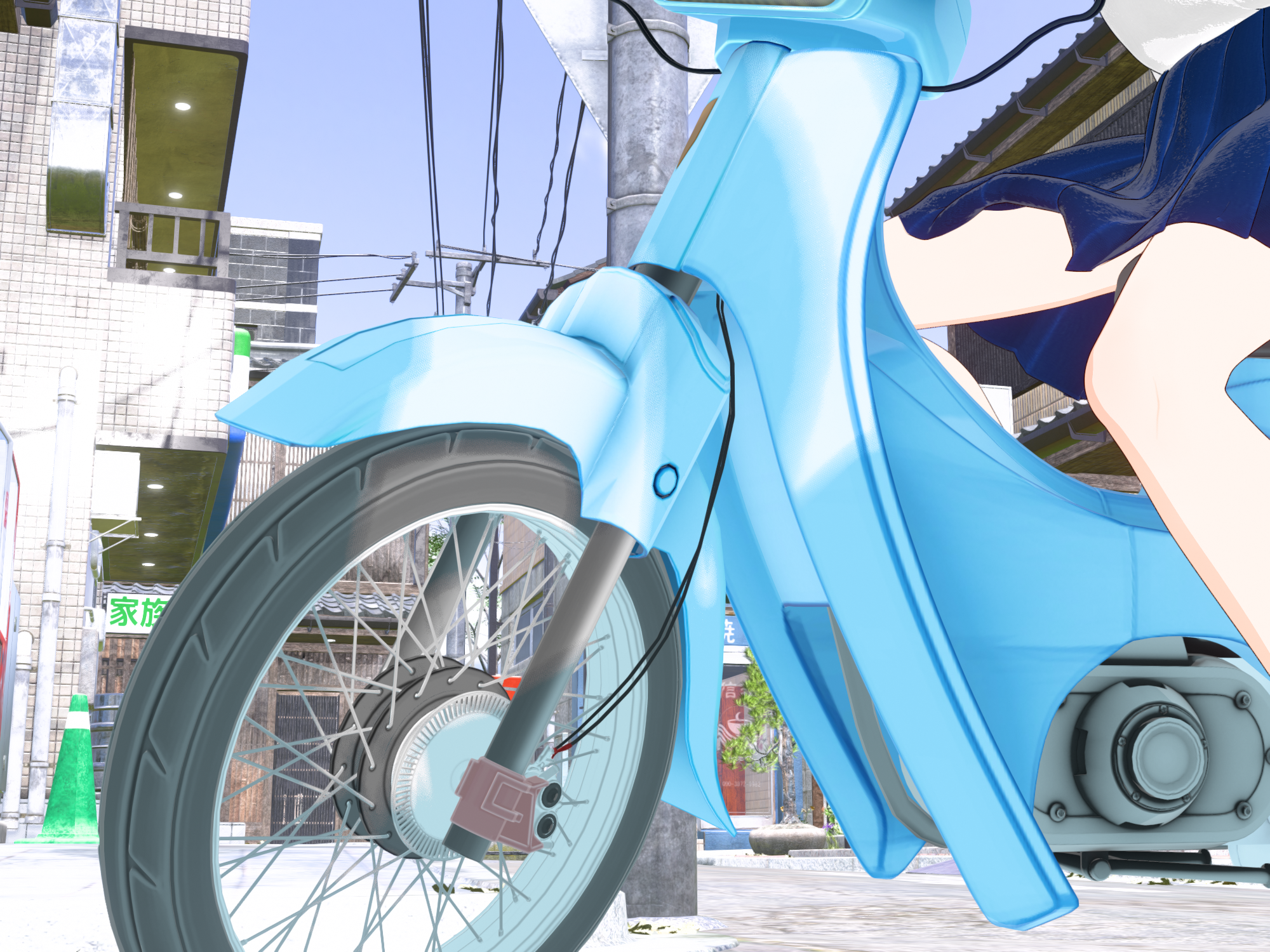
-
3D Comic Book Tips And Pictures
Thank you so much for the links. I'm not thrilled about needing to use a geoshell, but I am going to tinker with this and see what I can do. Thanks again!Space Jingoroh said:
mmitchell_houston said:
Leana said:
mmitchell_houston said:
This looks very nice, and very promising. What, exactly, is Filatoon? Is it a render setting built into Daz Studio or is it a separate product? I saw a bunch of Toon products recently listed, but non of them list a prerequisite for another product. Also, does it allow for pure b&w output?
Filatoon is a shader (well, a combination of a shader and a geoshell for the outline) that you use with the Filament render engine. The shader is available in the latest version of DS default resources, and you need DS 4.23 to use it.
Very interesting. Is there a tutorial on how to use this?Anime Toons and Filatoon Shader Q&A
FilaToon / Cell shaded rendering with Filament
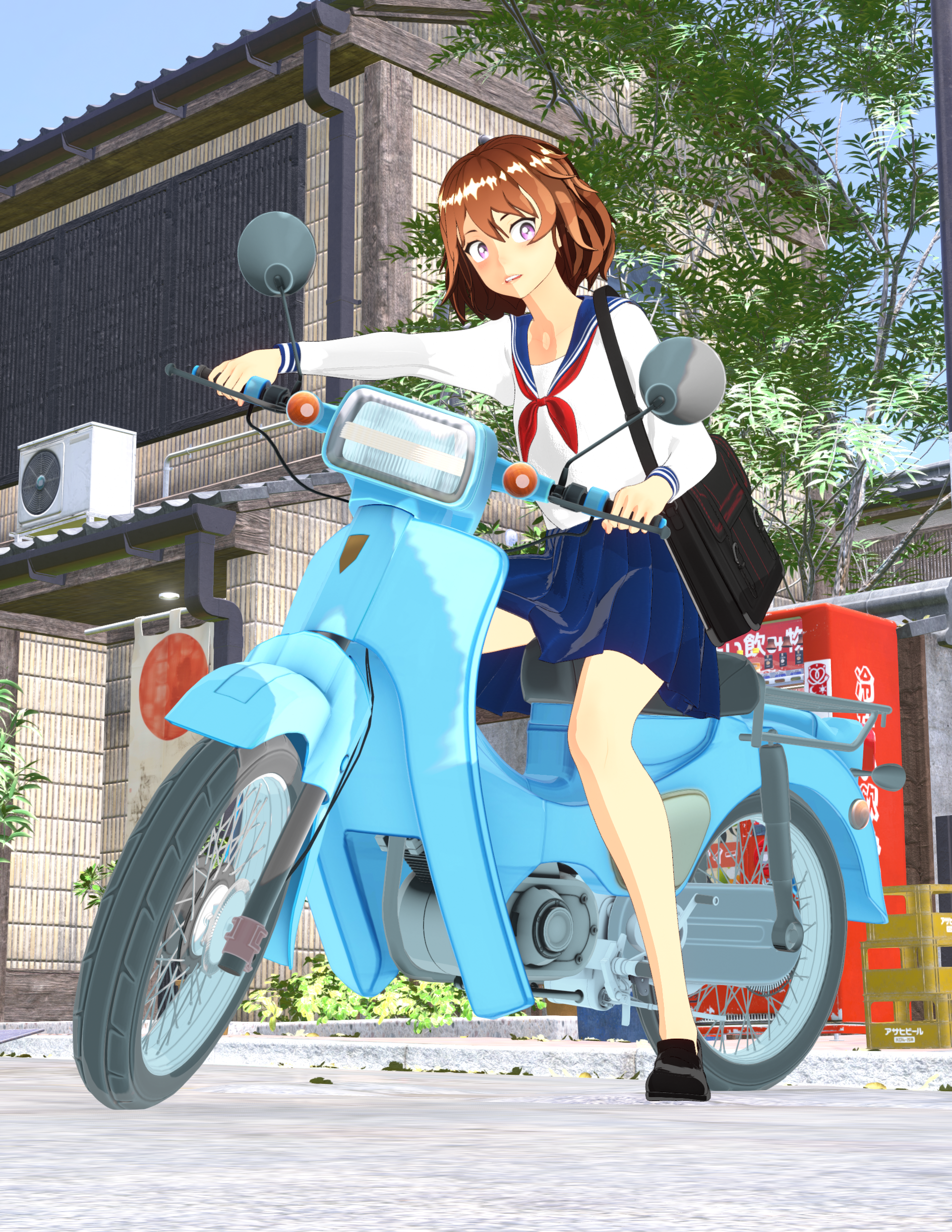 Anime Toons and Filatoon Shader Q&A
AlienRenders said:
I can do multivariable calculus but I can't figure this out. I set it to filament renderer. I applied the shader to a character. I added a distant light. I set shadows to raytraced. Character is completely black no matter what I try.
edit: Ok, if I increase MatCap Weight to 1, I get color. What is MatCap? And why does it need to be at 1?
edit2: Oh, environment weight also gives color and more definition. All right, this is starting to look good. I really like the outline shell. Wish that worked in iRay even without the toon shading.
edit3: For anyone wanting outlines in iRay, I have a method that isn't too bad.
Outlines with iRay
1. Create a geoshell for your character
2. Set offset distance to 0.2 (0.2 to 0.3)
3. In the geoshell material, set all the weight dials to zero (Diffuse overlay weight, translucency weight, glossy layered weight, etc.)
4. Set Refraction Index and Refraction Weight both to 1 (100%). This will make the shell transparent.
5. Set Top Coat Weight to 1. Set Top Coat Color to black. Scatter only. Roughness to 1. Color Effect to Reflectivity. Reflectivity to 0. Curve 0 to 0. Curve 90 to 2 (need to turn off "use limits" in the gear icon, parameter settings). Curve exponent to 10. Everything else in top coat settings to 0. IOR can remain at 1.5.
6. Cutout opacity to 1
If you want darker lines, especially in front of a white background, there are two possible solutions. You can bump up Curve 90 to 3 or higher. It will create a bit more shading though. AND/OR you can duplicate the shell, set an offset about 0.05 larger than the other shell and copy the material. You can add more shells if you want.
You can also lower refraction weight, but it'll make your character darker. I'm mentioning it because it can be a cool effect.
Intersting tips on toons in iRay.
For FilaToon the shadows on the light needs to be set to Deep Shadow Map.
For quickly set up the scene use Basic FilaToon Environment included in People | Genesis 9 Toon
For me FilaToon is better because of its instant rendering time even with many characters in the scene.
Figures look differentThe one was Filament, I changed them so they are both the same and look the same now.
Thanks to both of you for your help!
AIUTO...CHI CONOSCE L’ITALIANO? PARTE QUATTORDICIAppunto, io seleziono Filament nel viewport, e poi il render dal viewport.
Faccio come ha detto Imago, ma non va, se lascio l'outline esce tutto nero, se lo levo, tutto con un colore molto chiaro.
AIUTO...CHI CONOSCE L’ITALIANO? PARTE QUATTORDICIFilament, Filatoon è lo shader e si vede solo se attivi Filament. Ci stiamo incasinando coi termini.

In ogni caso, conviene ricominciare daccapo.
Per prima cosa bisogna avviare una sessione fresca di DAZ Studio. Poi si attiva Filament. Dopodichè si cercano nelle librerie gli shader Filatoon. A questo punto si carica una cosa qualsiasi nella scena, si seleziona e di fa doppio click su "Filatoon add outline" e a questo punto si seleziona il prop (non la geoshell) e si doppioclicca su "Filatoon base". Poi si cambiano colori, texture e via dicendo. A questo punto si aggiunge alla scena il "basic Filatoon environment"
Se anche con questo percorso non funziona, allora bisogna vedere passo passo cosa c'è che non va.
Anime Toons and Filatoon Shader Q&AImago said:
Space Jingoroh said:
When the camera angle is changed, the turnip or hair causes an “I-RO-PA-KA(color flicker)”.
Try changing the type of shadow in the Filament Draw options pane (you can create it in the "create" menu) and also increase its Map Size, it should solve the most of the problems.
Thank you very much.
I set the shadow map size to the largest 16384, shadow Cascades to the largest 4, and shadow type to DPCF, and the flicker is now finer and less noticeable.
It helped a lot.However, it has not disappeared completely.
The shadow outline keeps jerking and changing.
The width of the two-tiered shadow changes, and the position and shape of the outline keeps changing.AIUTO...CHI CONOSCE L’ITALIANO? PARTE QUATTORDICIDove sta esattamente?
Anche io ho solo Filament, non FilaToon
Anime Toons and Filatoon Shader Q&ASpace Jingoroh said:
When the camera angle is changed, the turnip or hair causes an “I-RO-PA-KA(color flicker)”.
Try changing the type of shadow in the Filament Draw options pane (you can create it in the "create" menu) and also increase its Map Size, it should solve the most of the problems.
3D Comic Book Tips And Picturesmmitchell_houston said:
Leana said:
mmitchell_houston said:
This looks very nice, and very promising. What, exactly, is Filatoon? Is it a render setting built into Daz Studio or is it a separate product? I saw a bunch of Toon products recently listed, but non of them list a prerequisite for another product. Also, does it allow for pure b&w output?
Filatoon is a shader (well, a combination of a shader and a geoshell for the outline) that you use with the Filament render engine. The shader is available in the latest version of DS default resources, and you need DS 4.23 to use it.
Very interesting. Is there a tutorial on how to use this?Anime Toons and Filatoon Shader Q&A
FilaToon / Cell shaded rendering with Filament
3D Comic Book Tips And Pictures
Very interesting. Is there a tutorial on how to use this?Leana said:
mmitchell_houston said:
This looks very nice, and very promising. What, exactly, is Filatoon? Is it a render setting built into Daz Studio or is it a separate product? I saw a bunch of Toon products recently listed, but non of them list a prerequisite for another product. Also, does it allow for pure b&w output?
Filatoon is a shader (well, a combination of a shader and a geoshell for the outline) that you use with the Filament render engine. The shader is available in the latest version of DS default resources, and you need DS 4.23 to use it.
AIUTO...CHI CONOSCE L’ITALIANO? PARTE QUATTORDICICrios said:
No, i Filament come Viewport, mica esiste il viewport FIlatoon?!?
Certo che esiste... Hai presente il tastino nel workspace dove scegli IRay e compagni?
Anime Toons and Filatoon Shader Q&AI can do multivariable calculus but I can't figure this out. I set it to filament renderer. I applied the shader to a character. I added a distant light. I set shadows to raytraced. Character is completely black no matter what I try.
edit: Ok, if I increase MatCap Weight to 1, I get color. What is MatCap? And why does it need to be at 1?
edit2: Oh, environment weight also gives color and more definition. All right, this is starting to look good. I really like the outline shell. Wish that worked in iRay even without the toon shading.
edit3: For anyone wanting outlines in iRay, I have a method that isn't too bad.
Outlines with iRay
1. Create a geoshell for your character
2. Set offset distance to 0.2 (0.2 to 0.3)
3. In the geoshell material, set all the weight dials to zero (Diffuse overlay weight, translucency weight, glossy layered weight, etc.)
4. Set Refraction Index and Refraction Weight both to 1 (100%). This will make the shell transparent.
5. Set Top Coat Weight to 1. Set Top Coat Color to black. Scatter only. Roughness to 1. Color Effect to Reflectivity. Reflectivity to 0. Curve 0 to 0. Curve 90 to 2 (need to turn off "use limits" in the gear icon, parameter settings). Curve exponent to 10. Everything else in top coat settings to 0. IOR can remain at 1.5.
6. Cutout opacity to 1
If you want darker lines, especially in front of a white background, there are two possible solutions. You can bump up Curve 90 to 3 or higher. It will create a bit more shading though. AND/OR you can duplicate the shell, set an offset about 0.05 larger than the other shell and copy the material. You can add more shells if you want.
You can also lower refraction weight, but it'll make your character darker. I'm mentioning it because it can be a cool effect.
Anime Toons and Filatoon Shader Q&A
This could prove to be a good work around though. If you apply the Filatoon shader to the sky dome and turn off "cast shadows" and "receive shadows", maybe plug the texture into both diffuse and emission, it would still be an adequate background.necroscension said:TheNathanParable said:
necroscension said:
TheNathanParable said:
necroscension said:
TheNathanParable said:
I haven't tried this myself yet, but I wonder if it might be better to use one of those skydome products rather than a HDRI background, such as Iray Worlds or Worldbase by Magix 101.
https://www.daz3d.com/iray-worlds-skydome
https://www.daz3d.com/the-all-new-worldbase-xt-lushlands
At least then you won't have to worry about the background being pixellated.
I have the first product, I'll give it a try.
I had attempted using a plane and a sphere to create a background but those pixelated as well. The main reason the pixelation became a problem for me is that the hdr I was trying to use had a painted look that got ruined by the resampling.
Vick 9 | Daz 3D -> I had to render the background using Iray in order to retain the painted look.
(edit) Unfortunately Filament doesn't like the product, I guess because it uses the sky image in both the Emission and Luminance properties in Surfaces (view attachment).
Have you tried applying the Filatoon shader to the backdrop? The default iray shaders may not translate well to filament.I applied the general shader and moved the image in the Emission slot to the base slot. Unfortunately the images are being resampled (see attached).Ok, I think I figured out why the mesh skydone is pixellated for you.
These are two renders of Mikey. On the left, I set the "texture resources" option in the Daz Studio preferences to "performance", which makes Mikey's textures pixellated. On the right, I set the option to "quality", which makes them sharper. It's most noticeable around the eyes.
I'm using a iray HDRI background in both of these. It seems these are completely unaffected by this option, but a mesh skydone like the one used in iray worlds or worldbase xt should look better with this option set to "quality". I'll try it out for myself once I get them installed and working.
The Iray Worlds product uses odd shaped images, so plugging in a new hdri doesn't really work. But I can confirm that if I create a dome from a sphere and plug in an hdri in the Base parameter in Surfaces there's no resampling. I tested with a Cake and Bob 16K hdri and confirm that I can actually see "film grain" instead of pixelation (view attachment). Too bad that setting doesn't apply to the hdri used in Environment Options.
Anime Toons and Filatoon Shader Q&ATheNathanParable said:
necroscension said:
TheNathanParable said:
necroscension said:
TheNathanParable said:
I haven't tried this myself yet, but I wonder if it might be better to use one of those skydome products rather than a HDRI background, such as Iray Worlds or Worldbase by Magix 101.
https://www.daz3d.com/iray-worlds-skydome
https://www.daz3d.com/the-all-new-worldbase-xt-lushlands
At least then you won't have to worry about the background being pixellated.
I have the first product, I'll give it a try.
I had attempted using a plane and a sphere to create a background but those pixelated as well. The main reason the pixelation became a problem for me is that the hdr I was trying to use had a painted look that got ruined by the resampling.
Vick 9 | Daz 3D -> I had to render the background using Iray in order to retain the painted look.
(edit) Unfortunately Filament doesn't like the product, I guess because it uses the sky image in both the Emission and Luminance properties in Surfaces (view attachment).
Have you tried applying the Filatoon shader to the backdrop? The default iray shaders may not translate well to filament.I applied the general shader and moved the image in the Emission slot to the base slot. Unfortunately the images are being resampled (see attached).Ok, I think I figured out why the mesh skydone is pixellated for you.
These are two renders of Mikey. On the left, I set the "texture resources" option in the Daz Studio preferences to "performance", which makes Mikey's textures pixellated. On the right, I set the option to "quality", which makes them sharper. It's most noticeable around the eyes.
I'm using a iray HDRI background in both of these. It seems these are completely unaffected by this option, but a mesh skydone like the one used in iray worlds or worldbase xt should look better with this option set to "quality". I'll try it out for myself once I get them installed and working.
The Iray Worlds product uses odd shaped images, so plugging in a new hdri doesn't really work. But I can confirm that if I create a dome from a sphere and plug in an hdri in the Base parameter in Surfaces there's no resampling. I tested with a Cake and Bob 16K hdri and confirm that I can actually see "film grain" instead of pixelation (view attachment). Too bad that setting doesn't apply to the hdri used in Environment Options.
AIUTO...CHI CONOSCE L’ITALIANO? PARTE QUATTORDICIMuscleman said:
Crios said:
Muscleman said:
Crios said:
No, ho caricato il vestito, e fatto partire il render. Ma il risultato è lo stesso se applico il materiale.
quando hai settato il viewpoint, controla se nei materiali appare, selezionando una parte del vestito ( scena, figura) l dicitura FILATOON, allora si che rendrizzera in filatoon se escono IRAY o Altro, vai in shader preset e applica lo shader del FILATOON di base, così da "convertirlo"
Ho provato anche in questo modo, ma non va. I colori sono bianchi e l'outline, se attivo, fa tutto nero.ma sei in filatoon come viewport?
No, i Filament come Viewport, mica esiste il viewport FIlatoon?!?
4.23.0.1 crashes on startup: QtCore4.dllOh, the curse of intel. I feel your pain, as a 13900ks cpu and z790 board user myself. Your solution relies in the bios.
If filament CTD's, daz studio crashes while loading something, plug-in throws unhandled exceptions, it is highly probably not the cpu, but how it is being handled by the bios itself. That is the trouble.
So far, within my over-35-years of oem machine building experience, I've never ever seen any intel base system, which struggles to work even within its own advertised specifications. I found my way out, so there is a chance that it will throw you out of your unfortunate loop. I find it highly inappropriate for intel to leave proper settings to be found by the end-user like this. I know I'm not the only one feeling like this, so here it goes:
1- You would probably want to get the latest bios first
2- Load intel's failsafe defaults (I use extreme setting on my asus z790)
3- It is *very very* important to leave svid as "Intel's Fail Safe" and rest at defaults for starting point.
4- Find your avx2 settings, lower avx2 binning by 4. Be careful, when you do this, some of the *other* customizations you might have done will be reverted by a safeguard, but let it be.
5- Disable IA Cep and SV cep if your cpu allow for it and if you want additional performance. Do this ONLY IF you have a cooler which has over 180 points (mine is 208). Make sure to do this step after step 4, because CEP settings will be one of those which will be reverted. Just keep points in order.
6- Find your CORE temperature throttling, enable it, set it to 100 degrees for a core.
7- Find your PACKAGE temperature throttling, enable it and set it to 90 degrees for the whole cpu package.
(Edit) 7.5 - I forgot to add also disable "Overclocking TVB". Just disable it. This setting also might get reset after step 4, so do it last.
8- Save & Exit bios.
If you're not comfortable with playing around bios, leave this to someone who does. If you are unable, RMA whole thing and ask your money back, then maybe try to fetch an amd x3d type of cpu.
I really wish this helps. Took almost a year to stabilize the z790 system, and I can deeply understand your frustration. Just for the record, I managed to stabilize it 2 days ago relative to creation of my response to you.
Anime Toons and Filatoon Shader Q&ACensored said:
TheNathanParable said:
necroscension said:
TheNathanParable said:
necroscension said:
TheNathanParable said:
I haven't tried this myself yet, but I wonder if it might be better to use one of those skydome products rather than a HDRI background, such as Iray Worlds or Worldbase by Magix 101.
https://www.daz3d.com/iray-worlds-skydome
https://www.daz3d.com/the-all-new-worldbase-xt-lushlands
At least then you won't have to worry about the background being pixellated.
I have the first product, I'll give it a try.
I had attempted using a plane and a sphere to create a background but those pixelated as well. The main reason the pixelation became a problem for me is that the hdr I was trying to use had a painted look that got ruined by the resampling.
Vick 9 | Daz 3D -> I had to render the background using Iray in order to retain the painted look.
(edit) Unfortunately Filament doesn't like the product, I guess because it uses the sky image in both the Emission and Luminance properties in Surfaces (view attachment).
Have you tried applying the Filatoon shader to the backdrop? The default iray shaders may not translate well to filament.I applied the general shader and moved the image in the Emission slot to the base slot. Unfortunately the images are being resampled (see attached).Ok, I think I figured out why the mesh skydone is pixellated for you.
These are two renders of Mikey. On the left, I set the "texture resources" option in the Daz Studio preferences to "performance", which makes Mikey's textures pixellated. On the right, I set the option to "quality", which makes them sharper. It's most noticeable around the eyes.
I'm using a iray HDRI background in both of these. It seems these are completely unaffected by this option, but a mesh skydone like the one used in iray worlds or worldbase xt should look better with this option set to "quality". I'll try it out for myself once I get them installed and working.
Sorry to barge in, but I just wanted to thank you... aparently I've been working this long and neither I nor my promo artist new about this setting... unfourtunatly we've now gone all the way throuch two toon products wodering why the crisp lines look so pixelated...
You can increase the Anti Aliasing value in Filament Draw Options.
Figures look differentThe first one is using Filament and the second is using Texture Shaded I think.
Anime Toons and Filatoon Shader Q&ATheNathanParable said:
necroscension said:
TheNathanParable said:
necroscension said:
TheNathanParable said:
I haven't tried this myself yet, but I wonder if it might be better to use one of those skydome products rather than a HDRI background, such as Iray Worlds or Worldbase by Magix 101.
https://www.daz3d.com/iray-worlds-skydome
https://www.daz3d.com/the-all-new-worldbase-xt-lushlands
At least then you won't have to worry about the background being pixellated.
I have the first product, I'll give it a try.
I had attempted using a plane and a sphere to create a background but those pixelated as well. The main reason the pixelation became a problem for me is that the hdr I was trying to use had a painted look that got ruined by the resampling.
Vick 9 | Daz 3D -> I had to render the background using Iray in order to retain the painted look.
(edit) Unfortunately Filament doesn't like the product, I guess because it uses the sky image in both the Emission and Luminance properties in Surfaces (view attachment).
Have you tried applying the Filatoon shader to the backdrop? The default iray shaders may not translate well to filament.I applied the general shader and moved the image in the Emission slot to the base slot. Unfortunately the images are being resampled (see attached).Ok, I think I figured out why the mesh skydone is pixellated for you.
These are two renders of Mikey. On the left, I set the "texture resources" option in the Daz Studio preferences to "performance", which makes Mikey's textures pixellated. On the right, I set the option to "quality", which makes them sharper. It's most noticeable around the eyes.
I'm using a iray HDRI background in both of these. It seems these are completely unaffected by this option, but a mesh skydone like the one used in iray worlds or worldbase xt should look better with this option set to "quality". I'll try it out for myself once I get them installed and working.
Sorry to barge in, but I just wanted to thank you... aparently I've been working this long and neither I nor my promo artist new about this setting... unfourtunatly we've now gone all the way throuch two toon products wodering why the crisp lines look so pixelated...
There's Always Another Sale Thread -- Discussions Only Pt 3daveso said:
Tomhip said:
daveso said:
Torquinox said:
I don't know where to put this comment. I'm really gag-reflex repulsed by the so-called anime and toon offerings I've seen since filatoon came out. Just ew! No to Vicky and Mikey et al. I will never buy any of that!
that toon stuff makes shopping easy here now... just whoosh right by them. Ueah, I'm not into toons much either, especially that style.
Its not on my buy list but I definitely think its a good business idea, most applications thatr deal with this style tend to be... for naughty purposes. So if they can tap into a new market and get new reveniue then everybody wins.
To be honest it is so distinct from the normal Daz stuff that it really could use a separate store page...
agree on the separate store page.
There is no separate store page for any other category. Some people don't want creepy Halloween stuff, some people don't want skimpwear, some people don't want G9, some people don't want (or only want) Iray, or 3Delight, or Filament/FilaToon. I don't think toon stuff requires a separate "page", anymore than any other category of assets. Where do you draw the line?
Daz 3D is part of

Connect
DAZ Productions, Inc.
7533 S Center View Ct #4664
West Jordan, UT 84084Licensing Agreement | Terms of Service | Privacy Policy | EULA
© 2026 Daz Productions Inc. All Rights Reserved.