-
Victoria 4 Blowout Sale
Hi folks, I was going to try and purchase some Victoria stuff -- they advertised them but yet in cart there is no discount?? am I missing something?
Streaming game made with DAZ productsAt 10am Pacific time I'm gonna be streaming my game Night Vigil on twitch. https://www.twitch.tv/drewradley
http://store.steampowered.com/app/509910/Night_Vigil/
It was made using Michael 4, Victoria 4 and lots of other DAZ origanls.
Are Victoria 8 anatomical features compatible with HD skins/overlays?Under normal circumstances it all works fine. They appear as a large greyed-out patch but that disappears when viewed in the nvidia setting or in the final render. But when combining with an HD figure, such as Miriam or Sahel, it doesn’t.....not even in the final render. Am I doing something wrong or are they actually incompatible?
Comics - Force Six Annihilators, Killer Butterfly, Mark of the Griffin, Dynamic Spider-Man PlusNew episode is out.
Force Six, The Annihilators #13
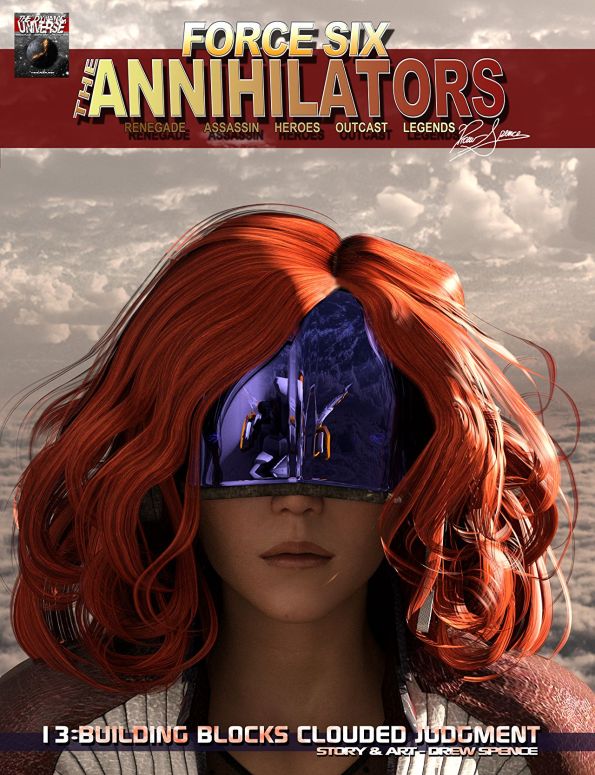
13 Clouded Judgment
It’s the thrilling conclusion of the Building Blocks story arc as Force Six goes head to head with a vengeful Victoria. It’s a fire fight flight of fancy for Force Six!
The Force Six forces finds themselves forced to the edge of their block, literally, as they come face to face with a femme fatale in a fatal tale that’s a fitting finale for the Building Blocks story arc. Mental blocks and Clouded Judgment awaits.

Read on comiXology for only 1.99
Or buy the entire story arc in PRINT!
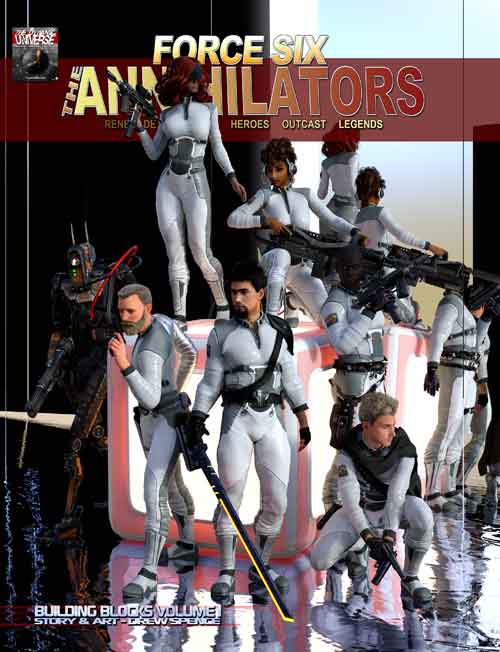
Force Six: The Annihilators
Building Blocks Volume I
Print = $22.50 (132 pages, deluxe quality print, full color)
Digital Download = $8.49
Celebrity Look-a-Likes for 3D figures Part 2Anyone know of a Margot Robbie head morph for Genesis 8? I have FWSA Haley for Genesis 3 /V7 but is a more stylized Victoria 7 than Margot Robbie. I am thinking about doing something "Terminalish"
SereneNight's Sci-fi FunThis looks great: perhaps one of the first dforceable outfits with some thickness and weight to it https://www.daz3d.com/dforce-eveningwear-for-genesis-8-males
I'm not a fan of that dress style. It's overly common in the DAZ Store that bottom hem style compared to that style in the real world.
I do really like sensibly funny Dame Edna style characters though. LOL, or Buffy and Hildegard if one is old enough to remember Bosom Buddies. Or one of Harvey Korman's female get-ups. Odd that that trick doesn't translate so well or easily from female to male impersonators, I can't even think of any outside of Victor/Victoria or the movie Boys Don't Cry. Must be more?
Lydia HD for Victoria 7 [Commercial]Hi everyone! This is my new character for Victoria 7.
Bring realism and uniqueness to your renders with this beautiful new character for Victoria 7!
Lydia is a high-quality character with HD morphs and two head and body shapes handcrafted in Zbrush, no additional morphs needed. This set includes face asymmetry for more realism and three Iray translucency options to choose from, as well as makeup, eyes, and nail materials for both Iray and 3Delight.
https://www.daz3d.com/lydia-hd-for-victoria-7
Have fun!
Isabelle
Does this character load with additional shaping from Victoria 7?
I mean does it activate Victoria 7 head + body sliders?Skin Builder, Skin Recipe Builder and Connect installation issues.DIM looks fine, but you haven't shown your settings for DS. You could run the http://docs.daz3d.com/doku.php/public/software/dazstudio/4/referenceguide/scripting/api_reference/samples/file_io/install_manager_config_import/start script (just download it using the link at the top of the scipt code, then drag that into the DS Viewport) - that should add the DIM directory to DS, which should let DS see the isntalled files.
To make Connect use your D: drive you need to go to Edit>Preferences>Content tab>Content Directory Manager, expand the entries to show the current Connect path, select it, and click the Edit buitton. Connect works fine for most content, the main exceptions being Victoria 4 and other figures using the ExP system, and it handles updates better than DIM as it needs to download only the updated files rather than the entire zip.
Need help with eyesI'm new to Daz and have been having issues with the eyes of my rendered characters. I have been using Victoria 8 and Genesis 8 female and each time I render I get grainy eyes even though the rest of the image comes out fine. I had simply been using the preset "Victoria 8 eyes 01". I tried paying around with some of the settings for the sclera but nothing fixed the issue. I then purchased the Project EYEray - Next Gen and Merchant Resource for Genesis 8. But when I selected the sclera I wanted to use, the eyes went black even after adding in the pupils. I've managed to play aorund with them a bit and get them to a tan color so I can at least see the pupil, but I feel like I'm totally missing an easy step to get the preset to work. Can anyone direct me to a video or instructions on how to manipulate this so that I'm not feeling like it's a waste of money to buy presets?
Thanks!
Hood and Cloak for a veritable Little-red-riding-HoodYes, there is a Hooded Cloak for pretty well every figure from Victoria 3 on I think. It's one of the staple items.
That sounds promising but I wonder what one of the 'staple items' means. One of the listed required products of 'Tattered and Torn: Hooded Cloak'?
The K4 are not named here but as compatible figures. I don't think the Mill Kids /Preschoolers were upward compatible to K4, were they?
March 2018 - Daz 3D New User Challenge - Posing@daybird You're close! Just need to take it a little further because the lower abdomen isn't quite in the right position either.
@sueya I'm using Phoenix for Victoria 7 in my screenshots, but this should work for both Genesis 3 and Genesis 8 figures. I didn't have to turn off any limits but you might have to for certain body types. Get it as close as you can before turning off limits and then turn them off if you need to do so.
Okay, so here is what I discovered when I went looking for that morph. Turns out it was a morph I had paid for so you might not have it. So, I looked at a Victoria 7 figure to see how close I could get the pose without a morph. Turns out if you do it in the right order, you can get pretty darn close.
First, select your figure's hip. (DancePose01) You should be able to do this without messing up the leg pose you already have. You might have to modify the legs a little bit once you get her in a position you like. But, bend the hips back as far as you can get it. (DancePose02) You don't need to turn off limits. Then, select the lower abdomen and bend it back as far as you can. This is what gives it that little extra dip in the back like your reference photo. (DancePose03 & DancePose04) After that, go back to the pelvis/hip bone and add some twist to match your reference image. (DancePose05) At this point, you could adjust her legs somewhat if you hadn't already had them in position. Or you can wait until the next step to do the legs. (DancePose06)
Next, you want to select the entire figure and rotate the whole figure until her upper body matches your reference image. (DancePose07) Make the rest of your adjustments twisting and fine-tuning the rest of the pose until you get it the way you like. Finish getting the legs under her.
Let me know if anything is unclear. Sorry, it took so long. It took longer to deal with getting my car fixed than I thought it would. As unexpected as it was, I needed to get it repaired as quickly as possible.
Hood and Cloak for a veritable Little-red-riding-HoodThank the both of you

Funny thing: there is an add-on for the hooded cloak(s) and they say it was compatible with The Kids 4 !
Does this mean there is a Hooded Cloak version that fits the K4 (eventually the Mill Preschoolers' one) ?
Yes, there is a Hooded Cloak for pretty well every figure from Victoria 3 on I think. It's one of the staple items.
Victoria 8 make-up?Hi there! I have recently started creating a Victoria 8 character. I’m not a fan of the make up that comes with Victoria 8 so I thought I’d use the same product that I’ve been using for all my genesis 3 characters, specifically this one: https://www.daz3d.com/extreme-closeup-makeup-for-genesis-3-female-s
When I load this make up on to my v8 character it shows up in the viewport and everything looks great! However when I go to render, it doesn’t appear on her face. Does anyone know of a way around this or are there any good make up products that are compatible specifically with v8?
I have seen this one on the daz store: https://www.daz3d.com/ultimate-make-up-for-genesis-8-female-s
I’m slightly hesitant to buy this straight away as I’m worried the same thing might happen. It does say it’s compatible with all gen 8 characters though. But it also says this in the description, “Note that as this set uses overlays, you may need to use the fibremesh eyebrows with characters based on Victoria 8 and Olympia 8, and it is for Iray only.” I’m not entirely sure what it means in the first bit.
Anyway, sorry for the essay. Any help would be much appreciated.
thanks :)
Released: Eye Brows Collection for Genesis 8 Females (commercial)https://www.daz3d.com/eyebrows-collection-for-genesis-8-females

This set contains 15 different eyebrows styles you can use with all Genesis 8 Female based characters that include a face map without painted eyebrows, like Victoria 8 for instance.
Included are 15 Layered Image Presets and 15 Diffuse Overlay Presets.
Which ones you use depends what you prefer or need. For instance the LIE presets can be combined with already applied other Diffuse Overlays like Make-Up. The Diffuse Layer Presets load much quicker than LIE presets. LIE presets have more depth because they also use bump maps.
Included are two colors for both types, black and brown. Beside that you can change the color of the eyebrows to any RGB color for both types of presets if you like. A short manual is included how to do that for both variants.
To round up the product several adjustments options are included as well:
Positions of the eyebrows layers / overlays can be adjusted too using the Daz Image Image Editor or LIE Editor. This is explained in the manual.
Optimized for Iray. This is NOT a Merchant Resource!
- Eyebrows Collection for Genesis 8 Female(s): (.DUF)
- Diffuse Layer Presets:
- 15 Eyebrows Presets Black Color
- 15 Eyebrows Presets Brown Color
- LIE Presets:
- 15 Eyebrows Presets BlackColor
- 15 Eyebrows Presets Brown Color
- Options:
- Diffuse Overlay Remover
- Diffuse Overlay Strength Options
- Diffuse Overlay Squared ON/OFF Option
- PDF Manual
-
- Usage Manual
- Textures Include:
- 30 LIE and Diffuse Maps (PNG) (4096 x 4096)
- Daz Studio Iray Material Presets (.DUF)
https://www.daz3d.com/eyebrows-collection-for-genesis-8-females
Show Us Your Iray Renders. Part VI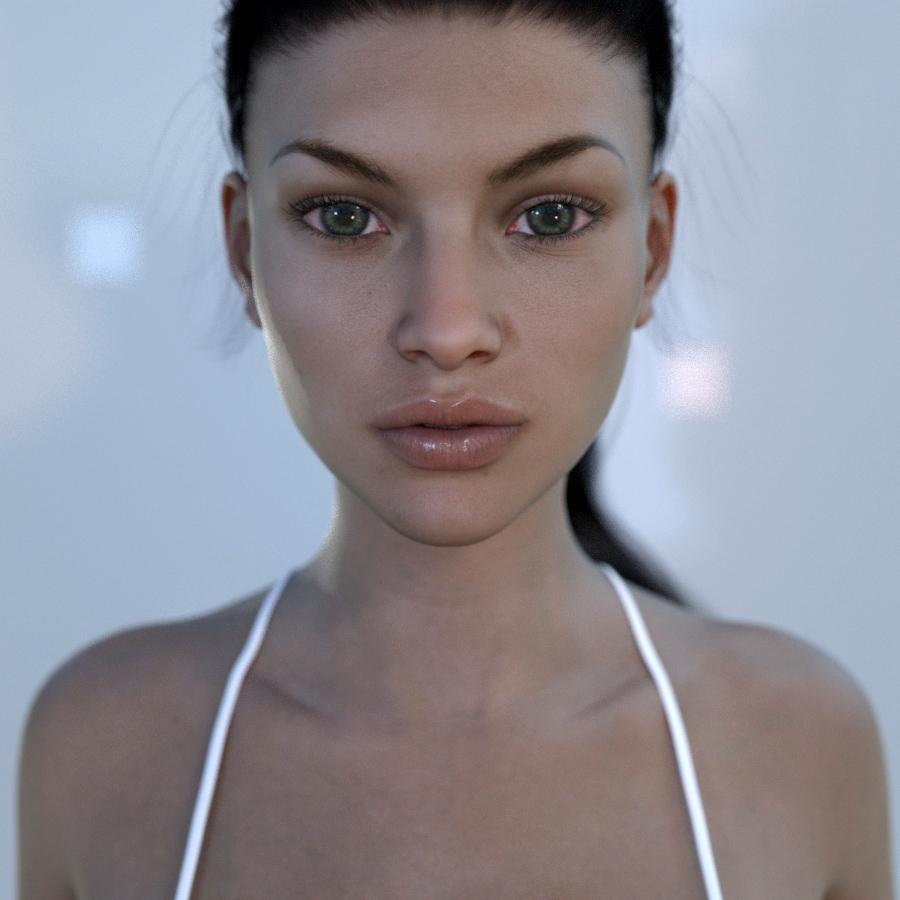
Victoria 7, 5 lights, env. map.
More renders and a tutorial on how I made this render: https://iamuman.deviantart.com/Show Us Your Iray Renders. Part VIVictoria 7, 5 lights, env. map.
More renders and a tutorial on how I made this render: https://iamuman.deviantart.com/Tactical Assault Outfit for Genesis 8 Male(s) and Female(s) [Commercial]Out of curiosity, will there be a pose where the finger does Not touch the trigger? For when they merely holding the weapon and not actually shooting. It's not important if it isn't, since it's fairly easy to change that, but I just thought I could ask :)
My (ex-Army) manager showed me a picture of his seven-year-old daughter holding a Nerf gun, and said "I'm so proud." When I looked closely at the picture, I saw that she had her index finger off the trigger, lying flat along the side of the gun, in the approved safe position.
Victoria and Michael should have equally good trigger discipline.
Licensing my videos2D renders, both still images and animations, are generally yours to use as you wish - the only, limited, exception I am aware of is the old Anne Marie Goddard Digital Clone for Victoria 3.
How to disable deformation when using "Fit to"?I made custom eyes for G8F. They work ok with basic female figure, but when I fit them to Victoria 8 or Hyuna they are deformed: they are not round anymore. How to avoid this?
I didn't find anything in parameters. I only want the eyes move and scale but keep the same shape.
Meet Mom and Dad - we've come a long way, babyI started with Poser 3.I don't remember how I got it. I never even rendered anything, I just played with creating a ton of fashion poses on stylized Poser characters that I made super skinny in extreme poses. It was really sort of like playing with dolls. Then eventually I got Poser 7, found Daz somehow which was just a content store at the time and was hooked!
yes ..the entire thrust of DAZ changed once DAZ Studio came into being. It was "the" place to go for quality content, for Poser, especially with the success of Victoria.
Daz 3D is part of

Connect
DAZ Productions, Inc.
7533 S Center View Ct #4664
West Jordan, UT 84084Licensing Agreement | Terms of Service | Privacy Policy | EULA
© 2026 Daz Productions Inc. All Rights Reserved.