-
[Released] RSSY Character And Material Conversion Bundle Genesis 8 to Genesis 9 [Commercial]
I only tried to convert Michael 8.1, and so far I don't get it fine as G9. Issues on the eyes (not well placed, nor good size and when trying to move them with powerpose, they just go out of the head xD) and the morph around the eyes is not OK. So, I don't know really what to do to get better result. I will try again.
Dragonhide PCS looks fantastic, but...Torquinox said:
joanna said:
PerttiA said:
"Please note that the suit utilizes a custom morph to properly fit the figure inside" = Some surgical modifications are needed.
This image in the gallery actually shows the morph, and as an owner of the bundle, I can confirm it's there.
Humans don't bend that way. Just sayin'
Yeah, with those joints on the suit, the only 'realistic' way to get a human inside is to remove his/her legs or attach the operators head to the mechanical body/suit
Dragonhide PCS looks fantastic, but...joanna said:
PerttiA said:
"Please note that the suit utilizes a custom morph to properly fit the figure inside" = Some surgical modifications are needed.
This image in the gallery actually shows the morph, and as an owner of the bundle, I can confirm it's there.
Humans don't bend that way. Just sayin'
G8M Loading ErrorIt is possible that when you have saved your own morph as morph assets, the link to that scene was saved with your morph => Everytime you load any G8M character, DS is looking for that scene.
[Released] RSSY Character And Material Conversion Bundle Genesis 8 to Genesis 9 [Commercial]RiverSoftArt said:
Submitted update today:
- Added user options for Transfer Utility settings to hopefully improve morphs
- Added Distance Tolerance option
- Added Adaptive Tolerance option
- Fixed ExecuteScript to NOT do an IncludeFile call. This was messing up on the mac
- Fixed bug in LoadMaterialSuits function where calling IncludeFile twice was messing up on the mac
Here's hoping the additions will work. I'm glad to have helped even if only a bit.
[Released] RSSY Character And Material Conversion Bundle Genesis 8 to Genesis 9 [Commercial]Submitted update today:
- Added user options for Transfer Utility settings to hopefully improve morphs
- Added Distance Tolerance option
- Added Adaptive Tolerance option
- Fixed ExecuteScript to NOT do an IncludeFile call. This was messing up on the mac
- Fixed bug in LoadMaterialSuits function where calling IncludeFile twice was messing up on the mac
[Released] RSSY Character And Material Conversion Bundle Genesis 8 to Genesis 9 [Commercial]N-RArts said:
I'm trying to convert an 8.1 character, but the conversion hangs on ERC Freezing: Neck Size. Which means the program becomes unresponsive, and I have to force close Daz Studio.
Where are converted morph files saved to in the data folder? I have to delete them and start again.
What does the Daz Log say? If you bring up the Daz Log (Help->Troubleshooting->View Log File...) in Notepad++, Notepad++ will detect when the log file changes so you can get all the messages DS sent out before it hung? It might be that it hung in a different place.
As far what happens after ERC freeze, the next major steps are creating the character property, saving the morphs, copying the materials, and then finally saving the character.
[Released] RSSY Character And Material Conversion Bundle Genesis 8 to Genesis 9 [Commercial]Keiron said:
Hi
If you add a g9 model to the scene then apply the morphs ie 8 or 8.1 that i've mentioned you get bad results, the same as you get when you have created a g9 transfer
in other words you get the same issue with appying a g8 or 8.1 to a g9 figure that you see in a g9 modified one
To clarify this further
I used your app to create morphs for the g9 figure from the g8 and g9
I listed the ones I had found problems with head, body, eyes, eyelashes. I could dial out a number of these issues, it looks like a number of dials were not set to 0 some had missing amounts and had a ? mark next to them
I have then now tried using the existing 8, 8.1 morphs on the g9 to see what happens
I see very simular issues to both existing and the app modded morphs, what im pointing out is that the existing morphs head should not control the body but they do in some and dont in others
Your app is'nt causing this
Hi RiversoftArt
I had to change my PC motherboard, so I have completely reinstalled eveything from scratch. no Daz folders at all
Had a job installing Daz Studio using DIM. but the other installer worked in the end
There are now no Genesis 9 modified morphs from using your app only the original one's
I woke up wondering, if opened up the Genesis 9 figure and applied the nail morphs what would happen?
Well using the Genesis 9 figure it does the same with the nail morphs without your app
The MSO_G9_NAILS WORK OK
A&AB NAILS MORPH THE WHOLE BODY NOT THE HEAD TO A FEMALE FIGURE
HALLIE NAILS MORPH THE WHOLE BODY NOT THE HEAD TO A FEMALE FIGURE
A&A NAILS MORPH THE WHOLE BODY NOT THE HEAD TO A FEMALE FIGURE
ACRILIC NAILS MORPH THE WHOLE BODY NOT THE HEAD AND CAUSE THE NOW FEMALE FIGURE TO LOOK UNFED
CYNDER81 NAILS MORPH THE WHOLE BODY NOT THE HEAD TO A FEMALE FIGURE
CYNDER_LONG_SQUARE NAILS MORPH THE WHOLE BODY NOT THE HEAD TO A FEMALE FIGURETO LOOK UNFED
DT-BEAUTIFUL NAILS MORPH THE WHOLE BODY NOT THE HEAD TO A FEMALE FIGURE
DT-FARAH NAILS MORPH THE WHOLE BODY NOT THE HEAD TO A FEMALE FIGURE
DT NAILS MORPH THE WHOLE BODY NOT THE HEAD TO A FEMALE FIGURE
KAYLEYSS SQUARE NAILS MORPH THE WHOLE BODY NOT THE HEAD TO A FEMALE FIGURE
LONG NAILS BY FWART MORPH THE WHOLE BODY NOT THE HEAD TO A FEMALE FIGURE
CB SQUARE NAILS MORPH THE WHOLE BODY NOT THE HEAD TO A FEMALE FIGURE
MOUSSO NAILS MORPH THE WHOLE BODY NOT THE HEAD TO A FEMALE FIGURE
OZ NAILS NAILS MORPH THE WHOLE BODY NOT THE HEAD TO A FEMALE FIGURE
SQUARE NAILS BY FWSA MORPH THE WHOLE BODY NOT THE HEAD TO A FEMALE FIGURE
STELETTA NAILS MORPH THE WHOLE BODY NOT THE HEAD TO A FEMALE FIGURE
DEMONHDFINGER NAIL FIX MORPH THE WHOLE BODY NOT THE HEAD TO A MALE FIGURE
DEMONHDFINGER NAIL FIX hd MORPH THE WHOLE BODY NOT THE HEAD TO A MALE FIGURE
HALLE EYE DETAILS HD EYES AND MOUTH DISTORTED AT 100% CHANGES WHOLE FACE
CATHERINE EYE EFFECTS WHOLE FACE
EYERIM REFINE HD EYES AND MOUTH DISTORTED AT 100% CHANGES WHOLE FACE
EYES CORNEA BULGE CHANGES FACE SHAPE
GOU LUK TOTALY CORRUPTS FIGURE
GOU LUK WITHOUT EYEBROWS TOTALY CORRUPTS FIGURE
DEMON HDEYE MOISTURE FIX CHANGES INTO A MALE FIGURE
OTHER G9 EYE MORPHS WORK FINE
DT FARAH HEAD CHANGES G9 BODY TO FEMALE
DT FELICIA HEAD OK
DT KIRANA HEAD CHANGES G9 BODY TO FEMAIL WITH SOME HEAD DISTORTION
DANAE HEAD OK
DOVE HEAD OK
DUCIBELLA HD HEAD OK
EILEEN HEAD OK
ELENA HEAD HD OK
EMMALEIGH HEAD OK
EMMANUELLE HEAD OK
ENDELLION HEAD OK
ERIKA HEAD CHANGES G9 TO FEMALE
EYRNN HEAD OK
ETSU HEAD CHANGES G9 BODY TO FEMALE
EVANGELINE HEAD OK
EVELYN HEAD OK
GA CIRCA HEAD OK
GEM HEAD 1 OK
GEN HEAD 2 OK
GEMMA HEAD OK
GOU LUK HEAD LOOKS DISTORTED
GWYN HEAD OK
HD RIO HEAD OK
HALLIE HEAD OK
HALLIE HEAD HD OK
HASHIMOTO HEAD CHANGES G9 BODY TO FEMALE
HELINA HEAD HD OK
HYUNA HEAD OK
JA DEVERY HEAD OK
MSO ALEXANDRA HEAD OK
VICTORIA HEAD OK
VICTORIA HEAD 8.1 OK
ZELARA HEAD OK
GS_ MISSINGHEAD_HD_LV4 CHANGES G9 BODY TO FEMALE
PHMTEENGAOHEAD SHAPE ADJUST1 OK
PHMTEENGAOHEAD SHAPE ADJUST1 OK CHANGES G9 BODY TO FEMALE
'CLEARLY A LOT OF THESE MORPHS ACT ON THE G9 FIGURE INCORRECTLY' BEFORE USING YOUR APP '
HOPE THAT HELPS
Ah! I think I understand now. Thanks.
What could be causing many of my script files to stop workingIt may be useful to check if its a problem with the script engine or the file locations.
You could try killing 2 stones with one bird & use a G8->G9 freebie pose convertor script to both check the script engine & do something you want to do at the same time. I know mine is dead simple, and has been tested on DS4.10 on, and can be got here: https://www.daz3d.com/forums/discussion/598316/g8f-m-pose-transfer-to-g9/p1 (There are other freebie G8->G9 scripts in the freebie forum too, but I really only keep track of my own).
If that doesn't work, the script engine is stuffed in some way calling for a re-installation of DS. If that one does work.. it's probably down to file locations and auto deletion of files somewhere unexpected. That rather calls for re-installation of the Riversoft script in the right place.
Regards,
Richard
Freebie Challenge May 2023 - "Sweet Music" - Main ThreadJackyBrown said:
3D Art Freebie Challenge May 2023 "Sweet Music"
What a lot of entries this month, and one even more beautiful than the other!"We want more, we want more..." the crowd yelled, so here's my second entry for this month. ;)
[Best watched at full size for details.]"Oops!"
Starring: Alysha, Linda and TaylorLashaThe tale:
"Yeah, yeah, yeah, yeah, yeah..."
ANY SIMULARITY TO ACTUAL PERSONS, PLACES, ENTITIES OR EVENTS IS UNINTENTIONAL AND PURELY COINCIDENTAL.
Non-motion Picture Soundtrack:Britney Spears - Oops!...I Did It Again (© 2000)
https://www.youtube.com/watch?v=CduA0TULnow&t=40s
COUNTABLE FREEBIES: (Alphabetic order)#01! Alysha for Genesis 8 Female by emotionaldreams
https://www.renderosity.com/freestuff/items/83613/alysha-for-genesis-8-female **#02! Candy Braids Hair for Genesis 8 Female(s) by zoro_d
https://www.renderosity.com/freestuff/items/88062/candy-braids-hair-for-genesis-8-female-s- **#03! Chameleon ROse2 for Genesis 8 Female by zoro_d
https://www.renderosity.com/freestuff/items/85859/chameleon-rose2-for-genesis-8-female **
[Lashes morph used]#04! dForce_Belly Dance Nights Outfit for Genesis 8 Female(s) by zoro_d
https://www.renderosity.com/freestuff/items/82950/dforce-belly-dance-nights-outfit-for-genesis-8-female-s- **
[BDNO pose 09 used]#05! DOA 6 Marie Rose - Head and Body Morphs for G8F by TritiumCG
https://www.deviantart.com/tritiumcg/art/DOA-6-Marie-Rose-Head-and-Body-Morphs-for-G8F-825236730 **
[Head morph 50%]#06! EA Sidecut Hair for Genesis 3 & 8 Female(s) by EichhornArt
https://www.renderosity.com/freestuff/items/82972/ea-sidecut-hait-for-genesis-3-amp-8-femela-s- **
[Skullcap used]#07! ED's Brick Shader (Iray) by Edheldil3D
https://www.deviantart.com/edheldil3d/art/Freebie-ED-s-Brick-Shader-Iray-788871766 **#08! Ellie for G8F by Shinteo
https://www.patreon.com/posts/ellie-for-g8f-39378399
[Head morph 50%]#09! Free (simple) Catsuit for Genesis 3 female by My-Rho
https://www.deviantart.com/my-rho/art/Free-simple-Catsuit-for-Genesis-3-female-593354373 **#10! Free Update for Biker Outfit G8F and Sideswept Hair by zoro_d
https://www.renderosity.com/freestuff/items/85860/free-update-for-biker-outfit-g8f-and-sideswept-hair **
[Side Swept ROse Hair update used only]#11! Flo Makeup For Genesis 8 Females by AprilYSH
https://aprilsvanity.com/shop/flo-makeup-for-genesis-8-females.html#12! Hoop Earrings for Genesis8 Female by Afrodite-Ohki
https://www.renderosity.com/freestuff/items/92631/hoop-earrings-for-genesis8-female **#13! Iray Jewelry Shaders by AllenArt
https://sharecg.com/v/95893/gallery/21/DAZ-Studio/Iray-Jewelry-Shaders **#14! Kiara Interior HDRI by Poly Haven
https://polyhaven.com/a/kiara_interior#15! Kristen Stewart - Head and Body Morphs for G8F by TritiumCG
https://www.deviantart.com/tritiumcg/art/Kristen-Stewart-Head-and-Body-Morphs-for-G8F-841957993 **
[Head morph 50%]#16! Linda - Character for G3F with texture maps by Edelzwicker
https://www.sharecg.com/v/89731/related/21/DAZ-Studio/Linda-Character-for-G3F-with-texture-maps **#17! Little Flower Studs for Genesis 8 and/or 8.1 Female by AllenArt
https://sharecg.com/v/98499/gallery/21/DAZ-Studio/Little-Flower-Studs **#18! Lunafreya for G8F by Shinteo
https://www.patreon.com/posts/lunafreya-for-40600356#19! Lunafreya Summoner Outfit For Daz by Shinteo
https://www.patreon.com/posts/lunafreya-outfit-67676433
[Hair, Add-on to the previous pack]#20! Maddy for GF8 Charakter Shape by MysticArtDesign
https://sharecg.com/v/98461/browse/21/DAZ-Studio/Maddy-for-GF8-Charakter-Shape **
[LIE Blush Make up & freckles, customized]#21! My Heart Necklace for Genesis 8 Female by Amy Aimei
https://www.deviantart.com/amyaimei/art/My-Heart-Necklace-for-Genesis-8-Female-729010047 **#22! Mystics Floor & Backplanes by MysticArtDesign
https://sharecg.com/v/94620/browse/21/DAZ-Studio/Mystics-Floor-Backplanes **#23! Nail Art for Genesis 8 and 8.1 Female(s) by zoro_d
https://www.renderosity.com/freestuff/items/92918/nail-art-for-genesis-8-and-81-females **#24! OnFleek for Genesis 3 & 8 Female(s) by AprilYSH
https://aprilsvanity.com/shop/onfleek-for-genesis-3-8-female-s.html#25! Piercing Gaze for Genesis 8 Females by SWTrium
https://www.renderosity.com/freestuff/items/83703/piercing-gaze-for-genesis-8-females **#26! PJs for Genesis 3 Female by Wilmap's Digital Creations
https://www.wilmapsdigitalcreations.co.uk/view_product.php?id=442 **
[Vest/Top used]#27! RE5 Sheva Alomar Head Morph for G8F by TritiumCG
https://www.deviantart.com/tritiumcg/art/RE5-Sheva-Alomar-Head-Morph-for-G8F-822643742 **
[Head morph 25%]#28! Rihanna - Head and Body Morphs for G8F by TritiumCG
https://www.deviantart.com/tritiumcg/art/Rihanna-Head-and-Body-Morphs-for-G8F-838891936 **
[Head and Body morph 25%]#29! Shiny PVC Latex Shaders Iray by AllenArt
https://sharecg.com/v/95937/gallery/21/DAZ-Studio/Shiny-PVC-Latex-Shaders-Iray **#30! Side Swept ROse Hair (G3F,G8F) Part 1&2 by zoro_d
https://www.renderosity.com/mod/freestuff/side-swept-rose-hair-g3f-g8f-part-1/79533 **
https://www.renderosity.com/mod/freestuff/side-swept-rose-hair-g3f-g8f-part-2/79534 **#31! SoulTrain Pants G8F_FREE by SdeB
https://www.sdebstore.com/collections/free-stuff/products/soultrain-pants-g8f_free **#32! SY 200 Morphs for Genesis 8 Head and Body by SickleYield
https://sharecg.com/v/91888/view/21/DAZ-Studio/SY-200-Morphs-for-Genesis-8-Head-and-Body **#33! TaylorLasha For Genesis 8 Female by MagicMaiden
https://www.renderosity.com/freestuff/items/92992/taylorlasha-for-genesis-8-female **
NO-COUNT ITEMS:--- 33 Eyes Materials for the Genesis 8 + 8.1 people by LevKornowska
--- CariqueB by hindudreams
--- Hoops for G8F by Lully (Renderosity Xmas 2018 Freebie)
--- Iray Fabric Shaders by AllenArt (AA Fabric Silver Lamé)
--- MIC Set by MDP_MI
--- Nose Ring 01 for G2F, G3F and/or G8F by AllenArt
--- Scene Lights for Iray by Lali Kamala (Holiday Loyalty Sale 2021 Free Item)
--- Skirt Outfit Watch for G8F by Tab (Y_Personal)PURCHASED/PAID FOR ITEMS: None 100% Freebies
*1 E-mail address required
** Registration required
#x! Countable Items (Bold ones are used by me for the first time I think.)
--- No longer available freebies
++ Free with DAZ Studio (or the Essentials)
$x. Purchased/Paid For Item
Rendered with DAZ Studio 4.10.0.123 (nVidia Iray®)Other free software used: GIMP v2.10.32 and Irfanview 4.60
Postwork: Used some filters that come with GIMP. Also used mcjDenoise (https://sites.google.com/site/mcasualsdazscripts9/mcjdenoise) and mcjLut by mcasual (https://sites.google.com/site/mcasualsdazscripts9/mcjlut) with the free FilterGrade Cinematic LUTs Pack (https://filtergrade.com/free-cinematic-luts-video-editing/) and the Vintage-Look Photoshop Effects Pack/Light Leaks Effect Pack by Michael Jarrott (https://creativecloud.adobe.com/discover/article/vintage-look-photoshop-effects-pack).
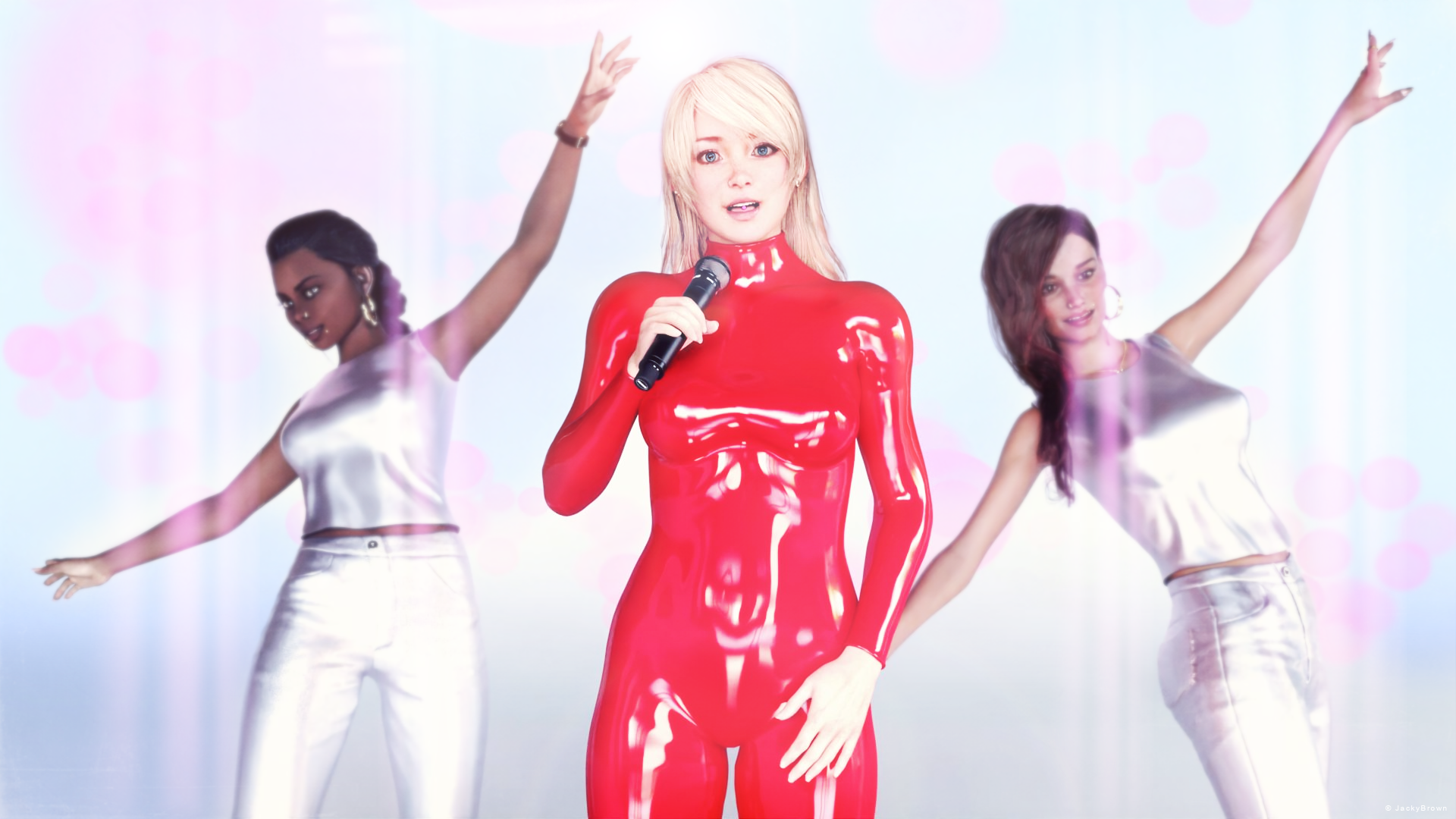
"Oops!"
yes, you are right there are a lot of renders and all of them really nice
All freebies checked, please move to Entries
[Released] RSSY Character And Material Conversion Bundle Genesis 8 to Genesis 9 [Commercial]I'm trying to convert an 8.1 character, but the conversion hangs on ERC Freezing: Neck Size. Which means the program becomes unresponsive, and I have to force close Daz Studio.
Where are converted morph files saved to in the data folder? I have to delete them and start again.
Clothing morphs aren't showing for Flirty School Uniform for Genesis 8 Female(s) RESOLVEDcrosswind said:
scottrussell916 said:
crosswind said:
You may click that Gear Icon of a morph dial, then go to File Path location and check if there're those morph files in data folder ...
Thank you, crosswind. I'm not sure which gear icon you're referring to. I tried clicking the gear icons for the morphs shown in my screenshot and they didn't have an option to go to the File Path.
However, I did find the directories where this products files are saved and checked to make sure that they were installed to the expected directories. It looks like they're where they're supposed to be.
Yeah, check if those dsf files are right in the folder.... If your DS version is older than 4.20, you'll have no option of that File Path. You either upgrade your DS version or check the path of 'data directroy' in the 2nd screenshop.
Ahh, thanks. I'm running version 4.21. I checked the file path the way that you suggested and confirmed that my files are all in the right places. For some reason, only some are available in DS.
Comparing your screenshot to what I see, for Flirty School Shirt you have Adjustments and Morphs (under Actor), while I only have Adjustments. Under Adjustments, I only have LoosenCollar and LoosenSleeveL, whereas you have all 11 options. I've had similar issues with other clothing and hair morphs, which are often hit or miss for me.
I'm wondering if it would help if I reinstalled DS? And maybe re-install my other 3D products one at a time, in case something was installed incorrectly. (I'm very new to Daz and I installed a lot of stuff in a short period of time - mostly without knowing what I was doing :) )
Freebie Challenge May 2023 - "Sweet Music" - Main Thread3D Art Freebie Challenge May 2023 "Sweet Music"
What a lot of entries this month, and one even more beautiful than the other!"We want more, we want more..." the crowd yelled, so here's my second entry for this month. ;)
[Best watched at full size for details.]"Oops!"
Starring: Alysha, Linda and TaylorLashaThe tale:
"Yeah, yeah, yeah, yeah, yeah..."
ANY SIMULARITY TO ACTUAL PERSONS, PLACES, ENTITIES OR EVENTS IS UNINTENTIONAL AND PURELY COINCIDENTAL.
Non-motion Picture Soundtrack:Britney Spears - Oops!...I Did It Again (© 2000)
https://www.youtube.com/watch?v=CduA0TULnow&t=40s
COUNTABLE FREEBIES: (Alphabetic order)#01! Alysha for Genesis 8 Female by emotionaldreams
https://www.renderosity.com/freestuff/items/83613/alysha-for-genesis-8-female **#02! Candy Braids Hair for Genesis 8 Female(s) by zoro_d
https://www.renderosity.com/freestuff/items/88062/candy-braids-hair-for-genesis-8-female-s- **#03! Chameleon ROse2 for Genesis 8 Female by zoro_d
https://www.renderosity.com/freestuff/items/85859/chameleon-rose2-for-genesis-8-female **
[Lashes morph used]#04! dForce_Belly Dance Nights Outfit for Genesis 8 Female(s) by zoro_d
https://www.renderosity.com/freestuff/items/82950/dforce-belly-dance-nights-outfit-for-genesis-8-female-s- **
[BDNO pose 09 used]#05! DOA 6 Marie Rose - Head and Body Morphs for G8F by TritiumCG
https://www.deviantart.com/tritiumcg/art/DOA-6-Marie-Rose-Head-and-Body-Morphs-for-G8F-825236730 **
[Head morph 50%]#06! EA Sidecut Hair for Genesis 3 & 8 Female(s) by EichhornArt
https://www.renderosity.com/freestuff/items/82972/ea-sidecut-hait-for-genesis-3-amp-8-femela-s- **
[Skullcap used]#07! ED's Brick Shader (Iray) by Edheldil3D
https://www.deviantart.com/edheldil3d/art/Freebie-ED-s-Brick-Shader-Iray-788871766 **#08! Ellie for G8F by Shinteo
https://www.patreon.com/posts/ellie-for-g8f-39378399
[Head morph 50%]#09! Free (simple) Catsuit for Genesis 3 female by My-Rho
https://www.deviantart.com/my-rho/art/Free-simple-Catsuit-for-Genesis-3-female-593354373 **#10! Free Update for Biker Outfit G8F and Sideswept Hair by zoro_d
https://www.renderosity.com/freestuff/items/85860/free-update-for-biker-outfit-g8f-and-sideswept-hair **
[Side Swept ROse Hair update used only]#11! Flo Makeup For Genesis 8 Females by AprilYSH
https://aprilsvanity.com/shop/flo-makeup-for-genesis-8-females.html#12! Hoop Earrings for Genesis8 Female by Afrodite-Ohki
https://www.renderosity.com/freestuff/items/92631/hoop-earrings-for-genesis8-female **#13! Iray Jewelry Shaders by AllenArt
https://sharecg.com/v/95893/gallery/21/DAZ-Studio/Iray-Jewelry-Shaders **#14! Kiara Interior HDRI by Poly Haven
https://polyhaven.com/a/kiara_interior#15! Kristen Stewart - Head and Body Morphs for G8F by TritiumCG
https://www.deviantart.com/tritiumcg/art/Kristen-Stewart-Head-and-Body-Morphs-for-G8F-841957993 **
[Head morph 50%]#16! Linda - Character for G3F with texture maps by Edelzwicker
https://www.sharecg.com/v/89731/related/21/DAZ-Studio/Linda-Character-for-G3F-with-texture-maps **#17! Little Flower Studs for Genesis 8 and/or 8.1 Female by AllenArt
https://sharecg.com/v/98499/gallery/21/DAZ-Studio/Little-Flower-Studs **#18! Lunafreya for G8F by Shinteo
https://www.patreon.com/posts/lunafreya-for-40600356#19! Lunafreya Summoner Outfit For Daz by Shinteo
https://www.patreon.com/posts/lunafreya-outfit-67676433
[Hair, Add-on to the previous pack]#20! Maddy for GF8 Charakter Shape by MysticArtDesign
https://sharecg.com/v/98461/browse/21/DAZ-Studio/Maddy-for-GF8-Charakter-Shape **
[LIE Blush Make up & freckles, customized]#21! My Heart Necklace for Genesis 8 Female by Amy Aimei
https://www.deviantart.com/amyaimei/art/My-Heart-Necklace-for-Genesis-8-Female-729010047 **#22! Mystics Floor & Backplanes by MysticArtDesign
https://sharecg.com/v/94620/browse/21/DAZ-Studio/Mystics-Floor-Backplanes **#23! Nail Art for Genesis 8 and 8.1 Female(s) by zoro_d
https://www.renderosity.com/freestuff/items/92918/nail-art-for-genesis-8-and-81-females **#24! OnFleek for Genesis 3 & 8 Female(s) by AprilYSH
https://aprilsvanity.com/shop/onfleek-for-genesis-3-8-female-s.html#25! Piercing Gaze for Genesis 8 Females by SWTrium
https://www.renderosity.com/freestuff/items/83703/piercing-gaze-for-genesis-8-females **#26! PJs for Genesis 3 Female by Wilmap's Digital Creations
https://www.wilmapsdigitalcreations.co.uk/view_product.php?id=442 **
[Vest/Top used]#27! RE5 Sheva Alomar Head Morph for G8F by TritiumCG
https://www.deviantart.com/tritiumcg/art/RE5-Sheva-Alomar-Head-Morph-for-G8F-822643742 **
[Head morph 25%]#28! Rihanna - Head and Body Morphs for G8F by TritiumCG
https://www.deviantart.com/tritiumcg/art/Rihanna-Head-and-Body-Morphs-for-G8F-838891936 **
[Head and Body morph 25%]#29! Shiny PVC Latex Shaders Iray by AllenArt
https://sharecg.com/v/95937/gallery/21/DAZ-Studio/Shiny-PVC-Latex-Shaders-Iray **#30! Side Swept ROse Hair (G3F,G8F) Part 1&2 by zoro_d
https://www.renderosity.com/mod/freestuff/side-swept-rose-hair-g3f-g8f-part-1/79533 **
https://www.renderosity.com/mod/freestuff/side-swept-rose-hair-g3f-g8f-part-2/79534 **#31! SoulTrain Pants G8F_FREE by SdeB
https://www.sdebstore.com/collections/free-stuff/products/soultrain-pants-g8f_free **#32! SY 200 Morphs for Genesis 8 Head and Body by SickleYield
https://sharecg.com/v/91888/view/21/DAZ-Studio/SY-200-Morphs-for-Genesis-8-Head-and-Body **#33! TaylorLasha For Genesis 8 Female by MagicMaiden
https://www.renderosity.com/freestuff/items/92992/taylorlasha-for-genesis-8-female **
NO-COUNT ITEMS:--- 33 Eyes Materials for the Genesis 8 + 8.1 people by LevKornowska
--- CariqueB by hindudreams
--- Hoops for G8F by Lully (Renderosity Xmas 2018 Freebie)
--- Iray Fabric Shaders by AllenArt (AA Fabric Silver Lamé)
--- MIC Set by MDP_MI
--- Nose Ring 01 for G2F, G3F and/or G8F by AllenArt
--- Scene Lights for Iray by Lali Kamala (Holiday Loyalty Sale 2021 Free Item)
--- Skirt Outfit Watch for G8F by Tab (Y_Personal)PURCHASED/PAID FOR ITEMS: None 100% Freebies
*1 E-mail address required
** Registration required
#x! Countable Items (Bold ones are used by me for the first time I think.)
--- No longer available freebies
++ Free with DAZ Studio (or the Essentials)
$x. Purchased/Paid For Item
Rendered with DAZ Studio 4.10.0.123 (nVidia Iray®)Other free software used: GIMP v2.10.32 and Irfanview 4.60
Postwork: Used some filters that come with GIMP. Also used mcjDenoise (https://sites.google.com/site/mcasualsdazscripts9/mcjdenoise) and mcjLut by mcasual (https://sites.google.com/site/mcasualsdazscripts9/mcjlut) with the free FilterGrade Cinematic LUTs Pack (https://filtergrade.com/free-cinematic-luts-video-editing/) and the Vintage-Look Photoshop Effects Pack/Light Leaks Effect Pack by Michael Jarrott (https://creativecloud.adobe.com/discover/article/vintage-look-photoshop-effects-pack).
"Oops!"
Clothing morphs aren't showing for Flirty School Uniform for Genesis 8 Female(s) RESOLVEDscottrussell916 said:
crosswind said:
You may click that Gear Icon of a morph dial, then go to File Path location and check if there're those morph files in data folder ...
Thank you, crosswind. I'm not sure which gear icon you're referring to. I tried clicking the gear icons for the morphs shown in my screenshot and they didn't have an option to go to the File Path.
However, I did find the directories where this products files are saved and checked to make sure that they were installed to the expected directories. It looks like they're where they're supposed to be.
Yeah, check if those dsf files are right in the folder.... If your DS version is older than 4.20, you'll have no option of that File Path. You either upgrade your DS version or check the path of 'data directroy' in the 2nd screenshop.
Clothing morphs aren't showing for Flirty School Uniform for Genesis 8 Female(s) RESOLVEDcrosswind said:
You may click that Gear Icon of a morph dial, then go to File Path location and check if there're those morph files in data folder ...
Thank you, crosswind. I'm not sure which gear icon you're referring to. I tried clicking the gear icons for the morphs shown in my screenshot and they didn't have an option to go to the File Path.
However, I did find the directories where this products files are saved and checked to make sure that they were installed to the expected directories. It looks like they're where they're supposed to be.
Dragonhide PCS looks fantastic, but...joanna said:
PerttiA said:
"Please note that the suit utilizes a custom morph to properly fit the figure inside" = Some surgical modifications are needed.
This image in the gallery actually shows the morph, and as an owner of the bundle, I can confirm it's there.
That is clearly not designed by an engineer. If it was the arms and legs would not go inside the arms and legs of the suit.
Arms of the operator would fit inside and use the controls for the suit, but the legs would need to be cut off.Dragonhide PCS looks fantastic, but...joanna said:
PerttiA said:
"Please note that the suit utilizes a custom morph to properly fit the figure inside" = Some surgical modifications are needed.
This image in the gallery actually shows the morph, and as an owner of the bundle, I can confirm it's there.
Ha, that's great! I can hear yakety sax playing as that guy is constantly running 2x speed past the screen for the entire song.
Dragonhide PCS looks fantastic, but...PerttiA said:
"Please note that the suit utilizes a custom morph to properly fit the figure inside" = Some surgical modifications are needed.
This image in the gallery actually shows the morph, and as an owner of the bundle, I can confirm it's there.
Dragonhide PCS looks fantastic, but...PerttiA said:
"Please note that the suit utilizes a custom morph to properly fit the figure inside" = Some surgical modifications are needed.
I do believe it comes with an amputee when you load it.
Dragonhide PCS looks fantastic, but..."Please note that the suit utilizes a custom morph to properly fit the figure inside" = Some surgical modifications are needed.
Daz 3D is part of

Connect
DAZ Productions, Inc.
7533 S Center View Ct #4664
West Jordan, UT 84084Licensing Agreement | Terms of Service | Privacy Policy | EULA
© 2026 Daz Productions Inc. All Rights Reserved.