-
SereneNight’s Sci-Fi Fun Thread 3
Serene Night said:
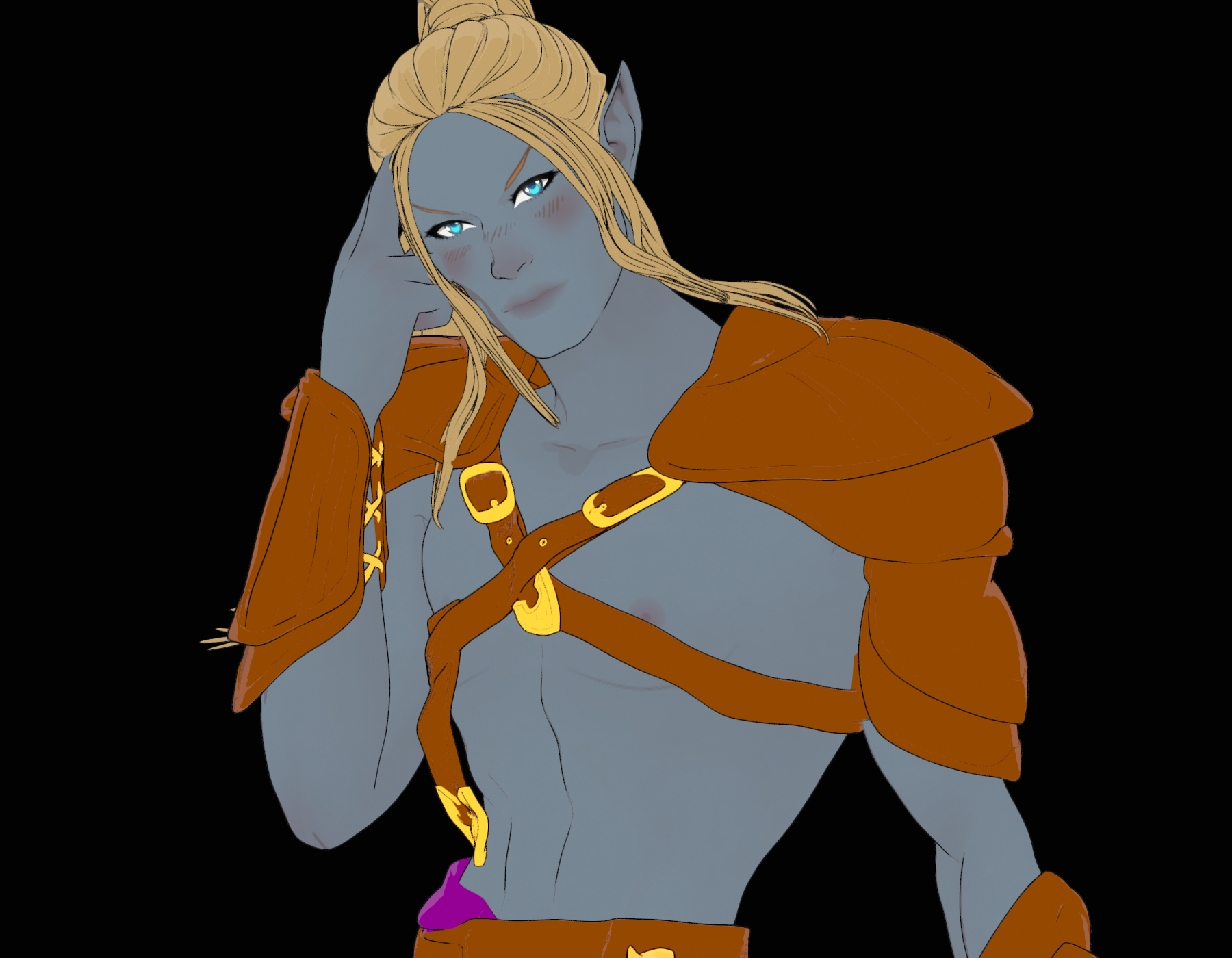
The new shader is very interesting to me. I'm not sure overall how great it will be without providing more content, but its pretty fun to mess around with. Here is an Elf done in the anime/filament style
That looks great. I bought the Vicky 9 Bundle and the Filitoon Genesis 9 Anime Shape Extension Pack and am quite happy with it.
AIUTO...CHI CONOSCE L’ITALIANO? PARTE QUATTORDICITiziano said:
L'unico modo per usare FilaToon in Filament è quello di lasciare la headlamp on?
In realtà basta che clicchi sul setaggio di base presente nelal cartella toon per l'environment e il gioco è fatto
SereneNight’s Sci-Fi Fun Thread 3The new shader is very interesting to me. I'm not sure overall how great it will be without providing more content, but its pretty fun to mess around with. Here is an Elf done in the anime/filament style
There's Always Another Sale Thread -- Discussions Only Pt 3i decided to use the premier membership to get as much as possible prior to expiration. Its free so why not, but then that is all folks. I've already spent my alottment of cash for October, so thats it folks for this month. Still have my FREE character bundle yet. Hoping something else beside filament toon stuff wil be added. thats the problem with subscribing to something where you have no clue if anything will even be needed or even wanted, even as free itms.
Anime Toons and Filatoon Shader Q&ALet's appreciate/discuss today's new releases - more ongoinger threaddaveso said:
OrangeFalcon said:
I picked up the new bundles today and have been very impressed with them. The cell shading style works with other assets and it's great to have a different style. The anime morphs are well done and can be used with other models, even Face Transfers.
The best part? Because you need to render the filament style in your active viewport, the renders are instant!
dont want to derail, but how do you keep a new window from popping up. My side view does render, but so does a new window. The main viewport isn;t rendering.
Two places
1. Open Tool Setting Pane. Click the Spot Render and uncheck new window. However for the Filatoons it's best imho to render in new window. They don't want you opening other apps or docs in front of the viewport but the window render is fine.
2. Render Settings>General>Render Target has two options Direct to file or Render Window.
Just a personal preference but I like choosing which drive based on if its a test render, for a project, a scene, a subset etc. And based on now I'll probably create one called canned toons for non-custom anime out of the boxish toons
FilaToon / Cell shaded rendering with Filamentainm.sloinneadh said:
Pax Asteriae said:
WendyLuvsCatz said:
Pax Asteriae said:
Rendered out this as a video to see how it was going and... well...
https://youtube.com/shorts/nMsdT9K-zSU
I suppose it's one way to fix pokethrough. Not quite sure why Filament decided he and his pants needed to vanish, but it definitely gave me a laugh.
it does that in animation sometimes if you have geografts, reloading the scene and rendering sometimes fixes it
There's no geografts though.
 It just decides it's had enough. It did also did it twice in viewport (well, the render's just the viewport anyway, so...) when I was fiddling around with the camera. I never know what it's going to hide either; the first time, the top and his body went and just left his pants, and the second time it was everything but eyes, teeth and hair. It just amused me that it was halfway through the video and suddenly he became The Amazing Dancing Teeth.
I saw similar issues when I left the animation rendering in the background while I browsed. Another one I had while browsing was the animation was sliced in two vertically, with the top half on the bottom and the bottom have on the top. I don't know if switching to another task is the cause, but there is a pop-up warning that tells you not to block the viewport while rendering an animation using filament.
Haha, not that either: it was the main app with nothing obscuring the viewport, and Windows knows better than to go to sleep (after severe words previously). I had it rendering on my render PC while I was working on a different one, so I could keep an eye on it. It's just a weird Filament bug. It's nice that it's not persistent though, so even if you save after it's happened, it reloads just fine. It's just the funniest DS bug I've encountered in a while, and Filament renders video so quickly that it's not a problem to redo it. (This video is ~361 frames and even though it's pretty basic, it rendered to video in around 10 minutes.)
FilaToon / Cell shaded rendering with FilamentPax Asteriae said:
WendyLuvsCatz said:
Pax Asteriae said:
Rendered out this as a video to see how it was going and... well...
https://youtube.com/shorts/nMsdT9K-zSU
I suppose it's one way to fix pokethrough. Not quite sure why Filament decided he and his pants needed to vanish, but it definitely gave me a laugh.
it does that in animation sometimes if you have geografts, reloading the scene and rendering sometimes fixes it
There's no geografts though.
It just decides it's had enough. It did also did it twice in viewport (well, the render's just the viewport anyway, so...) when I was fiddling around with the camera. I never know what it's going to hide either; the first time, the top and his body went and just left his pants, and the second time it was everything but eyes, teeth and hair. It just amused me that it was halfway through the video and suddenly he became The Amazing Dancing Teeth.I saw similar issues when I left the animation rendering in the background while I browsed. Another one I had while browsing was the animation was sliced in two vertically, with the top half on the bottom and the bottom have on the top. I don't know if switching to another task is the cause, but there is a pop-up warning that tells you not to block the viewport while rendering an animation using filament.
Filatoon Black border applying shader makes clothes vanishWhere did you find that filament->toon->border ? There's no such a "border" Shader preset.
You can add simply add Filatoon - General from Surfaces pane > Preset to the selected surfaces of Lillian gown.
Filatoon tips and tricksDreamlight has a tutorial that came out in 2021 https://www.daz3d.com/filament-pro-lights-and-rendering-secrets--2-new-lights--video-tutorial that I bought but never had a chance to examine. Today I opened the first video and a lot of my confusion with the lights was cleared up. I checked and it is currently on sale. Now this is NOT Filatoon and it discusses the previous version of Filament Draw Options, but it is close enough for anyone who never used 3Delight or messed with Filament before. Dreamlight also touches on some adjustments that had confused me for the toons. (I have to finish the tutorial still.)
As for sets, if you have bought older products with SKUs in the 22000s and before, good chance they are 3DL and will work with the Filament shader applied. I used it on a set this morning with no issues.
Filatoon Black border applying shader makes clothes vanishHi
Having some fun exploring the filatoon shader but I have tried applying the shader to say the lillian dress and if i apply the filament->toon->border shader it makes the clothes vanish and leaves just the border how do i get the border to work LOL liking this a lot (dont know what i will do with it but even so fun)
 FilaToon / Cell shaded rendering with Filament
WendyLuvsCatz said:
Pax Asteriae said:
Rendered out this as a video to see how it was going and... well...
https://youtube.com/shorts/nMsdT9K-zSU
I suppose it's one way to fix pokethrough. Not quite sure why Filament decided he and his pants needed to vanish, but it definitely gave me a laugh.
it does that in animation sometimes if you have geografts, reloading the scene and rendering sometimes fixes it
There's no geografts though.
It just decides it's had enough. It did also did it twice in viewport (well, the render's just the viewport anyway, so...) when I was fiddling around with the camera. I never know what it's going to hide either; the first time, the top and his body went and just left his pants, and the second time it was everything but eyes, teeth and hair. It just amused me that it was halfway through the video and suddenly he became The Amazing Dancing Teeth.FilaToon / Cell shaded rendering with FilamentPax Asteriae said:
Rendered out this as a video to see how it was going and... well...
https://youtube.com/shorts/nMsdT9K-zSU
I suppose it's one way to fix pokethrough. Not quite sure why Filament decided he and his pants needed to vanish, but it definitely gave me a laugh.
it does that in animation sometimes if you have geografts, reloading the scene and rendering sometimes fixes it
AIUTO...CHI CONOSCE L’ITALIANO? PARTE QUATTORDICI@Tiziano
Metti a 1 L'Environment Weight e togli la headlamp.. non avrai problemi di luce. Il comando serve appunto a gestire la luce di "base". Se metti altre luci e ti viene tutto troppo bruciato lo riabbassi.
Non c'è bisogno di Premier.. ti danno il G9 in versione anime e i materiali con l'aggiornamento delle librerie.. Vicky è solo l'ennesimo character. Il materiale lo puoi applicare a qualsiasi oggetto. Ricordati solo che poi non puoi renderizzare con Iray (i materiali Filatoon in Iray fanno pena).L'unica rottura è lo spessore delle linee.. tocca creare più geoshell (1 per ogni spessore che vuoi) e poi disattivarla nelle parti che non vuoi.
Almeno mettessero una funzione per avere lo sfondo in Filament...Anime Toons and Filatoon Shader Q&AMada said:
Petra said:
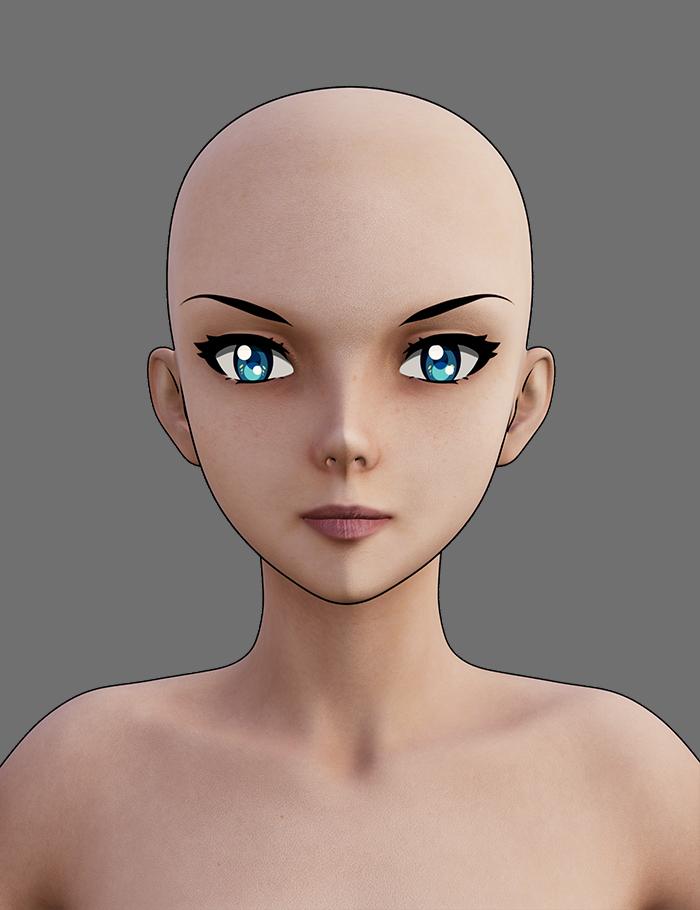
Can one put normal Iray shaders on the new Victoria 9 toon shape?
Yes but you won't have the outline, and the normal G9 eyeballs would probably work better with Iray Textures.
If you're just after the iray texture but still want the outline and render in filament, just drop the base colour texture used in iray into the right channel.
In this image I loaded Vicky Toon, and then applied Josie's Iray shader, and then removed the maps from the normal and specular channels to get a flatter look
Thank you so very much Mada, that is lovely. Is there a light that you could recommend that works good with filament renders?
FilaToon / Cell shaded rendering with Filamentrlvanoosterhout said:
I really dont understand it. I used the filament tool on different object. They keep turning black. Has anyone written a step by step guidance already. Getting hopeless here......
Giving a comprehensive sbs guidance will take some time. Let's firstly resolve the "black / dark scene" issue:
1) Do what's shown in below screenshot.
2) Load a G9 toon character or your current scean is already lit.
FilaToon / Cell shaded rendering with FilamentRendered out this as a video to see how it was going and... well...
https://youtube.com/shorts/nMsdT9K-zSU
I suppose it's one way to fix pokethrough. Not quite sure why Filament decided he and his pants needed to vanish, but it definitely gave me a laugh.
FilaToon / Cell shaded rendering with Filamentrlvanoosterhout said:
I really dont understand it. I used the filament tool on different object. They keep turning black. Has anyone written a step by step guidance already. Getting hopeless here......
I was getting this as well I found using one of the presets, skin hair etc worked.
FilaToon / Cell shaded rendering with Filamentrlvanoosterhout said:
I really dont understand it. I used the filament tool on different object. They keep turning black. Has anyone written a step by step guidance already. Getting hopeless here......
Have a look at Mada's thread https://www.daz3d.com/forums/discussion/704951/anime-toons-and-filatoon-shader-q-a#latest
FilaToon / Cell shaded rendering with FilamentI really dont understand it. I used the filament tool on different object. They keep turning black. Has anyone written a step by step guidance already. Getting hopeless here......
Daz 3D is part of

Connect
DAZ Productions, Inc.
7533 S Center View Ct #4664
West Jordan, UT 84084Licensing Agreement | Terms of Service | Privacy Policy | EULA
© 2026 Daz Productions Inc. All Rights Reserved.