-
Power blasts & bolts of lightning
Here are a few, there are more
https://www.daz3d.com/lightning-bolts-vol-1
https://www.daz3d.com/lightning-maker
https://www.daz3d.com/rl-bring-the-storm
https://www.daz3d.com/orestes-electromancy-for-iray
https://www.daz3d.com/orestes-electromancyLines and banding in HDRI rendersJust started noticing this recently and it only seems to be happening on one machine, my newest and most capable.
using some of the Orestes Burnt Lands and Forset Grove HDRIs, and a G8 figure, there are lines/bands that appear across the character, and they seem to move with the camera. Doesn't matter if it's the Perspective view, or other cameras I create. I've added a full render, not viewport. The band in this one is across the upper arms and chest. At other angles and with other figures they can appear across the hip or legs.
Anyone have any ideas?
I'm running DS4.15.03 on the machine in question, 4.15.02 on the machine that doesn't have the problem. And no, I'm not going to upgrade to 4.20, I;'ve tried that and it's got too many bugs.
Need help making iRay match FilamentSo I was working on this Orcish character, and as I was tweaking the iRay shader (iRay Uber MDL) I noticed I liked how the Filament preview looked more than the iRay render. I am only using this for a light source https://www.daz3d.com/orestes-iray-hdri-environments--cave-shelter.
Not being familiar enough with iRay, I was wondering if you could help me make the iRay shader (left image), look closer to Filament (right image). I tried playing with Transluncency color and values and SSS, but I'm having a particular hard time making the muscles "pop" more, look at the middle of the chest, there is some shading going on which in iRay looks more "flat" (to my eyes). I tried adding a separate ambient oclussion pass and it helps, but it is not quite there.
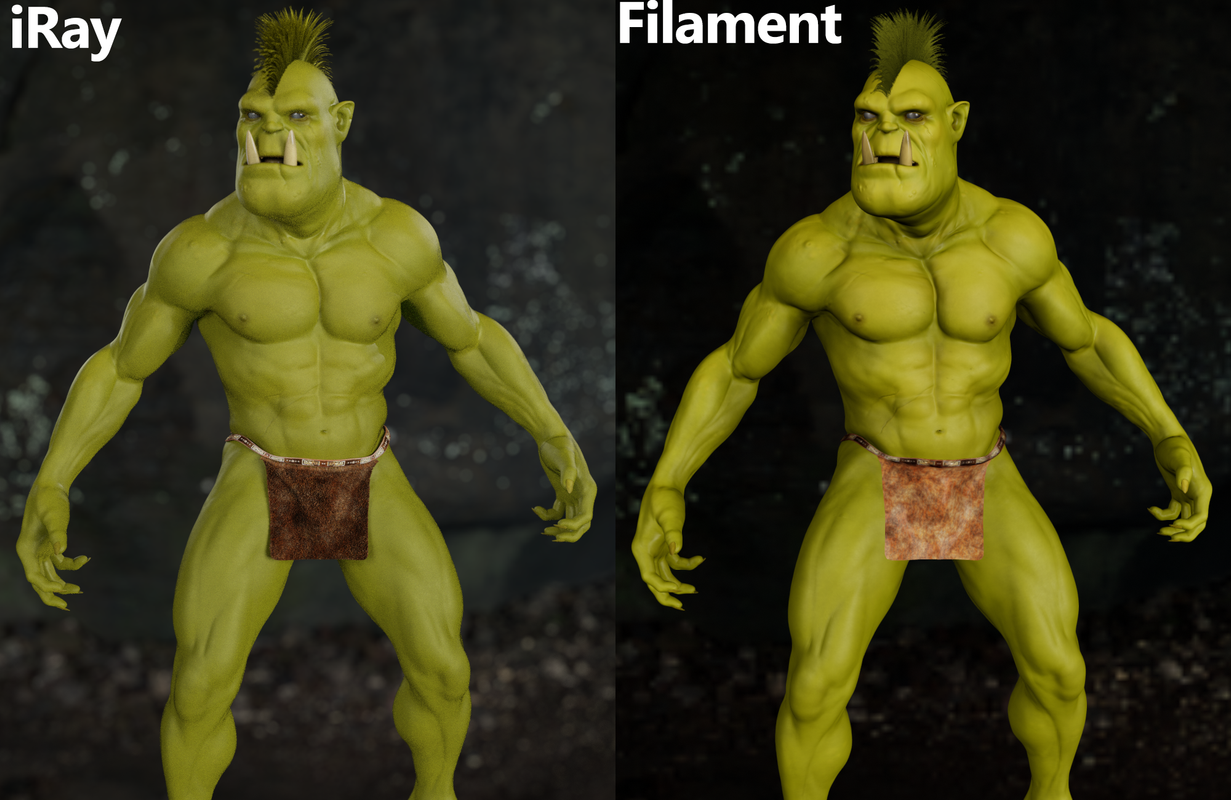
I am not looking for the more "real", this is an artistic choice of what looks "better" for my purposes, it is a look I am after.
Thank you.
Spotlight casting shadows over figuresI have Midnight Stories Blue Nebula HDRi and a soft fill 2 from Render Studio 2 Volumetric plus in the above image.
I've tried with different HDRs and with lights from Easy Light and Render and simply a basic spot light (and the shape changes the shadow.) The bigger the emitter size, the bigger the shadow across the skin and on the ground.
I hope this is what you need:
I've screen grabbed two and rendered the second. It's a simple daz spotlight, about 100000 and emitter 200x200. Render Emitter off (when Visibile in Viewport is off, the shadow is still there). The HDRis are nebula again and Orestes Oblivion. To me, it appears that something is going on with the HDRi's interraction with the spotlight, as its emitter shadow is moving with the HDRi light.
Thanks for your help with this. It's teeth gnashing! lol
"Ocean Wide" product lighting issueIf you still need an answer to your questions ...
- but now my scene looks a bit overlighted. Since i can't see the skydome in the scene tab i don't know how to chage intensity of the light. Does anybody know?
With an hdr image in the environment map, you can reduce (or increase) the brightness of a scene by lowering (or raising) the values for Environment Intensity, Environment Map or both. See the first two images below.
- And how can i delete the skydome if i need?
An hdr map can be loaded into the Environment Map either via a product such as Orestes Skydome (Render Settings) or manually by using either the Browse option of the Environment Map or by manually locating the desired image to use and dragging and dropping it onto the small icon for Environment Map. If you want to remove the map, choose the None option for the map. See the second two images below.
Merging a saved figure wipes out SkydomeI use the Orestes Skydomes a lot because they are so beautiful. There's one for just about any time of day.
So when I'm building a story, I save the custom figures I create (as seperate .duf files) to reuse in different scenes.
But when I merge one of these saved figures into a new scene, it clears out my skydome to a blank background (transparent).
Why is that?
Is there any way to avoid this?
IceScribe's Efforts in ArtIceScribe said:
First resized to a larger image with some major cropping, then postwork with some filters using Corel PaintShop Pro 2022. I like the atmosphere better. As in writing, sometimes there are things that seem 'precious', but have to be pruned out. I like the mood better in this version. Elements from Jackson's Field by TangoAlpha/DAZ, Under the Bridge/DAZ, Cookware Set by SloshWerks/DAZ, Clarvox Radio by 3D Classics, Summer Day HDRI by Orestes, June 1&2 by DesparateDreamer, Char Hair by goldtassel, Krayon Hair by goldtassel, Casual Springtime by Ryverthorn/DAZ
Hiya, I like that render a lot - kind of unfortunate now that the forums are not including pictures in the posts anymore - I mean the one where we see the girls from behind, right? It's a really interesting perspective and nicely balanced. Also like the overall impression a lot, the haziness of it all, suggests the heat of the day really well I think. Cool!
IceScribe's Efforts in ArtFirst resized to a larger image with some major cropping, then postwork with some filters using Corel PaintShop Pro 2022. I like the atmosphere better. As in writing, sometimes there are things that seem 'precious', but have to be pruned out. I like the mood better in this version. Elements from Jackson's Field by TangoAlpha/DAZ, Under the Bridge/DAZ, Cookware Set by SloshWerks/DAZ, Clarvox Radio by 3D Classics, Summer Day HDRI by Orestes, June 1&2 by DesparateDreamer, Char Hair by goldtassel, Krayon Hair by goldtassel, Casual Springtime by Ryverthorn/DAZ
IceScribe's Efforts in ArtTested Orestes Sulfur Skies.
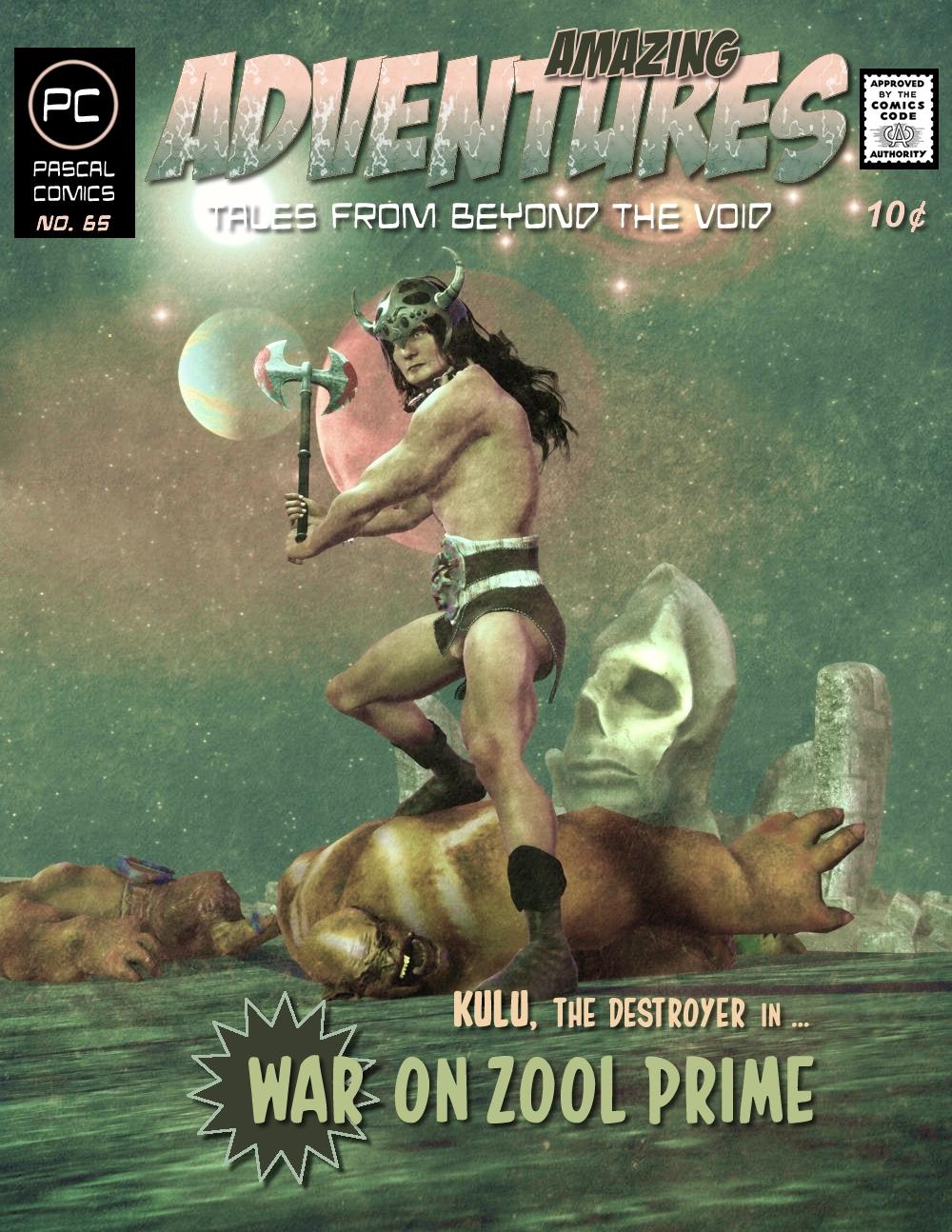
Amazing Adventures!Here's Issue No. 65 using Orestes Graphics : Sacelleum of Corlyk (love the name) in the foggy background.
 IceScribe's Efforts in Art
Remembered a culvert scene/prop, there in "Jackson's Field by Tango Alpha. I think it suits well. Had to use the Iray Uber script to make Iray, and then remove all gloss, reflection for the visible parts. Sky by Orestes is good. Overall, the general feeling of this scene works. I've made 2 copies of the DAZ scene, so I will make a 3rd, and work on that with the figures.
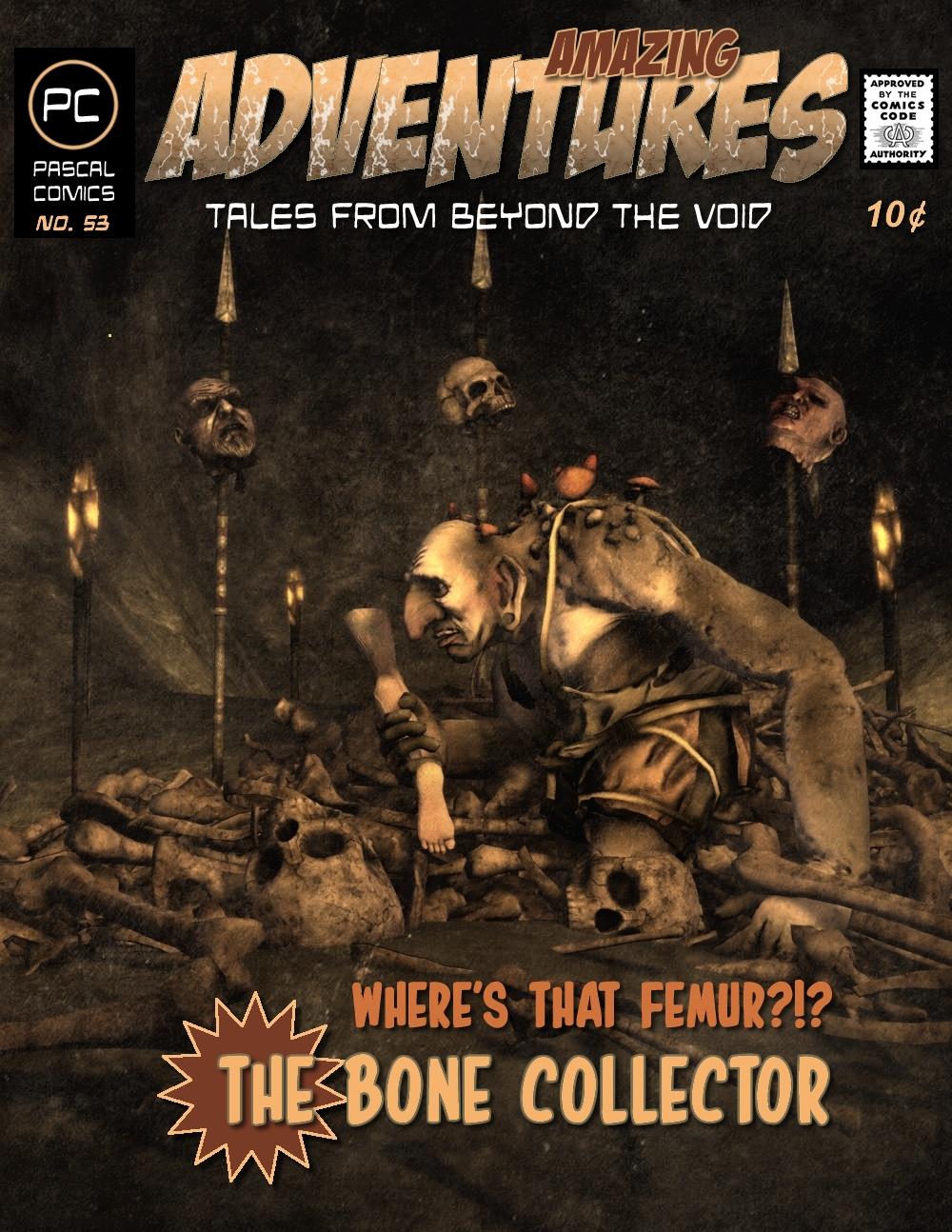
Amazing Adventures!Here's Issue No. 53 using Orestes Graphics 'Them Bones' and a forest troll I got from somewhere years ago. I've been collecting 3d models for years thinking I'd use them somewhere when I finally got off my butt to do some art. So here they are.
 Can't Edit Dome?
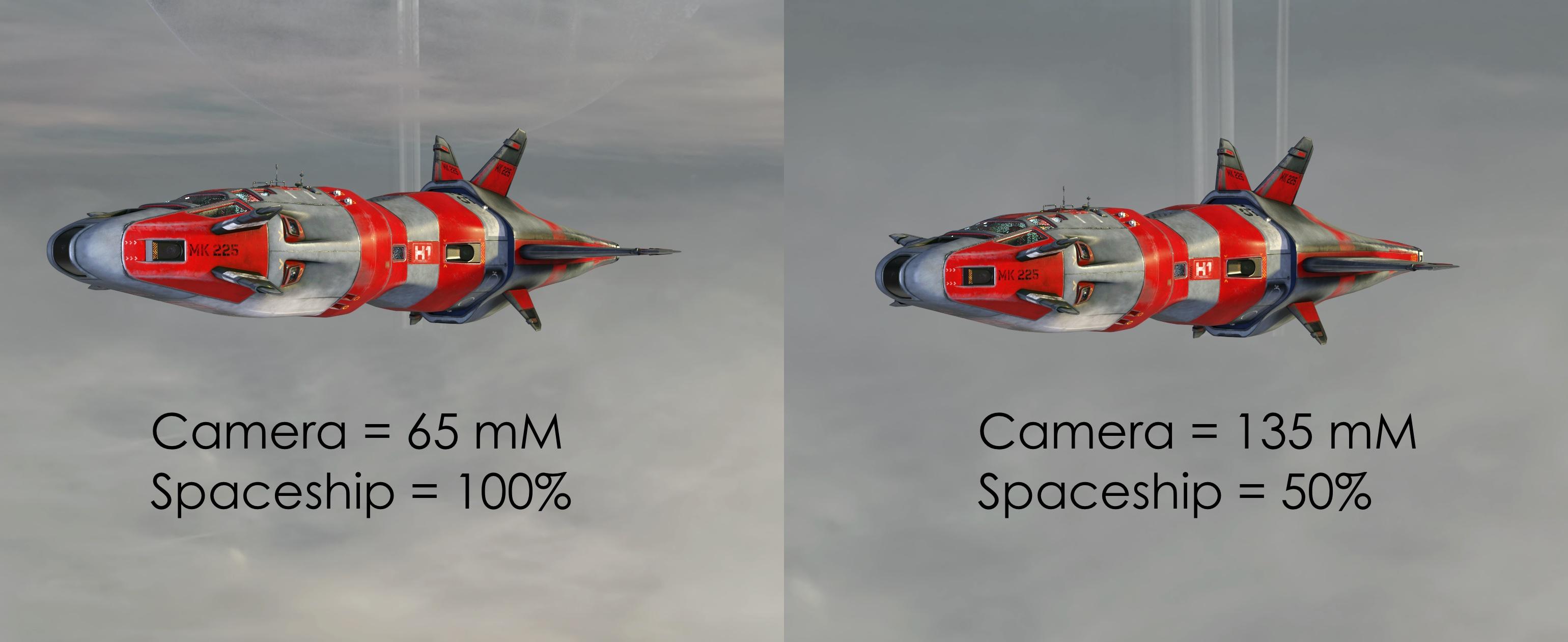
HDRI's don't scale like physical domes; they work more like the sky. What you do instead is change the focal length of the camera. Begin by reading http://docs.daz3d.com/lib/exe/fetch.php/public/read_me/index/21981/21981_quick-start-guide-to-the-iray-dome-and-the-use-of-hdris.pdf and then this https://alphauniverse.com/stories/how-to-take-big-moon-photos-all-in-camera/
I thought I would illustrate it by using https://www.daz3d.com/the-phantom and a HDRI, https://www.daz3d.com/orestes-iray-hdri-skydomes--oblivion, with a vertical edge on saturn-like planet. I rendered with two settings, camera 65 mM focal length and the ship at 100% and 130 mM focal length and the modal at 50% of normal size. Note the thickness of the ring bands:
 How to use the Bloom effect?
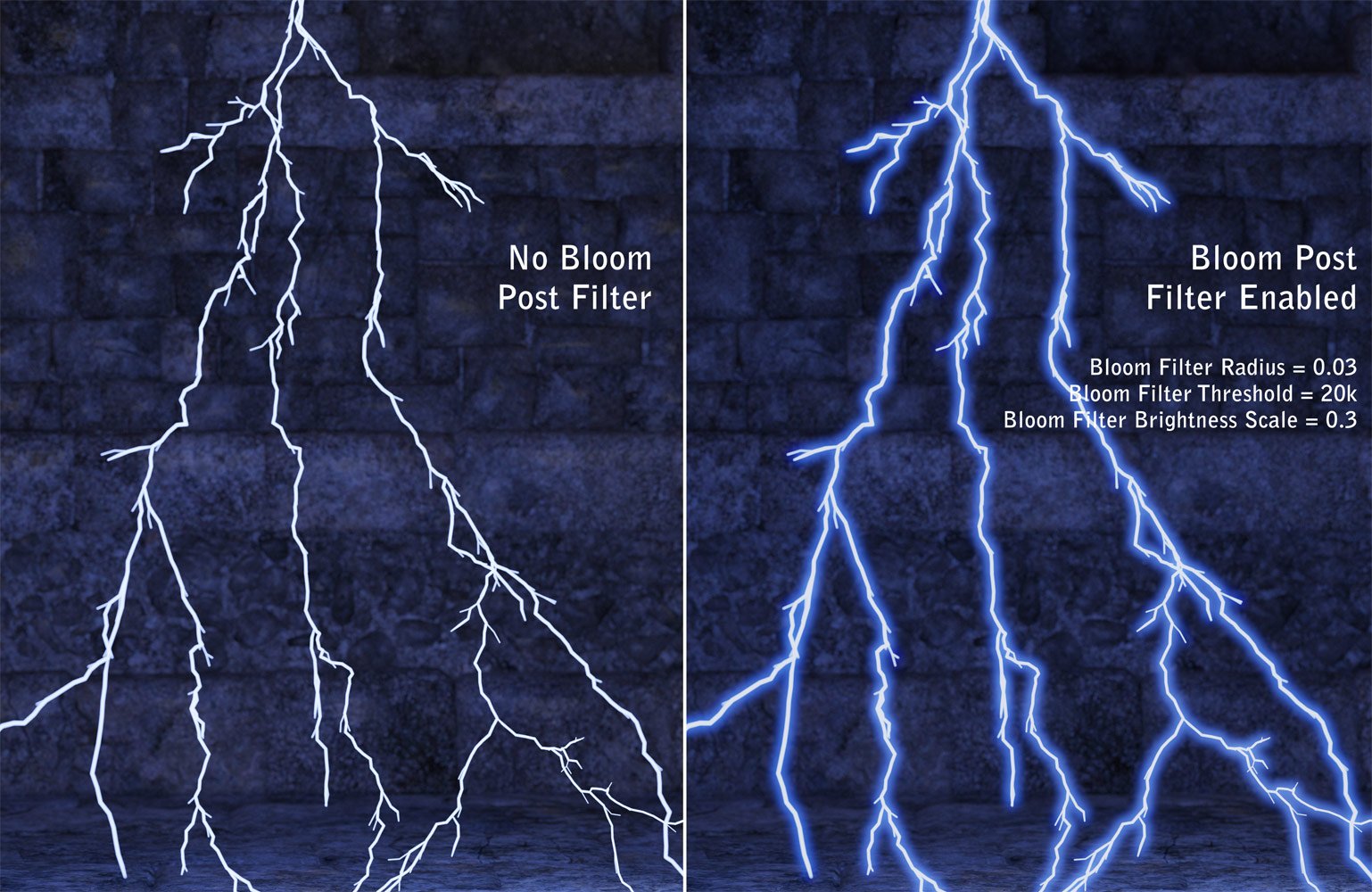
I purchased "Orestes Electromancy for Iray" [https://www.daz3d.com/orestes-electromancy-for-iray]. How do I produce the "Bloom effect" ONLY on the lightning? When I try adding it, the bloom effect impacts the entire image which is not what I want.
 Using an Nvidia GPU on a MacOS later than 10.13 (High Sierra)
Well, it's been educational :)
I managed to get OSX 10.13.6 High Sierra running on my HP z440 (E5-2680v4, Quadro M5000, 32Gb RAM) using the OpenCore documentation and the reddit r/Hackintosh list. I also managed to install OSX 64-bit DIM 10.0.0.0.0.0.0.0.80 and Daz Studio 4.12.0.86. I even got working Iray viewport visuals and Iray renders.
But, you really don't want to go down that route for anything serious.
I put together a very simple scene using Byni for Eva 8, the dForce Clarissa dress and Orestes' mystical whisps:
OSX 10.13.6 Nvidia drivers 380.something and CUDA 418.something
Simulation: 03:56
Render: 03:51Win10 Nvidia 472.something
Simulation: 00:57
Render: 1:50I guess there's all sorts of reasons, but it's not going to get better as it's not possible to go beyond OSX 10.13.6 given the the 'latest' Nvidia drivers. Nvidia hardware on OSX is an evolutionary dead-end.
I don't have the inclination to do the same test on GNU/Linux by running Daz under Wine 7.something, which I understand has the correct CUDA library etc. for Iray to work with much more recent drivers. All my Linux boxen run Alpine Linux which runs MUSL libc which in turn cannot run the Nvidia binary blob which is linked to glibc.
Hope my little experiment satisfies somebody's curiosity, someplace, somewhere, somehow.
:)
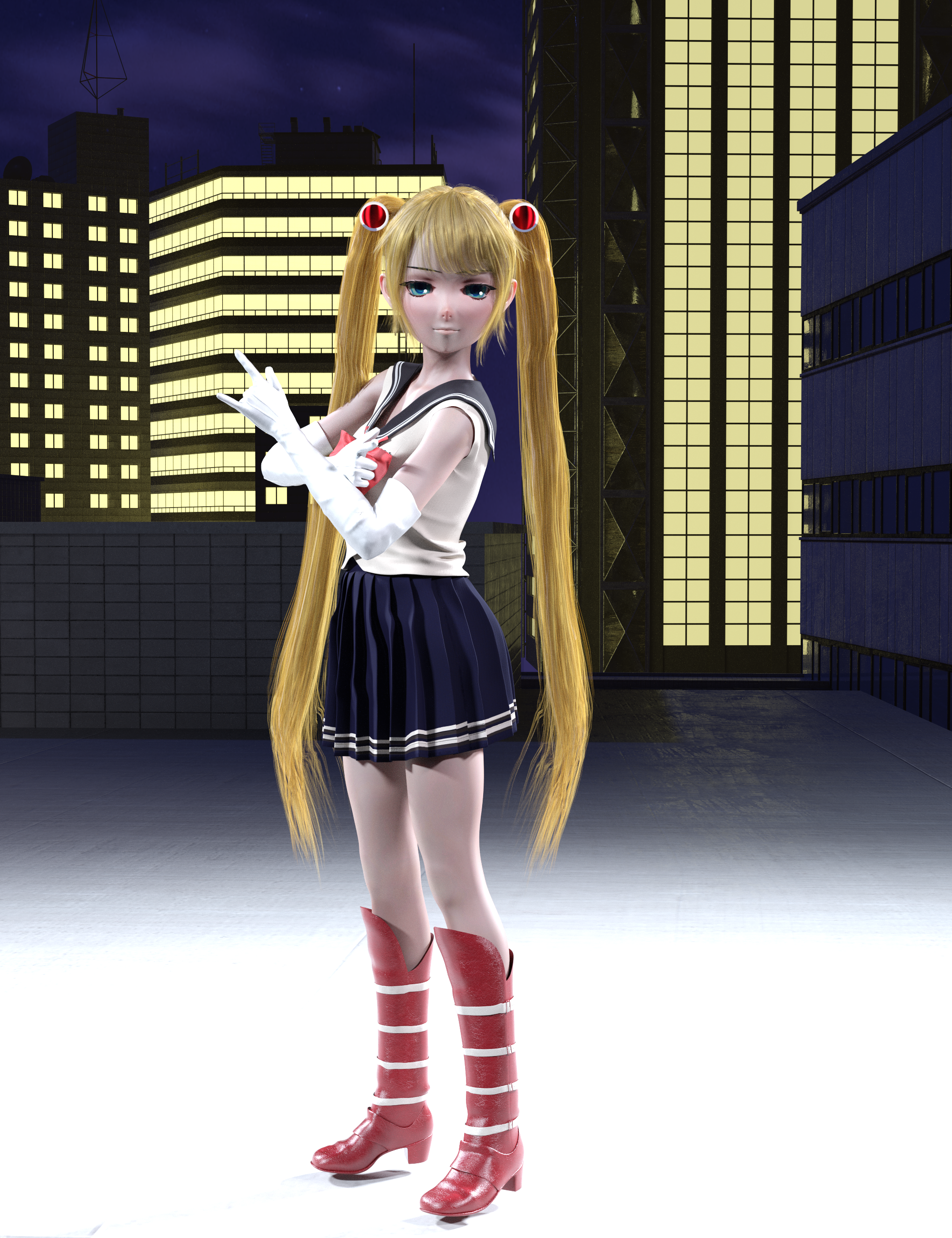
More Non-photorealistic Renders (NPR III)I adjusted the environment settings to get the sky closer to anime. It's from Orestes Starry Night. I used the JK Outfit and hid the sleeves
I made the hair spheres myself and used ultra sci-fi shaders to color them and added the white part in Clip Studio
The set is Streets of Japan plus some buildings from another site's free pack while I adjusted the lighting on the buildings myself since the windows are their own material zone. I feel like these buildings match Streets of Japan nicely for a background
I used the high schooler morph from the Growing Up bundle then made her calves and thighs longer to match the animation style and made more face adjustments
 Orestes HDRI Milky way problems
Using Orestes milky way hdri with depth of field on and using a finite sphere because the infinite sphere just won't work, unless I'm really screwing something up. Having all kinds of trouble trying to get the hdri into focus. Shouldn't the focal distance of the camera equal the dome radius in the environment tab? But it doesn't seem to work. Also, what is going on when I extend the focal distance out and it seemingly turns inside out?
HDRI Dome for sky not sharp - asking for advicehello,
i'm trying to use the Orestes Iray HDRI skydomes for a basic scene with 2 trees and the backdrop of the night sky
the trees render crystal clear but the night sky even though it's supposed to be 18000x7000 shows very blury and low quality
does anyone know how i can render so that the dome output is sharp and clear ?
example of poor night sky but clear trees attached
any advice where to look is appreciated
i have got a groundplane and i have also tried it out as far as it will go to try get the night in focus but nothing seems to work
How do you show a planet in the sky?Hi FSMCDesigns,
Thanks for the reply. I do have several of Orestes sets and I like them very much, but I have something specific in mind, and I would like to be able to create the effect myself if possible.
How do you show a planet in the sky?Check out Orestes, they have quite a few HDRIs with planets in them
Daz 3D is part of

Connect
DAZ Productions, Inc.
7533 S Center View Ct #4664
West Jordan, UT 84084Licensing Agreement | Terms of Service | Privacy Policy | EULA
© 2026 Daz Productions Inc. All Rights Reserved.