-
Simple way of fixing snaggy teeth in G8 import results from HeadShop?
By the way: the source photos used did not show any teeth (mouth closed) but please don't tell me to contact the HeadShop developer cuz that is a thorny path
Simple way of fixing snaggy teeth in G8 import results from HeadShop?Hello again, It's been a year and I am still a 'new user', having acquired some skills and massively lacking others and still not got a powerful GeForce videocard to finally take this hobby to a next level. [Sigh]. Anyway, today's question is about teeth, horrifically snaggy ones:
Like the reliable but ultimately disappointing “Face Transfer” the bugfesty train wreck of a plugin called “HeadShop” produces faces that have near zero verisimilitude with the original source portraits (I am sure you would disagree being a morph slider wizard and/or facemap virtuoso and I am glad for you), but I am kind of past that and have abandoned all hope for a look-a-like with these stagnant, poorly developed plugins. Still, I have found a use for my top-5-worst-purchase decision "HeadShop" and that is producing wildly unconventional faces but having said that, I am not ok with the crazy snaggledy-snag teeth that accompany these odd faces (see piccie).
Is there a way to (easily) replace these horrific teeth with a standard set of (Gen8) teeth? I can’t seem to find it in morph sliders and DAZ shop products like “Teeth Master” and “Easy teeth” don’t seem able to fix this problem at all (at best they make the teeth 20% less snaggy mainly by just making these travesties of teeth smaller).
Thx y'all
Distorted hands and TeethHi Everyone,
I hope you can help me with two problems I am having with a couple of morphs I am creating.
I have spent a lot of time applying a lot of morph dials from packages I have purchaced here to my base figures using the morph dials.... a bit of this and a bit of that... and an insane number of them to get the look I am going for. The bodies start with Gen 8.1M. The heads are different. On one of them I started with a Gen 8 head morph I liked, and then added a lot of morphs to that. On the second one, I started with a head morph I had tried creating several years ago for the original Genesis (Used headshop). I converted that to Genesis 3 using GenX AddOn Gen3 Bundle and then from gen 3 to gen 8 using Xtransfer-genesis 3 to 8 converter. after I got the look I wanted, I created a single dial for each of them using dial fusion. So far so good, BUT I am going to be upgrading my system very soon with a new Solid state hard drive for my C; drive, and finally upgrading to Win 10 (yes, I'm a dinosaur still using Win 7 ;p). My runtime is a mess, and I was thinking it would be a good time to reinstall things onto the new drive and get rid of a lot of old crap and other dead wood as well as errors, but with hundreds of dials going into my two characters, I don't want to loose what I have done by changing the way things are installed or possibly missing reinstalling something. Sooooooo.... I wanted to turn my two dial morphs into stand a lone morphs that were not dependant on all the tiny morphs that I used to create my dials. Since I am still using Win 7, blender etc were not an option, but I found a cool tutorial that would let me create the morphs using Hexagon :D.
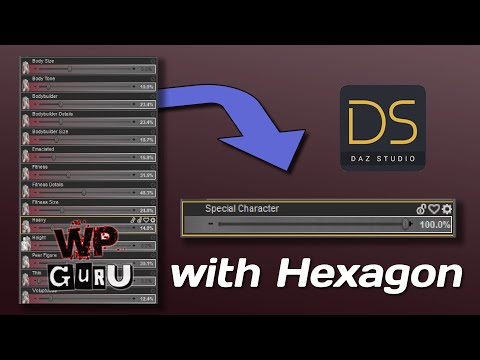
I followed the tutorial by WP Guru, and now have my morphs locked in.... except for two problems;
1) the hands distort badly when I pose the figures.... ok in Zero, but not when they are posed. I sort of remember reading somewhere that this is caused by a simple setting change, but I can not remember more than that about it. For some reason DAZ will not upload my images, So I have uploaded to Dropbox instead.... here is a link.
2) The teeth also are a problem. On the character that I started with a Gen 8M head before doing all the dial morphs, the teeth are normal on the multi-morph dial, but distorted on the Morph after I converted it with Hexagon into a stand a lone morph. Not severe distortion, but not normal. On the second character that I started with a Genesis head morph, and then converted it up to Gen3 and Then Gen8, there is some distortion on the teeth on the multi dial morph, and scarry nasty distortion on the hexagon converted version of that. I assume from that that the other conversions had some errors, but the additional distortion in the Hexagon converted morph is just horid. Here are links to the images of the Teeth problems.
multi-dial morph starting with Gen 8.1 No distortion
Same morph after converted using Hexagon.... Some distortion of the teeth.
My second character that originall started with a genesis morph that I converted up to Gen3 and Then Gen8. Top image is the multi-dial morph befor the conversion with Hexagon (some distortion) and the bottom image is the same morph after Hexagon conversion (hiddious distortion of the teeth)Any sugestions about what I can do?
PS... I never did any morphing of the teeth at any stage for either character, so I'm at a loss on that.
Creating a Genesis 8 character from a custom mesh?arstropica said:
Richard Haseltine said:
I'm sure Blender must have some kind of projection/shrink wrap type function. Hexxagon will snap to a background object, I think, though not sure if it works with a push/shrink type of tool.
Based on my research, Blender's shrinkwrap uses a combination of vertex positioning and groups to deform meshes. As a tool, it is more of a broadsword than a scalpel for doing any type of detailed retopology work. I've checked out HeadShop, Facegen and Daz's Face Transfer plugin and none of them really deliver good results. My initial goal was to take a 2D information from a photograph of a face and project it onto a Daz figure as accurately as possible. I had to come up with my own modeling workflow which uses 3 different types of software to import photogrammetric objects into Daz.
1. Face Alignment (free / open source)
URL: https://github.com/1adrianb/face-alignment
Requirements: Linux (apparently mac and windows too), Miniconda (https://docs.conda.io/en/latest/miniconda.html), Python 3.7
Installation: Clone my repository fork (https://github.com/arstropica/face-alignment/tree/demo) and follow the Github instructions.
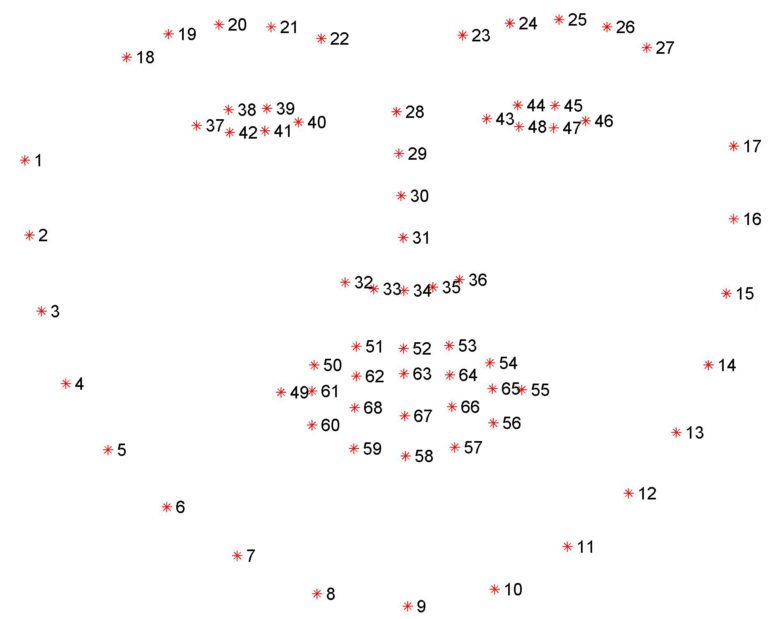
This python script is part of a 2-step process that generates an accurate 3D facial model from almost any photograph of a human in which the facial features are visible. The purpose of the script is to identify and localize facial landmarks on a 2D photo that can be used to build a 3D model later on. In it's original form, the script will generate 69 facial landmarks using DLib, a Computer Vision library. But we really only need 5 of these landmarks (2 eyes, 1 nose, and 2 lips corners).
I had to write my own implementation of the script to extract the 5 landmarks for the next step. (https://github.com/arstropica/face-alignment/blob/demo/scripts/batch.py).
Run python scripts/batch.py <image directory> to generate the landmark text files.
2. Microsoft Deep 3D Face Reconstruction (free / open source)
URL: https://github.com/microsoft/Deep3DFaceReconstruction
Requirements: Linux, Github Large File Storage (https://git-lfs.github.com/), Miniconda (https://docs.conda.io/en/latest/miniconda.html), Python 3.7, g++ & gcc Linux libraries
Installation: You can either clone the original repository, setup an anaconda environment and then download the dependencies separately or use my branch (https://github.com/arstropica/Deep3DFaceReconstruction/tree/demo) which contains the anaconda environment file as well as the dependencies and follow the Github instructions. If you do use my branch, you'll also need to install and initialize Github's LFS extension (https://git-lfs.github.com/) in the cloned repository in order to be able to download the 100M+ model files.
The Deep 3D package uses AI to reconstruct a 3D facial model from an image. The python script accepts the 5 landmarks from the previous step (similar to Facegen) and uses a trained AI model to render a textured 3D mesh of the facial characteristics of the subject in a photograph.
Copy your text and image files from the image directory in the face-alignment repo, to an "input" directory in Deep3D and run the demo.py script to generate the mesh(es).

3. Softwrap for Blender (paid plugin)
URL: https://blendermarket.com/products/softwrap
Requirements: Blender v2.8+, Meshlab
Installation: install from the settings/add-ons panel like any Blender plugin.
This is finally where the magic happens!
Softwrap is a Blender plugin that uses a cloth-like physics engine (not unlike dForce) to deform one mesh using another. It does it without changing the vertex order of the source mesh so it's perfect for Daz. There are a ton of settings from symmetrical deformations to mesh filtering, smoothing, elasticity, etc. A better way to look at the plugin is that it treats your source mesh as a cloth that wraps around a hard 3D object. Using the plugin to get a Genesis model to conform to a 3D mesh requires a few preliminary steps.
First take your 3D face mesh from Deep 3D and use an application like MeshLab to convert it to a DAE model. You need to do this if you want to import the face model into Daz Studio as it doesn't handle OBJ vertex colors well.
Then, in Blender, unwrap the model's UV map and bake the DAE model's vertex colors to a bitmap texture. (Here is a good tutorial if you don't know how: https://www.youtube.com/watch?v=7cphcAZ5ai8). It is a good idea to normalize the positioning of the model by rotating and aligning it with the origin and resetting its pivot.
Export the baked texture and the unwrapped model back to an OBJ and MAT format. Now you can import it into Daz.
At this point, I usually make shape or pose to adjustments to my Genesis character's head in Daz. I import my textured facial model into a scene with a vanilla Genesis character and position and/or scale it so that it covers the character's face. I then use the shape and pose morphs to make gross changes to Genesis facial characteristics so that the forehead, eyes, nose, mouth, chin and jaw are roughly the same shape, size and dimensions as my facial mask. This doesn't have to be perfect, but it will help with Softwrap's retopology process.
Export your Genesis character from Daz as an OBJ at base resolution (I use 1% scale to work in Blender). Also export your positioned 3D facial model the same way.
Import both OBJ models into Blender (ensuring the Poly Groups option is checked).
You may want to create a custom vertex group for the part of your Genesis model that will should not be affected by Softwrap. I usually create a group excluding the character's face, lips and eyelids.
In the Softwrap rollout, select the Genesis character as the source mesh and the Deep 3D mask as the target mesh. Select your vertex group as the Snapping & Frozen Group to protect the bits of your Genesis character that shouldn't be affected by the plugin. Hit the Start button and slowly increase the Snapping strength control to see the changes.
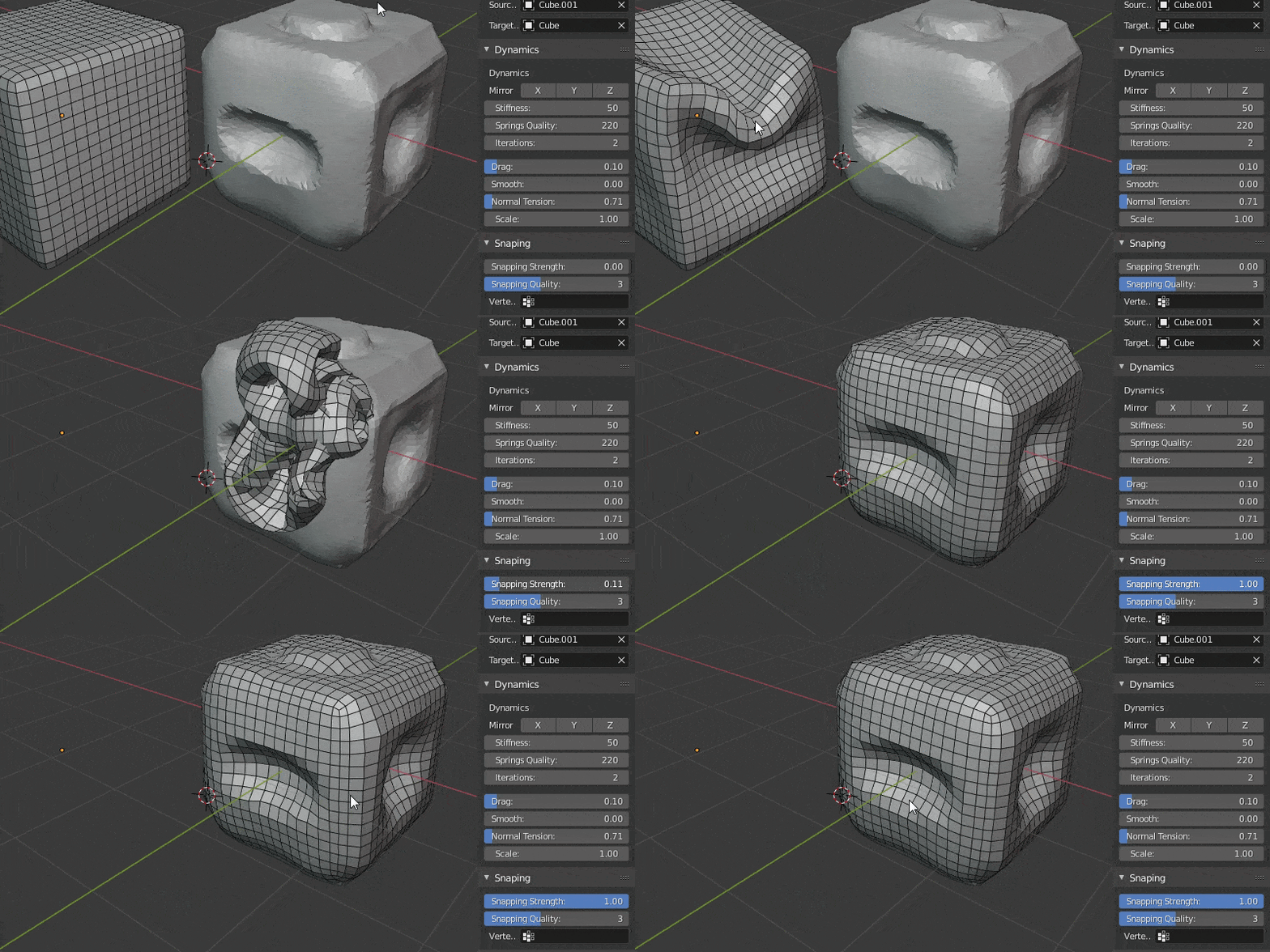

Use the pins, and other settings to fine tune the fit and then hit apply once you are satisfied. You can also leave the deformation as a shapekey and continue modifying your mesh.
Then you just export the mesh back to Daz (this time at 100%) and import it as a morph on a clean Genesis character and you have a good beginning for a custom character without ever having to do manual modelling.
Hope someone finds this helpful!
Has anyone gotten this to work, or improved on this workflow?
I can use softwrap in Blender, but have not had much luck with face alignment or Deep 3D Face Reconstruction in Windows
It seems like there is a new Pytorch-based version of Deep 3D Face Reconstruction that doesn't require the 5 facial landmarks: https://github.com/sicxu/Deep3DFaceRecon_pytorch#inference-with-a-pre-trained-model
FaceGen vs Face Transfer vs Headshop 12. Pros & Cons?Agree with this!
nonesuch00 said:
My ranking is:
1) FaceGen Artist Pro
2) Headshop
3) Face Transfer
What is the ideal Daz Studio install directoryWhich is the ideal Daz Studio install directory. I know Headshop support seems to like C:\Daz3d\Applications etc. and on another computer it was installed there by default. But when it seems impossible to install it there now. Program Files seems to be the place.
So, what's the meaning of this? Is there a best place to install Daz Studio? And why?
Old Content.....Pugwash_3769741927 said:
FirstBastion said:
I generally dont do cross generation conversions.
Personal choice and I respect that. It's certainly not something that works for everyone or with every product. Personally, I don't like to buy something and not feel I've got my moneys worth out of it. So to buy a $15-$20 converter app and extend the life of something that I enjoy using really does work for me, and as an (extremely) amateur 3D artist, justifies the process needed to myself. I'm not selling my art so this meagre expenditure satifies my needs.
For example. I love Syltermermaids V4 textures, not just for themselves but they work well with most of the output jpegs I get from Faceshop 6, especially her Pia set. I like FS6 more so than Abalone's recent versions of Headshop and Daz's Face Transfer so to use those head textures and morphs that I've already created only needs a texture converter for V4-G8 (thank you Blacksmith3D) and D3D's V4-G3 morph converter coupled with RiverArts Software's G3-G8 character converter. Trying to recreate the characters I've already made with the new apps hasn't worked yet and would add too much additional work to make a render worthwhile.
It's whatever you are happy with.I never checked under the hood, but the reason I don't do the conversions, is I have a suspicion that the conversion process generates a lot of additional data for those models leading to longer load times.
As you said, each artist decides what works best for them.
Old Content.....FirstBastion said:
I generally dont do cross generation conversions.
Personal choice and I respect that. It's certainly not something that works for everyone or with every product. Personally, I don't like to buy something and not feel I've got my moneys worth out of it. So to buy a $15-$20 converter app and extend the life of something that I enjoy using really does work for me, and as an (extremely) amateur 3D artist, justifies the process needed to myself. I'm not selling my art so this meagre expenditure satifies my needs.
For example. I love Syltermermaids V4 textures, not just for themselves but they work well with most of the output jpegs I get from Faceshop 6, especially her Pia set. I like FS6 more so than Abalone's recent versions of Headshop and Daz's Face Transfer so to use those head textures and morphs that I've already created only needs a texture converter for V4-G8 (thank you Blacksmith3D) and D3D's V4-G3 morph converter coupled with RiverArts Software's G3-G8 character converter. Trying to recreate the characters I've already made with the new apps hasn't worked yet and would add too much additional work to make a render worthwhile.
It's whatever you are happy with.Can we have a Genesis 9 male character whose between ages of 21-23?That's pretty... specific, and subject to personal taste actually. You may have better luck with HeadShop if the guy in the photo is what you are going for.HeadshopHi Laslo,
I'm using Headshop 13.
HeadshopKatherine,
it would be helpful to identify the HeadShop version you need advice with (i.e: HeadShopPRO 2023, HeadShopLT 2023, etc.).
For one, hair is adjustable sizable, etc - pls. watch how to video at 9:00 https://youtu.be/L-wZLeR2l7o and it also exports to User/Public/Documents/My DAZ 3D Library/Runtime/FaceShop/fs
I can also tell you that HeadShopPRO 2023 does not work with Genesis 8.1, only Genesis 3, 8, 9.
Also, tech support is available at [email protected], as you have sent me an email 2 days ago (and I responded).
Laslo
HeadshopHI,
I haven't had any luck with placing hair in Headshop. I can drag a hair style over, but I can't adjust it. And it doesn't save with the figure.
Also, I get the following sequence of error messages when I try to use Genesis 8.1 figures:
No surface configuration has been recorded for this figure. Surface selection will need to be applied manually.
Unhandled exception has occurred in your application I you click Continue, the application will ignore this error and attempt to continue. If you click Quit, the application will close immediately.
Value cannont be null
Parameter name: image
Headshop closed because it could not create the necessary files.
--------------------
It works with Genesis 3 and 8.0
Headshop Installbueller1998_df4ca4b697 said:
So I bought the new Headshop 2023 LT, and have had problems installing it.. I contiue to get an error when I install it to my directory where my other plugins are. The same thing is happening on my backu computer that has a different path, which I followed. The instructions say you must install to the directory where your plugins ae and the way you figure that out is to go to the menu where you find About Plugins and it shows the path.
Since I don't see any other posts with others having this problem, I assume I am doing something wrong. Can anyone help me out on the install?
Easy. According to your screenshot, you are trying to install HeadShop to DAZ 3D/Applications/64-bit/DAZ 3d/DAZStudio4/plugin. That is NOT what the instructions say. The correct location in your case is is DAZ 3D/Applications/64-bit/DAZ 3d.
I also suggest you notice in the README that tech support is available at [email protected].
Best, Laslo
Headshop InstallSo I bought the new Headshop 2023 LT, and have had problems installing it.. I contiue to get an error when I install it to my directory where my other plugins are. The same thing is happening on my backu computer that has a different path, which I followed. The instructions say you must install to the directory where your plugins ae and the way you figure that out is to go to the menu where you find About Plugins and it shows the path.
Since I don't see any other posts with others having this problem, I assume I am doing something wrong. Can anyone help me out on the install?
Abalone - Headshop 14 does not exist... is it same as Headshop Pro? Update: AnsweredNot to mention that HeadShop Pro 2023 supports Genesis 9
Abalone - Headshop 14 does not exist... is it same as Headshop Pro? Update: AnsweredOkay, I think I've answered my own question from the answers in this thread: https://www.daz3d.com/forums/discussion/556741/march-19-first-ever-headshoppro-at-daz-commercial The answer appears to be "No." as the main artwork shown for Headshop Pro has a note that it already includes it's own sets of libraries "a $100 value," whereas the version of the same image used in the store lacks that caption.
Abalone - Headshop 14 does not exist... is it same as Headshop Pro? Update: Answered[Headshop 14 does not exist... is it same as Headshop Pro?]...and, specifically, will the nose, teeth and mouth morph add-ons that are labeled as requiring either Headshop 14 and Headshop OneClick2022 (also currently non existant in the DAZ store) work with Headshop Pro?
Starting
Wow! Thanks for the tips, I thought I must have plug-ins and assets to do my avatar, I know it will make everything easier but I'll check your links to try learning about the manual development. Thaaaank yoou!FirstBastion said:And to make the actual avatar you need to do it manually or try to use one of the automatic plugins that may or may not work well enough.
https://www.daz3d.com/easy-character-creation-with-facegen
https://www.daz3d.com/headshop-13-genesis-8
StartingAnd to make the actual avatar you need to do it manually or try to use one of the automatic plugins that may or may not work well enough.
https://www.daz3d.com/easy-character-creation-with-facegen
https://www.daz3d.com/headshop-13-genesis-8
FaceGen vs Face Transfer vs Headshop 12. Pros & Cons?Catherine3678ab said:
info_b3470fa520 said:
Catherine3678ab said:
For those considering trying out HeadShop any number, it is expected that the installation of Daz Studio will be at some default location - not a user defined location. HeadShop2023 does not work on W11Pro with my D/S being at a user defined location.
Catherine, as long as you know where your DAZ Studio is located (hint; anywhere, but inside a folder that also contains "DAZStudio4" folder, which contains Studio and plugins), you can install HeadShopPRO 2023 to that folder. Unlike you, some users really don't know where they installed their working DAZ Studio or have multiple copies of DAZ Studio installed at various locations. In my experience 99.9% of the install issues are caused by this. Thanks for clarifying this.
Laslo
Sadly no Laslo, we've been through all this. It does not work over here. As best I can determine, something is either hardwired in HS "or" in W11Pro which prevents HS from functioning.
Just a thought, could be a request, for to make HS into a separate program like FaceGen is; so then it would not matter where one installed it either. FaceGen makes and saves the morphs, we then open D/S, load the figure and dial in the morphs. FaceGen does have to be told where the content folder is of course, and that is done by the user - it doesn't
presume it is located at some mysterious location.
Catherine, I know for a fact that you're mistaken. As you recall, I wanted to show you this, but unfortunately you declined tech support, whether by skype or telephone.
Daz 3D is part of

Connect
DAZ Productions, Inc.
7533 S Center View Ct #4664
West Jordan, UT 84084Licensing Agreement | Terms of Service | Privacy Policy | EULA
© 2026 Daz Productions Inc. All Rights Reserved.