-
Rigging clothing with transfer utility makes item disappear?
Daz Studio treats it as being made for the base, so it will fit it to that and then project the morph into the fitted item (which, if the shape is smaller than the default, will shrink it inside the figure). If possible mdoel to the base shape, if that isn't an option set the Source Shape to the morph used (or Current for multiple morphs) and then check Reverse Source Shape from Target in the additional options in the Transfer Utility.
Is it possible to modify haircuts?* D-Former is a couple of nodes attached to an object to deform its shape. You may find quite a few tutorials on youtube by searching 'Daz d-Former'...
* A 'Weight map' (Black and White map) is used on a strand-based hair (SBH) to generate hair clumps / curves' density from weight 0% (Black) to 100% (White), similar to a Cutout Opacity map. You can find the weight map slots on Surfaces pane of a SBH (or search 'clump' or 'density'). Then modify the map as needed...I saw no 'Blow morph' on this hair but Yes, you may add some blow effects by yourself... For instance, this is a dForce hair, so use a 'dForce Wind Node' + several D-Formers to make the 'blow shapes', even other shapes as you wish... as attached screenshot. You may search 'Daz Wind node' on youtube...
"SY Intense Muscle Genesis 8, 8.1, and 9" Causes hands to deform on Genesis 8 femaleUsing the "SYIM Add Body Shape HD G8 Female" deforms hands on Genesis 8 and 8.1 female figures.
I have tried to unistall any other morphs but it still deforms hands on many but not all poses using genesis 8 female.
How do I know if it is the product that is at fault or something on my PC.
Attached image is stadard genesis 8.1 basic femail with only morph applied is "Intense Muscle Shape HD" in Base pose laying A.
(don't know if any file got attached it just says Uploading...)
[Released] RSSY Character And Material Conversion Bundle Genesis 8 to Genesis 9 [Commercial]DISCLAIMER, I have no financial stake in this product, I am just a Daz user. I don't even get paid for my YouTube videos (yet).
Before you return this product, please watch this live video of me using the Gen 8-to-9-character converter.
My video is over 8 hours long...
Please be considerate that this is live and not scripted.
I cover just about every conceivable aspect of this converter.
Just when the product seems to have problems (about 5 hours in), suddenly, it begins to shine and shows its real strengths.
This product is truly a "game changer" and I am not just saying that.
RSSY Gen 8 to Gen 9 Character Converter NEW UPDATE!

I am VERY pleased with this converter.
In working with this converter, I have uncovered various issues with Genesis 9 and the eyes not fitting right.
It has occurred to me that the eyes must be fit into the Gen 9 figures after any morph.
If you see me struggling with something in the video. Please leave a running commentary in the comment section.
Multiple comments are welcome, I read them all and try and answer them as well. (Please be nice.)
RiverSoftArt and Sickle Yield, please, if you see me struggling with a particular part of the program feel free to leave answers/comments in the comment section.
Best

Please like, subscribe and click the bell for "all" notifications.
 Newbie question regarding character creation
There are also body part and head part morph packages you can buy to create a similar-looking character to your posted pic.
And if you have body part morphs and head part morphs but you need some inspiration from inside DAZ Studio to get you started, there's Zev0's Shape Gen and Shape Gen Plus for Genesis 8 figures.
I personally have had a lot of fun creating custom character shapes with Zev0's Shape Gen Plus combined with Zev0's Skin Builder 8 for Genesis 8 Female and SloshWorks' Genesis 8 UV Swap products. 175 custom characters and counting.
Help, my wings crunch when auto following!Use rigidity - I usually set the reference points at the bottom and the tip of each wing. You want the rigid weightmap fill at the base of the wings to be quite low, so that it deforms somewhat with the morph applied and not pull away from the figure to leave a gap, but full strength on the main part of the wings so that they don't distort.
Rigging clothing with transfer utility makes item disappear?What it says on the tin - I have some OBJ clothing items I've imported into daz, I've rigged stuff like this before to make rigged weareble clothing in the past but I can't remember exactly how I did it (step by step) or what tutorial I followed, now I'm trying to do it again but whenever I hit ok on the transfer utility the obj item just... vanishes? Like it's still in the scene, it lists it as an object, but it's invisible in the viewport. Is there something I've forgotten to check in the transfer utility menu? Could me having moved the og obj files I've imported have something to do with it? When I try to do it I select the G8 figure as source and shape as current (it's got morphs dialled in), the OBJ clothing as target and shape default, and then the only thing I change is I check reverse source shape from target.
[Released] RSSY Character And Material Conversion Bundle Genesis 8 to Genesis 9 [Commercial]necroscension said:
RiverSoftArt said:
necroscension said:
With the converter, I've notice most of the models I have do not use FBM/FHM in their morph naming but use Head or Body instead. I have attempted to resave the name of the morphs to start with FHM/FBM, but still have issues because sometimes I wind up having doubled morphs. Was it ever considered to see if the morph name includes Head or Body as an OR statement?
You must not buy most of your characters from Daz.
This is a naming convention that has been in place for years.Ok, I will make an update to check if the morph name starts with FHM/Head or FBM/Body.
It may be standard, but it is not widely used. I'm trying to spot check, but there are Daz store characters that do not use FBM/FHM and instead use "<Character Name><Body or Head>", i.e. "Tathar Head" and "CCPuckBody". Darwin's Mishap, ChangelingChick, PedroFurtadoArts, Dax Avalange, Marcius (no longer with Daz but still sold here), Mousso, Oskarsson are some who don't or haven't followed the standard, and that's just on the male side.
Are you looking at names or labels? It's the name that matters, and has the standard, but the label is what shows on the slider..
Why is there no updates to face transfer?As far as I know, there are already some flaws with face transfer for G8, and now we have G8.1 and G9, but why after so long there is no update to it?
Help, my wings crunch when auto following!I've recently started updating some previously released products to Genesis 9 figures. And I'm puzzled as to what might be going on with my fairy wings.
- Geometries werre reshaped using Genesis 8F to 9 templates by Sickle Yield, then exported and adjusted in ZBrush.
- Cleaned up OBJ files were then loaded into DS 4.21 and rigged as normal using the Transfer utility
- When it came to the wings, custom bones were created for Upper and Lower right and left wings, and polygons assigned to each of these groups appropriately. Each group is 100% weight mapped to its respective bone.
- Smoothing modifiers and subdivision surfaces are applied.
- I've tried saving both as an attachment, and as a Wardrobe Top item. Both are exhibiting this problem.
- Everything works as expected until I apply a character preset to G9. Then I see crunching in the opper portion of the wings. This happens on "normal" proprtioned figures, and height adjusted figures.
I am wondering if there is a generic solution to fixing this issue. Otherwise the only other option I can think of is having to adjust the wings for each character and apply as a morph.
Help! 8-(
How to achieve this Skin quality ?MelonLord said:
lilweep said:
- High Definition details: Use either HD morphs in conjunction with high SubD level (e.g., ~ level 4) or otherwise use Normal maps and Bump maps. You can use a combination of all three, of course. Just be aware that Normal Map details will often just be a baked version of the HD morph details, so depending on what maps and morphs you are using you might not want to use both HD morph and Normal map for a given character at same time or it will represent doubling of the HD detail. But you can always eyeball what looks good.
- Skin microdetail maps: The PBR Skin shader has slots for skin details, so can plug some micro facet detail maps in there if you want. (I dont think this is generally necessary)
- Specularity: Use good quality specularity or roughness maps, ideally they should have speculairty details that correspond to the High Definition details, but probably not totally necessary.
- Vellus Hair: That character in your example picture is using Those Things's vellus hair product.
- Skin Shader: Use skin shader with good SSS settings and specularity settings. MelissaGT has some tutorial somewhere for setting SSS for Uber shader, and there are also some advice buried within various forums like this one.
I did tried Vellus but dropped it cause of how long it took to render and honestly, didnt see much difference with it. Besides that, I am absolutely clueless about all the other points you've mentioned. Also one more thing, I've tried experimenting using Skin Detail Resource 2 and got a similar result but it's still nowhere near the one above
Sorry i just browse the forums using the 'New Threads' feature and sometimes dont see that they are in New Users subforum before responding.
I can simplify what I said.
- High Definition details:
- The genesis character base mesh is very low poly (in other words it doesnt have a lot of geometry to work with). You can see this for yourself if you turn on any of the wireframe viewport options. Anyway, you may want a highpoly mesh to be able to get more detail using HD morphs. The base mesh can be further subdivided into a highpoly mesh on the Parameters tab, under Resolution (the options are Base and High Resolution). The High Resolution option enables Subdivision, which means you can increase the geometry by virtually subdividing it with the Render SubD or Viewport SubD values. (These two options give you a highpoly mesh only when you render or only in the viewport respectively. It will slowdown your viewport if you have the viewport SubD on, so typically I leave this at 1 and only have a high Render SubD.)
- Now with a high poly mesh, you can use HD morphs. HD morphs are made to change the shape of the character at very small scale to get fine details like pores, wrinkles, etc. On Daz Store, any character that has "HD" in the name comes with HD morphs. Some may be better than others. You can activate these by dialing in HD morphs in either the Shaping or the Parameters tabs.
- Besides HD morphs, another way to get detail is with texture maps. Most characters will come with Normal maps and Bump maps. These are just images that are intepreted by the render engine as height details on the skin like pores and wrinkles etc. When you load a character or apply a character's skin material preset, usually the normal maps and bump maps will be loaded. You can see these under the Surfaces tab. Unlike HD morphs, Normal maps and Bump maps do not require high SubD, so will work even at low poly.
- Skin microdetail maps: already covered in other post
- Specularity: Some characters will come with high quality specularity maps. Once again, these are just image textures that the renderer interprets as a glossy effect. The textures assist with the appearance of skin details by adding a glossy effect and roughness to skin where needed. If a character is well made, it will have high quality spec map that complements the HD morph/normal map details. You can see this texture map (and all other maps) used in your skin shader on the Surfaces tab.
- Skin Shader: There are different approaches to rendering skin. Some people use the all-purpose Uber shader and some use the newer PBR Skin shader. The shader is just telling the renderer how to render your scene objects. Both the Uber and PBR Skin can achieve realistic skin, and both have advantages and disadvantages. The PBR Skin despite being newer and made specifically for skin, is lacking some SSS settings that the Uber shader has. Either way, whichever shader is being used, it will make a big difference on realism if the skin shader has good SSS settings. SSS = subsurface scattering. A lot of vendors dont have this set up very well off-the-shelf. So tweaking SSS can improve the skin quality a lot. Again, these SSS settings are adjusted on the Surfaces tab, but if youre new, you might want to just focus on orienting yourself with other things first.
There's Always Another Sale Thread -- Discussions OnlyNice! I was wondering what people would choose from that massive G8 "Goodie Bag" list. Hard to narrow it down to just ten items. I tried (somewhat successfully) for a split between "practical" and "cool stuff":
HS dForce Hip and Breast V2
Ultimate Pose Mixer
Universal Pose Splitter
Face To Face Autopose Arms
L4N4 HD
MiA Lvl 4 HD
Aeridian Lady Stardust
Muelsfell Halfblood Anashia HD
CC Beard Boss
CC Centaur Breeds[Released] RSSY Character And Material Conversion Bundle Genesis 8 to Genesis 9 [Commercial]RiverSoftArt said:
necroscension said:
With the converter, I've notice most of the models I have do not use FBM/FHM in their morph naming but use Head or Body instead. I have attempted to resave the name of the morphs to start with FHM/FBM, but still have issues because sometimes I wind up having doubled morphs. Was it ever considered to see if the morph name includes Head or Body as an OR statement?
You must not buy most of your characters from Daz.
This is a naming convention that has been in place for years.Ok, I will make an update to check if the morph name starts with FHM/Head or FBM/Body.
It may be standard, but it is not widely used. I'm trying to spot check, but there are Daz store characters that do not use FBM/FHM and instead use "<Character Name><Body or Head>", i.e. "Tathar Head" and "CCPuckBody". Darwin's Mishap, ChangelingChick, PedroFurtadoArts, Dax Avalange, Marcius (no longer with Daz but still sold here), Mousso, Oskarsson are some who don't or haven't followed the standard, and that's just on the male side.
[Released] RSSY Character And Material Conversion Bundle Genesis 8 to Genesis 9 [Commercial]jepegraphics said:
SickleYield said:
jepegraphics said:
necroscension said:
Material Suits updates are out! It appears that the suits with anatomical elements are working with shape dials/presets! Thanks sickleyield!
At least DAZ Studio doesn't crash anymore whe loading the Material Suit, that's a big step forward!
Now only someone who can explain how to get the shaping morphs of the MASC Gens to show up - any suggestions? The basic shape morphs in the genitals are there, but not the various expansions from other merchants.
They can't directly. Even aside the shortcoming of being unable to get HD morphs into conformers, there wasn't a way to get any morphs from one genital set to another without just using transfer utility again, because the gens suit has to conform to the bodysuit (not the other set of gens). If you want to try a workaround, you can mark morphs as favorite on thr gens you want to copy from and use the "morphs" function of Transfer Utility. I understand if that's a deal breaker, but it was a problem I couldn't solve. The original morphs are there because I recreated them all one by one.I'm sorry to hear that and I have to say that this is indeed a deal breaker for me. I'm sorry that I didn't understand what really was going on with this product, otherwise I wouldn't have bought it. As it is now I have no use of it. Morph transfer would be an option, but I already have all those morphs on G8 Male Gens, so I will further use G8 with it's maps and G9 with it's maps, it is not a real problem.
That's too bad but understandable. I am sorry the product did not work for you as you hoped. Please return it.
[Released] RSSY Character And Material Conversion Bundle Genesis 8 to Genesis 9 [Commercial]TheRenderer said:
RiverSoftArt said:
TheRenderer said:
Lovely product. I'm glad I came here to the forums else I would have NEVER figured out how to solve all the morph distortion that was happening when converting characters. The material suits are excellent as well! I am wondering however... has anyone else run into an issue where they are unable to apply any G8 materials or shaders to the G8 Eyelash Suit? I've been tinkering with it for about half an hour now on a few converted characters and haven't really been able to make much progress.
It's truthfully not THAT big of a deal as I can just hide the Eyelash suit and apply a G9 eyebrow product to the character but I was wondering if anyone had found a viable solution for this.
Select the RSSY Genesis 8 Eyelash Suit. Go to the Surfaces pane. Select the RSSY Genesis 8 Eyelash Suit surface. Double-click on the preset that is for G8 Eyelashes.
p.s. I am glad you came to the forum and didn't give up. I am happy you got it working for you.
That was what I tried originally, 'Surfaces' pane and all.The eyelash suit isn't registering any sort of change even when I select the G8 Eyelash preset. The other suits are having no problem but for whatever reason.... that one aint working. I can manually apply some materials using the cutout opacity selection and all that jazz so this is really just a minor inconvenience but I figured you should be aware of it...
I wonder if it is the preset is somehow wrong? Because I confirmed the eyelash suit would accept materials before posting last time. Perhaps posting the log will let me know something.
[Released] RSSY Character And Material Conversion Bundle Genesis 8 to Genesis 9 [Commercial]Keiron said:
Keiron said:
Here is the Aurore G8 conversion
To correct the corrupt conversion a number of dials are in play
HD body Body causes Distortion
HD head Body causes Distortion
Kayleyss Square Nails causes figure to look like it's unfed for weeks, not sure why this dial is at 100% ?
Morph Dials are set to the values the G8 version had on conversion.
Hi I think the G8 is OK, I just looked at all the dials for the nails etc for a standard g8 they are set to 0
However when you choose the actor the converted character has morph dials at 100%
Just loaded the original Albany it has Mousso nails at 100%, so the actor is setting the dials differentely, no hd settings in this one
FHM Aurore Assymetry changes face completely not just the assymetry
Assymetry morphs on the head will not ever work I think.
In the renders below no particular order the original has the RSSY eyelashes in the wrong place, render with RSSY eyelashes removed and render with eyes replaces with g9 ones
You can't change the eye colour with these RSSY 8 eye's, but you can if you replace them with the g9 eyes or reloading the RSSY eys 8 or 8.1 eyes
To change the eye color, select the RSSY Genesis 8 Eye Suit and load the G8 eyes preset to change
Hi I had filter by contex on, so it was selecting g9 eyes. In the surface tab, I entered just her name in the search field all is good, otherwise you get everything
Unable to use the make up options
To use makeup, select the RSSY Genesis 8 Female Suit and load the G8 makeup preset to change.
Hi Thank you, I had filter by contex on, so it was selecting g9. In the surface tab, I entered just her name in the search field all is good
Breast up and down controls set to 80% reset to 100 to correct
Not sure what you mean here, but morphs that only affect a small portion of the body will also affect the body as a whole
When I loaded both the converted actor and the original, the breasts looked different, so I checked the settings and found that everything looked OK
From the parameters tab, I looked at the parameters breast up and down and found it was set to min -80% I reset this to -100% then they looked the same
Keep up the good work
Not sure why the parameters breast would be different.
Thanks for the extra information.
Is it possible to modify haircuts?Unfortunately it's not easy though it's possible... as this is a strand-based hair. You have no way to either manipulate its geometry with Geometry Editor / Mesh Grabber or export / import a morph with Morph Loader Pro, or edit it with Strand-Based Hair Editor. The only way to deform it is to use a D-Former(s) on it. Like the screenshot as attached, I roughly 'scaled' and 'pushed' the tail...
Head gamesbarbult said:
Your Christian conversion mix looks very good. I think I'll try a Christian conversion next. Here is my manual Ollie conversion to G9. I also converted his small nose morph. He also mixes well with other G9 men, but the result is not as handsome as your guy, considering that he is Ollie, after all.
True. You can definitely mix Ollie with other morphs, but the result will always tend to look somewhat "gawky" ;) However, if you love even the most unique looking people like me, then that's a bonus. LOL
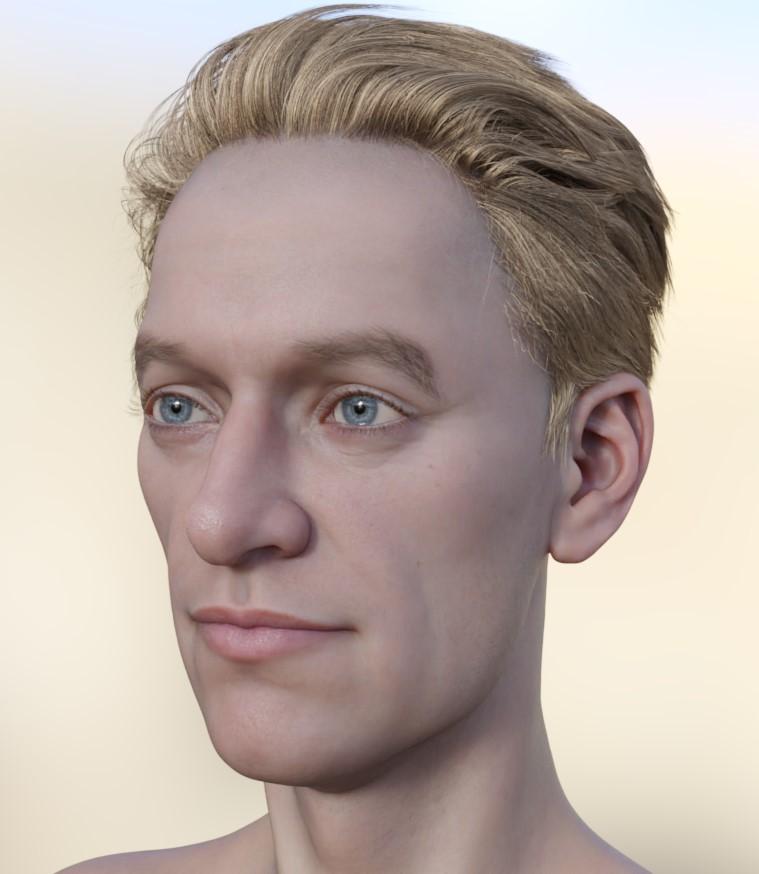 Head games
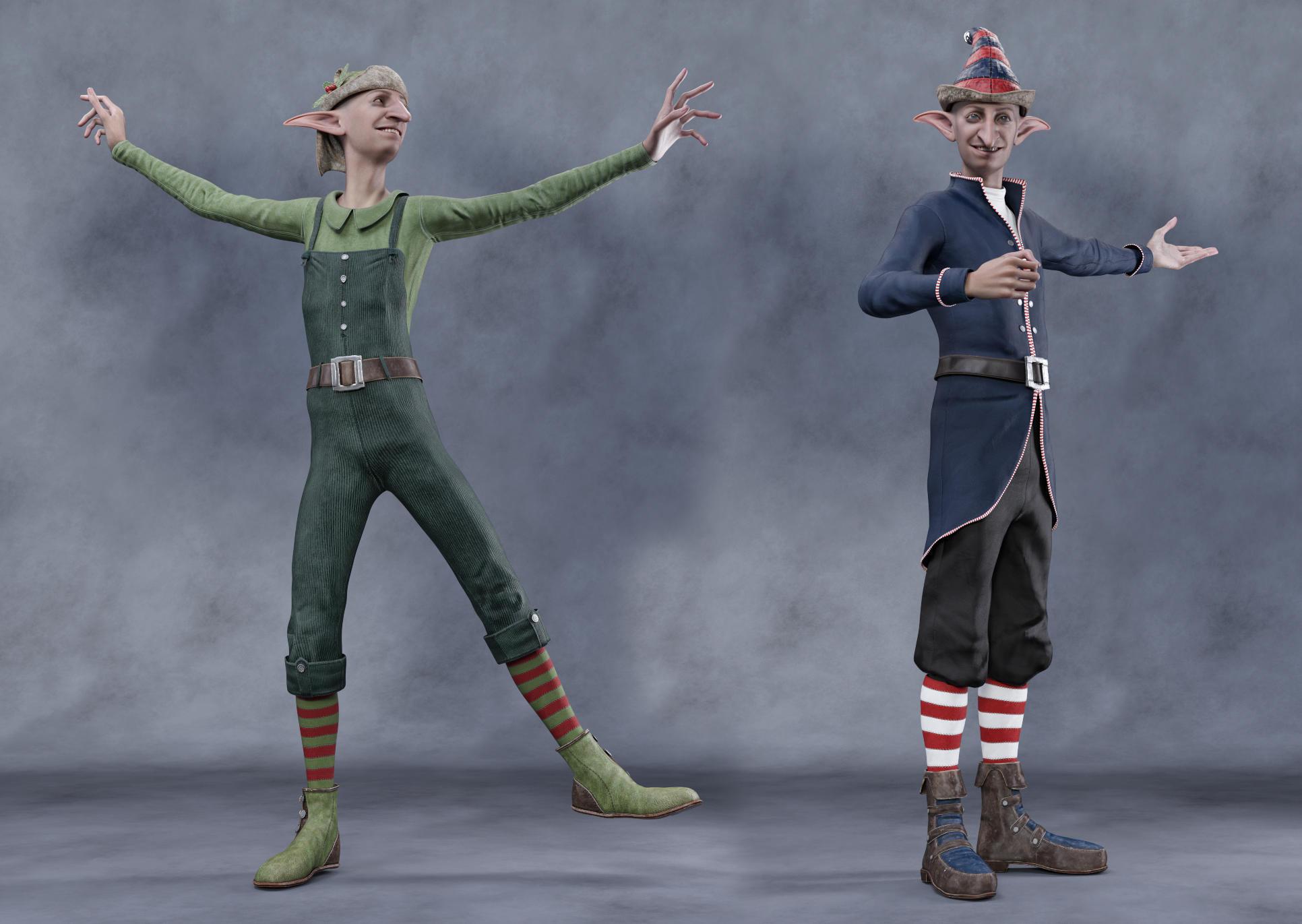
Yanno, I still love Ollie and here he is on G9 wearing two outfits that look like they were made for him. LOL
He also has his "Nose Long" morph here at 50% and his ears morph at 100%
 UltraSceneryXT - large terrain/landscape generator
Is there no other way to install the plugin? If I have to connect my art computer to the internet, that's a dead stop.
It 's been air-gapped since I first installed Studio and my product library in 2016. I'm sure that Microsoft has seven
years of data they want to hoover up and unwanted updates to install, and I'm not taking any chances.
I downloaded it using DIM onto a throwaway computer USB drive, can I transfer it somehow to my art computer?
That worked with accelerator. But I can't get it to work with XT. Oh, the plugin shows up and creates a tab and all,
but when I click on "Create/New UltraSceneryXT Terrain/OK" Studio locks up with an error message.I really, really hate anything which requires me to connect my computer to the internet. Why design things that way?
Daz 3D is part of

Connect
DAZ Productions, Inc.
7533 S Center View Ct #4664
West Jordan, UT 84084Licensing Agreement | Terms of Service | Privacy Policy | EULA
© 2026 Daz Productions Inc. All Rights Reserved.