-
Distortion because of toes
If its flat shoes then just use the footwear template for the transfer utility, the toes are already removed. High heels is a bit more complicated :)
"SY Intense Muscle Genesis 8, 8.1, and 9" Causes hands to deform on Genesis 8 femalesvagsigge said:
Setting SYIMSpJCMForeArmFwd_135_R to zero helped.
SYIMSpJCMForeArmFwd_135_L was 0.0% already
OK, that's the problematic morph... maybe there're more.. so you better submit a support ticket.
Base Model suggestions?PerttiA said:
If you want to manipulate the figures, then it may be better to buy morph packs instead.
You can get a lot of mileage out of just Shape Shift and 200 Plus. You should absolutely grab the base morphs (female body and head, male body and head) if nothing else, because many other morph packs and even some characters require those to work correctly.
[Released] RSSY Character And Material Conversion Bundle Genesis 8 to Genesis 9 [Commercial]rorronline said:
somthing else i am noticing with the converted characters from the batch script. is on a few of the characters for the head morphs they seem to in a couple of cases includes the shoulders and neck area as well. Some head morphs also include the body as well when it should only be the head. Kiina for gen 8 and CC Elandor are examples.
Any ideas why this occurs?Based on fully reading the last 10 pages, my guess is that those characters don't use the proper naming convention for the head and body morphs, so that the tool is having to "guess" where the head and body morphs are separated based on a predefined range of where they should likely be separated. To partially check that you could go to the gen 8 morphs in question. Go to shaping tab, morph, click parameters, and look at the contents of the "Name" field. The names should start with FHM or FBM. FHM is for head and FBM is for body. It does not matter what is in the Label Field. It was said that you might be able to fix the conversion results by fixing the contents of the "Name" field on the messed up morphs to match the proper naming convention.
[Released] RSSY Character And Material Conversion Bundle Genesis 8 to Genesis 9 [Commercial]RiverSoftArt said:
rorronline said:
ok so been waiting for these since gen 9 release. And finally. However there is some issues.
The Batch Converters work but only marginally. There is a large amount of characters both male and female that after convertion look like they got ran over by a mac truck a few times. I understand that maybe some of the stylized characters could have this issue but most of them that end up this way are 'normal' characters. Real people type of characters. A bit disappointing.
From the manual:
The Converted Character’s Body is wrinkled. Because of the way that morphs must be converted, a morph that on Genesis 8 appears to only touch a small part of the head can affect the whole body on Genesis 9. You need to show Currently Used parameters to show all morphs on the converted character. Then, one by one, dial in the morphs to find the offending morph(s). Once you find them, delete the morphs from your HD (click the Gear icon, Parameter Settings, and look at File Path for the asset to figure out where the morph is and what it is called). You should also resave the character with the offending morph(s) dialed out (set to 0).
THe Custom character convcerters worker once each. Meaning One male converted fine, and one female converted fine. Since then i get Daz throwing a scripr error. pertentent log file parts are below. Any ideas?
I have tried everything including uninstalling and reinstalling. Nothing helps.
2023-06-04 11:30:37.077 [INFO] :: Loading script: D:/Daz Library/Scripts/RiverSoft Art/Character Converter/Convert Custom Character G8M to G9.dse
2023-06-04 11:30:37.955 [DEBUG] :: FOUND: D:/Daz Library/data/RiverSoft Art/Common/RSConstants.dsa
2023-06-04 11:30:38.033 [DEBUG] :: FOUND: D:/Daz Library/data/RiverSoft Art/Common/RSAdvCharacterConversionConstants.dsa
2023-06-04 11:30:38.051 [DEBUG] :: FOUND: D:/Daz Library/data/RiverSoft Art/Common/RSG8G9CharacterConversionConstants.dsa
2023-06-04 11:30:38.067 [DEBUG] :: FOUND: D:/Daz Library/data/RiverSoft Art/Common/RSBuildPanels.dsa
2023-06-04 11:30:38.080 [DEBUG] :: FOUND: D:/Daz Library/data/RiverSoft Art/Common/RSHelperFunctions.dse
2023-06-04 11:30:38.110 [DEBUG] :: FOUND: D:/Daz Library/data/RiverSoft Art/Common/RS2019HelperFunctions.dse
2023-06-04 11:30:38.144 [DEBUG] :: FOUND: D:/Daz Library/data/RiverSoft Art/Common/RS2020HelperFunctions.dse
2023-06-04 11:30:38.156 [DEBUG] :: FOUND: D:/Daz Library/data/RiverSoft Art/Common/RS2021HelperFunctionsConstants.dsa
2023-06-04 11:30:38.186 [DEBUG] :: FOUND: D:/Daz Library/data/RiverSoft Art/Common/RS2021HelperFunctions.dse
2023-06-04 11:30:38.227 [DEBUG] :: FOUND: D:/Daz Library/data/RiverSoft Art/Common/RS2022HelperFunctions.dse
2023-06-04 11:30:38.235 [DEBUG] :: FOUND: D:/Daz Library/data/RiverSoft Art/Common/RS2023HelperFunctions.dse
2023-06-04 11:30:38.309 [DEBUG] :: FOUND:
2023-06-04 11:30:38.310 [DEBUG] :: FOUND: D:/Daz Library/data/RiverSoft Art/Common/RSG8G9CharacterConversionFunctions.dse
2023-06-04 11:30:38.346 [WARNING] :: Script Error: Line 4231
2023-06-04 11:30:38.346 [WARNING] :: TypeError: Result of expression 'this.sWhatsThis' [undefined] is not an object.
2023-06-04 11:30:38.346 [WARNING] :: Stack Trace:
<anonymous>()@D:/Daz Library/data/RiverSoft Art/Common/RSG8G9CharacterConversionFunctions.dse:4231
2023-06-04 11:30:38.348 [INFO] :: Error in script execution: D:/Daz Library/Scripts/RiverSoft Art/Character Converter/Convert Custom Character G8M to G9.dseShoot! That is a bug I introduced in the update. I will fix it asap.
I am also getting this error when I try using the custom character converter. I look forward to trying the fixed version. I read through all 10 pages hoping someone had an answer to my issues before I bothered yal knowing you are likely super busy.
I have the full bundle as I was hoping this tool will let me merge my beasty morphs to gen 9. I saw that the product photos showed one of the werewolf morphs with Victoria so I was excited hoping that I could get okish results with half my library of non pure humoid shape characters. So far my experience has not been great, but the custom character converter is 100% broken currently, so I can't actually test that part. You have the fix on its way so I look forward to testing it once I can.
With that said, in the software I see the character converter and the custom character converters for the gen 8 and 9s, but I have some confusion from the instructions manual.
In the manual on page 4 it says "Shape files cannot be converted with the Character Converter script. Please use the Convert Custom Character script to convert morphs that are defined in Shape files."
So I looked for the section in the instructions that is for "Convert Custom Character" which matches what I see in the Daz interface, but it does not exist. Instead what exists is the "Convert Scene Character" section which starts on page 8. The index for the manual has the same name.
(1) Is the "Convert Scene Character" section the same thing as the "Convert Custom Character" section?
If it is the same thing, then in that section it says "It does not create a character preset or a scene subset preset (needed if it Material Suit is used).
(2) Does this mean it won't create a character material suit then?
(3) Some folks have mentioned getting better results following SY instructions on doing manual conversions of gen 8 to 9. Would yal be able to point me to where that is so I can test between the results of the tool and the manual conversions?
(4) It is mentioned that some morphs won't work around large eyes unless you use the eye shape fixer. Since I could not test my custom characters, I tried running the tool against story book frog, and the head got very messed up with the eye sockets and mouth very distorted. It also massively distorted the feet something completely unuseable. Do you have any reccomendations where I might be able to get some OKish results? If there is some distortion, I could fix that possibly in blender, but storybook frogs feet look like pancakes meaning they would need to almost be resculpted from scratch... lol
I am trying to see if this tool will have use to me as I want to jump onto the gen 9 bandwagon, but if I can't bring in a decent chunk of my Oso, Joe Quick, Josh Crocket, and Raw Art morphs, with okish enough results where I can clean them up in blender, then I might just end up sticking to Gen 8/8.1 like what a lot of folks seem to be doing.
I need to be able to do half blood races for my world, so I wanted to be able to merge non-human races with the new characters like Victoria 9, Joan 9, etc. instead of just sticking to the Gen 8.1s. You are doing good work so I hope you don't take this too negatively as I know there is a lot of that right now with a tool having to do such a hard/complex task within the limitations of DAZ Studio.Thanks
[Released] RSSY Character And Material Conversion Bundle Genesis 8 to Genesis 9 [Commercial]rorronline said:
somthing else i am noticing with the converted characters from the batch script. is on a few of the characters for the head morphs they seem to in a couple of cases includes the shoulders and neck area as well. Some head morphs also include the body as well when it should only be the head. Kiina for gen 8 and CC Elandor are examples.
Any ideas why this occurs?I can answer this one, this is what my last comments were about. The head/body morph names don't follow the Daz standard of starting with FBM/FHM, so the script doesn't handle them as such. This is also mentioned other times in this thread. You can rename the morphs to start with FBM or FHM (the name, not the label!) but you'd want to delete those afterward and not overwrite the original morphs. Since these are usually named with "Head" or "Body" in the name, I asked if the check for FBM/FHM could check for "head" or "body" in the name if FBM/FHM is not found.
Otherwise, the script works great as long as the head/body morph names start with FBM/FHM and the character doesn't include the HD morph as part of the preset. Characters that also rely on other shaping morphs may not transfer those morphs well because the full G8M head/body shape may get included in these morphs. It is possible to fix some character presets that include the HD morph - the HD morphs can be dialed out on the transferred character (it won't be HD anyway) and the preset resaved. You can also resave the G8 character preset as a non HD preset by dialling out the HD morph, save it as a new character preset (don't overwrite the old one!) and then transfer the new preset.
Base Model suggestions?If you want to manipulate the figures, then it may be better to buy morph packs instead.
2023 Memorial Day Weekend Sales - Share Your Renders!OK, you talked me into it. One more on this thread... Looks like we're back to perpetual "Uploading..." again today, so just linking to my gallery instead.
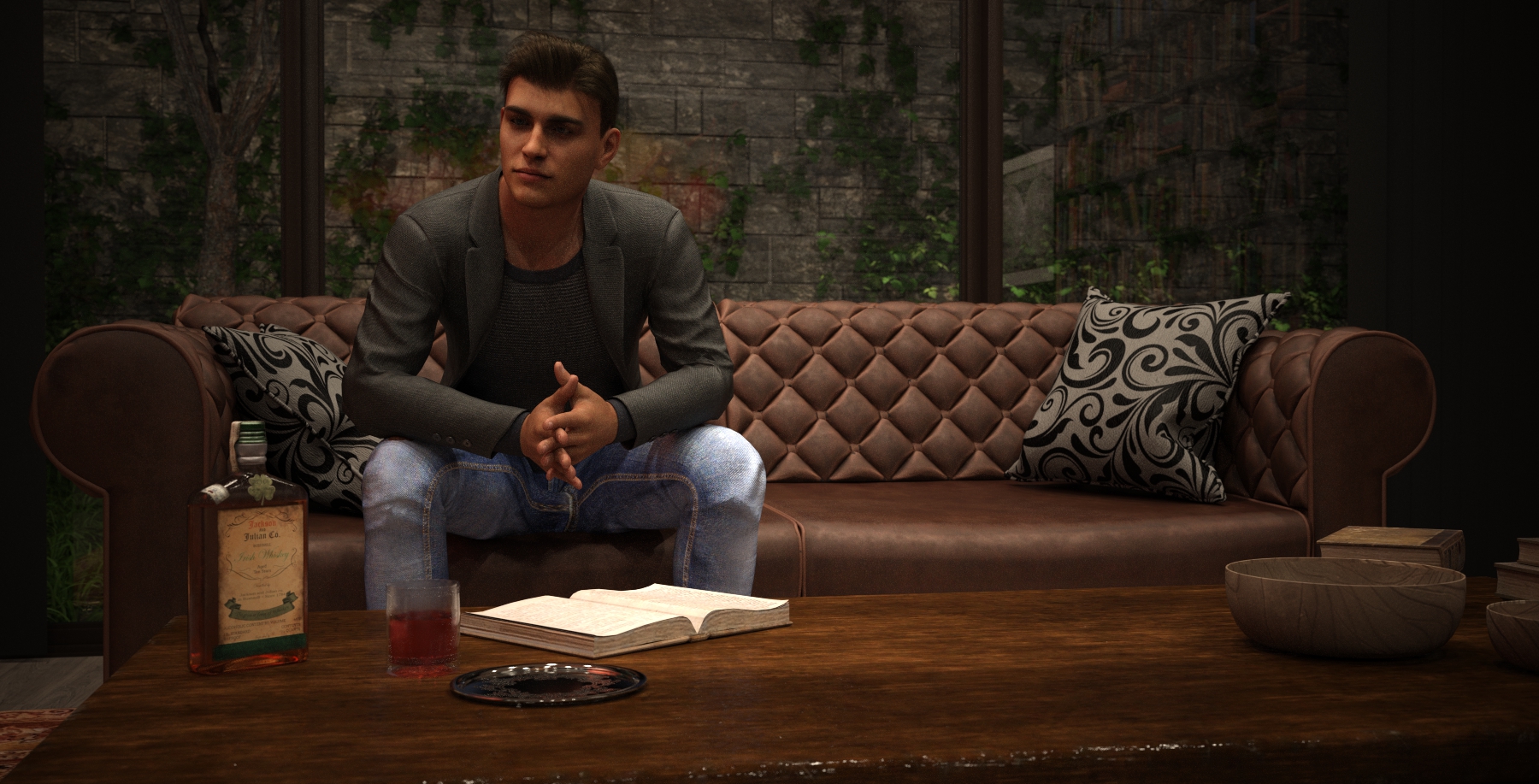
The bottle and glass are the new Vintage Drinks set bought in the Memorial Day sale, but this actually is more experimentation than new. The guy (hopefully) resembles the character I used in the last few items I posted in this thread, but it's not the same figure. This is a G9, to which I've applied the Face Transfer shape of that previous G8.1 character and used its G8 FaceGen mat files converted to G9. I was contemplating putting a close-up of him in the Head Games thread - he is G9, and Simtenero Randomizer was used to get a few random tweaks to the shape.
"SY Intense Muscle Genesis 8, 8.1, and 9" Causes hands to deform on Genesis 8 femalesvagsigge said:
I will try to post screenshot again.
This is what it looks like with only that morph applied from what I can see.
Oh my ~ My gut feeling is that there must be something wrong with one or some JCM morphs.... With Intense HD morph dialed, select Currently Used and tick show hidden properties... Type 'SYIM' into the filter field, check if there's a JCM morph named 'SYIMSpJCMForeArmFwd_135_L' having value. If so, try to zero it. Or post a screenshot if possible.
"SY Intense Muscle Genesis 8, 8.1, and 9" Causes hands to deform on Genesis 8 femaleI will try to post screenshot again.
This is what it looks like with only that morph applied from what I can see.
Rigging clothing with transfer utility makes item disappear?crosswind said:
So, any screenshot? What software did you use to make the garment or you just got some obj files from somewhere ?
I mean, I don't know what good screenshots would do since I've pretty much explained the situation entirely, but here. First picture is what things look like prior to using transfer utility, second is what my transfer utility window looks like, and third is what it looks like after I've applied it to the jacket. I made the objs in blender (changed the scaling and alignment ofc because blender naturally wants it to be super small and laying down instead of right side up) using the fbx model of a character from a videogame.
Rigging clothing with transfer utility makes item disappear?Richard Haseltine said:
Daz Studio treats it as being made for the base, so it will fit it to that and then project the morph into the fitted item (which, if the shape is smaller than the default, will shrink it inside the figure). If possible mdoel to the base shape, if that isn't an option set the Source Shape to the morph used (or Current for multiple morphs) and then check Reverse Source Shape from Target in the additional options in the Transfer Utility.
Yes, like I've stated in my original post I'm already doing that
[Released] RSSY Character And Material Conversion Bundle Genesis 8 to Genesis 9 [Commercial]Hi RiverSoftArt
I was looking at Ally as this Actor and a few more that have issues with the RSSI lashes
I found 2 dials that let you move the eyelashes up and down, the bottom eyelash looks OK, but the top one doesn't fit the eye may be needs a rotate and or size dial
Sickleyield tried but things can move ever so slightly in conversion and the morph misses hat
I added the Genesis 9 eyelash and that looks fine
Then I noticed the left eye was smaller that the right, I couldn't see a problem in the eye Scale dials, I set her left up by 25% to correct it
Hmmm, I wonder if Ally has a slightly assymetrical face? You may have to try using the eye dialog and moving one of the eyes.
Just Loaded Ally gen 8, you could be right about slightly assymetrical face her left eye looks very slightly down, I can't see any assymetrical dials, no idea why that affects her eye size?
mind you it could also be the actor is not standing completley straight? lol reset the main window
just added a plane and looked close, both eyes look the same
the g9 has different size eyes
I'm removing any head and body HD morphs, all but 1 Nail morphs, to get good results, so far a lot of the eye problems go when setting these to 0
[Released] RSSY Character And Material Conversion Bundle Genesis 8 to Genesis 9 [Commercial]Submitted update this morning:
- Modified GetMorphType function to check an array of prefixes for matching the head or body morph names (now supports morph names that start with FHM *or* Head to identify the morph as a head)
- Fixed bug thrown by DoCharacterDialog because of copy/paste error (this.sWhatsThis) in v1.0.1
"SY Intense Muscle Genesis 8, 8.1, and 9" Causes hands to deform on Genesis 8 femaleBetter post a screenshot with this Laying A pose + Show Hidden Properties in Paramters pane. Perhaps the distortion might come from some JCM morph(s) ...
[Released] RSSY Character And Material Conversion Bundle Genesis 8 to Genesis 9 [Commercial]Keiron said:
Hi RiverSoftArt
I was looking at Ally as this Actor and a few more that have issues with the RSSI lashes
I found 2 dials that let you move the eyelashes up and down, the bottom eyelash looks OK, but the top one doesn't fit the eye
Sickleyield tried but things can move ever so slightly in conversion and the morph misses hat
I added the Genesis 9 eyelash and that looks fine
Then I noticed the left eye was smaller that the right, I couldn't see a problem in the eye Scale dials, I set her left up by 25% to correct it
Hmmm, I wonder if Ally has a slightly assymetrical face? You may have to try using the eye dialog and moving one of the eyes.
I'm removing any head and body HD morphs, all but 1 Nail morphs, to get good results, so far a lot of the eye problems go when setting these to 0
[Released] RSSY Character And Material Conversion Bundle Genesis 8 to Genesis 9 [Commercial]N-RArts said:
@RiversoftArt Sorry for the delay in reply, but I had to make sure that everything was okay, before I replied.
Anyway, I've successfully converted two characters to G9.
The first charcter was a G8F. I made the changes to the file as you said. I still couldn't get it to convert. I had to export the character will ALL morphs loaded as an obj, then re-load the character through Morph Loader, save the morph, load morph, save as a character file, then convert from there. EXCEPT, when I tried to convert the character, Daz lost its mind and crashed. The reason was because of the change that I had made in the .dsa file. So I edited the script back to how it was before the first edit.
That character converted with no issues.
Although I also had to go through the same issue with my G8M character. It's turned out pretty great, except the edges of the eyelids are distorted.
The Material suit is a great product too. I did have a strange incident where it looked like the Geoshell was "lit up" when I added skin textures to it (although there were no emmisives in the texture). But the issue seems to have corrected itself.
I'm looking forward to the release of your hair converter.

Thank you for sharing. I am glad you got it working for you.
The hair converter I think you will love. A much less finicky process and a much better script because of it.
 [Released] RSSY Character And Material Conversion Bundle Genesis 8 to Genesis 9 [Commercial]
RexRed said:
DISCLAIMER, I have no financial stake in this product, I am just a Daz user. I don't even get paid for my YouTube videos (yet).
Before you return this product, please watch this live video of me using the Gen 8-to-9-character converter.
My video is over 8 hours long...
Please be considerate that this is live and not scripted.
I cover just about every conceivable aspect of this converter.
Just when the product seems to have problems (about 5 hours in), suddenly, it begins to shine and shows its real strengths.
This product is truly a "game changer" and I am not just saying that.
RSSY Gen 8 to Gen 9 Character Converter NEW UPDATE!

I am VERY pleased with this converter.
In working with this converter, I have uncovered various issues with Genesis 9 and the eyes not fitting right.
It has occurred to me that the eyes must be fit into the Gen 9 figures after any morph.
If you see me struggling with something in the video. Please leave a running commentary in the comment section.
Multiple comments are welcome, I read them all and try and answer them as well. (Please be nice.)
RiverSoftArt and Sickle Yield, please, if you see me struggling with a particular part of the program feel free to leave answers/comments in the comment section.
Best

Please like, subscribe and click the bell for "all" notifications.
Thank you for sharing and posting. I would love to watch it but I barely have 8 minutes free time, let alone 8 hours!

I am so glad you like the converter though.
[Released] RSSY Character And Material Conversion Bundle Genesis 8 to Genesis 9 [Commercial]necroscension said:
Richard Haseltine said:
necroscension said:
RiverSoftArt said:
necroscension said:
With the converter, I've notice most of the models I have do not use FBM/FHM in their morph naming but use Head or Body instead. I have attempted to resave the name of the morphs to start with FHM/FBM, but still have issues because sometimes I wind up having doubled morphs. Was it ever considered to see if the morph name includes Head or Body as an OR statement?
You must not buy most of your characters from Daz.
This is a naming convention that has been in place for years.Ok, I will make an update to check if the morph name starts with FHM/Head or FBM/Body.
It may be standard, but it is not widely used. I'm trying to spot check, but there are Daz store characters that do not use FBM/FHM and instead use "<Character Name><Body or Head>", i.e. "Tathar Head" and "CCPuckBody". Darwin's Mishap, ChangelingChick, PedroFurtadoArts, Dax Avalange, Marcius (no longer with Daz but still sold here), Mousso, Oskarsson are some who don't or haven't followed the standard, and that's just on the male side.
Are you looking at names or labels? It's the name that matters, and has the standard, but the label is what shows on the slider..
Names. I did catch earlier where it was stated it was standard for the names to start with FBM/FHM. I also understand that the name is intended for internal use and the label is for external use (programmer here!). QC apparently doesn't look for that.
QA can miss something like that, though it is probably dependent on the tester. Daz has pushed for the naming convention for a long time. It is a shame that PAs ignore it.
FWIW, I'm having morphs to now copy along with all of my G8M/G8.1M conversions that aren't part of the figure being converted. The head/body morphs for PFA's Roy HD, are now converting with every conversion (maybe due to trying to rename the morphs to have FHM/FBM?). I have searched/deleted/reinstalled this character, and for whatever reason it's still converting as though it's part of other characters. The G8M/G8.1M characters themselves, however, load correctly. Anyway, because of this I now have reservations about renaming the morphs to start with FBM/FHM as stated earlier in the thread. I can at least undo the problem sliders and resave, it's just troublesome that it happened.
(Found those problem Roy morphs! Now to figure out why a cornea morph is getting pulled into the conversion! That is a morph I know I never touched, is an older morph, and didn't appear in my base character conversions at the beginning of this)
Also, FWIW, I have converted nearly all of the G8M base characters with no issue (before the above renaming problem).
That is strange that the cornea is being pulled in now. I am not sure what could be happening as the script does not touch the original G8 characters.
That is great you have converted most of them.
[Released] RSSY Character And Material Conversion Bundle Genesis 8 to Genesis 9 [Commercial]rorronline said:
ok so been waiting for these since gen 9 release. And finally. However there is some issues.
The Batch Converters work but only marginally. There is a large amount of characters both male and female that after convertion look like they got ran over by a mac truck a few times. I understand that maybe some of the stylized characters could have this issue but most of them that end up this way are 'normal' characters. Real people type of characters. A bit disappointing.
From the manual:
The Converted Character’s Body is wrinkled. Because of the way that morphs must be converted, a morph that on Genesis 8 appears to only touch a small part of the head can affect the whole body on Genesis 9. You need to show Currently Used parameters to show all morphs on the converted character. Then, one by one, dial in the morphs to find the offending morph(s). Once you find them, delete the morphs from your HD (click the Gear icon, Parameter Settings, and look at File Path for the asset to figure out where the morph is and what it is called). You should also resave the character with the offending morph(s) dialed out (set to 0).
THe Custom character convcerters worker once each. Meaning One male converted fine, and one female converted fine. Since then i get Daz throwing a scripr error. pertentent log file parts are below. Any ideas?
I have tried everything including uninstalling and reinstalling. Nothing helps.
2023-06-04 11:30:37.077 [INFO] :: Loading script: D:/Daz Library/Scripts/RiverSoft Art/Character Converter/Convert Custom Character G8M to G9.dse
2023-06-04 11:30:37.955 [DEBUG] :: FOUND: D:/Daz Library/data/RiverSoft Art/Common/RSConstants.dsa
2023-06-04 11:30:38.033 [DEBUG] :: FOUND: D:/Daz Library/data/RiverSoft Art/Common/RSAdvCharacterConversionConstants.dsa
2023-06-04 11:30:38.051 [DEBUG] :: FOUND: D:/Daz Library/data/RiverSoft Art/Common/RSG8G9CharacterConversionConstants.dsa
2023-06-04 11:30:38.067 [DEBUG] :: FOUND: D:/Daz Library/data/RiverSoft Art/Common/RSBuildPanels.dsa
2023-06-04 11:30:38.080 [DEBUG] :: FOUND: D:/Daz Library/data/RiverSoft Art/Common/RSHelperFunctions.dse
2023-06-04 11:30:38.110 [DEBUG] :: FOUND: D:/Daz Library/data/RiverSoft Art/Common/RS2019HelperFunctions.dse
2023-06-04 11:30:38.144 [DEBUG] :: FOUND: D:/Daz Library/data/RiverSoft Art/Common/RS2020HelperFunctions.dse
2023-06-04 11:30:38.156 [DEBUG] :: FOUND: D:/Daz Library/data/RiverSoft Art/Common/RS2021HelperFunctionsConstants.dsa
2023-06-04 11:30:38.186 [DEBUG] :: FOUND: D:/Daz Library/data/RiverSoft Art/Common/RS2021HelperFunctions.dse
2023-06-04 11:30:38.227 [DEBUG] :: FOUND: D:/Daz Library/data/RiverSoft Art/Common/RS2022HelperFunctions.dse
2023-06-04 11:30:38.235 [DEBUG] :: FOUND: D:/Daz Library/data/RiverSoft Art/Common/RS2023HelperFunctions.dse
2023-06-04 11:30:38.309 [DEBUG] :: FOUND:
2023-06-04 11:30:38.310 [DEBUG] :: FOUND: D:/Daz Library/data/RiverSoft Art/Common/RSG8G9CharacterConversionFunctions.dse
2023-06-04 11:30:38.346 [WARNING] :: Script Error: Line 4231
2023-06-04 11:30:38.346 [WARNING] :: TypeError: Result of expression 'this.sWhatsThis' [undefined] is not an object.
2023-06-04 11:30:38.346 [WARNING] :: Stack Trace:
<anonymous>()@D:/Daz Library/data/RiverSoft Art/Common/RSG8G9CharacterConversionFunctions.dse:4231
2023-06-04 11:30:38.348 [INFO] :: Error in script execution: D:/Daz Library/Scripts/RiverSoft Art/Character Converter/Convert Custom Character G8M to G9.dseShoot! That is a bug I introduced in the update. I will fix it asap.
Daz 3D is part of

Connect
DAZ Productions, Inc.
7533 S Center View Ct #4664
West Jordan, UT 84084Licensing Agreement | Terms of Service | Privacy Policy | EULA
© 2026 Daz Productions Inc. All Rights Reserved.