-
Weird G9 Bends
Havos said:
I have seen a similar issue with this on G8 as well, which is normally because I am using G8 in combination with these products: https://www.daz3d.com/turbo-loader-for-genesis-8-and-81 and https://www.daz3d.com/turbo-loader-booster-utilities.
The first product renames a lot of dsf files so that they will not be loaded when G8F/G8M are loaded which significantly reduces load times. The second product makes the files readable again when reading in a particular character file. What I have noticed that if I have a bit of V8's head dialed into a character, then it will switch on V8s head morph and all of V8s jcms (both head and body), but not V8s cntrl dial or V8s body dsf.
As a result any G8F character loaded later will often use V8s jcms even though none of her body is being used. This will cause deformations when the body bends similar to what was posted above.
Since Turbo loader is not even supported yet for G9, that is not what is causing the issues for the OP. However if does show how the complexity and interdependant natures of the various Genesis morphs and jcms can cause some characters jcm dials to be non zero, even when there is no obvious reason why this could be the case. In my case it is no fault or error in V8, just a case of how some renamed dsf files can cause unexpected issues.
I use Turbo Loader as well but haven't seen such an issue. If only dialing V8/V8.1's head morph, there won't be any V8/V8.1 body related pJCM triggered when posing the figure but only eJCM / cbs will be triggered if an Expression / FACS morph is given on 8 or 8.1. The mechanism should be all the same...
Duplicate formula found Genesis 9Siciliano1969 said:
When I opened the Vinme Torso Width morph via notepad and looked for the -vinme under the following as instructed in the above attachments 2-3:
Asset info ID
Modifier library name
Channel label
And at the bottom under Scene modifiers ID
I found they were already modifed and did not contain -vinme at the end of the string. There was an update done (I think to shapeshift) yesterday on 6/10/2023 in the Install Manager and that is when the problem began. It could be I'm reading crosswind's post wrong and not doing the correct thing. Has anywone had success yet with crosswind's remedy? I still have my ticket opened, but since there are pending tickets on this issue I should probably close mine.
I updated Shape Shift and check the id of the morph file - Torso Width... it was modified as 'SS_body_bs_Torso Width' (with a prefix...). So if you have Shape Shift updated, there should be no duplicate formulas error... So Zev0 fixed it first, I suppose Vinme won't have to fix it then...
Weird G9 BendsI have seen a similar issue with this on G8 as well, which is normally because I am using G8 in combination with these products: https://www.daz3d.com/turbo-loader-for-genesis-8-and-81 and https://www.daz3d.com/turbo-loader-booster-utilities.
The first product renames a lot of dsf files so that they will not be loaded when G8F/G8M are loaded which significantly reduces load times. The second product makes the files readable again when reading in a particular character file. What I have noticed that if I have a bit of V8's head dialed into a character, then it will switch on V8s head morph and all of V8s jcms (both head and body), but not V8s cntrl dial or V8s body dsf.
As a result any G8F character loaded later will often use V8s jcms even though none of her body is being used. This will cause deformations when the body bends similar to what was posted above.
Since Turbo loader is not even supported yet for G9, that is not what is causing the issues for the OP. However if does show how the complexity and interdependant natures of the various Genesis morphs and jcms can cause some characters jcm dials to be non zero, even when there is no obvious reason why this could be the case. In my case it is no fault or error in V8, just a case of how some renamed dsf files can cause unexpected issues.
Character Mix in ‚Demetria Hair‘?I'd really love to rebuild the character AprilYSH used in their promos for the Demetria Hair, see here:https://www.daz3d.com/demetria-hair-for-genesis-9 . Am also attaching pictures. Can anyone make an educated guess as to the mixture? The base morph looks like Olympia to me, but with much stronger features and another skin. But that might already be totally wrong, I'm really bad at guessing characters. Any ideas much welcome, and thanks for reading!
Edit: Okay, uploading doesn't work (again) for me right now, so no pics, sorry!
Buy Something That Doesn't Work in Carrara? Post your Questions and Workarounds here. (please)Thank you, Bunyip and Wendy. The Genesis option is excellent because the genesis figure has a base child morph character. I used to convert my older content to 'wearable presets' for the newer figures. Stopped in order to save disk space. Might be worth revisiting the K4 content. Also, will try the animation pose alternative. Always good to have more options.
Duplicate formula found Genesis 9When I opened the Vinme Torso Width morph via notepad and looked for the -vinme under the following as instructed in the above attachments 2-3:
Asset info ID
Modifier library name
Channel label
And at the bottom under Scene modifiers ID
I found they were already modifed and did not contain -vinme at the end of the string. There was an update done (I think to shapeshift) yesterday on 6/10/2023 in the Install Manager and that is when the problem began. It could be I'm reading crosswind's post wrong and not doing the correct thing. Has anywone had success yet with crosswind's remedy? I still have my ticket opened, but since there are pending tickets on this issue I should probably close mine.
Weird G9 BendsColinFrench said:
lilweep said:
I guess its understandable that this could get past QA since if just testing the character itself, you wouldnt see this issue pop up, only when testing other characters would you see it.It's not that difficult to check, just install the PA's product then load the base G9 figure and see if there are any morphs activated that shouldn't be.
Heck, you should be able to write a script to check since they know the only morphs which should be active with the base G9 figure. Then verifying it is no more difficult than pressing the proverbial button. I would hope that QA already has automated unit tests for various types of products.
Not exactly... this is not 'some character morph Default Value 0 or 1 's problem' while the issue related to cbs ( aka pJCM on G8), so in general, if there's no pose given, there'll be no distortion found...
Weird G9 Bendslilweep said:
Yeah your screenshot shows that the character JCM is not under control of the character morph so will fire even if character morph is not active. So needs a ticket.
Fact that several different PAs are doing this is alarming, as can ruin experience of G9 for users unless they dig deeper and troubleshoot. Makes me wonder how many complaints about G9 bends are just due to library of faulty characters.
Interesting.
How do I convert Gen 3 hair to Gen 8?Rex, You may refer to Sickleyield tutorial https://www.youtube.com/watch?v=wJk3LLfWq7Y&t=363s (Change Preferred Base in Scene Id... + Transfer Rigging) to avoid auto-fit and reserve hair's rig. After fitting, save a Figure Asset plus a Wearable Preset, then it'll be a G8 version hair.
Next, try to use RSSY Hair Converter G8 to G9 to see if you can make it work... I don't have that converter by now.
PS: Pls define a correct Content Type when saving Figure Asset ( as Follower/Hair ) as I remember that RiverSoft's Hair converter script will check if the Content Type is a hair...
Weird G9 BendsHello HID3D,
Your products are great(and I really enjoy them)! It just so happened that when I was loading a pose for Ruby in a scene, that I noticed the weird bends. After lots of trial and error, it is other vendor's characters cbs/jcm morphs that are firing, regardless of the base G9 or G9-based character, creating the strange deformations. I suspect it might be the way they name their morphs(spaces in the name?) that could possibly be it, or that a setting isn't properly ticked, allowing the morph to load regardless if the character is loaded or not.
Thanks, -David
Weird G9 BendsYeah your screenshot shows that the character JCM is not under control of the character morph so will fire even if character morph is not active. So needs a ticket.
Fact that several different PAs are doing this is alarming, as can ruin experience of G9 for users unless they dig deeper and troubleshoot. Makes me wonder how many complaints about G9 bends are just due to library of faulty characters.
Genesis 9 clothing questions & answersHere is a quick and dirty documentation of what seems to work for me now to convert G8 clothing with dForce Dynamic Surface Add-On to G9. Some of these steps may be unnecessary, I don't know. Consider this a WIP. I'd be interested in feedback if outher people try it. I realize this is not detailed, like Catherine's tutorials. I just wanted to write this down so I have something to follow the next time I find a garment to convert that has a dForce Dynamic Surface Add-On. I hope it makes sense!
- load G8 garment with addon (Augmentation Flightsuit in my test)
- turn off smoothing
- set res to base
- set subD to 0
- export garment to OBJ
- export addon to OBJ
- delete G8 garment including children (addon and adjustable weight map)
- import garment OBJ
- import addon OBJ
- load G8
- dial in g9 clone
- Transfer Utility G8 CURRENT shape to garment
- Transfer Utility G8 CURRENT shape to addon
- export garment in G9 shape to OBJ
- export addon in G9 shape to OBJ
- Close and restart Daz Studio? or just new scene?
- load G8 garment with addon again (Augmentation Flightsuit in my test)
- set res to base
- set subD to 0
- update garment base geometry vertex positions with garment G9 shape OBJ
- update addon base geometry vertex positions with addon G9 shape OBJ
- load G9
- Transfer Utility G9 Default shape to garment(with appropriate template)
- Transfer Utility garment Default shape to addon
- Set garment res and smoothing modifier back to the G8 garment's settings
- save garment asset
- save addon asset
- fix/add back items that were connected with rigid follow nodes on the G8 garment (buttons, for example)
- save wearable preset with garment, addon and push modifier weight node
Recommended laptop specs for scene creation onlyI'm not sure this is really viable.
From a technical point of view it's perfectly possible and so far we've got two interpretations of how to do this, but is it really worthwhile?
1 - @RobertDy - Create the scenes using Daz resources stored on a laptop without using Iray. He'll upload the finished scenes to his home PC and render them there, using some remote desktop software. That laptop will need a lot of drive space for the models and a fair chunk of RAM to run three instances of Studio. I don't know why he uses 3 instances of Studio that but that's his workflow. 32GB minimum. Enough storage for the assets he wants to use.
Without using Iray to preview the scenes you will not get an accurate depiction of the final results. Pokethrough, lighting, nada. I fail to see the point of this as you will essentially be using your main PC, sight unseen, to render an image and you have no idea how it will turn out. You can always correct minor errors with spot rendering but how on earth will you know how the lighting will pan out?
The only way this is viable is with either a very, very fast CPU for CPU preview rendering or a gaming GPU to preview Iray which is something he doesn't want. Both are not cheap. Impasse.
2 - @thistledownsname - all you want is a remote desktop. You'll need Windows 10/11 Pro (or alternative remote desktop software) for the host and the fastest wifi/LAN connection you can buy. This is the option that is more usable in my opinion as a relatively low spec laptop could be used. However, the latency between the client and the host will likely prove infuriating.
How do I know? We've tried it. A commercial mobiles games company. You can do it, but it's a pain. Try repositioning a figure, tweaking a pose...good luck! Perhaps you have better internet infrastructure than we do, faster speed etc., but if you have romantic ideas of creating a scene whilst sitting in first class on a train... think again!
My opinion is dialling it in from a low-spec machine is not an option. The only solution that works for us is a powerhouse of a laptop that can preview scenes you've made *on that laptop* and you then transfer them to your rendering PC.
Weird G9 BendsClick the gear icon in Parameters tab next to those offending character CBS sliders and see if it has ERC[Multiply] as one of the Controllers. The ERC[Multiply] controller should be the character body morph. E.g., for ESD Alina Shin CBS, the ERC[Multiply] should be ESD Alina Body
Doing what Matt said is best, report issue and hope they fix it. Can uninstall thsoe characters in meantime.
Otherwise you can fix it manually, but it isnt the job of Daz users to fix PA's mistakes (asuming that's what's going on here)
I guess its understandable that this could get past QA since if just testing the character itself, you wouldnt see this issue pop up, only when testing other characters would you see it.
Weird G9 BendsHello Matt_Castle and Lilweep,
Here is just G9 Feminine in the Easy Days Pose#28, and again, the cbs/jcm's for FN Edith and ESD Alina are firing. I reset their sliders, and the deformations are gone. Note that it is the shin_x155p slider causing the divot, as well as other cbs sliders. Odd thing is that it's doing this without loading FN Edith nor ESD Alina characters. Not sure if this is something accidently baked into the pose set or crosstalk with sliders. I'll try with another pose set to see if the issue duplicates. Also, I just uninstalled the Vinme morphs, as I was getting the duplicate morph errors, as indicated in another thread.
Thanks, -David
How do I resize the pupil and iris, make them smaller?crosswind said:
It's not suggested to modify texture maps (more work... ), better tweak morphs.
G8.x - If you own G8F/M Head Morphs products (42075, 42085), just adjust Eyes Iris Size and Eyes Pupils Dilate.
G9 - If you own Genesis 9 Head Shapes product (86960), adjust Eye Iris Size Larger/Smaller and Eye Pupils Dilate.
Or use Blender or Zbrush to create iris size and pupil size morphs of your own, as needed...PS: Yes, as Richard mentioned above, Eye Pupils Dilate on G9 is a FACS Pose Control morph, so it'll be zeroed each time you zero figure's pose / expression. Better lock it or create a separate morph (Modifier/Shape) based on it and save it as a morph asset to your Vendor path...
Thank you for your response Crosswind.
The problem that exists is that converted characters from Gen 8 to Gen 9 are sort of in limbo. The Gen 8 iris and pupil scale morphs in the products (42075, 42085) work with the Genesis 8 eyes.
The Gen 9 iris and pupil scale morphs in the products (86960) work with the Genesis 9 eyes.
But the converted characters from Gen 8 to 9 use neither the Genesis 8 nor 9 eyes...
They use the Gen 8 and 8.1 "eye suit" and the respective morphs have no effect on the eye suit.
Weird G9 BendsStarkdog said:
Hello Nakamuram002 and Matt_Castle,
I tried this pose again, but with HID Ruby. Again, I saw the weird deformations. Amongst the hundreds of hidden cbs sliders, somehow, sliders for FNEdith and E3DAlina were activated. Once I zeroed out those character sliders, the deformations went away. It seems like there is more cross-talk and inadvertent cbs/jcm activation in the G9 series than G8.
Thanks, -David
Thats not a G9 problem, thats a HID Ruby or FNEdith and E3DAlina problem you are describing. Just inept PA's.
In Property Heirarchy, the Shin155x CBS morph for the characters should be set up with 'Controller' 2nd Stage as 'ERC [Multiply]' for the Character's body morph so it is only active when the character body morph is dialled in.
If the PA didnt do this, then their CBS are being dialled in when they are not needed, i.e., when the character morph is not even loaded.
You can check (in Parameters tab or in Property Heirarchy tab) that the morphs were set up correctly with appropriate 2nd stage Controllers
-
E3DAlina_body_cbs_shin_x155p_l.dsf
-
E3DAlina_body_cbs_shin_x155p_r.dsf
-
FNEdith_body_cbs_shin_x155p_l.dsf
-
FNEdith_body_cbs_shin_x155p_r.dsf
Weird G9 BendsFrom your screenshot it looks like the Shin x155 CBS/JCM is dialling in too early.
Go to Parameters tab and make sure you have 'Preference>Show Hidden Properties' on.
Look at 'Currently Used' parameters to see active morphs.
Toggle them until you find faulty one(s).
Once you know which one is faulty you can either leave it turned off for temporary fix for current scene, or permanently fix it (in Property Heirarchy if set up incorrectly, e.g., keyed to dial in too early, or else make new corrective morph) and then resave morph. Otherwise can try to remove it (or the character it belongs to) from your content library in such a way that you wont get missing files errors.
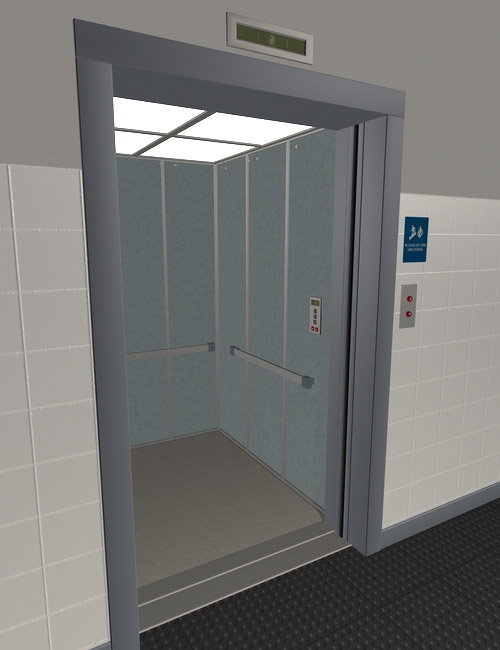
Elevator Doors?I don't have the product, but in the promo image, there does look like doors slid back into the cavity. Try to select those doors and check if there is a morph slider or a translation slider for the doors in the parameters tab.
The image you posted shows the doors closed, and the image I am posting shows them open, there likely is a slider to move them.
 Weird G9 Bends
It looks like you've probably got some bugged package that's got JCMs (or CBs as they now are on G9) that aren't properly linked to their master morph.
Daz 3D is part of

Connect
DAZ Productions, Inc.
7533 S Center View Ct #4664
West Jordan, UT 84084Licensing Agreement | Terms of Service | Privacy Policy | EULA
© 2026 Daz Productions Inc. All Rights Reserved.