-
Genesis 9 HD Morphs Kit
Catherine3678ab said:
Actually yes there is one such kit somewhere in this store for G8F if I recall correctly [or G8.1F]. However the HD morphs weren't very user friendly if one isn't a PA and have the necessary morph loader to load them. [so I returned it]
So who knows, maybe that PA will release one for G9.
These are the only ones I know of. I figured if something like this was popular or allowed by DAZ there would be more of them in the store.
Duplicate formula found Genesis 9crosswind said:
Thanks, I've only used DIM for any installations and only in 1 folder (C:/Daz 3D/Applications/Data/DAZ 3D/My DAZ 3D Library). See the attached notepad log and errors show alot of Vinme dups.
Sorry, my bad ! I must be old... I checked my Lib and found I also modified 'Vinme Abdomen Length.dsf' last year but I totally forgot about it ...
 The reason is the same: 'SS_body_bs_Abdomen Length.dsf' and 'Vinme Abdomen Length.dsf' have the same IDs.
Still, fix Vinme's morph file as his product was released later than Zev0's. The same steps: just add a suffix to the ID by following the screenshots I posted above. Then the warnings will be gone...
Thanks crosswind will check after work
[Released] RSSY Hair Converter from Genesis 8 to Genesis 9 [Commercial]SickleYield said:
Artini said:
Conversion of https://www.daz3d.com/biker-hair-and-beard-for-genesis-3-and-8-male
on https://www.daz3d.com/nahuel-for-genesis-9-hd
Anybody knows, how to fix beard around mouth?
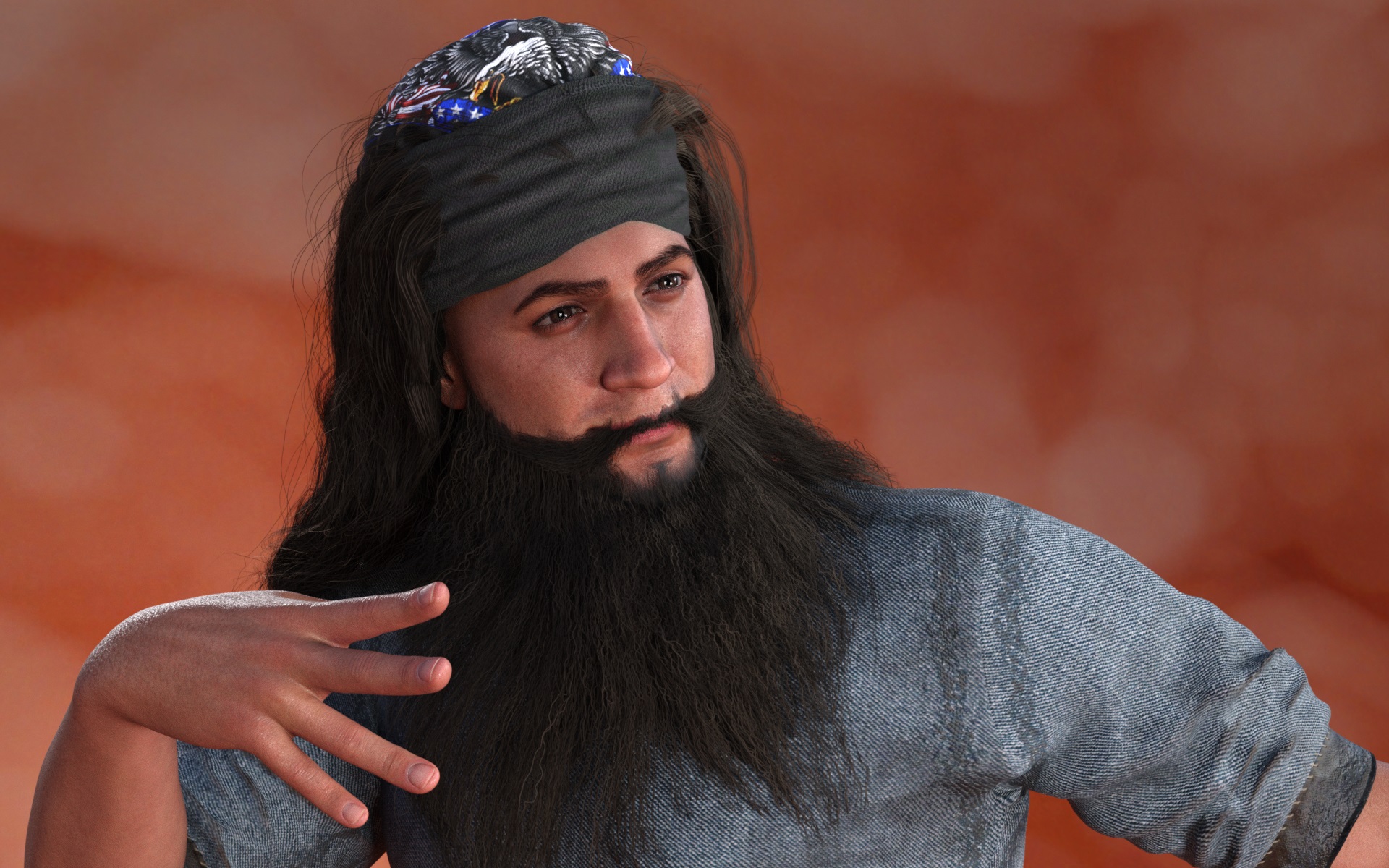
Hi hi! Looks like it might be fighting with your head morphs a bit. You can dial the Converter Morph G8M and Converter Morph G8F from from Actor/Converter Morphs up and down a little to move the vertical position of the beard.
I can confirm I'm seeing the same, and this even happens on an unmorphed G9. It doesn't appear too pronounced until you look at Biker Beard, but they're all low around the mouth, adding morphs (and textures) just make it more noticeable. I also see triangulization around the chin. FWIW, I had noticed that with some hairs that didn't seem to convert I could re-convert and that would fix the issues I was seeing (like the converting morph loading as 0), but that doesn't help with the beards.
Used in pics: Zenty Cool beard, Mavick beard, Biker beard
[Released] RSSY Hair Converter from Genesis 8 to Genesis 9 [Commercial]Artini said:
Conversion of https://www.daz3d.com/biker-hair-and-beard-for-genesis-3-and-8-male
on https://www.daz3d.com/nahuel-for-genesis-9-hd
Anybody knows, how to fix beard around mouth?
Hi hi! Looks like it might be fighting with your head morphs a bit. You can dial the Converter Morph G8M and Converter Morph G8F from from Actor/Converter Morphs up and down a little to move the vertical position of the beard.
[Released] RSSY Character And Material Conversion Bundle Genesis 8 to Genesis 9 [Commercial]Eboshijaana said:
This is a good conversion, though I have no idea wtf is up with the teeth, tear and eyelashes.
Obviously some morph is doing that. If it was the eyes, I would think it is the extra eye morph that automatically triggers when the main morph is engaged that is causing the problem. It is probably something similar here. I have asked SickleYield for her advice.
[Released] RSSY Character And Material Conversion Bundle Genesis 8 to Genesis 9 [Commercial]necroscension said:
RiverSoftArt said:
aaráribel caađo said:
I'm having a very frustrating time converting my character via the Fit Clone method that I think underlies this product. Does it create morphs that can be combined, or just single characters? I want the flexibility of converting G8 morphs and character presets that I can combine together. I've seen somebody combined G9 and G8 characters, but don't know if that works with multiple G8 characters. If this can solve my problem, it's an insta purchase :)
The product converts each used morph individually. It does not combine the used G8 morphs into one combined morph before converting. (I thought about it after seeing all the issues people had. I still may add that feature if I end up doing the G3-G9 conversion but right now I need a break from Character Conversion).
On this note, just a question: I noticed when I converted PedroFurtadoArts Alistair that a secondary morph, something like Alistair Chin Correction, and it didn't "break" the head/body morphs (it doesn't appear to also contain the G8M head shape baked in). I believe I noticed that it had PHM in the name, is the script not baking the body/head morphs for these PHM/PBM morphs? I'm not complaining, just noticing, especially since this character didn't use the FHM/FBM naming conventions for the head/body morphs.
It is not converting it, or converting it but it is no problem? The script doesn't differentiate between morphs except when saving the head/body morphs it restricts their area of affect to the appropriate body part.
[Released] RSSY Hair Converter from Genesis 8 to Genesis 9 [Commercial]Choppski said:
I am finding I have issues with some facial hair--depending on the face morph.
That could be true. I asked Sickleyield if there is anything to do about it.
That said, one reason I bought this is that when I autofit hair to g9, saving often takes like 10-15 minutes for some reason. I tested it and with converted hair, it zips. So even if I have to autofit facial or body hair (haven't tried body hair yet), at least I can use head hair and cut down on save time.
I think because autofitted hair may have the geometry or something embedded in the scene file. Are the files very big. But yes, having properly converted hair helps with scenes too.
Duplicate formula found Genesis 9Thanks, I've only used DIM for any installations and only in 1 folder (C:/Daz 3D/Applications/Data/DAZ 3D/My DAZ 3D Library). See the attached notepad log and errors show alot of Vinme dups.
Sorry, my bad ! I must be old... I checked my Lib and found I also modified 'Vinme Abdomen Length.dsf' last year but I totally forgot about it ...
The reason is the same: 'SS_body_bs_Abdomen Length.dsf' and 'Vinme Abdomen Length.dsf' have the same IDs.Still, fix Vinme's morph file as his product was released later than Zev0's. The same steps: just add a suffix to the ID by following the screenshots I posted above. Then the warnings will be gone...
Duplicate formula found Genesis 9Thanks, I've only used DIM for any installations and only in 1 folder (C:/Daz 3D/Applications/Data/DAZ 3D/My DAZ 3D Library). See the attached notepad log and errors show alot of Vinme dups.
It seems another morph, Abdomen Length... Will check it after I'm back home.
Genesis 9 HD Morphs KitActually yes there is one such kit somewhere in this store for G8F if I recall correctly [or G8.1F]. However the HD morphs weren't very user friendly if one isn't a PA and have the necessary morph loader to load them. [so I returned it]
So who knows, maybe that PA will release one for G9.
Duplicate formula found Genesis 9It seems to be only "Abdomen Length" that's duplicated.
Don't have Vinme because of these problems, but the Abdomen Length in ShapeShift seems to have been updated 06.06 and even though the name and label of the morph are unique, the "id" is "Abdomen Length"
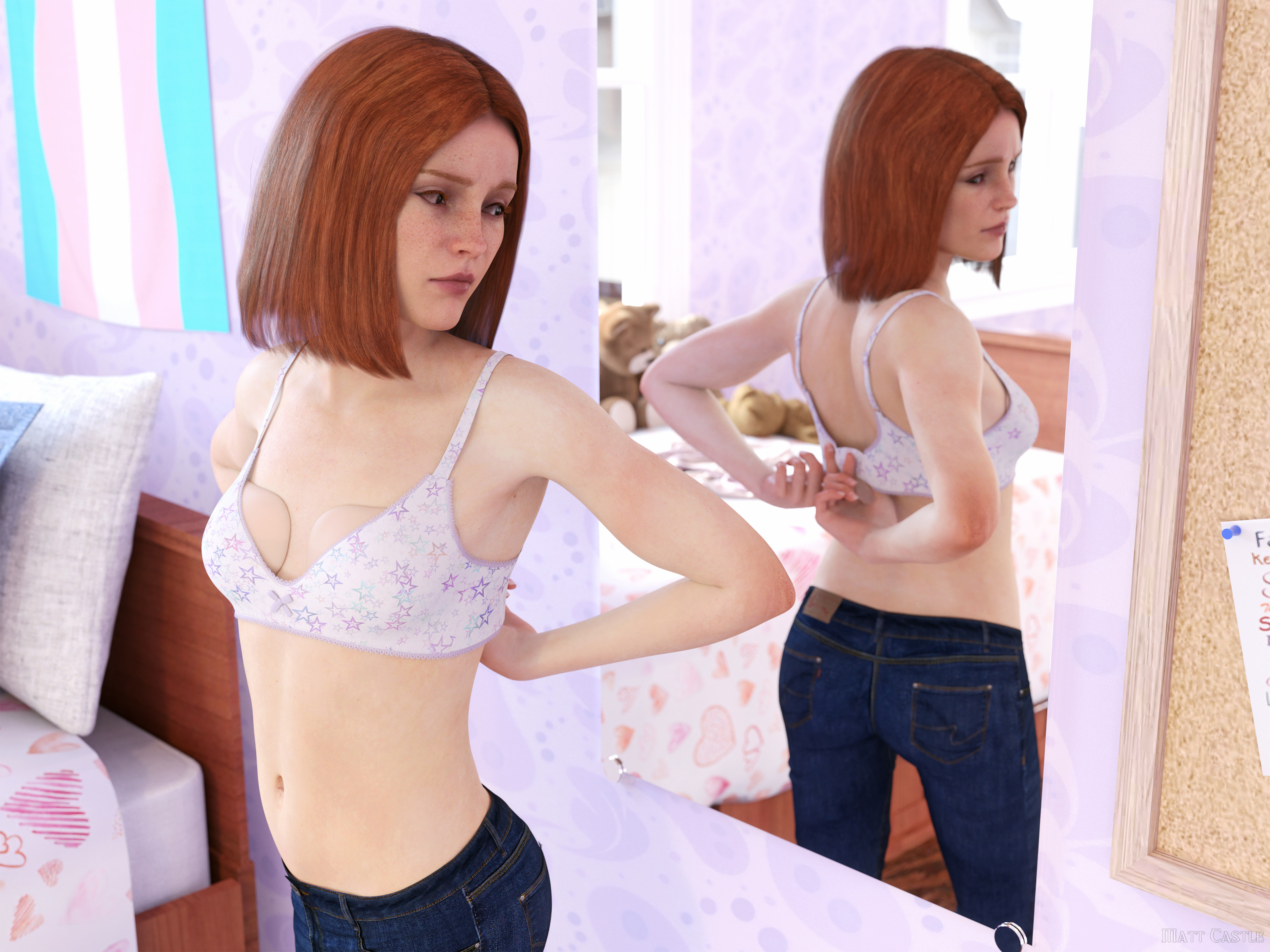
Matt Castle does some stuffI've been a bit short of ideas of late, but I'm going to try to do some stuff with my LGBTQ cast over Pride Month.
~~~~~
While she's living as trans for several years (and has been on puberty blockers for the last couple), Kristin's only recently started using breast prostheses, so there's a bit to get used to.
Gordig said:
re-edit: I would be very interested to hear about morph conversion, though.
Sorry, completely missed this comment before.
As is, Centaur 7 and 8 are based on the Horse 2 geometry with some Y and Z offset which I'd have to look up, and scaled down by a factor of 1.35. I've got a preset slider for Horse 2 that mostly handles this, as well as also posing/morphing the neck to mostly follow the human torso of the centaur. You can export this shape, and your desired morph to OBJs, and reimport these shapes as a new mesh from which you can transfer the morph.
Note though that you need to export the centaur mesh as a standalone OBJ to transfer to that first (there's morph rigidity on the geografft normally, which stops you transferring the shapes properly). At this stage, you can then transfer to your mesh, and then use that (possibly with some clean up in Blender) to reimport on to the centaur.
I have also transferrd Horse 2 followers too, but they... they definitely vary in difficulty.
Morphing across jointsIs there a way to create, for example, a pair of pants that can morph into shorts? Or a long-sleeved shirt that can morph into a T-shirt? The obvious issue to work around is changing the assigned bone of the morphed vertices on the fly. Would this be impossible or just very difficult?
Duplicate formula found Genesis 9crosswind said:
Siciliano1969 said:
crosswind said:
Siciliano1969 said:
When I opened the Vinme Torso Width morph via notepad and looked for the -vinme under the following as instructed in the above attachments 2-3:
Asset info ID
Modifier library name
Channel label
And at the bottom under Scene modifiers ID
I found they were already modifed and did not contain -vinme at the end of the string. There was an update done (I think to shapeshift) yesterday on 6/10/2023 in the Install Manager and that is when the problem began. It could be I'm reading crosswind's post wrong and not doing the correct thing. Has anywone had success yet with crosswind's remedy? I still have my ticket opened, but since there are pending tickets on this issue I should probably close mine.
I updated Shape Shift and check the id of the morph file - Torso Width... it was modified as 'SS_body_bs_Torso Width' (with a prefix...). So if you have Shape Shift updated, there should be no duplicate formulas error... So Zev0 fixed it first, I suppose Vinme won't have to fix it then...
I'm not sure what I'm doing wrong since I am still getting this error. I updated Shapeshift yesterday and that is when the problem started for me. Its annoying but I love both products so I'm keeping them installed and dealing with it until there is a final fix.
I double-checked for times, the duplicate formulas is really gone... Have you by chance installed multiple copies of Shape Shift... i.e. into different libraries? Or attached your log file down below so that we may help to check...
Thanks, I've only used DIM for any installations and only in 1 folder (C:/Daz 3D/Applications/Data/DAZ 3D/My DAZ 3D Library). See the attached notepad log and errors show alot of Vinme dups.
Duplicate formula found Genesis 9Siciliano1969 said:
crosswind said:
Siciliano1969 said:
When I opened the Vinme Torso Width morph via notepad and looked for the -vinme under the following as instructed in the above attachments 2-3:
Asset info ID
Modifier library name
Channel label
And at the bottom under Scene modifiers ID
I found they were already modifed and did not contain -vinme at the end of the string. There was an update done (I think to shapeshift) yesterday on 6/10/2023 in the Install Manager and that is when the problem began. It could be I'm reading crosswind's post wrong and not doing the correct thing. Has anywone had success yet with crosswind's remedy? I still have my ticket opened, but since there are pending tickets on this issue I should probably close mine.
I updated Shape Shift and check the id of the morph file - Torso Width... it was modified as 'SS_body_bs_Torso Width' (with a prefix...). So if you have Shape Shift updated, there should be no duplicate formulas error... So Zev0 fixed it first, I suppose Vinme won't have to fix it then...
I'm not sure what I'm doing wrong since I am still getting this error. I updated Shapeshift yesterday and that is when the problem started for me. Its annoying but I love both products so I'm keeping them installed and dealing with it until there is a final fix.
I double-checked for times, the duplicate formulas is really gone... Have you by chance installed multiple copies of Shape Shift... i.e. into different libraries? Or attached your log file down below so that we may help to check...
Duplicate formula found Genesis 9crosswind said:
Siciliano1969 said:
When I opened the Vinme Torso Width morph via notepad and looked for the -vinme under the following as instructed in the above attachments 2-3:
Asset info ID
Modifier library name
Channel label
And at the bottom under Scene modifiers ID
I found they were already modifed and did not contain -vinme at the end of the string. There was an update done (I think to shapeshift) yesterday on 6/10/2023 in the Install Manager and that is when the problem began. It could be I'm reading crosswind's post wrong and not doing the correct thing. Has anywone had success yet with crosswind's remedy? I still have my ticket opened, but since there are pending tickets on this issue I should probably close mine.
I updated Shape Shift and check the id of the morph file - Torso Width... it was modified as 'SS_body_bs_Torso Width' (with a prefix...). So if you have Shape Shift updated, there should be no duplicate formulas error... So Zev0 fixed it first, I suppose Vinme won't have to fix it then...
I'm not sure what I'm doing wrong since I am still getting this error. I updated Shapeshift yesterday and that is when the problem started for me. Its annoying but I love both products so I'm keeping them installed and dealing with it until there is a final fix.
Weird G9 Bendscrosswind said:
Not exactly... this is not 'some character morph Default Value 0 or 1 's problem' while the issue related to cbs ( aka pJCM on G8), so in general, if there's no pose given, there'll be no distortion found...
So then apply a pose to a default G9 which bends all the major joints to some degree (doesn't have to be much to trigger the unwanted pJCM / CBS, right?) and then do the check for extraneous items. Still seems like an easy thing to automate, but I cheerfully admit I know less about this topic than you do. ;-)
[Released] RSSY Hair Converter from Genesis 8 to Genesis 9 [Commercial]Choppski said:
I am finding I have issues with some facial hair--depending on the face morph.
That said, one reason I bought this is that when I autofit hair to g9, saving often takes like 10-15 minutes for some reason. I tested it and with converted hair, it zips. So even if I have to autofit facial or body hair (haven't tried body hair yet), at least I can use head hair and cut down on save time.
Yes, this is the advantage of the converted hairs and clothes.
Besides that, saved scene files take less space, than with the autofitted items.
Identify a Genesis 9 modelGordig said:
MetalSunde94 said:
Cris Palomino said:
Moved to Product Suggestions as it was not a Daz Studio discussion.
Ok, it wasn't really a suggestion but I just wanted to what character that is or what the morph mix was!?
Also, arguing with moderators about their decisions is not a recipe for success.
It wasn't an argument!
Duplicate formula found Genesis 9Has there been another Shape Shift update? The Vinme problem came back after the last Shape Shift update.
I would have thought PA unique ID's would be required after Rarestone's morph package got pulled for duplicate errors years ago.
Daz 3D is part of

Connect
DAZ Productions, Inc.
7533 S Center View Ct #4664
West Jordan, UT 84084Licensing Agreement | Terms of Service | Privacy Policy | EULA
© 2026 Daz Productions Inc. All Rights Reserved.