-
Rtx 3060 with PCIe 3.0
Not to any great extent - the initial transfer of data to the GPU will be slower with as lower interface, but after that the main work is internal (it does have to pass each iteration back, but that is a relatively small chunk of data).
Duplicate formula found Genesis 9Hi Crosswind,
Works like a charm for the base character and any new characters I make after the modification, but any previously made characters the dsf morph files must be modified for both the Vinman Torso Width and Abdomen Length as you have illustrated above. i'm really hoping Vinman updates his product. I really enjoy and use both products and will put up with the annoying error popup until it gets fixed.
Metahumans imported to Daz? Smart Content and AI?Actually I'm pretty interested in Tafi (though I just got an email from it still with no 'Beta' enclosed). The most important and interesting things might be its 'profit model' which could be more complex and interesting than any other 'AI' of 2D. Maybe a typical case, for instance:
- Assuming I used 5 character assets on hand in my Lib to blend a figure and tried quite a lot params combination, but finally got no satisfying 'fusion result';
- Then I enter the text in Tafi saying 'a head morph which.... blah blah blah' even clearly type in the names of those 5 characters. After 30 secs, the result(s) show on the screen.
Me: Holly sh*t, that 'angel' (No.1) is the very one I want! but... the alternative No.3 is even much much beautiful !
Tafi: 15 token for No.1 while 30 for No.3, as if it got what I thought ? ! (妈妈咪呀,thanks to the algorithm !! )
- Then I choose No.3 for sure... token balance is reduced by 30... Tafi show me the download link... or let's say: even a G9 single head morph dsf file. I click a button, the morph is automatically installed into my Lib.
( Transaction was completed and recorded! Both of Tafi and me are satisfied ! )
- But later on I wonder where the texture maps are ? Then I ask Tafi.
Tafi: No.1's texture is from Pixie 9 呀! (你什么眼神儿?)
Me: Ha, that's gr....! Hey, I mean No.3 ! (你什么脑子?)
Tafi: Oh, sorry! No.3 is from Ally 9..
Me: なに?I didn't type in anything related to Ally 9 !
Tafi: Have you carefully read ToS, Ms. crosswind? 'All generated 'Alternative Results' are not 100% limited to what you entered'... (That's a reall AI !! )
(...it took me 2 mins to revisit ToS...)
Me: Ok, ok ~ just give me Ally 9.
Tafi: As usual, pls go to https://www.daz3d.com/shop/ to bring Ally 9 back home (into Lib)
(...it took me 10 mins to get Ally 9 and apply the material preset to 'AI No.3'. Then I found I could not get the same result after tweaking a lot... )
Tafi suddenly says (Voice add-on ? ! !) : Sorry, the visual effect of No.3 is from our value-added service: Tafi Ai Shader, Tafi Ai Lightening, Tafi Ai Post-Work... the token for different options are .......
Me: Wow, that's great! Hmm, I'd like..
( 120 token reduced from balance. Both of Tafi and me are satisfied again ! )....one day, While I was downloading DS 7.5, I saw a notification from mailbox: Tafi will be totally free starting from...

なに ? ? ! ! Suddenly, I woke up ...
Face Transfer on Genesis 9Well I'm not burying FT anytime soon. For me, it the fastest way to transfer a face to a texture with a lot more accuracy in that second of time than I could ever manage manually using an image editor. Going by its name, it does that task fine [esp. for the price involved].
As for morphing heads FaceGen covers more figures all from one set of actions. I'm glad enough to see that it now handles G9, and that was a great catch concerning the textures. If it's brought to their attention am pretty sure it would be fixed in a future update.
Face Transfer on Genesis 9I did some more testing and found a something I think is not intended. With Genesis 9 (and only G9) Facegen has a new check box option to "optimize textures for Iray". So I kept this box checked at first.
Over time I started noticing my textures were kind of yellow and light. You can see that my Asian girl is much more yellow above. For G9 (and again, only G9) FG now creates 2 textures for every surface. It creates a base color and a SSS trans map. However I noticed the textures are always the same! So there is no point...but I found out the issue. When you uncheck the box, it will create textures tinted just like they look with the old Genesis models.
So what I think is happening is that Facegen has goofed this up. The Iray textures should be creating the base color like normal, and the SSS map is this new yellowish texture. I created a set with both options, and placed the textures like I just described. The results are very nice. You can compare this to the pic above.
The left side has the 2 different textures, while the right side is the same base and trans map when selecting "Iray Optimization". Turning Iray Optimization off and using both textures as a base and trans result in the same tone as my G8 pic in the previous post.

So I believe Facegen has a bug to fix.
Additionally, I am seeing a consistent issue with the upper eyelids not following the arc like they do with Genesis 8. I have tested more faces, and this issue pops in a lot of them. In some cases it is fine because the person has eyelids like that, but for others it is not accurate.
Of course Facegen is rarely 100% accurate anyway, how can it be with just 1 or 2 photos. But it works amazingly well sometimes, and even if you don't get a perfect likeness, you can still get a unique face to add to your runtime. I have been surprised at good Facegen can be at times.
Anyone who is able to should at least upgrade to version 3.12. You can get to this version for free. After more testing, I found that when it comes to Genesis 8/8.1 and older, Facegen 4 works exactly the same with these models as it does in 3.12. And version 3.12 has a lot of small improvements that are not immediately noticeable, but they are there. Having used FG for ages, I can tell that some upgrades have been done.
If you know what models the 8 G9 base textures are, you can use the Genesis 8/8.1 originals and get the same results. 3.12 will create textures that look exactly like 4.2 does with Iray Optimization turned off. If you want to create the same effect that FG 4.2 can with G9, all you need to do is some color correction on the textures in your favorite editor and save the new textures as trans maps. Try out the free 4.2 demo, make a texture set with Iray Optimization on, and then use texture as a guide to color correct the textures for your G8 creations in FG 3.12.
Since I have 3.12, I can make the Asian girl for G8.1 without any watermark on her head. I was using the "East Asian" female skin as FG calls it, which is Clara 8.1 skin converted to G9. I'll sub in Victoria 8.1 for this 8.1 test.
So this is all I did: I fixed her lips in the texture. I created trans maps by using Hue Saturation in GIMP. I added in exactly 2 lip morphs to replicate the pout. 1 gave more inner lip curve, the 2nd lowered the corners (like her frown.) I applied Victoria 8.1 materials first, and replaced color and trans maps. I also changed the tear materials because it looks too black in Daz 4.21. The last thing I did was use the Genesis 9 eye texture that I got from the Facegen 4 demo, they work on the 8.1 UV just fine. That's all I did, it was very quick.

You can pretty much replicate this with Genesis 9 in the Facegen 4.2 by creating 2 textures sets, 1 with Iray Optimization and 1 without. Use the Iray texture as trans map. You might want to create or find a morph that can correct the upper eyelid shape. All you really have to do is lift the middle part of the crease up a little.
Here is a side view. This pic is to show how much better Facegen is at blending the texture in. I did NOT do anything to blend the texture in better. The only texture edit I did was on the lips. I created a new trans map, but that is based directly off the original (with new lips).

Try replicating this in Face Transfer or other. I seriously doubt you can. All I did was fix her lips, this looks pretty darn good. You can take a peek at Victoria 8.1's textures and see just how much the color has changed. This one thing is Facegen's biggest improvement. It is not perfect, there are some cases where I can still get a bit of that clown face. But these are not as common, they are not as extreme as they used to be. You don't have to battle Photoshop trying to blend the face in so much anymore. Hooray! This is from Facegen 3.12, so you don't need the latest version to get this perk. FG does a great job blending and toning almost any set of textures now. To my shock, even the African textures can be used! You will get more artifacts going from one extreme to another, but it is possible. I do not know how they managed to make that work at all, but it makes using Facegen much more enjoyable.
You also don't get as many neon textures anymore. The colors are just better in general. I am sure it is possible, but it happens way less.
So at this point, I do not see any reason to use Face Transfer ever again. First of all, FT cannot even use the photo I had. So you'd be screwed immediately. I actually used GIMP to add a scalp to her photo, and used the resulting image in Face Transfer. This worked, but the face still stood out from the rest of the images it creates. The new eyes you get from G9 in Facegen 4.2 are also worlds better than anything Face Transfer does. The eyes are not far off the color in the photo. You can use these eye textures on 8.1 as well (and even 8.0 if you made the UV for it.) I believe it is worth downloading the demo just for this one texture you can make.
Plus Facegen is still getting updates, obviously. I imagine they will update to fix the texture glitch, and possibly work out the eyelids. Face Transfer is almost certainly a dead product.
What would I put into Google if I wanted a tutorial on how to color correct skin?Meaning: what is the process or tools called in Gimp?
Please see attached -- this is a render done by someone I follow on Deviantart. You see how her feet have reddish purple on the bottom and look way more realistic than out-of-the-box Daz feet? I asked how he did it and the only thing I could get out of him is that it's "color correction" done in photoshop along with a morph.
I tried searching "how do I color correct skin" but Google doesn't quite know what I'm asking it and comes back with a tutorial on how to, say, turn someone's skin in a photograph a weird color, like blue or green. I tried following the tutorial and adapting accordingly, but as far as I can tell the tutorial is covering a topic that is just too different from what I'm trying to do.
"How do I color skin in Gimp" comes back with the same thing.
So I guess the root question is: what is the process called when you do color correction for skin?
Like, for another example -- let's say I wanted to add a custom bruise (outside of the MATs available in the store). Custom bruises, blushing, dirt application - pretty much anything that involves custom altering the skin color of a rendered G8M/G8F. What do I plug into Google for it to know what it is that I'm asking it?
Anyone going to buy the Stonemason Sci-Fi Props: Crates And Containers Bundle?3DMinh said:
Hi,
Can someone have this items give me a quick render of what's inside of the crates / barrels when the lid is removed? Is there a morph to remove / open the lid?
Thank you very much.
As far as i have checked up on this, the lid can just be selected and removed like an object. I don't see any morphs.
Character and wearable presets questionAre you meaning to save the morph as Modifier/Pose or save the preset after I change the morphs used to Modifier/Pose. Just want to be sure I'm understanding the process.
Script to dial bend, front back, twist, side-side, up downI am working on a script to set some of my morph sliders from a script.
There is a sample script I am using that can link sliders to morphs or settingsIs it possible to use Genesis 8.1 poses on Genesis 9?Free converter here https://www.renderosity.com/freestuff/items/93219/g8fm-pose-transfer-to-g9
Long Load Times – Why is this still a problem?My scenes rarely take more than 5 minutes to load. A single G8 figure takes maybe a minute. However, sometimes it does get a little stuck and I sit staring at the screen. Generally I find some other activity to distravt me for a few minutes. Having said that, the sooner DAZ come up with a better way of loading scenes, the happier I will be. I don't have hundreds of characters but I do have a lot of morph packages because that's how I create my own characters. Maybe there's a lesson there?
I'll be even happier if they find a way to reduce the lag between closing DAZ Studio and being able to reopen it. That can take much longer than the load times.
Character and wearable presets questionIs there anyway to create a preset that combines both the character preset and the wearable preset? I have a few characters for Genesis 9 that I've created. The way I've been doing it for the last week is creating a character preset that does the character morph and the textures and then having to do a wearable preset that adds in props for the nipples and navel and a geoshell. It would be great to have to just one file that does it all. I'm just not sure how to go about that and which of the many preset options to save it as.
Anyone going to buy the Stonemason Sci-Fi Props: Crates And Containers Bundle?Hi,
Can someone have this items give me a quick render of what's inside of the crates / barrels when the lid is removed? Is there a morph to remove / open the lid?
Thank you very much.
Recommended laptop specs for scene creation onlyRobertDy said:
How do I know? We've tried it. A commercial mobiles games company. You can do it, but it's a pain. Try repositioning a figure, tweaking a pose...good luck! Perhaps you have better internet infrastructure than we do, faster speed etc., but if you have romantic ideas of creating a scene whilst sitting in first class on a train... think again!
My opinion is dialling it in from a low-spec machine is not an option. The only solution that works for us is a powerhouse of a laptop that can preview scenes you've made *on that laptop* and you then transfer them to your rendering PC.
The scenes will be created on the laptop, saved on a cloud storage like OneDrive, then render previewed and rendered on the remote desktop. The only delay is saving the scene to the cloud storage and having to reopen it on DAZ on the remote desktop's end. I don't know why you think this is a bad idea. You'll be able to see exactly how the render looks when previewing it remotely, and any fixes can be done via the remote desktop's DAZ. Even the entire setting up of the scene can be done remotely, therefore removing that delay of having to save a scene done on a laptop and reopening it in remote DAZ, BUT remote scene controls can be laggy and the viewport navigation can be a little problematic, plus it's always good to have a backup option if I'm taking long trips (my eventual aim). The scenario I described is optimal - if you can, do all DAZ work directly from a laptop to prevent any bugs and hiccups when using remote DAZ for scene creation, then leave the only necessary remote work like rendering to the remote desktop. And oh, why do I have three instances? Simple, to do three stories all at once. While render one, do scene creation on another, if that one needs props or clothing conversion, the third instance helps. You probably are unaware of this, so it's something you'd want to consider.The mere act of rendering and doing "something else" while it renders would suggest you need a pretty powerful GPU. RAM also, quite a bit and fast. You should not imagine worse hardware than your PC will run this kind of 3 instance setup without issue. I have a powerhouse laptop and I know exactly what its limits are compared to my powerhouse PC ( 3080ti laptop, 4090 desktop, DDR5 ram, PCIE 5.0 SSDs, etc, best CPUs in the range for both). My laptop can render incredibly fast, but it will never reach the multitasking abilities of my PC in a million years. The PC will not freeze under ANY circumstances, for example, which isn't something you can say of a laptop, regardless of build and components. Heating being less efficient also slows down the laptop over hours of rendering, or at least throttles its performance to some degree. There are a lot of things to be said here, but any laptop under 3000-4000$ won't even scratch the surface of your needs imo.
The Official aweSurface Test Track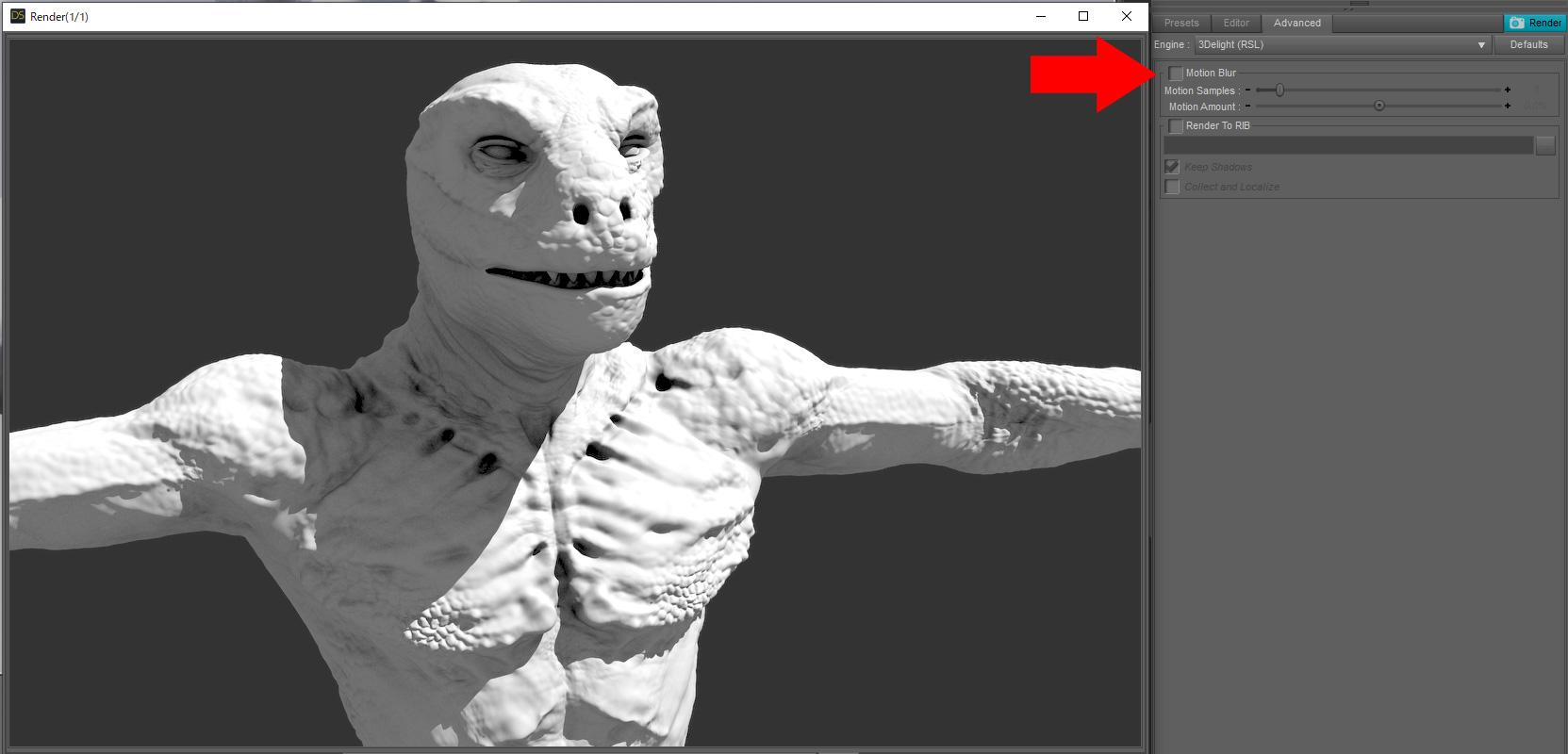
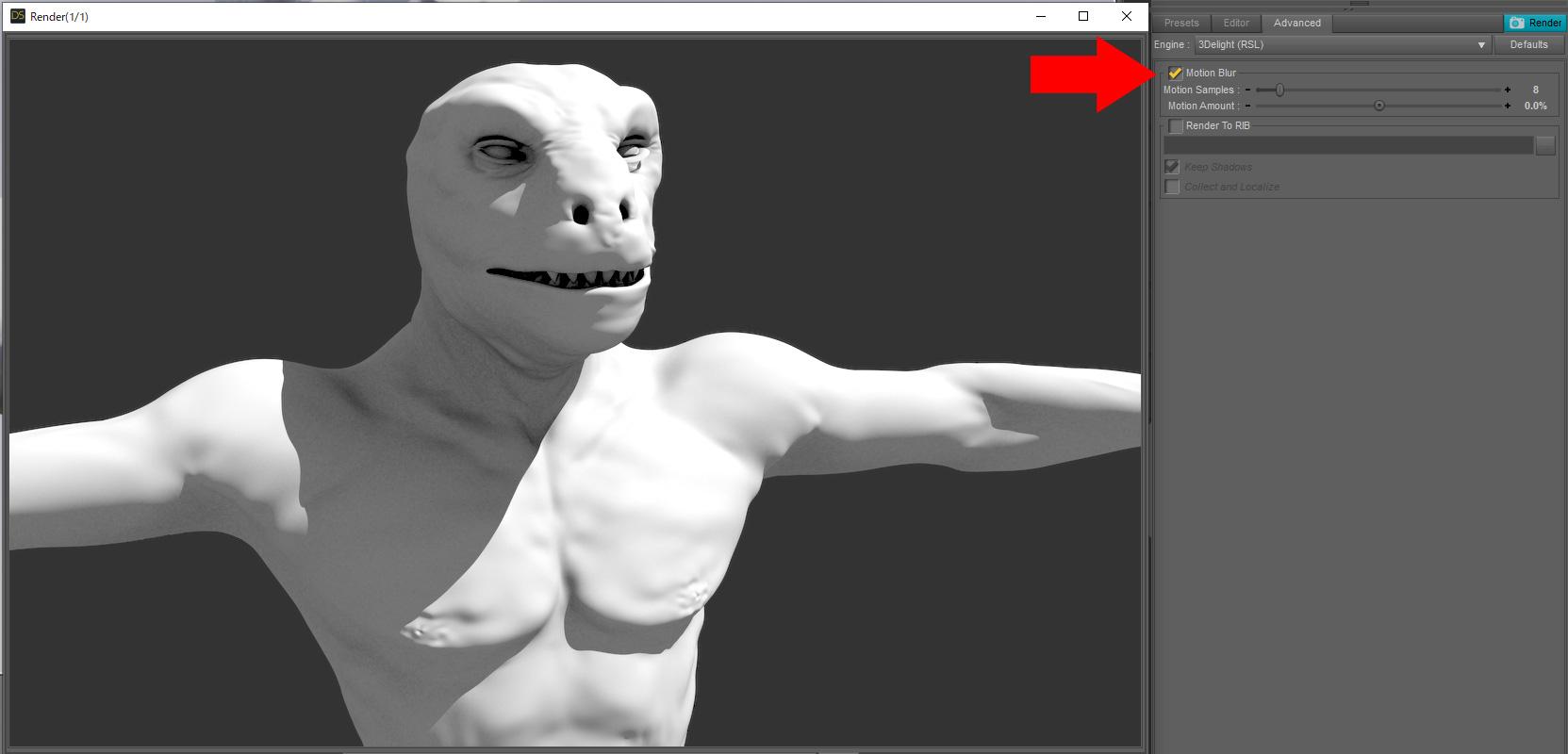
Tested without AWE Shading Kit.
When the Motion Blur check is turned on, the HD Morph effect is lost.This is a DAZ Studio issue.
I have submitted a ticket to support.The Official aweSurface Test TrackDARU said:
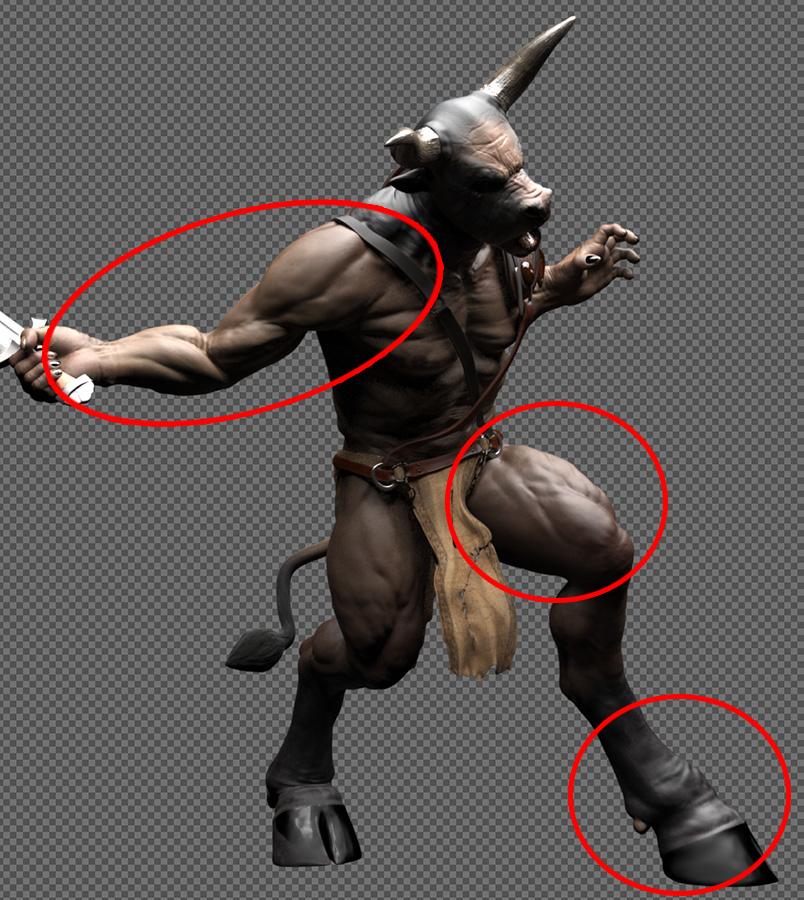
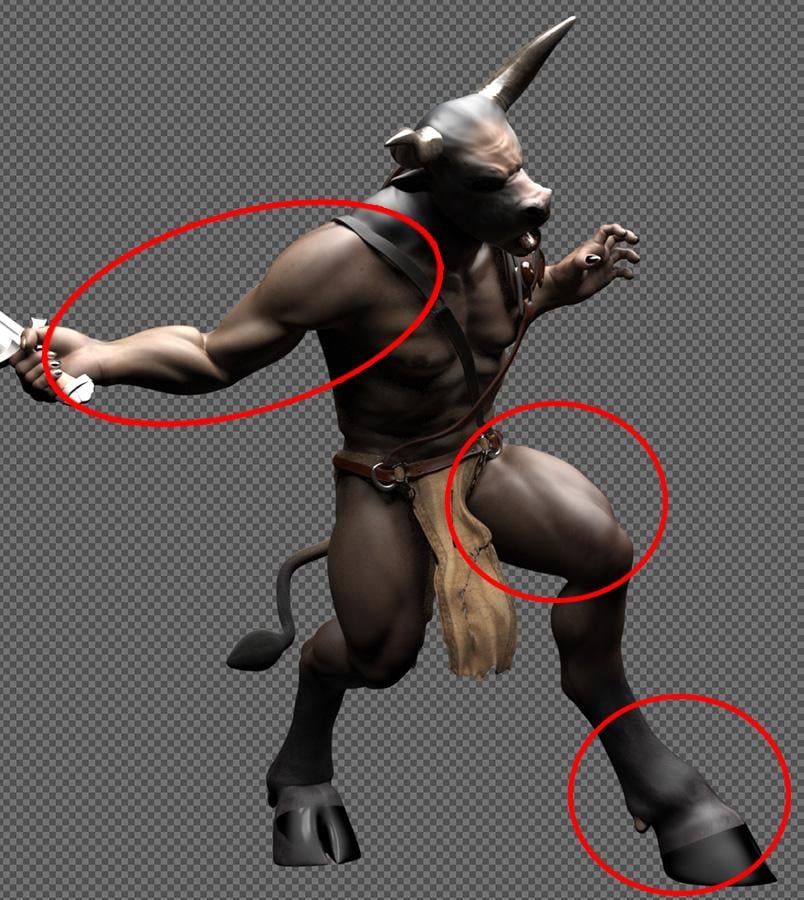
HD morph effects are lost just by turning on the motion blur check.
Image 1 : Motion blur check OFF
Image 2 : Motion blur check ON
※I have marked the obvious points.
※The amount of motion blur is set to zero to show that it is not blurred by motion blur effects.Why is the effect of HD Morph lost just by turning on the motion blur check?
Ok I get it now, tks for clarifying:) Interesting observation, I wasn't aware of that. I'll do some testing today, to atleast try to replicate the issue.
The Official aweSurface Test Track HD morph effects are lost just by turning on the motion blur check.
Image 1 : Motion blur check OFF
Image 2 : Motion blur check ON
※I have marked the obvious points.
※The amount of motion blur is set to zero to show that it is not blurred by motion blur effects.Why is the effect of HD Morph lost just by turning on the motion blur check?
[RELEASED!!!] Dynamic Character Animation in Daz Studio [commercial]All in all, I think you'll love the course.
If, like me, you really like how Daz figures work in daz Studio and would like to make cool character animations, I am sure you'll love my story.
Using the free method I demonstrate for converting animations from other generations, I've converted my entire aniBlock and motion Pose files into Genesis 3 aniBlocks. That was a lot of fun and I show you how I did all of that, and then demonstrate Riversoft Art's Bone Minion, which I bought the Genesis 3 Poses for Genesis 9 kit - since all of my animations are now prepped for Genesis 3.
Bone Minion is quite a thing! As seen in the course, I was even able to transfer my soft-body simulations from my Rosie 7 animations to Genesis 9 using a special Bone Minion included in his kit. Love it!!!
I had a lot of fun making this course and Paul, form Digital Art Live loved it. It's truly the most professional speaking job I've ever done in my life.
I love helping people. Especially with this stuff - I love this stuff!!!
Celebrity Look-a-Likes for 3D figures part 3derezz119 said:
https://www.deviantart.com/magnus1781/art/M-Rauch-891978051
^^^ Magnus has done a Melissa Rauch
Only thing is I'm not talented enough to match skin and eyebrows correctly, lol. The morph looks good though.
Face Transfer on Genesis 9I got to play around with the demo a bit, and it looks pretty good for G9.
For long time Facegen users, there are several quality of life improvements that make things easier. These things also lower the bar of entry for FG quite a bit as well, because now you don't need to do so many steps manually like before.
The last version had auto dots, but if you missed the final version of FG3, this will be new to you. The dots are automatic now, but you still have freedom to move them. This helps prevent confusion over what goes where.
V4 also creates a material preset. You still need to apply the base material preset first, then apply the preset created in FG. It even has a little icon of your character in the Daz list. A nice touch indeed. So you no longer have to dig into your folders to apply every texture. A very appreciated improvement.
Additionally, you can now create a mesh and textures separately! This is a great addition, and one I personally asked the devs for years ago. So now you can create a bunch of textures without any new head morphs, which is something I do. You can also just create head morphs and skip making textures. Really nice addition. Just remember to give your variants unique names, or you will overwrite previous ones. This might sound elementary, but it is easy to get carried with playing with the options because of the next improvement.
FG also asks which G9 base texture to use for your face. You can pick any of the 8 base sets with just a click. This is fantastic for a couple reasons. Choosing from a preset base lets FG better tone its color to your photo. You can create a much better ethnic character with these option in Facegen than you could before. But it is good to try all 4 base texture sets and see what the best one is. You may be surprised. Like I mentioned above, make sure to give each a different name to not overwrite them. The option still exists to use any texture you want. In past versions this was risky because the color matching was not optimized for just any texture, it was optimized for the base(s). But you have the freedom to try it.
The app also does a much better job of toning the color of the body textures to match your face. I mentioned 3.12 doing this, I think 4 may have improved it more. You can still get some mismatches on certain skins, it depends on your photo. So even if you choose a texture that is wildly different, you might still get a surprisingly good result.
Eye textures. This is something completely new. If you used GF before, the eye textures it creates are pretty bad. Eyes are not even round, lol. However this new FG has made a big change in how it makes eye textures. It is attempting to blend in the color of the eye into an existing base eye texture. Results will vary, but the eye textures FG creates are actually useable now.
HOWEVER, there is a big caveat to several of these new features. Many of them are exclusive to the Genesis 9. If you are still using G8 or older, those appear unchanged since FG 3.12.
That means you do not get a nice material preset for older Genesis. So it is up to you to apply a preset that works with different textures. They don't even offer the fun option to create separate morphs or skins. The option exists to make only head morphs, but I want the option to only make skins. It is maddening that only G9 gets this. The awesome new eye texture feature is only for G9. Though you can get away with using G9 eye textures on a G8.1 UV map, that is beside the point. I am actually stunned that the dev didn't bother making these new features work with G8 or 8.1 at all. 8.1 have multiple base skins just like 9 does, but no dice.
So in closing, if you are using G9, then the FG upgrade might be worth checking out. If you are still mostly on previous Genesis models, however, then there is basically nothing new here. Stick with 3.12, as that version does offer some improvements like auto dots and improved blending.
Since we are still kind of in the early days of G9, you could use Facegen to build an army of G9 characters for your runtime. But since I don't use Genesis 9 much at all, I don't see a need for me personally.
Here is a quick test shot. The Genesis 9 model on the RIGHT is straight "out of the box", no changes what so ever. The Genesis 8 on the left is using a skin preset I made, but the base textures are straight out of Facegen. I cheated the eyes, I copied the G9 eyes to G8 (using a 8.1 UV) so the eyes look the same between them.
BTW, this is something that Face Transfer cannot do. The head is cut off. If you try to run this photo in Face Transfer, it will fail and not complete the model. But Facegen can handle these images fine. Though they may not be good for depth of field if the face is too close to the camera.


The color difference is down to the original skin, the base G8 is rather pink. You can see that Facegen struggles with the lip corners on this person, which is due to how her mouth is practically frowning. However the shape is surprisingly decent. You can easily fix the mouth texture, I've done that with this same photo in the past. The eyes are not too far off her distinct eye shape. But you may notice the G9 has a bit of a dip in the upper eyelid. I can only guess this is because of how G9 handles eyes, and it is an artifact of the process. So I think the G8 one handled the eyes better than the G9 here. I can't say which texture I like more. The G9 is using the first preset, the caucasian. You can see that face blends in better with both of these compared to past Facegen efforts. Again, these textures are straight out of Facegen with no edits.
Daz 3D is part of

Connect
DAZ Productions, Inc.
7533 S Center View Ct #4664
West Jordan, UT 84084Licensing Agreement | Terms of Service | Privacy Policy | EULA
© 2026 Daz Productions Inc. All Rights Reserved.