-
Getting on the 9 train, or not
marble said:
GhostofMacbeth said:
Curious why you need cutout opacity on skin? Perhaps there is another way to approach what you are doing.
I searched the forum for possible alternative ways of doing this but couldn't find one. As for why .... well, during that search I also noticed a few other comments basically asking the same as though it is a ridiculous thing to do.
If you enable Cutout Opacity, it will also enable Thin Walled. This will give any skin using Translucency a different and inferior look.
That's why Cutout Opacity is useless for anybody who renders IRAY human skins - both UBER and PBR.
And that's why some folks are scratching their heads as to why you would need this function.
An image like the one you posted would have to be assembled in post if you want IRAY human skin to look its best.
Two questions regarding anatomical elements for all genesis versions.stripe6499_9253833ae8 said:
Something else I've never heard of, and I need to learn about... Sigh...
I think I have links lost somewhere in the forum so have re-uploaded this for you if you want it. [or for anyone else too of course]
Let's Make Projections Morphs {DA page for the download}
Postwork with Affinity Creative Suite of Photo - Designer - PublisherIn general I like APhoto and ADesinger (APublisher not so much):
I use APhoto for render pass compositing. It works for me, but the ocio implementation is borked (they don't follow the rules how the various options should be presented in the UI which makes it a bit difficult to use). But 32 bit editing in general is working.
Texture painting is ok but:
In my opinion the brushing is still one of the worst compared to: Corel Painter, Krita, Photoshop, ClipStudio. If you paint with a soft brush in 8 bit mode you always get severe banding once you paint multiple strokes on top of each other. A fix was requested for years but they did not fix it in V2.
Installation desaster with V2:
Before you buy V2 better try to install the trial. Serif has created a desaster with their new install method (it is now an APP not a normal installation anymore). Read posts from crying users here:
Softproof
For professional work you might find out that the Softproof function is not working correctly (to a degree that it is unusable). A fix was requested by a lot of users but it did not get fixed in V2.
Brush cursor
If I am painting on a graphics display (with pen on screen) I can't disable the brush cursor. So there is always this damn cursor and the tip of the physical pen fighting for my attention - very distracting. A lot of users requested to get a "disable cursor" feature for years but it got ignored.
Mask visibility
When you create a mask, you can't see it together with the underliying image while painting on it (you know this red mask overlay you see in Photoshop). You can either see the mask in solo mode or the image but never the mask and the image. Again, fix rwas requested again and again, year after year but not delivered.
https://forum.affinity.serif.com/index.php?/topic/39891-how-to-show-red-overlay-when-masking/
Texture packing and alpha editing
If you are a 3D artist and need to edit the alpha channel and do texture packing you maybe not want to use APhoto.
GPU acceleration
GPU acceleration in V1 never worked for me and a lot of other users ("it feels like half of the posts in their forum get answered with "disable hardware acceleration"). Now in V2 trial it is ok for me, but alot of others posting in the forum still have issues. But nevertheless the software is working fast enough with a core i7 for me, even without GPU support. But with GPU now working in V2 it is really fast.
Blend ranges
Those blend ranges are a big helper in image editing. They are like luma masks but directly integrated into the adjustments. Really a nice feature.
Conclusion
In general I like the software but with Affinity ignoring issues and requests made by a lot of users I am now trying Krita and others more to see if they could be a better alternative. Not decided yet and it is not about the price. I think 119 € intro price (same price for new and existing users - no discount for those who already own V1) is ok (included in that price are all three apps for Win and MAC and the ipad versions).
Two questions regarding anatomical elements for all genesis versions.Catherine3678ab said:
If one has collected a sufficient number of morphs, using the search term 'bulge' on the Parameters dial can show what's available.
I do have what seems to be a rather popular set of projection morphs for G8M over at Renderosity [free]. 9 Invisible Morphs for G8M - Projection Morphs
Thank you Catherine. That's most kind of you. Downloaded and installed. I'll be interested to try them out. So far I've been saving my mesh grabber alterations as morphs for the items I've been amending, I sometimes need it for female clothing items that are sheer, to avoid hair poke through. It's all good experience, and I'm sure that one day I'll become capable and get into Blender to do things properly.
Getting on the 9 train, or notGhostofMacbeth said:
Curious why you need cutout opacity on skin? Perhaps there is another way to approach what you are doing.
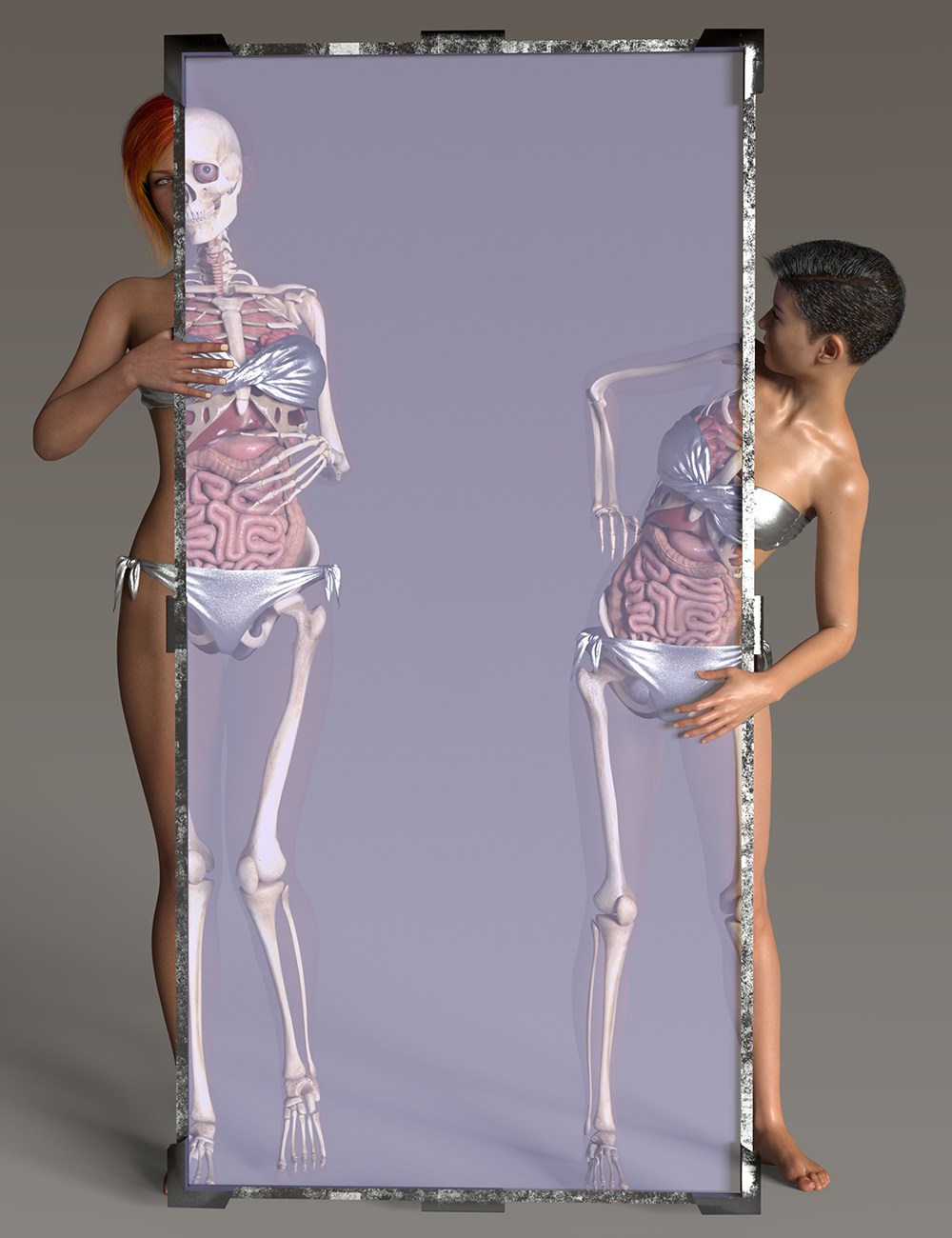
I searched the forum for possible alternative ways of doing this but couldn't find one. As for why .... well, during that search I also noticed a few other comments basically asking the same as though it is a ridiculous thing to do. I can think of a few reasons and I have rendered such images quite often. For example, I have the V4/M4 internal anatomy and also the skeletons and I have experimented with semi-transparent skin with those internals positioned inside a G8 character. As I rarely post anything I render (this hobby is for personal enjoyment, not for public display) I let my imagination run free.
 Two questions regarding anatomical elements for all genesis versions.
If one has collected a sufficient number of morphs, using the search term 'bulge' on the Parameters dial can show what's available.
I do have what seems to be a rather popular set of projection morphs for G8M over at Renderosity [free]. 9 Invisible Morphs for G8M - Projection Morphs
UltraScenery - new territory [Commercial]Llola Lane said:
Martinjfrost said:
Llola Lane said:
Daventaki said:
Martinjfrost said:
Ive attached some slides made as part of a tutorial i did which should help explain it.
Is the tutorial still available?
I second that question :)
It was part of a webinar i did for Digital Art Live a few months ago i know its not available through daz but you could contact them and ask if there is a recording of it you could purchase
https://digitalartlive.com/event/50-shades-of-iray-an-evening-with-martin-frost/
The post work bit was part of a larger discussion about texturing etc. We did talk about fleshing it out in to a proper step by step but nothing came of it.
However with a quick search this came up on youtube and its pretty clear and much the same workflow. Well worth watching.
https://www.youtube.com/watch?v=aIQYqcj1yBI
Also This overview of photorealism and lighting is very good, not DS specific but good theory and practices to remember.
Thanks Martin.. I'll check them out later this week... ;)
Quick check... Looks like i can't use canvases... I don't have a program to open up .EXR files (sighs) Oh well!
UltraScenery - new territory [Commercial]Martinjfrost said:
Llola Lane said:
Daventaki said:
Martinjfrost said:
Ive attached some slides made as part of a tutorial i did which should help explain it.
Is the tutorial still available?
I second that question :)
It was part of a webinar i did for Digital Art Live a few months ago i know its not available through daz but you could contact them and ask if there is a recording of it you could purchase
https://digitalartlive.com/event/50-shades-of-iray-an-evening-with-martin-frost/
The post work bit was part of a larger discussion about texturing etc. We did talk about fleshing it out in to a proper step by step but nothing came of it.
However with a quick search this came up on youtube and its pretty clear and much the same workflow. Well worth watching.
https://www.youtube.com/watch?v=aIQYqcj1yBI
Also This overview of photorealism and lighting is very good, not DS specific but good theory and practices to remember.
Thanks Martin.. I'll check them out later this week... ;)
IRAY viewport render causing CPU / GPU temps to soar and crash DAZ Studio after new NVIDIA drivers?I've not seen this myself, but if you've got something like CPUID HWMonitor or something else that can record temps it would be good start.
If you have found a bug like this it would be good to catch it early.
Record the Studio version you are using , the GPU driver version, and a temperature log and post them in the beta test forum so others can help look for the issue
Also submit a bug report so the devs know about it.
edit:typos
UltraScenery - new territory [Commercial]Llola Lane said:
Daventaki said:
Martinjfrost said:
Ive attached some slides made as part of a tutorial i did which should help explain it.
Is the tutorial still available?
I second that question :)
It was part of a webinar i did for Digital Art Live a few months ago i know its not available through daz but you could contact them and ask if there is a recording of it you could purchase
https://digitalartlive.com/event/50-shades-of-iray-an-evening-with-martin-frost/
The post work bit was part of a larger discussion about texturing etc. We did talk about fleshing it out in to a proper step by step but nothing came of it.
However with a quick search this came up on youtube and its pretty clear and much the same workflow. Well worth watching.
https://www.youtube.com/watch?v=aIQYqcj1yBI
Also This overview of photorealism and lighting is very good, not DS specific but good theory and practices to remember.
RS Character Converter G8F to G3F crashes DAZ after conversionGood day all.
I bought this https://www.daz3d.com/character-converter-from-genesis-8-female-to-genesis-3-female like a 100 years ago and now I'm finally playing with it. Even though I'm successfuly converting G8F to G3F, DAZ Studio crashes right after closing the script window. Every single time. Now I think all converions were with G8.1F, don't remember if I tried with G8F. Also, there is a window that pops up saying somthing like I'm using this method for the first time and the script needs to do something extra only once. But this window shows up every time I do a new conversion.
Has anyone experienced this issue? I searched for the "official" forum page of this product but couldn't find it. Found the thread.
I know is not a big issue because at the end of the day, the convertion works. But the crashing annoys me. Oh and I'm using DAZ 4.21.0.5
Cheers
Rigging Models for Use in CarraraOn the clothing that comes with the figure. I mentioned the 'attach skeleton' method. You are likely to get some poke through. Here is a long-dead thread on a variety of ways to fix poke through when clothing is 'attached' to the same skeleton as a rigged figure. One of my earliest Carrara forum posts.
 THANKS, DAZ for the forum fix!
marble said:
McGyver said:
Daywalker Designs said:
kyoto kid said:
...but did they fix the 502/504 bad gateway issue yet?
This is usually a result of data speed issues between the DAZ Servers and whatever specific Cloudflare server you're going through, which may not be something that DAZ3D has any control over.
The Cloudflare report always puts the failure on DAZ's servers...
You: Browser (working) -> Network: Cloudflare (working) -> www.daz3d.com: Host (error)
Exactly. I've just had two in a row and it is really annoying. I read somewhere (here on this forum) that DAZ will need to replace the forum software to fix it so that does not suggest a Cloudflare problem. Besides, Cludflare is used by many, many huge online entities without any issues and, just from personal experience, DAZ is the only - yes the ONLY - site that I have a problem reaching.
I'm not saying it's a Clouflare problem; I'm saying that the "gateway" may not be a server that's directly under DAZ3D's control.
THANKS, DAZ for the forum fix!McGyver said:
Daywalker Designs said:
kyoto kid said:
...but did they fix the 502/504 bad gateway issue yet?
This is usually a result of data speed issues between the DAZ Servers and whatever specific Cloudflare server you're going through, which may not be something that DAZ3D has any control over.
The Cloudflare report always puts the failure on DAZ's servers...
You: Browser (working) -> Network: Cloudflare (working) -> www.daz3d.com: Host (error)
Exactly. I've just had two in a row and it is really annoying. I read somewhere (here on this forum) that DAZ will need to replace the forum software to fix it so that does not suggest a Cloudflare problem. Besides, Cludflare is used by many, many huge online entities without any issues and, just from personal experience, DAZ is the only - yes the ONLY - site that I have a problem reaching.
New! Novica & Forum Members Tips & Product Reviews Pt 14Novica said:
Daventaki said:
Ah, NorthOf45 beat me to it I had to look up how to spell it.. lol
I knew it was a weird spelling and had an x or z in it. Man, trying to do a search for something like that was excruciatingly hard
 And no flowing fins. I guess I was remembering the tail- and it's certainly NOT a fish. No wonder Robert (and I) went the wrong direction.
It is a type of salamander...
New! Novica & Forum Members Tips & Product Reviews Pt 14Daventaki said:
Ah, NorthOf45 beat me to it I had to look up how to spell it.. lol
I knew it was a weird spelling and had an x or z in it. Man, trying to do a search for something like that was excruciatingly hard
And no flowing fins. I guess I was remembering the tail- and it's certainly NOT a fish. No wonder Robert (and I) went the wrong direction.New! Novica & Forum Members Tips & Product Reviews Pt 14Robert Freise said:
You don't mean this one by any chance
https://www.daz3d.com/amipiscus-friendly-fish-original-figure
No, I'd already seen that one :) But good guess! I am not finding it under fish at all. I don't THINK it's a reptile/amphibian, but maybe I should expand my search. Thanks for trying to help!
Getting on the 9 train, or notrichardandtracy said:
I'm just wondering why nobody seems to have mentioned little geografts for navel an nipples (or if they did, it was so long ago I forgot). This seems a simple idea to me. I have made one (yes, that's total the depth of the experience I have, so I could be talking complete nonsense - hope not) and it appears to be nowhere near as difficult as I expected. There are good instructions in this forum that I followed, and it worked. I was doing an 'I wonder if I could...' Halloween geograft that worked much better than expected (or wanted, to be honest, in some ways it put me off) and can't be put on a family forum. But as a first experience I was amazed at how easy it was to create. The geograft could be made with all the detail the user wants and no need to boost the subdivision level at all. Regards, Richard.
I thought about geografts, too. Then you have to be concerned about texturing the new geometry in a way that works with the existing geometry and you're maybe looking at geoshells to get coverings (not necessarily clothing but any covering) to work with them. That's true of any geografts, I think. More work.
THANKS, DAZ for the forum fix!Sven Dullah said:
...but it's still most annoying and most other companies around the globe have solved their issues by now...
Annoy is too mild a descriptor, I prefer irritating-infuriating! And yeah this forum is quite unique as it's a little too custom-made, as I don't believe there's a standardised forum template, as the issues are too unique in nature!
Sale?Thank you. I'm sure it was reported and fixed before I even figured out how to include the image in a forum post.
Daz 3D is part of

Connect
DAZ Productions, Inc.
7533 S Center View Ct #4664
West Jordan, UT 84084Licensing Agreement | Terms of Service | Privacy Policy | EULA
© 2026 Daz Productions Inc. All Rights Reserved.