-
So, Easter Eggs?
Ryuu@AMcCF said:
The metal shaders popped up in my DIM download this morning when I did my purchases and included the 4/4 Hair shader in my order.
I had not needed to submit a ticket to resolve this. It may just need a 4-day waiting period for the sequence to show up.
1. First I've heard about any of this - 3:45 p.m. Eastern on Shatteredday afternoon <grin>
2. When I think "Easter Eggs" I think of hidden goodies, usually with some sort of pun attached or intended, like the rabbit symbol on the cover of Playboy (ok, used to be) or little personal touches like Alfred Hitchcock in the movie Repulsion, I believe it was - he's in the newspaper? So in DAZ-land an "egg" would something like pocket litter in a man's pants or an actual rigged hatchling (and "pip" morph) in the "eggs" in a model birds nest. Or, um, interesting reading material in the drawer beside the nightstand in a model of "Hotel Sovietskaya" in Moscow. Or in one of the storerooms of a model of Maralargo - use the included slider to open and close the door sort of thing.
Character Conversion: M4H4 to G8M/8.1M/9?FSMCDesigns said:
nomad-ads_8ecd56922e said:
Interesting, what is the name of the skin converter at Rendo? Who makes it?
Probably Blacksmith3D
Yes it was Blacksmith. Strange that it is no longer available, not even on their own website, I assume the company behind it has folded.
I prefer to have the skins converted to G3F/G3M UVs as they are easier to use and modify than using the geo graft UV utilities provided here, although I do have some of those, and they work well.
I have transferred characters from various vendors, including Mortem Vertus that ZippyGuitar mentioned was difficult to transfer (I can post examples if any one is interested). The only vendor I struggled with was Eric Farris who uses PMD files for the morphs, although I could probably get round that by using Poser to transfer them to normal morph injections.
Use G8 wearable preset on G9?I have a wearable preset that loads a sword prop into G8's hand. Is it possible to transfer this to G9? And if so, how?
Character Conversion: M4H4 to G8M/8.1M/9?I transfered a bunch of M4 characters onto G8M a while back, and Giacomo was one of them. The morph was transferred as has been outlined above, Gen X2 to get on to G3M and then X-Transfer to get to G8M. The skin was converted using a utility sold at Rendo. Here it is a quick and crude render of him. You can see it is the same character, but it is not identical. No doubt you can get closer by tweaking various head morphs.
 Character Conversion: M4H4 to G8M/8.1M/9?
Hylas said:
In my experience, the process is very much hit and miss.
I usually don't even bother transferring the body shapes and stick to the head shapes.
Best case scenario, you get a G8M head shape that looks more or less like the M4 original, but less defined. I use dials to get the shape closer to the original.
Worst case the transfer doesn't work at all. I don't know enough about these processes to be able to tell why some characters transfer and others don't.
That's how much I can tell you. Good luck!
I agree with Hylas' recommendations and his methods sound like what I do. With my experience, I have had no luck transferring Jepe's M4 Characters (LOVED his Mil4 men) and Mortem Vetus M4 characters over to G8, but characters from Mec4D, Phoenix66, and a few others have worked just fine. I've found too, that just transferring the head morphs is preferrable for my needs.
Character Conversion: M4H4 to G8M/8.1M/9?I've done Michael 4 -> Genesis 8.1 transfers.
There's probably several ways to go about it; this is the way I did it:To transfer the shapes, you need all of these products:
https://www.daz3d.com/genesis-generation-x2
https://www.daz3d.com/genx2-addon-for-genesis-2
https://www.daz3d.com/genx2-addon-for-genesis-3
https://www.daz3d.com/xtransfer--genesis-3-to-genesis-8-converterTo transfer the skin:
https://www.daz3d.com/legacy-uvs-for-genesis-8-michael-4To convert to IRAY:
https://www.daz3d.com/iray-converter-for-generation-4In my experience, the process is very much hit and miss.
I usually don't even bother transferring the body shapes and stick to the head shapes.
Best case scenario, you get a G8M head shape that looks more or less like the M4 original, but less defined. I use dials to get the shape closer to the original.
Worst case the transfer doesn't work at all. I don't know enough about these processes to be able to tell why some characters transfer and others don't.
That's how much I can tell you. Good luck!
Hexagon BETA - version 2.5.2.137! (*UPDATED*)In my support ticket to Daz, posted in these threads - didn't get that certain answer. Just that is was known, intended and otherwise no direction. So good to see clarity.
Resumed availablity of Hex Beta is a good thing.

My one issue that I hope they deal with one day is memory management. Have 128GB ram. Still sculpting - will eventually slow down and then if keep sculpting, especially smoothing, it will get internal error pop-up. This is a regular feature for years. Fix is as soon as see slow down, just stop sculpting, send to DAZ, save morph, close Hex, and then resend to Hex to open new session. Bit like DS scene sessions. Just close and start a new one to be safest. Perhaps DS improved that, but shutting down and loading a fresh scene just works reliably.
How to preview UE render in DAZ?Krys Kryngle said:
Try using the DAZtoUnreal bridge. There are some material settings loaded in there that would be a good start. Remember that DAZ materials are made to look good in DAZ, not anything else (and they often don't). Your materials in unreal should be closer to real world colors. If you have a green face texture, your character will still have that green color when rendered in Unreal. Experiment with different textures to see what you like or just look at the skin texture images and try those that look closest to real world. Just as an example, I think the Alexandria skin textures transfer pretty good if I'm remembering correctly.
Figured it out, thanks!
Julia 9 HDjd641 said:
carlosgimpera said:
I've been playing a bit with her. Her out of the box body proportions aren't the best but with the teen body morph option for losing neck weight and the several options if you add the make-up and skins I think is a win win.
Julia comes with a body morph or is that from something else?
I used the teen morphs in both of them. It's a different product.It softens the bulky G9 chest. And body morphs from the G9 essential pack. Cheers.
Transfering Genesis 9 shape to Genesis 8mlominy said:
Is there any tutorial on how to transfer Genesis 9 character shape to Genesis 8?
There are a couple for going from Genesis 1-8 to 9, but since the G9s are so dependent on HD morphs and the software to work with those is restricted to PAs by DAZ, I'm not sure if one could actually make a G9 to previous generation morph that would accurately retain all of the G9's details.
Julia 9 HDcarlosgimpera said:
I've been playing a bit with her. Her out of the box body proportions aren't the best but with the teen body morph option for losing neck weight and the several options if you add the make-up and skins I think is a win win.
Julia comes with a body morph or is that from something else?
Combine facial meshes and morphs for game enginesAs for 'combination of facial expressions / morphs', yes you can.
- Load a Base Figure. Dial the expressions you want. Set figure's Resolution Level to Base. Export to obj file.
- Zero figure's pose or press CTRL SHIFT + F. Use Morph Loader Pro(default settings) to import obj file into the figure
- Go to Parameters Pane, Morphs - Morph Loader, dial the imported morph to 100%, then ERC Freeze in Edit Mode. Rename it as needed..
- Save it as a Morph Asset.This is the standard way of make a single dial of 'combined morphs'. FACS on G8.1 can well supports 'blend shapes' Mocap in UE, but I know nothing about Unity, so you have to further figure it out...
Transfering Genesis 9 shape to Genesis 8Is there any tutorial on how to transfer Genesis 9 character shape to Genesis 8?
Julia 9 HDI've been playing a bit with her. Her out of the box body proportions aren't the best but with the teen body morph option for losing neck weight and the several options if you add the make-up and skins I think is a win win.
1. Using the hair of the gamer bundle (I like her better with the Taylor hair shown in the promos) and some geoshells
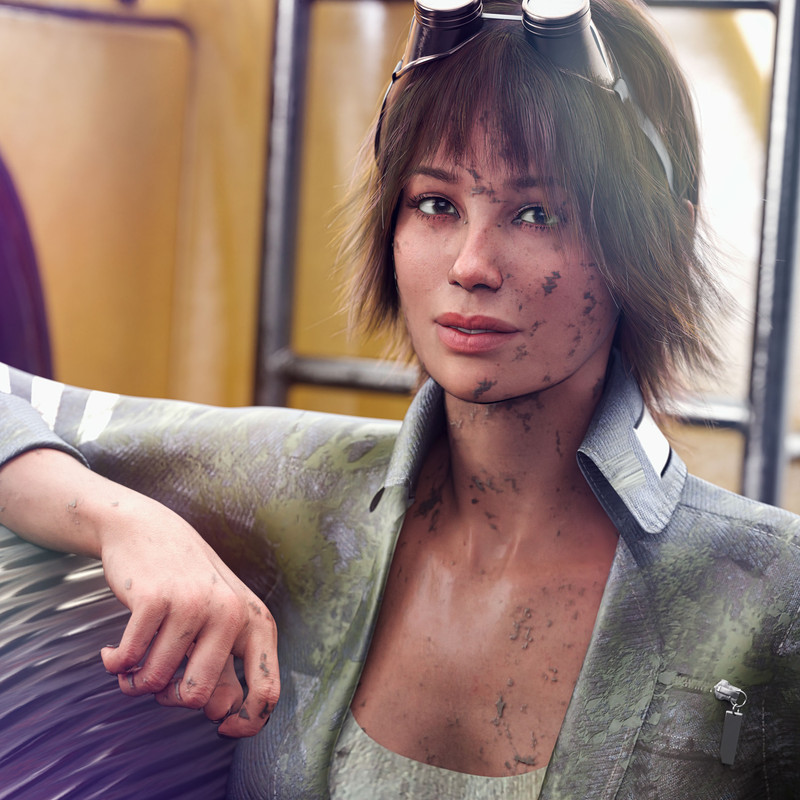
2. With that combo 50% Julia 50% Victoria. Teen Skin and some body morphs. A bit noisy, I was impatient.

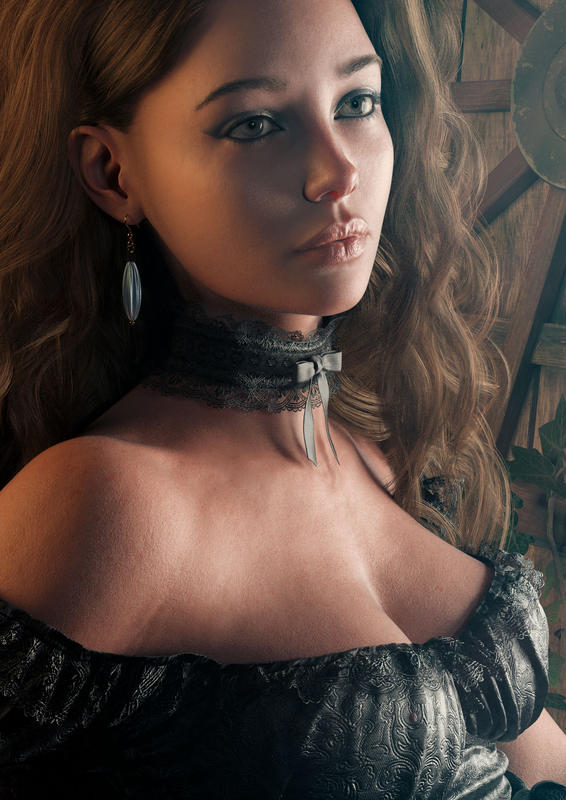 Face transfer so much better
I would like to know if there are any plans or things in the make to update Face Transfer to Gen 9? Noticed the creator has only one Gen 8 version in his shop... @itSeez3D
Gen 8.0/8.1 male's arm mesh completely distorted, anyone else have this problem? (solved)Richard Haseltine said:
You have installed some new cotnent which has an error in itss et up - check for updates (in DIM or Smart Content with DS online, depending on how you install), there was a daz character that did this but that was fixed ages ago.
I suspected that as well, probably a runtime file, but what if I installed contents via manually file migrate? I have no log to see which file may cause the problem, and I haven't installed any Gen8/8.1 character for sometime since last year.
And let's say once I spotted which file cause the problem, how can I fix it? what if it's something in runtime file which I can't delete? how did the other person fix the problem?
Attached is the log when I upload a stock gen 8.1 male figuer, a brunch of "formula target property not found" and strangely, I have "simonWM arm bend" in the log when there's 0 morph used on this stock gen 8.1 male figuer
edit: btw, why all my screenshots were deleted?
Julia 9 HD

I just saw that her right thumb goes into her left hand on the first one :(Here's a render of the Julia Teen Freckled skin in 8K (saved as jpg with 95% quality to make size managable for some people..) on the left.
2nd pic on the right (or below depending..) uses the regular Julia G9 freckled skin as a comparison. Nothing was changed beyond that, and the fingers position was adjusted so they do not poke into another unlike in the first pic..
Morphs
- 70% Julia
- 50% Julia HD details
- 30% Josie
- 100% Josie Proportions
- 100% Breasts Small
Materials
- Applied Julia's materials
- Applied Julia's Teen freckled materials
You seem to have to apply some other materials prior to the teen ones as they do not map the nails whatsoever (white texture - same behavior with angela's teen materials). Other than that it seems to load the needed Julia G9 / Base G9 normals mix.
While I do not like the current Josie incarnation by itself, I find it very useful to make some characters appear younger. Obviously there are morphs meant for that, but I find Josie's own morph to work very well for it. The G9 skin details (8K normals) look good but are very sandpaper-ish.
I also find it weird they didn't include some morph that could be applied on top of Julia to go along with the skin. This whole release is weird. Julia herself does not look like a teenager whatsoever, so why the skin but no morph? Missed opportunity there.
The skin differences when opening the textures seem that there's some blur going on for the teen version, above the skin / moles, but below the freckles. Not sure how elese to explain it, but everything seems a bit more blurry when zoomed in. It's mostly noticable around the navel where you can see the very faint hair being blurred. The other differences are smaller areolas, and slight different skin tint overall.
Julia 9 HDdaveso said:
franky85 said:
Havos said:
vagans said:
I don't get the Julia 9 Teen addon. If it's just skin and normals, what does it have to do with Julia 9? They don't even use the Julia 9 model for advertising it, which is somewhat misleading to consumers.
I was also perplexed by this. I don't understand why the two skin add-ons list Julia 9 as a requirement, they certainly do not need her morph. Do the skins use part of Julia's skin?.
It uses Julia's :
- Specular Lobe 1 Roughness
- Normal Map (it seems only the acne mats have their own head normal map, all the others fall back to Julia's)
i guess I can drop those two from my cart too. Or can they work wih another g9 skin? like the base skins?
Can't see why not - it's essentially just diffuse and subsurface scattering maps, + the acne head normals.
Julia 9 HDfranky85 said:
Havos said:
vagans said:
I don't get the Julia 9 Teen addon. If it's just skin and normals, what does it have to do with Julia 9? They don't even use the Julia 9 model for advertising it, which is somewhat misleading to consumers.
I was also perplexed by this. I don't understand why the two skin add-ons list Julia 9 as a requirement, they certainly do not need her morph. Do the skins use part of Julia's skin?.
It uses Julia's :
- Specular Lobe 1 Roughness
- Normal Map (it seems only the acne mats have their own head normal map, all the others fall back to Julia's)
i guess I can drop those two from my cart too. Or can they work wih another g9 skin? like the base skins?
Julia 9 HDHavos said:
franky85 said:
Havos said:
vagans said:
I don't get the Julia 9 Teen addon. If it's just skin and normals, what does it have to do with Julia 9? They don't even use the Julia 9 model for advertising it, which is somewhat misleading to consumers.
I was also perplexed by this. I don't understand why the two skin add-ons list Julia 9 as a requirement, they certainly do not need her morph. Do the skins use part of Julia's skin?.
It uses Julia's :
- Specular Lobe 1 Roughness
- Normal Map
Ok, that explains it, thanks.
Added some precision in my original post.
New finding : it seems the skin does not contain any nails texture, so they come up as white if you only load that texture on top of a base plain freshly loaded G9 figure. So you need to load Julia's (or presumably another character's) textures and then load the teen one. Since it requires Julia's anyway, I'll file a bug report I think.
Daz 3D is part of

Connect
DAZ Productions, Inc.
7533 S Center View Ct #4664
West Jordan, UT 84084Licensing Agreement | Terms of Service | Privacy Policy | EULA
© 2026 Daz Productions Inc. All Rights Reserved.