-
Let's appreciate/discuss today's new releases - ongoing thread
Daywalker Designs said:
FSMCDesigns said:
I like the look of TMA Aaliyah for Genesis 8.1 Female, but knowing that PA puts their files in the most awkward locations keeps me from buying from them (DAZ needs to set them straight on file locations. A user shouldn't have to search for the shaping and materials folders for files to load from a character)
That's a bit strange. I would look in People\<insert Genesis version here>\Characters\charactername (or People\<insert Genesis version here>\Characters\vendorname\charactername)for the shaping presets (at least for figures prior to Genesis 9) and expect the materials in a subfolder of that. I'd also expect a vendor specifc scaled actor preload in People\<insert Genesis version here>\Characters. That's pretty much how I have the few custom characters I've done in zBrush set up in DAZ Studio.
Exactly, that is how most are packaged. If you look at the readmes, there is a single character load under the PAs name in characters and all other files are in shaping and materials instead of subfolders in the character folder .
Let's appreciate/discuss today's new releases - ongoing threadFSMCDesigns said:
I like the look of TMA Aaliyah for Genesis 8.1 Female, but knowing that PA puts their files in the most awkward locations keeps me from buying from them (DAZ needs to set them straight on file locations. A user shouldn't have to search for the shaping and materials folders for files to load from a character)
That's a bit strange. I would look in People\<insert Genesis version here>\Characters\charactername (or People\<insert Genesis version here>\Characters\vendorname\charactername)for the shaping presets (at least for figures prior to Genesis 9) and expect the materials in a subfolder of that. I'd also expect a vendor specifc scaled actor preload in People\<insert Genesis version here>\Characters. That's pretty much how I have the few custom characters I've done in zBrush set up in DAZ Studio.
Women's Basketball Uniform? Baggy Knee Length Shorts? Matching Jersey?Thanks for replies. "Basketball kit" seems a winner. Odd it didn't show up when I'd typed 'basketball', 'basketball uniform', etc. Anyway, good idea about supersuit to make bandage brace. Hadn't thought of that.
Nice to find another PA who makes contemporary stuff. Outfit looks great. Also looks like Darius & Monique will be getting hairdo & probably snag a couple of his characters while I'm at it.
---
That's why I like DAZ forums. Can always count on members to help out if draw a blank on search results.
Best wishes & enjoy week. ; )
epileptic seizure warningDP WES said:
Cris Palomino said:
We have flagged this up to Daz.
Is this the best course of action due to a lack of response or action?
Want to know how to block autoplay?
Brave - brave://settings/content/autoplay
Chrome - chrome://flags/#autoplay-policy
Firefox - https://support.mozilla.org/en-US/kb/block-autoplay
Since afaik no video is allowed to auto play on a product page or forum it will only effect the front page that is autoplaying anyway.
Thanks. I just linked to the main shopping page to spare my eyeballs. But I'll keep this tidbit incase I need it in the future
 Postwork with Affinity Creative Suite of Photo - Designer - Publisher
They recently confirmed that there will be a normal installer again in the future. The new msix app method created so many issues for so many users that the topic in their forum became a big shitstorm. But at least they understood how bad the APP idea was in the context of workflows and pipeline integration.
epileptic seizure warningCris Palomino said:
We have flagged this up to Daz.
Is this the best course of action due to a lack of response or action?
Want to know how to block autoplay?
Brave - brave://settings/content/autoplay
Chrome - chrome://flags/#autoplay-policy
Firefox - https://support.mozilla.org/en-US/kb/block-autoplay
Since afaik no video is allowed to auto play on a product page or forum it will only effect the front page that is autoplaying anyway.
THANKS, DAZ for the forum fix!Daywalker Designs said:
marble said:
McGyver said:
Daywalker Designs said:
kyoto kid said:
...but did they fix the 502/504 bad gateway issue yet?
This is usually a result of data speed issues between the DAZ Servers and whatever specific Cloudflare server you're going through, which may not be something that DAZ3D has any control over.
The Cloudflare report always puts the failure on DAZ's servers...
You: Browser (working) -> Network: Cloudflare (working) -> www.daz3d.com: Host (error)
Exactly. I've just had two in a row and it is really annoying. I read somewhere (here on this forum) that DAZ will need to replace the forum software to fix it so that does not suggest a Cloudflare problem. Besides, Cludflare is used by many, many huge online entities without any issues and, just from personal experience, DAZ is the only - yes the ONLY - site that I have a problem reaching.
I'm not saying it's a Clouflare problem; I'm saying that the "gateway" may not be a server that's directly under DAZ3D's control.
It's a bit weird though, that I - from my memory - never a cloudflare problem resulting in these 503/504 errors with any other server than DAZland's.. so IF it's not DAZland's server that is causing the problem, they should contact their provider to check if their routing could be handled differently?!? Of course it's easier to ignore the problem and leave a possible solution to someone else...
Let's appreciate/discuss today's new releases - ongoing threadI am very picky with purchasing content now, especially this time of year with lots of bills and the holidays coming up. As for the toon heros, it's probably a quality product knowing the PA, but I have no use for toon anything.
I like the look of TMA Aaliyah for Genesis 8.1 Female, but knowing that PA puts their files in the most awkward locations keeps me from buying from them (DAZ needs to set them straight on file locations. A user shouldn't have to search for the shaping and materials folders for files to load from a character)
Enchanted Attic does look nice and useful for some of my projects.
I haven't jumped on the G9 bandwagon yet, but seeing new heels for her might make me jump sooner than I thought!!.
Gateway...Adding forum problems...
Refreshing the page was "Waiting for www.mczbf.com" for quite a long time.
Going to the page, opened a mostly blank page with the text "Hello World"UltraScenery - new territory [Commercial]Llola Lane said:
barbult said:
Maybe Fisio will be useful.
interesting... never heard of it... you are a wealth of information Barb :)
I just stumbled over the new forum thread about it.
How to Use dForce: Creating a Blanket, Draping Clothes on Furniture, and Much More [Commercial]This was a dForce topic that I heard about today. Unlike sometimes, it came together pretty quickly.
91. Cling Wrap
Bluefeathers posted to the Daz Forum looking to get the effect of a character breaking through a sheet of cling film. I gave it a try and came up with a reasonable representation of that happening.
a. Create a plane with 250 divisions.
b. Add a dynamic dForce modifier to the plane.
c. In the Surface pane, set the Simulation parameters as follows:
- Stretch, Shear, and Bend Stiffness to 0.01
- Buckling stiffness to 100%
- Buckling ratio to 0%
- Density is 600
d. Add a dForce modifier weight node to the plane. Using the Node Weight Map tool found in the Tool Settings pane, click Add Map to create an influence weight map. Then right click in the viewport and choose Selection Type/Polygon Selection. Draw a rectangle on the plane slightly end from the borders. That will select the center of the plane.
e. Right click in the viewport and choose Geometry Selection/Invert Selection to select the outside faces of the plane.
f. Right click in the viewport and choose Weight Editing/Fill Selected and choose 0%. This will lock the edges of the plane in place, while allowing dForce to deform the center of the plane.
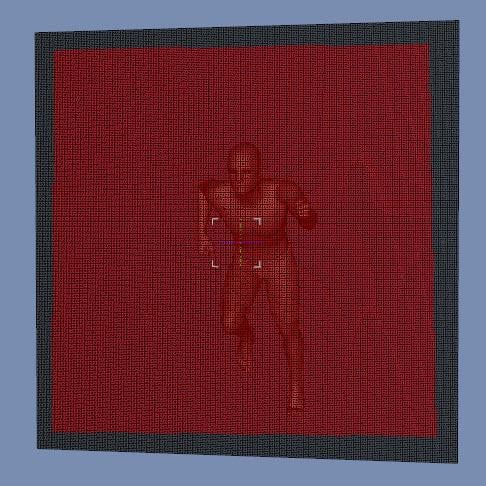
g. Add a figure (I’m using Genesis 2 Male) and pose it how you like. Move the figure so it is almost touching the plane.
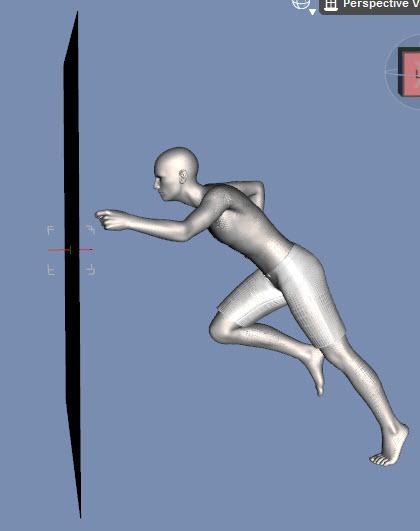
h. With the figure selected and using the timeline, click on the +key to add a keyframe at frame 0.
i. Go to frame 15 and move the figure so it is protruding through the plane to whatever depth you want. When animated, the figure will move towards the plane and push it forward. Moving the figure and not the plane prevents dForce momentum effects on the plane.
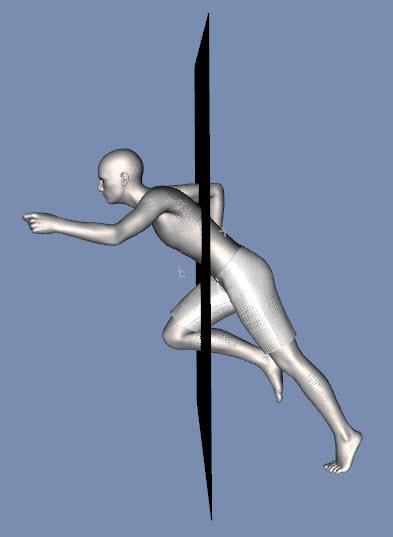
j. In the Simulation Settings pane, set Environment/Gravity to 0. All we want is deformation from movement, not gravity.
k. Run an animated simulation. You can stop after frame 15 is reached as once the figure stops moving momentum effects begin to take over.
l. Select whichever frame you like best to render.
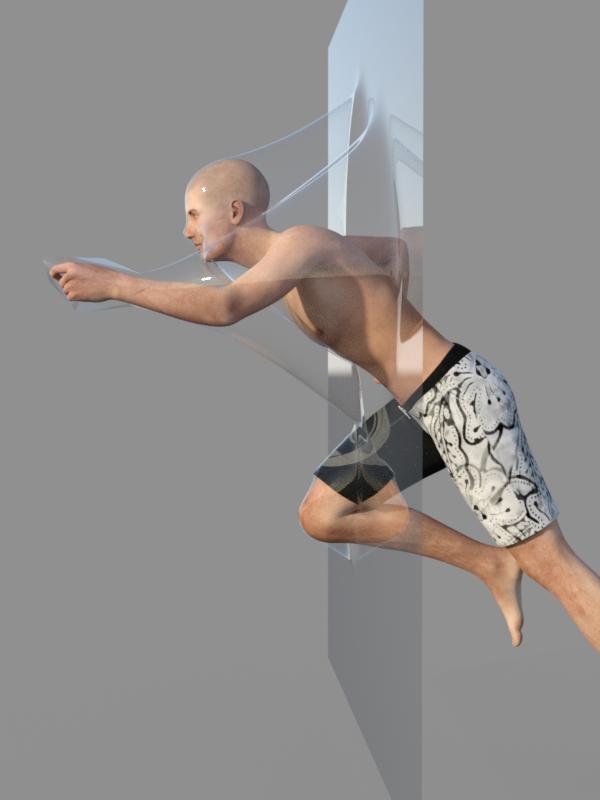
m. For the pose I used, the hand presses forward and stretches just a few polygons giving a triangular look to the film. One way to correct this is to use a product like MeshGrabber to move any offending vertices to a more suitable position. You will need to do this after every simulation.

n. Another way to correct this is to use an animated sphere so more polygons are located by the hand.
- Create a 5 inch sphere with 16 sides and 16 divisions.
- At frame 0, position it so it overlaps the figure’s leading hand. Click on the +key to set a keyframe.
- At frame 15, reposition the sphere so it is over the moved hand. Scale it down so it is just larger than the hand (I used 80%).
- Run the simulation.
- The sphere keeps more polygons near the hand and avoids the jutting polygons. It does mean the head doesn’t project as much at frame 15 so I picked frame 12 to render as it gave the best overall look.
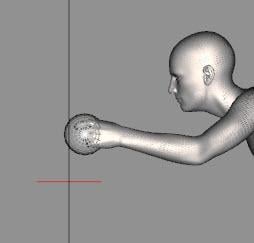

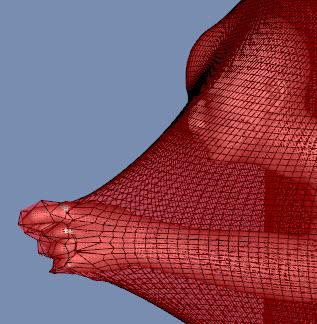
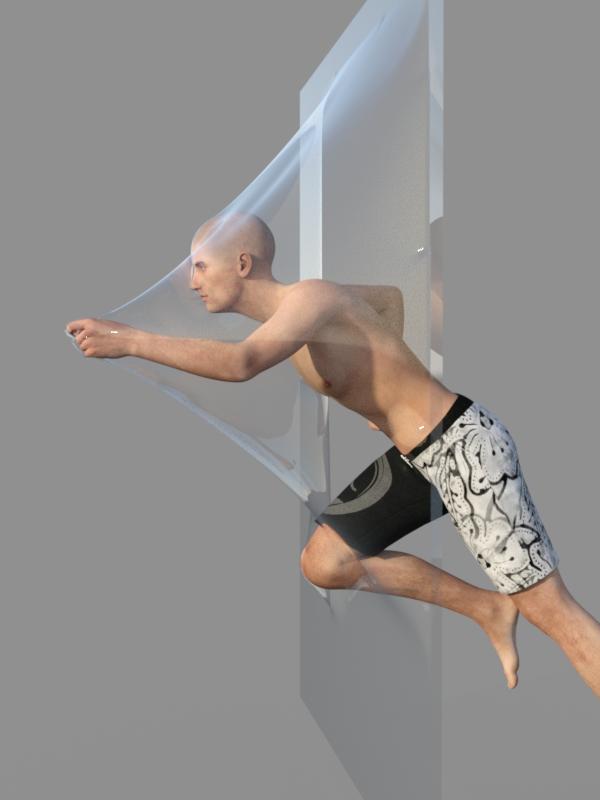
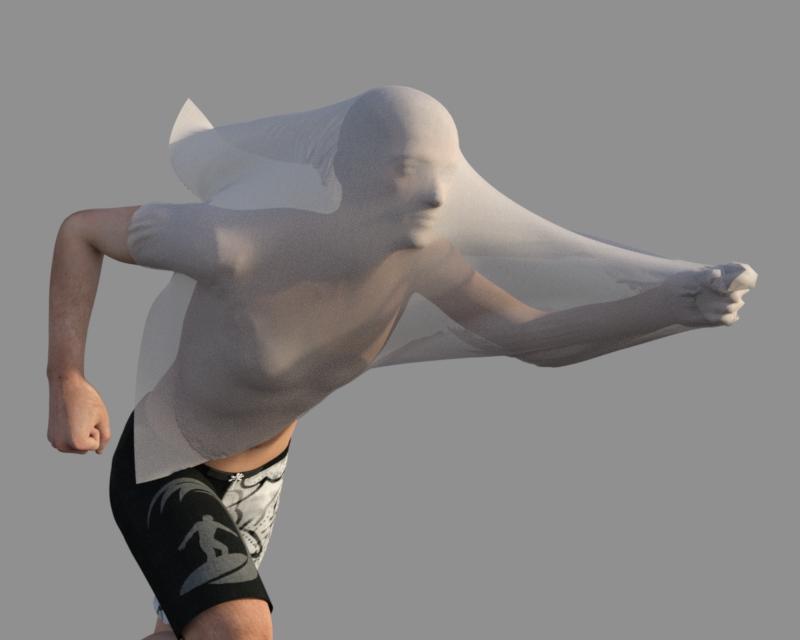
ETA: You can leave off the weight map, scale down the plane, and use a more extreme figure movement to get something like this:
 I'm Looking to Upgrade My GTX 1080, Any Suggestions?
AgitatedRiot said:
Just about any RTX will run in your system.
Also might keep an eye out here Pay it Forward Daz3d Style - Page 5 - Daz 3D Forums
Thanks for the reassurances and the suggestion, but I think the cost of sending something where I live is prohibitive enough that I can't take advantage of the forum's generosity. The one time I bought something from the USA, shipment and customs were more expensive than the item in question.
Duplicate Formulas Found in Filesvectorinus said:
Not at all, nabob21. You will not believe me, but in fact it is not so difficult to understand text files, which are essentially a DS log file and PHMFlirtingMasculineL.dsf. Another thing is when the dsf file is encrypted.
Encrypted or compressed?
Nothing can be done here. I would advise you to try to do the operations I described as a training if you have Genesis installed. Open the file with Windows Wordpad and look for the word formulas in it, for example. Wordpad will take you directly to the desired section of code. The main thing is to know the control keys for text editors. "Ctrl+F" (search by keyword), "F3" (continue searching) and of course Ctrl+C and Ctrl+V. And to make it easier to understand the log file, you need to be able to quickly clear it: "Ctrl+A" (select everything), "Delete" (deleteing the selected one) and "Ctrl+S" (quick saving the (already empty) file. This will increase the speed of your search in the log file in case of a problem with Daz Studio. It seems primitive, but all editors from a simple Notepad to the monstrous Visual Studio react the same way to these keyboard shortcuts. What I mean is that once you learn Wordpad, you'll be able to jump right into programming in Visual Studio ;-)))) By the way, I myself have no idea what formulas means. The main thing when working with files is to think logically.
General question about how to shop on Daz3dIt may be easier to use the store search (upper right corner of page) for the basic stuff, e.g. "v4" or "victoria 4" (gives different results) or "victoria 4 elite". The Elite stuff is high quality shapes/morphs and textures for the Gen 4 figures, they are generally quite good. Store search currently has some issues but usually you can find what you're looking for. For a wedding gown I'd search on "wedding" or "bride" or other relevant words, product naming is often inconsistent so some things can be hard to find via search.
Old Gen 4 stuff goes on sale regularly though with big discounts like up to 80% sometimes so unless you're in a hurry you might consider waiting. DAZ+ club membership (also on sale regularly) gives you a 30% discount on all DAZ originals and 65+% on DAZ+ content, plus monthly coupons, you can save a lot there.
And you have 30 days to return products if for some reason they don't match your expectations.
So what forum section do you frequent and why?The moment I wake up every morning, or screaming in the middle of the night, I like to visit the NFT forum first to make sure all is still good in the world.
Actually that's a steaming lie, if and when I do it's to make sure I'm still in this stupid dimension and haven't phased over into a parallel universe where sanity is the norm... I like to know I'm still in this one where there is little chance of sanity ever occurring.
Its comforting... like a pit warm quicksand.
Normally I like to visit the Commons the most... either to try and help someone with some random bit of knowledge I might possess, which they'll usually ignore, or to make an observation or comment that I find entertaining to make... I don't actually assume my commentary is useful, enlightening or entertaining... it's the Cheez Whiz of commentary, having zero nutritional value, is probably dangerous to one's health and bad for the environment, but it is colorful, sticks to the carpet or your pet's fur and comes in a pressurized canister you can throw at people who annoy you.
And just like that analogy, it makes no sense... but it keeps me from reading the news and being angrier than I need to be.
But almost a third of the time the forums freeze and I end up reading the news and become more malcontent than I was previously, which I fear will eventually lead to me collapsing into a black hole of malcontention, tearing a hole in the fabric of time-space and causing other parallel stupid universes to comagulate with ours...
The consequences are alarming.
Or not.
Who knows, or cares...
But yeah... usually I peruse The Commons.
Mid-way through 2022 a new Sales Thread:Report Issues Here "There's Always Another Sale™"Richard Haseltine said:
Mazh said:
Sorry I have to say it....browsing the store is a pita, not only that the "jumping back to the first page of a given selection" (when you've viewed an item in detail) is back (at least for me/ opera browser) which was gone for some time.
Plus there are issues with the sorting order (new arrivals) - early sku's between recent ones and I've also experienced issues with the check box filters in the store search lately.
If I want to look at an item I open it in a new tab (middle button/mouse-wheel click or right-click menu)
Thank you Richard, sure there are ways to work around, I often put things (I might be interested in) into the cart to look at these later in detail.
But you might agree to the fact, that Daz went not long ago through the painful prozess of replacing a store front end with known flaws with something......well
Deviantart AI Art GeneratorHow does that site work? I just ran a couple of my gallery pieces thru their search function and apparently each one has around 80-85% similarity with the top result -- whatever that means. I noticed many of the images in the results include Daz, Renderosity and other 3D store promo shots, a lot of which were for products I own and use in making my 3d art. So if that's the case, I probably wouldn't know if my work's been used for AI training. Not that I think it is because I'm not extremely prolific or a big or even moderate name artist that would attract imitators.
BUT ... if my original work is already that close a match for what AI has learned then I don't know whether to be impressed or dismayed. On one hand that means it should be a very useful tool for me to make pretty pictures with. On the other :sigh: I guess I'm not that original after all. What a blow to the old ego!
Mid-way through 2022 a new Sales Thread:Report Issues Here "There's Always Another Sale™"Mazh said:
Sorry I have to say it....browsing the store is a pita, not only that the "jumping back to the first page of a given selection" (when you've viewed an item in detail) is back (at least for me/ opera browser) which was gone for some time.
Plus there are issues with the sorting order (new arrivals) - early sku's between recent ones and I've also experienced issues with the check box filters in the store search lately.
If I want to look at an item I open it in a new tab (middle button/mouse-wheel click or right-click menu)
Mid-way through 2022 a new Sales Thread:Report Issues Here "There's Always Another Sale™"Sorry I have to say it....browsing the store is a pita, not only that the "jumping back to the first page of a given selection" (when you've viewed an item in detail) is back (at least for me/ opera browser) which was gone for some time.
Plus there are issues with the sorting order (new arrivals) - early sku's between recent ones and I've also experienced issues with the check box filters in the store search lately.
Mid-way through 2022 a new Sales Thread:Report Issues Here "There's Always Another Sale™"maikdecker said:
Which of Vyktohria's figures are the poses in the Medusa Poses for VYK Medusa product supposed to be for? Using the search option for the shop using "Medusa" or checking all products made by Vyktohria by using the filter to show their products gives me no result for a VYK Medusa product being in the shop...
Compatible Figures: Genesis 9
VYK Medusa will come ... "soon"?

Daz 3D is part of

Connect
DAZ Productions, Inc.
7533 S Center View Ct #4664
West Jordan, UT 84084Licensing Agreement | Terms of Service | Privacy Policy | EULA
© 2026 Daz Productions Inc. All Rights Reserved.