-
Genesis 8 or 8.1 shapes on genesis 9?
The easiest way to use genesis 9 clothing on a genesis 8 character I have tried is a tip I read here on the forum. Just place the head of cyour chartcher in geneis 9.
Here is a attempt to add Sakura 8 on to a Genesis 9 body, and it worked great. The head moves with the gen 9 poses too, the only thing to keep in mind is that there may become a neck gap if you move the head to much indepenently, but then you can just lower the head down a bit.
Then you can use all the head textures and morphs from gen 8 on a gen 9. Then you can just copy the body morphs to gen 9 from 8 (through daz3d) and it will look the same. Matching the skin goes quickly too if you use a shader or do a quick edit in a program like photoshop. Thought it was good to spread if somone sells a really cool clothing item you woul like on your gen 8 chartcher.Dartanbeck's Journey - CG FilmmakingCollecting and Resourcing
Like any filmmaking project, the Producer has to collect assets needed to complete every shot.
I became a Platinum Club member almost as soon as I became a Daz 3d member. I knew that I would be needing all manner of items that weren't even on my lists of current needs - these things just pop up.This is not a big deal if you have a decent budget - just hop into your account when you need something and grab it. The store is so full now compared to how it was when I first started perusing its halls. But I often don't have much (if any) funding available to just grab stuff, so I needed to start building up a library of pretty much anything I could get my hands on. Daz + is Perfect for that!
I've been collecting since 2010 - and most of the time not spending a whole lot of money. It's amazing how many assets we can acquire for not much more than our Daz + membership alone!
Well now my story is coming together and I'm needing to pick out assets for the upcoming scenes. Here's something fun I've been doing to spark my memory of what I have:
Product Library
Yeah, it's not a secret that, if we want to know what we have we can check our Product Library here and have a look. Different ways to sort them and there's a handy Search bar as well. I also like how they now show the product images on the page, if we don't disable that feature. Really handy for me.
What it doesn't have are the category filters that the Store has. Maybe in the future.
Store Filters
What did I just say? Oh... Right. The Product Library doesn't have the filters for finding assets like those in the store proper.
This brings up a fun way for me to write my scene resources - just shopping the store as if I had to buy my way in.
To do this, I use the navigation tools at the top of the store to get my category, like People > Clothing, Places and Things, etc., and then use the filters on the left edge to further narrow it down, if needed (I do this when I'm wanting to see Creatures for a specific figure, like Genesis 8 Male, for example) and then next to "Hide Owned" I instead select "Show Only Owned" and I get a listing of store items I can buy for free because I already have them.
 I'm writing this here and now because I just got done completely dressing out a scene using nice, new Iray items that I've collected in recent years using all of the many sales that go on throughout every year. In doing so, I've stumbled upon countless really cool assets and tools that can really help my entire experience in building these set stages and location environments.
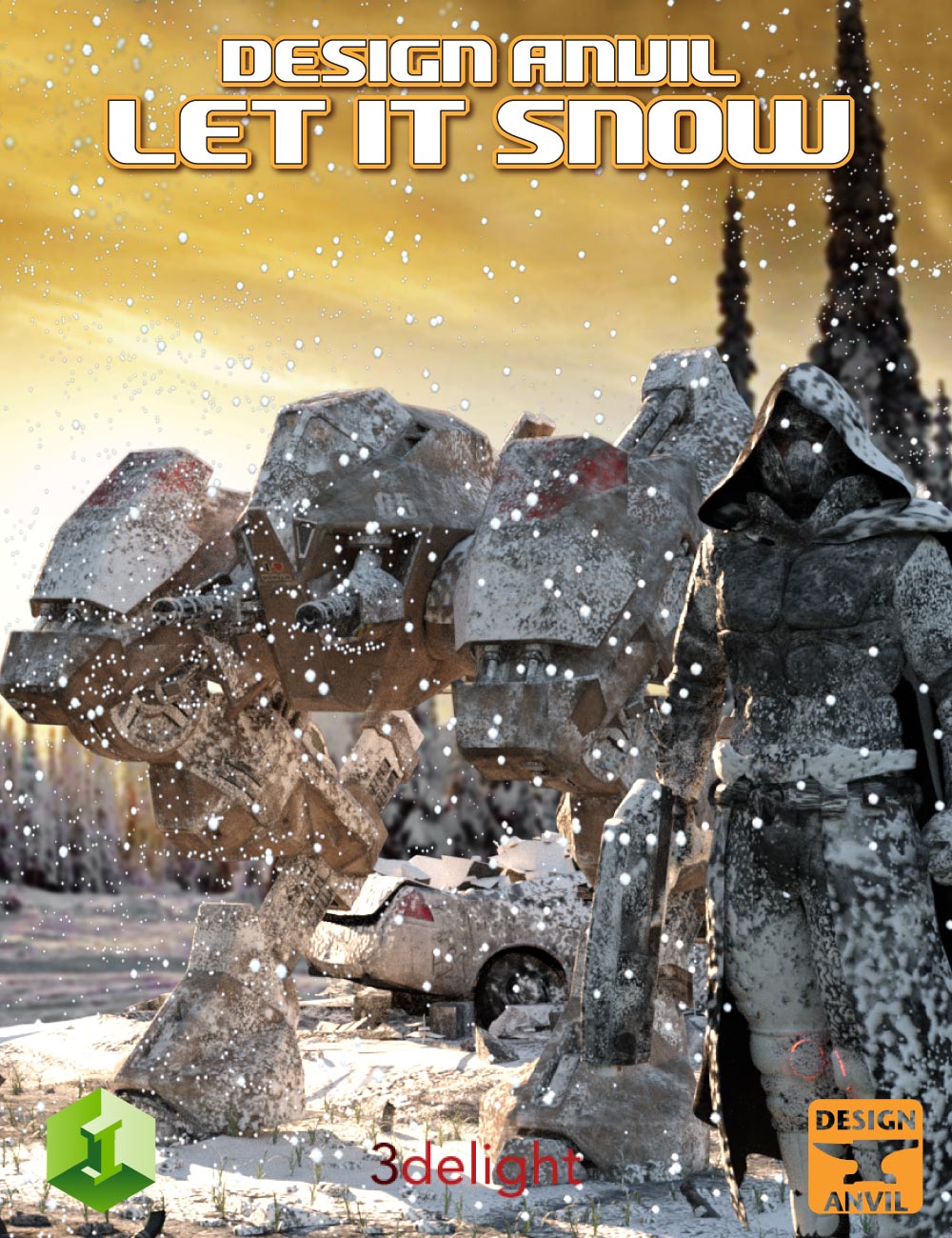
I'm not there yet, but for my snowy scenes I have this wonderful looking set of tools called DA Let it Snow, which has shells for covering stuff with snow (including people, etc.,) as well as snowflakes which can be animated. I wasn't really feeling a need for something like this, which is why I'm really glad that I ran across it just now! I remember being all excited when I looked at it during the sale. But during some of these sales we can get pages and pages (Product Library pages) of assets - and when we're busy animating stuff completely unrelated to this cool new thing, it can easily become temporarily overlooked.
Try It Out
Seriously! I just designed a Demon from another Plane using a spattering of various elements I have in my library for a figure that I can animate efficiently. I've also outlined my initial thoughts for dressing out everyone I need for my upcoming scenes. I know my character/clothing assets pretty well anyway, but this really helps to speed up the process - especially since I'm waiting just a few more minutes for my simulation to finish, file to save, or animation rendering to complete!
Cheers Friends! ;)
Oh... I gotta go. One of RawArt's Lesser Goblins just punched Rosie 7 in the face, and she turned around and kicked his ass. Better go make sure everythings still okay for the next shoot! Argh!!!
So what forum section do you frequent and why?Richard Haseltine said:
takezo_3001 said:
Dandene said:
I'm mostly a Commons person, myself. I occassionally wander into Daz+ and peruse the other sections if there isn't much going on in here. I tend to miss a lot of conversations and don't want to necro.

Heheheh, don't worry about necroposting here, this forum is unique in that there is no such rule, spoken or otherwise, that discourages necroposting, so feel free to necropost as if you've never necroposted before!
I've never understood the in-principle objection to necroposting - if a therad is relevant why not reply to it rather than starting a new one? Of course sometimes people will post to an old problem thread saying "same issue" when it probably isn't, but that is easily corrected.
That's good to know. I've never quite understood the problem with necroposting, only that many many forums had that as a rule over the 20+ years I've been using online forums. I always thought it was a bit weird.
Shader For Dirty FaceSearch dirt in the shop it brings up a whole list of different dirt options.
So what forum section do you frequent and why?MelanieL said:
3WC said:
Ascania said:
This one: https://www.daz3d.com/forums/discussions
Me too. I don't care what forum it is in, if it is a new thread about something I am interested in, I will look at it. Who has time for all those mouse clicks? And what if you miss something?
Add 1 to that.
I start my "Daz day" by opening the first 3 or 4 pages (that's about the most that changes in a normal day) then going forward from page 4 to page 1 looking for threads I've been reading or new threads that sound like they might be interesting. When I get to the top of page 1, I do a refresh to see what has appeared while I've been reading, then I'm done.
There is also a TamperMonkey script I use that simply hides the previously viewed threads, so I simply go through the first 3 or 4 pages, and then nothing else shows up for me. I think you can find it with the Daz Deals addons. Will also hide any threads you want to ignore. Very useful.
Daz Central Arbitrarily Changes Order On Itemsstripe6499_9253833ae8 said:
Richard Haseltine said:
This has been an issue since the store forum change, at least in Daz Studio. It is related to the data the store supplies, since it started without a software update that might trigger it.
Is the issue being addressed? Or has it just been noted, with no intent to fix it?
I don't know its status, it may be hanging on other changes.
Shouldn't both sex promos for G9 become standard?Mada said:
xyer0 said:
CHWT said:
G9 gives you hopes / dreams / inspirations (you name it) that you can have the best of both worlds :)I'll add / delusions to your list, since art, like life, consists of choices. But the choice is made before our opinions are given.
I really don't think that is the case or even meant like that at all - nobody sat down and said you have to do it exactly like this and no opinions allowed.
If something was worked on before G9 was even out then PAs did the best with what they had, and made promos that in their mind showcased their product.
Now that there's actually some products out people CAN express their opinions - and having a different opinion doesn't mean that your choice was taken away. Its just a different opinion :)
If PAs want to showcase products that look wrong on a figure they can render away, nobody is stopping them - but making it a rule that they have to do it - that's taking away choices.
I think you misinterpreted my post, Mdm Mada. I wasn't making the point you addressed. I apologize for making it ambiguous, but this forum requires it.
As far as rules go, I'd be satisfied with a mere requirement that G9 People & G8 clothing, etc. not be listed under G8 People, but that's another thread.
Weird search results - please donateiPad safari
unchecked owned product box set items per page to 60
Aiko search results 18 pages
"Aiko" initial search results 1 of 8 but go to page 2 let it refresh draw and it says 2 of 21
EDIT: yeah its just Radom for 1 of X it randomly changes on me when going to page 2. No consistency
Redacted...I had a similar issue happen on a G3 character that I reported on the Brow Remover thread in the PA Commercial Products forum. It's happens just to the skin on the face, not the rest of the body. Never had it happen before. At the time I was using the 4.20 Beta and tested it in the 4.16 General release (which I had been using for some time) and the same occurred, so it wasn't the version something in the version of Daz I was using that caused it
Daz Central Arbitrarily Changes Order On ItemsRichard Haseltine said:
This has been an issue since the store forum change, at least in Daz Studio. It is related to the data the store supplies, since it started without a software update that might trigger it.
Is the issue being addressed? Or has it just been noted, with no intent to fix it?
Daz Central Arbitrarily Changes Order On ItemsThis has been an issue since the store forum change, at least in Daz Studio. It is related to the data the store supplies, since it started without a software update that might trigger it.
G8F/M Pose Transfer to G9richardandtracy said:
I saw yesterday that a number of people were suffering from a small number of G9 poses being available. So, can I offer a 4575 line script to transfer poses to G9. You need to have the pose applied to G8F, and it is then transferred to G9 by the script. You need to select the hip of each appropriate character. The script makes a guess as to which is which in the scene, but you need to confirm or correct the choices.
G8F and G9 are very similar, so the poses convert pretty well. The biggest problem preventing immediate use of G8 poses is that the bone names are quite different, and a few bones have different zero settings. I used about 1700 lines of code to get the face rig to transfer, something I've not done in any previous transfer script. This is one area where not everything has a 1:1 equivalence, so I have tried to make it work as well as possible - if anything G8F has more bones in the face than G9. In the lips & eyelids I've had to average up to 3 G8F bone dial values to go into one G9 parameter dial. Not everyone wants the face rig pose to come over with the body pose, so the face rig pose transfer is optional with a checkbox. The head, ears and eye poses always transfer with the body pose.

I do hope it's useful until someone like RiversoftArt can come up with a pose transfer that doesn't need G8F to be open.
Pose shown: BBarbs freebie 'Just Elegant 07' from Renderosity, Characters CHB Milan and V9. Background is Namtar3D's underwater HDRI available somewhere on this forum and at Renderosity.
The image shows that the pose has transferred properly, but due to different limb lengths between the characters, V9's right fingers are embedded in her heel. This is something that you would have had to deal with between two G8 characters and is not something the script can cope with. Allen Art reports below that it works with male figures. I've not tested it but can't see any reason why it wouldn't.
Regards
Richard
Thank you SOOOO much! I have spent so much money on my G8 characters and nothing works correctly with G9. This scriipt made me fell a little better.
morphing a geograft asset in custom poseI am certain I used to be able to do this in oder versions of DS, as I have actual blender files with posed geografts.
My old workflow used to be
1. activate the geometry selection tool so as to separate the base figure from the geograft.
2. hide posed base figure and export obj of the geograft asset "in situ"
3. make edits in blender and export obj
4. morph loader pro, reverse deformations=yes
Profit.
But this doesn't work anymore - DS complains that my morph obj has the wrong vertex count. I've searched the forum and found the most relevant thread here. The proposed workflow in the last post there also does not work, same complaint (plus additional complaints about mismatching ERC's).
I'm stuck now, and a little bit desperate - how can I make a geograft morph that is *not* in the default, unparented, unfitted state?
So what forum section do you frequent and why?3WC said:
Ascania said:
This one: https://www.daz3d.com/forums/discussions
Me too. I don't care what forum it is in, if it is a new thread about something I am interested in, I will look at it. Who has time for all those mouse clicks? And what if you miss something?
Add 1 to that.
I start my "Daz day" by opening the first 3 or 4 pages (that's about the most that changes in a normal day) then going forward from page 4 to page 1 looking for threads I've been reading or new threads that sound like they might be interesting. When I get to the top of page 1, I do a refresh to see what has appeared while I've been reading, then I'm done.
Getting on the 9 train, or notMendoman said:
Oso3D said:
PerttiA: Good question!
Consider the favorite topic, nipples. What if you want a character with nipples in a different position? In G8, one would think 'oh, I'll just pull the mesh over here.' And at that point... all your clothing gets distorted horribly. Woops.
What if you want four+ nipples? Well, only one pair might have edge loops, hrm.
Also, if you've ever used a smooth brush around looped nipples/navels/etc, oy. The topology gets distorted super fast and you have to keep correcting.
'missing hints'... well, what I do is have Daz Studio open with wireframe so I know 'the male nipple is around that square' and eyeball it on the zbrush (or Blender or whatever) mesh. It's not super hard.
Actually nipples is a great example, but I have to admit that it sounds scary approach if PAs are just eyeballing where the nipples are supposed to be. If character creator A eyeballs his/her model's nipples 1 cm one way and B eyeballs 1 cm to the other way, and then they both create their new models. Not any kind of expert on this, but I assume if me as a customer who wants to use A's textures on B's character will end up having nipple textures 2 cm off from where the nipple mesh is, right? Personally I prefer the "old way" where the mesh topology marked where navel and nipples are supposed to be.
Also I'm not a big sculptor myself, but I've made some some small morphs for my characters with Blender. Since normal customers don't have access to HD tools, I believe it's much harder for us hobbyist to define nipples or whatever since we can't add extra vertices where we need them and topology does not support it. I get it that this is a good business move, since now other character creators (except those that are working with Daz and have access to HD tools), are having big troubles trying to create new characters for G9, but as a customer I do like the versatility that those other store's vendors' have given.
This right here is good example of what I'm talking about, as well. I don't need nipples in different places, and I don't need 4 of them, I just need to be able to have the flexiblity to add my own realism and unique touches to the characters I purchase. I also need to ensure that any other morphs I purchase are presupposing the same base figure that I am, so that I can know that the morphs will apply the intended result.
I know most users don't do their own sculpting, and I think that I (as well as the OP in the text I quoted) am more of an edge use case and from a business perspective not part of the 80% they want to target. NO problem there. I don't like feeling like my own opinions are discarded immediatly by people saying that Displacement/Normals are a replacement. Unfortunately, for me, they aren't.
As with all change, though, there are positives and negatives, and it's just an exercise in evaluating whether the positives outweigh the rest. My own concerns could be unfounded, as morphs and everything could still work as expected and perhaps I'll just have to export out a SubD5 instead of SubD4 character to sculpt on top of, but only time will tell.
Also unfortunately, this seems to have become an "us vs them" kind of conversation, and I'm not interested in that so I'm out. I only wanted to discuss some of the concerns I had to see if anybody else shared them and had opinions on what options were availble to mitigate them, but I'd rather not risk unintentionally offending a group of people. I'm a big boy, and I can figure it out without crying on the forum about it ;)
Hair locks for hoods ?richardandtracy said:
I don't even know what one is. So may have seen one without knowing. And, yes, fashion & I are completely unaquainted with each other.
When doing a Google search I get things like R clip bonnet catches for cars (which I presume are not what you meant), or, and I quote, things referred to as 'dreads for white girls' illustrated by images of grumpy young women having a seriously bad hair day and an excess of ironwork stuck through every bit of their faces (OK, I admit that'd make me grumpy too). Which, in all honesty, doesn't clarify a thing for me..
Regards,
Richard.
Loose hair strands (locks) that can be placed around the edges of a hood (or hat) to make it clear that there is hair under there without having to fit a whole hair model in.
So what forum section do you frequent and why?Ascania said:
This one: https://www.daz3d.com/forums/discussions
Me too. I don't care what forum it is in, if it is a new thread about something I am interested in, I will look at it. Who has time for all those mouse clicks? And what if you miss something?
Hair locks for hoods ?I don't even know what one is. So may have seen one without knowing. And, yes, fashion & I are completely unaquainted with each other.
When doing a Google search I get things like R clip bonnet catches for cars (which I presume are not what you meant), or, and I quote, things referred to as 'dreads for white girls' illustrated by images of grumpy young women having a seriously bad hair day and an excess of ironwork stuck through every bit of their faces (OK, I admit that'd make me grumpy too). Which, in all honesty, doesn't clarify a thing for me..
Regards,
Richard.
Do you ever...yes and yes
tend to topic search my product library to find what I own and then to know what I have to search for in my content to actually find it
Easy way to delete manually installed files?qq_81ee1a28 said:
I installed most of my files manually, is there any convinient way of uninstalling them? or do I have to track down every file from a specific asset and delete them one by one?
Basically, yes. Might help to download a zip just to see how it was packaged, go to those places and delete the files and/or folders. {have D/S closed when messing about in these folders}
Sometimes using the computer's search feature helps too.
Daz 3D is part of

Connect
DAZ Productions, Inc.
7533 S Center View Ct #4664
West Jordan, UT 84084Licensing Agreement | Terms of Service | Privacy Policy | EULA
© 2026 Daz Productions Inc. All Rights Reserved.