-
Can anyone ID this female model?
She does look like mostly Victoria 9, with some slight facial morphs. Its the hair that makes her look different from her usual.
Looking for a Genesis 3 Female ModelIs this it? https://www.daz3d.com/summer-for-victoria-7
Looking for a Genesis 3 Female Modelirmamandola117 Doing a search for some characters I have found this:
https://www.daz3d.com/summer-edition-liu (Genesis 1 Female)
https://www.daz3d.com/summer-character-and-hair (Genesis 1 Female)
https://www.daz3d.com/summer-girl-for-genesis-2-female-s (Genesis 2 Female)
https://www.daz3d.com/summer-for-victoria-7 (Genesis 3 Female)
I believe this one match what you are looking for. but you need the base character https://www.daz3d.com/victoria-7 Victoria 7 for this to work with.
Good luck
 Can someone explain the V3/V4 workflow to me?
Gordig said:
Victoria 4, Aiko 4 and the Girl are actually distinct figures, so if something is compatible with one, you can't assume that it will be compatible with the others.
While V3, A3 or SP3 are indeed different figures with different rigging and don't share much (they can share textures, but by default that's all), A4, G4 and S4 are actually morphs for V4.
However contrary to Genesis figures, content for V4 does not automatically follow morphs applied to the figure.
Some V4 clothes or hairs include morphs to fit G4, S4 or A4, or to match the basic head and body morphs, but not all. It is possible to make those items follow morphs you have used though, there's a command called "transfer active morphs" you can use for that. But you have to explicitely tell DS to do it.Regarding using morphs:
Basically when you load a figure DS/Poser loads a list of dials corresponding to the morphs. In order to use those morphs, DS/poser needs to load the "morph deltas" in memory so it knows how the morph works and can apply it.
For Genesis figures, DS automatically loads the morph deltas when you use the corresponding dial for the first time, but for V3 or V4 you need to explicitely tell DS/poser to do it, by "injecting" the morph delta into the figure. The dialog which asks you which morphs you plan to use when you load V4 will then "inject" the select morphs so that you can use them directly. If you want to use other morphs afterwards, you can use the corresponding "INJ" pose to activate them. Conversely, you can use a "REM" pose to remove/unload the deltas for a morph you don't want to use.August 2024 - DAZ 3D New User Challenge - Open Render ChallengeHalcon Bluesky dijo:
IAUNPOM ¡Hola! de que Pais eres?
Me da curiosidad, debido a que usas Daz Studio, la interfaz del programa que usas está en Español?
¡Te deseo buena suerte con tu representación!
He tenido que usar al tío Google para comunicarme contigo

Hola, ¿de qué país eres?
Me picó la curiosidad, porque estás usando Daz Studio, ¿la interfaz del programa que estás usando está en español?
¡Te deseo mucha suerte con tu render!
Tuve que usar al tío Google para comunicarme contigo
Hola, Hello !
My english is more or less basic, i don't know if the google translate make a great work. I use translator for english or other to spanish or translate a word, maybe i try to write in english whit help of the translator or translate all the text spanish to english, but I don't know which translator is more suitable, that's why I write in Spanish."pero no se cual traductor es mas adecuado por eso escrivo en español." I don't consider myself from any particular country, i speak Catalan and Spanish and a little English.
The DAZ interface I use is in this English, have a good day !
And somthing of history
I've been using Daz for over a year. I studied synthetic imaging technician with the Alias Wavefront program and a few months after starting the course they switched to the first version of Maya a long time ago. After a few years I put aside 3D, and a few more years later I started to use Blender a little as a hobby, the lack of resources is what allows me, I have had it installed for several years almost without using it, I made a Rubik's cube which I wanted to make move like one physically, because I was solving a Rubik's cube and I wanted to study movements without messing up my physique and thus be able to study some movements. I solved the cube before making it move like the physical one in blender, but it's not like I solved it quickly I took my time. The thing is that since I don't have projects or am motivated to do 3D, I didn't dedicate myself to it. One day I started looking at AI-generated images and making some and from there I started to feel like doing something in 3D. I looked for programs and found Daz, I remember that a long time ago I already found it and when installing it I found the first version of Victoria and Michael seems to remember I opened it and little more before uninstalling. A year ago I installed DAZ again, I didn't remember that I had already seen it, there was some more content in the installation and I started to look and see the possibilities it offered, until that moment I had not used HDRI of global illumination and it was relatively new to me, in the gallery of the DAZ page there were images for me very impressive and having almost no resources to dedicate to 3D, No projects, with the initial content I started to see what I could do, I looked at the tutorials on the page and I continue to use it almost daily since then.
New Year, New Sales Thread: Report Issues Here "Reporting Only"Edit: The new day fixed the two examples I gave.
They are plenty of strange behaviors. All screenshots were taken just now, so the situation may change in less than 30 minutes with the new Daz Day.
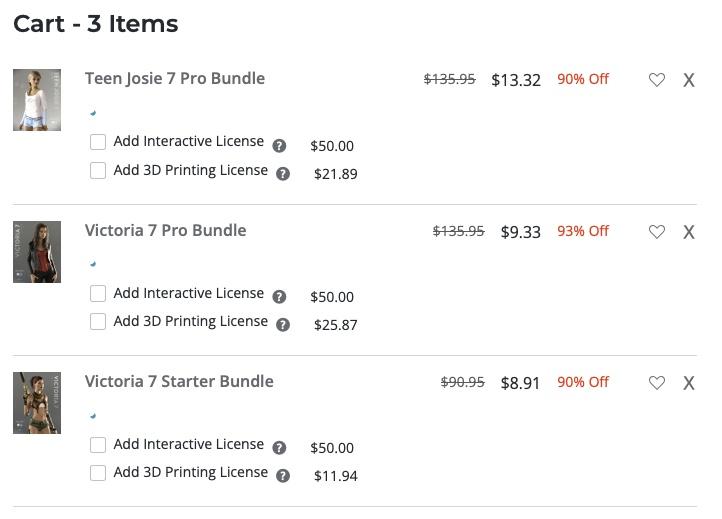
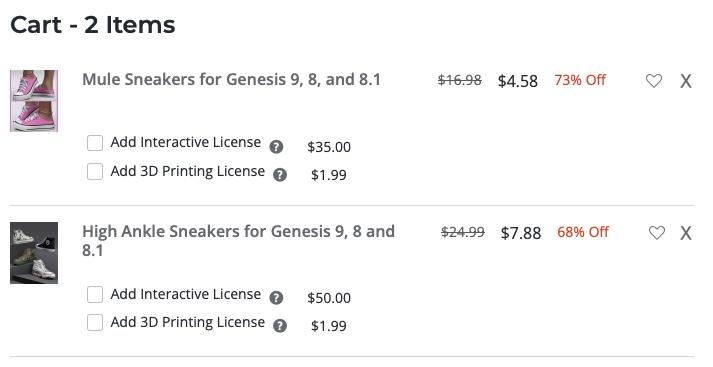
One example: Victoria 7 bundles and Teen Josie 7 Pro bundle are all in the 80 % categorie and all have a 86 % base discount but in the cart (80% base discount then the 30% discount for Daz Originals when someone is a Daz+ member), they don't have the same discount which is not how it supposed to be and means that only the Victoria 7 Pro Bundle get the two 30% discount (one for owning a Golden Ticket, on from the Orange Banner)
With a base price of $100, the maths are:
- 100*(1-0.86)*(1-0.3)*(1-0.3)=6.86 so a global discount of ~93%
- 100*(1-0.86)*(1-0.3)=9.8 so a global discount of ~90%
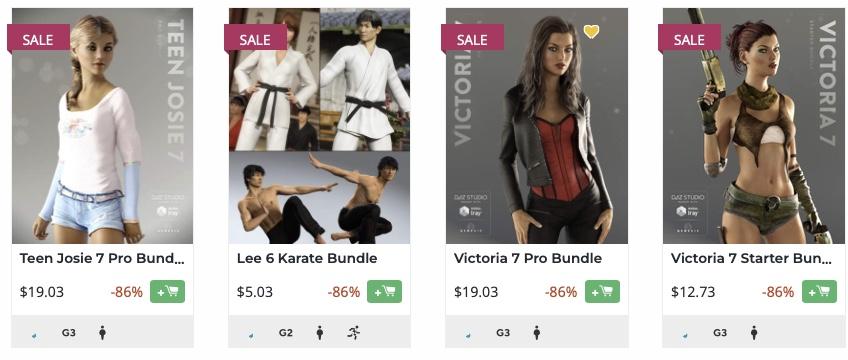
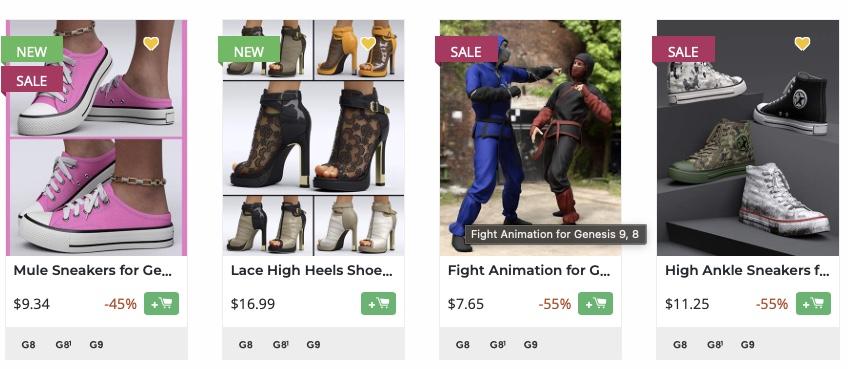
Another one, a new product have a base discount of 45% and ends with a 73% discount in my cart which means it does get the two 30 % discount (GT and Orange Banner). But an article from one the 55/65/80% categories (so eligible to the same two 30 % discount) ends with a 68 % discount in my cart, despite starting with a 55 % base discount. Which means it's missing one of the 30 % discount, because otherwise, it should have a higher final discount (~78%).
- 100*(1-0.55)*(1-0.3)*(1-0.3)=22.05 so a global discount of 77.95%
- 100*(1-0.86)*(1-0.3)=31.5 so a global discount of 68.5%
 Can someone explain the V3/V4 workflow to me?
Gordig said:
Victoria 4, Aiko 4 and the Girl are actually distinct figures, so if something is compatible with one, you can't assume that it will be compatible with the others.
How can I tell, if it's not in the name, that it's compatible with V4 or A4 or Stephanie (S4?)?
Whereas Genesis and beyond have all morphs available as soon as you load them, but you might have to inject the morphs you want into V4 post-load.
What does that mean? How do I do this? I know when I load V4, I get a loader that asks me what all I want to load with it. I can load muscular bodies or a better skin, but afterwards?
Richard Haseltine said:
Actually the why of the content locations is the Poser library structure -
Aaaaahhh! This makes sense. I don't like it (LOL) but it makes sense!
Can someone explain the V3/V4 workflow to me?The "why" of that is that Genesis introduced features that made working with figures in DS so much easier for successive generations. For example, anything that's compatible with V8 will work on G8, because they are fundamentally the same figure, which is not the case for generation 4 and earlier. Victoria 4, Aiko 4 and the Girl are actually distinct figures, so if something is compatible with one, you can't assume that it will be compatible with the others. Whereas Genesis and beyond have all morphs available as soon as you load them, but you might have to inject the morphs you want into V4 post-load.
Can anyone ID this female model?Pretty sure that is Victoria 9
Licensing for products from other marketplacesHello!
So, here's the use case:
I've got Interactive License for Genesis 8 Starter Essentials in DAZ, this allows me to use this product in commercial videogames, which is what I want to do. I also have Victoria 8 Pro Bundle with the same Interactive License, Genesis 8 Female Head and Body Morphs with the Interactive License as well and plenty more.
I've got products from RenderHub with Extended Use License, which allows me too to use them in commercial videogames.
I am able to import Render Hub content into DAZ Studio (clothing and characters mostly) and add it to my characters for which I have the Interactive License.
The question is, can I use the result content (a mix of products from RenderHub and Daz) for a commercial videogame? I would be exporting the content to Unity using the Daz to Unity Bridge.
Do I need to purchase a particular Daz license to use DAZ Studio as the tool to export the external content (from RenderHub, mixed with content from the Daz Store) to Unity for my commercial games?
I hope you can help me with this!
Thank you!
Genesis 9 eyes rendering bright white ??straker1999 said:
crosswind said:
straker1999 said:
@crosswind:
I checked 3 of my base figures, all G8 and the skins show that they are all PBR shaders.So you mean you've successfully rendered G8 characters with PBRSkin shader ?
Yes, all of renders with G8 figures have skins that show as PBR Metalicity/Roughness under the Base Mixing drop down.
Too bad G9's don't have this option, might be able to get them to cooperate a little better.No ~ I'm afraid we're talking about different things. PBRSkin (ss1) and Iray Uber are Shaders, PBR Metalicity/Roughness is one of the option in Base Mixing properties under Iray Uber Shader (ss2). These two Shaders have different property structure as well as shader node definition.
If you have Victoria 8.1, you can try rendering with her on which PBRSkin Shader is applied. It might not work just like G9 while using your DS 4.12 ~~
Is Daz studio useful in any way?kyoto kid said:
Calliope23 said:
That's an amazing render, Kyoto Kid. I really like that. The fact that you used a photo background is barely noticable. It just looks like part of the scene. Love how happy the girls look and how detailed the render is.
This is an example of what I usually do. I guess I'm more interested in portraying the figure than anything else; DAZ people are so cool. The background is by Sveva. I got the Genesis 8 character for free during the recent DAZ DAY thing. She is Neiva HD for Victoria 8 by Emrys and Fred Winkler Art. I like how she's got a snowflake geoshell to add to her sort of strange beauty. The lights are the PTF Very Cool Lights that were a Christmas gift freebie last year.
...thank you. Everything in the foreground is geometry including the trees where the street turns and the helicopter above. .
The real; trick with photos is matching the lighting angle and brightness to that in the photo so it all fits together seamlessly.
BTW that is a vvery nice, it would make nice book cover..
Thanks a lot! Someone told me the figure looked like a character in a sci-fi or fantasy novel, so book cover would work.
I agree you've done a wonderful job blending the photo in seamlessly in your render, and that's a good tip about matching the lighting angle and brightness to that of the photo.
couple of question as a newbie with onn and oof usage of daz/blender of a yearThere are many tutorials on youtube on different topics.
Jay Verluis has a Daz channel that comes into many beginner/medium aspekts of how to use Daz Studio https://www.youtube.com/user/versluis
and https://www.youtube.com/@Daz_3D
Regarding use of Victoria 8 in other characters, it is in some, but all in all very few. If you buy characters here at Daz it will say on the product page that Victoria 8 is required.
Regarding skin it is very much a matter of personal taste (they will all more or less fill about the same).
Regarding environments, it depends on what type of environment you are after. They can vary rather much in size. But Stonemason is hard to pass when talking about environments, as he is a rather efficient modeller and texturer, but it still depends what you are after.
couple of question as a newbie with onn and oof usage of daz/blender of a yearFirst question is about models, so of the models I use are for victoria 8 and I've noticed that some of them for some reason have a 50% or 20% usage of victorias face, is it normal??
Second I look for tutorials for more advanced tricks for general stuff, lighting, and other stuff such as shader usage and some basic animation in daz for some loops?? I look for ages for a tutorial on costum poses and expression poses. Also how to organise my daz assests since its a mass.
Third. can you recommend me some good skin shaders for models and some good enviorments that don't take too much space??
Thank you in advance
Is Daz studio useful in any way?kyoto kid said:
Calliope23 said:
That's an amazing render, Kyoto Kid. I really like that. The fact that you used a photo background is barely noticable. It just looks like part of the scene. Love how happy the girls look and how detailed the render is.
This is an example of what I usually do. I guess I'm more interested in portraying the figure than anything else; DAZ people are so cool. The background is by Sveva. I got the Genesis 8 character for free during the recent DAZ DAY thing. She is Neiva HD for Victoria 8 by Emrys and Fred Winkler Art. I like how she's got a snowflake geoshell to add to her sort of strange beauty. The lights are the PTF Very Cool Lights that were a Christmas gift freebie last year.
...thank you. Everything in the foreground is geometry including the trees where the street turns and the helicopter above. .
The real; trick with photos is matching the lighting angle and brightness to that in the photo so it all fits together seamlessly.
BTW that is a vvery nice, it would make nice book cover..
Great render and composition.
You have mastered matching photos in the render very well.
Is Daz studio useful in any way?Calliope23 said:
That's an amazing render, Kyoto Kid. I really like that. The fact that you used a photo background is barely noticable. It just looks like part of the scene. Love how happy the girls look and how detailed the render is.
This is an example of what I usually do. I guess I'm more interested in portraying the figure than anything else; DAZ people are so cool. The background is by Sveva. I got the Genesis 8 character for free during the recent DAZ DAY thing. She is Neiva HD for Victoria 8 by Emrys and Fred Winkler Art. I like how she's got a snowflake geoshell to add to her sort of strange beauty. The lights are the PTF Very Cool Lights that were a Christmas gift freebie last year.
...thank you. Everything in the foreground is geometry including the trees where the street turns and the helicopter above. .
The real; trick with photos is matching the lighting angle and brightness to that in the photo so it all fits together seamlessly.
BTW that is a vvery nice, it would make nice book cover..
Genesis 9 eyes rendering bright white ??crosswind said:
straker1999 said:
If I load up a base G9 and apply character maps from Kat (included base skins) everything is white. If I load full MAT from TX Eleanor, skins are fine and eyes have detail but no color. I f I load up Unforgetable HD (Connery Character) skin ok, eyes white.....If I apply HH Belle eye MAT's to this character they work. BUT if I apply the HH Belle skin MAT....that is white.
So that means Iray renderer plugin in DS 4.12 cannot support to render skins with PBRSkin shader, that should be the reason why you got normal skins with Iray Uber shader but white with PBRSkin shader. Haver you ever render with PBRSkin shader before, like with Victoria 8.1 ?
So I would be able update the entire application with out ill effects through DIM??
Suggest you not update General Release , as I said above, order DS Beta (Public Build) for free and install the latest Public Build. Then you can keep your DS 4.12 while using the latest Public Build.
If you DO want to install latest General Release, change the application folder name of 4.12 beforehand.
Yes you could. But I would agree to download the BETA of 4.22+, since I don't know anything about your computer specs, The newer version of DS might not play nice with your system. But like I said before: Back up your 4.12 installers.
Genesis 9 eyes rendering bright white ??straker1999 said:
If I load up a base G9 and apply character maps from Kat (included base skins) everything is white. If I load full MAT from TX Eleanor, skins are fine and eyes have detail but no color. I f I load up Unforgetable HD (Connery Character) skin ok, eyes white.....If I apply HH Belle eye MAT's to this character they work. BUT if I apply the HH Belle skin MAT....that is white.
So that means Iray renderer plugin in DS 4.12 cannot support to render skins with PBRSkin shader, that should be the reason why you got normal skins with Iray Uber shader but white with PBRSkin shader. Haver you ever render with PBRSkin shader before, like with Victoria 8.1 ?
So I would be able update the entire application with out ill effects through DIM??
Suggest you not update General Release , as I said above, order DS Beta (Public Build) for free and install the latest Public Build. Then you can keep your DS 4.12 while using the latest Public Build.
If you DO want to install latest General Release, change the application folder name of 4.12 beforehand.
Rebuilding LOST Dragoness – Seeking Missing AssetsHello Daz 3D Community,
I’m reaching out for help rebuilding a beloved dragoness character named Distaute. My friend Vic originally created her using Daz 3D assets years ago, but unfortunately, the original files and his account login have been lost. I've been working hard to recreate her in Daz Studio, but I’m missing several key elements and could really use your help! :)
I've attached my best reference images of her. Her body shape varies slightly in some of them, but the main goal is to get her back in one piece as best we can.I’m very new to Daz 3D, so please forgive any knowledge gaps I might have. I’m unsure if I’m looking in the right places, but I’m eager to learn and appreciate any guidance you can offer.
Here’s what I’ve managed to gather so far:
Distaute Components:
- Body Base?: Victoria 4.2 Base
- Skin: Lizardians Xtreme | Lizardians
- Wings???: CCWings Variety Pack
Missing Components:
- Head Shape: [MISSING]
- Muscular Body + Large Feet + Large Breasts: [MISSING]
- Horns: [MISSING]
- Tail: [MISSING]
- Head Fin: [MISSING]
- Claws: [MISSING]
I’m especially looking for recommendations on specific assets or advice on how to recreate these features. If you have any tips or suggestions or know of any products that might fit these descriptions, I would greatly appreciate your help.
Distaute is a character that holds a lot of sentimental value, and I’m committed to bringing her back to life in the best way possible. Thank you so much in advance for any assistance you can provide!
Warm regards,
LizzyGlizzyIs Daz studio useful in any way?That's an amazing render, Kyoto Kid. I really like that. The fact that you used a photo background is barely noticable. It just looks like part of the scene. Love how happy the girls look and how detailed the render is.
This is an example of what I usually do. I guess I'm more interested in portraying the figure than anything else; DAZ people are so cool. The background is by Sveva. I got the Genesis 8 character for free during the recent DAZ DAY thing. She is Neiva HD for Victoria 8 by Emrys and Fred Winkler Art. I like how she's got a snowflake geoshell to add to her sort of strange beauty. The lights are the PTF Very Cool Lights that were a Christmas gift freebie last year.
Daz 3D is part of

Connect
DAZ Productions, Inc.
7533 S Center View Ct #4664
West Jordan, UT 84084Licensing Agreement | Terms of Service | Privacy Policy | EULA
© 2026 Daz Productions Inc. All Rights Reserved.