-
Well If You Want Gen 9 Capability In FaceGen
Catherine3678ab said:
If one has recently purchased FaceGen [before the upgrade's release], see the note on their website - can get a free upgrade.
My purchase was a long time ago, so no, not shelling out full price for G9 but am happy to see it being supported.
I've tried this as per an email reveived from SI. Sent them my Daz receipt and got a free upgrade to FaceGen 4. Nice!
I was originally hesitant with FaceGen because I'd used it a long time in the past, but I decided to give it a go when Daz had it on a recent discount. Added in 8 tokens and got it for a very nice price. Wasn't sure if SI would honour their upgrade offer, so was a happy camper when they did.
I've tried comparisons of 8.1 and 9 using the same source image/face generation. Straight to G9 vs using an 8.1 clone to G9 works better and, to me, looks better too. It fixes some of the issues that clones inherently have, particularly around the eyes. The eyes on the FaceGen G9 imports can clip ever so slightly at extreme (unnatural) rotations, but it's night and day versus using clones (and clone issues were nothing to do with FaceGen anyway - it's just how they work on any morph transfer). Anyway, happy to have excluded a few steps of FaceGen to G9 and I appear to be getting better likenesses than I was previously. If you've a qualifying discount but from a Daz Store purchase, looks like SI will be happy to transfer that over too. Realise I'm in the fortunate position of having bought FaceGen only a few weeks ago, but can't complain at that!
[Released] RSSY Character And Material Conversion Bundle Genesis 8 to Genesis 9 [Commercial]Jeremion said:
RiverSoftArt said:
Jeremion said:
I only tried to convert Michael 8.1, and so far I don't get it fine as G9. Issues on the eyes (not well placed, nor good size and when trying to move them with powerpose, they just go out of the head xD) and the morph around the eyes is not OK. So, I don't know really what to do to get better result. I will try again.
Michael should not be a problem at all. You do not need the eye dialog. It sounds like a morph was created on the eyes that are moving them. Check in \data\DAZ 3D\Genesis 9\Genesis 9 Eyes\Morphs to see if there is an eye morph that could be engaging that messes things up (a quick way is just to rename this directory so none of the eye morphs engage. Look for this folder under the first directory listed in the Daz Studio Formats section of the Content Directory Manager (which is usually My Library
Hello,
Yeah I found that weird too... look. I renamed the "morphs" directory. And retested. Enclosed the screen and below the logs.
One strange thing : If I load Michael 8.1, everything is fine.What do you mean if you LOAD M8.1? Do you mean just LOAD M8.1 into the same scene or CONVERT M8.1?
I see in the log that the converter script copy "BaboonG8M-IrisSize" for any reason? (it is one of the character I tried to convert as well, but I don't have it anymore, I deleted it). Is there a place the script keep its previous work? For sure, BaboonG8M is not used on the original Michael 8.1 lol.10:03:35 GMT+0200 (Paris, Madrid (heure dété)): Executing Script
10:03:35 GMT+0200 (Paris, Madrid (heure dété)): Selecting Preset: D:/Daz3D/People/Genesis 8 Male/Characters/Michael 8.1.duf
10:03:35 GMT+0200 (Paris, Madrid (heure dété)): Converting character from D:/Daz3D/People/Genesis 8 Male/Characters/Michael 8.1.duf to D:/Daz3D/People/Genesis 9/Characters/Converted/Michael 8.1.duf
10:03:35 GMT+0200 (Paris, Madrid (heure dété)): Enabling morphs for asset, D:/Daz3D/People/Genesis 8 Male/Characters/Michael 8.1.duf
10:03:36 GMT+0200 (Paris, Madrid (heure dété)): Turbo Loader: 8 morphs were searched for
0 Enabled (0 failed to enable)
0 Disabled (0 failed to disable)
8 unchanged
0 skipped
in 221 msecs
Note: Multiple files may exist for a morph if you use Daz Connect
10:04:25 GMT+0200 (Paris, Madrid (heure dété)): Michael 8.1 is of type Actor/Character
10:04:43 GMT+0200 (Paris, Madrid (heure dété)): Converting Morphs: BaboonG8M-IrisSize,FHMMichael8_1,FBMMichael8_1,CTRLMichael8_1,PHMMichael8_1HDIris
10:15:41 GMT+0200 (Paris, Madrid (heure dété)): Copy Icons from D:/Daz3D/People/Genesis 8 Male/Characters/Michael 8.1.duf to D:/Daz3D/People/Genesis 9/Characters/Converted/Michael 8.1 Genesis 9.duf
10:15:41 GMT+0200 (Paris, Madrid (heure dété)): Copy Categories from D:/Daz3D/People/Genesis 8 Male/Characters/Michael 8.1.duf to D:/Daz3D/People/Genesis 9/Characters/Converted/Michael 8.1 Genesis 9.duf
10:15:41 GMT+0200 (Paris, Madrid (heure dété)): Execution Complete.
The script works by loading the character and seeing what morphs are being used. If you load M8.1 into a new scene, look for BaboonG8M-IrisSize, I am sure you will find it (it may be a hidden property though).
[Released] RSSY Character And Material Conversion Bundle Genesis 8 to Genesis 9 [Commercial]Keiron said:
Here is the Aurore G8 conversion
To correct the corrupt conversion a number of dials are in play
HD body Body causes Distortion
HD head Body causes Distortion
Kayleyss Square Nails causes figure to look like it's unfed for weeks, not sure why this dial is at 100% ?
Morph Dials are set to the values the G8 version had on conversion.
FHM Aurore Assymetry changes face completely not just the assymetry
Assymetry morphs on the head will not ever work I think.
In the renders below no particular order the original has the RSSY eyelashes in the wrong place, render with RSSY eyelashes removed and render with eyes replaces with g9 ones
You can't change the eye colour with these RSSY 8 eye's, but you can if you replace them with the g9 eyes or reloading the RSSY eys 8 or 8.1 eyes
To change the eye color, select the RSSY Genesis 8 Eye Suit and load the G8 eyes preset to change.
Unable to use the make up options
To use makeup, select the RSSY Genesis 8 Female Suit and load the G8 makeup preset to change.
Breast up and down controls set to 80% reset to 100 to correct
Not sure what you mean here, but morphs that only affect a small portion of the body will also affect the body as a whole
Good attempt, keep up the good work
[Released] RSSY Character And Material Conversion Bundle Genesis 8 to Genesis 9 [Commercial]TheRenderer said:
Lovely product. I'm glad I came here to the forums else I would have NEVER figured out how to solve all the morph distortion that was happening when converting characters. The material suits are excellent as well! I am wondering however... has anyone else run into an issue where they are unable to apply any G8 materials or shaders to the G8 Eyelash Suit? I've been tinkering with it for about half an hour now on a few converted characters and haven't really been able to make much progress.
It's truthfully not THAT big of a deal as I can just hide the Eyelash suit and apply a G9 eyebrow product to the character but I was wondering if anyone had found a viable solution for this.
Select the RSSY Genesis 8 Eyelash Suit. Go to the Surfaces pane. Select the RSSY Genesis 8 Eyelash Suit surface. Double-click on the preset that is for G8 Eyelashes.
p.s. I am glad you came to the forum and didn't give up. I am happy you got it working for you.
[Released] RSSY Character And Material Conversion Bundle Genesis 8 to Genesis 9 [Commercial]Eboshijaana said:
RiverSoftArt said:
Eboshijaana said:
Naturally, I had to experiment on the update.
It is not AS broken as pre-update, but not quite the transfer utility level.I also exposed a few TU settings in the data/RiverSoft Art/Common/RSG8G9CharacterConversionConstants.dsa file. You could try setting some of those.
Okay, I've spent a few hours testing the converter with the file edited. I tried using the EXACT same settings between the converter and TU.
Thoughts;
1. Regardless of settings, the Converter changes the body of g9 while TU leaves it alone.
2. Could the 'reverse source shape from target' setting affect the above?
I will try to use my self-made clone for the converter, just to see if it would affect things.The ADJUST_TARGET_BASE constant is the one that sets the 'reverse source shape from target'
[Released] RSSY Character And Material Conversion Bundle Genesis 8 to Genesis 9 [Commercial]necroscension said:
RiverSoftArt said:
Keiron said:
Hi RiversoftArt
I've just downloaded a recent update
I have just converted Albany
I found the nails morphs caused an issue with a thin body, so I dialed out the one that caused the issue may be all these dials could be zeroed by default
If you want to have them removed by default, edit the data/RiverSoft Art/Common/RSG8G9CharacterConversionConstants.dsa file (in a text editor), the variable
var MORPH_FILTERS = [
'mouthrealism',
'eyelash',
'height',
'navel'
];specifies the names of morphs to not convert.
Ah, so we can use this to skip converting HD morphs on characters where HD is part of the preset. (Or save the character without the HD morphs as another character preset...)
Or any morph used more than once that causes problems.
[Released] RSSY Character And Material Conversion Bundle Genesis 8 to Genesis 9 [Commercial]necroscension said:
With the converter, I've notice most of the models I have do not use FBM/FHM in their morph naming but use Head or Body instead. I have attempted to resave the name of the morphs to start with FHM/FBM, but still have issues because sometimes I wind up having doubled morphs. Was it ever considered to see if the morph name includes Head or Body as an OR statement?
You must not buy most of your characters from Daz.
 This is a naming convention that has been in place for years.
Ok, I will make an update to check if the morph name starts with FHM/Head or FBM/Body.
[Released] RSSY Character And Material Conversion Bundle Genesis 8 to Genesis 9 [Commercial]RiverSoftArt said:
Jeremion said:
I only tried to convert Michael 8.1, and so far I don't get it fine as G9. Issues on the eyes (not well placed, nor good size and when trying to move them with powerpose, they just go out of the head xD) and the morph around the eyes is not OK. So, I don't know really what to do to get better result. I will try again.
Michael should not be a problem at all. You do not need the eye dialog. It sounds like a morph was created on the eyes that are moving them. Check in \data\DAZ 3D\Genesis 9\Genesis 9 Eyes\Morphs to see if there is an eye morph that could be engaging that messes things up (a quick way is just to rename this directory so none of the eye morphs engage. Look for this folder under the first directory listed in the Daz Studio Formats section of the Content Directory Manager (which is usually My Library
Hello,
Yeah I found that weird too... look. I renamed the "morphs" directory. And retested. Enclosed the screen and below the logs.
One strange thing : If I load Michael 8.1, everything is fine.
I see in the log that the converter script copy "BaboonG8M-IrisSize" for any reason? (it is one of the character I tried to convert as well, but I don't have it anymore, I deleted it). Is there a place the script keep its previous work? For sure, BaboonG8M is not used on the original Michael 8.1 lol.10:03:35 GMT+0200 (Paris, Madrid (heure dété)): Executing Script
10:03:35 GMT+0200 (Paris, Madrid (heure dété)): Selecting Preset: D:/Daz3D/People/Genesis 8 Male/Characters/Michael 8.1.duf
10:03:35 GMT+0200 (Paris, Madrid (heure dété)): Converting character from D:/Daz3D/People/Genesis 8 Male/Characters/Michael 8.1.duf to D:/Daz3D/People/Genesis 9/Characters/Converted/Michael 8.1.duf
10:03:35 GMT+0200 (Paris, Madrid (heure dété)): Enabling morphs for asset, D:/Daz3D/People/Genesis 8 Male/Characters/Michael 8.1.duf
10:03:36 GMT+0200 (Paris, Madrid (heure dété)): Turbo Loader: 8 morphs were searched for
0 Enabled (0 failed to enable)
0 Disabled (0 failed to disable)
8 unchanged
0 skipped
in 221 msecs
Note: Multiple files may exist for a morph if you use Daz Connect
10:04:25 GMT+0200 (Paris, Madrid (heure dété)): Michael 8.1 is of type Actor/Character
10:04:43 GMT+0200 (Paris, Madrid (heure dété)): Converting Morphs: BaboonG8M-IrisSize,FHMMichael8_1,FBMMichael8_1,CTRLMichael8_1,PHMMichael8_1HDIris
10:15:41 GMT+0200 (Paris, Madrid (heure dété)): Copy Icons from D:/Daz3D/People/Genesis 8 Male/Characters/Michael 8.1.duf to D:/Daz3D/People/Genesis 9/Characters/Converted/Michael 8.1 Genesis 9.duf
10:15:41 GMT+0200 (Paris, Madrid (heure dété)): Copy Categories from D:/Daz3D/People/Genesis 8 Male/Characters/Michael 8.1.duf to D:/Daz3D/People/Genesis 9/Characters/Converted/Michael 8.1 Genesis 9.duf
10:15:41 GMT+0200 (Paris, Madrid (heure dété)): Execution Complete.
Hexagon to DAZ Studio LinkAhm, no. There is absolutely no option for Reverse Deformation.
I know for a fact, there used to be one looking exactly like the morph loader dialog, but it has changed for areason I don't understand.
I am on DAZ studio 4.21.0.5 and Hexagon 2.5.2Hexagon to DAZ Studio LinkIt's still in same place. Use all the time. When send back to DAZ, when you name your new morph, and attenuate or whatevs, the reverse deformation is there.
You may have to click once on morph name to open the submenu though.
Head gamesYour Christian conversion mix looks very good. I think I'll try a Christian conversion next. Here is my manual Ollie conversion to G9. I also converted his small nose morph. He also mixes well with other G9 men, but the result is not as handsome as your guy, considering that he is Ollie, after all.
Head gamesSo, the Genesis 8's mix really well with the Genesis 9's. Since I'm much better at mixing men than women (IMHO...lol), here's one. It's primarily Christian 8 (I converted manually - I feel I get a better, cleaner shape that way) and he's wearing Ivar's skin for now. There are also LOTS of little morph tweaks. That awesome hair is by Uncanny Valet (and if they would make more male styles, I would buy it instantly...lol) ;)
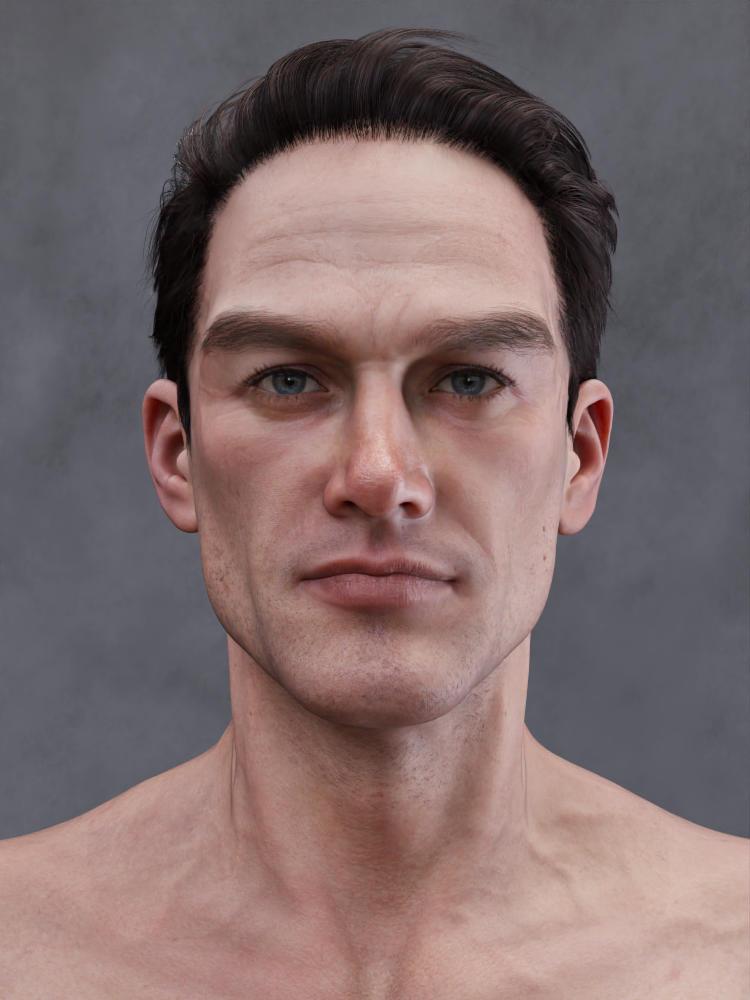
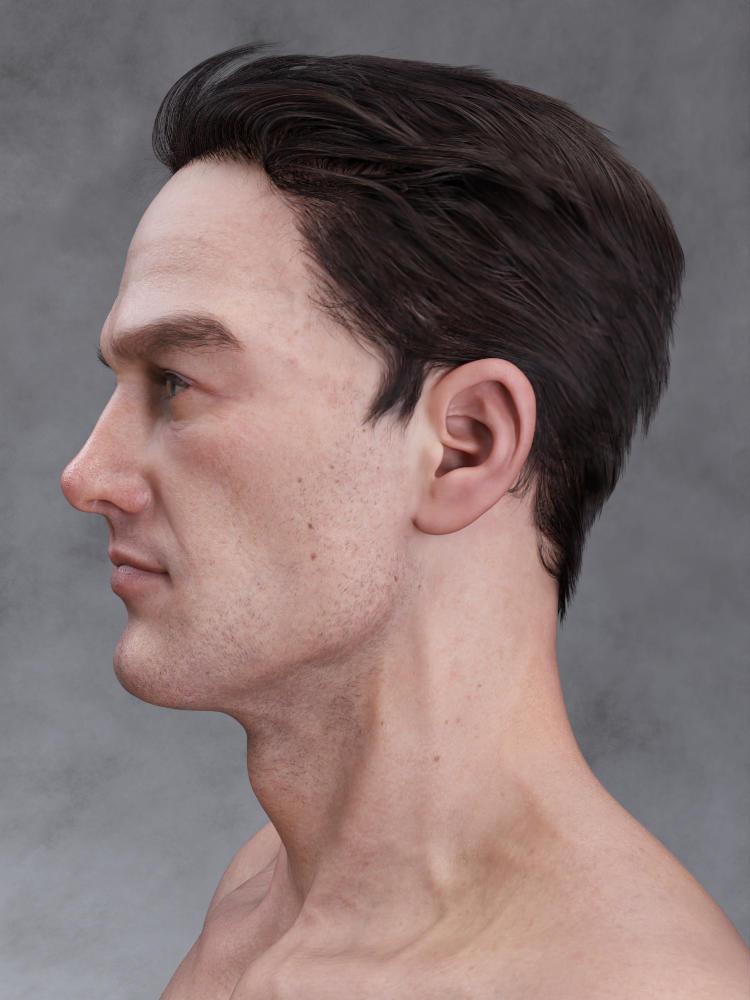 Third Party Figure Won't Load
The morph files contain the name of the character -- for example, "!Serena Body INJ" -- so I'm guessing the file names are unique.
Genesis 8 Model Deformation Is Perplexing (and Unpleasant)You were right, it was a morph. I disabled all of them using the Turbo Loader extension and was able to figure out what was wrong and reconfigure the preset values for that software. Works like a charm now. Thanks for the tip!
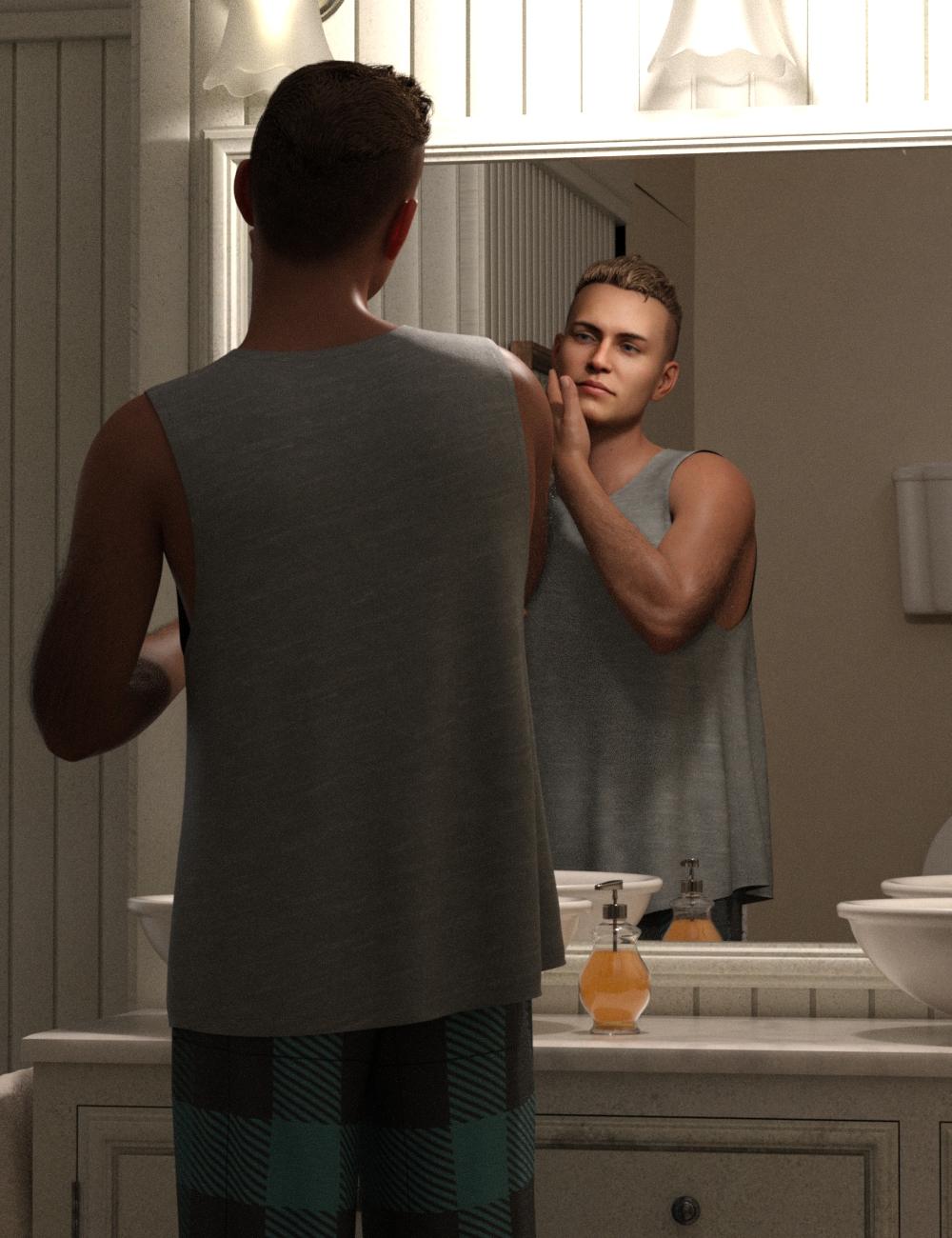
2023 Memorial Day Weekend Sales - Share Your Renders!Here's today's new product-testing Face Transfer person, getting ready for a long day of unexpected adventures ... Here he is sporting the Raker Short Hair and the Stellan Lounge outfit with its extra textures - one of the texture sets that I picked up for .36 cents. It's still a peaceful morning here in the Woodman House: Bathroom set.
 Is there a way to save a Pose Control for Shapes, as a Preset. [Solved, Yes!]
Saxa -- SD said:
Like Richard says, it's definately the type of control. You may also want to find those morphs, copy and paste them to a new folder of your choice that DAZ content includes in its library (your setup) , and then modify the duf with notepad++ using replace feature to make it a second set of morphs that won't get overwritten with a product update. Just compare the duf of a working morph. Will take a bit probably to get right first time, but after will be faster.
Thank you for the idea. I'm not too keen on modifying morph dufs as doing so would not enable me to make pose presets that could be used on other computers.
Is there a way to save a Pose Control for Shapes, as a Preset. [Solved, Yes!]Like Richard says, it's definately the type of control. You may also want to find those morphs, copy and paste them to a new folder of your choice that DAZ content includes in its library (your setup) , and then modify the duf with notepad++ using replace feature to make it a second set of morphs that won't get overwritten with a product update. Just compare the duf of a working morph. Will take a bit probably to get right first time, but after will be faster.
Genesis 8 Model Deformation Is Perplexing (and Unpleasant)The link would have been fine if you had left it in wire shaded style.
That looks as if there is either a morph in effect that lacks joint adjustments or a joint adjustment without its matching morph applied - either way, the centres of rotation do not line up with the placement of the shape's joints. Does Edit>Figure>Zero>Zero Figure Shape remove the effect?
Don’t think MLP works for genesis 9 very well.I never had to do that with genesis 8 or genesis 3. It would always make the bone fit the morph.but that could be useful now that i know. I had past projects that did that and couldnt figure out why cause like i said, it usually does it automatically for me.
[Released] RSSY Character And Material Conversion Bundle Genesis 8 to Genesis 9 [Commercial]Lovely product. I'm glad I came here to the forums else I would have NEVER figured out how to solve all the morph distortion that was happening when converting characters. The material suits are excellent as well! I am wondering however... has anyone else run into an issue where they are unable to apply any G8 materials or shaders to the G8 Eyelash Suit? I've been tinkering with it for about half an hour now on a few converted characters and haven't really been able to make much progress.
It's truthfully not THAT big of a deal as I can just hide the Eyelash suit and apply a G9 eyebrow product to the character but I was wondering if anyone had found a viable solution for this.
Daz 3D is part of

Connect
DAZ Productions, Inc.
7533 S Center View Ct #4664
West Jordan, UT 84084Licensing Agreement | Terms of Service | Privacy Policy | EULA
© 2026 Daz Productions Inc. All Rights Reserved.














