-
There's Always Another Sale Thread -- Discussions OnlyNice! I was wondering what people would choose from that massive G8 "Goodie Bag" list. Hard to narrow it down to just ten items. I tried (somewhat successfully) for a split between "practical" and "cool stuff":
HS dForce Hip and Breast V2
Ultimate Pose Mixer
Universal Pose Splitter
Face To Face Autopose Arms
L4N4 HD
MiA Lvl 4 HD
Aeridian Lady Stardust
Muelsfell Halfblood Anashia HD
CC Beard Boss
CC Centaur Breeds[Released] RSSY Character And Material Conversion Bundle Genesis 8 to Genesis 9 [Commercial]RiverSoftArt said:
necroscension said:
With the converter, I've notice most of the models I have do not use FBM/FHM in their morph naming but use Head or Body instead. I have attempted to resave the name of the morphs to start with FHM/FBM, but still have issues because sometimes I wind up having doubled morphs. Was it ever considered to see if the morph name includes Head or Body as an OR statement?
You must not buy most of your characters from Daz.
 This is a naming convention that has been in place for years.
Ok, I will make an update to check if the morph name starts with FHM/Head or FBM/Body.
It may be standard, but it is not widely used. I'm trying to spot check, but there are Daz store characters that do not use FBM/FHM and instead use "<Character Name><Body or Head>", i.e. "Tathar Head" and "CCPuckBody". Darwin's Mishap, ChangelingChick, PedroFurtadoArts, Dax Avalange, Marcius (no longer with Daz but still sold here), Mousso, Oskarsson are some who don't or haven't followed the standard, and that's just on the male side.
[Released] RSSY Character And Material Conversion Bundle Genesis 8 to Genesis 9 [Commercial]jepegraphics said:
SickleYield said:
jepegraphics said:
necroscension said:
Material Suits updates are out! It appears that the suits with anatomical elements are working with shape dials/presets! Thanks sickleyield!
At least DAZ Studio doesn't crash anymore whe loading the Material Suit, that's a big step forward!
Now only someone who can explain how to get the shaping morphs of the MASC Gens to show up - any suggestions? The basic shape morphs in the genitals are there, but not the various expansions from other merchants.
They can't directly. Even aside the shortcoming of being unable to get HD morphs into conformers, there wasn't a way to get any morphs from one genital set to another without just using transfer utility again, because the gens suit has to conform to the bodysuit (not the other set of gens). If you want to try a workaround, you can mark morphs as favorite on thr gens you want to copy from and use the "morphs" function of Transfer Utility. I understand if that's a deal breaker, but it was a problem I couldn't solve. The original morphs are there because I recreated them all one by one.I'm sorry to hear that and I have to say that this is indeed a deal breaker for me. I'm sorry that I didn't understand what really was going on with this product, otherwise I wouldn't have bought it. As it is now I have no use of it. Morph transfer would be an option, but I already have all those morphs on G8 Male Gens, so I will further use G8 with it's maps and G9 with it's maps, it is not a real problem.
That's too bad but understandable. I am sorry the product did not work for you as you hoped. Please return it.
[Released] RSSY Character And Material Conversion Bundle Genesis 8 to Genesis 9 [Commercial]TheRenderer said:
RiverSoftArt said:
TheRenderer said:
Lovely product. I'm glad I came here to the forums else I would have NEVER figured out how to solve all the morph distortion that was happening when converting characters. The material suits are excellent as well! I am wondering however... has anyone else run into an issue where they are unable to apply any G8 materials or shaders to the G8 Eyelash Suit? I've been tinkering with it for about half an hour now on a few converted characters and haven't really been able to make much progress.
It's truthfully not THAT big of a deal as I can just hide the Eyelash suit and apply a G9 eyebrow product to the character but I was wondering if anyone had found a viable solution for this.
Select the RSSY Genesis 8 Eyelash Suit. Go to the Surfaces pane. Select the RSSY Genesis 8 Eyelash Suit surface. Double-click on the preset that is for G8 Eyelashes.
p.s. I am glad you came to the forum and didn't give up. I am happy you got it working for you.
That was what I tried originally, 'Surfaces' pane and all.The eyelash suit isn't registering any sort of change even when I select the G8 Eyelash preset. The other suits are having no problem but for whatever reason.... that one aint working. I can manually apply some materials using the cutout opacity selection and all that jazz so this is really just a minor inconvenience but I figured you should be aware of it...
I wonder if it is the preset is somehow wrong? Because I confirmed the eyelash suit would accept materials before posting last time. Perhaps posting the log will let me know something.
[Released] RSSY Character And Material Conversion Bundle Genesis 8 to Genesis 9 [Commercial]Keiron said:
Keiron said:
Here is the Aurore G8 conversion
To correct the corrupt conversion a number of dials are in play
HD body Body causes Distortion
HD head Body causes Distortion
Kayleyss Square Nails causes figure to look like it's unfed for weeks, not sure why this dial is at 100% ?
Morph Dials are set to the values the G8 version had on conversion.
Hi I think the G8 is OK, I just looked at all the dials for the nails etc for a standard g8 they are set to 0
However when you choose the actor the converted character has morph dials at 100%
Just loaded the original Albany it has Mousso nails at 100%, so the actor is setting the dials differentely, no hd settings in this one
FHM Aurore Assymetry changes face completely not just the assymetry
Assymetry morphs on the head will not ever work I think.
In the renders below no particular order the original has the RSSY eyelashes in the wrong place, render with RSSY eyelashes removed and render with eyes replaces with g9 ones
You can't change the eye colour with these RSSY 8 eye's, but you can if you replace them with the g9 eyes or reloading the RSSY eys 8 or 8.1 eyes
To change the eye color, select the RSSY Genesis 8 Eye Suit and load the G8 eyes preset to change
Hi I had filter by contex on, so it was selecting g9 eyes. In the surface tab, I entered just her name in the search field all is good, otherwise you get everything
Unable to use the make up options
To use makeup, select the RSSY Genesis 8 Female Suit and load the G8 makeup preset to change.
Hi Thank you, I had filter by contex on, so it was selecting g9. In the surface tab, I entered just her name in the search field all is good
Breast up and down controls set to 80% reset to 100 to correct
Not sure what you mean here, but morphs that only affect a small portion of the body will also affect the body as a whole
When I loaded both the converted actor and the original, the breasts looked different, so I checked the settings and found that everything looked OK
From the parameters tab, I looked at the parameters breast up and down and found it was set to min -80% I reset this to -100% then they looked the same
Keep up the good work
Not sure why the parameters breast would be different.
Thanks for the extra information.
Is it possible to modify haircuts?Unfortunately it's not easy though it's possible... as this is a strand-based hair. You have no way to either manipulate its geometry with Geometry Editor / Mesh Grabber or export / import a morph with Morph Loader Pro, or edit it with Strand-Based Hair Editor. The only way to deform it is to use a D-Former(s) on it. Like the screenshot as attached, I roughly 'scaled' and 'pushed' the tail...
Head gamesbarbult said:
Your Christian conversion mix looks very good. I think I'll try a Christian conversion next. Here is my manual Ollie conversion to G9. I also converted his small nose morph. He also mixes well with other G9 men, but the result is not as handsome as your guy, considering that he is Ollie, after all.
True. You can definitely mix Ollie with other morphs, but the result will always tend to look somewhat "gawky" ;) However, if you love even the most unique looking people like me, then that's a bonus. LOL
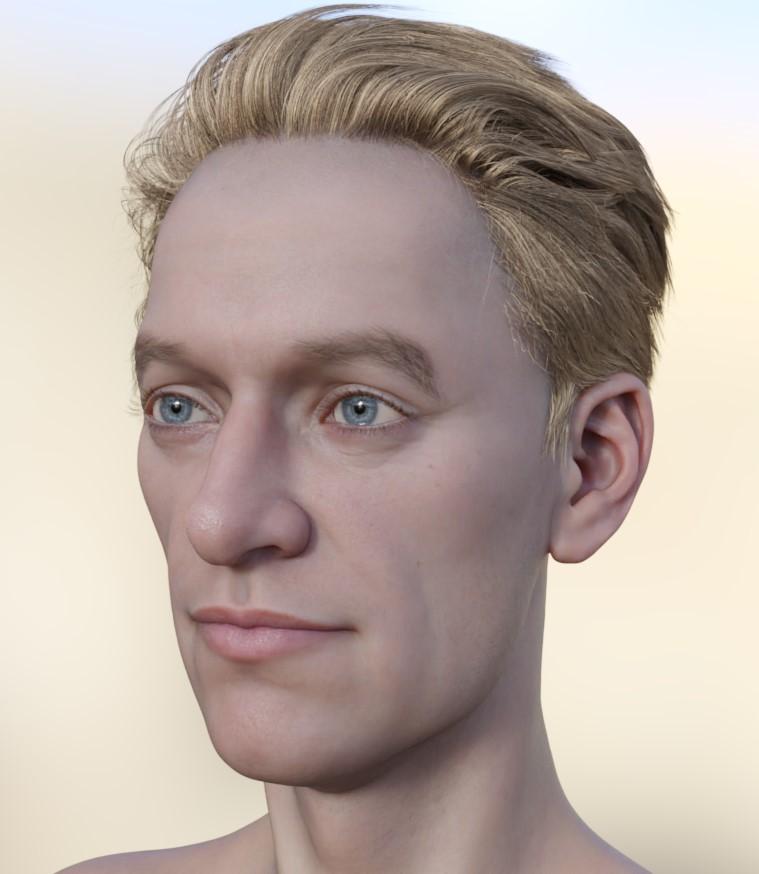 Head games
Yanno, I still love Ollie and here he is on G9 wearing two outfits that look like they were made for him. LOL
He also has his "Nose Long" morph here at 50% and his ears morph at 100%
 UltraSceneryXT - large terrain/landscape generator
Is there no other way to install the plugin? If I have to connect my art computer to the internet, that's a dead stop.
It 's been air-gapped since I first installed Studio and my product library in 2016. I'm sure that Microsoft has seven
years of data they want to hoover up and unwanted updates to install, and I'm not taking any chances.
I downloaded it using DIM onto a throwaway computer USB drive, can I transfer it somehow to my art computer?
That worked with accelerator. But I can't get it to work with XT. Oh, the plugin shows up and creates a tab and all,
but when I click on "Create/New UltraSceneryXT Terrain/OK" Studio locks up with an error message.I really, really hate anything which requires me to connect my computer to the internet. Why design things that way?
Well If You Want Gen 9 Capability In FaceGenJust FYI, the automatic face dots are not exclusive to the latest version. I have the auto dots in my version, which I think is 3.12. However, while the auto dots are convenient, they don't always fall in the right place. Luckily you can still move the dots manually.
I honestly wouldn't expect the tech to improve all that much without a total overhaul. The base for FG is pretty old. We are generating a 3d model from only 1-3 pics, and most probably only have 1 front facing shot. Without more photos from different angles it just isn't going to get better unless they add some kind of AI component.
They have added some improvements over time. The biggest one in 3.12 is that faces blend much better into the rest of the texture. The color of body textures better match the face color. I was quite surprised how much better it was over previous versions. But you are right, this is basically the same app that has existed for quite a long time. I think it is past time for a whole new software that includes AI. There already are AI generators that can create full 3d objects with just a couple pics.
Photogrammetry is also taking off. There are multiple apps that use mobile cameras to create 3d objects. You just take the camera and go around your subject. This creates a file like OBJ which can be used with other applications to eventually make a Genesis morph. Obviously this requires having your subject available for the scan, so probably not ideal for your favorite celebrities.
How to achieve this Skin quality ?lilweep said:
- High Definition details: Use either HD morphs in conjunction with high SubD level (e.g., ~ level 4) or otherwise use Normal maps and Bump maps. You can use a combination of all three, of course. Just be aware that Normal Map details will often just be a baked version of the HD morph details, so depending on what maps and morphs you are using you might not want to use both HD morph and Normal map for a given character at same time or it will represent doubling of the HD detail. But you can always eyeball what looks good.
- Skin microdetail maps: The PBR Skin shader has slots for skin details, so can plug some micro facet detail maps in there if you want. (I dont think this is generally necessary)
- Specularity: Use good quality specularity or roughness maps, ideally they should have speculairty details that correspond to the High Definition details, but probably not totally necessary.
- Vellus Hair: That character in your example picture is using Those Things's vellus hair product.
- Skin Shader: Use skin shader with good SSS settings and specularity settings. MelissaGT has some tutorial somewhere for setting SSS for Uber shader, and there are also some advice buried within various forums like this one.
I did tried Vellus but dropped it cause of how long it took to render and honestly, didnt see much difference with it. Besides that, I am absolutely clueless about all the other points you've mentioned. Also one more thing, I've tried experimenting using Skin Detail Resource 2 and got a similar result but it's still nowhere near the one above
How to achieve this Skin quality ?- High Definition details: Use either HD morphs in conjunction with high SubD level (e.g., ~ level 4) or otherwise use Normal maps and Bump maps. You can use a combination of all three, of course. Just be aware that Normal Map details will often just be a baked version of the HD morph details, so depending on what maps and morphs you are using you might not want to use both HD morph and Normal map for a given character at same time or it will represent doubling of the HD detail. But you can always eyeball what looks good.
- Skin microdetail maps: The PBR Skin shader has slots for skin details, so can plug some micro facet detail maps in there if you want. (I dont think this is generally necessary)
- Specularity: Use good quality specularity or roughness maps, ideally they should have speculairty details that correspond to the High Definition details, but probably not totally necessary.
- Vellus Hair: That character in your example picture is using Those Things's vellus hair product.
- Skin Shader: Use skin shader with good SSS settings and specularity settings. MelissaGT has some tutorial somewhere for setting SSS for Uber shader, and there are also some advice buried within various forums like this one.
Best Serratus Anterior & External Oblique muscles for G8M?I have every muscle morph set you can think of for G8M (SWOLE for Genesis 8 Male, Auto Muscle Enhancer HD For Genesis 8 Male, Musculature HD Morphs for Genesis 8 Male, The Brute 8 HD Add-On, etc etc), but I can't seem to find a nice looking set for the serratus anterior and external oblique muscles. All the muscle sets tend to have an extremely muscular base. It is possible to have a skinny/swimmers/athletic build and still show these muscles.
Can anyone think of any characters that have these muscles shown, but don't look like the hulk?
Or maybe I can take an existing normal map set, intensify those particular muscles, and smooth out everything else.
Any advise would be greatly appreciated.
[Released] RSSY Character And Material Conversion Bundle Genesis 8 to Genesis 9 [Commercial]SickleYield said:
jepegraphics said:
necroscension said:
Material Suits updates are out! It appears that the suits with anatomical elements are working with shape dials/presets! Thanks sickleyield!
At least DAZ Studio doesn't crash anymore whe loading the Material Suit, that's a big step forward!
Now only someone who can explain how to get the shaping morphs of the MASC Gens to show up - any suggestions? The basic shape morphs in the genitals are there, but not the various expansions from other merchants.
They can't directly. Even aside the shortcoming of being unable to get HD morphs into conformers, there wasn't a way to get any morphs from one genital set to another without just using transfer utility again, because the gens suit has to conform to the bodysuit (not the other set of gens). If you want to try a workaround, you can mark morphs as favorite on thr gens you want to copy from and use the "morphs" function of Transfer Utility. I understand if that's a deal breaker, but it was a problem I couldn't solve. The original morphs are there because I recreated them all one by one.I'm sorry to hear that and I have to say that this is indeed a deal breaker for me. I'm sorry that I didn't understand what really was going on with this product, otherwise I wouldn't have bought it. As it is now I have no use of it. Morph transfer would be an option, but I already have all those morphs on G8 Male Gens, so I will further use G8 with it's maps and G9 with it's maps, it is not a real problem.
[Released] RSSY Character And Material Conversion Bundle Genesis 8 to Genesis 9 [Commercial]RiverSoftArt said:
Eboshijaana said:
RiverSoftArt said:
Eboshijaana said:
Naturally, I had to experiment on the update.
It is not AS broken as pre-update, but not quite the transfer utility level.I also exposed a few TU settings in the data/RiverSoft Art/Common/RSG8G9CharacterConversionConstants.dsa file. You could try setting some of those.
Okay, I've spent a few hours testing the converter with the file edited. I tried using the EXACT same settings between the converter and TU.
Thoughts;
1. Regardless of settings, the Converter changes the body of g9 while TU leaves it alone.
2. Could the 'reverse source shape from target' setting affect the above?
I will try to use my self-made clone for the converter, just to see if it would affect things.The ADJUST_TARGET_BASE constant is the one that sets the 'reverse source shape from target'
Okay, back to the drawing board then.
[Released] RSSY Character And Material Conversion Bundle Genesis 8 to Genesis 9 [Commercial]RiverSoftArt said:
TheRenderer said:
Lovely product. I'm glad I came here to the forums else I would have NEVER figured out how to solve all the morph distortion that was happening when converting characters. The material suits are excellent as well! I am wondering however... has anyone else run into an issue where they are unable to apply any G8 materials or shaders to the G8 Eyelash Suit? I've been tinkering with it for about half an hour now on a few converted characters and haven't really been able to make much progress.
It's truthfully not THAT big of a deal as I can just hide the Eyelash suit and apply a G9 eyebrow product to the character but I was wondering if anyone had found a viable solution for this.
Select the RSSY Genesis 8 Eyelash Suit. Go to the Surfaces pane. Select the RSSY Genesis 8 Eyelash Suit surface. Double-click on the preset that is for G8 Eyelashes.
p.s. I am glad you came to the forum and didn't give up. I am happy you got it working for you.
That was what I tried originally, 'Surfaces' pane and all.The eyelash suit isn't registering any sort of change even when I select the G8 Eyelash preset. The other suits are having no problem but for whatever reason.... that one aint working. I can manually apply some materials using the cutout opacity selection and all that jazz so this is really just a minor inconvenience but I figured you should be aware of it...
[Released] RSSY Character And Material Conversion Bundle Genesis 8 to Genesis 9 [Commercial]
They can't directly. Even aside the shortcoming of being unable to get HD morphs into conformers, there wasn't a way to get any morphs from one genital set to another without just using transfer utility again, because the gens suit has to conform to the bodysuit (not the other set of gens). If you want to try a workaround, you can mark morphs as favorite on thr gens you want to copy from and use the "morphs" function of Transfer Utility. I understand if that's a deal breaker, but it was a problem I couldn't solve. The original morphs are there because I recreated them all one by one.jepegraphics said:necroscension said:
Material Suits updates are out! It appears that the suits with anatomical elements are working with shape dials/presets! Thanks sickleyield!
At least DAZ Studio doesn't crash anymore whe loading the Material Suit, that's a big step forward!
Now only someone who can explain how to get the shaping morphs of the MASC Gens to show up - any suggestions? The basic shape morphs in the genitals are there, but not the various expansions from other merchants.
Head gamesbarbult said:
Your Christian conversion mix looks very good. I think I'll try a Christian conversion next. Here is my manual Ollie conversion to G9. I also converted his small nose morph. He also mixes well with other G9 men, but the result is not as handsome as your guy, considering that he is Ollie, after all.
Looking good! Ollie is one of my favorites and probably the second character I transferred. LOL
[Released] RSSY Character And Material Conversion Bundle Genesis 8 to Genesis 9 [Commercial]RiverSoftArt said:
Jeremion said:
RiverSoftArt said:
Jeremion said:
I only tried to convert Michael 8.1, and so far I don't get it fine as G9. Issues on the eyes (not well placed, nor good size and when trying to move them with powerpose, they just go out of the head xD) and the morph around the eyes is not OK. So, I don't know really what to do to get better result. I will try again.
Michael should not be a problem at all. You do not need the eye dialog. It sounds like a morph was created on the eyes that are moving them. Check in \data\DAZ 3D\Genesis 9\Genesis 9 Eyes\Morphs to see if there is an eye morph that could be engaging that messes things up (a quick way is just to rename this directory so none of the eye morphs engage. Look for this folder under the first directory listed in the Daz Studio Formats section of the Content Directory Manager (which is usually My Library
Hello,
Yeah I found that weird too... look. I renamed the "morphs" directory. And retested. Enclosed the screen and below the logs.
One strange thing : If I load Michael 8.1, everything is fine.What do you mean if you LOAD M8.1? Do you mean just LOAD M8.1 into the same scene or CONVERT M8.1?
I see in the log that the converter script copy "BaboonG8M-IrisSize" for any reason? (it is one of the character I tried to convert as well, but I don't have it anymore, I deleted it). Is there a place the script keep its previous work? For sure, BaboonG8M is not used on the original Michael 8.1 lol.10:03:35 GMT+0200 (Paris, Madrid (heure dété)): Executing Script
10:03:35 GMT+0200 (Paris, Madrid (heure dété)): Selecting Preset: D:/Daz3D/People/Genesis 8 Male/Characters/Michael 8.1.duf
10:03:35 GMT+0200 (Paris, Madrid (heure dété)): Converting character from D:/Daz3D/People/Genesis 8 Male/Characters/Michael 8.1.duf to D:/Daz3D/People/Genesis 9/Characters/Converted/Michael 8.1.duf
10:03:35 GMT+0200 (Paris, Madrid (heure dété)): Enabling morphs for asset, D:/Daz3D/People/Genesis 8 Male/Characters/Michael 8.1.duf
10:03:36 GMT+0200 (Paris, Madrid (heure dété)): Turbo Loader: 8 morphs were searched for
0 Enabled (0 failed to enable)
0 Disabled (0 failed to disable)
8 unchanged
0 skipped
in 221 msecs
Note: Multiple files may exist for a morph if you use Daz Connect
10:04:25 GMT+0200 (Paris, Madrid (heure dété)): Michael 8.1 is of type Actor/Character
10:04:43 GMT+0200 (Paris, Madrid (heure dété)): Converting Morphs: BaboonG8M-IrisSize,FHMMichael8_1,FBMMichael8_1,CTRLMichael8_1,PHMMichael8_1HDIris
10:15:41 GMT+0200 (Paris, Madrid (heure dété)): Copy Icons from D:/Daz3D/People/Genesis 8 Male/Characters/Michael 8.1.duf to D:/Daz3D/People/Genesis 9/Characters/Converted/Michael 8.1 Genesis 9.duf
10:15:41 GMT+0200 (Paris, Madrid (heure dété)): Copy Categories from D:/Daz3D/People/Genesis 8 Male/Characters/Michael 8.1.duf to D:/Daz3D/People/Genesis 9/Characters/Converted/Michael 8.1 Genesis 9.duf
10:15:41 GMT+0200 (Paris, Madrid (heure dété)): Execution Complete.
The script works by loading the character and seeing what morphs are being used. If you load M8.1 into a new scene, look for BaboonG8M-IrisSize, I am sure you will find it (it may be a hidden property though).
Hello,
Yeah, I meant I tried to load Michael 8.1 : no baboon. See the screenshots. I guess Baboon is the issue with the conversion but I dont know why in fact, it's just something which comes from I don't know where. Is that possible the script used some files in a temporary directory somwhere ?
0) I uninstall Baboon package (for info) through DIM
1) I loaded Michael 8.1, show hidden properties (see enclosed), no baboon.
2) I started a new empty scene and launch a Michael 8.1 conversion : Baboon appears in the log window for any reason (see screen)
3) Once converted, the conversion is wrong, and Baboon appears with iris size in parameters[Released] RSSY Character And Material Conversion Bundle Genesis 8 to Genesis 9 [Commercial]Keiron said:
Here is the Aurore G8 conversion
To correct the corrupt conversion a number of dials are in play
HD body Body causes Distortion
HD head Body causes Distortion
Kayleyss Square Nails causes figure to look like it's unfed for weeks, not sure why this dial is at 100% ?
Morph Dials are set to the values the G8 version had on conversion.
Hi I think the G8 is OK, I just looked at all the dials for the nails etc for a standard g8 they are set to 0
However when you choose the actor the converted character has morph dials at 100%
Just loaded the original Albany it has Mousso nails at 100%, so the actor is setting the dials differentely, no hd settings in this one
FHM Aurore Assymetry changes face completely not just the assymetry
Assymetry morphs on the head will not ever work I think.
In the renders below no particular order the original has the RSSY eyelashes in the wrong place, render with RSSY eyelashes removed and render with eyes replaces with g9 ones
You can't change the eye colour with these RSSY 8 eye's, but you can if you replace them with the g9 eyes or reloading the RSSY eys 8 or 8.1 eyes
To change the eye color, select the RSSY Genesis 8 Eye Suit and load the G8 eyes preset to change
Hi I had filter by contex on, so it was selecting g9 eyes. In the surface tab, I entered just her name in the search field all is good, otherwise you get everything
Unable to use the make up options
To use makeup, select the RSSY Genesis 8 Female Suit and load the G8 makeup preset to change.
Hi Thank you, I had filter by contex on, so it was selecting g9. In the surface tab, I entered just her name in the search field all is good
Breast up and down controls set to 80% reset to 100 to correct
Not sure what you mean here, but morphs that only affect a small portion of the body will also affect the body as a whole
When I loaded both the converted actor and the original, the breasts looked different, so I checked the settings and found that everything looked OK
From the parameters tab, I looked at the parameters breast up and down and found it was set to min -80% I reset this to -100% then they looked the same
Keep up the good work
Daz 3D is part of

Connect
DAZ Productions, Inc.
7533 S Center View Ct #4664
West Jordan, UT 84084Licensing Agreement | Terms of Service | Privacy Policy | EULA
© 2026 Daz Productions Inc. All Rights Reserved.