-
HDR artifacts and request for tips
I don't particularly care for using HDRI in Carrara. It's so helpful to be able to see the effects (at least somewhat) in working view, and be able to rotate the thing to get the result I want. Carrara makes me jump through hoops for that. But the Realistic Sky in combination with Sun and Moon lights are Su-freaking-perb in my opinion!
Oh... and I'm sorry for posting a DS/Iray image in the Carrara forum, but this is an important question. I wanted to show what HDRI do in a physically based engine.
I'm absolutely Not dissing Carrara for this. I love how I can light scenes in Carrara!
Daz Bridges Update!!!cobusp said:
Hi, it does not seem like the Daz2Cinema plugin works in my older version of Cinema R19. It does look like the extension *.pyp hasn't changed, though. Can somebody help please?
I'd say you're more likely to get a response in the C4D forum, but that's been a ghost town lately. The best I can suggest is that you go to github and see if you can download an older version of the bridge.
Burchard Eye Problem...Anyone Have This Happen? --SOLVED--melanie said:
NorthOf45 said:
In the Content Library, right-click on the .duf file icon. Select "Browse to File Location". This will open a file explorer window, in a folder where you can find the actual files. Just right-click and select "Open with..." or drag it onto a notepad session (or whichever editor you prefer), or whatever gets it into the editor. Search for the "//Runtime" string and change it to "/Runtime". Save and you're done.
It could literally take weeks or months for the ticket to be actioned.
Well, I tried this, found the line with the double slash, deleted the extra one, and saved it, but it didn't work. I even rebooted my computer in case it didn't recognize it, but nothing. It's still giving me the error message. Bruchard does come in, but not iwthout that error message looking for that file, even though it's there. So I don't know what the problem is. I did put in a ticket for it, so I guess I'll wait until they get around it.
You are on the right track. There are three occurrences per file, not just the first one. One more try, you'll get it...
Burchard Eye Problem...Anyone Have This Happen? --SOLVED--NorthOf45 said:
In the Content Library, right-click on the .duf file icon. Select "Browse to File Location". This will open a file explorer window, in a folder where you can find the actual files. Just right-click and select "Open with..." or drag it onto a notepad session (or whichever editor you prefer), or whatever gets it into the editor. Search for the "//Runtime" string and change it to "/Runtime". Save and you're done.
It could literally take weeks or months for the ticket to be actioned.
Well, I tried this, found the line with the double slash, deleted the extra one, and saved it, but it didn't work. I even rebooted my computer in case it didn't recognize it, but nothing. It's still giving me the error message. Bruchard does come in, but not iwthout that error message looking for that file, even though it's there. So I don't know what the problem is. I did put in a ticket for it, so I guess I'll wait until they get around it.
CLOAKED - Animation WIPCLOAKED is my personal animation project. SInce I'm doing it all in DazStudio, I want to share it here with this forum. Feedback is appreciated.
I have almost 2 mins of animation at this point. I will keep sharing to this discussion as I keep making progress. NONE of this animation has been polished yet - very RAW! You'll see errors, and "unfinished stuf". I'm just establishing the shots, the pace, and the story at the moment.
NOTE: I just finished the last shot you see in this video today, so that's why the female character doesn't have the cloak on at the end. No DForce simulation yet - but it will be there in upcoming videos.
Thank you.
 dForce Office Lady Suit for Genesis 8 and 8.1 Females pantyhose texture
hansolocambo said:
To save wearables separately and without the pose :
- Load a Genesis 8, create a keyframe at 0. Load the outfit at keyframe 1, it'll load with the pose.
- Frame 0 you have the default pose and all parts, Coat, Pumps, Pantyhose, Skirt, Shirt.
- Now you can save each part one by one. Select your Genesis and, for each part of the outfit : .File > Save as > Wearable(s) Preset. Name a first file Coat for example, save it in the original folder : ..\People\Genesis 8 Female\Clothing\Jason Fang\Office Lady Suit\Coat.duf
Wearable(s) Preset Save Options. Select only the Coat. And save the wearable.
What the content creator did, in the Wearable(s) Preset Save Options, was to tick "Include Pose Settings" in the Pose Tab.
Pantyhose :
This cloth sadly loads without Iray, and there aren't any texture for pantyhose in the : ..Runtime\Textures folder either. So... quiet a lot feels very unfinished here :/
I suggest you submit a ticket explaining what's missing from this bundle. The clothes are nice, but that doesn't excuse the fact that the finishing and checking of the bundle leaves a lot to be desired. Especially for an item sold on the official website.Thanks a lot for the very detailed explanation, sorry for the late answer
 I lose myself on Daz forum response style, I will for sure. Thanks again for your help
 -D
DazStudio feature wish: "limit search to this section"In Content Library, right-click menu on folders: "limit search to this folder and subfolders", then when entering a word in the search bar filter out all paths not starting with that of the selected folder.
Often enough you want to search for a pose for example but the specific word returns hits from all sorts of folders. Or you want to search through G8 only, not G3. Etc.
Oh, and regexes for the search field please.
Why is there no "Runtime" folder in my Daz Studio Content Library tab?I am currently batch converting 3,555 .hdr and .exr files to .jpg using Photoshop due to the fact there is no single place to view and load these images into Daz from within Daz.
I will have to open the .jpg folder and look for an image then locate that image in my HDRI folder with the same name then manually load the hdr/exr image into the environments tab.
Within Daz I am offered about 200 HDRI images out of the roughly 3555 images I have purchased.
I had to "copy" these images both .hdr and .exr out of My Daz Content Library into another folder and then batch convert them to.jpg.
This batch conversion I suspect will take my PC a day or so to accomplish...
If I purchase any new HDRIs from the Daz Store I will need to manually locate them and convert them as well, as I go along.
Rather than "smart content" gathering these images into a single user-friendly place I have to go to this effort simply to view and use the products I have purchased...
And btw, there is no Windows Explorer image thumbnail creator for Windows for .exr files due to the fact that .exr files are Apple 's proprietary HDRI format.
Again it would be nice if these files were gatherd into one place within Daz Studio.
This HDRI issue has been a problem for years.
One would think a simple solution to this would have been created by now so these assets could be viewed and applied from within Daz Studio.
A simple *.hdr and *.exr search of the My Daz Content Library folder is all that would be needed to make a script to create a list of available images where small thumbnails could be created from that list.
Just saying...
If anyone knows a way to access these products from within Daz that have been purchased from Daz, please let me know how you do it.
Render-Settings seems to be the area in Smart Content where a relatively few seem to be shown.
Why is there no "Runtime" folder in my Daz Studio Content Library tab?Why is there no "Runtime" folder in my Daz Studio Content Library tab?
I have purchased many .hdr and .exr files but in the Smart Content tab, there are some here, some there and some not listed anywhere...
This could not be any more confusing. Really.
I do a Windows Explorer search for them in "My Daz Studio Library" i.e. *.hdr and *.exr and they all show up.
It lists in the file path that they mostly live in My Daz Studio Library > Runtime > Textures.
Why is there no "Runtime" folder listen in the Daz Content Library tab?
So I have added a Base Directory to my Daz Studio Formats folder in the Daz Content Library and selected "runtime" from the My Daz Studio Library folder on my hard drive.
The folder trees are within the Runtime, but no files showing up...
I have had to copy all of these .hdr and and.exr files from the runtime into another folder.
Is there some reason why these files are scattered all over the Daz Content Library and most of them are not even accessable but actually "hidden"?
It really could not be any more difficult to locate these very large HDRI files and see the thumbnails for them "within" Daz Studio...
Burchard Eye Problem...Anyone Have This Happen? --SOLVED--In the Content Library, right-click on the .duf file icon. Select "Browse to File Location". This will open a file explorer window, in a folder where you can find the actual files. Just right-click and select "Open with..." or drag it onto a notepad session (or whichever editor you prefer), or whatever gets it into the editor. Search for the "//Runtime" string and change it to "/Runtime". Save and you're done.
It could literally take weeks or months for the ticket to be actioned.
search function not workingMacTire said:
So 3rd party assets cannot be searched?
The Content Library search goes by file names and will work on anything, the other content panes use the database and so require metadata - Daz content will (almost) always have that, soem third party content will have it though it will usually have to be imported, or you can add your own.
Burchard Eye Problem...Anyone Have This Happen? --SOLVED--Before I put in a ticket, I'm just wondering if anyone has had any problem getting Burchard to load without an error message that an eye texture is missing. The "missing" texture is there, but for some reason, it won't load with Burchard. I found the file in the correct place, but my DAZ Studio can't seem to find it. If I click through the error messages, he loads and his eyes seem to render all right, but I'm just wondering if anyone else had had this problem. My sister has the same problem with her Burchard on her computer as well. I even tried to uninstall him and reinstall him, but this continues to happen. I've used him in the past, and I don't remember this happening. I haven't seen any other threads here in the forum about this. The missing file is: runtime/textures/Emrys/Burchard/BurchardEyesB_1006.jpg
If I locate it and find it, it still gives me the message, but he will lead and his eyes do render all right, but that's a lot of work to get him to come in.
rifle from carnival midway jumps when parented to genesisTechnical help forum https://www.daz3d.com/forums/categories/technical-help , not support.
Parent In Place is a check box at the bottom of the Change Parent dialogue or, if you are using Drag and Drop in the Scene pane, it's a checkable command in the Scene pane option menu - the lined/hamburger button in the top corner, or rigth-click the tab.
rifle from carnival midway jumps when parented to genesisIs Parent In Place on?
I'm leaving this one sicne it is perhaps a geenral suage issue, but please don't use the Daz Studio Discussion forum for questions about specific products - those generally should go to Technical Help.
Medieval City Block Promo Iray LightingJay Jay said:
Hi Apologies if this is in the wrong forum section bit I'm sort of stumped. Got the Medieval City Block which looks fantastic and as its optimised for Iray I'm going to make an assumption that the promo art was rendered in Iray. Sorry if I'm wrong there. I'm very new to Iray (been a die hard 3DL renderer forever) as all my experiences with Iray have resulted in things being too photo real. But the promos in this set look closer to 3DL and look fantastic. Does anyone have any tips or tutorials on how to use Iray yet get results like this? I'll be hugely grateful for any help. Thank you Jay
My guess and the easiest way to get the effect is in post, I mean with brushes in Photoshop
On Daz Store some products can help https://www.daz3d.com/rons-steam-and-smoke and https://www.daz3d.com/rons-smoke
Another technique is to follow this tutorial

I hope this help you
Need Genesis 9 Goth makeup.I tried to mess around, although I have no real knowledge of what it should look like.
But this is what I came up with after a bit a web search.
Head gamesAllenArt said:
leemoon_c43b45a114 said:
Casey, Michael, and various other G9 morphs...
Lee
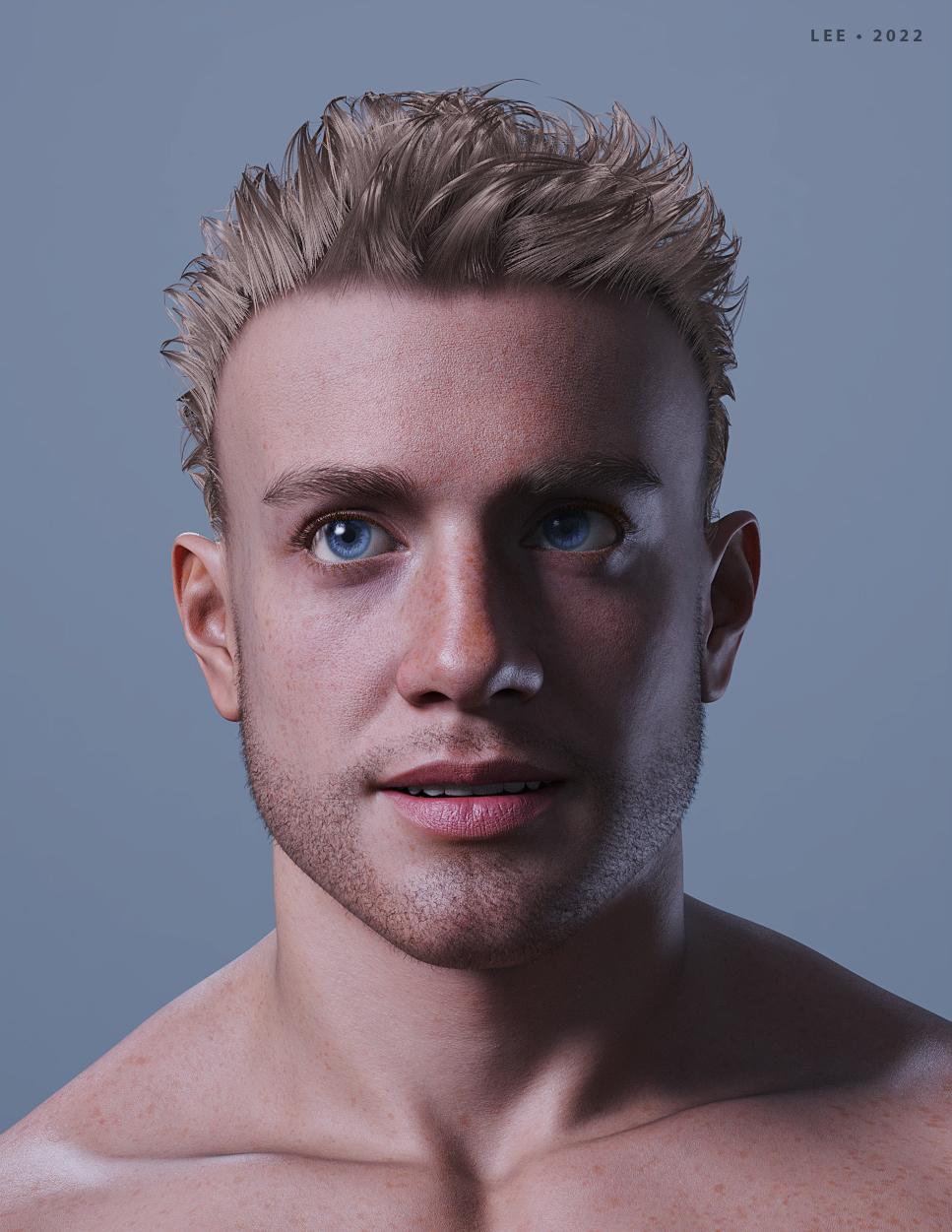
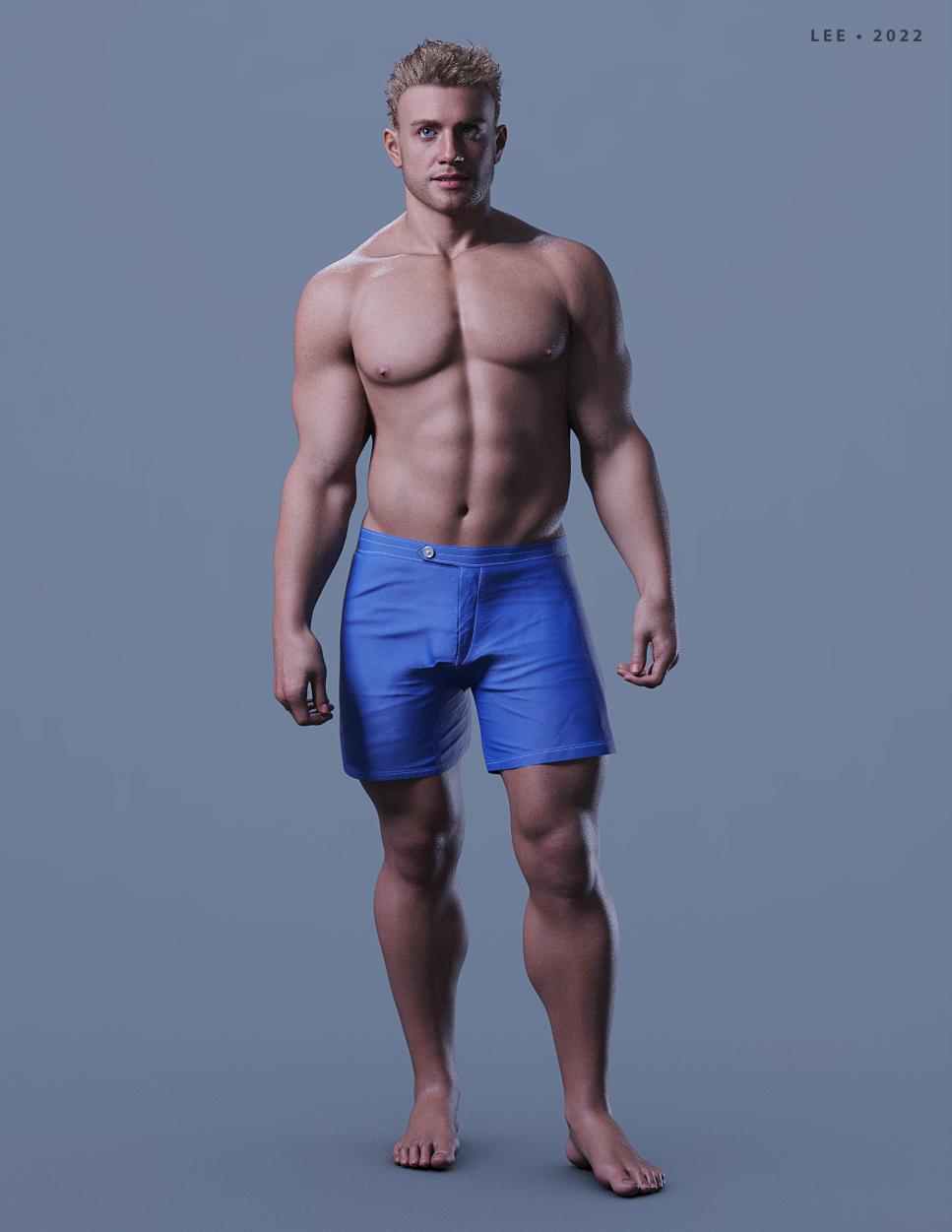
LOVE his face!! Wow, what a hunk. LOL
Thank you, AllenArt!
I put the shaping preset for him on my forum thread. He needs a few G9 products to get the shape.
Lee
[Fisio SB addOn released] Fisio: Physics SimulatorPeter Wade said:
Alberto said:
Peter Wade said:
Something is broken in your system.
Which version of windows do you have?
Is it updated?
Are you able to render with Filament?
According to the properties window it's Windows 10 Pro Version 22H2 Build 19045.2251 and it has Windows Feature Experience Pack 120.2212.4180.0
Windows Update says it is up to date
Filament renders OK.
I need to have a look at ways to check the system, I think there are a couple of commands I can use for that. I did a search for the things that were showing as missing and a couple of sites said they are part of the 2015 runtime for Visual C or it might habe been C++, I'll have to look i to that further.
Peter,
Could you check with CFF Explorer the file "dzfilamentapi.dll"? It's inside the subfolder "\Program Files\DAZ 3D\DAZStudio4\"
dzfilamentapi.dll requires the api-ms-win-crt files.
Interesting. That .dll shows the api-ms-win-crt files as missing as well but filament does render. If the code contains refeneces to a library that isn't there but it never calls the functions would that work? When I saw stdio in the list my experience with C made me wonder if the developers were using it as some sort of debug console that doens't get used in the release version. But I'm way out of date with current programming methods so I may be talking rubbish.
Did you try to reinstall Daz Studio?
If this doesn't work, you could, if you wish, reinstall or repair the redistributable https://www.microsoft.com/en-us/download/details.aspx?id=53840
How do I avoid "Topology has changed..." trying to GoZ back to Daz Studio?bigD3d said:
Hello,
I ran into this issue tonight and thought I share what worked for me in case it helps other who come across the forum entry later on...
My item i'm sending to ZBrush is an older V4 clothing item (and I see this issue most often with older meshes like this). I found that I could update the mesh in Daz and then when I used ZBrush, added a morph, and sent it came back the morph was taken. To make the change you can:
Edit > Figure > Geometry > Triangulate...
This converted the entire mesh into triangles, and I'm guessing closed or connected any loose edges/vertices, etc. If you have loaded a texture on it, you can save the figure and the material, and it would propably be best to also save as a new product. The old textures won't work if you reload them onto the item though. But the surface groups are still there so you can add 3rd party textures.
Its not a perfect solution, but hope it helps someone. Oh, and this is Daz Studio 4.16. I'm not sure when this Triangulate... option came, but just in case...
thanks
Thank you a lot! It works!
[Fisio SB addOn released] Fisio: Physics SimulatorAlberto said:
Peter Wade said:
Something is broken in your system.
Which version of windows do you have?
Is it updated?
Are you able to render with Filament?
According to the properties window it's Windows 10 Pro Version 22H2 Build 19045.2251 and it has Windows Feature Experience Pack 120.2212.4180.0
Windows Update says it is up to date
Filament renders OK.
I need to have a look at ways to check the system, I think there are a couple of commands I can use for that. I did a search for the things that were showing as missing and a couple of sites said they are part of the 2015 runtime for Visual C or it might habe been C++, I'll have to look i to that further.
Peter,
Could you check with CFF Explorer the file "dzfilamentapi.dll"? It's inside the subfolder "\Program Files\DAZ 3D\DAZStudio4\"
dzfilamentapi.dll requires the api-ms-win-crt files.
Interesting. That .dll shows the api-ms-win-crt files as missing as well but filament does render. If the code contains refeneces to a library that isn't there but it never calls the functions would that work? When I saw stdio in the list my experience with C made me wonder if the developers were using it as some sort of debug console that doens't get used in the release version. But I'm way out of date with current programming methods so I may be talking rubbish.
Daz 3D is part of

Connect
DAZ Productions, Inc.
7533 S Center View Ct #4664
West Jordan, UT 84084Licensing Agreement | Terms of Service | Privacy Policy | EULA
© 2026 Daz Productions Inc. All Rights Reserved.