-
Controlling morphs in sequence
Ha! I totally misunderstood what you want...
 So set them as below:
I could not scroll down to capture the full screenshot but I believe you'll know how to set it for Child 4 morph... For Child 1, you also can use 'Keys' option...other than Scalar. I just kept it simpler...
Controlling morphs in sequenceHey Crosswind thanks for the response, the problem I'm having is that it fires all the children at once. I'm trying to get the parent dial to progressively dial in each in turn until the parent reaches 100%
so the parent dial would be:
1-25%: Child morph 1: 0 - 100%
26-50%: Child morph 2: 0-100%
41-75%: Child Morph 3: 0-100%
76-100%: Child Morph 4: 0-100%
[Released] RSSY Character And Material Conversion Bundle Genesis 8 to Genesis 9 [Commercial]I'm putting this here in case anyone else finds it useful.
Using the main converter, I was having issues with the resulting morphs being garbled, like others here. It was nowhere near as bad for me as it is for others but still, it wasn't correct. I could dial in a great head morph or a great body morph but not both together. I'd tried renaming morphs with FBM and FHM, I'd dialled out any other morphs and resaved (there weren't any as it's a custom character with head and body morps only) and so on. No joy there but the material suit worked great, so that was something.
I moved over to the scene converter which went through it's processes before throwing up something like an 'error converting morphs' box. I was about to give up and try to fully manual route. Then I noticed that my custom character was in the viewport and looking spot on. I checked the dials and they worked - no distortions, so I quickly saved off those morphs, cleared the scene, loaded a default G9, dialled the morphs and.....they worked perfectly. Huzzah!!
Now it's worth bearing in mind that I've only tried this once as of typing but I thought it was worth sharing. So hopefully, if I get garbled morphs again, I can use a mix and match of the two coverters to get the required result. The material suit from the main converter and the morphs from the scene comverter, while deleting the morphs that aren't needed. It's not ideal but if it keeps working then that's good enough for me.Hopefully others might find this useful and I'll be trying more characters later.
 Controlling morphs in sequence
1st create the morph dials (Properties), then use Property Hierarchy (Window - Panes - Property Hierarchy) to assign the Parent morph as the controller of each Child morph, and set the scarlar values as needed. Pls refer to the attached screenshot...
I'm not sure if there's a full tutorial demonstrating these... you may search 'Daz Josh' or 'Daz Sickleyield' on youtube to check their channels... there should be some relevant videos.
PS: If you wanna 25%, 50%, 75% and 100% as the max value of each child morph, just enter them in Max Value fields accordingly...
[Released] RSSY Character And Material Conversion Bundle Genesis 8 to Genesis 9 [Commercial]Keiron said:
Hi
Continuing on the following have issues the rest of my actors starting with B and C had issues with the nails which is corrected by setting any nail morph to 0
BJ Yoemi Eyes Cornea Bulge causes an issue set to 0 to correct
Noem HD details causes an issue set to 0 to correct
Candida Fittness detail causes an issue set to 0 to correct
Cb Cara eylashes grey around eyes
Hope that helps
Thanks for sharing!
[Released] RSSY Character And Material Conversion Bundle Genesis 8 to Genesis 9 [Commercial]Hi
Continuing on the following have issues the rest of my actors starting with B and C had issues with the nails which is corrected by setting any nail morph to 0
BJ Yoemi Eyes Cornea Bulge causes an issue set to 0 to correct
Noem HD details causes an issue set to 0 to correct
Candida Fittness detail causes an issue set to 0 to correct
Cb Cara eylashes grey around eyes
Hope that helps
[Released] RSSY Character And Material Conversion Bundle Genesis 8 to Genesis 9 [Commercial]ArtofGohan said:
RiverSoftArt said:
ArtofGohan said:
Here's the Screenshot.
Yup, that is what I meant by wrinkled, but yours looks way more extreme
 Please do:
The Converted Character’s Body is wrinkled. Because of the way that morphs must be converted, a morph that on Genesis 8 appears to only touch a small part of the head can affect the whole body on Genesis 9. You need to show Currently Used parameters to show all morphs on the converted character. Then, one by one, dial in the morphs to find the offending morph(s). Once you find them, delete the morphs from your HD (click the Gear icon, Parameter Settings, and look at File Path for the asset to figure out where the morph is and what it is called). You should also resave the character with the offending morph(s) dialed out (set to 0).
Ok I'm confused on what you mean here. You want me to check every individual morph on the coverted gen 9 Female as in go back and forth with the dials? Or on gen 8 female?I mean load the converted wrinkled G9. Select Currently Used in the Paramenters pane to see all the morphs dialed in. Dial them ALL to 0. Dial each used morph in one by one to find the problem morphs.
Head gamesAllenArt said:
barbult said:
@AllenArt, That is a nice looking guy. What manual technique did you use to convert him?
Thanks. I used the tutorial from Catherine3678ab in the freebies section, but before I exported the morph I changed the size to as close as default G9 as I could get it. Then I used RSSY's Eye Adjuster script to get the eyes in the right place (because they weren't). Then I exported the "morphed" eyes and brought those back in with a controller and pointed them at the Torian 9 morph. It took awhile for everything to get adjusted let's say...lol. If I do it for every one of my favorite characters I'll still be at it when I'm dead. LOL
I didn't immediately find Catherine's tutorial (I'll have to look harder). I found one by Jay Versluis that I followed. I definitely need to try your suggestion of adjusting the size before exporting. Anyway, I converted Kala 8 and Charlotte 8 and mixed them 50/50 and applied Kala 9's skin and HD morphs. I think it is a beautiful combination.
 Downloading 3rd Party content
Hey I need some help with locating some files on my laptop. I recently purchaced a morph pack from renderhub and can't seem to locate the morphs file to install it to. I've been in contact with the artist about this for about a day and she tells me to go to C:/USER/USERNAME/MYDOCUMENTS/DAZ3D/STUDIO/MY LIBRARY/DATA/DAZ3D/GENESIS8/FEMALE/MORPHS. But the issue is as soon as I click on documents its comes up empty. I tried installing the morph pack to the program file but there is no morphs folder there, and it doesn't work. This is insanely frusturating as the file I need to put the morph pack into doesn't seem to exist and I am over this. I don't know much about files and all that stuff, but I follow her directions exactly as she tells me but cannot find this anywhere on my computer.
Freebie Challenge May 2023 - "Sweet Music" - Entries Thread OnlyAn Elvish Lullaby
An elvish bard sings softly to his daughter as she starts to fall asleep.
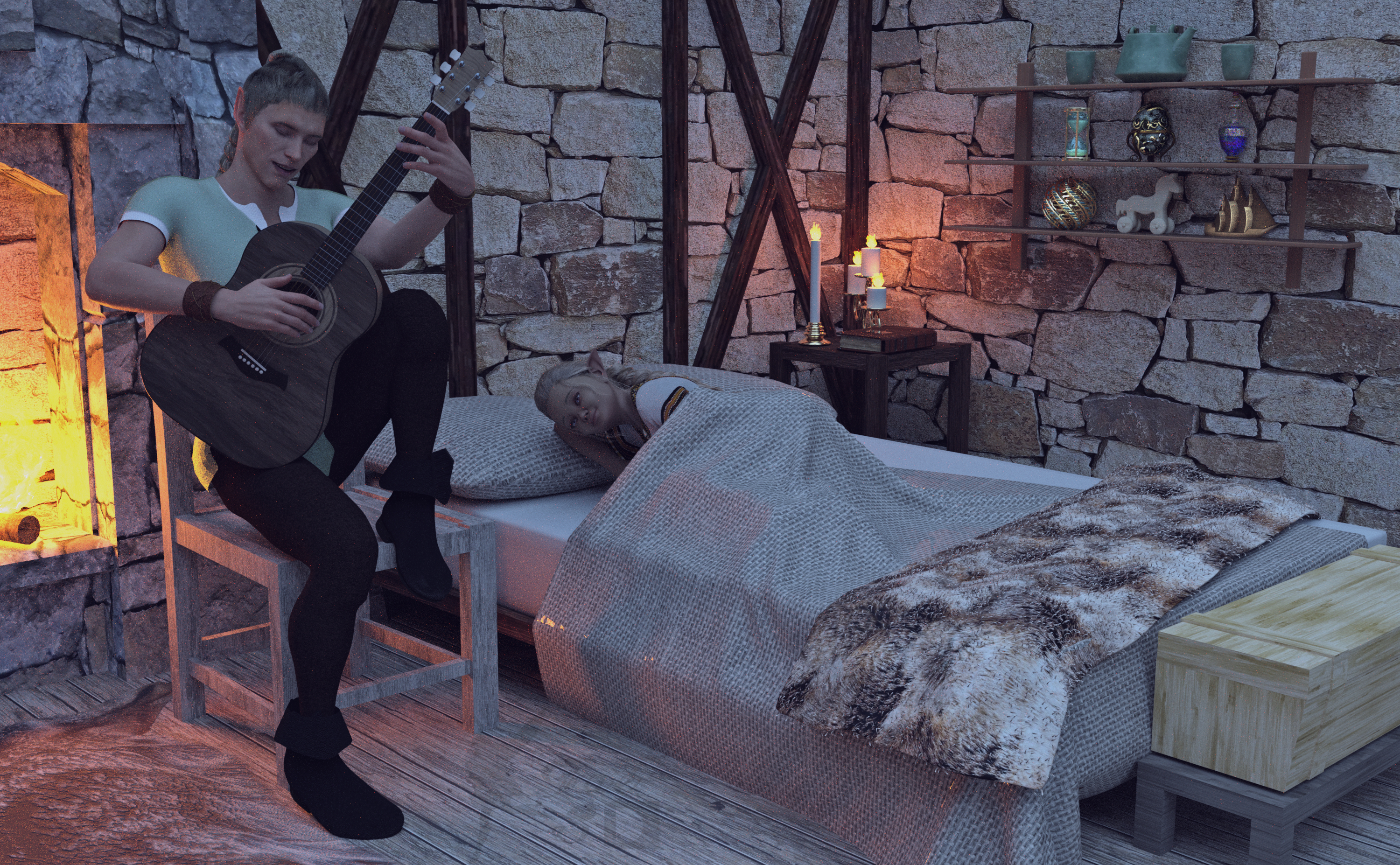
Freebies:
Walther G8M (Materials Only) - https://sharecg.com/v/92848/favorite/21/DAZ-Studio/G8M-Walther
Charming Outfit - https://www.renderosity.com/mod/freestuff/charming-for-g8m/83939
G8M Bracelet - https://www.daz3d.com/forums/discussion/559311/g8m-bracelet/p1
Freebie Mr. Gibbs Set (Boots Only) - https://www.renderosity.com/freestuff/items/91448/freebie-mr-gibbs
SY Hair Pack 01 - https://sharecg.com/v/97201/favorite/21/DAZ-Studio/SY-Hair-Pack-01-Genesis-8
SY 200 Morphs Genesis 8 - https://sharecg.com/v/91888/favorite/21/DAZ-Studio/SY-200-Morphs-for-Genesis-8-Head-and-Body
LD Paul (Ears Morph Only) - https://www.renderosity.com/freestuff/items/77776/paul-for-genesis-8m
Dante DMC5 Free Eyebrows for Genesis 8 Male - https://sharecg.com/v/94753/favorite/21/DAZ-Studio/Dante-DMC5-Free-Eyebrows-for-Genesis-8-Male
El Mariachi Guitar - https://www.renderosity.com/freestuff/items/93700/el-mariachi-guitar-part-1 https://www.renderosity.com/freestuff/items/93701/el-mariachi-guitar-part-2
Medieval Hovel - https://www.renderosity.com/freestuff/items/85194/medieval-hovel
Shimmery Sheer Fabrics II Shaders - https://sharecg.com/v/95898/favorite/21/DAZ-Studio/Shimmery-Sheer-Fabrics-II
Gray Pier HDRI - https://polyhaven.com/a/gray_pier
HF3D Sylkie for Genesis 8.1 (Head Morph at 50% and Ear Morphs and Materials) - https://www.renderosity.com/freestuff/items/94867/hf3d-sylkie-for-genesis-81-part-1 https://www.renderosity.com/freestuff/items/94868/hf3d-sylkie-for-genesis-81-part-2
Leanna morphs for Genesis 8F (Kid Morph) - https://www.renderosity.com/freestuff/items/83924/leanna-morphs-for-genesis-8f
Dashiki Dress G8F FREE - https://www.sdebstore.com/products/dashiki-dress-g8f_free
Candy Braids Hair for Genesis 8 Female(s) - https://www.renderosity.com/rr/mod/freestuff/candy-braids-hair-for-genesis-8-female-s-/88062
Genesis 8 Young Child Pose 2-22 - https://www.renderosity.com/freestuff/items/82244/genesis-8-young-child-pose-2-22
Morphing Flame for Iray - https://www.renderosity.com/mod/freestuff/morphing-flame-for-iray---100-free/76201
Wolf Pelt - https://sharecg.com/v/77872/browse/21/DAZ-Studio/Wolf-Pelt
Morphing Shelf - https://sharecg.com/v/77543/favorite/21/DAZ-Studio/Morphing-Shelf
Wooden Horse - https://www.cgtrader.com/free-3d-models/sports/toy/wooden-horse--2
Faberge Egg- https://3dshards.com/product/faberge-egg/
Asian Tea Set - https://3dshards.com/product/asian-tea-set-for-daz-studio/
Hourglass Timer Prop - https://www.digi-dotz.com/index.php/props/hourglass-timer-prop-for-daz-studio
Old Book - https://www.renderosity.com/freestuff/items/88625/old-book
Wooden Ship Toy 9 - https://www.cgtrader.com/free-3d-models/vehicle/other/wooden-ship-toy-9
Glamor Ball - https://www.renderosity.com/freestuff/items/90865/glamor-ball
Bottle 04 - https://www.renderosity.com/freestuff/items/84007/bottle-04
Iray Jewelry Shaders - https://sharecg.com/v/95893/favorite/21/DAZ-Studio/Iray-Jewelry-Shaders
No Count:
Genesis 8 Female Expressions
Plane Primitive (Bed Sheet)
Paid:
None, I was determined to make an image with no counted paid items
I tweaked the materials, the lighting and the poses. Set up and rendered within Daz Studio Iray. Postwork in Pixelmator. I’ve attached the before post render (the one that says Render) and the finished image file.
No HDD on new systems, or very small. Suggestion on systemdaveso said:
one thing I've been seeing is most new systems come with 512gb SSD drives.. some with 1TB, and very few with 2TB. Bunches of them have no, or very small 1TB HDD.
WHY? Especially when you;re here, you need huge HDD drives. I guess external would work maybe?
Is there a non-gaming system off the shelf that can compete with the gaming systems? 32gb memory at least, 3080, maybe new 4060ti 16gb, or 4070, 4070Ti CPU. I can't afford anything else.
1 or 2 TB SSD and 6 or so HDD.
Fast CPU ... this always confuses me, but what is fast? I see a lot of i7 units, and i9. i9 13900, i7 13900, etc ... and different generations of both. very confusing ...
HERE'S THE CATCH --- $2100 MAXI recently ordered a 4 TB m.2 SSD for around $224 at Amazon.
https://www.amazon.com/dp/B0B25M8FXX?psc=1&ref=ppx_yo2ov_dt_b_product_details
If you don't want to or are not able to build your own computers then you can get something like that and have someone help you. Provided that the new motherboard supports m.2, Most newer motherboards do. It would be possible to transfer the OS installation from the smaller drive to the 4TB.
In my case, I will start over with a completely new operating installation. I disconnect all the boot drives from the computer and only have the new target drive hooked up. Then I install the OS. This way the bootloader is on the new drive. Once the OS is installed I reconnect all the other drives. I can now boot into each drive separately via the BIOS menu. And each drive is a self-contained OS. I have also in the past converted an entire old machine with multiple drives to a virtual machine which I can then reference from time to time by booting it up virtually. I already have numerous 1 and 2TB m.2 SSD drives in this system but decided to jump to 4TB because I keep having to shuffle stuff around and uninstall some programs to make space on the OS drive, which is only 1TB. I built this machine in 2017 and it is still a legacy from the original build. I never made an effort to redo the OS installation 100%. I started on a 2TB drive and then went back to the original installation because of deadlines.
Check out this guide. It's been around for a while. I know you said $2100 was your max budget, but sometimes you gotta aim a little higher. It is a gaming PC guide but would still be relevant for Daz.
https://techbuyersguru.com/guide/the-best-3500-ultimate-gaming-pc-build/
Head gamesbarbult said:
@AllenArt, That is a nice looking guy. What manual technique did you use to convert him?
Thanks. I used the tutorial from Catherine3678ab in the freebies section, but before I exported the morph I changed the size to as close as default G9 as I could get it. Then I used RSSY's Eye Adjuster script to get the eyes in the right place (because they weren't). Then I exported the "morphed" eyes and brought those back in with a controller and pointed them at the Torian 9 morph. It took awhile for everything to get adjusted let's say...lol. If I do it for every one of my favorite characters I'll still be at it when I'm dead. LOL
Getting on the 9 train, or notI used the 50% off banner to get the new G8/8.1M to G9 character transfer utility. I bought a product by a PA from a different site that softens the compressed breasts effect enough that I have some hope I can get some enjoyment from G9 despite my not feeling particularly supported.Alvin Bemar's Gescon: Very close but not usable :(yes, slip is a problem, I tried rigid method before, also has a little bit slip problem. But the cutout map will not slip, so how about put a bloody cylinder ( '>' cutted) inside the limb?geograft I never used, but yesterday I saw a thread talked about this, here: https://zonegfx.com/forums/topic/any-good-tutorials-for-geografts/
they also talked about Mesh grabber, I thought this is an idea, maybe you can try to modify the limb by Mesh grabber, then save as a custom morph.
I tried cutout before. Unfortunately, it causes light to enter into the figure, so that is a no go. Mesh-grabber is not animatable, so that limitation eliminates the option.
[Released] RSSY Character And Material Conversion Bundle Genesis 8 to Genesis 9 [Commercial]RiverSoftArt said:
ArtofGohan said:
Here's the Screenshot.
Yup, that is what I meant by wrinkled, but yours looks way more extreme
Please do:The Converted Character’s Body is wrinkled. Because of the way that morphs must be converted, a morph that on Genesis 8 appears to only touch a small part of the head can affect the whole body on Genesis 9. You need to show Currently Used parameters to show all morphs on the converted character. Then, one by one, dial in the morphs to find the offending morph(s). Once you find them, delete the morphs from your HD (click the Gear icon, Parameter Settings, and look at File Path for the asset to figure out where the morph is and what it is called). You should also resave the character with the offending morph(s) dialed out (set to 0).
Ok I'm confused on what you mean here. You want me to check every individual morph on the coverted gen 9 Female as in go back and forth with the dials? Or on gen 8 female?Extending dForce Simulation?Richard Haseltine said:
crosswind said:
Technically you can export the simulated result as an obj file and import it as a delta morph with Morph Loader Pro, then dial it and simulate from current status. But usually we don't do that, for instance, if we find the clothing does not drape well, we may add some Initialization Time or tweak dynamic surface a bit, etc...
That isn't extending the simulation as all information about energy and momentum is discarded, it is starting from the previous final shape and will have an abrupt changes of direction compared with the previous simulation (which would be lost on running the new simulation).
Yes, that's true in most cases... the params still need to be tweaked before the 2nd simulation ~ Then the final result might be the same.
[Released] RSSY Character And Material Conversion Bundle Genesis 8 to Genesis 9 [Commercial]SickleYield said:
It looks like the male gens suit on the material suit are causing a crash when a morph with any hd option is triggered, including the navel. Why??? I don't know. I don't know how this got missed in testing either. But I'm working on it today, and I sincerely hope to have a fix out soon. Thanks Jepe for letting us know so it didn't get further with the bug.
Thank god it's a bug and not my machine!
 I'm sure you'll find a solution - let us know! Extending dForce Simulation?
crosswind said:
Technically you can export the simulated result as an obj file and import it as a delta morph with Morph Loader Pro, then dial it and simulate from current status. But usually we don't do that, for instance, if we find the clothing does not drape well, we may add some Initialization Time or tweak dynamic surface a bit, etc...
That isn't extending the simulation as all information about energy and momentum is discarded, it is starting from the previous final shape and will have an abrupt changes of direction compared with the previous simulation (which would be lost on running the new simulation).
[Released] RSSY Character And Material Conversion Bundle Genesis 8 to Genesis 9 [Commercial]It looks like the male gens suit on the material suit are causing a crash when a morph with any hd option is triggered, including the navel. Why??? I don't know. I don't know how this got missed in testing either. But I'm working on it today, and I sincerely hope to have a fix out soon. Thanks Jepe for letting us know so it didn't get further with the bug.Need 30 children's book illustrations -- willing to pay -- or partnerI wrote a children's book years ago for a young adult audience which I had envisioned with illustrations. However, my wife was a librarian and while attending a library conference with her in Chicago, had by chance shared a cab with the marketing director for children's books for Houghton Mifflin. She told me that older kids think pictures are too childish and want to read like adults.
So I did my due diligence, got the Writer's Handbook, and found all the publishers that might consider my book. In the end, I narrowed it down to 32. I sent out query letters in the spring and by the fall of the year had received rejections from 31 publishers. Then, in December of that year, I got a call from a literary agent with a large literary agency in New York. The agent who was interested in my book was a former Simon and Schuster children's book editor. She was excited about my book and was "100% sure" she could sell my book. I was ecstatic. I felt like this was it, fame and fortune were on my doorstep.
However, a year later, she called me and told me that she had given up. I was devastated. So I gave up on getting the book published. Now, I am retired and thinking that I always envisioned the book with illustrations, decided that I would break the book into five volumes so that I can turn it into a picture book for a younger audience.
The book is a fantasy about a set of glasses that when put on, transported the wearer to another world, an alternate world where people took on the characteristics of their own personalities and inanimate objects become animate. At this point, I do not care as much about making money and becoming a famous children's book author as just wanting to see the book become a reality before I die. I.
So, at the suggestion of my nephew, who has a very successful industrial design firm, I sought some help on Upwork. I found a firm that I thought understood what I wanted and could produce detailed and realistic images for the book. I contracted with them to do the first volume of the book. I used DAZ studio characters and rendered images to help them to see what I wanted the characters to look like. I created many reference files to help them understand my vision for the book. They used Maya to produce their illustrations, so I felt it was a good fit. I thought that they would be able to transfer my characters from DAZ to Maya. It would enable us to work together to produce scenes and so on. Well, months went by and they were unable to make the transitions. Finally, they stopped answering my emails and taking my phone calls. Bummer. So I gave up on the project. They took my money (the first third) and did not produce anything useful.
Now, I am again seeking help in creating the illustrations for my book. There are five volumes with approximately 30 to 40 illustrations per volume that I want to be created for the series: Jonathan and the Animal, Vegetable, and Mineral Glasses. I have been looking at illustrators on various websites and created a Word file with the list and examples of their illustrations that fit the quality and level of realism that I feel is necessary to bring the book to life. I sent emails to these illustrators or their agents and got only one response, a man who was a very talented illustrator whose estimate for the work on the first book (about three months) would be around $10,000, which was way over my budget. If I could afford it, I would love to work with him, but I simply could not afford it. Well, I actually could afford it, but it would be a hard sell to my wife, who also just recently retired.
I love the work I see from DAZ artists and from DAZ vendors who create the images for their product pages and am wondering if I could find someone who is willing to work with me to produce the 30 images for the first volume. DAZ Studio is the perfect vehicle for creating the quality illustrations that I seek for my books. I have advertised in the past (a year or so ago) on Commons and received zero responses. I am not sure why. I also have many other ideas for children's books. I have been a technical writer for over 30 years so I know a lot about publishing large complex books with lots of cad and photo images. I am also currently working on a novel.
So, if there is anyone interested in working with me on this, please contact me. I have a limited budget, but it is not insubstantial. Or, we could work as a team and try to get the first volume into libraries and possibly get a publisher to market the book. My wife is a former librarian and was a former Director of the Board of Library Commissioners in Massachusetts, where we live, and has connections with many librarians. My strategy would be to create the first book and to shop it around to librarians in the New England area to see if I could get some traction. I am an artist, myself, and could print the images on canvas and stretch them on a frame, then use them in readings at libraries to promote the book.
One question that one might ask is why, if you have some knowledge of DAZ, do you not do the illustrations yourself? Well, I started with DAZ at its inception decades ago and every time I try to work with it, I get frustrated and have to give up. I just cannot seem to get the results I want and the amount of effort to learn just never seems to pay off. I do not have the ability or the patience to create the level of illustrations that I see from DAZ vendors and artists. I have decided that it would be best to partner with someone who already has the skills with DAZ to produce the quality of illustrations that I seek. Maybe over time, working with that person, I could develop the skills to do my own illustrations using DAZ Studio.
If you are interested, I can send you the first two volumes of Jonathan and the Animal, Vegetable, and Mineral Glasses (or all five volumes for that matter so you can really immerse yourself in the world that Jonathan finds himself and become as excited as I am with the prospect of actually bringing the book to life). I can also send you the Word file with the list of illustrators and samples of their work to show you the quality and type of illustrations that I seek for the book.
I believe that working with a DAZ artist might be the best way to go.
One more thing. When I originally created the young-adult version of the novel, it was only the first novel in a series. Much like Lord of the Rings or Harry Potter, the first book would simply be the introduction to Jonathan's world. The threat from the world of the glasses would continue after the first book as the two worlds (the two realities) merged. This means that if the first volume for the younger audience gets any traction, there could be many more books in the series beyond the five volumes that I have already written.
Daz 3D is part of

Connect
DAZ Productions, Inc.
7533 S Center View Ct #4664
West Jordan, UT 84084Licensing Agreement | Terms of Service | Privacy Policy | EULA
© 2026 Daz Productions Inc. All Rights Reserved.