-
Adding a character shape parameter to clothing
Yes ~ as long as Auto Follow is checked in the property of your character full body morph / head morph, it'll be injected on the clothing the moment you dial it on the figure (or with auto-fit...) But in most cases, you still have to fix the FBM on the clothing especially with such a 'heavily-morphed' character. I use Blender as well and I rely on it very much for fixing all these morphs / pJCMs, etc. etc.
WelI I believe Shapes Injector can trigger / import FBMs on wearables all together, but there're some free scripts as well, for instance, some good scripts from a PA - MikeD : http://www.mikededes.com/category/3d-section/3d-gifts/free-scripts/
Adding a character shape parameter to clothingI notice that many clothing items come with in-built support for different DAZ characters. Is there a way to add one of my own morphed characters?
I know there is a script which I think might do that for me ( https://www.daz3d.com/shapesinjector ) and I have it wishlisted but I missed it a few days ago when it was on sale at a big discount ($5.99). It will probably be on sale again but, in the meantime, is there any way to do this manually for just a single character?
EDIT: on reading the product description for that script I'm not sure it will do what I want because it says:
ShapesInjector is a DAZ Studio script to speed up the process of setting all CTRL and FBM morphs for all supported characters
The problem is that my character is heavily morphed (heavy being the operative word here) so autofit produces some very ugly results with that inevitable cling under the breasts and heavy belly. I can morph the dress in Blender but I thought that having the shape injected into the dress might be a better option. Also those ugly results are obvious on any of my X-Large character shapes.
Simply speed-up complex scene loadingA while ago I posted a problem, I was having with excessively long load times for complex scenes. I got some interesting advice and so today (7/4/23 – our Nation’s birthday), I decided to get a few brews and build a simple speed-up solution. I’d appreciate any constructive advice from you guys. So, here’s the step by step of what I did.
1. I had three different Daz3D source file locations, so I merged them into a single folder called DAZ3D-Library. I found some duplicate files during the merge and kept the most recent.
2. I wrote a simple batch file called 01-TRANSFER-DFS-FILES-TO-MASTER.bat that moves all the dfs files from the DAZ3D-Library to a Master-DFS-Files folder retaining original directory structure.
3. As a test, in the DAZ Studio app I Included the DAZ3D-Library and the Master-DFS-Files folders in the DAZ Studio Formats setting. Under these conditions DAZ3D worked as before with all installed morphs etc. available for creating new scene content.
4. But I wanted to speed-up the load time for existing complex scenes. So I removed the Master-DFS-Files folder from the DAZ Studio Formats setting and replaced it with a new Current-DFS-Files folder that was initially empty.
5. I then had Daz Studio load a scene. Almost immediately Daz displayed a missing files window and stopped the load. I manually copied all the text from the missing files window into a text file, Missing-Files.txt and ran another simple batch file 02-COPY-REQUIRED-DFS-FILES-TO-CURRENT.bat that adds the missing dsf files to the Current-DFS-Files folder with the appropriate directory structure. I then allowed the load to continue which was successful.
6. I then did a quick comparison test by loading the same scene twice, once with all the dfs files (Master-DFS-Files) in the DAZ Studio Formats path and then with only the dfs files missing from the scene (Current-DFS-Files) in the path. Here are the results:
Test 1, all dfs file in path
Load time: 13 minutes
Scene size in memory: 18.8 GB
Warnings: duplicate formulas found
Test 2, current dfs files in path
Load time: 3 minutes - includes manual copy / current dfs generation
Scene size in memory: 12.2 GB
Warnings: none
BATCH FILES: (note my DAZ stuff’s on drive Q:)
01-TRANSFER-DFS-FILES-TO-MASTER.bat
echo on
rem Moves all dfs files to Master-DFS-Files folder retaining original directory structure.
q:
cd "\DAZ\00 DAZ 3D\Studio"
RoboCopy.exe "Q:\DAZ\00 DAZ 3D\Studio\DAZ3D-Library\." "Q:\DAZ\00 DAZ 3D\Studio\Master-DFS-Files\." *.dsf /MOV /FP /NP /IS /Z /E
Pause
02-COPY-REQUIRED-DFS-FILES-TO-CURRENT.bat
rem Clears Current-DFS-Files then populates it based on the files listed in the Missing-Files.txt document
echo Y|del "Q:\DAZ\00 DAZ 3D\Studio\Current-DFS-Files\*.*"
for /F "usebackq tokens=*" %%A in ("C:\Users\Settings\Desktop\Missing-Files.txt") do echo F|xcopy /S /Q /Y /F "Q:\DAZ\00 DAZ 3D\Studio\Master-DFS-Files%%A" "Q:\DAZ\00 DAZ 3D\Studio\Current-DFS-Files%%A"
pause
Well, that’s it for now, time for more beers. I’ll do more testing but so far so good. Let me know if this looks like I’m headed for disaster.
Custom morphs in DAZ do never show up in the parameters tab - Please helpBejaymac said:
This is one of those situations where lack of knowledge in the community tends to bite people on the ass.
Lack of knowledge and shared knowledge I might add. Because finding useful information on this topic isn't exactly easy, it also doesn't help that many shown links towards the Daz3D documentation direct you to either empty pages or just brief summaries. And I'm not someone who already stops looking after 2 pages on Bing or Google ;)
In this instance saving as a scene/subset isn't a good idea either, as the asset data will either be saved in the DUF file, or into the "data/auto_adapted" folder, and that can get messy to deal with.
Well, I have other experiences there. After I discovered the above I saved several assets as subsets, brought those into my new scenes and then autofitted them to the intended character; worked like a charm, and I also had access to the morph. However, very important detail: I made sure to export/save the morph first.
If you plan on "keeping" the autofitted asset, then the best thing to do is to save it as a new asset, using "File > Save As > Support Assets > Figure/Prop Asset", before you start doing any work to it.
Agreed, that is the better solution.
Another solution which I started to use is re-doing the morph, but this time on an "untainted" asset, ZBrush is very useful for this because you don't have to "GoZ" full figures 'back' but can also tell it to focus on just one "sub tool" (= ZBrush terminology; refers to one part of the figure).
Thank you very much for sharing your experiences on this, it's much appreciated! I'm actually playing with the idea to roll my experiences up in a morphing guide and when I do you can be sure I'll be referencing you as well (I strongly believe in 'credit where credits due').
Confuse! My morph acts unexpectedlyJames said:
Here it is.
Use it on G9 Figure.
@barbult
Doesn't seems so
@Catherine3678ab
Thank you.
Have you made cloth with G9 and create a morph for a certain figure?Yes but not with MD.
eta: https://www.daz3d.com/forums/discussion/597726/genesis-9-clothing-questions-answers
There are some differences for G9, some nifty clothing tools were added to D/S as well, so consider combing through the above link. Mada started the thread and does provide some guidance in there for us :-)
...................
In making any type of replacement morph, there are a few things to remember: D/S will only accept ONE name for ONE morph. A second morph with the same name will be ignored. So in making FBMs for example, the generated one is not a saved morph so that can be 'renamed' on the fly, and your preferred new morph named appropriately to replace it. IF for whatever reason the generated morph was saved, then it must renamed and saved before creating the new morph OR if you're into the method of changing an existing morph and resaving that on the fly, same idea. {not my preferred method}
Also when making morphs, it doesn't hurt to remove the clothing from the scene and load in a fresh copy to continue working with -- to make certain that the morphs are saved as desired etc before moving on.
Remember to zero morphs before saving them.
And ... when dialing out of the figure the character shape, and if then the clothing looks real silly -- select the clothing and check that all the morphs were zeroed. The generated morph might be dialed to -100% or so even if it was renamed -- there's an awful lot of calculations that the program does in the background ;-)
Crosswind was able to replicate what the problem you encountered was and provided good guidance. After taking a break, come back to reread through it. Something should 'click' for you soon enough.
Confuse! My morph acts unexpectedlyJames said:
Since you pointed about the dforce saved simulation result on my hijab.
I made the correction. By hitting the clear button on the simulation pane.
And save it again.
But it didn't work for me.I've already shown the right way and steps above: - clear > export > import > Refit with Transfer Utility > Save figure asset...
Then...
I see something.
Here's the differenceThe image number 3. Step 1-3
If you do that, the hijab will work only for Sarah.The reason why I used a character morph was just because I thought you did not use G9 Base figure, so I just replicated your case so as to reproduce the issue.
You must've known the best way to make a garment is always to use a Base figure other than a custom figure, no matter you're a user or a PA / author...That's the similar process as when I created the hijab for the base model only (with minor differences)
Every morphs, I made afteraward also works flawlessly. No complaint.
So the correct way you mentioned, I already applied it at the beginning.That was great if you've done so from very beginning !

The problem started when I wanted to make the hijab also work on different body,
by making morphs for the intended body. (Dforce simulation cleared as suggested)
for example:
Helena Body,
Sarah Body,
and so on body.Right, no problem for this process since you were creating FHMs / FBMs for the hijab to make it well fit on the figures you use.
Could you make the hijab that you have created for Sarah works on different body,
by making a morph, so it will work on multiple bodies?
Cos here's where I meet my problem.Nope~ extra work will be needed. I also have to go for the above process to make FHMs / FBMs on hijab as needed.
BTW, I recommend Mada's Daz University, you may watch her SOP and tips/tricks... though she nearly doesn't use MD but the process in DS is almost the same.
https://www.youtube.com/watch?v=Ii16tUmLzD8&list=PL2SdKrOTXeXA1qMgNE84AsM8_Wq63gOBF
Confuse! My morph acts unexpectedlySince you pointed about the dforce saved simulation result on my hijab.
I made the correction. By hitting the clear button on the simulation pane.
And save it again.
But it didn't work for me.Then...
I see something.
Here's the differenceThe image number 3. Step 1-3
If you do that, the hijab will work only for Sarah.
That's the similar process as when I created the hijab for the base model only (with minor differences)
Every morphs, I made afteraward also works flawlessly. No complaint.
So the correct way you mentioned, I already applied it at the beginning.The problem started when I wanted to make the hijab also work on different body,
by making morphs for the intended body. (Dforce simulation cleared as suggested)
for example:
Helena Body,
Sarah Body,
and so on body.
Could you make the hijab that you have created for Sarah works on different body,
by making a morph, so it will work on multiple bodies?
Cos here's where I meet my problem.
looking for specific detail morphs that i lost the files tohello!
recently my ssd crashed and i lost all my daz3d filesi'm still missing a couple morphs that i forgot the author of, it's a long shot but maybe someone here recognizes the morph names and can tell me who it is or what the products are called.
morph are for G8F and the names are as following:
arm toned
leg toned
back toned
armpits athletic
armpits raisedetail
abdomen StyleAthletic
abdomenStyleSofter
thanks in advance to anyone willing to help
Confuse! My morph acts unexpectedlyI did not use G9 Base, it is JS Sarah... I don't have Helena and your issue is irrelevant to the character morph.
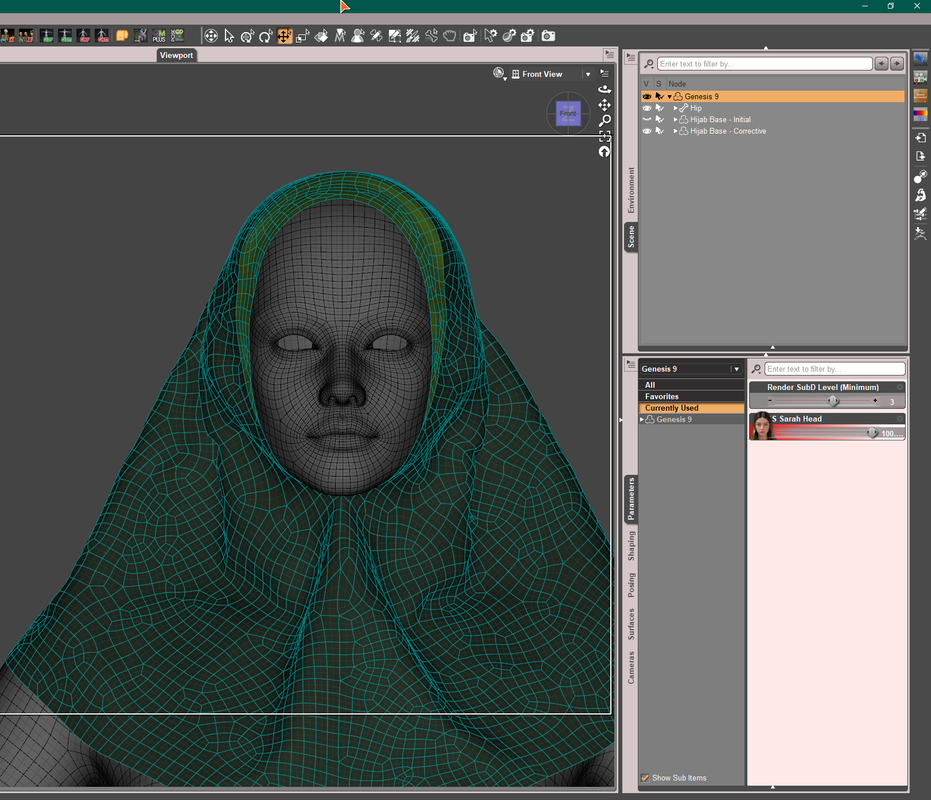
You've not got the point yet... You 'Figure asset of Hijab saved with a dForced sim. result' won't work on any G9 base or character when you go for fixing morph with external application and import back as a delta morphs.
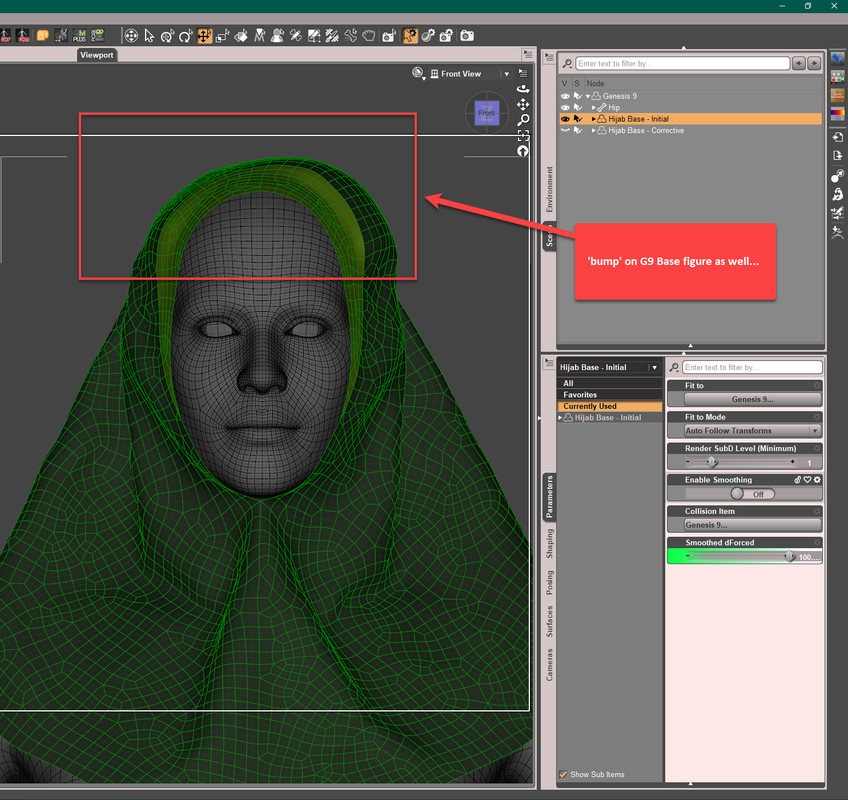
I made and converted lots of clothing w. or w/o dForce but never save Figure asset in that way, my PA friends (who make garments) don't do that either.... so suggest you go for the correct way.
Confuse! My morph acts unexpectedlyI see that you are using the base model.
Try using not the Base Model.
You see, I don't experience any problem with the hijab put on the base model.
It works as it should, with all the morphs imported using morph loader pro.
My problem starts to occur on a certain figure. In my case 'Helena'.
As I mentioned (or tried to explain), I was trying to make a morph to make the hijab looks correct on a certain figure.
I tried your solution - Clearing dforce.
So, I start again.
I put the hijab on base model.
Clear dforce.
Save as wearable.
Next,
I Load Helena figure
Put hijab on Helena.
Export it, fix it.
Import as a morph - Morp Loader Pro.
Doesn't work. It doesn't morph as sculpted.
As you can see the hijab on Helena has some minor issues on the back. Which I tried to fix, including smoothing the head area.Confuse! My morph acts unexpectedlyI reproduced the issue you met (SS 1-2), and still it came from that you saved the hijab figure with the dForced result. When Morph Loader Pro 'reversed deformations', the geometry (vertex positions) turned wrong.
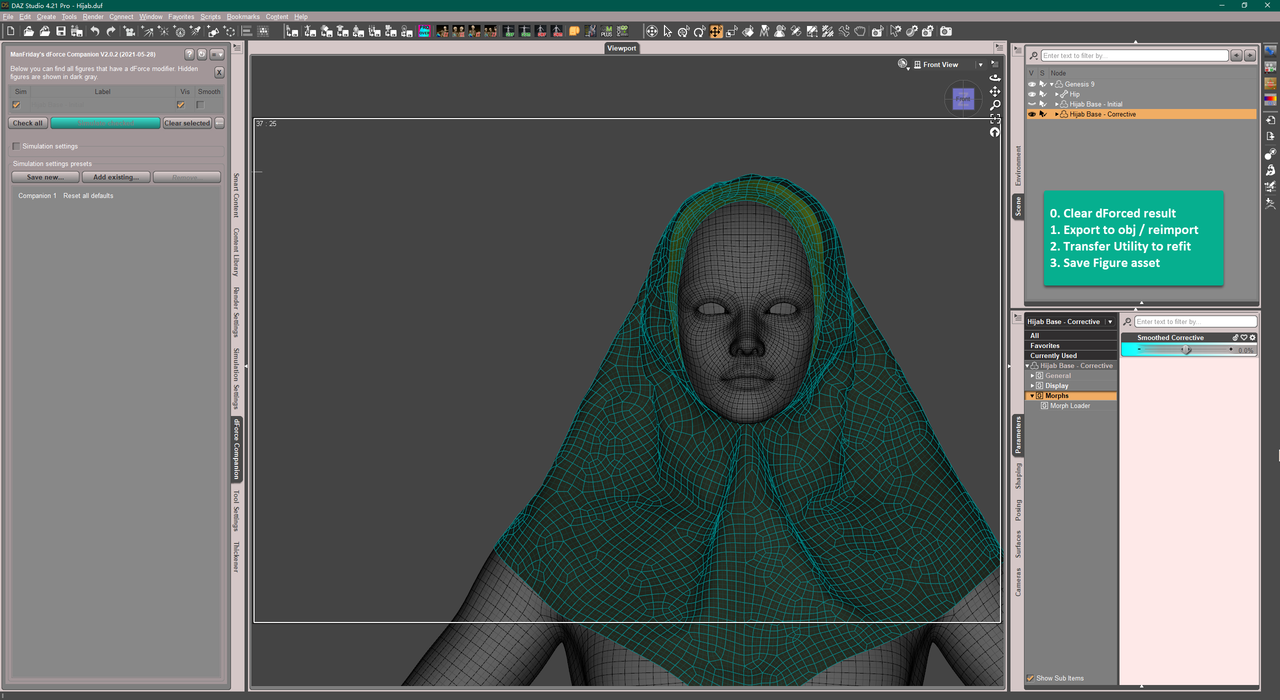
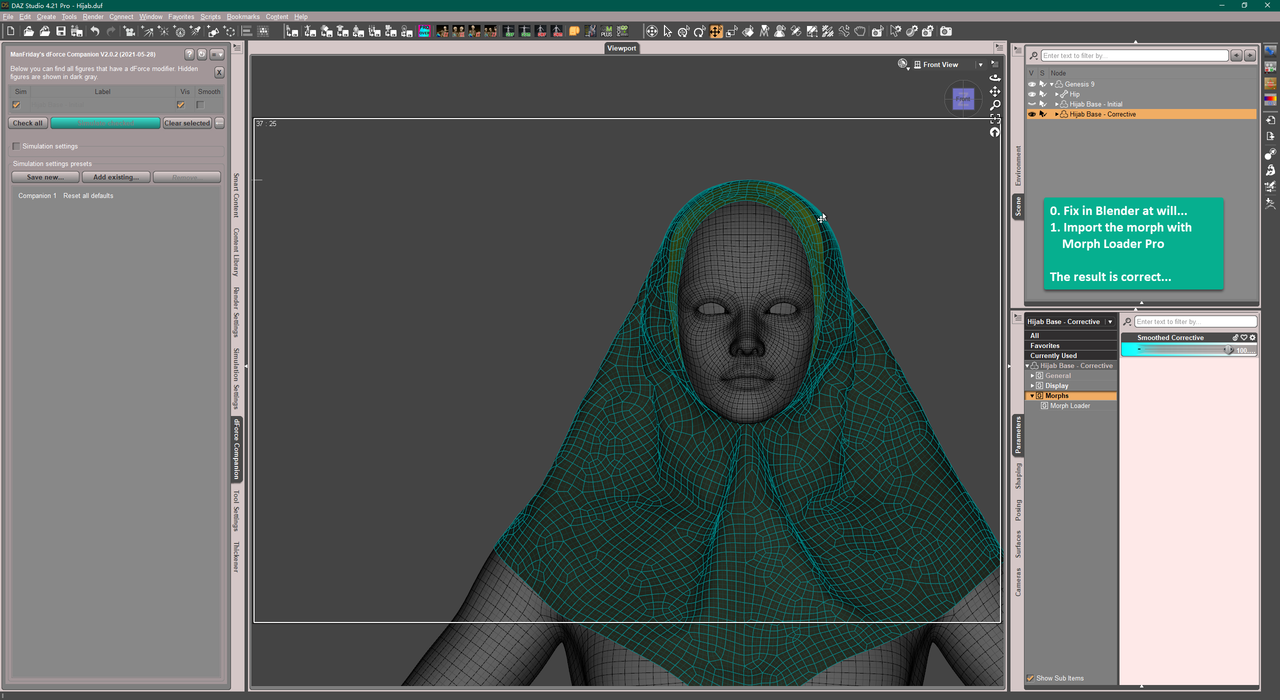
So never save figure asset with 'dforce simulation result'. Correct way is shown in SS 3 - 4. (almost the same approach as I mentioned above...)
1-2
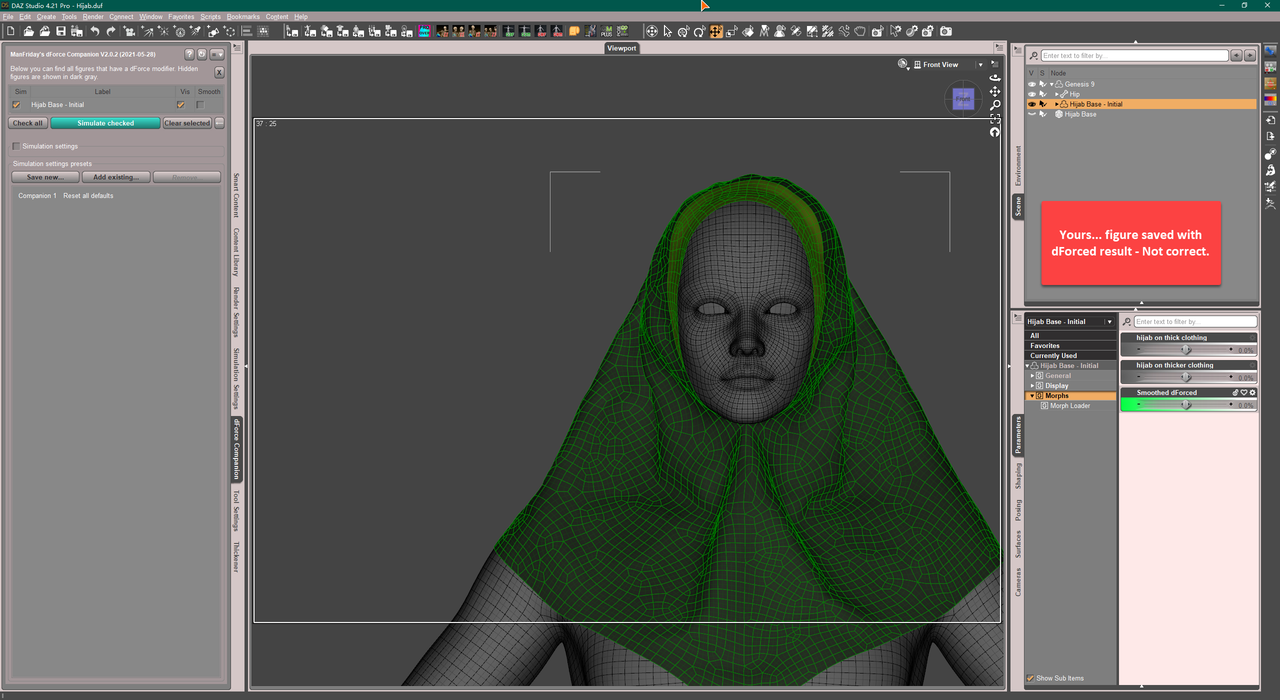
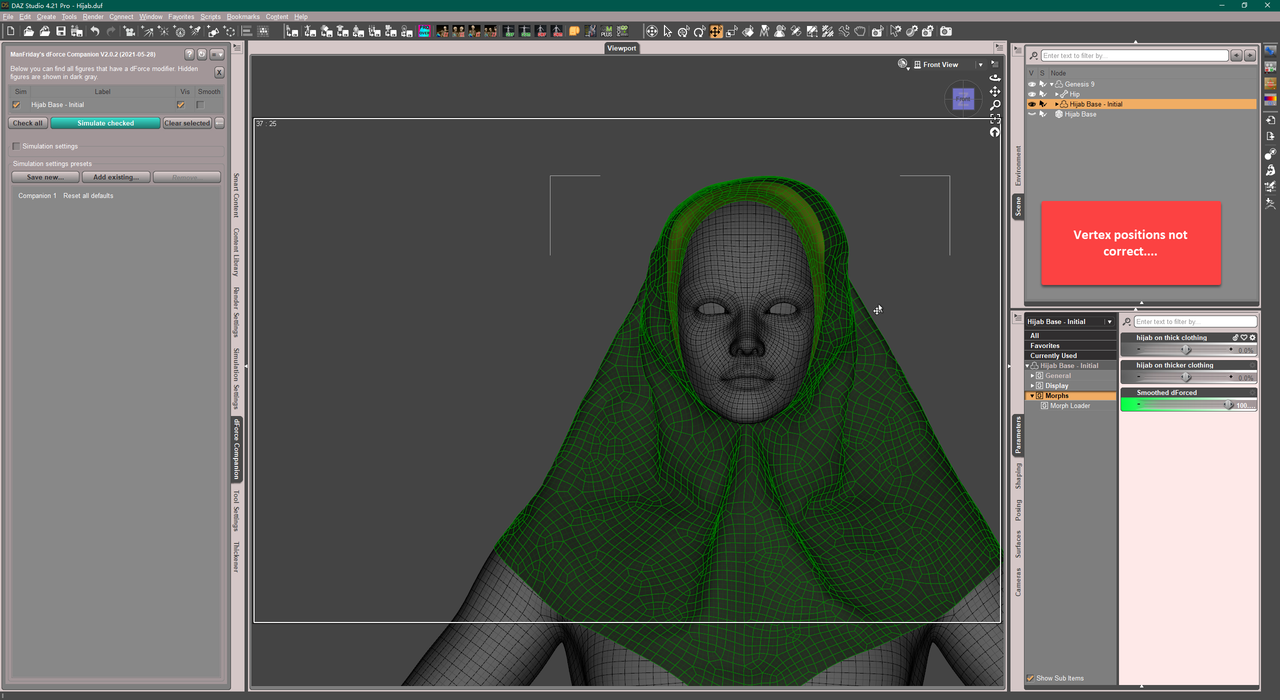
3-4
 Confuse! My morph acts unexpectedly
@crosswind
That's not the problem I'm dealing....
After you put it on a figure
Clear the dforce as you think it should.
Try export the hijab, fix it on blender make the head area smooth, no bump.Make it something like this:
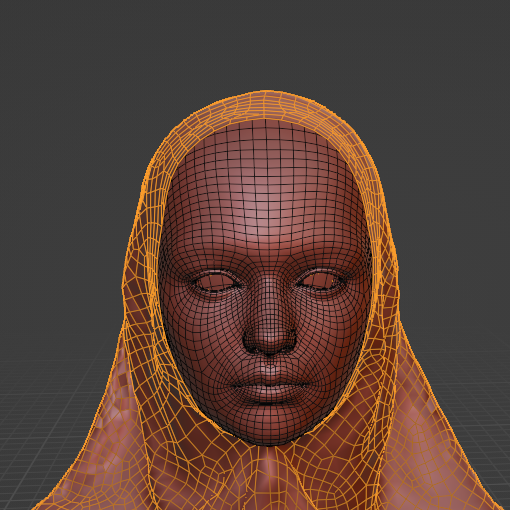
Reimport it again as a morph (morph loader pro)...
See if the morph result will be exactly as you sculpted on blender or not.
In my case it's not.
Confuse! My morph acts unexpectedlyGot it ~ I checked the hijab, you saved it as the Figure asset / Wearable with dForced result... as screenshot 1 - 2, so it was the culprit...that was why I first asked you about the dForce modifier and clearance...
If you'd like to use the 'dForced result' as the base geometry of the hijab, you simulate it first and then export it as obj and import it back to DS. Then use Transfer Utility to make it 'refitted' to the figure, and save as Figure asset, as shown in screenshot 3 - 4.
[Released] RSSY Character And Material Conversion Bundle Genesis 8 to Genesis 9 [Commercial]SickleYield said:
Sylvan said:
Hi River! Thanks for the product, it's very helpful :)
I am running into a slight problem with the eyebrows, tear, mouth and eyes though. (see screenshot)
The eyescript helps with the eyes, but the other parts stay in the wrong place.
The PDF does address this:With extreme head morphs, the convert scene character conversion process can leave the Genesis 9 Eyebrows, Eyelashes, and Tears in the wrong place after conversion. Load the Genesis 9 character into a new scene to fix this
I restarted DAZ and the morph is there but even though I reload G9 into a new scene, the unwanted morphs are still applied.
I am pretty sure I am missing a step, but where?
Thanks in advance for your time! In that case, I suggest deleting the eyelash etc. Morphs and letting them auto generate. You can see morphs of conformers to delete them by checking Show Hidden in your Parameters tab. If that doesn't help I'm afraid neither autoconform nor the script can help.
Thank you! I will have a go at it. My original character is using like a million morphs, so I am guessing that is asking a bit too much :)
I might dial back on the eye morphs and use G9 morphs to dial them back in to create a likeness.Pose Presets ignore values of morphs introduced after they were savedcrosswind said:
I don't get the point... so let's confirm first -: You ever saved a 'Pose Preset' and would like to use it to Zere figure's pose but always reserve the values of '4 custom Pose Control morphs' you made before.... then you further made the 5th Pose Control morph... well let's assume '200 Pose Control morphs', and dialed them all. Now you still wanna zero the figure's pose but reserve the values of '4 custom Pose Control morphs' ? Is that correct?
If that is correct, you don't need to resave anything at all. First Lock the dials of '4 custom Pose Control morphs', then Zero Figure's Pose. Then you may save a new Pose Preset if needed. Suggest you put all your 'custom Pose Control morphs' into a unique Group under Pose Control. Then it'll be very easy and quick to save any preset...
I understand that my description was not well-worded. I was trying to sum up multiple issues into a single scenario.
Let me perhaps put it this way. Say I construct a pose of a body builder flexing. This pose is made up of normal joint rotations and 4 Flex Pose Morphs I sculpted for muscle flexes (let's say for example Left Bicep, Right Bicep, Left Quad, Right Quad). Let's say they are dialed to 100%. Every Other Pose Morphs (facial expressions, etc) I have aren't used, so their value is 0. Save As>Pose Preset>Flex1. Because the Other Pose Morphs are saved as 0's, if I use the pose preset on top of an already posed figure, say for animation keyframing, this will overwrite whatever their previous value was with a zero.
A month later I decide to sculpt a flex for the Back muscles. I make another pose using normal joint rotations, the previous 4 Flex Pose Morphs, and this new one for the Back, all saved to 100%. Save As>Pose Preset>Flex2. Again, Other Pose Morphs are saved in the preset as 0's.
The problem arises because Flex1 does not contain any data for how to handle the new Back morph, therefore if I go an try to animate from Flex2 to Flex1, Back will remain at 100% (the value stored in Flex2) instead of becoming a 0 as it should (because it didn't exist when Flex1 was made, it should by definition be a 0).
This is a small example using just two presets and the addition of one new morph. Extrapolate this over a few years of new morphs being sculpted and hundreds of presets saved :(. The ultimate foot-gunning.
As of right now, the only way I know how to remedy this is to load Flex1 on an unposed figure and just resave it -- Back will be assigned a 0 and all will be well. Except....it's not just one pose that needs this treatment. It's... a lot :(. Not to mention any pose presets that involved more complex settings, like unchecking/checking only certain morphs etc.
Confuse! My morph acts unexpectedlyHere it is.
Use it on G9 Figure.
@barbult
Doesn't seems so
@Catherine3678ab
Thank you.
Have you made cloth with G9 and create a morph for a certain figure?Are There Morphs For Qinfen Hair?crosswind said:
No morph of shaping, no dForce... I won't buy it even if I can customize on it ~~
Same, which is a pity, it is nice looking hair
Are There Morphs For Qinfen Hair?No morph of shaping, no dForce... I won't buy it even if I can customize on it ~~
Arms (Armpits?)Wish people would post images with diagrams and arrows pointing out what their complaints are.
Also claim that there is some 'fundamental flaw in the G9 skeleton' is likely unfounded based on OP, as what is described (without pictures and evidence might i add) is a morph/sculpt issue, and JCM/CBS issue, not a G9 skeleton issue.
I recognise topology flow of G9 could be better, but that's not going to outright make *checks notes* the "arms just attach to the torso really oddly"
Weird Texture Issue with Topmodel Updo Hair and OOT Hairblending 2.0 for Genesis 3 Female(s)I've had a go at this and I cannot replicate your issue. I dragged our old G3 drive out from its dusty corner and fired it up: Updo hair on G3 - saved as a wearable and restored perfectly with a hair blending material. Base G8 - hair fitted from G3 wearable with no issues. G9 - hair fitted from G3 wearable with no problems. G3 hair saved as G8 wearable - same on all generations. Studio 4.21.0.5.
If it worked before and now it doesn't this, logically, suggests something has changed in your library that is causing it. I have seen hairs that happily use HD morphs from characters and cause odd geometry effects until that morph is dialled out but nothing that would affect textures.
I'm not sure if this is allowed or not, as I don't know what data is saved with wearables, but I'm happy to send you my .duf wearable and you can see if the issue persists. I suspect it will.
Daz 3D is part of

Connect
DAZ Productions, Inc.
7533 S Center View Ct #4664
West Jordan, UT 84084Licensing Agreement | Terms of Service | Privacy Policy | EULA
© 2026 Daz Productions Inc. All Rights Reserved.