-
DAZ Horse 3 - will there actually be any support this time?
semperequstri said:
vwrangler said:
And it seems that support for Horse 3 has appeared.
Nice to see, but those new morph and shape packs... YIKES! I appreciate the PA's efforts, but the morph and shape packs are ( to be polite) way less than accurate. I would LOVE to support Horse 3 and the PA's who are making content as I do a LOT of equestrian art. But I just CAN'T- sorry.
I have to agree. I put off purchasing Horse 3 in hopes that addons would come out to make it better, at least better than Horse 2, but no disrespect, the latest offerings don't do that for me
I agree with the others on maybe posting images of the specifics that are off so that maybe they can be addressed since it seems many are happy with it just looking like a horse in general.
Arms (Armpits?)lilweep said:
Wish people would post images with diagrams and arrows pointing out what their complaints are.
Also claim that there is some 'fundamental flaw in the G9 skeleton' is likely unfounded based on OP, as what is described (without pictures and evidence might i add) is a morph/sculpt issue, and JCM/CBS issue, not a G9 skeleton issue.
I recognise topology flow of G9 could be better, but that's not going to outright make *checks notes* the "arms just attach to the torso really oddly"
Cool. So, look at https://www.daz3d.com/koo-madee-hd-for-genesis-9 and check out the 5th and 6th promo pictures. That arm is a travesty. This is one of the most egregious but it's a problem with a lot of G9s. Some are better. But all have this issue to some extent.
Confuse! My morph acts unexpectedlyOkay had a little time so brought the Hijab into D/S. Sent it over the bridge to Hexagon. Made it to fit better on the Default G9. Sent it back over the bridge to D/S as a Prop. [removed the original Hijab]
Ran the transfer utility to make the obj into clothing [bones for a full bodysuit 'cause it's covering a number of areas], smoothing on, Added a dforce sim thing and ran one simulation [I normally start with 30 seconds on the timeline]. Sent that Hijab back over the bridge to Hexagon and smoothed it out a bit.
btw - confirmed, yes there are no holes and no n-gons :-)
Then sent the Hijab back over to D/S as an .obj and fixed up the surfaces. Ran the Transfer Utility and made it into clothing.
And not to be overly concerned about making a million FBM/FHM morphs ... think you'll find that IF the garment is made to the Default G9, it will auto-follow pretty nicely for many of the available figures. Right now I do not have many to test with, one older woman and one gorilla for example. And in none of the shapes did strange lumps appear in the top of the headdress.
And of course the images won't load. Back in a minute with a link.
Here we go:
https://www.deviantart.com/catherine3678ab/art/Minerva-9-970462641
https://www.deviantart.com/catherine3678ab/art/1-for-default-G9-970462638
DAZ Horse 3 - will there actually be any support this time?Gogger said:
Catherine3678ab said:
Keep an eye out for something from DesignAnvil ;-) Teaser posted over at DA :-)
Bunch of new horse stuff! Yayy!
https://www.daz3d.com/da-ultimate-shape-pack-for-horse-3--breedshttps://www.daz3d.com/the-da-daz-horse-3-pro-material-set
https://www.daz3d.com/da-ultimate-morph-pack-for-daz-horse-3
Yeah! And with all those nice discounts price came out pretty good too. [for once I actually had a few points that worked!]
DAZ Horse 3 - will there actually be any support this time?Richard Haseltine said:
semperequstri said:
vwrangler said:
And it seems that support for Horse 3 has appeared.
Nice to see, but those new morph and shape packs... YIKES! I appreciate the PA's efforts, but the morph and shape packs are ( to be polite) way less than accurate. I would LOVE to support Horse 3 and the PA's who are making content as I do a LOT of equestrian art. But I just CAN'T- sorry.
I can't imagine DA, or Daz, would be willing to do a full rework but if you can point out soem of the issues it may be possible to offer workarounds or incorporate them into a new product of some kind.
This would also be really helpful for people like me who don't know much about horses. Could you just elaborate on what's striking you the most as being inaccurate? Because being the clueless no-horsey that I am, I thought it all looked rather fine!
DAZ Horse 3 - will there actually be any support this time?semperequstri said:
vwrangler said:
And it seems that support for Horse 3 has appeared.
Nice to see, but those new morph and shape packs... YIKES! I appreciate the PA's efforts, but the morph and shape packs are ( to be polite) way less than accurate. I would LOVE to support Horse 3 and the PA's who are making content as I do a LOT of equestrian art. But I just CAN'T- sorry.
I can't imagine DA, or Daz, would be willing to do a full rework but if you can point out soem of the issues it may be possible to offer workarounds or incorporate them into a new product of some kind.
Daz Studio 5 development updateoutrider42 said:
as the AI would be effectively competing against Daz store products. Why would you need buy a cyber scape environment if you could just ask for one from the AI during a render? It would not be compatible with the Daz business model. I do think AI generators could be bad for Daz Studio as it could pull away some users, but Daz will always have its dedicated users for one reason or another. I am aware of the beta test for the Tafi text to 3D character thing. It is a totally different beast from image generation. It is essentially a text prompt controlled Daz Studio from the description.Maybe I should start my reply by saying, I never made a claim that AI is the most creative tool, or is better, equal, less than, a Human artist....
But I was comparing AI to Daz... and I think that there are similarities. And your last paragraph or so (quoted above) speaks to the point I was trying to make vis-à-vis Daz versus AI.
At the end of the day, throw Aiko into a scene and dress her up... how much different will she look than anyone elses Aiko? Yes, you can go to your morph dials (previously purchased) and make her nose fatter.... or with AI, use a big fat nose prompt.
Daz may always have its core users... but as AI and its controls get better (and for the sake of argument, AI art for the masses is really only 2-3 years old now), that dedicated fan base may find it harder and harder to justify that $129 Surfin Safari Bundle when all you'll have to do is put in the prompt words "... Realistic sufer on a red surfboard riding a 60' wave"
Time will tell though.... I just hope Daz 5 gets here fast.
DAZ Horse 3 - will there actually be any support this time?vwrangler said:
And it seems that support for Horse 3 has appeared.
Nice to see, but those new morph and shape packs... YIKES! I appreciate the PA's efforts, but the morph and shape packs are ( to be polite) way less than accurate. I would LOVE to support Horse 3 and the PA's who are making content as I do a LOT of equestrian art. But I just CAN'T- sorry.
Daz Studio Face Transfer ProblemBecasue 1st one - : has better resolution, a cleaner face, more balanced light, more symmetrical, plainer smile, less hair, etc. etc. ~~ Transfer with Face Transfer, FaceGen or sth. similar, then use partial head morphs to tweak and finetune the head/face...
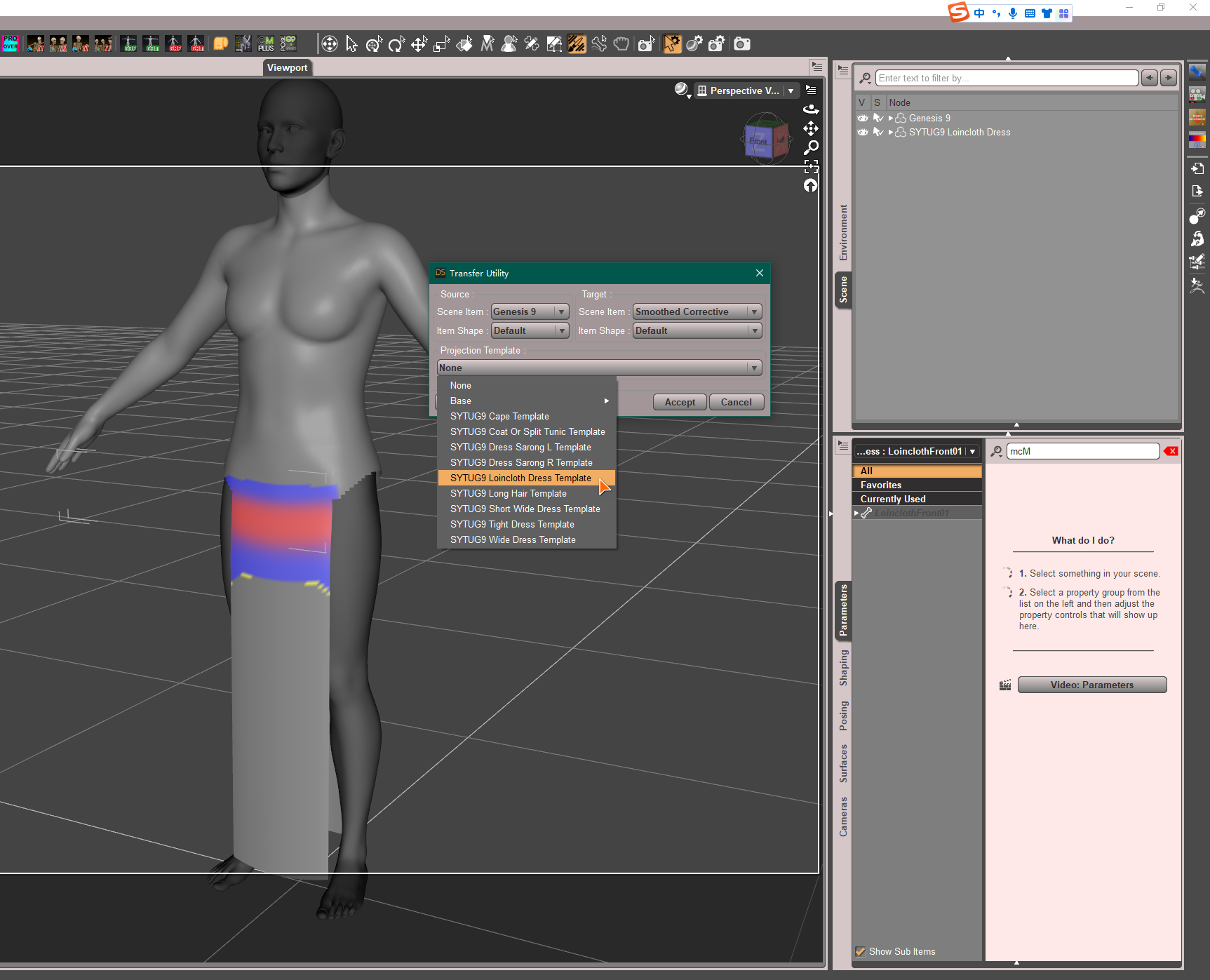
Applying SY Ultra Templates for Genesis 9...to Genesis 9 clothing1) The templates are not 'morphs'... They were intentionally designed and made (with a geometry and proper weights) for the purpose of auto-fit and conversion, so it's meaningless and useless to 'bring' them into an existing G9's garment.
2) However, if you make a garment for G9, you may use a template which has the same or similar 'shape' as the garment you make when fitting it to G9 with Transfer Utility.
 Daz Studio Face Transfer Problem
Hi:
Face transfer looks fantastic.
But I find lots of headphoto won't work.
In the attachment, only the first pic "head.png" works well.
The rest jpg picture does not work.
I think all of them are qualified headphoto.
How can I fix it.
Thanks!
Adding a character shape parameter to clothingmarble said:
1) I shall revisit that Jay tutorial. I've probably watched it before but my memory is atrocious.
2) My initial question was really to do with the morphs included in the garment and how to add a shape - just like those listed in the screenshot (attached).
Yea, that's great!
3) I use the Darkside style which is a little harder to read than the others. I have adjusted the colours now so that I have a little more contrast in those boxes.
Looks better !
4) Should I be using that Delta Only option each time I adjust clothing with a morph imported by MLP?
Yes, as long as you export an 'existing single morph' for fixing, use 'Reverse Deformations : Yes' + 'Overwrite Existing: Delta Only' when importing with MLP.
When you create a single dial of your character, normally - 'Reverse Deformations : No' + 'Overwrite Existing: Make Unique' ...
Applying SY Ultra Templates for Genesis 9...to Genesis 9 clothingIs this possible? the genesis 9 templates [in SY Ultra Templates for Genesis 9] include a lot of morph additions when converting from g8 to g9. is it possible to add those morphs to outfits that are already g9?
Adding a character shape parameter to clothing1) I shall revisit that Jay tutorial. I've probably watched it before but my memory is atrocious.
2) My initial question was really to do with the morphs included in the garment and how to add a shape - just like those listed in the screenshot (attached).
3) I use the Darkside style which is a little harder to read than the others. I have adjusted the colours now so that I have a little more contrast in those boxes.
4) Should I be using that Delta Only option each time I adjust clothing with a morph imported by MLP?
DAZ Horse 3 - will there actually be any support this time?Catherine3678ab said:
Keep an eye out for something from DesignAnvil ;-) Teaser posted over at DA :-)
Bunch of new horse stuff! Yayy!
https://www.daz3d.com/da-ultimate-shape-pack-for-horse-3--breedshttps://www.daz3d.com/the-da-daz-horse-3-pro-material-set
https://www.daz3d.com/da-ultimate-morph-pack-for-daz-horse-3
Adding a character shape parameter to clothingmarble said:
crosswind said:
marble said:
Ok, thanks although I think I need to dig a little deeper into your answer as there are bits beyond my present understanding.
The character morph I have is the result of a playing with numerous morph dials so I don't have a single parameter to dial-in to change to that shape. I believe it is possible to do that - is that what you are suggesting? I saved my character as a scene subset.
By "fix the FBM" do you mean the process of exporting to Blender and using the Edit/Sculp tools to make it fit nicely? I then re-import it to the original garment using Morph Loader Pro. That creates a morph but I am not sure that's the same thing as FBM, is it (I wish I had a better understanding of these DAZ terms - what on earth is a pJCM??).
Thanks also for the tip on the free scripts - I'll take a look. It was already on my to-do list to scroll through all the Casual scripts too - I bet he has one.
OK, I got it ~ there's no single dial of Full Body Morph (FBM) and Full Head Morph (FHM) of your character, but still you will find lots of 'morph dials' in the hidden properties of the clothing, and most of them shoud be Partial Body Morphs (PBMs) or Partial Head Morphs (PHMs, esp. on headwear etc.) or sth. like those...
In fact you may create single dials of FBMs and FHMs with ERC Freeze for you characters, just like what PAs (who make character products) do. That turns out to be a pretty optimal and clean way, and you still can save it as a Scene Subset or a Character preset.As for 'Fix the FBM' and the process you mentioned, yes, that was what I meant. If you have a single dial of FBM of your character, there'll be a hidden FBM on the clothing, you export the figure + clothing as obj to Blender, sculpt the clothing well with the best fitting result, then export the clothing to obj and import it back to DS 'as a delta' with Morph Loader Pro, so as to 'overwrite' the hidden FBM on the clothing. That's a typical process of 'Fixing FBM' for a piece of clothing.
pJCMs - Pose JCMs which means JCMs triggered by a Pose. You must've known JCMs (Joint Corrective Morphs) --- when a figure's joints rotate (Bend, Twist, Side-Side), the relevant partial body morphs could be automatically corrected by pJCMs (hidden morph dials as well).
All these pJCMs from the figure will be also injected on the clothing. So, for instance, if the figure's upper arms bend, you need to check if the pJCMs around the armholes of the clothing are correct or not. If there're some distortions, you have to fix them. More or less, the process is as same as fixing an FBM.Yes, I thought that (create a single dial) was possible although I am not familiar with the process (ERC Freeze, etc.). Maybe there's a tutorial somewhere.
I do know what JCMs are but I had not heard of pJCMs. Still not sure what the difference is, TBH. A pose is just moving the joints/bones isn't it?
I have seen all those hidden parameters in the clothing - they do a good job of hiding them because, in my viewport, I can't read the labels with highlighting each individual parameter.
Not sure what the Morph Loader Pro "delta" is but I usually say "Yes" to Reverse Deformations - is that what you mean?
1) Yea, Jay ever made a tutorial - how to create 'a single dial' - : https://www.youtube.com/watch?v=mZ1TOAqIzeU&t=323s
2) pJCMs and eJCMs (Expression JCMs) are just the naming convention of those 'hidden corrective morphs' (as SS 1 - 2 down below) The former is driven by poses, the latter by expressions,
3) Oh, for better reading, I think you may tweak the color in menu: Windows - Style - Customize Style...
4) Yes, Delta (or Delta Only) is one of the options of 'Overwrite Existing' in Morph Loader Pro dialogue box. Normally we export a pJCM for fixing, we just make a 'delta' change on the morph with sculpting tools in ZB or Blender, then update the pJCM on the figure or garment with this 'Delta'. (SS - 3)
5) A table of frequently-used abbreviations... (SS - 4)
Adding a character shape parameter to clothingcrosswind said:
marble said:
Ok, thanks although I think I need to dig a little deeper into your answer as there are bits beyond my present understanding.
The character morph I have is the result of a playing with numerous morph dials so I don't have a single parameter to dial-in to change to that shape. I believe it is possible to do that - is that what you are suggesting? I saved my character as a scene subset.
By "fix the FBM" do you mean the process of exporting to Blender and using the Edit/Sculp tools to make it fit nicely? I then re-import it to the original garment using Morph Loader Pro. That creates a morph but I am not sure that's the same thing as FBM, is it (I wish I had a better understanding of these DAZ terms - what on earth is a pJCM??).
Thanks also for the tip on the free scripts - I'll take a look. It was already on my to-do list to scroll through all the Casual scripts too - I bet he has one.
OK, I got it ~ there's no single dial of Full Body Morph (FBM) and Full Head Morph (FHM) of your character, but still you will find lots of 'morph dials' in the hidden properties of the clothing, and most of them shoud be Partial Body Morphs (PBMs) or Partial Head Morphs (PHMs, esp. on headwear etc.) or sth. like those...
In fact you may create single dials of FBMs and FHMs with ERC Freeze for you characters, just like what PAs (who make character products) do. That turns out to be a pretty optimal and clean way, and you still can save it as a Scene Subset or a Character preset.As for 'Fix the FBM' and the process you mentioned, yes, that was what I meant. If you have a single dial of FBM of your character, there'll be a hidden FBM on the clothing, you export the figure + clothing as obj to Blender, sculpt the clothing well with the best fitting result, then export the clothing to obj and import it back to DS 'as a delta' with Morph Loader Pro, so as to 'overwrite' the hidden FBM on the clothing. That's a typical process of 'Fixing FBM' for a piece of clothing.
pJCMs - Pose JCMs which means JCMs triggered by a Pose. You must've known JCMs (Joint Corrective Morphs) --- when a figure's joints rotate (Bend, Twist, Side-Side), the relevant partial body morphs could be automatically corrected by pJCMs (hidden morph dials as well).
All these pJCMs from the figure will be also injected on the clothing. So, for instance, if the figure's upper arms bend, you need to check if the pJCMs around the armholes of the clothing are correct or not. If there're some distortions, you have to fix them. More or less, the process is as same as fixing an FBM.Yes, I thought that (create a single dial) was possible although I am not familiar with the process (ERC Freeze, etc.). Maybe there's a tutorial somewhere.
I do know what JCMs are but I had not heard of pJCMs. Still not sure what the difference is, TBH. A pose is just moving the joints/bones isn't it?
I have seen all those hidden parameters in the clothing - they do a good job of hiding them because, in my viewport, I can't read the labels with highlighting each individual parameter.
Not sure what the Morph Loader Pro "delta" is but I usually say "Yes" to Reverse Deformations - is that what you mean?
Adding a character shape parameter to clothingmarble said:
Ok, thanks although I think I need to dig a little deeper into your answer as there are bits beyond my present understanding.
The character morph I have is the result of a playing with numerous morph dials so I don't have a single parameter to dial-in to change to that shape. I believe it is possible to do that - is that what you are suggesting? I saved my character as a scene subset.
By "fix the FBM" do you mean the process of exporting to Blender and using the Edit/Sculp tools to make it fit nicely? I then re-import it to the original garment using Morph Loader Pro. That creates a morph but I am not sure that's the same thing as FBM, is it (I wish I had a better understanding of these DAZ terms - what on earth is a pJCM??).
Thanks also for the tip on the free scripts - I'll take a look. It was already on my to-do list to scroll through all the Casual scripts too - I bet he has one.
OK, I got it ~ there's no single dial of Full Body Morph (FBM) and Full Head Morph (FHM) of your character, but still you will find lots of 'morph dials' in the hidden properties of the clothing, and most of them shoud be Partial Body Morphs (PBMs) or Partial Head Morphs (PHMs, esp. on headwear etc.) or sth. like those...
In fact you may create single dials of FBMs and FHMs with ERC Freeze for you characters, just like what PAs (who make character products) do. That turns out to be a pretty optimal and clean way, and you still can save it as a Scene Subset or a Character preset.As for 'Fix the FBM' and the process you mentioned, yes, that was what I meant. If you have a single dial of FBM of your character, there'll be a hidden FBM on the clothing, you export the figure + clothing as obj to Blender, sculpt the clothing well with the best fitting result, then export the clothing to obj and import it back to DS 'as a delta' with Morph Loader Pro, so as to 'overwrite' the hidden FBM on the clothing. That's a typical process of 'Fixing FBM' for a piece of clothing.
pJCMs - Pose JCMs which means JCMs triggered by a Pose. You must've known JCMs (Joint Corrective Morphs) --- when a figure's joints rotate (Bend, Twist, Side-Side), the relevant partial body morphs could be automatically corrected by pJCMs (hidden morph dials as well).
All these pJCMs from the figure will be also injected on the clothing. So, for instance, if the figure's upper arms bend, you need to check if the pJCMs around the armholes of the clothing are correct or not. If there're some distortions, you have to fix them. More or less, the process is as same as fixing an FBM.Adding a character shape parameter to clothingOk, thanks although I think I need to dig a little deeper into your answer as there are bits beyond my present understanding.
The character morph I have is the result of a playing with numerous morph dials so I don't have a single parameter to dial-in to change to that shape. I believe it is possible to do that - is that what you are suggesting? I saved my character as a scene subset.
By "fix the FBM" do you mean the process of exporting to Blender and using the Edit/Sculp tools to make it fit nicely? I then re-import it to the original garment using Morph Loader Pro. That creates a morph but I am not sure that's the same thing as FBM, is it (I wish I had a better understanding of these DAZ terms - what on earth is a pJCM??).
Thanks also for the tip on the free scripts - I'll take a look. It was already on my to-do list to scroll through all the Casual scripts too - I bet he has one.
Adding a character shape parameter to clothing@marble, I know you mention loving to spin the dials to create characters... Are you aware that if you select your Parameters Pane, Click the "Hamburger" Menu, choose Preferences>Show Hidden Properties, then with the Clothing Item Selected in the Scene Tab (and fitted to your figure), select Actor in the left side of the Parameters Pane, the "greyed out" dials to the right are the Projection Morphs that have been applied to the clothing, that make up your character morph and pertain to the clothing item (upper body morphs for a shirt, etc)... You can dial those even further or back them off, just for the clothing item. It's sure not a custom morph from Blender, but especially with G9 and there being no Fit Control available yet, I've been using the Projection Morph Manager product a ton (which just gives you a little easier interface to control these Projection Morphs without having to look at greyed out dials and with extended undo features). Between that, smoothing modifiers and adding dForce to absolutely anything that will handle it, I've been having a lot of fun with G9's and their clothing which anymore seem to come with no morphs at all.
Anyway, this isn't the exact solution you're looking for, but it's part way there at least letting you see your character's morphs which are already there in the fitted clothing and possibly do some adjustment without buying or exporting anything. I think that should be true for any clothing (or Hair for that matter) fitted to any Character who's morphs one way or another began from dial spinning. Might be worth looking at even just to see it and understand a little more about what's going on under the hood of a fitted tutu...
Daz 3D is part of

Connect
DAZ Productions, Inc.
7533 S Center View Ct #4664
West Jordan, UT 84084Licensing Agreement | Terms of Service | Privacy Policy | EULA
© 2026 Daz Productions Inc. All Rights Reserved.