-
iRay or 3DL toon shader that...
I have pwToon & it is pretty nice actually but I was wanting a pwToon style shader what would allow me to replace the 'all human textures & maps' on a character with strictly colors without manually removing those maps and search for the right colors in the right slots to replace the now missing diffuse map colors.
Is there such a product?
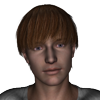
Non-photorealistic Renders (NPR)Using good old PWToon to get my animu on. Softened it a bit in Photoshop.
She's cute ^_^
Thanks. Strange thing is, she's not even a character in any of my current projects. I just wanted something that looked vaguely like an 80s anime character to do light and shading tests on.
Non-photorealistic Renders (NPR)Using good old PWToon to get my animu on. Softened it a bit in Photoshop.
She's cute ^_^
Non-photorealistic Renders (NPR)Using good old PWToon to get my animu on. Softened it a bit in Photoshop.
how do I get V4 please?Here A partial list of thing you need to load via the DIM.
Product ID Product Name 17031 Advanced Ambient Light 18516 Advanced Distant Light 17409 Advanced Spotlight 9799 Aged for M4 9799 Aged for M4 ExpCF 9799 Aged for M4 PowerLoader 9799 Aged for V4 9799 Aged for V4 ExpCF 9799 Aged for V4 PowerLoader 5980 Aiko 4 Base 5980 Aiko 4 Base PoserCF 5980 Aiko 4 Base StudioCF 5980 Aiko 4 PowerLoader 11970 Distinctive Features M4 10522 Distinctive Features V4 9658 F4 Creature Expansion 8070 Hiro 4 Base 8070 Hiro 4 Base PowerLoader 14811 Install Manager Default Filters 15390 keyMate for DAZ Studio 4.5+ (Win 64-bit) 10028 Kids 4 Toddler 10028 Kids 4 Toddler PowerLoader 15548 LAMH for DAZ Studio 4.5+ (Win 64-bit) 9300 M4 Elite Body Shapes 9300 M4 Elite Body Shapes PowerLoader 9845 M4 Elite Ethnic Faces 9845 M4 Elite Ethnic Faces PowerLoader 9335 M4 Elite Gens 9745 M4 Elite Jeremy Carrara Shaders Ca 9754 M4 Elite Lee Carrara Shaders 9734 M4 Elite Rob Carrara Shaders 9746 M4 Elite Sol Carrara Shaders 8934 M4 Elite Texture: Sol Ca 8123 M4 Merchant Resource African 8428 M4 Metro Hair 7877 Michael 4 Base 7877 Michael 4 Base PowerLoader 7877 Michael 4 Base Puppeteer StudioCF 7877 Michael 4 Base StudioCF 8653 Michael 4 Creature Creator Morphs 8653 Michael 4 Creature Creator Morphs PowerLoader 7878 Michael 4 Genitalia 7878 Michael 4 Morphs++ 7878 Michael 4 Morphs++ Genitalia PowerLoader 7878 Michael 4 Morphs++ PowerLoader 9579 Michael 4 Muscle Morphs 9579 Michael 4 Muscle Morphs PowerLoader 2104 Millennium Horse 6415 Millennium SubDragon 6352 Millennium SubDragon LE 6352 Millennium SubDragon LE PowerLoader 6352 Millennium SubDragon LE StudioCF 6415 Millennium SubDragon PowerLoader 6415 Millennium SubDragon StudioCF 10027 NBM for V4 9647 NGM for Elite Fantasia 11690 NGM for Reby Sky 11691 NPM for Reby Sky 11130 NPM for SP4 11624 NPM for V4 Elite 4464 pwCatch for DAZ Studio 4 5387 pwEffect for DAZ Studio 4 4345 pwGhost for DAZ Studio 4 8258 pwSurface2 for Daz Studio 4 7253 pwToon for DAZ Studio 4 9357 Stephanie 4 Elite Base 9357 Stephanie 4 Elite Base PowerLoader 9357 Stephanie 4 Elite Base StudioCF 8436 The FREAK 4 Base 8436 The FREAK 4 Base PowerLoader 8436 The FREAK 4 Base StudioCF 9240 The FREAK 4 Character Morphs 8390 the Girl 4 Base 8390 the Girl 4 Base PowerLoader 9404 The Kids 4 Base 9404 The Kids 4 Base PowerLoader 9405 The Kids 4 Morphs++ 9405 The Kids 4 Morphs++ PowerLoader 3908 The Vintage Sleigh Ps 7403 V4 Elite Body Shapes 7403 V4 Elite Body Shapes PowerLoader 9846 V4 Elite Ethnic Faces 9846 V4 Elite Ethnic Faces PowerLoader 7377 V4 Elite Texture: Amy Ca 7376 V4 Elite Texture: Lana Ca 7674 V4 Elite Texture: Marie Ca 7378 V4 Elite Texture: Maya Ca 10304 V4 Elite: Reby Sky 10304 V4 Elite: Reby Sky PowerLoader 4783 Victoria 4.2 Base 4783 Victoria 4.2 Base PowerLoader 4783 Victoria 4.2 Base StudioCF 5280 Victoria 4.2 Creature Creator Morphs 5280 Victoria 4.2 Creature Creator Morphs PowerLoader 4787 Victoria 4.2 Morphs++ 4787 Victoria 4.2 Morphs++ Developer Kit 4787 Victoria 4.2 Morphs++ PowerLoader 4787 Victoria 4.2 Morphs++ StudioCF 3940 Victoria 4.2 Muscle Morphs
Wow that's a pretty good list thank you! I use DIM anyway but its nice to have the info in case I need it at some point.
how do I get V4 please?Here A partial list of thing you need to load via the DIM.
Product ID Product Name 17031 Advanced Ambient Light 18516 Advanced Distant Light 17409 Advanced Spotlight 9799 Aged for M4 9799 Aged for M4 ExpCF 9799 Aged for M4 PowerLoader 9799 Aged for V4 9799 Aged for V4 ExpCF 9799 Aged for V4 PowerLoader 5980 Aiko 4 Base 5980 Aiko 4 Base PoserCF 5980 Aiko 4 Base StudioCF 5980 Aiko 4 PowerLoader 11970 Distinctive Features M4 10522 Distinctive Features V4 9658 F4 Creature Expansion 8070 Hiro 4 Base 8070 Hiro 4 Base PowerLoader 14811 Install Manager Default Filters 15390 keyMate for DAZ Studio 4.5+ (Win 64-bit) 10028 Kids 4 Toddler 10028 Kids 4 Toddler PowerLoader 15548 LAMH for DAZ Studio 4.5+ (Win 64-bit) 9300 M4 Elite Body Shapes 9300 M4 Elite Body Shapes PowerLoader 9845 M4 Elite Ethnic Faces 9845 M4 Elite Ethnic Faces PowerLoader 9335 M4 Elite Gens 9745 M4 Elite Jeremy Carrara Shaders Ca 9754 M4 Elite Lee Carrara Shaders 9734 M4 Elite Rob Carrara Shaders 9746 M4 Elite Sol Carrara Shaders 8934 M4 Elite Texture: Sol Ca 8123 M4 Merchant Resource African 8428 M4 Metro Hair 7877 Michael 4 Base 7877 Michael 4 Base PowerLoader 7877 Michael 4 Base Puppeteer StudioCF 7877 Michael 4 Base StudioCF 8653 Michael 4 Creature Creator Morphs 8653 Michael 4 Creature Creator Morphs PowerLoader 7878 Michael 4 Genitalia 7878 Michael 4 Morphs++ 7878 Michael 4 Morphs++ Genitalia PowerLoader 7878 Michael 4 Morphs++ PowerLoader 9579 Michael 4 Muscle Morphs 9579 Michael 4 Muscle Morphs PowerLoader 2104 Millennium Horse 6415 Millennium SubDragon 6352 Millennium SubDragon LE 6352 Millennium SubDragon LE PowerLoader 6352 Millennium SubDragon LE StudioCF 6415 Millennium SubDragon PowerLoader 6415 Millennium SubDragon StudioCF 10027 NBM for V4 9647 NGM for Elite Fantasia 11690 NGM for Reby Sky 11691 NPM for Reby Sky 11130 NPM for SP4 11624 NPM for V4 Elite 4464 pwCatch for DAZ Studio 4 5387 pwEffect for DAZ Studio 4 4345 pwGhost for DAZ Studio 4 8258 pwSurface2 for Daz Studio 4 7253 pwToon for DAZ Studio 4 9357 Stephanie 4 Elite Base 9357 Stephanie 4 Elite Base PowerLoader 9357 Stephanie 4 Elite Base StudioCF 8436 The FREAK 4 Base 8436 The FREAK 4 Base PowerLoader 8436 The FREAK 4 Base StudioCF 9240 The FREAK 4 Character Morphs 8390 the Girl 4 Base 8390 the Girl 4 Base PowerLoader 9404 The Kids 4 Base 9404 The Kids 4 Base PowerLoader 9405 The Kids 4 Morphs++ 9405 The Kids 4 Morphs++ PowerLoader 3908 The Vintage Sleigh Ps 7403 V4 Elite Body Shapes 7403 V4 Elite Body Shapes PowerLoader 9846 V4 Elite Ethnic Faces 9846 V4 Elite Ethnic Faces PowerLoader 7377 V4 Elite Texture: Amy Ca 7376 V4 Elite Texture: Lana Ca 7674 V4 Elite Texture: Marie Ca 7378 V4 Elite Texture: Maya Ca 10304 V4 Elite: Reby Sky 10304 V4 Elite: Reby Sky PowerLoader 4783 Victoria 4.2 Base 4783 Victoria 4.2 Base PowerLoader 4783 Victoria 4.2 Base StudioCF 5280 Victoria 4.2 Creature Creator Morphs 5280 Victoria 4.2 Creature Creator Morphs PowerLoader 4787 Victoria 4.2 Morphs++ 4787 Victoria 4.2 Morphs++ Developer Kit 4787 Victoria 4.2 Morphs++ PowerLoader 4787 Victoria 4.2 Morphs++ StudioCF 3940 Victoria 4.2 Muscle Morphs
Cel Shaders for Iray?Within DS, the most perfect system, imo, is PWToon + LineRender9000.
Cel Shaders for Iray?If you use 3dl then the PWToon shaders are probably your best bet.
ONLINE 3D Comics using DAZ-Has anyone done them and are you making decent money?I think it's pretty clear that no one here thinks they're going to hit instant success and quit their day job overnight.

That said, it's also a fact that everyone here -- bar none -- has a need to create artwork. 3D content costs money, and many of us would like to recoup some of that with the possibillity -- however slight -- of maybe making artwork full time however far in the future that might be.
There's a lot of good advice, and most of the best focuses on what's needed if you do want to do this for a living. All of it was fairly realistic, not negative, which is nice to see.
Some of the best advice concerned streamlining production; I've been doing computer production art/dtp in one form or another since 1986, including 15 years in the comic industry, and probably the biggest hurdle for a lot of artists is the concept of "good enough". It's the difference between creating a piece of Art (capital "A") and finishing some art to meet a deadline (self-imposed or not). If you're not serious about your deadlines, it becomes too easy to keep redoing the same render over and over to try to get it perfect.
As Singular Blues points out, it's very important to set up a productive workflow. If I were setting up a production-oriented workflow for a webcomic, here's what I'd do (note, this is for a story-based webcomic, not a joke-a-day comic -- the setup for a joke-a-day comic is much, much easier but the writing is much, much harder, unless you have a real talent for it):
1. Get the main story written. There'll be changes -- daily -- and you'll think of way-cool new things to add while you're working, but without a main plot and some solid ideas you'll wander off every chance you get.
2. Thumbnail. Pad and paper, iPad or other tablet, or the back of napkins, doesn't matter. For every hour you spend visualizing it on paper, you'll save multiple hours setting up your scenes onscreen. When you sit down to do your 3D, you should already know what you're doing.
3. Create your main characters and main scenes first. Think of it in terms of filming a movie or tv series: you don't start filming it and then start building sets and hiring actors, etc.
4. Try and find a style that works for you; the discussion above is pretty good regarding 3D comics and what's expected, but a lot of the opinions are based on history. Bad 3D art isn't any worse than bad 2D art, everybody can do it, but what's changing is the audience. As pointed out, we Baby Boomers are a diminishing group, and in some ways (not the death-way, obviously) that's a good thing. Hard core, old time collectors might not be very interested in 3D art, but the kids just entering into the reading zone are used to seeing half of their tv shows and movies in the style, and will probably be more accepting of it-- again, if done well.
5. Take advantage of the very advantages built into the 3D artwork system. I'd never spend 30 minutes framing a character (if that's actually framing the character, not loading the scene and characters, posing, etc.) -- for a panel in a story I doubt there's a lot of value-add to fine-tuning the frame past the first 10 minutes, certainly not enough to justify the extra time that could be used for multiple renders. I generally load a scene, drop in and pose characters, add one of my default light sets and render. On my old iMac, it takes between 10-20 minutes for 4096 x 3072 pixels; I almost never render anything smaller, but might do a spot-render to check some placement and such. While it's rendering, I work on other things (writing, thumbnailing, textures, etc.). Once it's done, I save it, rotate the camera, and do more renders of the same scene from different angles; if it's a really good scene, I might render through another cycle with slightly different poses and expressions. After an hour or two, I usually have over half-a-dozen renders. I might only need one right now, but I now have a library of shots that can be used again later, especiallly when some shots will be closed-ups and others far shots.
6. Try and find a postwork workflow that suits your style. For me, I started with using PWToon on everything, but after thousands of renders found I was losing some things (shadows and special effects shaders suffered badly); I found a style I like using some Topaz filters (clean and simplify) and a few Photoshop actions for altering the colours, shading and outlines. Is the final output awesome? I don't think so, not as good as if I spent hours fine-tuning each render, but is it "good enough"? For me, yes. The final output is a one-size-fits-all style that totally removes my postwork time on the images. Once I have a batch of renders finished, I run a single batch action in PhotoShop that does the postwork on as many images as there are in the folder, while I eat, sleep, or go for a walk. It's about compromise; I've tested quick renders and drawing over them, but it takes me longer to do a single panel well than it does to render four or five more panels. That said, if DAZ ever came up with a trimmed-down Studio that let me render smaller, simpler images on my iPad Pro, I would very likely switch over to doing paint-overs just for the freedom to stay away from my computer more (and change my format to match) .
After that, it's page assembly with whatever program you want to use for panels and word balloons.
Hopefully that's not all stating the painfully obvious, but I think that anyone thinking in terms of doing a webcomic should go for it, but that they should have a plan and a goal in mind first.
Will you make it? Statistics say that 80% of entrepreneurs fail within the first 18 months, but that doesn't stop 100% from trying, and trying anyway is how the 20% succeed. The bonus is that your'e probably not counting on supporting yourself on the earnings in the first 18 months, or probably in the first 48 or 60. It takes time to build your audience, and the longer you're prepared to build, the better.
I'd mentioned Dave Kellett earlier. He started with his brilliant "Sheldon" strip, but always wanted to do a sci fi strip, "Drive". After a few Drive comics here and there, he had to put it aside for other work, but lamented not being able to afford do to it. He turned to Patreon (remember, he already had a solid following via Sheldon) and now makes about $1000 per page -- not per month, per page -- and he's since added Sheldon to Patreon -- another $1000 per page of Sheldon.
It's difficult to guess where we'll be in 5 years, but it's worth it to follow through to the best of your abilities. I remember an interview with a comic artist who loved to hear people at cons tell them they were "thinking of doing a comic" -- he loved it because he knew that 95% or more of them who were only "thinking of it" would never actually do it, which meant less competition for him.
-- Walt Sterdan
MANGA STYLE & VISUAL STYLE topic - Update Sept 23rd 2017: Fixed Dropbox links! [Commercial]PWToon, for 3dl, is my favorite cartoon shader, but I prefer LineRender9000 for the lining
Thanks for volunteering to answer all of my upcoming questions, William.
LR9k seems OK for basic fine-tip type outlining, but nothing darker or deeper, since it can't interact with the color shader. But I'll worry about that when I find the color mix I'm looking for. pwToon and I are not yet friends. . . nor are VSS nor the dzToon* shaders, though, either. AoA's subsurface toon skin promos, like always, are sexy, but I have yet to find many PA's who bother to document pricisely how they sculpted their work in the first place. That's a readme that I'd pay extra for.  TheNathanParable at least provides great presets that are easy to produce quick results that look a lot like his promos. (I've just been trying to do something entirely different with them.)MANGA STYLE & VISUAL STYLE topic - Update Sept 23rd 2017: Fixed Dropbox links! [Commercial]
PWToon, for 3dl, is my favorite cartoon shader, but I prefer LineRender9000 for the lining
MANGA STYLE & VISUAL STYLE topic - Update Sept 23rd 2017: Fixed Dropbox links! [Commercial]OK, that was very helpful. Thank you. I didn't glean that nuance from the settings guide or the step-by-step. I think what you're saying is that the Shade parameters work like a mask. The Colour parameters provide the underlying color. I had it backwards in my head. That gets me a lot closer to where I want to be!
However, I think, if I understand what you're saying, I can't get all the way to where I want to be with MSS.
 By zeroing out the Shade parameters (updated preset), I get two tones where I'm expecting 4.
When I apply the partial preset to be more like a quad (Partial Presets\Shading Presets\Contrast\Shade - Light), it seems to do what I would expect and only changes the Shade parameters to mask in the different Colour parameters, but instead of nice bands of color, I get polkadots.

So, is it "You can't get there from here with MSS?" (i.e. to something like the the toon shader in the preview window which at least shows me where I would generally expect the bands of different tones) or "You're still missing a vital clue (or seven)?" I'm hoping it's the latter, since I like the way the MSS parameters are laid out, but I'm also willing to be told that I'm using the wrong tool for the job and I should go spend more time with one of the other shader packs that I also own: AoA, Sketchy, pwToon, VSS, etc. (Yes, I have a little OCD.
 Why do you ask?)Multi-Man for Genesis 3 Male, Is there a Female Companion in the Works?
For a long time I used PWToon and similar in 3DL when I wanted to do, well, non photorealistic stuff.
Nowadays I use Iray, because it's faster, and then LineRender9000 to get good toonish lines.
Note: If you want really fast Iray renders even without GPU and whatnot and you're doing toon stuff... erase maps. Doing Toon Iray, I usually only have to put in a map for the face and eyebrows, and then a toon iris, and that's it.
Thanks for the reminder on removing the maps. By the way the Morpheus combines really well with the DAZ Body & DAZ Head morphs and DAZ Expression set.
Multi-Man for Genesis 3 Male, Is there a Female Companion in the Works?For a long time I used PWToon and similar in 3DL when I wanted to do, well, non photorealistic stuff.
Nowadays I use Iray, because it's faster, and then LineRender9000 to get good toonish lines.
Note: If you want really fast Iray renders even without GPU and whatnot and you're doing toon stuff... erase maps. Doing Toon Iray, I usually only have to put in a map for the face and eyebrows, and then a toon iris, and that's it.
You can get toon like renders with Iray? And the toon lines?
Multi-Man for Genesis 3 Male, Is there a Female Companion in the Works?For a long time I used PWToon and similar in 3DL when I wanted to do, well, non photorealistic stuff.
Nowadays I use Iray, because it's faster, and then LineRender9000 to get good toonish lines.
Note: If you want really fast Iray renders even without GPU and whatnot and you're doing toon stuff... erase maps. Doing Toon Iray, I usually only have to put in a map for the face and eyebrows, and then a toon iris, and that's it.
Shader (or post work) to look like a drawing?line render 9000, and and freebie geoshell shader from the visual-style shaders and manga-style shaders package creator released/shared will help get some good outlines. search for 'NPR' renders for some great leads/tips/technique threads. pwtoon and daz native toon shaders might be of interest as well.
fwiw, these all only work with the 3delight render engine, not the newer iray renderer.
welcome back!
hope this helps!
--ms
Daz Studio Pro BETA - version 4.9.4.122! (UPDATED)Then I have not deeply considered about DS new color picker, but at least I think it can not copy and paste between two Color property.
because when pick up color from property1 colorA. DS pick the Color witch gamma correction applied. then when apply picked color for property2 DS apply gamma correction again, then set color for the property2 I think,,, I test it like that,, Though I do not know if it is supposed to be,,, (I test with uber iray property)
1. apply uber iray shader, on to primitve plane, then set base color as R,G,B (128,128,128) float clor is 0.2,0.2,0.2 pic1
2. set Diffuse Overray weight, then activate Diffuse Overlay Color.
4 on the Diffuse Overlay Color, activate DS color picker, by Alt +Click
5 then hover on to the Base Color to pic Color and change Diffuse Overlay Color, now it set Diffuse Over lay Color as (0.5 0.5 0.5)
(seems applied gamma correction ,,,) then not same as Base color.
So that ,DS color picker not use for copy and paste color between two Color properties of shader, but to apply color from image? I do not feel difficulity, about gamma correction, but I do not know clear usage,, of DS color picker still.
Thanks Kitakoredaz and cm152335. Very clever guide to my problem.
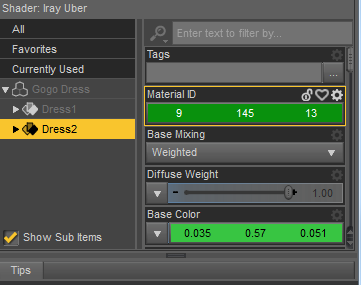
Effectively my problem was gamma correction with uber iray shader. I repeated your tests with gogo dress for G3F and bunnydazzed shoes for V4. Gogo have Uber Iray shader, Bunny have DAZ Studio Default shader.
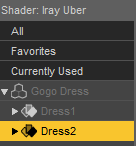
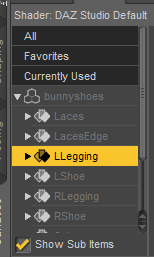
1.- I selected a color from a web color picker, RGB(9,145,13)
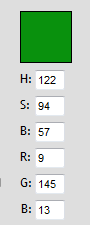
2.- With a color picker program I tested this color, picking from the green square. This display same RGB numbers that the web.
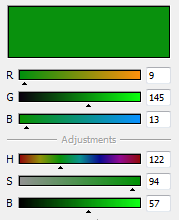
3.- Then, I picked over green square using DAZ picker for Bunny default shader (previously set to white 255). Successfully Diffuse Color was setting to RGB(9,145,13).
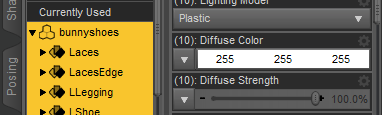 pick =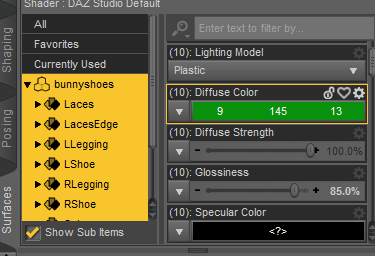
DS Select Color window displayed the same RGB.
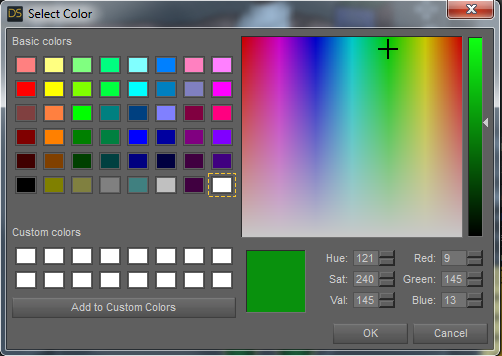
4.- Float color displayed the same color...but float numbers displayed were not! the appropriate numbers. Multiplying (0.006, 0.29, 0.0014) by 255 produce approximately RGB(0,74,0), a dark green.
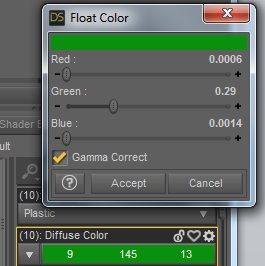
5.- Effectively, unchecking Gamma Correct produces a darker color.
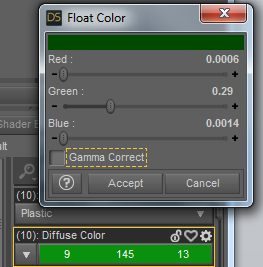
But I can't retain Gamma Correct unchecked after click on accept. Opening Float color again only display Gamma Correct checked again.
6.- I picked over green square using DAZ picker for Gogo Uber Iray shader (previously set to white 1.0 too).Wrong green in Base color channel, but appropriate float numbers, multiplying (0.006, 0.29, 0.0014) by 255 is very near to RGB(9,145,13).
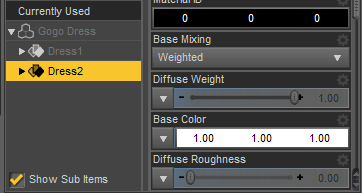 pick =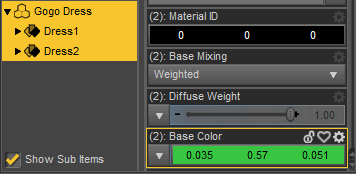
7.- But Select Color window displayed other integers RGB(56,197,66), a lighter green different to RGB(9,145,13).
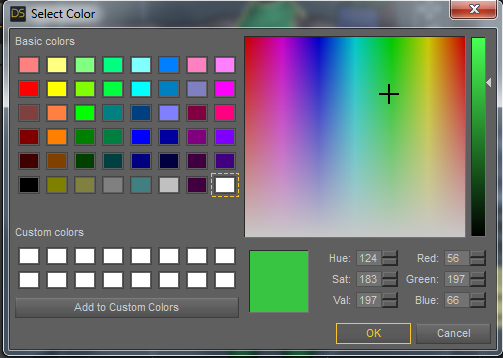
8.- This lighter green with and without Gamma Correct in Float Color. Without gamma looks like the original green square.
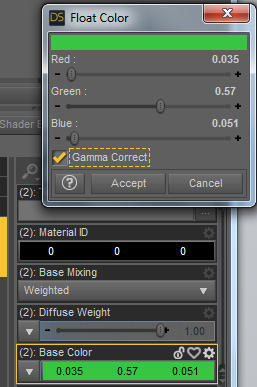
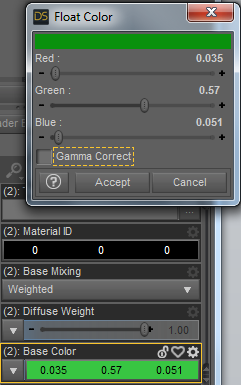
9.- Then I picked the green square for Material ID channel in Uber Iray shader. Result was RGB(9,145,13) the appropriate color.
10.- Iray render left, 3Delight render right.
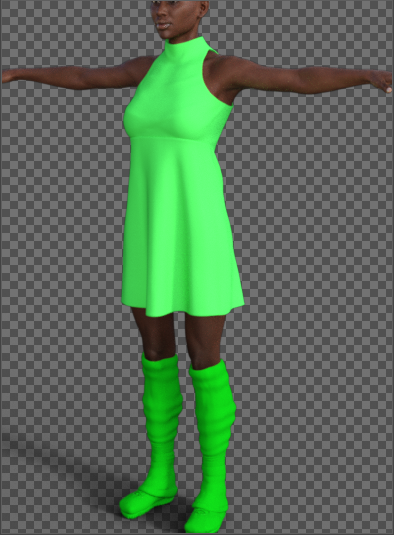
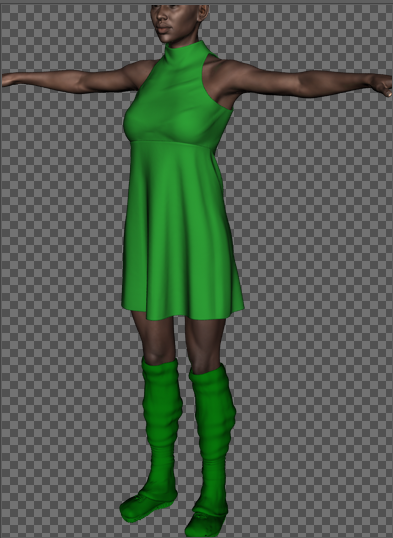
Because I need the color picker to easily create a lot of preset for my Renderman custom shaders, pwToon and Manga Style Shaders, just now the shift in color is not a big problem for me, it appears a Iray thing. So, now I am very happy with the daz color picker.
Need idiot proof toon shader/render tut, esp for four listed...I bought the pwToon shaders recently. I can't wait to try them.
Need idiot proof toon shader/render tut, esp for four listed...I haven't encountered a 'toon' style thing that doesn't require a fair amount of fiddly work.
Most outliners use Normals, which requires tweaking to avoid the 'big black fill' problem. Only ToonyCam and LineRender9000 (to my knowledge) can create outlines a different way, and both require a fair amount of set up. I generally prefer LR9k (with Fresnel outlines)
Yeah. What you said!
That's one reason I liked what Crescent had done with her pwToon presets. She offered 3 different outline presets (small, medium, and large) to help with items in the scene. Small is ideal for backgrounds and background items. Medium is a perfect setting for figures and objects they interact with. Large seems good for closeup items. She'd offered them as excellent startup settings.
Need idiot proof toon shader/render tut, esp for four listed...What type of look are you looking for? I've had some luck playing with pwToon for a few years. If you follow some of the links in my signature, you can see some of the pictures I've done over the years. If you're interested, I can make up a quick tutorial of my process.
One big help was starting off with Crescent's pwToon presets (http://www.sharecg.com/v/69733/favorite/21/DAZ-Studio/Crescents-pwToon-Cel-Shaders). They're a bunch of color presets that are quite good. They remove the specular color and have different diffuse and shading colors than the usual gray shade. Also, they have a smooth shade or hard shade option, and different outline widths depending on what you need.
Was this done with pwToon too?
http://mysteriousworldsofsphinxmagoo.tumblr.com/image/159998052456
That one was done with Sketchy. I avoided the line drawing options because I wanted to test the Toon capabilities in Sketchy and to play a little bit with iRay. Not a lot of Toon or cel-shaded options in iRay...
OK, thanks. I may try MEC4D's vol 2 iRay shader presets for the gummi / wax / glass materials 1st and adjust the colors as needed.
Daz 3D is part of

Connect
DAZ Productions, Inc.
7533 S Center View Ct #4664
West Jordan, UT 84084Licensing Agreement | Terms of Service | Privacy Policy | EULA
© 2026 Daz Productions Inc. All Rights Reserved.