-
How to use morphs I purchased
katherine said:
Thank you for your help, SofaCitizen. These morphs are not appearing in the Shaping-morphs section. I used Morph Loader Pro to load some standard Genesis 8 morphs in there and they work. So, I seem to be in the right place.
And thank you, Richard Haseltine. "How did you install the morphs?" is the problem. I don't seem to be able to install them at all. In the Order list in the store, when I click download it goes to a page for the product, but there is never any download link, no zip file or download and install link.
I got a freebie in the same order, and it has a download link which works and a Download_And_Install which reports that the account referenced is not set up in Install Manager.
The morph package, however, doesn't do anything.
And Daz doesn't respond to "Submit a Request" questions anymore.
You shouldn't have to use Morph Loader Pro to activate morphs that you have installed correctly.
If you have bought products you don't need to click on anything, just fire up DIM and it will look for any purchased products that are not installed and offer them up in the first tab.
Currently, my experience is that they are responding to support tickets but a bit slower than they were a few months ago. In addition, I am seeing updated packages in DIM so perhaps there is more of a back-log than usual?
How to use morphs I purchasedThank you for your help, SofaCitizen. These morphs are not appearing in the Shaping-morphs section. I used Morph Loader Pro to load some standard Genesis 8 morphs in there and they work. So, I seem to be in the right place.
And thank you, Richard Haseltine. "How did you install the morphs?" is the problem. I don't seem to be able to install them at all. In the Order list in the store, when I click download it goes to a page for the product, but there is never any download link, no zip file or download and install link.
I got a freebie in the same order, and it has a download link which works and a Download_And_Install which reports that the account referenced is not set up in Install Manager.
The morph package, however, doesn't do anything.
And Daz doesn't respond to "Submit a Request" questions anymore.
Continuing Dforce SimulationRichard Haseltine said:
crosswind said:
As default, not possible... In general, just try to get a good draping result by 'one simulation'. If you use timeline for simuation, you may add more frames after the last key frame to have more stable / better draping.
But if you really need a '2nd simuation' based on the 1st simuation's result, you can export 'the result' to obj and import it back as a morph dial with Morph Loader Pro. Dial it and go for the 2nd simulation, then the cloting or object is gonna further drape to some extent.
Note, however, that this will not be the same as continuing the previous simulation - it will lose all information about momentum from the previous sim and just start over from rest.
Yea, that's why there first of all should be a 'dial' of previous result, then this technique is more or less used for some special case, e.g. I use it on the simulation of self-made 'rolled sleeves' with contraction settings, etc...
[RELEASED!!!] Dynamic Character Animation in Daz Studio [commercial]I'm really enjoying this and learning a lot! I got through Part 2-2 and wanted to stop and practice making some Pose Controls while the info was fresh in my mind (these are so awesome, even beyond their use in animating), so I loaded in a Base Genesis 9 as that's what I've mainly been using. I created a few Controls, boy were you right, especially after the way you went through it, slowly, repeating the important things, it really is fast and easy.
One detail I'm missing, and I went back through a couple of the vids to try to find it, but what I'm not sure about is if there is a step necessary to "Save" the Pose Controls you create so that it's available for any character of the same generation... I found a mention when you were looking for a rogue improperly pathed dial, you mentioned saving the ones that you could find... but not what that process is, if there is any. All I've done is left Edit Mode and saved the Scene with the G9 that has the Controls I made (which work great!), that's obviously not enough to have the Controls be there on another character I loaded into another new Scene. I apologize if I'm missing where you mentioned it or if it's something obvious... my brain is stuck, apparently.
EDIT: I think I found my answer in the Daz3D Documentation of all places... It looks like it's Select the Figure, Save As->DSF Morph File, Name it, tick the boxxes of the Controls you made, hit Go... Sorry again if I missed you explaining this. Maybe let me know if this is either wrong or not entirely right.
Thanks for this Tutorial. It is fun and it is exciting to me to learn these kinds of things that open tons of doors in DS!!
Celebrity Look-a-Likes for 3D figures Part 4Anya Chalotra (Actress) Yennefer For G8F
Known for: The Witcher TV Series (2019– )FWIW, I don't think it's an Anya Chalotra morph, as I think it's based on the game character, and I believe Denise Gough was used as the motion capture model for the game character.
Continuing Dforce Simulationcrosswind said:
As default, not possible... In general, just try to get a good draping result by 'one simulation'. If you use timeline for simuation, you may add more frames after the last key frame to have more stable / better draping.
But if you really need a '2nd simuation' based on the 1st simuation's result, you can export 'the result' to obj and import it back as a morph dial with Morph Loader Pro. Dial it and go for the 2nd simulation, then the cloting or object is gonna further drape to some extent.
Note, however, that this will not be the same as continuing the previous simulation - it will lose all information about momentum from the previous sim and just start over from rest.
Let's appreciate/discuss today's new releases - ongoing threadfelis said:
Richard Haseltine said:
felis said:
xyer0 said:
I wish dForce Sexy Suspender Outfit had a shirt closed morph. It's a great looking shirt. I guess I could put a t-shirt under it.
It is actually fairly tricky to make a close morph, as you need to have enough space between the shirt and the buttons to leave room for the other side of the shirt if it can be simulated. Else the user need to push the buttons out after simulation, but that might be acceptable.
I wonder if the suspenders do simulate, and if not how it looks on girls with a different size breasts.
My reaction on seeing it was pretty much "Oh for a version with a closed shrt" (as you say that isn't soemthing that could be done with a morph, though if there is enough fabric it might be doable with a dForce Addon with a low expand/contract value).
I tried.
I made a dForce add-on, but after I had applied it, I realised that there is no setting for contraction-expansion for a dForce Add-on.
You can put a top under the shirt. There are some morphs to loosen it.
And the suspenders does not simulate. It wasn't my expectation, but I was curious. As they act as conforming, they can look a little weird dependant on character morphs and pose, and there is a risk of clipping with the shirt (or other tops) (which might be fixed with smoothing, and collision with the shirt).
Thanks, I hadn't remembered that (assuming it had ever penetrated my brain in the first place). It did occur to me after posting that the waistband on the trousers would, assuming the parts are separate, hold the closing fabric back and cause unsightly distortion even if my suggestion had worked in principle.
Need Help! Genesis 8/8.1 skin distorts after posing...Is this happening with all G8 figure morphs you dial in or just a specific one?
If it happens for all, then it looks like some figure you bought recently was not rigged correctly, and its helper jcm morphs (looks like HD ones based on the warping) are triggering when you move the arms and legs around, even though the figure morph itself is not dialed in.
The only way to solve this would be to start with a blank g8m and then move a single arm up. Make sure under parameters you have show hidden properties selected. Then select "Currently used" and then look to see what morphs are triggering and what figure name is in that morphs name.
I can show you a real example of this.
Redz Studio did not rig up some of the Davit charaters jcm's correctly. Even though I don't have Davit dialed in, the following morph is triggered:
pJCMDavitAbdomen3Fwd
I know it's for "Davit" because the name is after the "pJCM" part of the name.
Why is it dialed in even though I don't have Davit's character dialed in? Because he or she didn't rig the morph to trigger when the Davit character is dialed in, they based it on two standard G8M jcm's being dialed in from bending the torso.
You have the same thing going, but just a more extreme example.
Let's appreciate/discuss today's new releases - ongoing threadRichard Haseltine said:
felis said:
xyer0 said:
I wish dForce Sexy Suspender Outfit had a shirt closed morph. It's a great looking shirt. I guess I could put a t-shirt under it.
It is actually fairly tricky to make a close morph, as you need to have enough space between the shirt and the buttons to leave room for the other side of the shirt if it can be simulated. Else the user need to push the buttons out after simulation, but that might be acceptable.
I wonder if the suspenders do simulate, and if not how it looks on girls with a different size breasts.
My reaction on seeing it was pretty much "Oh for a version with a closed shrt" (as you say that isn't soemthing that could be done with a morph, though if there is enough fabric it might be doable with a dForce Addon with a low expand/contract value).
I tried.
I made a dForce add-on, but after I had applied it, I realised that there is no setting for contraction-expansion for a dForce Add-on.
You can put a top under the shirt. There are some morphs to loosen it.
And the suspenders does not simulate. It wasn't my expectation, but I was curious. As they act as conforming, they can look a little weird dependant on character morphs and pose, and there is a risk of clipping with the shirt (or other tops) (which might be fixed with smoothing, and collision with the shirt).
Continuing Dforce SimulationAs default, not possible... In general, just try to get a good draping result by 'one simulation'. If you use timeline for simuation, you may add more frames after the last key frame to have more stable / better draping.
But if you really need a '2nd simuation' based on the 1st simuation's result, you can export 'the result' to obj and import it back as a morph dial with Morph Loader Pro. Dial it and go for the 2nd simulation, then the cloting or object is gonna further drape to some extent.
UltraScenery - new(er) territory [Commercial]richardandtracy said:
You might well be surprised about the river depth. In a similar circumstance, I was very surprised: Many years ago my parents took over a smallholding bounded by the headwaters of the River Torridge in North Devon, at a point where it was around 15 ft wide and 12 inches deep in summer. We had a bullock get into the river and charge upstream, but because of the banks it couldn't get out. My brother and I got upstream of it, jumped in and headed it back. During that process, much to our surprise, we found a number of holes in the river bed at least 6ft deep where we had to swim even though the river looked no different from the surface. The lasses are jumping into one in that scene. Honest Guv.. Regards, Richard.
Hey, off topic, but I can't find the right thread - your G8 to G9 pose converter is fantastic for dealing with hierarchical poses. I can run the hierarchical pose with G8 and then use your converter to transfer that G8 pose to G9. I used it with the Z Luxury Morphing Office Chair for G8 and 8.1.I had to do a few small tweaks, because I used a morphed character, but it worked very well.
DAZ Horse 3 - will there actually be any support this time?Design Anvil - Razor42 said:
Thanks CWRW your reputation proceeds you and your insights are always welcome here.
Firstly let’s just agree that no model is perfect and at some point there does need to be some concessions in regards to capability and time invested. But perfection is the goal we all strive for.
Knees: Your right that knee does need some improvement and clearly protrudes to much to the fore and needs some overall streamlining. It does seem to be amplified with the Clydesdale Morph which I expect relates to one of the DA leg thickening morphs. The knees aren't the greatest or most detailed right through to the base.
I'll look at tracking down the DA morphs in regards to the front knee and improving them and perhaps making HD morph to improve the overall knee quality.
Gaskins: The gaskins aren’t too bad in most ways, and the rigging for the whole rear leg seems okay when looking through the joint editor. But point taken and I do think it’s worth exploring making the gaskin longer and also further refining the shape in regards to the whole rear leg and in turn the rear section rigging.
Topline: I’m not really sure what you mean by the “spine undulates” maybe something in regards to the general shape of the topline? The wither can be dialed up and made wider, taller and fuller and in the render a little further down you can see I have done so. Neck bending also needs to be considered here.
Neck: There are also a few morphs currently to change the necklines especially where it joins to the body. But point taken some more morphs to improve the topology here would be great addition.
Head: And your right some improvement could be made to the shape of the head specifically for the shape of the Clydesdale breed and if I had infinite time to spend on these I would love to spend a lot more time refining it for a more regal look.
Keep in mind that there are 8 breed related shapes in this pack for $17.49 at the current price point. Your draught horse is currently on sale at a price point of $16.95. The more time I invest into the product the further the price point would need to rise. (8 x $16.95 = $135.60).
Perhaps you would like to through your hat in and make us an 8 breed horse pack for Horse 3 at a $17.49 price point? Let me know… I’ll be happy to critique :)
Jokes aside, thanks for your input I’ll definitely take it onboard when I’m looking at updates here and future products. Feel free to add more detail if you have the time. Your experience in this area is highly valued!
PS: Love the pic

LOL I wish you knew how much I wish I could model. I have been a painter/2d animal artist since I was 6. I tried modeling and rigging and yes I suck at those big time. That is part why I went with doing what I could in the 3d world as a texture artist (and "art director" for animal modelers). For me, my love for animals was always more important to me than the money I might make working on 3d animals and I always strived to make the best possible product I could for my own satisfaction and personal artwork. Over the years maybe I have suceeded, maybe I have failed in that regard. I did the best I could, so I admire that honest trait in anyone in this business. These days I make my own 2d animal artwork for myself and it sells/licenses well and that is all I care about at this later point in my life. I am essentially retired from making 3d market products.
So for anyone out there who is interested in making better 3d horse models/textures etc., study REAL living, breathing horses - they will teach you much about equestrian anatomy....and also much about life too..
And also for equine anatomy one MUST study George Stubbs: (THE best ever equestrian artist, who I and most everyone pale in relation to....) https://www.amazon.com/Anatomy-Horse-Dover-Artists/dp/0486234029
All my best...
(me and a very good friend who is longer with us.. bless you Oscar...)
DAZ Horse 3 - will there actually be any support this time?Thanks CWRW your reputation proceeds you and your insights are always welcome here.
Firstly let’s just agree that no model is perfect and at some point there does need to be some concessions in regards to capability and time invested. But perfection is the goal we all strive for.
Knees: Your right that knee does need some improvement and clearly protrudes to much to the fore and needs some overall streamlining. It does seem to be amplified with the Clydesdale Morph which I expect relates to one of the DA leg thickening morphs. The knees aren't the greatest or most detailed right through to the base.
I'll look at tracking down the DA morphs in regards to the front knee and improving them and perhaps making HD morph to improve the overall knee quality.
Gaskins: The gaskins aren’t too bad in most ways, and the rigging for the whole rear leg seems okay when looking through the joint editor. But point taken and I do think it’s worth exploring making the gaskin longer and also further refining the shape in regards to the whole rear leg and in turn the rear section rigging.
Topline: I’m not really sure what you mean by the “spine undulates” maybe something in regards to the general shape of the topline? The wither can be dialed up and made wider, taller and fuller and in the render a little further down you can see I have done so. Neck bending also needs to be considered here.
Neck: There are also a few morphs currently to change the necklines especially where it joins to the body. But point taken some more morphs to improve the topology here would be great addition.
Head: And your right some improvement could be made to the shape of the head specifically for the shape of the Clydesdale breed and if I had infinite time to spend on these I would love to spend a lot more time refining it for a more regal look.
Keep in mind that there are 8 breed related shapes in this pack for $17.49 at the current price point. Your draught horse is currently on sale at a price point of $16.95. The more time I invest into the product the further the price point would need to rise. (8 x $16.95 = $135.60).
Perhaps you would like to throw your hat in and make us an 8 breed horse pack for Horse 3 at a $17.49 price point? Let me know… I’ll be happy to critique :)
Jokes aside, thanks for your input I’ll definitely take it onboard when I’m looking at updates here and future products. Feel free to add more detail if you have the time. Your experience in this area is highly valued!
PS: Love the pic
DAZ Horse 3 - will there actually be any support this time?Design Anvil - Razor42 said:
semperequstri said:
Richard Haseltine said:
Wrong and toonish aren't really helpful when it comes to figuring out what would need to change, though. Toonish in particular can be tricky - I have felt that about some other animal reelases that have generally been praised (and even soem human characters), but would need to narrow it down if I wanted to turn it into feedback that might inform future products (or even a service pack).
If more detail is required I'd be happy to make a series of examples. I just didn't think this was the place for that.
Go for it, I'd be interested in hearing your opinion. Just be aware we are looking at shape in the contraints of existing topography, rigging and poly limits. Each shape also needs to be capable of a fairly broad range of movement as Horse 3's rigging offers a much broader range of movement compared to other horses available. The shape also needs to be capable of representing male and female and play well with other morphs such as additive foal, add old age or breed mixing. Comments like the body should be 10% longer are not really helpful in this context as I have said the morph pack, which the shapes are built from, contains numerous morphs to make the body longer in multiple ways. So that is something that is easily corrected with a simple dial spin to user preference. You can even save the adjustments as a new character if you like. Also keep in mind their are no actual muscles keeping the shape defined, so muscle definition that looks correct in one pose may look awful in another. In most situations in modeling it's best to aim for a middle ground with muscle definition rather than perfect for one pose.
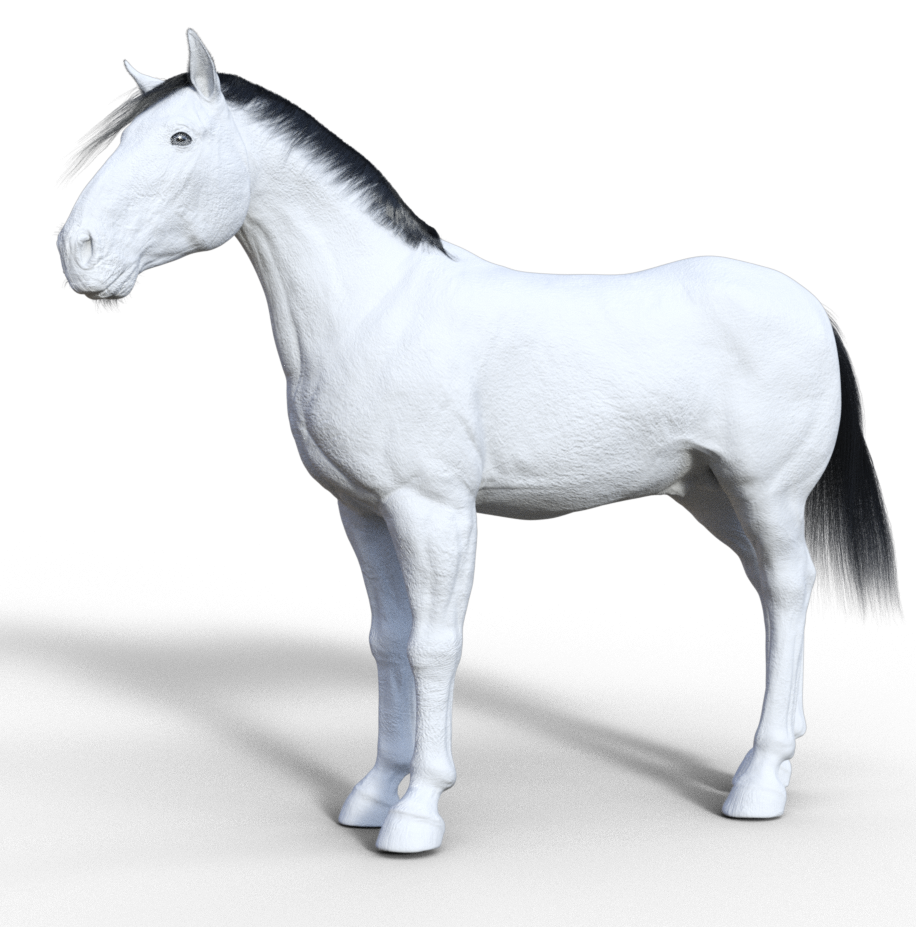
You have asked for detailed advice on equine anatomy. I have done illustrations for several equine anatomy books over my 35 years in the horse business, that are still on the market and consulted by serious horsepeople. (refrences on request). I will give you some feedback... For one if I had a horse with knees ("knees" is the commonterm for the middle joint of the front legs of equus) like that it would be incredibly crippled/dead. The front of the equine "knee" is shaped much like a shield and should be quite flat in profile unless seriously compromised usually by advanced age and/or arthritis.
2. The gaskins are much too short/distorted in a really odd way...I am still trying to sort out how weird they are and why...
3. The topline (spine) is lumpy, undulates and again looks arthritic. Also the wither is quite small/narrow for the breed while the head is overly too large and clunky looking (and just plain "plug" ulgy.... Clydes are normally gorgeous and noble looking...
4. The neck musculature is just not correct/especially the underneck. Too many details to get into here. Look at real living breathing horses is all I can say...
There is more and I won't get into the rigging issues of the base model, but those are the really blatant issues I see with the horse just standing still with all four legs "under him". ... you asked, and I am answering.
Confuse! My morph acts unexpectedlyCatherine3678ab said:
crosswind said:
James said:
are you starting with an Hijab that was modelled to the default shape of G9 first. Saved that first. Then doing all of the above?
Mmmm.... do you mean by default as the non gender G9 shape?
or as the feminim dial put to 100%?
I put the feminim dial to 100%
Then I modeled the hijab.
Save the hijab as wearable. Then put it on Helena.
Then... do all your steps before polishing. I haven't done any polishing. cos when do the morph loader pro, the lump still there.(I'll give you a video to reproduce the issue and show how to fix it...)
Pls check this and give it a try: https://mega.nz/file/XfoiDSYC#ILRBDD0LnIn30ts1BFvoZXAr8pbm9dZka-J5wa1jE60
And how to reverse Feminine Head Morph and Updating Base Geometry with Draping Result : https://mega.nz/file/qGAzwBQb#f1IeaSk2U81g2mRUeKI1HHz9L0Y_6e52ZeKvin9ivA0
Those were interesting videos, always nice to see how other people do things.
One major something I noticed though is that it seems that finally [at least in the edition of D/S that you're using] they fixed the .obj export. So for those working with whatever edition it is I'm still using ... remember to hide "everything" that is not to be exported. If one forgets the morph will not happen as the G9 figure [in these examples] would be included along with the hijab.
Yea, I just recalled that you're using an older DS version...
 DAZ Horse 3 - will there actually be any support this time?
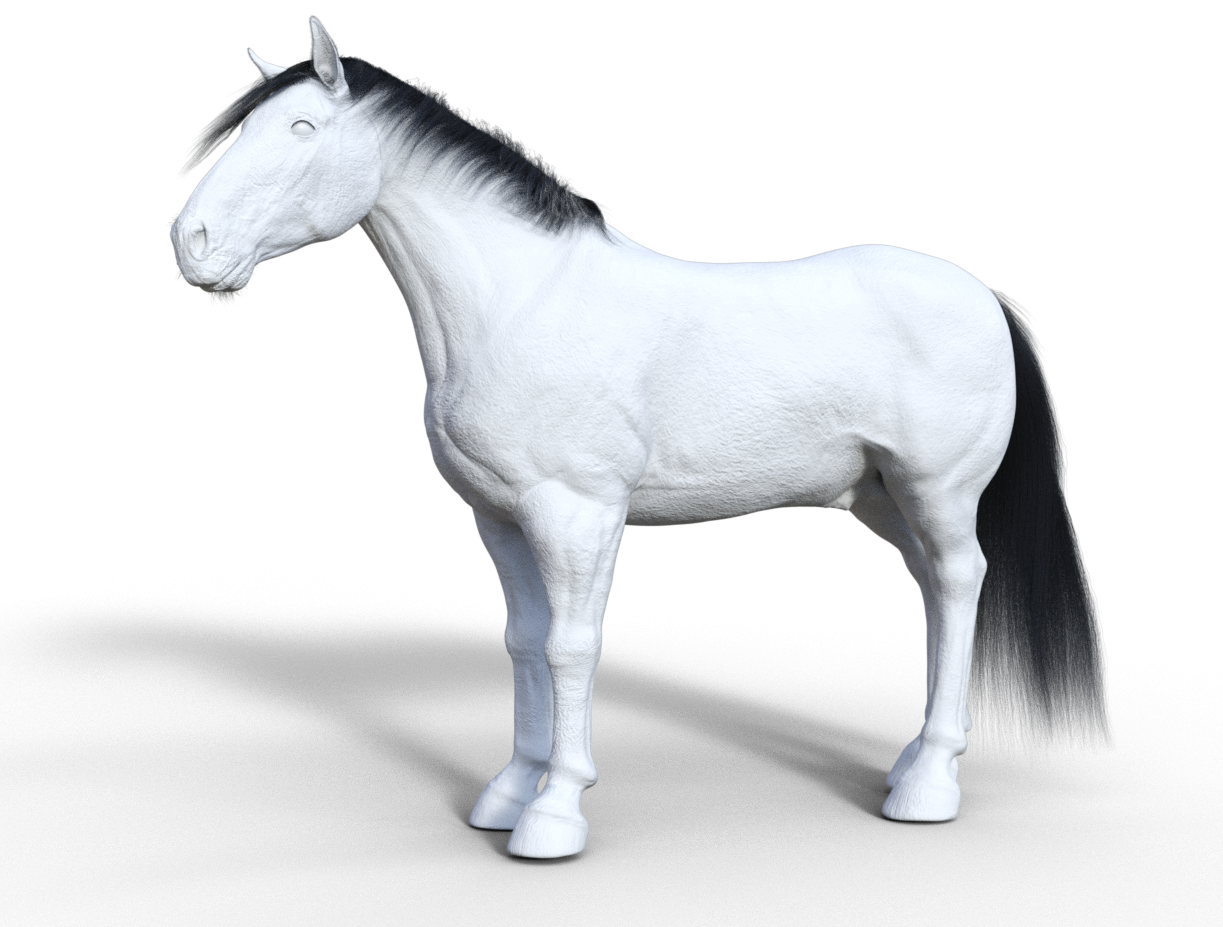
I've also just finished the update to wildstyle hair and will be uploading later today. The changes were mainly to do with the eyelashes now being cards rather than Dforce and some changes with the tail in latest Horse 3 update which affected the presets.
This image is The Clydesdale with a few tweeks using the morph pack to increase the heaviness of the stature.
 Confuse! My morph acts unexpectedly
crosswind said:
James said:
are you starting with an Hijab that was modelled to the default shape of G9 first. Saved that first. Then doing all of the above?
Mmmm.... do you mean by default as the non gender G9 shape?
or as the feminim dial put to 100%?
I put the feminim dial to 100%
Then I modeled the hijab.
Save the hijab as wearable. Then put it on Helena.
Then... do all your steps before polishing. I haven't done any polishing. cos when do the morph loader pro, the lump still there.(I'll give you a video to reproduce the issue and show how to fix it...)
Pls check this and give it a try: https://mega.nz/file/XfoiDSYC#ILRBDD0LnIn30ts1BFvoZXAr8pbm9dZka-J5wa1jE60
And how to reverse Feminine Head Morph and Updating Base Geometry with Draping Result : https://mega.nz/file/qGAzwBQb#f1IeaSk2U81g2mRUeKI1HHz9L0Y_6e52ZeKvin9ivA0
Those were interesting videos, always nice to see how other people do things.
One major something I noticed though is that it seems that finally [at least in the edition of D/S that you're using] they fixed the .obj export. So for those working with whatever edition it is I'm still using ... remember to hide "everything" that is not to be exported. If one forgets the morph will not happen as the G9 figure [in these examples] would be included along with the hijab.
Confuse! My morph acts unexpectedlyJames said:
are you starting with an Hijab that was modelled to the default shape of G9 first. Saved that first. Then doing all of the above?
Mmmm.... do you mean by default as the non gender G9 shape?
or as the feminim dial put to 100%?
I put the feminim dial to 100%
Then I modeled the hijab.
Save the hijab as wearable. Then put it on Helena.
Then... do all your steps before polishing. I haven't done any polishing. cos when do the morph loader pro, the lump still there.Yes, moving forward, making the garment on the default, gender neutral, G9 is preferable. After a garment is made and saved, then additional figures are dialed into G9 and fix-it replacement morphs are made if/when/as necessary. Not every character would necessarily require a replacement fixit morph as "auto-follow" tends to work quite nicely {esp. if going to be using a dForce simulation anyhow}.
By the by, women might be wearing a tight fitting head covering underneath their hijabs esp if using a style that juts up and/or out at the front to any degree. It's a very serious matter that they show "no" hair. And this is where we shall leave these comment as nothing more needs to be said about it ;-)
Freebie Challenge JUN/JUL 2023 - Holes, Gaps, Caves, Tunnels - Main Thread3D Art Freebie Challenge June-July 2023 "Holes, Gaps, Caves, Tunnels"
My first entry for this double month, the second will follow soon...
[Best watched at full size for details.]
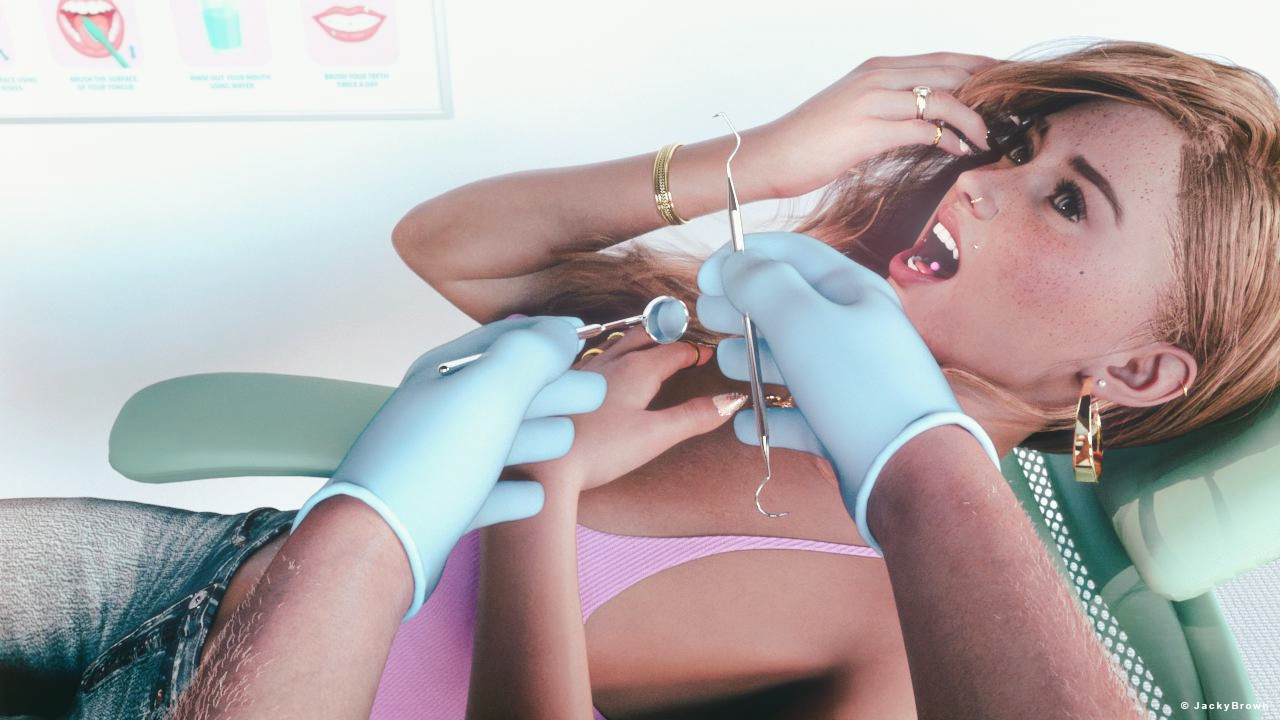
"No cavities! :)"
Starring: TaylorLasha-AngelieThe tale: (Entirely fictional)
"I believe I've seen a huge hole at 48 buccal, and that's like a cave for bacteria, I have to poke it with this dental hook pick to see if it is really a cavity." the dentist joked. "Whod? Wreely?" mumbled TaylorLasha-Angelie. "Nah, I'm just kidding, don't worry, no cavities as always! Well done!"
Non-motion Picture Soundtrack:
Dentist! - Little Shop of Horrors (The New Cast Album) (© 2019) EXPLICIT LYRICS!
https://www.youtube.com/watch?v=c8nB4N7MN7o
COUNTABLE FREEBIES: (Alphabetic order)#01! Bezel Set Ring for G3F G8F by AllenArt
https://sharecg.com/v/95896/gallery/21/DAZ-Studio/Bezel-Set-Ring-for-G3F-G8F **#02! Braid Bracelets for G3M, G3F, G8M, and G8F by Fisty
https://www.sharecg.com/v/92874/gallery/21/DAZ-Studio/Braid-Bracelets-for-G3M-G3F-G8M-and-G8F **#03! Chameleon ROse2 for Genesis 8 Female by zoro_d
https://www.renderosity.com/freestuff/items/85859/chameleon-rose2-for-genesis-8-female **
[Lashes morph used]#04! DaisyTop for Daz Genesis 8 Female by Digi-Dotz
https://www.digi-dotz.com/index.php/clothing/daisytop-for-daz-genesis-8-female#05! Dental Pick (FBX) by symension123
https://sketchfab.com/3d-models/dental-pick-b015b15b67e44d429d275b3216bcac3a **#06! Dentist Mirror v1 (OBJ) by printable_models
https://free3d.com/3d-model/dentist-mirror-v1--597938.html#07! ED's Brick Shader (Iray) by Edheldil3D
https://www.deviantart.com/edheldil3d/art/Freebie-ED-s-Brick-Shader-Iray-788871766 **#08! Flo Makeup For Genesis 8 Females by AprilYSH
https://shop.aprilsvanity.com/flo-makeup-for-genesis-8-females.html#09! Frame DIN-A by klausdbg
https://www.sharecg.com/v/66868/gallery/5/3D-Model/Frame-DIN-A **#10! Free Update for Biker Outfit G8F and Sideswept Hair by zoro_d
https://www.renderosity.com/freestuff/items/85860/free-update-for-biker-outfit-g8f-and-sideswept-hair **
[Side Swept ROse Hair update used only]#11! Hoop Earrings for Genesis8 Female by Afrodite-Ohki
https://www.renderosity.com/freestuff/items/92631/hoop-earrings-for-genesis8-female **#12! Iray car related shader presets 'megapack' by Tom2099
https://www.deviantart.com/tom2099/art/Iray-car-related-shader-presets-megapack-539622361 **#13! Iray Jewelry Shaders by AllenArt
https://sharecg.com/v/95893/gallery/21/DAZ-Studio/Iray-Jewelry-Shaders **#14! Kiara Interior HDRI by Poly Haven
https://polyhaven.com/a/kiara_interior#15! Little Flower Studs for Genesis 8 and/or 8.1 Female by AllenArt
https://sharecg.com/v/98499/gallery/21/DAZ-Studio/Little-Flower-Studs **#16! Maddy for GF8 Charakter Shape by MysticArtDesign
https://sharecg.com/v/98461/browse/21/DAZ-Studio/Maddy-for-GF8-Charakter-Shape **
[LIE Blush Make up & freckles, customized]#17! Morphing Pillow by TrekkieGrrrl
https://trekkiegrrrl.dk/mpp3.htm (item 1)#18! My Heart Necklace for Genesis 8 Female by Amy Aimei
https://www.deviantart.com/amyaimei/art/My-Heart-Necklace-for-Genesis-8-Female-729010047 **#19! Nail Art for Genesis 8 and 8.1 Female(s) by zoro_d
https://www.renderosity.com/freestuff/items/92918/nail-art-for-genesis-8-and-81-females **#20! New Walther 2.0 tanned skin + hair system by Ruslanomar
https://sharecg.com/v/98463/browse/21/DAZ-Studio/New-Walther-2.0-tanned-skin-%2B-hair-system **#21! Office Chair by inLite Studio
https://inlitestudio.com/3d/product/office-chair/ **#22! OnFleek for Genesis 3 & 8 Female(s) by AprilYSH
https://aprilsvanity.com/shop/onfleek-for-genesis-3-8-female-s.html#23! Pd-Soft Leather Daz Studio Shaders for Iray by Parrotdolphin (Janet)
https://sharecg.com/v/80223/gallery/7/Material-and-Shader/Pd-Soft-Leather-Daz-Studio-Shaders-for-Iray **#24! Piercing Gaze for Genesis 8 Females by SWTrium
https://www.renderosity.com/freestuff/items/83703/piercing-gaze-for-genesis-8-females **#25! Police Gloves for Genesis 8 by zoro_d
https://www.renderosity.com/freestuff/items/82851/police-gloves-for-genesis-8 **#26! PS Angelie for Genesis 8 Female or Genesis 8.1 Female by pixeluna
https://www.renderosity.com/freestuff/items/90309/ps-angelie-for-genesis-8-female-or-genesis-81-female **#27! Side Swept ROse Hair (G3F,G8F) Part 1&2 by zoro_d
https://www.renderosity.com/mod/freestuff/side-swept-rose-hair-g3f-g8f-part-1/79533 **
https://www.renderosity.com/mod/freestuff/side-swept-rose-hair-g3f-g8f-part-2/79534 **#28! SoulTrain Pants G8F_FREE by SdeB
https://www.sdebstore.com/collections/free-stuff/products/soultrain-pants-g8f_free **#29! SY 200 Morphs for Genesis 8 Head and Body by SickleYield
https://sharecg.com/v/91888/view/21/DAZ-Studio/SY-200-Morphs-for-Genesis-8-Head-and-Body **#30! TaylorLasha For Genesis 8 Female by MagicMaiden
https://www.renderosity.com/freestuff/items/92992/taylorlasha-for-genesis-8-female **
NO-COUNT ITEMS:--- Nose Ring 01 for G2F, G3F and/or G8F by AllenArt
--- Scene Lights for Iray by Lali Kamala (Holiday Loyalty Sale 2021 Free Item)
--- Tattoo Kit by Stegy [Glove cuffs]PURCHASED/PAID FOR ITEMS: None 100% Freebies
*1 E-mail address required
** Registration required
#x! Countable Items (Bold ones are used by me for the first time I think.)
--- No longer available freebies
++ Free with DAZ Studio (or the Essentials)
$x. Purchased/Paid For Item
Rendered with DAZ Studio 4.10.0.123 (nVidia Iray®)Other free software used: GIMP v2.10.34 and Irfanview 4.62
Postwork: Used some filters that come with GIMP. Also used mcjDenoise (https://sites.google.com/site/mcasualsdazscripts9/mcjdenoise) and mcjLut by mcasual (https://sites.google.com/site/mcasualsdazscripts9/mcjlut) with the free FilterGrade Cinematic LUTs Pack (https://filtergrade.com/free-cinematic-luts-video-editing/) and the Vintage-Look Photoshop Effects Pack/Light Leaks Effect Pack by Michael Jarrott (https://creativecloud.adobe.com/discover/article/vintage-look-photoshop-effects-pack).
"No cavities! :)"
DAZ Horse 3 - will there actually be any support this time?semperequstri said:
Richard Haseltine said:
Wrong and toonish aren't really helpful when it comes to figuring out what would need to change, though. Toonish in particular can be tricky - I have felt that about some other animal reelases that have generally been praised (and even soem human characters), but would need to narrow it down if I wanted to turn it into feedback that might inform future products (or even a service pack).
If more detail is required I'd be happy to make a series of examples. I just didn't think this was the place for that.
Go for it, I'd be interested in hearing your opinion. Just be aware we are looking at shape in the contraints of existing topography, rigging and poly limits. Each shape also needs to be capable of a fairly broad range of movement as Horse 3's rigging offers a much broader range of movement compared to other horses available. The shape also needs to be capable of representing male and female and play well with other morphs such as additive foal, add old age or breed mixing. Comments like the body should be 10% longer are not really helpful in this context as I have said the morph pack, which the shapes are built from, contains numerous morphs to make the body longer in multiple ways. So that is something that is easily corrected with a simple dial spin to user preference. You can even save the adjustments as a new character if you like. Also keep in mind their are no actual muscles keeping the shape defined, so muscle definition that looks correct in one pose may look awful in another. In most situations in modeling it's best to aim for a middle ground with muscle definition rather than perfect for one pose.
Daz 3D is part of

Connect
DAZ Productions, Inc.
7533 S Center View Ct #4664
West Jordan, UT 84084Licensing Agreement | Terms of Service | Privacy Policy | EULA
© 2026 Daz Productions Inc. All Rights Reserved.