-
UltraScenery - new(er) territory [Commercial]
I am on 4.23.0.4 Public Build on my Win 10/Win 11 computers and have no issues so far on any plug-ins or scripts. I haven't upgraded my MacBook Pro M1 to 4.23 nor to Sequoia due to so many warnings and lack of information on impact. I have tried to research but only found out a new update to Sequoia is due out in a few weeks that may fix problems the most recent fix didn't address. And I still haven't heard a clear answer if the M1 chip plays nice with Sequoia and Daz Studio. I just don't have it in me to clean up another disaster.
I did make headway on filament/filatoon this morning. And I have been setting up Alienator Pro sets for USC2. Kept wondering if it is possible to restrict the plants to specified areas, as in a garden?
AIUTO...CHI CONOSCE L’ITALIANO? PARTE QUATTORDICIImago said:
Kainjy said:
non so se vanno bene con Filament
Ovvio che non funzionano...

Come ti dicevo materiali e shader per un certo motore funzioneranno appieno solo col loro motore.
Chiedevo appunto perché, non avendo Filament sul mac, non avrei potuto usare quegli shader; i modelli anime base li ho presi comunque. Quando avrò tempo (per la serie "nuovo romanzo di Asimov") proverò sia l'accoppiata anime shapes/OsoToon su Iray, che eventualmente Filament mettendo la beta di 4.23 sul pc. Ma ancora prima devo liberare spazio sull'hard-disk per metterci la roba nuova...
Anime Toons and Filatoon Shader Q&AThought I'd experiment some more with older sets and trees - just going with the solution of removing the outline from the tree leaves so I don't deal with the block planes. Also tried out KA's atmosphere for filament (the mist plane option) since there's no DOF ability in filament to soften the background - this kind of helps. I only realized this morning that we can use skydomes in filament, so now I can put some of those skydomes from older 3DL sets to good use. I think I nabbed this skydome from one of 3DU's toon sets...
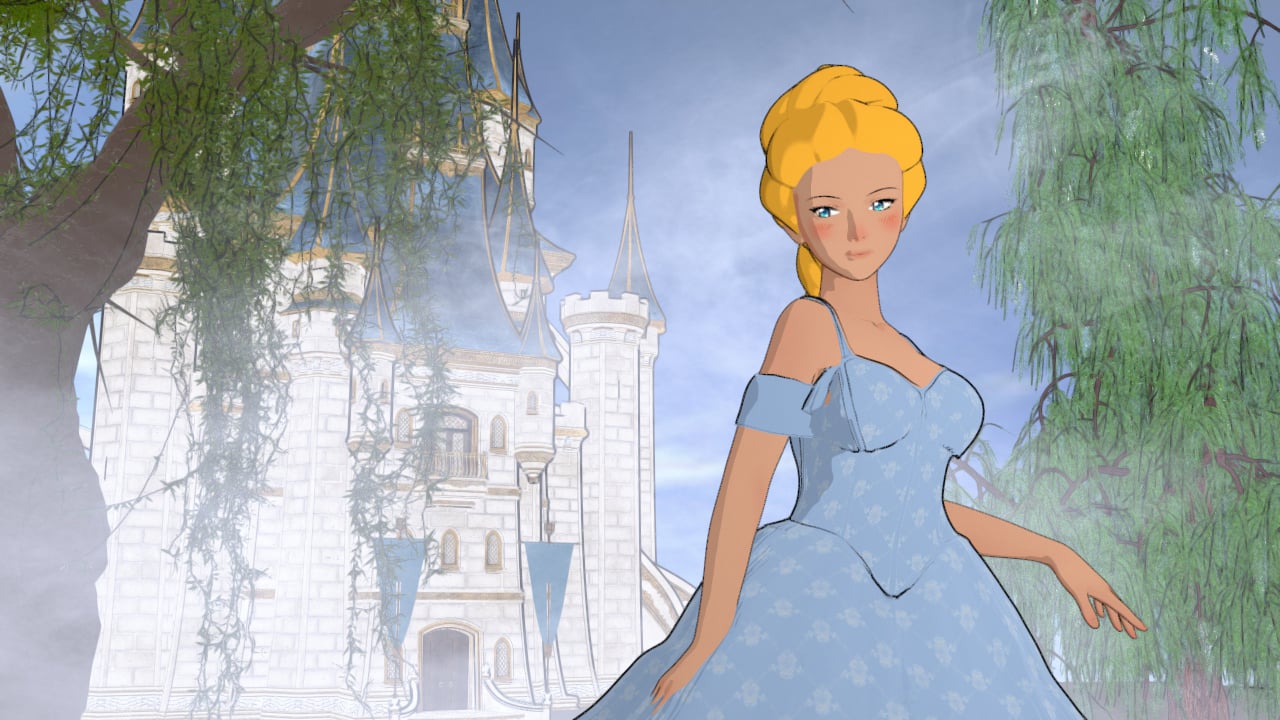 FilaToon / Cell shaded rendering with Filament
jdavison67 said:
I don't see how this is any better than 3Delight, which made a pretty good "toon like" render.
Rendering speed.
I have some Anime and toon shaders for 3Delight but all of them requires extra render time than normal. Filament is literally instant and you can even have all the shadows in real time. That's why we NEED Filament to be fixed and improved.
Anime Toons and Filatoon Shader Q&AMada said:
daznoob said:
Normally just a lurker here, and maybe I missed this, but I read through the thread and haven't seen the exact issue:
If any outline shader is applied, I get a black, glossy texture over the whole surface. Applies to the character skin as well as clothing. Disabling the outline on the specific surface lets me see the texture again. Used the default toon environment with distant light, filament, etc.
Even tried uninstalling and reinstalling all G9 essentials (3 parts), the 2 G9 default items, etc. via DIM. Same results. Messed with offset in the outline parameters, but it just looks like you're scaling a "shell" over the whole item.
I just use this stuff for fun so no big deal and no lost commissions/work or anything like that. Just wondering what the culprit might be.
Thanks! And otherwise looks really cool! Seeing everyone's renders makes me want to play with this some more.
Are you using the latest Daz Studio? The filament engine has undergone a lot of changes from earlier versions :)
Hahah...hooo, holy crap. I do a lot of tech support so I know fully well how often we just make dumb mistakes. That was a doozy.
I'd figured, hey, I always update via DIM and had double checked that it was listed there as the current version...
...but I still had a shortcut to an old version pinned to my taskbar and it's also what showed up when I hit [Start] and type Daz. But apparently I was launching 4.15 still and I am a dingus. But that's OK because everyone is a dingus sometimes and this one wasn't regarding anything important.
Cheers and thanks for pointing out the obvious
 Anime Toons and Filatoon Shader Q&A
Having checked, the grass and trees use black and white transmaps, which makes sense as Filament reacts badly to anything but pure black and white transmaps. The trees don't have outline shells, and the outline geoshell on the school has the grass turned off.
G9 TOON is so nice ,but I still have some questions...kyoreona said:
Leana said:
G9 toon is indeed G9 with a toon shape, and alternate eyes.
You can mix the toon shape with your other G9 morphs but I would recommend not using either of them at 100%. Mada suggested using the anime morph at 30% and a G9 morph at 70%, for example.To render with filament, set the render engine to "viewport" and use the filament style for the viewport.
Thank u !
But how can I render a roadlamp at the park in the night ?
add a point light or linear light
use the Filatoon shader on the bulb and set the ambient high and cast and recieve shadows off on the shader
bloom in the Filament draw node helps, can add lensflare too
G9 TOON is so nice ,but I still have some questions...Leana said:
G9 toon is indeed G9 with a toon shape, and alternate eyes.
You can mix the toon shape with your other G9 morphs but I would recommend not using either of them at 100%. Mada suggested using the anime morph at 30% and a G9 morph at 70%, for example.To render with filament, set the render engine to "viewport" and use the filament style for the viewport.
Thank u !
But how can I render a roadlamp at the park in the night ?
G9 TOON is so nice ,but I still have some questions...G9 toon is indeed G9 with a toon shape, and alternate eyes.
You can mix the toon shape with your other G9 morphs but I would recommend not using either of them at 100%. Mada suggested using the anime morph at 30% and a G9 morph at 70%, for example.To render with filament, set the render engine to "viewport" and use the filament style for the viewport.
Anime Toons and Filatoon Shader Q&ALlola Lane said:
Ok.. I'll join in the fun... been playing with Filament... Does anyone know HOW to do DOF? I can't seem to do it with the camera... I wanted the background blurry to bring out the character more. This is Aiko 5 with a bunch of morphs and expressions.
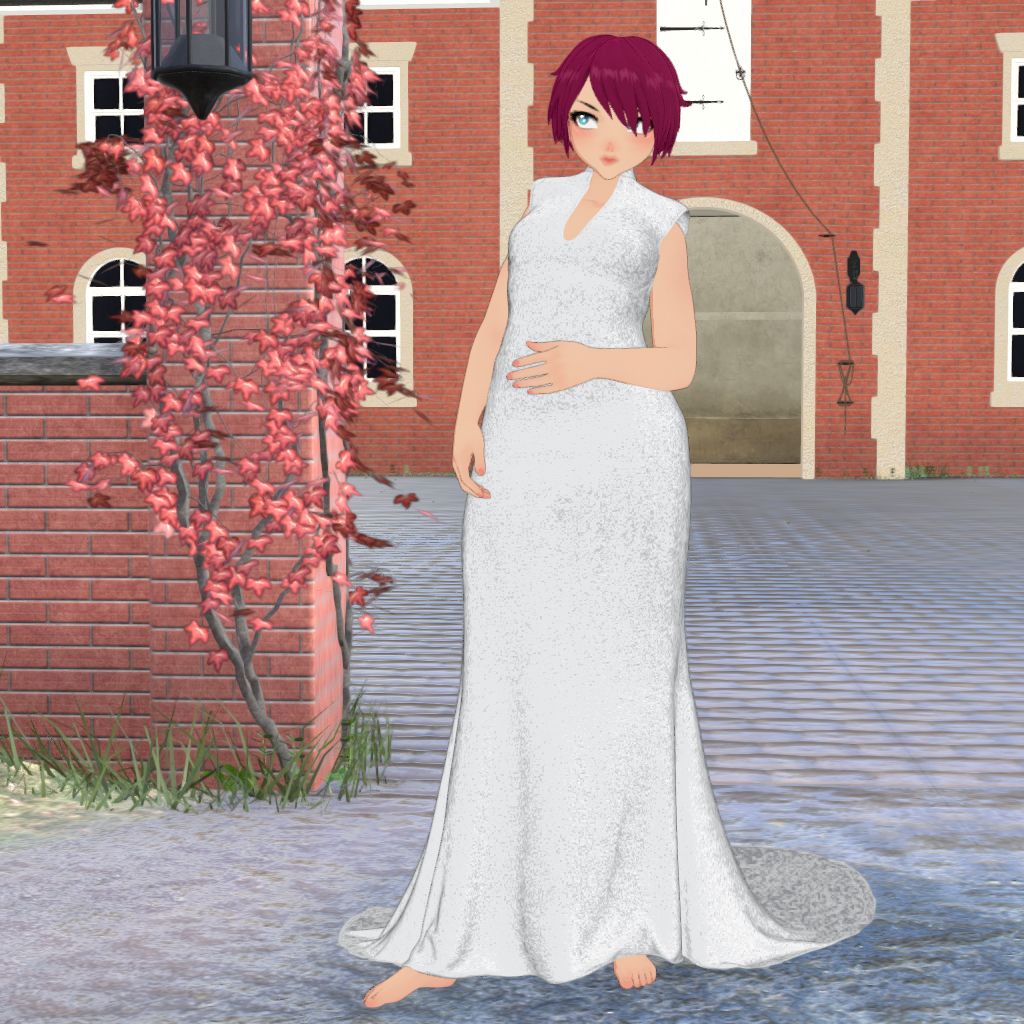
you could try basic depth map maker using iray canvas - theres a run through video on the product page.
AIUTO...CHI CONOSCE L’ITALIANO? PARTE QUATTORDICIKainjy said:
non so se vanno bene con Filament
Ovvio che non funzionano...
Come ti dicevo materiali e shader per un certo motore funzioneranno appieno solo col loro motore.
FilaToon / Cell shaded rendering with Filament3Diva said:
Wonderland said:
I started watching some anime on Netflix and noticed, at least in the particular show I was watching, that the lighting was totally flat. No shading on skin at all. The only shadows were ground shadows. Which makes me feel better because I can't seem to get lighting to work in FilaToon. I tried putting in colored rim lighting and it did nothing. But non-anime comics definitely do have shading so I will have to figure it out. I'm not sure why my lighting doesn't work even if I crank it up...
Can you share a screenshot of everything in your scene tab? Sometimes that can help to narrow down what the issue might be. For instance, you need a Distant Light in the scene, I recommend NOT having an Environment Options Node, NOR a Tonemapper Options node and JUST using the Filament Draw Options node and adjust the settings on the Filament Options Node accordingly.
I'm not on the computer now but basically I was setting it up with a three point lighting like I would in iRay with the light on one side a blue or purple color and the other yellow, orange or green. Nothing seemed to show up. There may have been a little light but no colors.
Anime Toons and Filatoon Shader Q&A3Diva said:
Llola Lane said:
Ok.. I'll join in the fun... been playing with Filament... Does anyone know HOW to do DOF? I can't seem to do it with the camera... I wanted the background blurry to bring out the character more. This is Aiko 5 with a bunch of morphs and expressions.
Lovely render!
I don't think Filament can do Depth of Field. To get the focus off the background and on the figure you can try a "fade out" of the background by making the background surfaces an Emission surface in the Surfaces Tab.
Ok.. I think I understand that... I'll give it a try :) If worse comes to worse I can always render the background and girl separate.. then merge them together... but DOF looks more realistic
FilaToon / Cell shaded rendering with FilamentWonderland said:
I started watching some anime on Netflix and noticed, at least in the particular show I was watching, that the lighting was totally flat. No shading on skin at all. The only shadows were ground shadows. Which makes me feel better because I can't seem to get lighting to work in FilaToon. I tried putting in colored rim lighting and it did nothing. But non-anime comics definitely do have shading so I will have to figure it out. I'm not sure why my lighting doesn't work even if I crank it up...
Can you share a screenshot of everything in your scene tab? Sometimes that can help to narrow down what the issue might be. For instance, you need a Distant Light in the scene, I recommend NOT having an Environment Options Node, NOR a Tonemapper Options node and JUST using the Filament Draw Options node and adjust the settings on the Filament Options Node accordingly.
Anime Toons and Filatoon Shader Q&Aelsephster said:
Elor said:
I'm likely still missing something.
I think I put something like 200000 lumens, but it only started having a visible impact once I got the spotlight close enough:
I ran into the same problem but then I finally found the Ray Length setting under Display was the solution. I have no idea why this is under Display instead of Light, but at least it worked. The default setting is only 2.5, which is very short.
in the Filament Draw environment settings, crank up scene light and distant light as needed
Anime Toons and Filatoon Shader Q&ALlola Lane said:
Ok.. I'll join in the fun... been playing with Filament... Does anyone know HOW to do DOF? I can't seem to do it with the camera... I wanted the background blurry to bring out the character more. This is Aiko 5 with a bunch of morphs and expressions.
Lovely render!
I don't think Filament can do Depth of Field. To get the focus off the background and on the figure you can try a "fade out" of the background by making the background surfaces an Emission surface in the Surfaces Tab.
Anime Toons and Filatoon Shader Q&AOk.. I'll join in the fun... been playing with Filament... Does anyone know HOW to do DOF? I can't seem to do it with the camera... I wanted the background blurry to bring out the character more. This is Aiko 5 with a bunch of morphs and expressions.
UltraScenery - new(er) territory [Commercial]daveso said:
paulawp (marahzen) said:
barbult said:
memcneil70 said:
I think folks are playing with filatoons and rediscovering the 3DL roots.
That is a very astute and interesting observation. Here we are, all excited about essentially regressing a decade.
Filament is a much faster renderer (Viewport) than 3DL, though, and the outline is interesting.Not to derail this thread, my only "toonish" interest was in being able to create coloring book page-type images, particularly including USC. One of my coworkers was creating coloring book pages to distribute at work and I offered to help, thinking that I could whip up something from Daz. Never made a single one.
with the new line making capability, would it be possible to create a coloring book page? Using ultrascenery could result in some really interesting coloring work.
The new stuff is only in 4.23 beta, right? I have to admit I'm a little reluctant to upgrade my beta instance, which is still on a somewhat older 4.22.1.x version. It's the only way I can render many/most USC scenes.
ETA: I see that it looks like 4.23 is available for general release. That I will try, not today but soon. I've been a little out of touch the last few days with work stuff.
Anime Toons and Filatoon Shader Q&AMada said:
Mark_e593e0a5 said:
If I undrestand this correctly, the shaders only work in Filament render mode - which is not available at all on Mac up until current 4.22 version. Mac users have been instructed NOT to upgrade to 4.23, so I cannot check if it has been made avilable - suppose it isn't. I really like the look of the shaders, but they seem to be not useable for me. Please tell me I am wrong.
Unfortunately you are correct - but there are work going on behind the scenes to get it out to mac users as soon as possible. The shader relies on filament to work properly.
Well, it's true that they're working behind the scenes to get it out to Mac users, but I've been waiting almost a full four years now for Filament on the Mac and it won't be availble until Daz Studio 5 comes out. I'm not holding my breath.
Thanks for this thread, though, it's exciting to see what's being done for those who can use it.
UltraScenery - new(er) territory [Commercial]paulawp (marahzen) said:
barbult said:
memcneil70 said:
I think folks are playing with filatoons and rediscovering the 3DL roots.
That is a very astute and interesting observation. Here we are, all excited about essentially regressing a decade.
Filament is a much faster renderer (Viewport) than 3DL, though, and the outline is interesting.Not to derail this thread, my only "toonish" interest was in being able to create coloring book page-type images, particularly including USC. One of my coworkers was creating coloring book pages to distribute at work and I offered to help, thinking that I could whip up something from Daz. Never made a single one.
with the new line making capability, would it be possible to create a coloring book page? Using ultrascenery could result in some really interesting coloring work.
Daz 3D is part of

Connect
DAZ Productions, Inc.
7533 S Center View Ct #4664
West Jordan, UT 84084Licensing Agreement | Terms of Service | Privacy Policy | EULA
© 2026 Daz Productions Inc. All Rights Reserved.