-
Freebie Challenge JUN/JUL 2023 - Holes, Gaps, Caves, Tunnels - Entries Thread Only
Free contest june july 2023
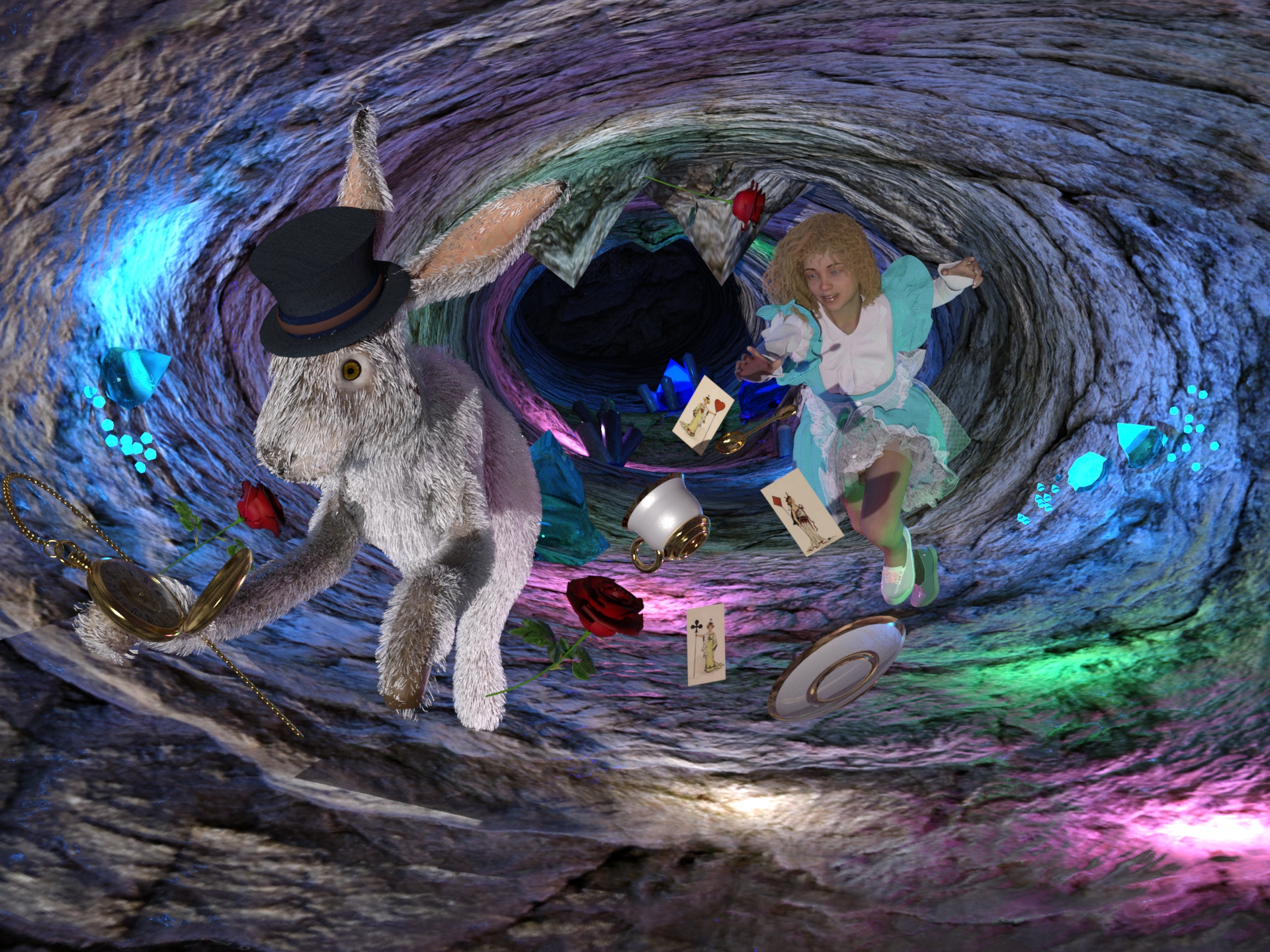
Holes, Gaps, Caves, TunnelsAlice follows the White Rabbit into the Tunnel to Wonderland
Freebies
pocket clock 3Ddi evilvoland
https://www.turbosquid.com/it/3d-models/3d-vintage-pocket-watch-1196580Sci-fi Cave Free 3D model
https://www.cgtrader.com/free-3d-models/science/other/sci-fi-caveFollow the white Rabbit
https://sharecg.com/v/95671/gallery/21/DAZ-Studio/Follow-the-white-RabbitHare
here:https://sharecg.com/v/33792/browse/11/Poser/HareHare Fur
https://sharecg.com/v/97389/gallery/21/DAZ-Studio/Hare-Fur
Merlin rose
http://www.merlinstudios.co.uk/temp/MerlinsRose.zipLily Character Morph For G8 and G8.1 Female
https://www.renderhub.com/humanxystudio/lily-character-morph-for-g8-and-g8-1-female
https://www.cgtrader.com/free-3d-models/character/woman/lily-character-morph-for-g8-and-g8-1-femaleDingo's Wild Curls for Genesis 8 Female by Dingo
https://www.renderosity.com/freestuff/items/86422/dingos-wild-curls-for-genesis-8-femaleGothic maid Outfits for Genesis 8 Female by MarcelineClaudel
https://www.renderosity.com/freestuff/items/82223/gothic-maid-outfits-for-genesis-8-femaleAllegro Trainers for Genesis Female 8 by Rapier69
https://www.renderosity.com/freestuff/items/88819/allegro-trainers-for-genesis-female-8Twizted Character Creation Kit by TwiztedMetal
https://www.renderosity.com/freestuff/items/81217/twizted-character-creation-kitThere are some problems uploading file, I put a link to gallery
P.S.: I downloaded merlin rose a lot of time ago. Now I found the link on a forum page from 2013, at this address. A Rose by any other Texture (.......wow, that was horrid). Need a rose prop, anyone got an idea? - Daz 3D Forums
On the page is the direct download link I mentioned, which gives an error message, but choosing the "keep" option downloads the file.
Need to Solve a dForce Problemmikethe3dguy said:
crosswind said:
Unfortunately I don't have it either.
From other items of faintblue, I didn't see any dForce add-on so I presume there is no add-on on this one either...but they really prefer to making morphs based on various poses. So first check if there's a morph suitable for your figure's pose. (I see at least 20 morphs for 20 poses...from ReadMe)
Ohhh, I see. Thanks! Never seen pose files for figures that pose the clothing too. That seems really strange and limiting. Damn, not sure I can use that for what I need. Though I suppose I can try starting with a pose where the shirt is open, re-painting areas of the weight map, then transitioning to the pose I want my character to assume in a dForce sim. Though buttons might behave badly. Lotta work for what's going to be 3-4 poses.
You don't happen to know of a dForce men's dress shirt that can open and just simulate normally, do you? I think there might be some for G8F, though I might be able to use them. Haven't found one for G8M.Nah... tbh, I rarely see men's dForce Shirt with both good open/close morphs... Well on the contrast, there're some from womenswear...
They could be auto-fitted on G8M or converted for G8M with Genesis 8 Cross-Figure Resource Kit, as long as you think the design / style of the shirt may well suit a man character.
 Need to Solve a dForce Problem
crosswind said:
Unfortunately I don't have it either.
From other items of faintblue, I didn't see any dForce add-on so I presume there is no add-on on this one either...but they really prefer to making morphs based on various poses. So first check if there's a morph suitable for your figure's pose. (I see at least 20 morphs for 20 poses...from ReadMe)
Ohhh, I see. Thanks! Never seen pose files for figures that pose the clothing too. That seems really strange and limiting. Damn, not sure I can use that for what I need. Though I suppose I can try starting with a pose where the shirt is open, re-painting areas of the weight map, then transitioning to the pose I want my character to assume in a dForce sim. Though buttons might behave badly. Lotta work for what's going to be 3-4 poses.
You don't happen to know of a dForce men's dress shirt that can open and just simulate normally, do you? I think there might be some for G8F, though I might be able to use them. Haven't found one for G8M.Freebie Challenge JUN/JUL 2023 - Holes, Gaps, Caves, Tunnels - Main ThreadFree contest june july 2023
Holes, Gaps, Caves, TunnelsAlice follows the White Rabbit into the Tunnel to Wonderland
Freebies
pocket clock 3Ddi evilvoland
https://www.turbosquid.com/it/3d-models/3d-vintage-pocket-watch-1196580Sci-fi Cave Free 3D model
https://www.cgtrader.com/free-3d-models/science/other/sci-fi-caveFollow the white Rabbit
https://sharecg.com/v/95671/gallery/21/DAZ-Studio/Follow-the-white-RabbitHare
here:https://sharecg.com/v/33792/browse/11/Poser/HareHare Fur
https://sharecg.com/v/97389/gallery/21/DAZ-Studio/Hare-Fur
Merlin rose
http://www.merlinstudios.co.uk/temp/MerlinsRose.zipLily Character Morph For G8 and G8.1 Female
https://www.renderhub.com/humanxystudio/lily-character-morph-for-g8-and-g8-1-female
https://www.cgtrader.com/free-3d-models/character/woman/lily-character-morph-for-g8-and-g8-1-femaleDingo's Wild Curls for Genesis 8 Female by Dingo
https://www.renderosity.com/freestuff/items/86422/dingos-wild-curls-for-genesis-8-femaleGothic maid Outfits for Genesis 8 Female by MarcelineClaudel
https://www.renderosity.com/freestuff/items/82223/gothic-maid-outfits-for-genesis-8-femaleAllegro Trainers for Genesis Female 8 by Rapier69
https://www.renderosity.com/freestuff/items/88819/allegro-trainers-for-genesis-female-8Twizted Character Creation Kit by TwiztedMetal
https://www.renderosity.com/freestuff/items/81217/twizted-character-creation-kitThere are some problems uploading file, I put a link to gallery
Need to Solve a dForce ProblemUnfortunately I don't have it either.
From other items of faintblue, I didn't see any dForce add-on so I presume there is no add-on on this one either...but they really prefer to making morphs based on various poses. So first check if there's a morph suitable for your figure's pose. (I see at least 20 morphs for 20 poses...from ReadMe)
Can I use Mesh Grabber for custom morphs on clothes?If you want to spend money, you can use this: https://www.daz3d.com/mesh-grabber-morph-editor-win
It saves a morph you created with Mesh Grabber directly to the item. I'd also recommend the bundle (the tools are also available for mac) https://www.daz3d.com/mesh-grabber-bundle-win
Also, this excellent turorial session: https://www.daz3d.com/mesh-grabber-expert-guide-powerful-manipulation-of-meshes-and-morphs
Can I use Mesh Grabber for custom morphs on clothes?If you export the clothing after mesh grabber modification at base resolution, you can import it as a morph and save that.
Can I use Mesh Grabber for custom morphs on clothes?Good day all,
Is it possible to use mesh grabber to create a custom morph for an existing piece of clothing so that I can create a slider that will show up whenever I upload the outfit?
Cheers
daz transfer utility I have some questionsI still don't understand what you are trying to do.
But are you aware of that DS default assumes that your object is modelled towards the base character, when using transfer utility.
Vo Yonina for G9 mouth morph is always active.FSMCDesigns said:
jd641 said:
CS reported back that they were able to reproduce the issue and will report back when there's a fix.
It doesn't seem like there are too many people who have Yonina but just in case someone buys it before a fix is out, DAZ is aware of the issue now.

Anyway, good CS caught it so hopefully the PA can learn for next time..
Update: CS tried to fix it, the update didn't change anything, I managed to fix it myself and showed them what I did and they thanked me for solving the issue. A few weeks later an update came out and I thought that they implimented what I had done and that would be it finally but it was just the same outdated mouth morph file which replaced my fixed file. I was too annoyed to fix it again so I just left Yonina installed but I never used her. I finally uninstalled Yonina yesterday and now every single file I have that has g9 in it (which is a lot) is complaining that I'm missing two morphs, both are for Yonina, "Vo Yonina Eyes.dsf" and "Vo Yonina Lashes.dsf". If it was't so long since I bought this, I'd ask for my money back but it's been quite a while. But this vendor... I really wish I could get my money back directly from that sale because with this mess I'm really annoyed that they have any money from me. Lesson learned though, I'll never buy anything from them again.
I'm disappointed that CS couldn't fix the mouth morph issue after two tries, but after uninstalling it and having two more morphs that were apparently active, screwing up every file with g9 in it I'm not sure how this made it past QA.
a handful of daz questions, and some requestsGordig said:
iDiru said:
I'm sorry to be posting in here again...I'm such a newbie to daz studio.
I want to ask a few questions and request some things. First off, I want to make my own character with Genesis 8. In Poser I saved it to the library once it was finished with hair and other attachments so I didn't have to redo everything.
How can I do something like this in Daz? How do I save a figure I've made to the library?
File -> Save As -> Wearable preset with the main figure selected. If you also want to save the morph and/or textures, you can also use Character preset under the same menu. *snip
I would save as a Scene Subset instead.
daz transfer utility I have some questionsAfter creating a character, switch to base, export obj, and then pour it into DAZ. If I use the transfer utility to import obj models, they will change. Even if I do not create new vertices, the model will still be disordered
Why Sometimes Genesis 9 Expression Can't be Zeroed?Most likely there's a single dial of expression (comes from Expression products in most of the cases... )... that single dial's Owner Node must be Genesis 9 other than its Head. If you select Head to Zero Selected Item(s) Pose, it won't work. However if you select G9's root node to zero pose..., all poses will be zeroed... If the author of the product created a linked morph or an Alias of that single expression dial on G9's head, that would work for Zero seleted items pose...
So you either use the Zero Expression / Reset Expression presets come along with that Expression product, or manually reset the dial, or Save a 'Zero Expression' Pose Preset from a G9 Base figure with no expressions (only select the path: Pose Controls - Head), then use this Pose Preset to zero figure's expressions. (You have to save such a preset from time to time after you install an Expression Product...)
hair ID - from JS Katey promos - SOLVEDFae3D said:
I believe it is Fae Halfup Hair for Genesis 9, 8, and 8.1
I agree. Looks like it has a blow back morph applied.
https://www.daz3d.com/fae-halfup-hair-for-genesis-9-8-and-81
https://gcdn.daz3d.com/p/89889/i/faehalfuphairforgenesis98and8105daz3d.jpg
Daz Bridge Support Is Here!Hivolt said:
Hair does not transfer over to Blender.
The skeketon is a bunch of odd shapes too
Seems that the hiar was converted to something that in blender shows up as a dot.
I had better luck with the other importer other than the skeletons it imported for the mouth eyes and other parts
Probably dForce or Strand based hair (the version built into DS, the old Garibaldi plug-in which became the built-in version, or Look At My Hair).
Daz Bridge Support Is Here!Hair does not transfer over to Blender.
The skeketon is a bunch of odd shapes too
Seems that the hiar was converted to something that in blender shows up as a dot.
I had better luck with the other importer other than the skeletons it imported for the mouth eyes and other parts
Possible to turn off collision for specific body parts?LOL! I am in love with that female soccer player! (hehehehehehe)
I have to second that auto fit and smoothing generally do a really good job, given the enormous number of figures and character morphs that abound in the DAZ world.
But in addition to the original request to turn off collision on body parts (even just a check to ignore hands or foot parts would be awesome), I add another request ... and that would be to specify more than one item as a collision base.
Take for example you have a long shirt or tunic top that you are going to put over pants from a completely different set. So there is no existing morph for the tunic top to fit over those pants. In that case, if you choose to collide against the pants, the upper part of the tunic might have pokethrough with the character. If you choose to collide against the Genesis figure, you get pokethrough in the areas over the pants. Ideally, it would be nice to choose BOTH the character and the pants. (Unless there is a way to do that and I am missing something somewhere?)
[Released] Legacy Set Converter * Commercial *WillowRaven said:
I posted the following question in the commons area, and someone led me here.
"Questions using Legacy Set Converter on the original Toon Generations Bundle.
I've used the converter to convert poser props successfully, but they didn't have morphs or added texture/material options or Poser 'poses' files with material choices. Materials aren't that big a deal since I tend to resurface almost everything to suit my needs, but just so I know, does the converter also convert morphs, pose files, etc., too? Will the ability to age up and down the figure still be an option? Do I have to do something special to keep morphs? And what about poses?
Update:
Just playing with it, I see that the dial-in body shapes and poses followed with the conversion. Does anyone know anything more about the LSC?"
Naturally, I hadn't read here first to know it can't convert figures or clothes, and I just plowed in and experimented while waiting on possible responses. I was pleasantly surprised LSC does convert at least some figures. They are not textureless, and the dial-in morphs are working. The clothes and hair did, too, but those are all plain clothes and toon hair sets. Both fit the figure fine and follow the poses and morph as expected. LOVING this set and will grab the material converter set you have, too.
I did convert some figures, but as there "might be" issues, I decided to say "not supported", but I know that some will work, but it is a "try on your own risk". Glad to hear you found it useful.
mouth gets distorted when trying to convert from g8m to g3mm300 said:
hi im tryin to convert Archdemon HD for Genesis 8 Male to genesis 3 male but the mouth gets distorted and really wired looking
im using transfer utility
can someone please help?
No, the HD morphs 'we the people' cannot transfer between the Genesis figures. Only PAs can as they have access to another tool required for that task.
An awful lot of work would have gone into that figure, requiring undoubtedly all kinds of what I call 'fix-it' morphs, so it will work correctly on the figure it is intended for.
What I would suggest doing is using that character with G8M and then go into the Hidden morphs [Parameter Tabs with show hidden toggled on] and dial in some of Genesis 8 female. See how that works for you.
Van Helsing 9carlosgimpera said:
I like her, nice details and one of the best originals body morph yet, imo. She reminds me of Jacqueline 8.1. Nice mix with Joan 9, an oportunity to use her morph for something else. The make up pack has more options than ever and I really like it is subtle, not as crazy as some of the make up packs that came with last characters. As I didn't have any banner/token bought the character and make up only.
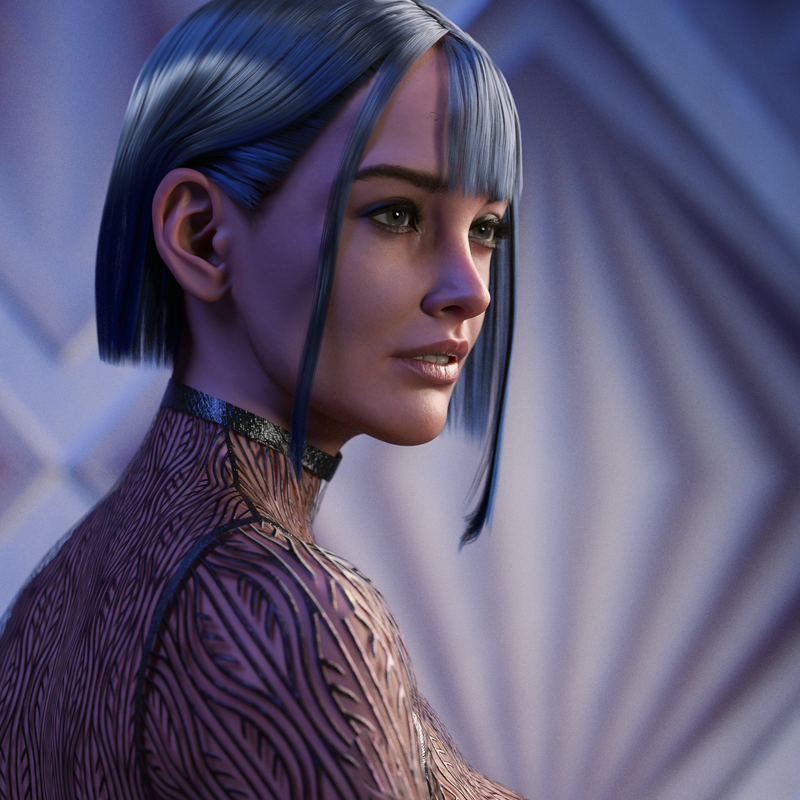
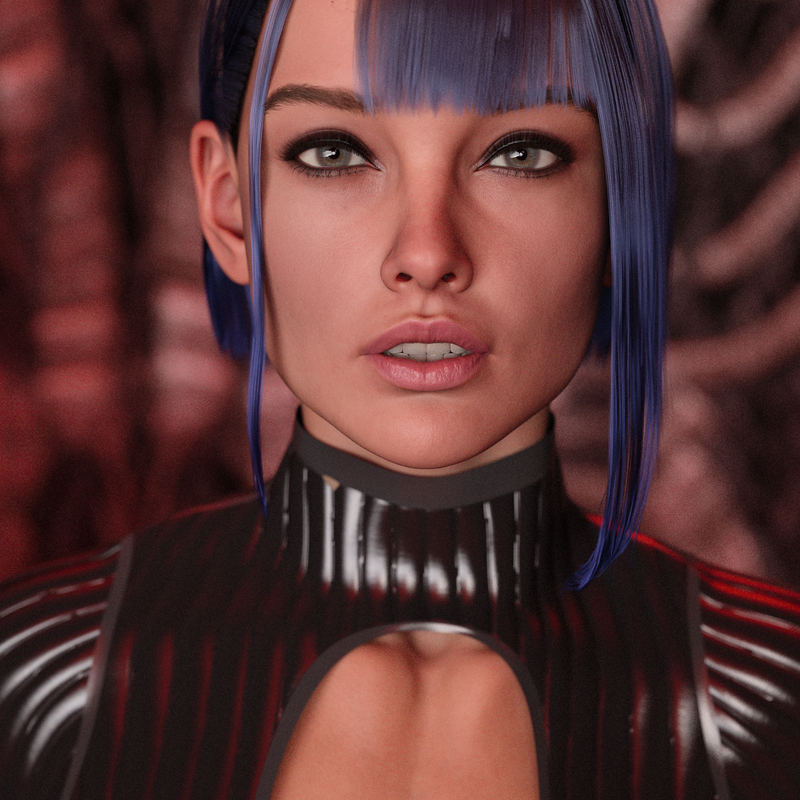
like those renders. What hair is that?
Dont think I have seen it in the store.
Daz 3D is part of

Connect
DAZ Productions, Inc.
7533 S Center View Ct #4664
West Jordan, UT 84084Licensing Agreement | Terms of Service | Privacy Policy | EULA
© 2026 Daz Productions Inc. All Rights Reserved.