-
Morph between characters
Export you modified mesh as obj, then use morph loader too in DS to import that obj as a morph. On you've done that you can save it as a new morph asset if you want to have it available in other scenes.
If the morph differs a lot from the base shape, you might need to adjust rigging to shape too.
Morph between charactersHello. I'm new to the program, so I apologize if the answer is obvious. I took the original genesis character, exported it to another program, modified it, imported it back. The topology, geometry, and numbering of the vertices completely coincide with the original model, only the position of the vertices has been changed. Is there a way to create a morph between the original character and the modified one. A morph that will be used as a slider for the original genesis model (so that it is compatible with the original one), which can be smoothly changed from the original one to the modified one.
Has anyone, or any product been successful at converting G8.1's JCMS over to G9 yet?Not yet!
The market we serve (Android/Apple) gets very upset about bikinis et.al. so all of our game characters are generally clothed in long-sleeved, long skirted or trousered apparel. The noodly limbs aren't a problem when they're hidden by dForce clothing. It is more obvious with non dForce items that are not easily convertible and a fair few of these have hit the store lately...
I've wracked my brains trying to figure out a solution to this - we can transfer the figure shapes - but the geometry is just too different for a quick fix for JCMs to work. I suspect it will need someone with good human modelling skills to make it happen.
We'll be buying a decent set of JCMs the second they hit the store but, frankly, they should have been provided with the figure.
Has anyone, or any product been successful at converting G8.1's JCMS over to G9 yet?Has anyone, or any product been successful at converting G8.1's JCMS over to G9 yet?
It's a long wait, to see if K.M.Image will come out with their morphs again, so I may as well see if it is possible to transfer G8.1's UNBM over to G9, until it comes out, well, hopefully, it will come out at some point, as G9 is naked without them as far as I'm concerned, as I rely heavily on UNBM!
Things I'm Playing with ........carrie58 said:
I don't know what changed but I can upload pictures again!! That makes me very happy! This is G9 with a CDI head morph ,needs some work on the eyes but Ihave to learn how to do that.......so much to learn so few brain cells ....
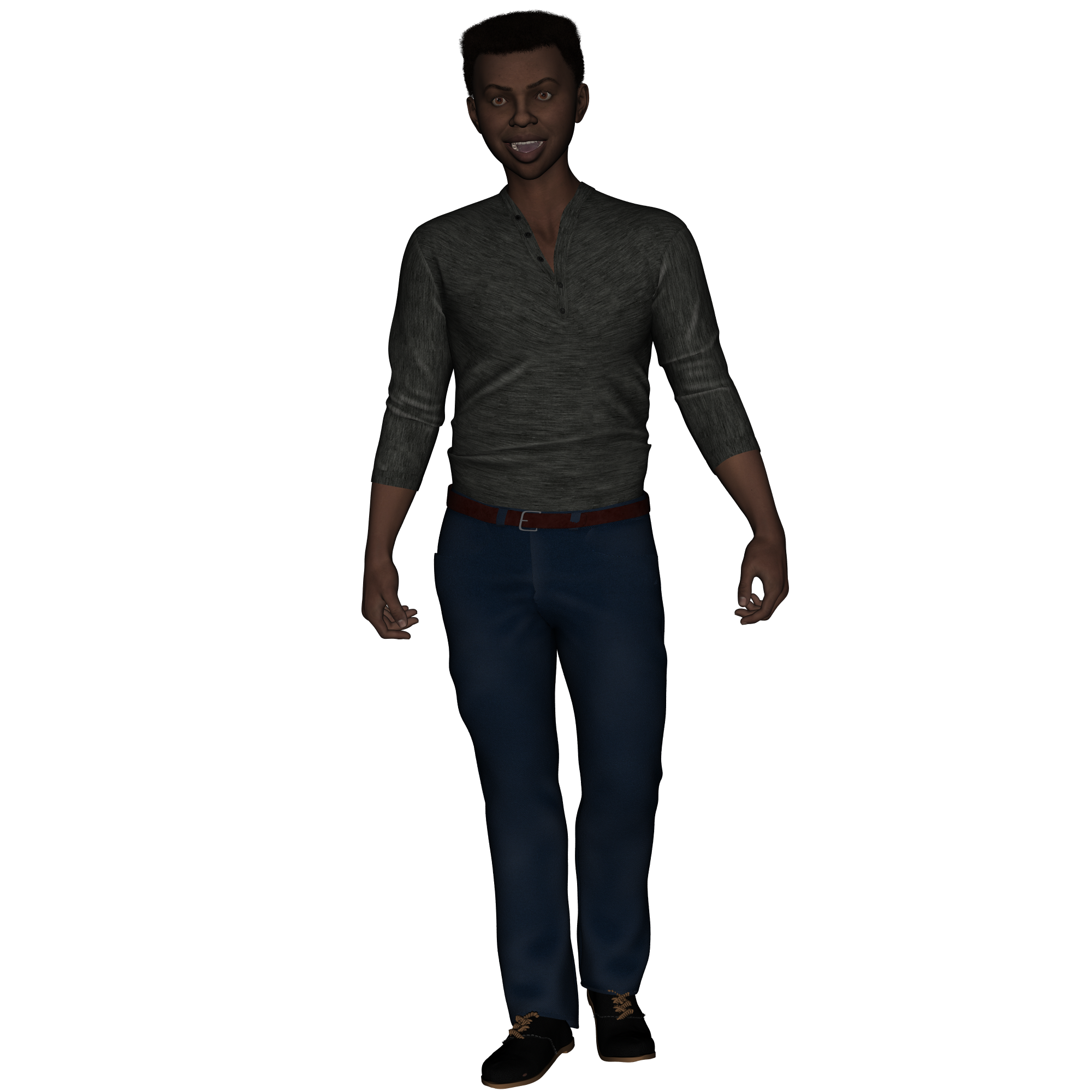
Wow, that outfit never gets old! And now it works with G9. Great figure!
Angler-fish head morph with the dangly light attachmentan Angler-fish head morph with the dangly light attachment for Genesis 9 and the earlier generations (if not too hard) would be cool.
matching skin and webbed hands etc a bonus.
Maybe a variety of fishy shapes.
[Released] ManFriday’s Figure Converter for Genesis 9 [Commercial]vwrangler said:
Bunyip02 said:
TheRenderer said:
I've already seen a few posts about wonky hands and arms appearing post-conversion and just wanted to say that I have noticed the same thing happening but ONLY after I apply a unique G9 pose to the newly converted character (which was originally a G8). Other than that, the character conversion is nearly perfect.
For me at least, the 'bend' slider limits on the hands of these converted characters are very wide which is leading to some pretty distorted figures.
Had the same problem, went into the Joint Editor and adjusted the rigging to shape, then froze the ERC and saved the morph, poses worked fine after that. Don't know if that is a bug in the conversion.
The PDF that comes with the program does explicitly say that the Adjust-Rigging-to-Shape part might be needed, although it doesn't mention ERC Freeze.
From the PDF manual -
6 After conversion
After the Figure Converter reports a successful morph conversion, there are
two additional steps you might want to take:1. You probably want to run “Adjust rigging to shape”. to adjust the target
figure’s rigging to the new morphs. If you turn on the Joint Editor tool
when your converted morphs are active and they contain substantial
displacements, you might find that the figure’s bones no longer align with
the figgure’s shape: they might be outside the body, or point in awkward
angles. To fix that, turn on your converted morphs in the target figure
and select the “Adjust rigging to shape” command, which adjusts the
bones to the current shape of the figure.“Edit” -> “Figure” -> “Rigging” -> “Adjust Rigging to Shape”
2. After conversion, your new morphs “live” in the Genesis 9 figure in
the current scene. To add them to all Genesis 9 figures on the system,
you need to save them out as morph support assets. The “Conversion
complete” window (figure 5) has a button for that; see the next section for
details.Character does not return to y=0.00 when using "Move to Floor".You haven't used a length morph that has misplaced the feet position?
Things I'm Playing with ........I don't know what changed but I can upload pictures again!! That makes me very happy! This is G9 with a CDI head morph ,needs some work on the eyes but Ihave to learn how to do that.......so much to learn so few brain cells ....
DAZ Horse 3 - will there actually be any support this time?xyer0 said:
MelissaGT said:
Here is a quick comparison of the new head moprh and color next to Harry. I tried to find the closest approximation of coat color for Harry. This is the Grulla Dun coat along with the Fresian morph (click for bigger size) -
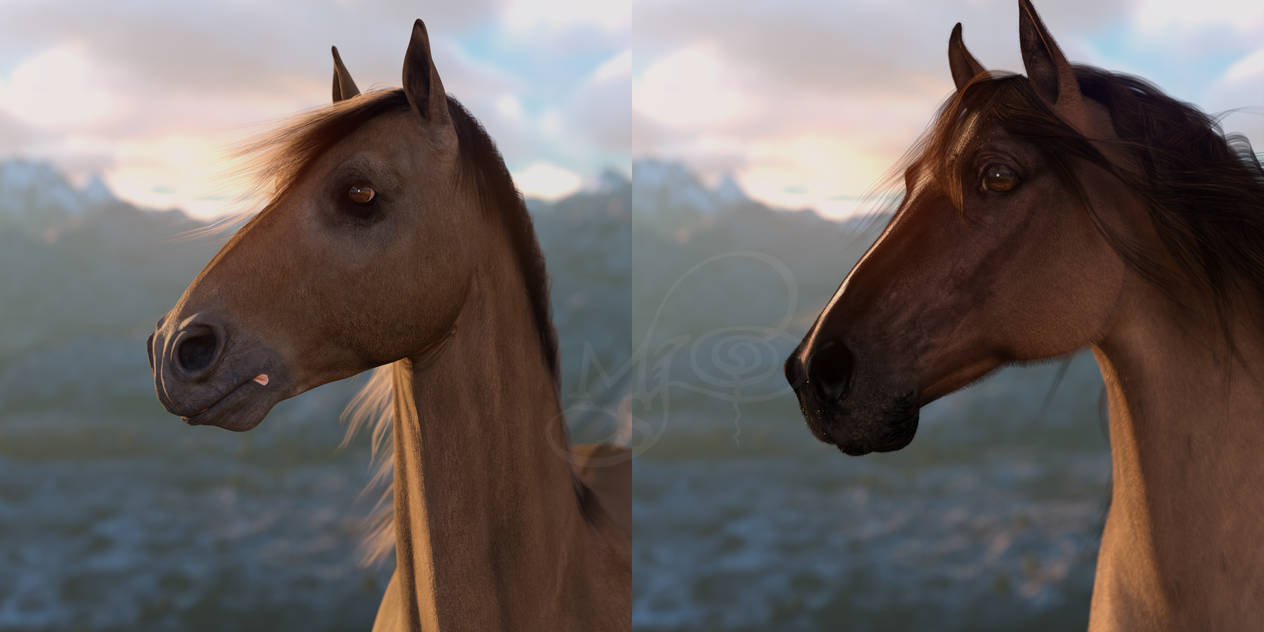
Oof! Thanks for saving me money. Is it a camel, giraffe, or mule? What's up with his tongue?
That's not his tongue...it's a coloration on the lip texture.
DAZ Horse 3 - will there actually be any support this time?MelissaGT said:
Here is a quick comparison of the new head moprh and color next to Harry. I tried to find the closest approximation of coat color for Harry. This is the Grulla Dun coat along with the Fresian morph (click for bigger size) -
Oof! Thanks for saving me money. Is it a camel, giraffe, or mule? What's up with his tongue?
DAZ Horse 3 - will there actually be any support this time?MelissaGT said:
Here is a quick comparison of the new head moprh and color next to Harry. I tried to find the closest approximation of coat color for Harry. This is the Grulla Dun coat along with the Fresian morph (click for bigger size) -
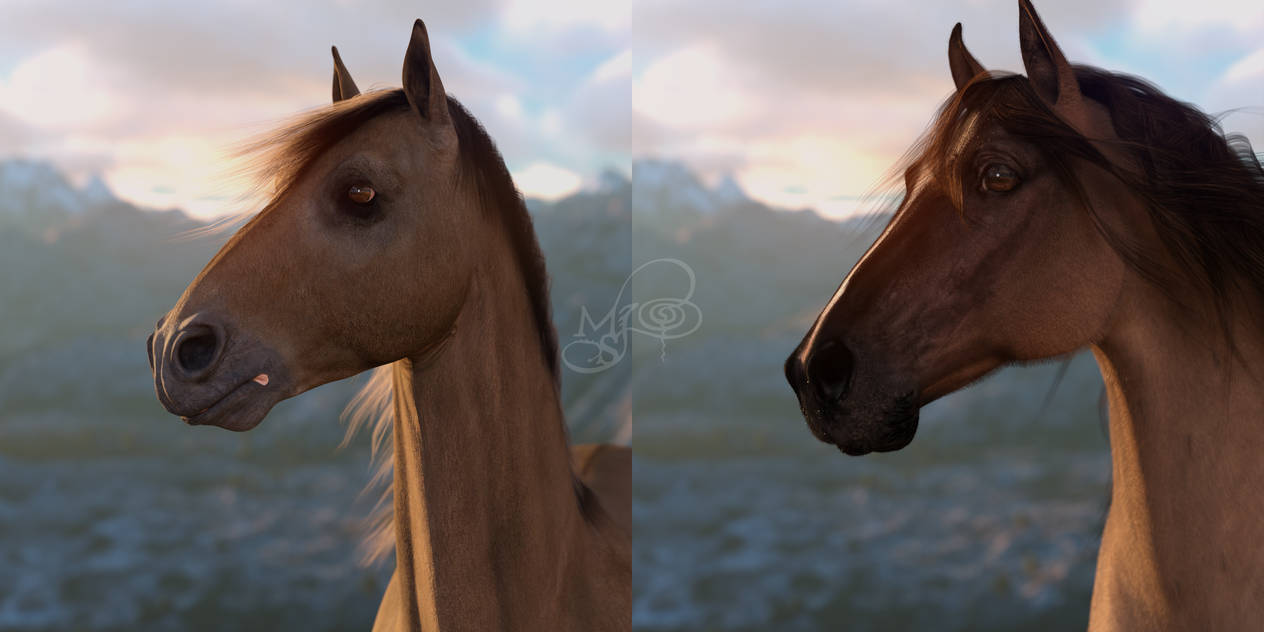
Thanks, very nice renders also! Okay, the Hivewire horse is still in a league of its own, absolutely.
DAZ Horse 3 - will there actually be any support this time?Here is a quick comparison of the new head moprh and color next to Harry. I tried to find the closest approximation of coat color for Harry. This is the Grulla Dun coat along with the Fresian morph (click for bigger size) -
[Released] ManFriday’s Figure Converter for Genesis 9 [Commercial]Bunyip02 said:
TheRenderer said:
I've already seen a few posts about wonky hands and arms appearing post-conversion and just wanted to say that I have noticed the same thing happening but ONLY after I apply a unique G9 pose to the newly converted character (which was originally a G8). Other than that, the character conversion is nearly perfect.
For me at least, the 'bend' slider limits on the hands of these converted characters are very wide which is leading to some pretty distorted figures.
Had the same problem, went into the Joint Editor and adjusted the rigging to shape, then froze the ERC and saved the morph, poses worked fine after that. Don't know if that is a bug in the conversion.
The PDF that comes with the program does explicitly say that the Adjust-Rigging-to-Shape part might be needed, although it doesn't mention ERC Freeze.
[Released] ManFriday’s Figure Converter for Genesis 9 [Commercial]I've not been able to successfully get this to work. I've followed the instructions, but any G8 character that I've tried to convert I get the following:
---------------------------
Error — ManFriday's Figure Converter V1.0.5
---------------------------
<p><b>Could not convert figure.</b></p>
<p>Failed to find new morph “Temporary high-res morph” in node “tempg8-tgt-ImnOrx4a” figure after conversion; Morph Loader Pro returned: “”.</p>
---------------------------
OK
---------------------------Please assist.
Disregard. I've figured out the issue and it's working now. Proceeding on to testing with some of my custom characters.
DAZ Horse 3 - will there actually be any support this time?@MelissaGT, I see now what you mean, one cannot combine it with any of the other pre-made shapes. Since I've only bought the DA Morph pack, not the shapes (https://www.daz3d.com/da-ultimate-morph-pack-for-daz-horse-3), and I don't like the Thoroughbred that much, I guess I'd be okay with that. I've checked the DA morphs in the file list, and these really do only include morphs for single body or head areas, so they should be useable along with the Deepsea morph.
I understand your general disappointment, though. I was expecting something much more - I dunno, advanced maybe as well. Which, clearly, Horse 3 isn't, from all I've read here. Still, I do like the extra figures one can make with Horse 3, like the reindeer and Sleipnir, and Pegasus, and now this pretty lil one.
DAZ Horse 3 - will there actually be any support this time?tsroemi said:
MelissaGT said:
tsroemi said:
JOdel said:
Looks like Deepsea has waded into the pool now. He's done some very nice animal models in the past. I'm not quite sold on his horse yet.
It does have a strand-based mane and tail. Don't know whether that will behave better than the one that comes with the base.
The Deepsea horse looks lovely to me, but what is the horse pros' take on him?
Ok...so...here we go.
- It's a head morph only. The issue with this is that you can't dial in any of the DH3 full-body shapes...because the head is not separated. So if you want to use the Deepsea head shape, you're stuck with the base DH3 body. It is a good head morph though.
- Only one coat color. There are a couple variations, but same color.
- Only one mane/tail color. There are a couple shade variations, but same color. Also, no multi-color variations...so like no highlights and/or lowlights...no nuanced color. So like all one color, which is still my main issue with the default DH3 mane/tail.
I will work on getting a comparison put together.
Thanks, that's really helpful! Doesn't sound too good though, unfortunately. Why would I want what is basically just a morph (with some very limited textures) which prevents me from doing any further morphing? That doesn't make sense to me at all. Huh, would it maybe be possible to split the head morph off with something like Pose Splitter and insert it into Horse 3 proper? I'm not very clever with operations like that myself, but maybe somebody else here knows? Otherwise, it rather sounds like a pass to me, sadly. The head is really very pretty, but ...
Edit: I'm seeing in the file list that the Deepsea morphs are in Horse 3's normal morph folders in data, so - am I misunderstanding something here? It looks to me like I could just dial in the Deepsea horse's head morphs and then add whatever variations I want from my other Horse 3 morphs, from DA's package for example. Melissa, did you maybe mean that the Deepsea horse itself just doesn't come with an additional body morph? That would make sense to me, and I wouldn't really mind that much, since I could use the other morphs for that. Am I getting it right this time? Sorry for being a bit daft today

It doesn't come with a body morph. When you dial in the shape, it's the head only. However...all of my DH3 body morphs include the head as well...so they will not work with DeepSea's head morph unless you like the look of both of them together (you won't). I'm not sure if the newly released DH3 shapes separate head from body. I only have the thoroughbred and standardbred. I'm not spending any more money on DH3 to find out because everything about this model just keeps disappointing me. Having enough shapes is only part of the equation. You need the skin and hair variety to go with it.
DAZ Horse 3 - will there actually be any support this time?MelissaGT said:
tsroemi said:
JOdel said:
Looks like Deepsea has waded into the pool now. He's done some very nice animal models in the past. I'm not quite sold on his horse yet.
It does have a strand-based mane and tail. Don't know whether that will behave better than the one that comes with the base.
The Deepsea horse looks lovely to me, but what is the horse pros' take on him?
Ok...so...here we go.
- It's a head morph only. The issue with this is that you can't dial in any of the DH3 full-body shapes...because the head is not separated. So if you want to use the Deepsea head shape, you're stuck with the base DH3 body. It is a good head morph though.
- Only one coat color. There are a couple variations, but same color.
- Only one mane/tail color. There are a couple shade variations, but same color. Also, no multi-color variations...so like no highlights and/or lowlights...no nuanced color. So like all one color, which is still my main issue with the default DH3 mane/tail.
I will work on getting a comparison put together.
Thanks, that's really helpful! Doesn't sound too good though, unfortunately. Why would I want what is basically just a morph (with some very limited textures) which prevents me from doing any further morphing? That doesn't make sense to me at all. Huh, would it maybe be possible to split the head morph off with something like Pose Splitter and insert it into Horse 3 proper? I'm not very clever with operations like that myself, but maybe somebody else here knows? Otherwise, it rather sounds like a pass to me, sadly. The head is really very pretty, but ...
Edit: I'm seeing in the file list that the Deepsea morphs are in Horse 3's normal morph folders in data, so - am I misunderstanding something here? It looks to me like I could just dial in the Deepsea horse's head morphs and then add whatever variations I want from my other Horse 3 morphs, from DA's package for example. Melissa, did you maybe mean that the Deepsea horse itself just doesn't come with an additional body morph? That would make sense to me, and I wouldn't really mind that much, since I could use the other morphs for that. Am I getting it right this time? Sorry for being a bit daft today
DAZ Horse 3 - will there actually be any support this time?tsroemi said:
JOdel said:
Looks like Deepsea has waded into the pool now. He's done some very nice animal models in the past. I'm not quite sold on his horse yet.
It does have a strand-based mane and tail. Don't know whether that will behave better than the one that comes with the base.
The Deepsea horse looks lovely to me, but what is the horse pros' take on him?
Ok...so...here we go.
- It's a head morph only. The issue with this is that you can't dial in any of the DH3 full-body shapes...because the head is not separated. So if you want to use the Deepsea head shape, you're stuck with the base DH3 body. It is a good head morph though.
- Only one coat color. There are a couple variations, but same color.
- Only one mane/tail color. There are a couple shade variations, but same color. Also, no multi-color variations...so like no highlights and/or lowlights...no nuanced color. So like all one color, which is still my main issue with the default DH3 mane/tail.
I will work on getting a comparison put together.
Centaur 9 for genesis 9 femaleCan we PLEASE get a centaur 9 for genesis 9 female and some cute teen and young adult morphs for her? I used the genesis 8 version extensively. One of my main characters was a teenage centaur girl using genesis 8 centaur female and a teenager centaur morph for her. I'd like to do a genesis 9 version of her and one of her older sisters
Daz 3D is part of

Connect
DAZ Productions, Inc.
7533 S Center View Ct #4664
West Jordan, UT 84084Licensing Agreement | Terms of Service | Privacy Policy | EULA
© 2026 Daz Productions Inc. All Rights Reserved.