-
RSSY Clothing Converter V4/M4-G8 not working
https://www.daz3d.com/forums/discussion/310226/released-rssy-clothing-converter-from-michael-4-to-genesis-8-male-commercial#latest
https://www.daz3d.com/forums/discussion/304091/released-rssy-clothing-converter-from-victoria-4-to-genesis-8-female-commercial#latest3D Comic Book Tips And PicturesThanks for the feedback. The post work you did on the hair does improve the image. Did you use a custom brush in Photoshop, or some other method?
So far I have been trying to create comic images using software, without any drawing at all. I think maybe it's time I see what happens if I try combining different methods with some drawing work in Photoshop as well. I have found that I can pretty much get all the layers I need out of Daz, (colour, mask, flats, shading, ambient occlusion, etc.) so it saves me having to export into Unity. Although I do miss the Unity MKToon materials that do give some great comic book effects as well as toon outlines.
I really like the Victoria 4 and Michael 4 character results, they seem more suited for comic book images. I just wish the clothing system was as easy to use as genesis figures. I think I may try an image with M4 and V4 together in some sort of fantasy image, with some sort of fantasy creature, complete with a background.
I took a look at TopazStudio. The base software is free, which is cool. Which plugins would you recommend for achieving the best artistic results?
Thanks for the feedback. I'm going to quote professional comic book artist Brian Haberlin (he also uses Poser in comics that he creates and that have been published by Image Comics): When using Poser, "there's ALWAYS hand work!" In other words, once you get your renders, you will ALWAYS need to do a little touch-up. As for her, I didn't use any brush at all. I just used the selection tool and drew a quick squiggle across her hairline and then filled it with white. I did this because her hairline in the original was so straight that I thought she was wearing a headband. Just a few imperfections made it look more realistic. Ditto for those loose strands: I just used the selection tool and "drew" random hair strands and filled them with black. Or I used the selection tool to "cut" white areas out of the hair near the bottom. I really only spent a tiny amount of time on it. I spent more time downloading/saving and then uploading the file.
If you'll forgive me using my "teacher voice" for a moment (I feel self-conscious doing it because I'm certainly not an expert or qualified to teach anything in this subject), but if you can accept the fact that you'll always need to do just a little bit of hand work / touch-ups on your art, then I think you're ready to focus on things like panel composition and storytelling (and yeah, I should have those thumbnails I promised you soon).
Back to "normal voice," I totally agree that both V4 and M4 really have shapes that lend themselves well to comic books. But if you want to see a "classic" superhero, check out the really old Michael 3 body! There is something VERY comic bookish about his dimensions and shape. In other words, his body is very "heroic." However, there are a lot of limitations regarding expressions and movement, so I don't recommend using him as a principle character in a comic. A background figure or secondary character, though? Yeah, M3 is still pretty darn good.
TOPAZ STUDIO: I bought both Impression and Simplify and seem to be using Impression the most. However, these aren't cheap: They are about $140 (I might have also picked up "edges" for $15). So far Impression is the one I use most, but it's $99. You would definitely need to decide it's worth the investment.
Talk more later, bud!
3D Comic Book Tips And PicturesThanks for the feedback. The post work you did on the hair does improve the image. Did you use a custom brush in Photoshop, or some other method?
So far I have been trying to create comic images using software, without any drawing at all. I think maybe it's time I see what happens if I try combining different methods with some drawing work in Photoshop as well.
I have found that I can pretty much get all the layers I need out of Daz, (colour, mask, flats, shading, ambient occlusion, etc.) so it saves me having to export into Unity. Although I do miss the Unity MKToon materials that do give some great comic book effects as well as toon outlines.
I really like the Victoria 4 and Michael 4 character results, they seem more suited for comic book images. I just wish the clothing system was as easy to use as genesis figures.
I think I may try an image with M4 and V4 together in some sort of fantasy image, with some sort of fantasy creature, complete with a background.
I took a look at TopazStudio. The base software is free, which is cool. Which plugins would you recommend for achieving the best artistic results?
Library managementI thought about that, but I need to see a thing to know if it'll work. Knowing what something is called isn't enough unless you use it all the time. This seems to the largest issue with victoria/michael 4 and lower.
Problem with Antomical Elements - Michael 4 Pro SuiteI've paid a big price for the Michael 4 3D Pro Suite, which advertises it includes Michael 4 Anatomical Elements (.CR2 & .OBJ). This purports to include all physical features including genitalia (scrotum size; uncircumcised, etc) However, there is no way to add that morph, nor does it show anything in the morph++ drop down menus under the parameters. When within the Content Library and in the MAT Elite folder under Textures, it has icons for genitals, but when clicked upon, nothing happens. How does one make them show?
Is it working Anatomical Elements features on Michael 4 model?HI:
I hva just instaled the Michael 4 Pro bundle free offered on the store and I have found that, in theory, it is possible to show genitalia on it. Somehow, I am unable to show it on the model neither the render. Is it working that feature? If it is possible...anybody could give me a detailed guide to do that?
Thanks in advance.
Please Could You Consider More Search Options?There has never been a naming convention here, despite it seeming like a basic requirement for this type of product.
When I look back at my old content it is an nightmare. "Sexy Stilettos"... for whom? "Madelaine Hair", "Fantasia", "The Nightmare!". So many things with no mention of the name of their "owner". I have to look at my Daz purchases page to find out..
Even new items don't seem to have rules as to how they are labelled.
Yesterday I was playing with a pretty new item, that will remain nameless. It is an outfit that is "For Genesis 3 and Genesis 8 Female". In my Smart Content I see the item... two icons, identical, same name. I clicked on the one on the right, which is usually the Genesis 8 one if there are two options like this... but of course it turned out I wanted the other one, heh.
Why, oh why, is it not a required standard to just put the Genesis generation on the thumbnail for these items? Or, ideally, for all items! Gosh, wouldn't that be nice? A wee 8 in the corner so you can instantly see it. Or colour coded perhaps.
This would also be so useful when trying to fit retro clothes on. I have the Victoria/Michael 4 clones for Genesis 8 so they can wear 5 generations of clothing.
But finding it is a nightmare. Lots of clothes... but how to spot which is which? I click on something... it asks which generation it is for, for fitting... erm... back to the Daz store to find out.
OK, grumble over. Is it possible to easily rename files? Or is there a solution I don't know about to all this?
Error during install see log fileWhich Michael? Michael 4 is not supported via Connect, later Michaels are add-ons for the matching Genesis.
I missed the quesion - the log file can be opened via Help>Troubleshooting>View Log File. Do that just after receiving the error and scroll right to the end.
YouTube helpFor Victoria 4 / Michael 4 and earlier content, I find Poser format (cr2, pp2, etc.) easier to deal with. Most of that older stff is only Poser format, so that is generally seamless.
For Genesis 1,2,+ rigged figures, I find duf easier than converting to the Poser companion files.
For props, distinction doesn't matter as much. I find it best to use something set up for the 3Delight render engine because there is less hassle with the shaders than for Iray. Iray can till be used, but have to spend more time fixing shaders in my eperience.
Others may have a different opinion.
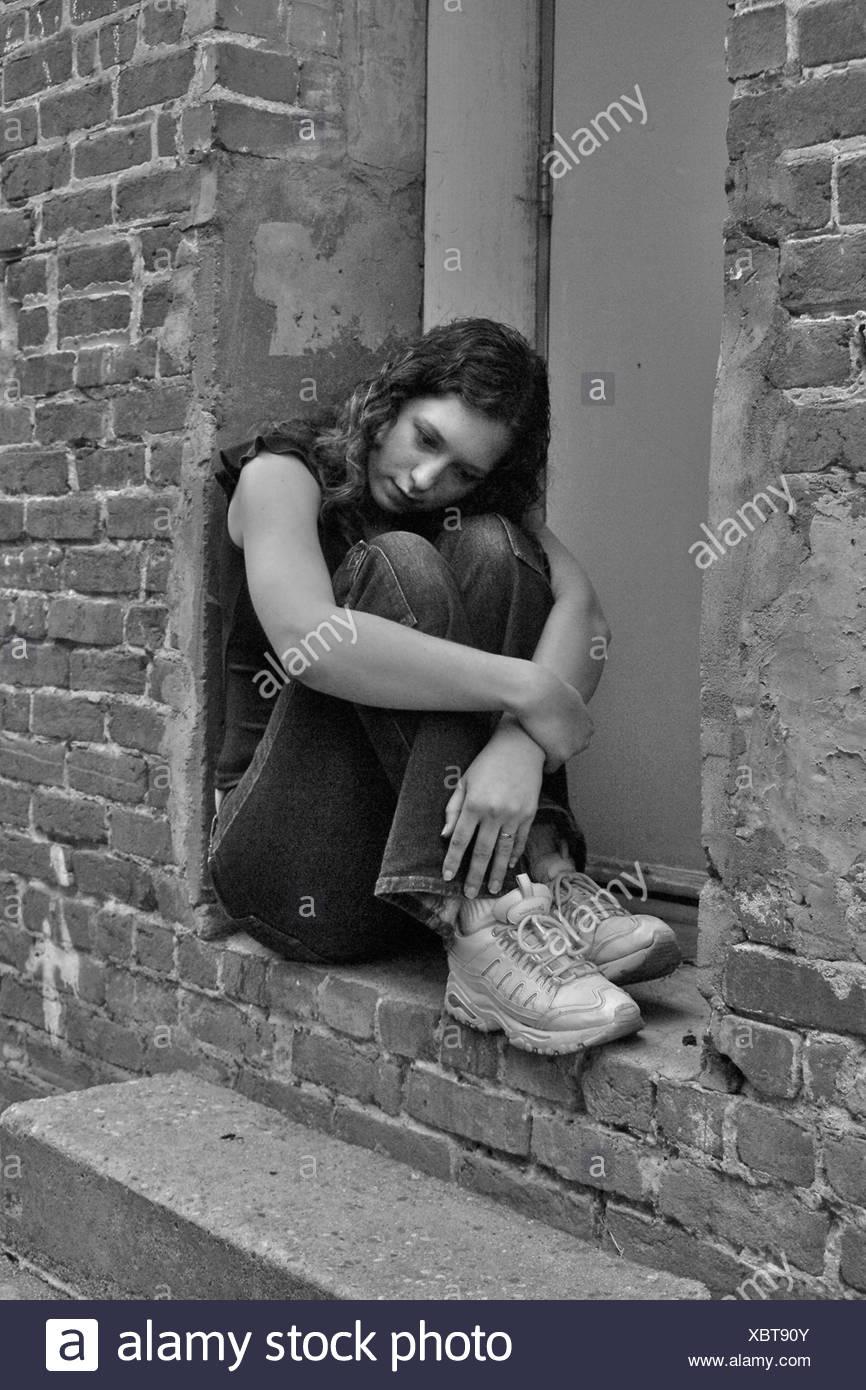
Seeking M4 V4 pose, arms around kneesI have been hunting through my runtime and cannot find a pose that I'm pretty sure I have.
I need a shot of Michael 4 or Victoria 4 with their arms wrapped around their knees looking depressed. Something like the attached photo.
Any suggestions?
 3D Comic Book Tips And Pictures
@Griffin_Avid I used to collect a few issues here and there. The fantasy aspect I think is what I enjoyed the most. The huge creatures and supernatural stuff. So much fun.
Red Nails is in the Book 1 compendium released by Dark Horse. Great story. The character of Tolkemec has a unique and grisley appearance. The art is great in that story. I really like the sense of scale with these ancient structures. It's also got dinosaurs, living skeletons and all the cool stuff associated with Conan. It's a good story.
I really like the John Buscema artwork. Probably my favourite from book 1 is 'Iron shadows in the moon'. But they are all good stories.
I am including the original renders out of Daz. The abs were part of the morph on the Michael 4 character. I think it was the Barbarian pack I used, which was obviously inspired by Conan itself.
I actually never considered using the older generation models for comic design, however, this render came out alright. I might dig out the old Victoria 4 model and do some tests using these characters in a comic format. Surprising what you can discover when you are just trying out things.
On a side note. How long does it usually take you guys to make a complete comic issue. It's already taken me over a month to make 1 and half pages, I'm thinking this may take some time to complete!
I'm also including a test render trying to emulate the Boris Vallejo art style. Might be good for cover artwork.
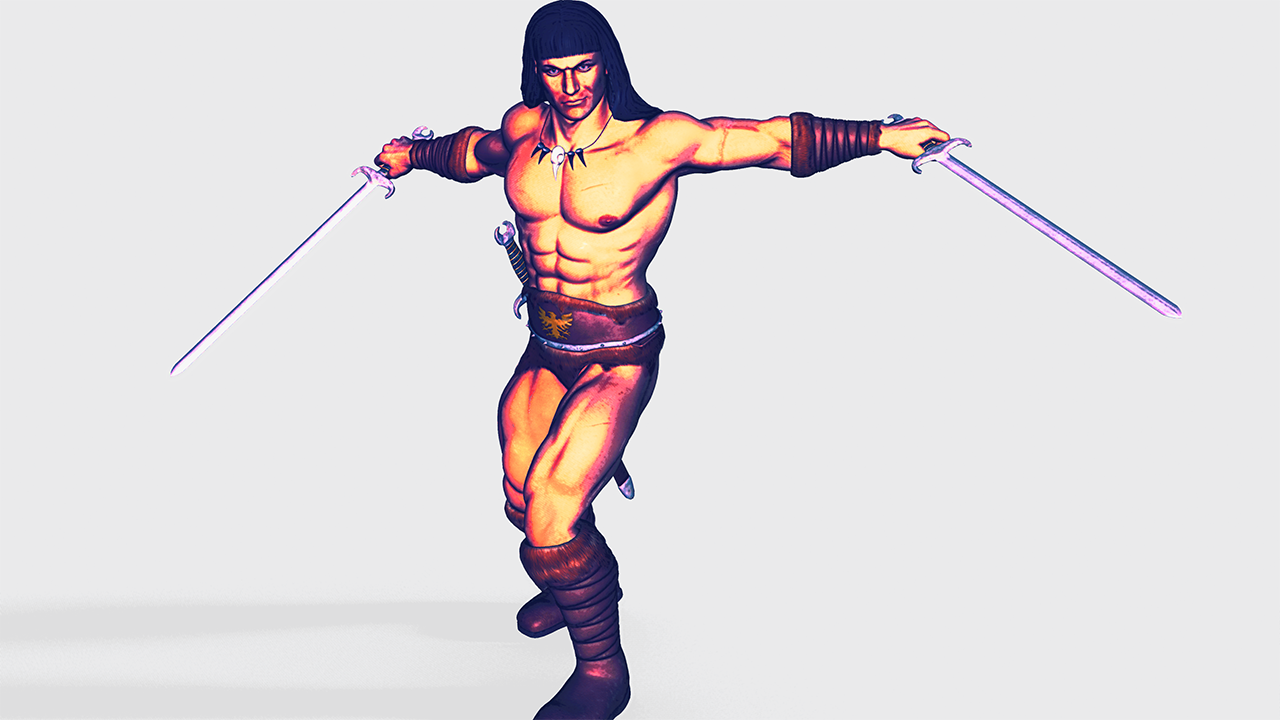
This render has a nice feel to it. Have you looked at Topaz Studio? It's a very cool set of filters designed to emulate painted effects.
(Also, Michael 4 and Victoria 4 both still have a lot of life left in them, especially when you are working with non-photographic renders (i.e. black & white or painted effects). All of my comics work uses the older generation figures because Poser 11 has the geometric edge feature (Live Comic Book Preview) that I use for my linework.
3D Comic Book Tips And Pictures@Griffin_Avid I used to collect a few issues here and there. The fantasy aspect I think is what I enjoyed the most. The huge creatures and supernatural stuff. So much fun.
Red Nails is in the Book 1 compendium released by Dark Horse. Great story. The character of Tolkemec has a unique and grisley appearance. The art is great in that story. I really like the sense of scale with these ancient structures. It's also got dinosaurs, living skeletons and all the cool stuff associated with Conan. It's a good story.
I really like the John Buscema artwork. Probably my favourite from book 1 is 'Iron shadows in the moon'. But they are all good stories.I am including the original renders out of Daz. The abs were part of the morph on the Michael 4 character. I think it was the Barbarian pack I used, which was obviously inspired by Conan itself.
I actually never considered using the older generation models for comic design, however, this render came out alright. I might dig out the old Victoria 4 model and do some tests using these characters in a comic format. Surprising what you can discover when you are just trying out things.
On a side note. How long does it usually take you guys to make a complete comic issue. It's already taken me over a month to make 1 and half pages, I'm thinking this may take some time to complete!
I'm also including a test render trying to emulate the Boris Vallejo art style. Might be good for cover artwork.
3D Comic Book Tips And PicturesGreat attention to detail with the noir sensibility, it is really the small details that bring images to life. A character who looks like they belong in their environment sells the believability of the comic.
I am a huge fan of the Conan comics. Savage sword were the best ones, not only because they were based on the actual stories of Robert E Howard, but also because of their intricate and detailed artwork. I used to collect the individual issues when I was young. The Boris Vallejo cover art was outstanding.
This inspired me to dust off my old Michael 4 character in Daz. I equipped him with Barbarian outfit and this time rendered directly out of Daz. I wanted to see if I could try and create a Savage Sword type of effect. Let me know what you think.
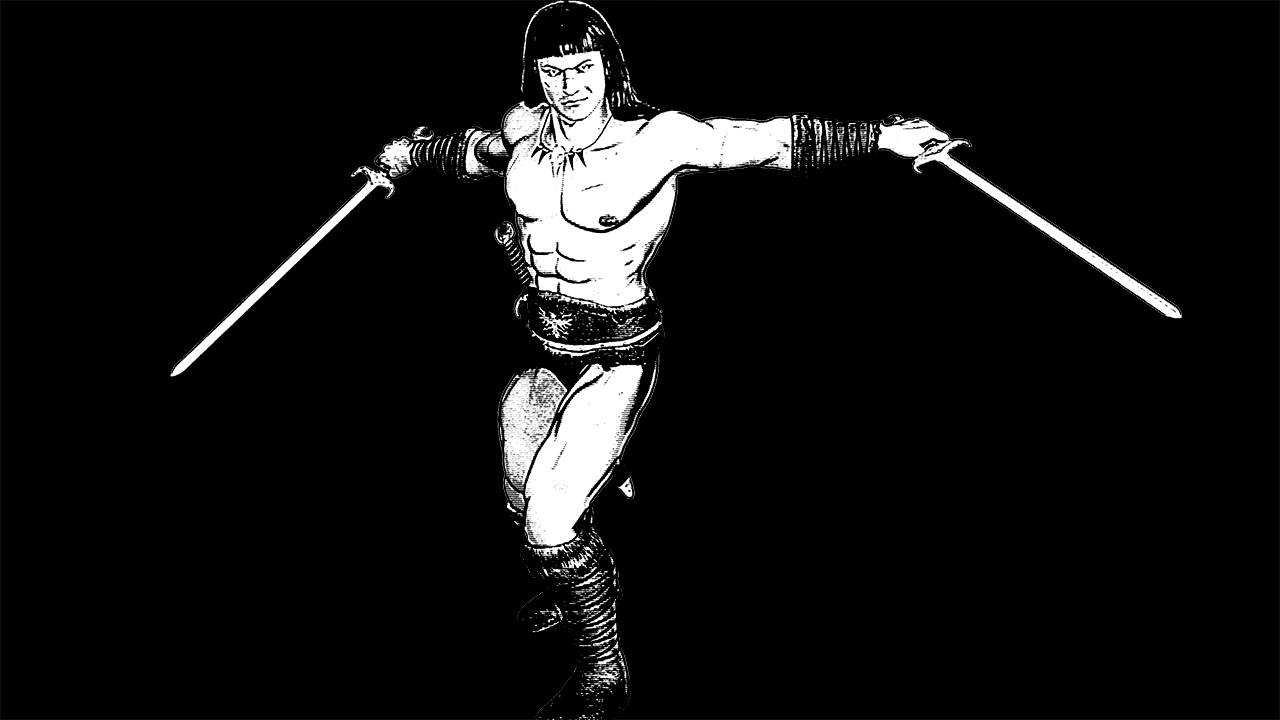
Yes, you nailed it! This is a great picture of the savage Cimmerian! Did you get those ab shadows/lines right out of Daz? If so, how?
Love the little feathered edges on the lines around his pecs and elsewhere. Very, VERY cool!
More Non-photorealisitic Renders (NPR II)Wow, there's some great work on this thread. @Headwax_Carrara Those rendered sketches are fantastic. I can see those being suitable for a professional market. Looks like you've got a really nice workflow.
@tkdrobert Your images are very cool. I have no idea how you created the Hulk, but that was seriously impressive. Enjoying your work a lot
@mmitchell_houston Great renders, I like the experimentation with textures and colors. Sometimes you can stumble over a good technique when trying out things. I read your comment on the comic book thread and decided to experiment with a Conan style character (Michael 4 - haven't used that character in ages, but he has some appropriate clothing and poses)
I am going for a sort of painterly, graphic novel style. Rendered out of Daz, one in Iray, one in 3Delight and did all postwork in Photoshop
3D Comic Book Tips And PicturesGreat attention to detail with the noir sensibility, it is really the small details that bring images to life. A character who looks like they belong in their environment sells the believability of the comic.
I am a huge fan of the Conan comics. Savage sword were the best ones, not only because they were based on the actual stories of Robert E Howard, but also because of their intricate and detailed artwork. I used to collect the individual issues when I was young. The Boris Vallejo cover art was outstanding.
This inspired me to dust off my old Michael 4 character in Daz. I equipped him with Barbarian outfit and this time rendered directly out of Daz. I wanted to see if I could try and create a Savage Sword type of effect. Let me know what you think.
CARRARA CHALLENGE 46: Get your Retro on - Voting ThreadEntry #: 3
Title: Baa Baa Blacksheep
Artist: Bunyip02
Links to WIP thread: https://www.daz3d.com/forums/discussion/comment/4516616/#Comment_4516616
Credits: Michael 4 - https://www.daz3d.com/michael-4-base-male-3d-model
WW2 USAAF pilot pack by adh3d - Renderosity
XD4 - CrossDresser 4.0 Utility Suite - EvilInnocence
F4U Corsair by Bazze - http://www.colacola.se/map_1.htm
Willys MB Jeep Updated - https://www.renderosity.com/mod/freestuff/willys-mb-jeep-updated/56852
USTentM1942 - WWII Tent City - https://www.sharecg.com/v/71091/browse/11/Poser/WWII-Tent-City
Lisa Botanticals Palm Trees
Lisa Botanticals PalmBush
Terrain from Bryce
[5K-JPG] Ground #05 - cc0textures.com
Tim Payne Lightdomes - https://www.daz3d.com/carrara-skies-lightdomes-1 (no longer available)
Tim Payne Skies - https://www.daz3d.com/carrara-skies-volume-1 (no longer available)
Discussion: Post work on trouser leg of pilot to fix a ripped mesh look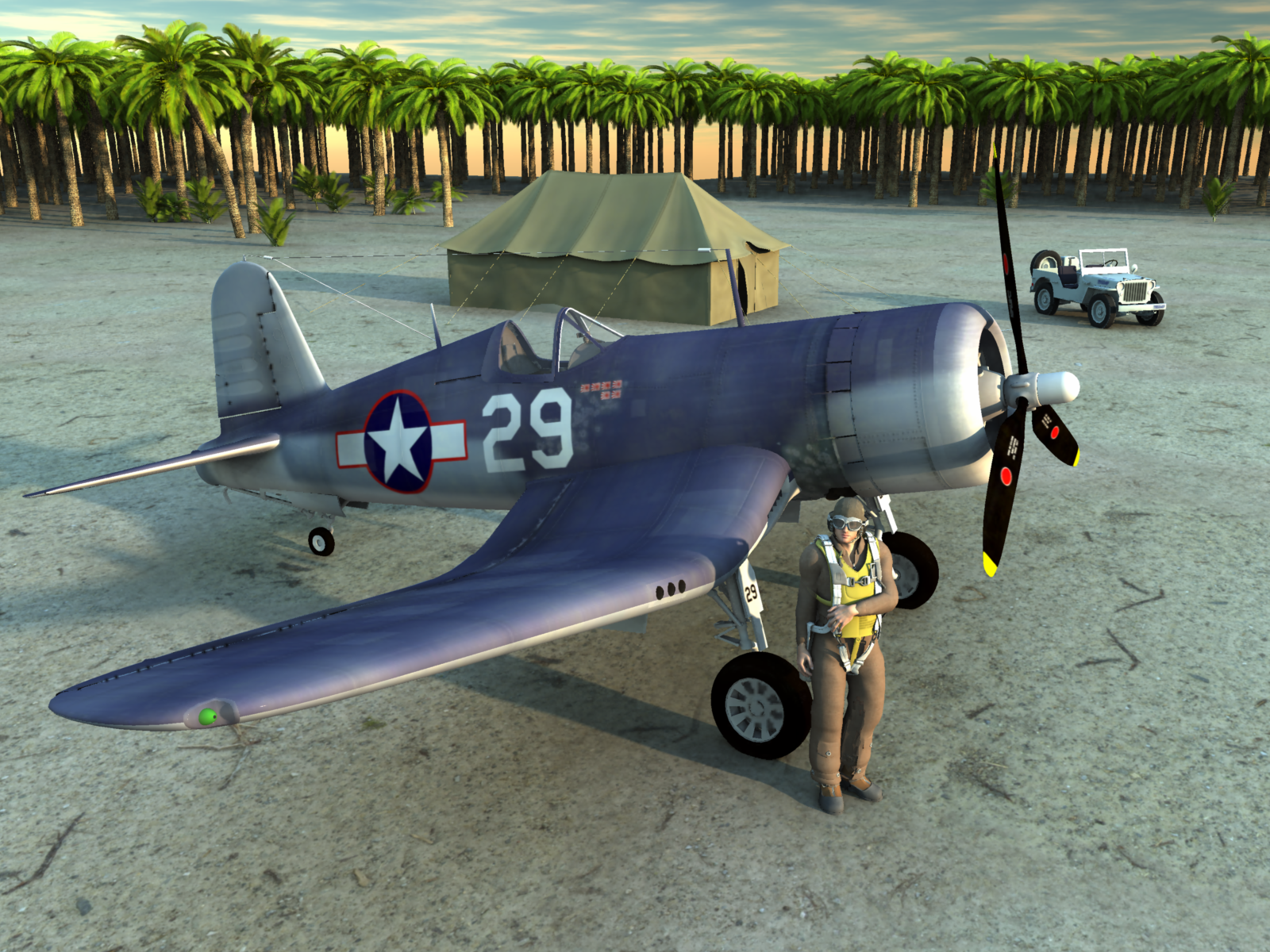 Will future versions of Daz Studio have a "Comic Book Preview" like Poser 11?
Uhm...I doubt so!
It doesn't seem like the current Daz version didn't have the technology to pull this off, so, if it's not here by now, I doubt it will be available in the future!
After all, it's already available in Poser, and I don't think many people would use this function in Daz.I can't really argue with either of those statements on their face... but I will! (he heh heh).
Honestly, we don't know that the technology isn't available to Daz Studio. From what I can tell, the outline feature MAY be some aspect of openGL technology. If that's the case then it would be a matter of implementing or accesing the code base that is already there. I could be way off here, but since the Poser feature requires that openGL be enabled and it is part of the preview option, that makes me think that I could be right here.
As for not many people wanting it... Well, I'm not so sure about that. If this feature were available to the artists who hang out in the Non-Photographc Renders and 3D Comics forum, I suspect it would be VERY welcome, indeed. Now, do I think geometric edges would become more popular than photorealism here at Daz? No. Not a chance. But I do think there is a substantial market of artists who would use it (even as a paid plug-in).
Then if there's a request, there's a market, and I hope you'll get what you're looking for! :D
I hope so. It would be nice to get to play with all of the great Genesis products out there. I do feel kind of stuck in the past with Michael 4 and Victoria 4. And yes, Dawn, Dusk and La Femme are more modern products, but they are woefully underrepresented when it comes to poses and clothing options. Using them almost always means starting a scene from scratch.
"Filter by Content" messed up?Okay, checked again:
What is the "compatibility Base"?
On the first Tab of Content DB Editor there is a compatibility Base in the Scene IDs Section.
With a Michael 4 selected, it says /Generation4/Michael 4.
With a Kids 4 selected, nothing shows up there.
The Kids 4 has to be set as a compatibility base in order for other things to be compatible with it, as I understand the system.
"Filter by Content" messed up?Okay, checked again:
What is the "compatibility Base"?
On the first Tab of Content DB Editor there is a compatibility Base in the Scene IDs Section.
With a Michael 4 selected, it says /Generation4/Michael 4.
With a Kids 4 selected, nothing shows up there.
Very Useful Daz Products IMHO (Converters, Lights, Utilities, Morphs, VRAM Optimizers, Shaders etc.)Here's some input for the beginner who's trying to keep their DAZ spending low:
(Needless to say, it's all just my subjective opinion.)Converters:
- I think auto-fit is good enough for starting out, especially when combined with Fit Control (which I absolutely do recommend).
- You can auto-fit M4/V4 items by first auto-fitting to Genesis, then from Genesis to G8.
- That being said, I would actually recommend M4/V4 clones for G8, because it generally achieves better results than the above method, and there's a ton of free M4/V4 items out there.
- Hair that's longer than shoulder length shouldn't be auto-fitted at all and just parented manually.
- Convert heeled G3 shoes to G8 with this free method.
- Convert M4/V4/Genesis/G2 poses to G3 with this freebie, and G3 poses to G8 with these two freebies.
Hair and Skin:
- It's worth playing around with the material settings and/or manipulate maps in your graphics editor (such as GIMP or Photoshop) to save on products like skin builder and color werks. See also here.
Morphs:
- Agree that DAZ Original Morphs are essential, and I like the 200+ Head and Face Morphs a lot. I personally don't find Shape Shift necessary.
- I do quite like SWOLE for G8. Obviously only if you're into that kind of thing.
Others:
- Since you single out glasses, you can get a lovely collection of free glasses here and here.
Might have more to add later, but I think i should go back to work now... *:)
Thank you for your tips! :D
These are nice ways to keep the cost really low while you're learning Daz, and I guess you're the first one to describe them, while others had just hinted at them.Yes, auto-fit is good for starting out! And Fit Control has a lot of features. Thank you for linking that SY guide!
The only problem with this method is that it requires a lot more time than just having everything ready to go in your "Smart Content". So, it's great if you don't do many renders or if you're learning Daz, but in my situation, for example, I'm glad I've organized my library in another way! ^^
Yes, there are a lot of freebies out there, and it's very important to use them at the start, although they don't usually have the quality of newer stuff, and you should at least change all the shaders. Again, that takes time. I've done that for some unique old outfits (like the Game of Thrones ones, that are not available for newer generation), but if I had to do that every time I used something, I'd probably get bored with Daz pretty soon xDI don't think I'd be able to replicate Skin Builder 8 stuff with Photoshop obtaining the same quality, and I've been using Photoshop since I was 13! I just do that for custom tattoos nowadays.
Nothing is necessary if you're just trying Daz out, but if you're creating many characters each month for your story you probably need some nice ways to differentiate one from the other.
Thanks for the eyeglasses freebie! I already have that G8 set, and I like its quality and simplicity of use! :D
Daz 3D is part of

Connect
DAZ Productions, Inc.
7533 S Center View Ct #4664
West Jordan, UT 84084Licensing Agreement | Terms of Service | Privacy Policy | EULA
© 2026 Daz Productions Inc. All Rights Reserved.