-
Dragonhide PCS looks fantastic, but...
joanna said:
PerttiA said:
"Please note that the suit utilizes a custom morph to properly fit the figure inside" = Some surgical modifications are needed.
This image in the gallery actually shows the morph, and as an owner of the bundle, I can confirm it's there.
That is clearly not designed by an engineer. If it was the arms and legs would not go inside the arms and legs of the suit.
Arms of the operator would fit inside and use the controls for the suit, but the legs would need to be cut off.Dragonhide PCS looks fantastic, but...joanna said:
PerttiA said:
"Please note that the suit utilizes a custom morph to properly fit the figure inside" = Some surgical modifications are needed.
This image in the gallery actually shows the morph, and as an owner of the bundle, I can confirm it's there.
Ha, that's great! I can hear yakety sax playing as that guy is constantly running 2x speed past the screen for the entire song.
Dragonhide PCS looks fantastic, but...PerttiA said:
"Please note that the suit utilizes a custom morph to properly fit the figure inside" = Some surgical modifications are needed.
This image in the gallery actually shows the morph, and as an owner of the bundle, I can confirm it's there.
Dragonhide PCS looks fantastic, but...PerttiA said:
"Please note that the suit utilizes a custom morph to properly fit the figure inside" = Some surgical modifications are needed.
I do believe it comes with an amputee when you load it.
Dragonhide PCS looks fantastic, but..."Please note that the suit utilizes a custom morph to properly fit the figure inside" = Some surgical modifications are needed.
Is it possible to convert G9 to G8 or G8.1 ?crosswind said:
Certainly it's possible. Pls check: https://www.youtube.com/watch?v=kXssz90XFEA&t=531s It's a one of the methods and post fixing is needed. I ususally use Wrap4D to make such a conversion.
I've came across this video. I thought it dealt with only converting those morph and shapes of G9 to G8 and not the actual face and everything. Surely, I will give it a try. Also you've mentioned W4D, is it a better process compared to the youtube video ?
Save & load a character "as a whole"Hey guys,
Sorry for posting dumb questions, but I haven’t used DS for some time and forgot some things.
Specifically, how do I save a character with all their morph values, textures, clothing, items, and whatever else, and load them into another scene with a few clicks?
[Released] RSSY Character And Material Conversion Bundle Genesis 8 to Genesis 9 [Commercial]Hi
If you add a g9 model to the scene then apply the morphs ie 8 or 8.1 that i've mentioned you get bad results, the same as you get when you have created a g9 transfer
in other words you get the same issue with appying a g8 or 8.1 to a g9 figure that you see in a g9 modified one
To clarify this further
I used your app to create morphs for the g9 figure from the g8 and g9
I listed the ones I had found problems with head, body, eyes, eyelashes. I could dial out a number of these issues, it looks like a number of dials were not set to 0 some had missing amounts and had a ? mark next to them
I have then now tried using the existing 8, 8.1 morphs on the g9 to see what happens
I see very simular issues to both existing and the app modded morphs, what im pointing out is that the existing morphs head should not control the body but they do in some and dont in others
Your app is'nt causing this
Hi RiversoftArt
I had to change my PC motherboard, so I have completely reinstalled eveything from scratch. no Daz folders at all
Had a job installing Daz Studio using DIM. but the other installer worked in the end
There are now no Genesis 9 modified morphs from using your app only the original one's
I woke up wondering, if opened up the Genesis 9 figure and applied the nail morphs what would happen?
Well using the Genesis 9 figure it does the same with the nail morphs without your app
The MSO_G9_NAILS WORK OK
A&AB NAILS MORPH THE WHOLE BODY NOT THE HEAD TO A FEMALE FIGURE
HALLIE NAILS MORPH THE WHOLE BODY NOT THE HEAD TO A FEMALE FIGURE
A&A NAILS MORPH THE WHOLE BODY NOT THE HEAD TO A FEMALE FIGURE
ACRILIC NAILS MORPH THE WHOLE BODY NOT THE HEAD AND CAUSE THE NOW FEMALE FIGURE TO LOOK UNFED
CYNDER81 NAILS MORPH THE WHOLE BODY NOT THE HEAD TO A FEMALE FIGURE
CYNDER_LONG_SQUARE NAILS MORPH THE WHOLE BODY NOT THE HEAD TO A FEMALE FIGURETO LOOK UNFED
DT-BEAUTIFUL NAILS MORPH THE WHOLE BODY NOT THE HEAD TO A FEMALE FIGURE
DT-FARAH NAILS MORPH THE WHOLE BODY NOT THE HEAD TO A FEMALE FIGURE
DT NAILS MORPH THE WHOLE BODY NOT THE HEAD TO A FEMALE FIGURE
KAYLEYSS SQUARE NAILS MORPH THE WHOLE BODY NOT THE HEAD TO A FEMALE FIGURE
LONG NAILS BY FWART MORPH THE WHOLE BODY NOT THE HEAD TO A FEMALE FIGURE
CB SQUARE NAILS MORPH THE WHOLE BODY NOT THE HEAD TO A FEMALE FIGURE
MOUSSO NAILS MORPH THE WHOLE BODY NOT THE HEAD TO A FEMALE FIGURE
OZ NAILS NAILS MORPH THE WHOLE BODY NOT THE HEAD TO A FEMALE FIGURE
SQUARE NAILS BY FWSA MORPH THE WHOLE BODY NOT THE HEAD TO A FEMALE FIGURE
STELETTA NAILS MORPH THE WHOLE BODY NOT THE HEAD TO A FEMALE FIGURE
DEMONHDFINGER NAIL FIX MORPH THE WHOLE BODY NOT THE HEAD TO A MALE FIGURE
DEMONHDFINGER NAIL FIX hd MORPH THE WHOLE BODY NOT THE HEAD TO A MALE FIGURE
HALLE EYE DETAILS HD EYES AND MOUTH DISTORTED AT 100% CHANGES WHOLE FACE
CATHERINE EYE EFFECTS WHOLE FACE
EYERIM REFINE HD EYES AND MOUTH DISTORTED AT 100% CHANGES WHOLE FACE
EYES CORNEA BULGE CHANGES FACE SHAPE
GOU LUK TOTALY CORRUPTS FIGURE
GOU LUK WITHOUT EYEBROWS TOTALY CORRUPTS FIGURE
DEMON HDEYE MOISTURE FIX CHANGES INTO A MALE FIGURE
OTHER G9 EYE MORPHS WORK FINE
DT FARAH HEAD CHANGES G9 BODY TO FEMALE
DT FELICIA HEAD OK
DT KIRANA HEAD CHANGES G9 BODY TO FEMAIL WITH SOME HEAD DISTORTION
DANAE HEAD OK
DOVE HEAD OK
DUCIBELLA HD HEAD OK
EILEEN HEAD OK
ELENA HEAD HD OK
EMMALEIGH HEAD OK
EMMANUELLE HEAD OK
ENDELLION HEAD OK
ERIKA HEAD CHANGES G9 TO FEMALE
EYRNN HEAD OK
ETSU HEAD CHANGES G9 BODY TO FEMALE
EVANGELINE HEAD OK
EVELYN HEAD OK
GA CIRCA HEAD OK
GEM HEAD 1 OK
GEN HEAD 2 OK
GEMMA HEAD OK
GOU LUK HEAD LOOKS DISTORTED
GWYN HEAD OK
HD RIO HEAD OK
HALLIE HEAD OK
HALLIE HEAD HD OK
HASHIMOTO HEAD CHANGES G9 BODY TO FEMALE
HELINA HEAD HD OK
HYUNA HEAD OK
JA DEVERY HEAD OK
MSO ALEXANDRA HEAD OK
VICTORIA HEAD OK
VICTORIA HEAD 8.1 OK
ZELARA HEAD OK
GS_ MISSINGHEAD_HD_LV4 CHANGES G9 BODY TO FEMALE
PHMTEENGAOHEAD SHAPE ADJUST1 OK
PHMTEENGAOHEAD SHAPE ADJUST1 OK CHANGES G9 BODY TO FEMALE
'CLEARLY A LOT OF THESE MORPHS ACT ON THE G9 FIGURE INCORRECTLY' BEFORE USING YOUR APP '
HOPE THAT HELPS
Clothing morphs aren't showing for Flirty School Uniform for Genesis 8 Female(s) RESOLVEDYou may click that Gear Icon of a morph dial, then go to File Path location and check if there're those morph files in data folder ...
[Released] RSSY Character And Material Conversion Bundle Genesis 8 to Genesis 9 [Commercial]Keiron said:
Hi RiversoftArt
I had to change my PC motherboard, so I have completely reinstalled eveything from scratch. no Daz folders at all
Had a job installing Daz Studio using DIM. but the other installer worked in the end
There are now no Genesis 9 modified morphs from using your app only the original one's
I woke up wondering, if opened up the Genesis 9 figure and applied the nail morphs what would happen?
Well using the Genesis 9 figure it does the same with the nail morphs without your app
The MSO_G9_NAILS WORK OK
A&AB NAILS MORPH THE WHOLE BODY NOT THE HEAD TO A FEMALE FIGURE
HALLIE NAILS MORPH THE WHOLE BODY NOT THE HEAD TO A FEMALE FIGURE
A&A NAILS MORPH THE WHOLE BODY NOT THE HEAD TO A FEMALE FIGURE
ACRILIC NAILS MORPH THE WHOLE BODY NOT THE HEAD AND CAUSE THE NOW FEMALE FIGURE TO LOOK UNFED
CYNDER81 NAILS MORPH THE WHOLE BODY NOT THE HEAD TO A FEMALE FIGURE
CYNDER_LONG_SQUARE NAILS MORPH THE WHOLE BODY NOT THE HEAD TO A FEMALE FIGURETO LOOK UNFED
DT-BEAUTIFUL NAILS MORPH THE WHOLE BODY NOT THE HEAD TO A FEMALE FIGURE
DT-FARAH NAILS MORPH THE WHOLE BODY NOT THE HEAD TO A FEMALE FIGURE
DT NAILS MORPH THE WHOLE BODY NOT THE HEAD TO A FEMALE FIGURE
KAYLEYSS SQUARE NAILS MORPH THE WHOLE BODY NOT THE HEAD TO A FEMALE FIGURE
LONG NAILS BY FWART MORPH THE WHOLE BODY NOT THE HEAD TO A FEMALE FIGURE
CB SQUARE NAILS MORPH THE WHOLE BODY NOT THE HEAD TO A FEMALE FIGURE
MOUSSO NAILS MORPH THE WHOLE BODY NOT THE HEAD TO A FEMALE FIGURE
OZ NAILS NAILS MORPH THE WHOLE BODY NOT THE HEAD TO A FEMALE FIGURE
SQUARE NAILS BY FWSA MORPH THE WHOLE BODY NOT THE HEAD TO A FEMALE FIGURE
STELETTA NAILS MORPH THE WHOLE BODY NOT THE HEAD TO A FEMALE FIGURE
DEMONHDFINGER NAIL FIX MORPH THE WHOLE BODY NOT THE HEAD TO A MALE FIGURE
DEMONHDFINGER NAIL FIX hd MORPH THE WHOLE BODY NOT THE HEAD TO A MALE FIGURE
HALLE EYE DETAILS HD EYES AND MOUTH DISTORTED AT 100% CHANGES WHOLE FACE
CATHERINE EYE EFFECTS WHOLE FACE
EYERIM REFINE HD EYES AND MOUTH DISTORTED AT 100% CHANGES WHOLE FACE
EYES CORNEA BULGE CHANGES FACE SHAPE
GOU LUK TOTALY CORRUPTS FIGURE
GOU LUK WITHOUT EYEBROWS TOTALY CORRUPTS FIGURE
DEMON HDEYE MOISTURE FIX CHANGES INTO A MALE FIGURE
OTHER G9 EYE MORPHS WORK FINE
DT FARAH HEAD CHANGES G9 BODY TO FEMALE
DT FELICIA HEAD OK
DT KIRANA HEAD CHANGES G9 BODY TO FEMAIL WITH SOME HEAD DISTORTION
DANAE HEAD OK
DOVE HEAD OK
DUCIBELLA HD HEAD OK
EILEEN HEAD OK
ELENA HEAD HD OK
EMMALEIGH HEAD OK
EMMANUELLE HEAD OK
ENDELLION HEAD OK
ERIKA HEAD CHANGES G9 TO FEMALE
EYRNN HEAD OK
ETSU HEAD CHANGES G9 BODY TO FEMALE
EVANGELINE HEAD OK
EVELYN HEAD OK
GA CIRCA HEAD OK
GEM HEAD 1 OK
GEN HEAD 2 OK
GEMMA HEAD OK
GOU LUK HEAD LOOKS DISTORTED
GWYN HEAD OK
HD RIO HEAD OK
HALLIE HEAD OK
HALLIE HEAD HD OK
HASHIMOTO HEAD CHANGES G9 BODY TO FEMALE
HELINA HEAD HD OK
HYUNA HEAD OK
JA DEVERY HEAD OK
MSO ALEXANDRA HEAD OK
VICTORIA HEAD OK
VICTORIA HEAD 8.1 OK
ZELARA HEAD OK
GS_ MISSINGHEAD_HD_LV4 CHANGES G9 BODY TO FEMALE
PHMTEENGAOHEAD SHAPE ADJUST1 OK
PHMTEENGAOHEAD SHAPE ADJUST1 OK CHANGES G9 BODY TO FEMALE
'CLEARLY A LOT OF THESE MORPHS ACT ON THE G9 FIGURE INCORRECTLY' BEFORE USING YOUR APP '
HOPE THAT HELPS
I am confused what you are saying @Keiron. How can G8 morphs work on G9 without being converted?
[Released] RSSY Character And Material Conversion Bundle Genesis 8 to Genesis 9 [Commercial]Artini said:
RiverSoftArt said:
Eboshijaana said:
Artini said:
Eboshijaana said:
I know this is a bit of a cop-out, but turning the figure into a single morph, then splitting it with the free character splitter and THEN converting the resulting character gets the best results.
It is an interesting idea.
What is this free character splitter, you are talking about?
https://www.daz3d.com/forums/discussion/617476/character-splitter This.
The script does split the morphs based on what the morph affects. The NECK_RANGE variable in the constants file specifies the low and high Y value for the cutoff for whether a morph affects the body or the head only.
Load a G8 figure, paste the following into the IDE pane and execute (change the NAME (not label) and the low, high in the GetMorphTypeFromName function call to try out different morphs and different ranges):
function GetMorphType( oGeom, oMorph, neckLow, neckHigh )
{
if (oMorph.name.toUpperCase().startsWith('FHM')) return 'Head';
else if (oMorph.name.toUpperCase().startsWith('FBM')) return 'Body';
// do it the hard way
var oDeltas = oMorph.getDeltas();
oDeltas.loadDeltas();
if (oDeltas.getNumDeltas() == 0)
{
if (output_debugL2) print('%1 morph does not have deltas'.arg(oMorph.getValueChannel().getLabel()));
return '';
}
var bAffectsHead = false;
var bAffectsBody = false;
var y;
for (var i = 0; i < oDeltas.getNumDeltas(); i++)
{
y = oGeom.getVertex(oDeltas.getDeltaIndex(i)).y;
if (y < neckLow) bAffectsBody = true;
else if (y > neckHigh) bAffectsHead = true;
if (bAffectsBody && bAffectsHead) return 'Full';
}
if (bAffectsHead) return 'Head';
else if (bAffectsBody) return 'Body';
return ''; // basically neck
}
function GetMorphTypeFromName(name, neckLow, neckHigh)
{
var node = Scene.getPrimarySelection();
if (!node) return 'Select a figure';
var morph = node.getObject().findModifier(name);
if (!morph) return 'Morph name not found';
return GetMorphType( node.getObject().getCurrentShape().getGeometry(), morph, neckLow, neckHigh )
}
print(GetMorphTypeFromName('Sylvian Head', 151, 165));
Thanks for all of the tips.
Your welcome!
BTW, if you think the NECK_RANGE should be different, please let me know and why. I am happy to change it if I got it slightly wrong.
[Released] RSSY Character And Material Conversion Bundle Genesis 8 to Genesis 9 [Commercial]Hi RiversoftArt
I had to change my PC motherboard, so I have completely reinstalled eveything from scratch. no Daz folders at all
Had a job installing Daz Studio using DIM. but the other installer worked in the end
There are now no Genesis 9 modified morphs from using your app only the original one's
I woke up wondering, if opened up the Genesis 9 figure and applied the nail morphs what would happen?
Well using the Genesis 9 figure it does the same with the nail morphs without your app
The MSO_G9_NAILS WORK OK
A&AB NAILS MORPH THE WHOLE BODY NOT THE HEAD TO A FEMALE FIGURE
HALLIE NAILS MORPH THE WHOLE BODY NOT THE HEAD TO A FEMALE FIGURE
A&A NAILS MORPH THE WHOLE BODY NOT THE HEAD TO A FEMALE FIGURE
ACRILIC NAILS MORPH THE WHOLE BODY NOT THE HEAD AND CAUSE THE NOW FEMALE FIGURE TO LOOK UNFED
CYNDER81 NAILS MORPH THE WHOLE BODY NOT THE HEAD TO A FEMALE FIGURE
CYNDER_LONG_SQUARE NAILS MORPH THE WHOLE BODY NOT THE HEAD TO A FEMALE FIGURETO LOOK UNFED
DT-BEAUTIFUL NAILS MORPH THE WHOLE BODY NOT THE HEAD TO A FEMALE FIGURE
DT-FARAH NAILS MORPH THE WHOLE BODY NOT THE HEAD TO A FEMALE FIGURE
DT NAILS MORPH THE WHOLE BODY NOT THE HEAD TO A FEMALE FIGURE
KAYLEYSS SQUARE NAILS MORPH THE WHOLE BODY NOT THE HEAD TO A FEMALE FIGURE
LONG NAILS BY FWART MORPH THE WHOLE BODY NOT THE HEAD TO A FEMALE FIGURE
CB SQUARE NAILS MORPH THE WHOLE BODY NOT THE HEAD TO A FEMALE FIGURE
MOUSSO NAILS MORPH THE WHOLE BODY NOT THE HEAD TO A FEMALE FIGURE
OZ NAILS NAILS MORPH THE WHOLE BODY NOT THE HEAD TO A FEMALE FIGURE
SQUARE NAILS BY FWSA MORPH THE WHOLE BODY NOT THE HEAD TO A FEMALE FIGURE
STELETTA NAILS MORPH THE WHOLE BODY NOT THE HEAD TO A FEMALE FIGURE
DEMONHDFINGER NAIL FIX MORPH THE WHOLE BODY NOT THE HEAD TO A MALE FIGURE
DEMONHDFINGER NAIL FIX hd MORPH THE WHOLE BODY NOT THE HEAD TO A MALE FIGURE
HALLE EYE DETAILS HD EYES AND MOUTH DISTORTED AT 100% CHANGES WHOLE FACE
CATHERINE EYE EFFECTS WHOLE FACE
EYERIM REFINE HD EYES AND MOUTH DISTORTED AT 100% CHANGES WHOLE FACE
EYES CORNEA BULGE CHANGES FACE SHAPE
GOU LUK TOTALY CORRUPTS FIGURE
GOU LUK WITHOUT EYEBROWS TOTALY CORRUPTS FIGURE
DEMON HDEYE MOISTURE FIX CHANGES INTO A MALE FIGURE
OTHER G9 EYE MORPHS WORK FINE
DT FARAH HEAD CHANGES G9 BODY TO FEMALE
DT FELICIA HEAD OK
DT KIRANA HEAD CHANGES G9 BODY TO FEMAIL WITH SOME HEAD DISTORTION
DANAE HEAD OK
DOVE HEAD OK
DUCIBELLA HD HEAD OK
EILEEN HEAD OK
ELENA HEAD HD OK
EMMALEIGH HEAD OK
EMMANUELLE HEAD OK
ENDELLION HEAD OK
ERIKA HEAD CHANGES G9 TO FEMALE
EYRNN HEAD OK
ETSU HEAD CHANGES G9 BODY TO FEMALE
EVANGELINE HEAD OK
EVELYN HEAD OK
GA CIRCA HEAD OK
GEM HEAD 1 OK
GEN HEAD 2 OK
GEMMA HEAD OK
GOU LUK HEAD LOOKS DISTORTED
GWYN HEAD OK
HD RIO HEAD OK
HALLIE HEAD OK
HALLIE HEAD HD OK
HASHIMOTO HEAD CHANGES G9 BODY TO FEMALE
HELINA HEAD HD OK
HYUNA HEAD OK
JA DEVERY HEAD OK
MSO ALEXANDRA HEAD OK
VICTORIA HEAD OK
VICTORIA HEAD 8.1 OK
ZELARA HEAD OK
GS_ MISSINGHEAD_HD_LV4 CHANGES G9 BODY TO FEMALE
PHMTEENGAOHEAD SHAPE ADJUST1 OK
PHMTEENGAOHEAD SHAPE ADJUST1 OK CHANGES G9 BODY TO FEMALE
'CLEARLY A LOT OF THESE MORPHS ACT ON THE G9 FIGURE INCORRECTLY' BEFORE USING YOUR APP '
HOPE THAT HELPS
wanting to select all G8F Aging morphs and add to favoritesI'm wanting to transfer G8F's Aging morphs over to G9. I already transfered a character I made for G8F to G9, but I need the aging morphs to make her look like the G8F version. I was wondering if there is a way to select all the morphs at once and add them to favorites rather than click the little heart icon for each one one at a time.
SketchUp Importer - Early Progress ReportHello again.
Thanks to all who have responded so far. Please note that I updated my most recent post (restarting this thread) with "Given that SketchUp is no longer free, is there any interest...".
The current state of SketchUp affairs is something that I want there to be no mistake about. When I originally developed the importer being discussed here, SketchUp Make 2017 was available for free. Since then, as has been pointed out, SketchUp is NO LONGER FREE, with pricing (as of the date of this post) as follows:
SketchUp Go is a web-based tool that, as far as I know, does not support Ruby scripting. Therefore, SketchUp Pro would be required to use models from there. SketchUp Make 2017 is also no longer supported (no surprise there), with the following statement (as of the date of this post) taken from the Trimble website:
If you still have SketchUp Make 2017, it should still "work". My plugin is certainly compatible with it, having been originally developed there. Having said that, it is possible that a given model on the 3D warehouse will no longer be available for download in SU2017 format, and therefore will be inaccessible to you if that is the only version of SketchUp you have.
These are some of the things that are driving my decision process, as to whether or not to resume this project. Additionally, if I restart this project, then proper development practices dictate that I must have a valid current subscription to SketchUp so that I can guarantee continued functionality of the plugin as SketchUp itself continues to evolve. This is a non-trivial expense that I have to consider, particularly in terms of whether or not I will recoup that investment, year after year, and then achieve some sort of margin that makes all of this worthwhile. That may sound harsh, but it's something I have to think very hard about.
In terms of the geometry questions that have come up, I'd like to chime in from the standpoint of having already developed a successful version of this importer for the Trainz Railroad Simulator. It's been in use for many years there, and I can confidently state that the geometry is internally structured in terms of triangles, and that triangles are used in my geometry transfer process. I will also say, however, that SketchUp models can sometimes have a large number of materials, and this can also affect performance in the target system (i.e. Daz). If you are using the SketchUp model as a static entity, I would not really expect this to matter; but if you are using it as part of an animation, it might. I say this with only limited knowledge of Daz, so please forgive me (and correct me) if this is not how it works.
My tool consists of a three parts: (1) a Ruby plugin that runs inside SketchUp, and creates an XML file that contains all the information needed to import the model into a given target environment; (2) an image processing utility that runs behind the scenes; and (3) a Daz script that reads the XML file and renders it in Daz.
The first part of the transfer process, in SketchUp, is governed by a parameters dialog that looks like this:
As you can see, there are options to deal with both sides of a given face. I also have some internal logic that attempts to automatically compensate for reversed faces when they are detected, but there is only so much you can do in this regard. The fact is that the person working with the SketchUp model is responsible for making sure that the model is READY to be transferred to another environment. My tool is not a substitute for laziness.
The produced XML file is read in by a Daz Plugin, with a very simple UI:
This plugin can (usually) auto-locate the XML file, and it uses Daz geometry APIs to re-create the model directly. So we go from this:
to this, with not much effort on your part, at least in terms of the transfer process.
As noted, my decision to proceed with this development effort will be -- in part -- based upon comments received here, both good and bad. I can tell you that there have been flame wars on the Trainz forums about how evil SketchUp is, and that I should be burned at the stake for even having dared to allow models from there into Trainz. I have also been praised by those who have taken the time to 'do it right' and have created iconic models that all seem to enjoy. The last thing I want to do is see a similar flame war erupt here, so part of my decision will also be based on the veracity (or not) of those types of comments.
Thank you for your kind attention. I look forward to reviewing continued comments from everyone.
Regards,
MikeFreebie Challenge May 2023 - "Sweet Music" - Entries Thread OnlySweet street Music with Bob
Inspired by the movie "A Street Cat Named Bob", 2016.
It's the true story of James Bowen, a street musician playing the guitar, with drug addiction problems in rehabilitation treatment. One day a stray and injured ginger cat enters his apartment. Thinking the cat is lost, he asks the neighbors, who don't seem interested, so he decides to keep and look after him and calls him BOB. A deep friendship is born, with the cat following the owner everywhere, even when busking on the streets of touristy London. The two become a London legend and hit the media.
The cat's presence and affection gave the protagonist the strength and motivation to complete the detox treatment.The author said Bob had saved his life.It is a touching story of hope, friendship and redemption.
The author wrote a book in 2012 about his friendship with BOB entitled "A Street Cat Named Bob" from which the film of the same name was made in 2016.Both the book and the film were very successful.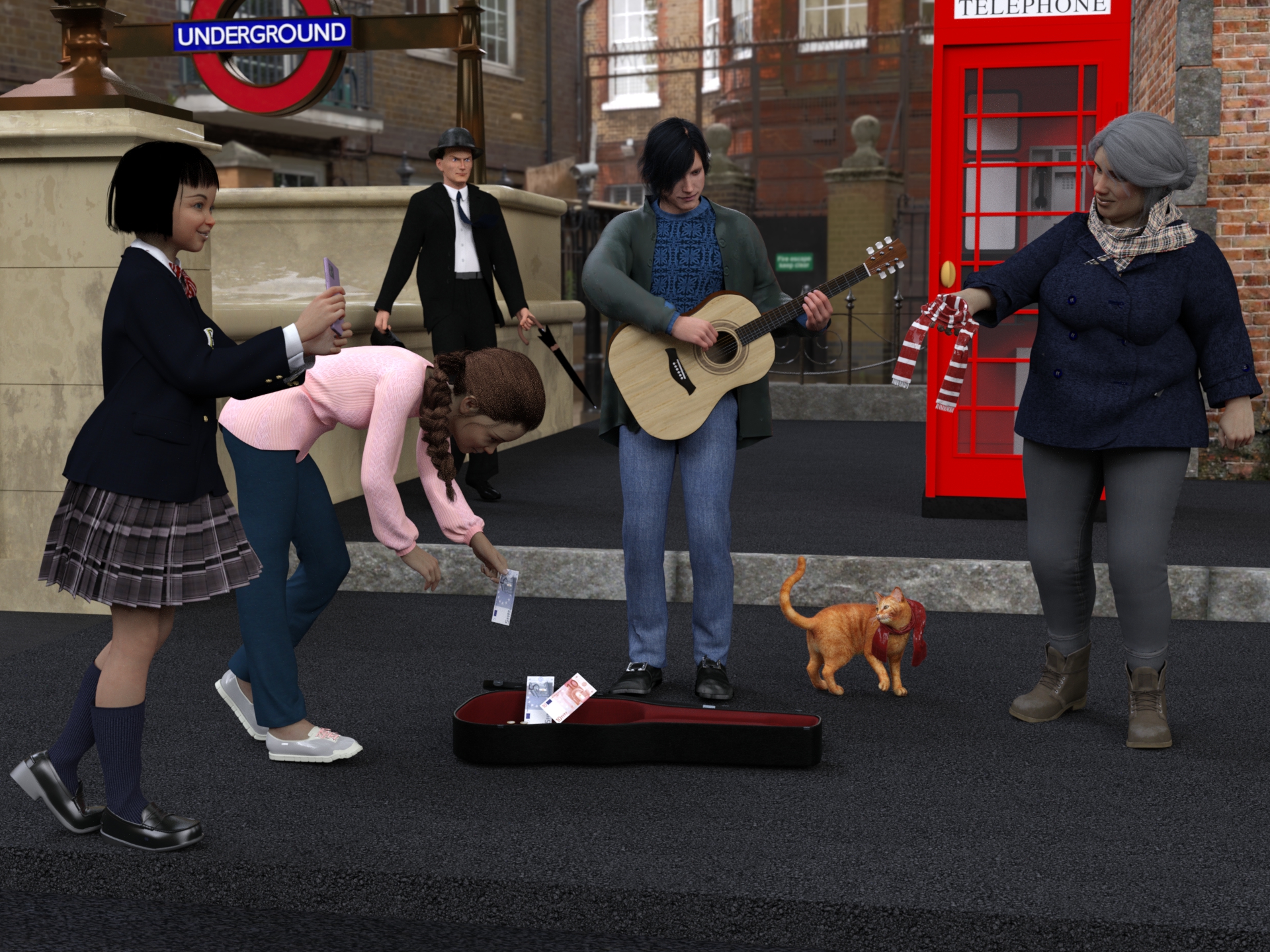
This image has been resized to fit in the page. Click to enlarge.
Freebies
TelephoneBox for POSER by paul_gormley
https://www.renderosity.com/freestuff/items/88019/telephonebox-for-poserSubway-entrance
https://www.turbosquid.com/it/3d-models/subway-entrance-3d-fbx/913817London Street (HDRI)
https://hdri-haven.com/hdri/london-streetwool scarf Free 3D model
https://www.cgtrader.com/free-3d-models/character/clothing/wool-scrafDavid10 for G8M
https://sharecg.com/v/94874/browse/21/DAZ-Studio/David10G8M dforce 40's inspired suit - high res version
https://www.deviantart.com/perlk/art/G8M-dforce-40-s-inspired-suit-high-res-version-963511567"Bowler Hat" (https://skfb.ly/66OnJ) by Joycestick is licensed under Creative Commons Attribution (http://creativecommons.org/licenses/by/4.0/).
https://sketchfab.com/3d-models/bowler-hat-3c3f5bfb98284924a70cf410ab532bc9Umbrella
https://www.turbosquid.com/it/3d-models/3d-umbrella-object-1270697Brown Leather Briefcase 3D Model
https://open3dmodel.com/3d-models/3d-model-brown-leather-briefcase_196422.htmlEveryday Hair Style for Genesis 8 Male(s) by zoro_d
https://www.renderosity.com/freestuff/items/80194/everyday-hair-style-for-genesis-8-male-s-Leisure Pants & Top for G8F
https://www.wilmapsdigitalcreations.co.uk/view_product.php?id=462Allegro Trainers for Genesis Female 8 by Rapier69
https://www.renderosity.com/freestuff/items/88819/allegro-trainers-for-genesis-female-8Candy Braids Hair for Genesis 8 Female(s) by zoro_d
https://www.renderosity.com/freestuff/items/88062/candy-braids-hair-for-genesis-8-femalesLily Character Morph For G8 and G8-1 Female Free 3D model
https://www.cgtrader.com/free-3d-models/character/woman/lily-character-morph-for-g8-and-g8-1-femaleNanami Genji Anime Charachter For Genesis 8 Female Free 3D model
https://www.cgtrader.com/free-3d-models/character/fantasy-character/nanami-genji-anime-charachter-for-genesis-8-femaleFree: Bob haircut for Genesis 8
https://www.deviantart.com/perlk/art/Free-Bob-haircut-for-Genesis-8-887913550Smartphone Prop by Foxclaw
https://www.renderosity.com/freestuff/items/87343/smartphone-propUpdate Sailor Uniform Winter Set Part 1
https://sharecg.com/v/94617/gallery/21/DAZ-Studio/Update-Sailor-Uniform-Winter-Set-Part-1Update Sailor Uniform Winter Set Part 2
https://sharecg.com/v/98662/gallery/21/DAZ-Studio/Update-Sailor-Uniform-Winter-Set-Part-2Fisherman Outfit4
https://www.deviantart.com/kalhh/art/Fisherman-Outfit4-858253233Genesis 8 Male Knitted Sweater
https://www.wilmapsdigitalcreations.co.uk/view_product.php?id=477G8M Polo Shirt & Jeans Trousers
https://www.sharecg.com/v/89614/Freebie Ferrieroutfit by Paspu (shoes)
https://www.renderosity.com/freestuff/items/91974/freebie-ferrieroutfitUPDATE - V Devil May Cry 5 Hair Prop for G8M
https://sharecg.com/v/93558/related/21/DAZ-Studio/UPDATE-V-Devil-May-Cry-5-Hair-Prop-for-G8MEl Mariachi Guitar Part 1 by sadrielxv
https://www.renderosity.com/freestuff/items/93700/el-mariachi-guitar-part-1El Mariachi Guitar Part 2 by sadrielxv
https://www.renderosity.com/freestuff/items/93701/el-mariachi-guitar-part-2El Mariachi Guitar Case by sadrielxv
https://www.renderosity.com/freestuff/items/93706/el-mariachi-guitar-caseMolly for Gf8.1 Charakter Shape
https://sharecg.com/v/98445/gallery/21/DAZ-Studio/Molly-for-Gf8.1-Charakter-ShapeBlazer Uniform Set for G8F
https://www.sharecg.com/v/94694/gallery/21/DAZ-Studio/Blazer-Uniform-Set-for-G8FGwennili Hair
https://www.deviantart.com/kayleyss/art/Gwennili-Hair-670556854TMWOutfit for Genesis 8 Female
https://www.deviantart.com/innmodels/art/TMWOutfit-for-Genesis-8-Female-878611570No count
"House on Suburb" free in the 2020 Renderosity giveawayPaid
DAZ House catI still have problems uploading the attachment, I put the link to the gallery
[Released] RSSY Character And Material Conversion Bundle Genesis 8 to Genesis 9 [Commercial]RiverSoftArt said:
Eboshijaana said:
Artini said:
Eboshijaana said:
I know this is a bit of a cop-out, but turning the figure into a single morph, then splitting it with the free character splitter and THEN converting the resulting character gets the best results.
It is an interesting idea.
What is this free character splitter, you are talking about?
https://www.daz3d.com/forums/discussion/617476/character-splitter This.
The script does split the morphs based on what the morph affects. The NECK_RANGE variable in the constants file specifies the low and high Y value for the cutoff for whether a morph affects the body or the head only.
Load a G8 figure, paste the following into the IDE pane and execute (change the NAME (not label) and the low, high in the GetMorphTypeFromName function call to try out different morphs and different ranges):
function GetMorphType( oGeom, oMorph, neckLow, neckHigh )
{
if (oMorph.name.toUpperCase().startsWith('FHM')) return 'Head';
else if (oMorph.name.toUpperCase().startsWith('FBM')) return 'Body';
// do it the hard way
var oDeltas = oMorph.getDeltas();
oDeltas.loadDeltas();
if (oDeltas.getNumDeltas() == 0)
{
if (output_debugL2) print('%1 morph does not have deltas'.arg(oMorph.getValueChannel().getLabel()));
return '';
}
var bAffectsHead = false;
var bAffectsBody = false;
var y;
for (var i = 0; i < oDeltas.getNumDeltas(); i++)
{
y = oGeom.getVertex(oDeltas.getDeltaIndex(i)).y;
if (y < neckLow) bAffectsBody = true;
else if (y > neckHigh) bAffectsHead = true;
if (bAffectsBody && bAffectsHead) return 'Full';
}
if (bAffectsHead) return 'Head';
else if (bAffectsBody) return 'Body';
return ''; // basically neck
}
function GetMorphTypeFromName(name, neckLow, neckHigh)
{
var node = Scene.getPrimarySelection();
if (!node) return 'Select a figure';
var morph = node.getObject().findModifier(name);
if (!morph) return 'Morph name not found';
return GetMorphType( node.getObject().getCurrentShape().getGeometry(), morph, neckLow, neckHigh )
}
print(GetMorphTypeFromName('Sylvian Head', 151, 165));
Thanks for all of the tips.
G9 Custom Face Morph How To Combine Eye Morph With It?MH said:
My Eye Morph has no "Controllers". My Face Morph has "Controllers" I included pictures to show it. How do I make my Eye Morph contain the "Controllers" please?
The steps are almost the same... After assigning the link (controller or subcompoment) in Property Hierarchy, make Adjust Rigging to Shape for the Head morph, ERC Freeze both morphs,then save the morph assets to the folders of your Vendor. You probably missed the step of ERC Freeze ...
G9 Custom Face Morph How To Combine Eye Morph With It?Is this Genesis 9? If so the eye morph on the eye figure needs to have a matching proerpty (exactly the same name) on the base figure, so that it follows that, and your master controller needs to set the slider on the base figure not the one on the eye (cross-figure links do not survive reloads, including restarting the application).
G9 Custom Face Morph How To Combine Eye Morph With It?My Eye Morph has no "Controllers". My Face Morph has "Controllers" I included pictures to show it. How do I make my Eye Morph contain the "Controllers" please?
G9 Custom Face Morph How To Combine Eye Morph With It?MH said:
crosswind said:
Set eye morph as the subcomponent of head morph, then save morph assets... it's a simple way. If you DO need a single control morph, create a single property and do the same.. (set head / eye morphs as its subcomponents, and save assets)
The eye morph does not work for when I close Daz Studio and when deleting Genesis 9. I did save the morph asset, but it only is using the face morph, when I've restarted Daz Studio.
If you saved the morph assets correctly, they would work. You may check the eye morph and its controller link as below.
Daz 3D is part of

Connect
DAZ Productions, Inc.
7533 S Center View Ct #4664
West Jordan, UT 84084Licensing Agreement | Terms of Service | Privacy Policy | EULA
© 2026 Daz Productions Inc. All Rights Reserved.