-
Problems loading and saveing in DAZ Studio 4.23
Hello,
i have problems loading and saveing
Saveing scenes over File / Save as / Scene.. says it is saveing but than the destination directory remains empty. Try to save again and it works. But when scene was loaded modified, and saved with the save button, the changes are not saved.
When loading old scenes (with Victoria 4) figure loads but clothes and hair is not loaded, error message comes, that certain files are not found. Checking the directory - files are there.
I created my own startup scene. Even this could not be loaded at program start. But there is a hint in the log:
2024-10-17 12:04:33.079 [INFO] :: Begin asset load (open): /D:/DefaultStartSczene.duf
2024-10-17 12:04:33.079 [ERROR] :: File Format Error: D:/DefaultStartSczene.duf
2024-10-17 12:04:33.079 [WARNING] :: Error loading asset: D:/DefaultStartSczene.duf
Operation failedCan anywone help me with this problems?
There's Always Another Sale Thread -- Discussions Only Pt 3TriCounter said:
Arrived today for the 80% off Bundles lol ... 20 year old content and down to 50% for Genesis 3 which was released over 10 years ago.
Now that we've got Daz 2D catoonz II'll hope to see if there's a Victoria abstract expessionism release next week.
I am wondering if Hiro9 will be necromanced since they killed him off a few generations back and seemed intent on shipping Aiko with a line of swole GigaChads
There's Always Another Sale Thread -- Discussions Only Pt 3Arrived today for the 80% off Bundles lol ... 20 year old content and down to 50% for Genesis 3 which was released over 10 years ago.
Now that we've got Daz 2D catoonz II'll hope to see if there's a Victoria abstract expessionism release next week.
Trying to match character in imagesFauvist said:
I looked at the OP original post and sample image. I believe the figure/character is just Victoria 8. I believe the texture is Fane Hair and Character for Genesis 8 Female(s), using the Tan Diffuse Preset for that character. I believe the eye and lip textures are from the original Vicoria 8 figure.
no. i'm wrong
Trying to match character in imagesI looked at the OP original post and sample image. I believe the figure/character is just Victoria 8. I believe the texture is Fane Hair and Character for Genesis 8 Female(s), using the Tan Diffuse Preset for that character. I believe the eye and lip textures are from the original Vicoria 8 figure.
Creating adult content with daz how to get started?Richard Haseltine said:
I have adult content all the time. Stuff with kids, people in diners... I'm thinking of doing a series where someone is trying to figure out their taxes.
Oh, you mean porn? Oh.
I just would like to make a sex story of mine, how can I find the organs like " penis and vagina", I installed the DAZ 3D , but I can't find the adult stuff on it, should I buy some products? what are they? please advice!
thank yoy
Actually, he didn't - which was rather the point.
However, the anatomical elements are included only in (some of) the pro Bundles for adult characters - e.g. Victoria 8 Pro and Michael 8 Pro. However you need to bear in mnd that the daz products are only the base mesh, daz does not sell shaping options and certainly not "action" shapes/poses.
so technically you mean we only do modeling here ha? seems fair i mean at least for modeling
Can turbo loader be applied to only specific character?
From independent character product perspective, they don't share any of their exclusive morphs from one another.James said:If Aiko is G8 Figure, why it doesn't share the same morphs as Victoria 8 which is also G8?
Can turbo loader be applied to only specific character?If Aiko is G8 Figure, why it doesn't share the same morphs as Victoria 8 which is also G8?
Anime Toons and Filatoon Shader Q&AMada said:
Petra said:
Can one put normal Iray shaders on the new Victoria 9 toon shape?
Yes but you won't have the outline, and the normal G9 eyeballs would probably work better with Iray Textures.
If you're just after the iray texture but still want the outline and render in filament, just drop the base colour texture used in iray into the right channel.
In this image I loaded Vicky Toon, and then applied Josie's Iray shader, and then removed the maps from the normal and specular channels to get a flatter look
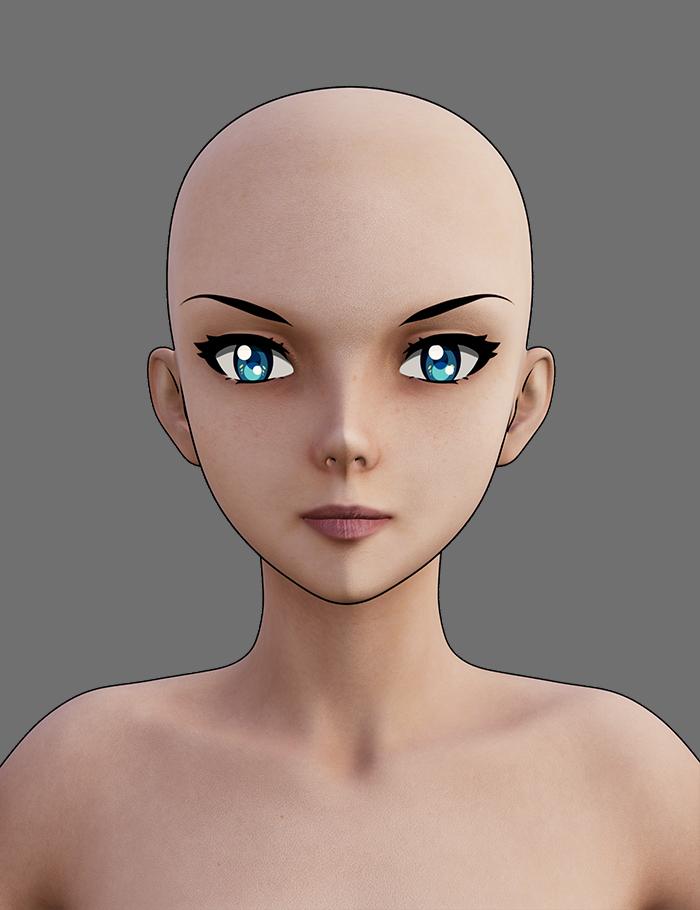
Thank you so very much Mada, that is lovely. Is there a light that you could recommend that works good with filament renders?
Can turbo loader be applied to only specific character?James said:
I asked the developer on youtube:
Can turbo loader be applied to only specific character? It seems after I set one character of gf8, the settings are also aplied to another gf8 characters.
He explained:
Every G8F morph applies, or can potentially apply, to every G8F character. Turning a morph off for one character turns them off for all.So it changes per figure, then.
To be exactly, we're talking about different things:
1) The way how Turbo Loader works. Turbo Loader lists, activates / deactivates (enables / disables) morphs firstly per Product (no matter Character Product, Morph Product ...) That seems the question you asked in this thread's title and what I explained.
2) The way how a Morph file (dsf) affects a Genesis figure, i.e. a) an activated (enabled) morph can be loaded, seen, dialed and take effect in Parameters pane; b) an deactivated (disabled) Morph cannot... That's more likely what RiverSoftArt replied. Of course, you cannot find disabled morphs on a figure, in fact it's irrelevant to any Character anymore.... That's more likely what Richard said.
Back to the question you further asked: Can turbo loader be applied to only specific character? It seems after I set one character of gf8, the settings are also aplied to another gf8 characters.
The more accurate answer should be more or less a mix of the above points:
Yes, Turbo Loader, as default, applies enablement / disablement per Character / Morph Product based on your selection in Product List. If you disable the morphs under a G8F Character Product (e.g. Victoria 8), you won't find them in G8F figure's property list in Parameter pane, but actually it won't affect another character, let's say Aiko 8 because Aiko 8 doesn't use Victoria 8's morphs...
Yike ~~~
 Who is the new model in the splash screen / twitter post?
Looks like a mix of Victoria 9 and Joan 9 to me.
There's Always Another Sale Thread -- Discussions Only Pt 3XiousDs said:
I am more curious how the shader would work on default characters like Victoria 9, Michael 9, Olympia, etc before any interest in Vicky 9. Vicky 9 looks like she would be good for folks who want to make Manga looking type stuff with the appropriate style eyes and stuff, but it seems like you could pretty easily be able to simulate the character with the toon essentials since Manga anesthetics are not that complex. It's not like the difficulty of trying to portray a believable real looking person which is where much of the HD and fancy high quality gen 9 skins come to play.
Mada started a Q&A/tutorial thread in this forum that I believe has some posts about this topic.
There's Always Another Sale Thread -- Discussions Only Pt 3I am more curious how the shader would work on default characters like Victoria 9, Michael 9, Olympia, etc before any interest in Vicky 9. Vicky 9 looks like she would be good for folks who want to make Manga looking type stuff with the appropriate style eyes and stuff, but it seems like you could pretty easily be able to simulate the character with the toon essentials since Manga aesthetics are not that complex. It's not like the difficulty of trying to portray a believable real looking person which is where much of the HD and fancy high quality gen 9 skins come to play.Vicky 9 hidden Requirements?xyer0 said:
https://www.daz3d.com/genesis-9-toon-essential-shapes-bundle
I am confused by this because I was ready to buy Vicky 9 | Daz 3D but this seems to say I have to buy Genesis 9 Toon Essential Shapes Bundle | Daz 3D which includes Genesis 9 Anime Base Expressions | Daz 3D, Genesis 9 Anime Head and Body Shapes | Daz 3D, and Genesis 9 Toon Starter Essentials Expansion | Daz 3D for Vicky 9 | Daz 3D to work?
I decided to buy Genesis 9 Toon Essential Shapes Bundle | Daz 3D as it seems to enable me to convert a lot of existing DAZ Genesis 9 content to anime. I'm going to wait on on one of either Vicky 9 Character Bundle | Daz 3D or Vicky 9 | Daz 3D as they seem to be rather specific translations of Victoria 9 to the anime version Vicky 9 that need at least the Genesis 9 Toon Starter Essentials Expansion | Daz 3D to function correctly, which came free in my DIM before I ordered, by the way for other customers wondering exactly which package was missing.
Anime Toons and Filatoon Shader Q&APetra said:
Can one put normal Iray shaders on the new Victoria 9 toon shape?
Yes but you won't have the outline, and the normal G9 eyeballs would probably work better with Iray Textures.
If you're just after the iray texture but still want the outline and render in filament, just drop the base colour texture used in iray into the right channel.
In this image I loaded Vicky Toon, and then applied Josie's Iray shader, and then removed the maps from the normal and specular channels to get a flatter look
Anime Toons and Filatoon Shader Q&ACan one put normal Iray shaders on the new Victoria 9 toon shape?
Let's appreciate/discuss today's new releases - more ongoinger threadtyra_oeildeloup said:
Seems it's intentional, since "Meet Vicky 9, using the new Genesis 9 Toon shape to do an all-new anime figure inspired by Victoria."
It's obviously intentional, but I can still say I think it's an odd choice.
A quick search already finds a lot of people referring to Victoria as Vicky, and given Daz's previous efforts to try to unconfuse their product lines (things like bringing generation and genesis numbers in line, and generally retiring characters built on core figures as a base), it seems weird to pick up that spanner and throw it right in there.
Let's appreciate/discuss today's new releases - more ongoinger threadMatt_Castle said:
And the award for core character name most likely to cause confusion because people already often refer to Victoria as Vicky goes to...
Seems it's intentional, since "Meet Vicky 9, using the new Genesis 9 Toon shape to do an all-new anime figure inspired by Victoria."
Let's appreciate/discuss today's new releases - more ongoinger threadAnd the award for core character name most likely to cause confusion because people already often refer to Victoria as Vicky goes to...
There's Always Another Sale Thread -- Discussions Only Pt 3
Prices always come and go. That is why this thread is, There's always another sale. You miss out on a great deal and now something is super expensive, just wait cause... There's always another sale.AsuCafe said:Sales are a bit quiet this time, most are no cheaper than last month.
But dogs are cute.
There is only one DOOR BUSTER and a new PLUS item every day at a very attractive price.
But I noticed the prices in Victoria 8 & 8.1 are pretty good ,seems better than last month?
Will these prices last a whole month?
Or come and go like last month?Daz 3D is part of

Connect
DAZ Productions, Inc.
7533 S Center View Ct #4664
West Jordan, UT 84084Licensing Agreement | Terms of Service | Privacy Policy | EULA
© 2026 Daz Productions Inc. All Rights Reserved.