-
Daz Studio 6 Beta - version 6.25.2026.19821! (Updated July 23, 2026)
crosswind said:
alex.schead said:
Richard Haseltine said:
alex.schead said:
Richard Haseltine said:
alex.schead said:
Richard Haseltine said:
alex.schead said:
Hi Richard,
I was wondering if you saw my question before, I've been trying to figure out if I'm dealing with a general problem with Daz Alpha/Beta, maybe a bug or something I caused somehow, or if it's a specific known bug.
I created a few characters then tried saving and loading them into a different scene. Just as a side note, I created them over the past 3 months and for the most part created them all in the same scene so I could compare their height and make sure I had the right relationship between the different characters.
When I try to load them into the same exact scene, the specific one I created them in, it works. But it doesn't work for any other one. The morph dials are clearly not the same, or they might be but they don't look right.
Daz Beta Morph Loading Issue_3 = original one as I made it
Daz Beta Morph Loading Issue_1 = this one is the loaded version with the problem, maybe it's not that clear in the render, but when rotating it in 3D it's very clear how "broken" the anatomy is in comparison to the original one
https://drive.google.com/drive/folders/19q7zKf7prCqdLOhBhNdY46lcs0g3222O?usp=sharing
I've tried saving them as subsets, personas, characters, and scenes but nothing seems to work. When I asked Grok it said that this is a "common" problem with new releases of Daz that are usually fixed closer to stable release but, I have no idea how much I could trust it in this case.
Thanks! And please let me know if I should be posting this on a different place. I wasn't sure.Are there custom morphs that have npt bneens aved as support assets in the scene file?
Thanks for the reply, Richard.
As I understand your question, yes. The characters are heavily customized using a mix of 2 characters from the store then some customization using a combination of things like:
- The Look Female Face Morph Resource for Genesis 9
- The Look Body Morph Resource for Genesis 9 Feminine
- P3D Face Builder for Genesis 9 Feminine
- and Daz's own expanded dials
As I understand it, I could "bake" the character into 1 dial morph with body and separated if I wanted, the trade off being performance, but if I kept it "unbaked" I have more flexibility with posing and deforming. I just mention this because maybe that's what I'm doing wrong? Should my workflow always be to "bake" the characters to avoid bugs like these?
I'm still learning Daz so I apologize if I misunderstood your question.None of those would count as custom morphs in the sense I meant - they all have files associated with them n the /data folder which any character loaded should have access to. A new morph created from a dForm or by loading an OBJ would be the kind of thing I had in mind, until saved as a support asset it would exist in the scene but not in other files (though a character preset saved from the scene and used to load a new figure, not aplied to an existing figure, should also include it).
Oh, I see. Then you're correct, the answer is no.
Would this mean that it's a bug of some kind?It would certainly appear to be something. If you could upload a sample scene (ideally simple, and using stock content - but I realise that may be tricky) then someone may be able to figure out what is happening.
https://drive.google.com/drive/folders/1hQdIsu_Q_-DPlPKyrlTnBUa7GsaphNnc?usp=sharing ;
I'm not 100% sure I was able to replicate the problem only using stock content, but please take a look.
Original scene = the scene I used to designed the character
New scene = the new scene I created using my "default template scene" and then importedI uploaded 1 render of each and the actual scene files (.duf) along with the character files (scene subset, persona and character files).
When I imported the character I used the scene subset file.
Hopefully this is enough for us to figure out what's going on.Thanks Richard, appreciate it.
The issue comes from the Timeline ~~
Open Window > Panes > Timeline, you can find that you customized your character at Frame 30. After loading whatever a Subset / Preset in a New Scene, the pointer goes to Frame 0, which is different from Frame 30.
You can simply save a Shaping Preset at Frame 30, delete Frame 30, point to Frame 0, load Shaping Preset (or copy Frame 30 to Frame 0 before deleting Frame 30...) Then save a Subset or other Preset as needed ~~ It'll work.
Hey crosswind!
Thank you so much for replying.
Ohhh wow, I had no idea the shape tab dials could be animated. I was ignoring the animation aspects of Daz and 3D until I was a little more comfortable with the rest. Such a silly mistake, thank you so much for the help.
Is there a way for me to stop myself from creating key frames unintentionally? I guess I'll just keep the timeline always in the UI so I can keep an eye on that. I just don't know how I created the key frame.
Thanks again!
I am looking for some help for custom export, setting morphs via scriptHow to export OBJ https://docs.daz3d.com/public/software/dazstudio/4/referenceguide/scripting/api_reference/samples/file_io/export_obj_silent/start
How to get proeprties https://docs.daz3d.com/public/software/dazstudio/4/referenceguide/scripting/api_reference/samples/properties/node_properties/start
Method to set a value on a float proeprty (which a morph slider will be) https://docs.daz3d.com/public/software/dazstudio/4/referenceguide/scripting/api_reference/object_index/floatproperty_dz#a_1ad14f1a69d9cc1bd789f3753bbba3bd04
Make sure you adhere to the license terms if you use any of the sample code.
Daz Studio 6 Beta - version 6.25.2026.19821! (Updated July 23, 2026)alex.schead said:
Richard Haseltine said:
alex.schead said:
Richard Haseltine said:
alex.schead said:
Richard Haseltine said:
alex.schead said:
Hi Richard,
I was wondering if you saw my question before, I've been trying to figure out if I'm dealing with a general problem with Daz Alpha/Beta, maybe a bug or something I caused somehow, or if it's a specific known bug.
I created a few characters then tried saving and loading them into a different scene. Just as a side note, I created them over the past 3 months and for the most part created them all in the same scene so I could compare their height and make sure I had the right relationship between the different characters.
When I try to load them into the same exact scene, the specific one I created them in, it works. But it doesn't work for any other one. The morph dials are clearly not the same, or they might be but they don't look right.
Daz Beta Morph Loading Issue_3 = original one as I made it
Daz Beta Morph Loading Issue_1 = this one is the loaded version with the problem, maybe it's not that clear in the render, but when rotating it in 3D it's very clear how "broken" the anatomy is in comparison to the original one
https://drive.google.com/drive/folders/19q7zKf7prCqdLOhBhNdY46lcs0g3222O?usp=sharing
I've tried saving them as subsets, personas, characters, and scenes but nothing seems to work. When I asked Grok it said that this is a "common" problem with new releases of Daz that are usually fixed closer to stable release but, I have no idea how much I could trust it in this case.
Thanks! And please let me know if I should be posting this on a different place. I wasn't sure.Are there custom morphs that have npt bneens aved as support assets in the scene file?
Thanks for the reply, Richard.
As I understand your question, yes. The characters are heavily customized using a mix of 2 characters from the store then some customization using a combination of things like:
- The Look Female Face Morph Resource for Genesis 9
- The Look Body Morph Resource for Genesis 9 Feminine
- P3D Face Builder for Genesis 9 Feminine
- and Daz's own expanded dials
As I understand it, I could "bake" the character into 1 dial morph with body and separated if I wanted, the trade off being performance, but if I kept it "unbaked" I have more flexibility with posing and deforming. I just mention this because maybe that's what I'm doing wrong? Should my workflow always be to "bake" the characters to avoid bugs like these?
I'm still learning Daz so I apologize if I misunderstood your question.None of those would count as custom morphs in the sense I meant - they all have files associated with them n the /data folder which any character loaded should have access to. A new morph created from a dForm or by loading an OBJ would be the kind of thing I had in mind, until saved as a support asset it would exist in the scene but not in other files (though a character preset saved from the scene and used to load a new figure, not aplied to an existing figure, should also include it).
Oh, I see. Then you're correct, the answer is no.
Would this mean that it's a bug of some kind?It would certainly appear to be something. If you could upload a sample scene (ideally simple, and using stock content - but I realise that may be tricky) then someone may be able to figure out what is happening.
https://drive.google.com/drive/folders/1hQdIsu_Q_-DPlPKyrlTnBUa7GsaphNnc?usp=sharing ;
I'm not 100% sure I was able to replicate the problem only using stock content, but please take a look.
Original scene = the scene I used to designed the character
New scene = the new scene I created using my "default template scene" and then importedI uploaded 1 render of each and the actual scene files (.duf) along with the character files (scene subset, persona and character files).
When I imported the character I used the scene subset file.
Hopefully this is enough for us to figure out what's going on.Thanks Richard, appreciate it.
The issue comes from the Timeline ~~
Open Window > Panes > Timeline, you can find that you customized your character at Frame 30. After loading whatever a Subset / Preset in a New Scene, the pointer goes to Frame 0, which is different from Frame 30.
You can simply save a Shaping Preset at Frame 30, delete Frame 30, point to Frame 0, load Shaping Preset (or copy Frame 30 to Frame 0 before deleting Frame 30...) Then save a Subset or other Preset as needed ~~ It'll work.
Daz Studio 6 Beta - version 6.25.2026.19821! (Updated July 23, 2026)alex.schead said:
Hi Richard,
I was wondering if you saw my question before, I've been trying to figure out if I'm dealing with a general problem with Daz Alpha/Beta, maybe a bug or something I caused somehow, or if it's a specific known bug.
I created a few characters then tried saving and loading them into a different scene. Just as a side note, I created them over the past 3 months and for the most part created them all in the same scene so I could compare their height and make sure I had the right relationship between the different characters.
When I try to load them into the same exact scene, the specific one I created them in, it works. But it doesn't work for any other one. The morph dials are clearly not the same, or they might be but they don't look right.
Daz Beta Morph Loading Issue_3 = original one as I made it
Daz Beta Morph Loading Issue_1 = this one is the loaded version with the problem, maybe it's not that clear in the render, but when rotating it in 3D it's very clear how "broken" the anatomy is in comparison to the original one
https://drive.google.com/drive/folders/19q7zKf7prCqdLOhBhNdY46lcs0g3222O?usp=sharing
I've tried saving them as subsets, personas, characters, and scenes but nothing seems to work. When I asked Grok it said that this is a "common" problem with new releases of Daz that are usually fixed closer to stable release but, I have no idea how much I could trust it in this case.
Thanks! And please let me know if I should be posting this on a different place. I wasn't sure.
The link of google drive is not accessible i.e. with no authorization...so folks couldn't check the issue ~~
I'm not sure what you meant by "...it's very clear how "broken" the anatomy is in comparison to the original one". If the anatomy you mentioned was a geo-graft, there might be issues that brought you different morph results because of auto-generated morphs.
Anyway, while we're checking your files, you can try:
1) Close the current Scene in latest DS 6.25 Beta, press F2, General tabl > Clear DSON Cache Files... Accept. Quit DS 6.25 Beta, relaunch it.
2) Load the Scene in which you customized your characters. Save that "problematic character" as a Scene Sub-Set.
3) Launch a 2nd Instance of DS 6.25 Beta ...by following below steps:
a) Right-click on your Windows Desktop, New > Shortcut...
b) In the field of app. location, paste: "C:/Program Files/DAZ 3D/DAZStudio6 Public Build/DAZStudio" -instanceName # -cleanOnLaunch true -copyAppSettings . -copySessionUI . -cleanOnExit true
c) Run the shortcut that newly-created on your Windows Desktop. You'll get a 2nd Instance of DS 6.25 Beta.
4) In the 2nd Instance, load the Scene-Subset you just saved.After loading the subset, compare the character as well as the anatomy in two Scenes, see what you get and if the issue is gone ~~
Daz Studio 6 Beta - version 6.25.2026.19821! (Updated July 23, 2026)Richard Haseltine said:
alex.schead said:
Richard Haseltine said:
alex.schead said:
Richard Haseltine said:
alex.schead said:
Hi Richard,
I was wondering if you saw my question before, I've been trying to figure out if I'm dealing with a general problem with Daz Alpha/Beta, maybe a bug or something I caused somehow, or if it's a specific known bug.
I created a few characters then tried saving and loading them into a different scene. Just as a side note, I created them over the past 3 months and for the most part created them all in the same scene so I could compare their height and make sure I had the right relationship between the different characters.
When I try to load them into the same exact scene, the specific one I created them in, it works. But it doesn't work for any other one. The morph dials are clearly not the same, or they might be but they don't look right.
Daz Beta Morph Loading Issue_3 = original one as I made it
Daz Beta Morph Loading Issue_1 = this one is the loaded version with the problem, maybe it's not that clear in the render, but when rotating it in 3D it's very clear how "broken" the anatomy is in comparison to the original one
https://drive.google.com/drive/folders/19q7zKf7prCqdLOhBhNdY46lcs0g3222O?usp=sharing
I've tried saving them as subsets, personas, characters, and scenes but nothing seems to work. When I asked Grok it said that this is a "common" problem with new releases of Daz that are usually fixed closer to stable release but, I have no idea how much I could trust it in this case.
Thanks! And please let me know if I should be posting this on a different place. I wasn't sure.Are there custom morphs that have npt bneens aved as support assets in the scene file?
Thanks for the reply, Richard.
As I understand your question, yes. The characters are heavily customized using a mix of 2 characters from the store then some customization using a combination of things like:
- The Look Female Face Morph Resource for Genesis 9
- The Look Body Morph Resource for Genesis 9 Feminine
- P3D Face Builder for Genesis 9 Feminine
- and Daz's own expanded dials
As I understand it, I could "bake" the character into 1 dial morph with body and separated if I wanted, the trade off being performance, but if I kept it "unbaked" I have more flexibility with posing and deforming. I just mention this because maybe that's what I'm doing wrong? Should my workflow always be to "bake" the characters to avoid bugs like these?
I'm still learning Daz so I apologize if I misunderstood your question.None of those would count as custom morphs in the sense I meant - they all have files associated with them n the /data folder which any character loaded should have access to. A new morph created from a dForm or by loading an OBJ would be the kind of thing I had in mind, until saved as a support asset it would exist in the scene but not in other files (though a character preset saved from the scene and used to load a new figure, not aplied to an existing figure, should also include it).
Oh, I see. Then you're correct, the answer is no.
Would this mean that it's a bug of some kind?It would certainly appear to be something. If you could upload a sample scene (ideally simple, and using stock content - but I realise that may be tricky) then someone may be able to figure out what is happening.
https://drive.google.com/drive/folders/1hQdIsu_Q_-DPlPKyrlTnBUa7GsaphNnc?usp=sharing
I'm not 100% sure I was able to replicate the problem only using stock content, but please take a look.
Original scene = the scene I used to designed the character
New scene = the new scene I created using my "default template scene" and then importedI uploaded 1 render of each and the actual scene files (.duf) along with the character files (scene subset, persona and character files).
When I imported the character I used the scene subset file.
Hopefully this is enough for us to figure out what's going on.Thanks Richard, appreciate it.
I am looking for some help for custom export, setting morphs via scriptHey there,
I am currently in the process of making the best off the daztoc4d bridge and that brings me to a step inside the pipeline which has me exporting a couple morphs over and over depending on base figure shapes that I created. My idea is to create a script, fill an array with urls to the specific morphs in the figure properties, or wherever they are nested in, then have a foreach cycle through it and set each of the morphs to 100%, wait a short moment so the morph is set, then call the daz obj exporter to export the figure in its current state with the morph dialed in, wait a little bit to make sure the morph export has finished, and then loop the thing
So basically like this:
fill array with morph url values
for each x in array
{
set morph value = 1
wait 500ms
trigger exporter
wait 2000ms
}
Anyone here who could give me the information needed, so I can actually set morph values via script, and how to trigger the export function?
If someone even has the time to create a script that does it, that would be great too, would save me the time to set it up :)
Thanks in advance to anyone sacrificing some time to help out.Daz Studio 6 Beta - version 6.25.2026.19821! (Updated July 23, 2026)alex.schead said:
Richard Haseltine said:
alex.schead said:
Richard Haseltine said:
alex.schead said:
Hi Richard,
I was wondering if you saw my question before, I've been trying to figure out if I'm dealing with a general problem with Daz Alpha/Beta, maybe a bug or something I caused somehow, or if it's a specific known bug.
I created a few characters then tried saving and loading them into a different scene. Just as a side note, I created them over the past 3 months and for the most part created them all in the same scene so I could compare their height and make sure I had the right relationship between the different characters.
When I try to load them into the same exact scene, the specific one I created them in, it works. But it doesn't work for any other one. The morph dials are clearly not the same, or they might be but they don't look right.
Daz Beta Morph Loading Issue_3 = original one as I made it
Daz Beta Morph Loading Issue_1 = this one is the loaded version with the problem, maybe it's not that clear in the render, but when rotating it in 3D it's very clear how "broken" the anatomy is in comparison to the original one
https://drive.google.com/drive/folders/19q7zKf7prCqdLOhBhNdY46lcs0g3222O?usp=sharing
I've tried saving them as subsets, personas, characters, and scenes but nothing seems to work. When I asked Grok it said that this is a "common" problem with new releases of Daz that are usually fixed closer to stable release but, I have no idea how much I could trust it in this case.
Thanks! And please let me know if I should be posting this on a different place. I wasn't sure.Are there custom morphs that have npt bneens aved as support assets in the scene file?
Thanks for the reply, Richard.
As I understand your question, yes. The characters are heavily customized using a mix of 2 characters from the store then some customization using a combination of things like:
- The Look Female Face Morph Resource for Genesis 9
- The Look Body Morph Resource for Genesis 9 Feminine
- P3D Face Builder for Genesis 9 Feminine
- and Daz's own expanded dials
As I understand it, I could "bake" the character into 1 dial morph with body and separated if I wanted, the trade off being performance, but if I kept it "unbaked" I have more flexibility with posing and deforming. I just mention this because maybe that's what I'm doing wrong? Should my workflow always be to "bake" the characters to avoid bugs like these?
I'm still learning Daz so I apologize if I misunderstood your question.None of those would count as custom morphs in the sense I meant - they all have files associated with them n the /data folder which any character loaded should have access to. A new morph created from a dForm or by loading an OBJ would be the kind of thing I had in mind, until saved as a support asset it would exist in the scene but not in other files (though a character preset saved from the scene and used to load a new figure, not aplied to an existing figure, should also include it).
Oh, I see. Then you're correct, the answer is no.
Would this mean that it's a bug of some kind?It would certainly appear to be something. If you could upload a sample scene (ideally simple, and using stock content - but I realise that may be tricky) then someone may be able to figure out what is happening.
Account not showing items I've purchasedIf you believe you have purchased items that are showing as not purchased on the website then you need to raise a sales ticket with Daz Support (see the Help Centre link in the footer) since only they will be able to help. You'll need to grab the order number that contained those products - either from your Daz Account page or the email you should have received.
For anything that is showing as purchased on the website but is missing from Smart Content this may be because it was a bulk-transfer from when the vendor moved their products from another website. They are usually found under "lost & found" but sometimes might be missing alltogether. Alternatively, if they are very old, they may be Poser-only products and so would not have any meta data (Smart Content). For either of these issues, the files should still be there if you navigate to the right place in the Library's phsyical location.
If they are not showing up in DIM then check your Filters since some might be tagged only with things that you have unchecked.
Also, there are sometimes products sold for one generation and then released later for a different generation. So, for example, you may have bought the G8 version of a product and then seeing the G9 version as unpurchased on the store - or something like that. Probably not in your case but it could be a possibility.
Also, I am assuming you have just one Daz account - if you have multiple for some reason then that probably adds in a bunch of other problems I wouldn't know about.
Daz Studio 6 Beta - version 6.25.2026.19821! (Updated July 23, 2026)Richard Haseltine said:
alex.schead said:
Richard Haseltine said:
alex.schead said:
Hi Richard,
I was wondering if you saw my question before, I've been trying to figure out if I'm dealing with a general problem with Daz Alpha/Beta, maybe a bug or something I caused somehow, or if it's a specific known bug.
I created a few characters then tried saving and loading them into a different scene. Just as a side note, I created them over the past 3 months and for the most part created them all in the same scene so I could compare their height and make sure I had the right relationship between the different characters.
When I try to load them into the same exact scene, the specific one I created them in, it works. But it doesn't work for any other one. The morph dials are clearly not the same, or they might be but they don't look right.
Daz Beta Morph Loading Issue_3 = original one as I made it
Daz Beta Morph Loading Issue_1 = this one is the loaded version with the problem, maybe it's not that clear in the render, but when rotating it in 3D it's very clear how "broken" the anatomy is in comparison to the original one
https://drive.google.com/drive/folders/19q7zKf7prCqdLOhBhNdY46lcs0g3222O?usp=sharing
I've tried saving them as subsets, personas, characters, and scenes but nothing seems to work. When I asked Grok it said that this is a "common" problem with new releases of Daz that are usually fixed closer to stable release but, I have no idea how much I could trust it in this case.
Thanks! And please let me know if I should be posting this on a different place. I wasn't sure.Are there custom morphs that have npt bneens aved as support assets in the scene file?
Thanks for the reply, Richard.
As I understand your question, yes. The characters are heavily customized using a mix of 2 characters from the store then some customization using a combination of things like:
- The Look Female Face Morph Resource for Genesis 9
- The Look Body Morph Resource for Genesis 9 Feminine
- P3D Face Builder for Genesis 9 Feminine
- and Daz's own expanded dials
As I understand it, I could "bake" the character into 1 dial morph with body and separated if I wanted, the trade off being performance, but if I kept it "unbaked" I have more flexibility with posing and deforming. I just mention this because maybe that's what I'm doing wrong? Should my workflow always be to "bake" the characters to avoid bugs like these?
I'm still learning Daz so I apologize if I misunderstood your question.None of those would count as custom morphs in the sense I meant - they all have files associated with them n the /data folder which any character loaded should have access to. A new morph created from a dForm or by loading an OBJ would be the kind of thing I had in mind, until saved as a support asset it would exist in the scene but not in other files (though a character preset saved from the scene and used to load a new figure, not aplied to an existing figure, should also include it).
Oh, I see. Then you're correct, the answer is no.
Would this mean that it's a bug of some kind?Daz Studio 6 Beta - version 6.25.2026.19821! (Updated July 23, 2026)alex.schead said:
Richard Haseltine said:
alex.schead said:
Hi Richard,
I was wondering if you saw my question before, I've been trying to figure out if I'm dealing with a general problem with Daz Alpha/Beta, maybe a bug or something I caused somehow, or if it's a specific known bug.
I created a few characters then tried saving and loading them into a different scene. Just as a side note, I created them over the past 3 months and for the most part created them all in the same scene so I could compare their height and make sure I had the right relationship between the different characters.
When I try to load them into the same exact scene, the specific one I created them in, it works. But it doesn't work for any other one. The morph dials are clearly not the same, or they might be but they don't look right.
Daz Beta Morph Loading Issue_3 = original one as I made it
Daz Beta Morph Loading Issue_1 = this one is the loaded version with the problem, maybe it's not that clear in the render, but when rotating it in 3D it's very clear how "broken" the anatomy is in comparison to the original one
https://drive.google.com/drive/folders/19q7zKf7prCqdLOhBhNdY46lcs0g3222O?usp=sharing
I've tried saving them as subsets, personas, characters, and scenes but nothing seems to work. When I asked Grok it said that this is a "common" problem with new releases of Daz that are usually fixed closer to stable release but, I have no idea how much I could trust it in this case.
Thanks! And please let me know if I should be posting this on a different place. I wasn't sure.Are there custom morphs that have npt bneens aved as support assets in the scene file?
Thanks for the reply, Richard.
As I understand your question, yes. The characters are heavily customized using a mix of 2 characters from the store then some customization using a combination of things like:
- The Look Female Face Morph Resource for Genesis 9
- The Look Body Morph Resource for Genesis 9 Feminine
- P3D Face Builder for Genesis 9 Feminine
- and Daz's own expanded dials
As I understand it, I could "bake" the character into 1 dial morph with body and separated if I wanted, the trade off being performance, but if I kept it "unbaked" I have more flexibility with posing and deforming. I just mention this because maybe that's what I'm doing wrong? Should my workflow always be to "bake" the characters to avoid bugs like these?
I'm still learning Daz so I apologize if I misunderstood your question.None of those would count as custom morphs in the sense I meant - they all have files associated with them n the /data folder which any character loaded should have access to. A new morph created from a dForm or by loading an OBJ would be the kind of thing I had in mind, until saved as a support asset it would exist in the scene but not in other files (though a character preset saved from the scene and used to load a new figure, not aplied to an existing figure, should also include it).
Daz Studio 6 Beta - version 6.25.2026.19821! (Updated July 23, 2026)Richard Haseltine said:
alex.schead said:
Hi Richard,
I was wondering if you saw my question before, I've been trying to figure out if I'm dealing with a general problem with Daz Alpha/Beta, maybe a bug or something I caused somehow, or if it's a specific known bug.
I created a few characters then tried saving and loading them into a different scene. Just as a side note, I created them over the past 3 months and for the most part created them all in the same scene so I could compare their height and make sure I had the right relationship between the different characters.
When I try to load them into the same exact scene, the specific one I created them in, it works. But it doesn't work for any other one. The morph dials are clearly not the same, or they might be but they don't look right.
Daz Beta Morph Loading Issue_3 = original one as I made it
Daz Beta Morph Loading Issue_1 = this one is the loaded version with the problem, maybe it's not that clear in the render, but when rotating it in 3D it's very clear how "broken" the anatomy is in comparison to the original one
https://drive.google.com/drive/folders/19q7zKf7prCqdLOhBhNdY46lcs0g3222O?usp=sharing
I've tried saving them as subsets, personas, characters, and scenes but nothing seems to work. When I asked Grok it said that this is a "common" problem with new releases of Daz that are usually fixed closer to stable release but, I have no idea how much I could trust it in this case.
Thanks! And please let me know if I should be posting this on a different place. I wasn't sure.Are there custom morphs that have npt bneens aved as support assets in the scene file?
Thanks for the reply, Richard.
As I understand your question, yes. The characters are heavily customized using a mix of 2 characters from the store then some customization using a combination of things like:
- The Look Female Face Morph Resource for Genesis 9
- The Look Body Morph Resource for Genesis 9 Feminine
- P3D Face Builder for Genesis 9 Feminine
- and Daz's own expanded dials
As I understand it, I could "bake" the character into 1 dial morph with body and separated if I wanted, the trade off being performance, but if I kept it "unbaked" I have more flexibility with posing and deforming. I just mention this because maybe that's what I'm doing wrong? Should my workflow always be to "bake" the characters to avoid bugs like these?
I'm still learning Daz so I apologize if I misunderstood your question.Daz Studio 6 Beta - version 6.25.2026.19821! (Updated July 23, 2026)alex.schead said:
Hi Richard,
I was wondering if you saw my question before, I've been trying to figure out if I'm dealing with a general problem with Daz Alpha/Beta, maybe a bug or something I caused somehow, or if it's a specific known bug.
I created a few characters then tried saving and loading them into a different scene. Just as a side note, I created them over the past 3 months and for the most part created them all in the same scene so I could compare their height and make sure I had the right relationship between the different characters.
When I try to load them into the same exact scene, the specific one I created them in, it works. But it doesn't work for any other one. The morph dials are clearly not the same, or they might be but they don't look right.
Daz Beta Morph Loading Issue_3 = original one as I made it
Daz Beta Morph Loading Issue_1 = this one is the loaded version with the problem, maybe it's not that clear in the render, but when rotating it in 3D it's very clear how "broken" the anatomy is in comparison to the original one
https://drive.google.com/drive/folders/19q7zKf7prCqdLOhBhNdY46lcs0g3222O?usp=sharing
I've tried saving them as subsets, personas, characters, and scenes but nothing seems to work. When I asked Grok it said that this is a "common" problem with new releases of Daz that are usually fixed closer to stable release but, I have no idea how much I could trust it in this case.
Thanks! And please let me know if I should be posting this on a different place. I wasn't sure.Are there custom morphs that have npt bneens aved as support assets in the scene file?
Daz Studio 6 Beta - version 6.25.2026.19821! (Updated July 23, 2026)Hi Richard,
I was wondering if you saw my question before, I've been trying to figure out if I'm dealing with a general problem with Daz Alpha/Beta, maybe a bug or something I caused somehow, or if it's a specific known bug.
I created a few characters then tried saving and loading them into a different scene. Just as a side note, I created them over the past 3 months and for the most part created them all in the same scene so I could compare their height and make sure I had the right relationship between the different characters.
When I try to load them into the same exact scene, the specific one I created them in, it works. But it doesn't work for any other one. The morph dials are clearly not the same, or they might be but they don't look right.
Daz Beta Morph Loading Issue_3 = original one as I made it
Daz Beta Morph Loading Issue_1 = this one is the loaded version with the problem, maybe it's not that clear in the render, but when rotating it in 3D it's very clear how "broken" the anatomy is in comparison to the original one
https://drive.google.com/drive/folders/19q7zKf7prCqdLOhBhNdY46lcs0g3222O?usp=sharing
I've tried saving them as subsets, personas, characters, and scenes but nothing seems to work. When I asked Grok it said that this is a "common" problem with new releases of Daz that are usually fixed closer to stable release but, I have no idea how much I could trust it in this case.
Thanks! And please let me know if I should be posting this on a different place. I wasn't sure.
Why doesn't Daz do updates of old actors?richardandtracy said:
@omvendt, I have taken a fair bit of time to 'update' a Victoria 3 character. This was to convert to Iray and TriAx rigging along with adding some clothing clones. The rigging after the process was no better because I didn't update the joint correctives. Take a look at the process in the 68 page tutorial I wrote to allow others to do it for themselves: https://www.daz3d.com/forums/discussion/655676/tutorial-making-triax-figures-from-old-parametric-characters/p1
The tutorial covers probably under half of the total updating process you're asking for. If you read the tutorial, you'll see why it takes a long time. It's also error prone and easy enough to get wrong. It is possible, but you are really creating a new figure from scratch, only re-using the mesh and out of date textures. It's almost certainly easier to start again unless you have an emotional tie to the character you're updating.
Regards,
Richard
I dont know about converting to various kinds of rigging, but the process for converting old shapes and textures to G9 is like only 1 page of instructions covering:
1. Convert shape to new figure (i.e., us Faceform Wrap or use a Clone)- morph loader
- adjust rigging to shape
- ERC freeze
2. Convert texture to new UVs (i.e., use Faceform Wrap texture transfer, or baking process)
3. Export correctives
4. Load correctives
5. Set up correctives
The real question is is there anything in older generations worth converting anyway?
Usually it is only the shape that is worth converting, which means step 2 can be skipped.
Most characters do not have 100s of correctives to fix. They only have like 5-20 max. Also they are symmetrical, so it's not like those are all "unique" and require much thought to set up after doing it for other side.
The value in having Daz or Daz vendors do this is that they can bring over HD morphs from previous generations.
Remove an anchor point in the laidback dude bathrobeIf the bathrobe has a morph making it further away from the legs, you can try to check it.
Considering that the lower legs don't seem to interact with anything during the simulation, you can also simply try to hide it during simulation.
Fabiana Appreciation Thread
Thank you so much for the beautiful comment and for sharing your creation!SapphireBlue said:I was working on a little song for a music challenge over the week-end. I was looking to do some light and sweet renders to go with it, and Umbrelli Girls popped up as I browsed my library. Though I've got most of Fabiana's store items here, I've still been super slow in putting things to use. (I was so happy to see her in the DAZ store and all her lovely things, as I only shop here at present.)
Thought I'd share the video in this thread - just 6 simple renders, but fitting the atmosphere. I really appreciated the morph to shorten (and lengthen) the umbrella stick, as I was using the prop and many of the poses with a shorter G9 figure. I batch converted the poses from G8 first. It's a very sweet set! Thanks to Fabiana for her artistry.
 Fabiana Appreciation Thread
I was working on a little song for a music challenge over the week-end. I was looking to do some light and sweet renders to go with it, and Umbrelli Girls popped up as I browsed my library. Though I've got most of Fabiana's store items here, I've still been super slow in putting things to use. (I was so happy to see her in the DAZ store and all her lovely things, as I only shop here at present.)
Thought I'd share the video in this thread - just 6 simple renders, but fitting the atmosphere. I really appreciated the morph to shorten (and lengthen) the umbrella stick, as I was using the prop and many of the poses with a shorter G9 figure. I batch converted the poses from G8 first. It's a very sweet set! Thanks to Fabiana for her artistry.
Freebie Challenge February 2026 - "Stronger Than You Think" - Entry ThreadCan't Hold Me Back
This little faerie will NOT be restrained!
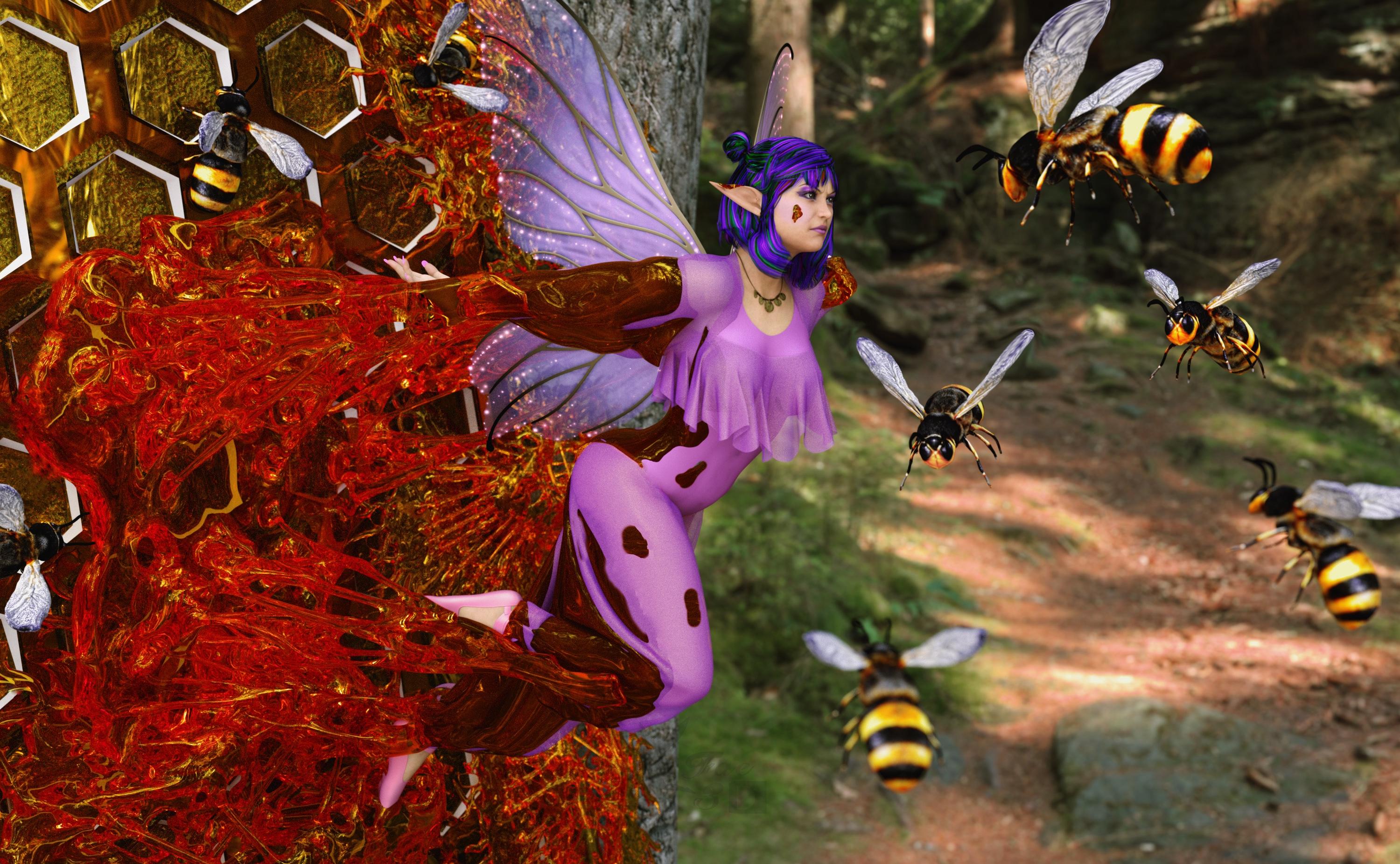
Free:
VFox Sarah for Genesis 8 Female - https://www.renderhub.com/vfoxgames/vfox-sarah-for-genesis-8-female
Flowerbell dForce Top G8F - https://www.renderosity.com/freestuff/items/96573/flowerbell-dforce-top-g8f
Three More Wishes G8F - https://www.renderhub.com/excessive/three-more-wishes-g8f
PSR Ballet Combo for GF8 - https://www.renderhub.com/pushee-ri/psr-ballet-combo-for-gf8
Pirate Outfit for Genesis 8/8.1 Female (necklace) - https://www.renderosity.com/freestuff/items/96578/pirate-outfit-for-genesis-881-female
eGirl Hair for Genesis 8 Female - https://www.renderhub.com/checkertoo/egirl-hair-for-genesis-8-female
Bikdingle Dark Elf Ears Morph for Genesis 8 Female - https://www.renderhub.com/bikdingle/bikdingle-dark-elf-ears-morph-for-genesis-8-female
FREE AGD Simple Face Jewelry (not sure this really showed up, ear studs) - https://www.renderhub.com/aglassdarkly/agd-simple-jewelry
Iray Shimmery Sheer Fabrics II - https://www.renderosity.com/freestuff/items/93778/iray-shimmery-sheer-fabrics-ii
AA Jewelry Iray Materials - https://www.renderosity.com/freestuff/items/99318/aa-jewelry-iray-materials
Bob Hair for Genesis 8 Females and DAZ Studio Free - https://www.renderhub.com/rango2001/bob-hair-for-genesis-8-females-and-daz-studio-free
Chameleon ROse2 for Genesis 8 Female (Materials) - https://www.renderosity.com/freestuff/items/85859/chameleon-rose2-for-genesis-8-female
Tree 01 - https://www.renderosity.com/freestuff/items/94781/tree-01
SY 200 Free Morphs Genesis 8 - https://www.deviantart.com/sickleyield/art/SY-200-Free-Morphs-Genesis-8-756465264
Bee Animal free 3D model - www.cgtrader.com/free-3d-models/animal/insect/bee-animal-66403bb0-eada-4d81-8133-99e4ac259466
Raumteiler04 Hexagon (deviantart) - https://www.deviantart.com/tinasbastelstube/art/Raumteiler04-Hexagon-802488069
Freegia for Genesis 8 Female (Skin) - https://www.renderhub.com/lias/freegia-for-genesis-8-female-free
No Count:
72 Funky Madness Hair Shaders - Used to be free on Renderosity, now appears to be gone
Paid:
Slime Attack - Vol.1 - https://www.daz3d.com/slime-attack-vol-1
Lumino Wings for G3F & G8F - https://www.renderosity.com/marketplace/products/128420/lumino-wings-for-g3f-g8f
Mesh Grabber (Mac) - https://www.daz3d.com/mesh-grabber-mac
SY Invisilights Iray - https://www.daz3d.com/sy-invisilights-iray
Set up and rendered within Daz Studio Iray. Postwork in Pixelmator. No AI used.
I’ve attached the before post render (the one that says Raw Render) and the finished image file.
Custom Gens Morph... HELP!lilweep said:
1. Load in the geograft to new scene by itself - Do not export it attached to the figure which is clearly what you are doing hence vertex count does not match.
2. Put it into its default shape (as per attached). It will not load in like this.
3. Set to Base Res
4. Select object in Daz Studio scene then Export (Filter Objects (✔) : Select Root)
5. Scale: Whatever, just leave as 100%
6. Import to Blender - sculpt without changing geometry
7. Export as obj.
- Scale : just leave as 100%.
- Note if you are using a recent version of Blender, vert order is preserved by default when exporting anyway
8. Morph loaded pro: Leave as default with default scale
- Name: blahblahblah
- Delta tolerance: 0.001
- Property group: blahblah
- Create Control Property: No
- Reverse Deformations: No (assuming you followed what I said in 1 and 2)*
- Overwrite Existing: Make Unique
- Morph mirroing: None
- Attenuate by: None
* If you have sculpted on top of a non-default shape, then you can make this Yes
If it's resizing on morph then you messed up 5,7,8 scaling. Leaving at 100% on each step is fine and works.
Thank you SO MUCH for this!!! All the help, from each commentor is greatly appreciated!
G8F model thumb segments bend sidewaysI found the culprit. "SY 200 Morphs for G8F", the "SY200 Fingers Length" morph. As soon as I reset it to 0 the issue goes away. Strange.
That is a freebie collection, I thing it was on DeviantArt once..? Not sure exactly. Sickleyield, if you happen to read this, any idea what do do about it? It's not something I'm dependent on, would just like to solve the riddle.
Daz 3D is part of

Connect
DAZ Productions, Inc.
7533 S Center View Ct #4664
West Jordan, UT 84084Licensing Agreement | Terms of Service | Privacy Policy | EULA
© 2026 Daz Productions Inc. All Rights Reserved.