-
SereneNight’s Sci-Fi Fun Thread 3
The XI Anime Convenience Store
is a lot of fun, with some nice realistic Asian groceries Unfortunately, it's pretty unwieldy to use because you have to view it in filament and seems a bit bigger than normal. The results are nice though lots of good items to flesh out your shopping scenes.
 More Non-photorealistic Renders (NPR III)
Xandyr78 said:
3Diva said:
Have you guys had a chance to check out Filatoon? I'm having a blast with it!

Oh my word that looks amazing. How much tweaking did you have to do to that?
Thank you. It took a LOT of tweaking and experimenting of both the shaders as well as the Filament Draw Options settings. I'm about to submit a product to Daz3D though that has the presets (shader presets and scene settings presets). The PAs got the shaders early and, sadly, I was out of town and away from my computer so couldn't get the product made and submitted before the release of Filatoon, but I'm hoping to get it submitted to Daz3D shortly. I'm working on a tutorial to go with it.
3D Comic Book Tips And PicturesI'm so excited about Filatoon! I'm planning on using it for my comic work. Here's the result of an experiment I'm doing with the Filatoon settings and the Filament Draw Options. This is a Filament render with zero post-work:
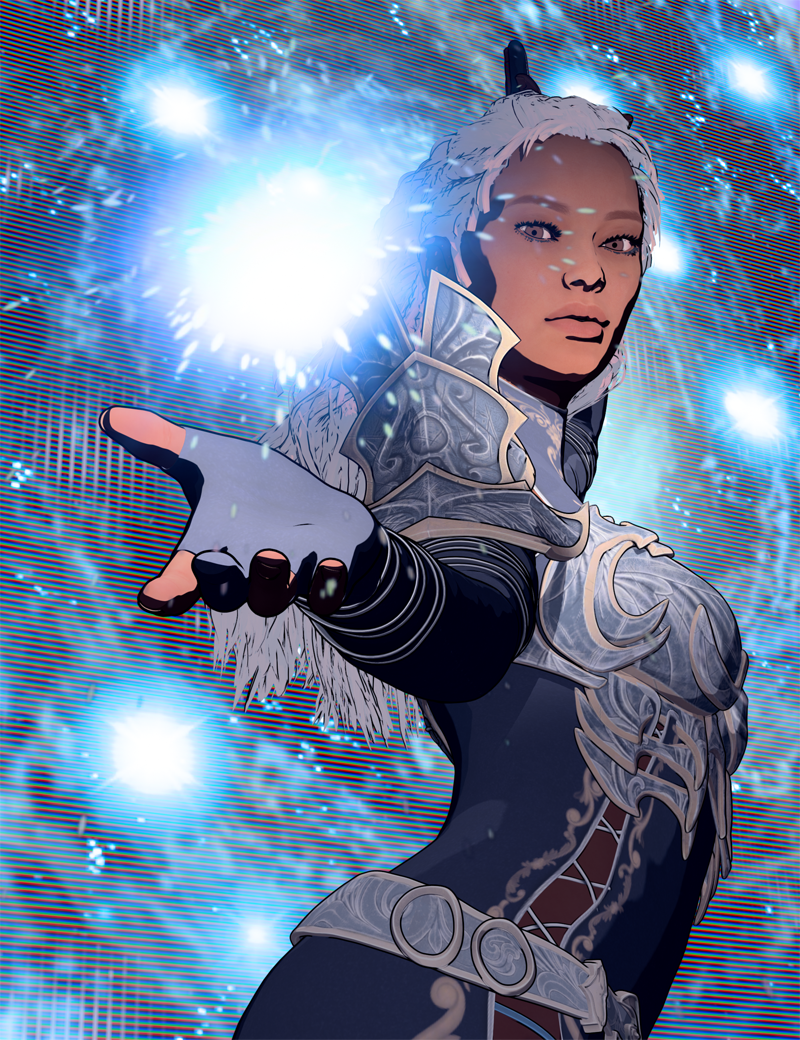
Is anyone else exploring Filatoon? One of my favorite parts is that it renders just about instantly - in about 1 second, even on my older machine! And what you see in the viewport is what you get! So cool!
Anime Toons and Filatoon Shader Q&ATaoz said:
3Diva said:
Ahhh I see - Recieve Shadows, that makes a HUGE difference in scenes like this. Thank you!
@3Diva You can also enable shadows for the lights, here an example using the distant light. Unfortunately you can't adjust Intensity and Softness, but hopefully that will come later.
Oh cool! That is good information - thank you! I played around with it and was able to get rid of some of the pixelation of the shadows by upping the Sub Divide of the shadow object as well as adjusting the "shadows" settings in the Filament Draw Options node. :) Thank you for the great tip!
[Released] Duskbound for G9 and G8F [Commercial]
I didn't use the cutout opacity on the cloth either.TesseractSpace said:Looks great in Filatoon. Tried it myself, had to remove the cutout opacity on the cloth since Filament didn't like it, but the outfit toons really well after that.
Using Daz Studio as a cpu stability benchmark - Within 2-3 minutes.DrunkMonkeyProductions said:
Which version of DS are you using?
I can't find half the setting you're talking about for filament draw options.
Latest public beta.
[Released] Duskbound for G9 and G8F [Commercial]Looks great in Filatoon. Tried it myself, had to remove the cutout opacity on the cloth since Filament didn't like it, but the outfit toons really well after that.
The Mac FAQTotte said:
inquire said:
I would just like some notification from Daz that yes they are at work producing a version of Daz studio that will run natively on the Apple Silicon M chips. That would remove some of my anxiety that Apple may drop Rosetta 2 and that people running DAZ studio in emulation mode Will not be able to run DAZ studio. As I've mentioned before, that has happened to me before with Rosetta 1, And other apps. So I don't think we should assume that Rosetta 2 Is going to remain permanently as an option in a new release of a Macintosh OS.
To my understanding that is what they are doing with the mythical Daz Studio 5, also Filament also requires DS 5 as Filament does not work with the way Qt 4.8 (which DS 4 is built on) works on macOS.
As I understand it Filament could be made to work with Qt 4, but it would still require a recompile that would break the Application Binary Interface and so cause all plug-ins to break - that is why it has to wait for DS5, which is going to break plug-ins anyway.
FilaToon / Cell shaded rendering with FilamentTheNathanParable said:
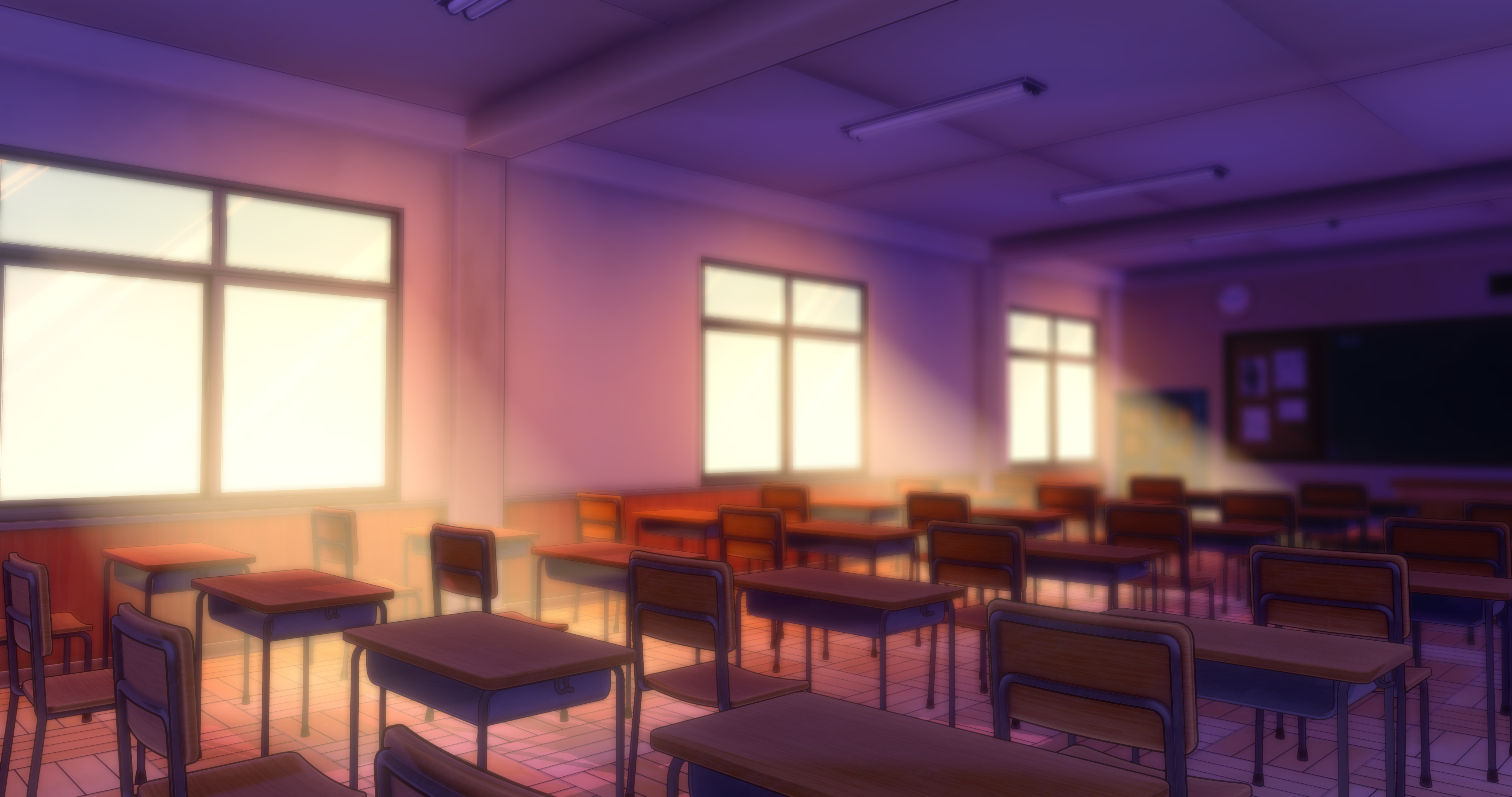
Experimenting with faking effects and using iray canvases for FilaToon renders.
So there are four lights in this scene. One distant light set to a dark purple with shadows, and three orange-ish spotlights outside each window with a wide spread and no shadows to add some glow.
The light shafts are props from the Filament Atmospheres product scaled down and positioned at each window, mimicking a technique i've seen in older videogames to create fake light shafts. I also adjusted the glass of the windows to be emissives so they're affected by bloom.
Finally, I used an iRay canvas to render out a depth map, making sure the fake light shafts were set to NOT be visible in render (this doesn't affect Filament renders at all, so you can set it and forget it), and used that in Krita to add a depth-of-field blur and to make the background a bit darker.
I really wanted to add a Ambient Occlusion canvas too, but for the life of me I couldn't get any decent results from that.
But yeah, aside from that one hiccup, i'm really glad with how this came out!
Gallery link: https://www.daz3d.com/gallery#gallery=all&sort=newest&page=1&image=1352301
Wow, I might start playing around with filament now after seeing this. This looks fantastic.
The Mac FAQinquire said:
I would just like some notification from Daz that yes they are at work producing a version of Daz studio that will run natively on the Apple Silicon M chips. That would remove some of my anxiety that Apple may drop Rosetta 2 and that people running DAZ studio in emulation mode Will not be able to run DAZ studio. As I've mentioned before, that has happened to me before with Rosetta 1, And other apps. So I don't think we should assume that Rosetta 2 Is going to remain permanently as an option in a new release of a Macintosh OS.
To my understanding that is what they are doing with the mythical Daz Studio 5, also Filament also requires DS 5 as Filament does not work with the way Qt 4.8 (which DS 4 is built on) works on macOS.
The Mac FAQWell in a thread on the FilaToon Shaders Mada mentioned that there is some work to finally port filament for Mac. Why should adding another render engine (isn't filament nothing else) break plug-in compatibility. Not that I'm an expert but does this make sense.
I'm rather worried that DS5 will be something one needs to wait until at least 2025 if not even longer. And as it is I'm also worried that DS5 for Mac might again lack on functionality a Win version gets.
Plus nobody knows that DAZ have on the roadmap in terms of making Studio even more subscription based so I would very well welcome a 4.X filament integration for Mac. Although a native Apple Silicon Studio might not surface before Studio 5.
Damn it.
The Mac FAQ1. No ETA as far as I know.
2. Richard Haseltine said in the Daz Studio 5 discussion that Filament on MacOS will only be added in Daz Studio 5:
Richard Haseltine said:
Filament for Mac will not be added before DS 5 as it will entail breaking plug-in compatibility.
https://www.daz3d.com/forums/discussion/comment/8919486/#Comment_8919486
Anime Toons and Filatoon Shader Q&ADartanbeck said:
Taoz said:
3Diva said:
Ahhh I see - Recieve Shadows, that makes a HUGE difference in scenes like this. Thank you!
@3Diva You can also enable shadows for the lights, here an example using the distant light. Unfortunately you can't adjust Intensity and Softness, but hopefully that will come later.
I'm in the middle of a lengthy simulation right now, but I'm pretty sure that there are shadow intensity adjustments on the individual FilaToon shaders (?) - there or in the Filament Draw Options
Yes, you're right:
https://app.screencast.com/hUHQyD7PFxfli
And you need to have the light's Shadow Type set to Deep Shadow Map for it to work, and Receiving Shadows must be On.
The Mac FAQAre there any news (or even planned release dates for):
- a proper 4.23 public release for Mac with all of ManFridays plugins running
- the filament toonshader finally available on MacAs it is I feel like I have to pay full Premier for a crippled product.
Anime Toons and Filatoon Shader Q&ATaoz said:
3Diva said:
Ahhh I see - Recieve Shadows, that makes a HUGE difference in scenes like this. Thank you!
@3Diva You can also enable shadows for the lights, here an example using the distant light. Unfortunately you can't adjust Intensity and Softness, but hopefully that will come later.
I'm in the middle of a lengthy simulation right now, but I'm pretty sure that there are shadow intensity adjustments on the individual FilaToon shaders (?) - there or in the Filament Draw Options
Questions about these new toon featuresDrogo Nazhur said:
crosswind said:
Drogo Nazhur said:
I think that I kno the answer but in order to use this new toon stuff, do we need to purchase new characters, hair, accessories, shaders, environments, etc., to create this toon world or is it just a different render engine which will work with existing characters and accessories?
You don't have to buy newly-released toon characters, hairs, wearables, etc. ~ The Filatoon shaders are provided in DS 4.23 and G9 Starter Essentials, so you can apply the new shaders to the products you own (not all... some products will work badly with Filatoon), plus necessary tweaking, then render with Filament drawstyle.
Will it work on G1. I have a lot of G1 toons.
It will apply to anything.
Questions about these new toon featurescrosswind said:
Drogo Nazhur said:
I think that I kno the answer but in order to use this new toon stuff, do we need to purchase new characters, hair, accessories, shaders, environments, etc., to create this toon world or is it just a different render engine which will work with existing characters and accessories?
You don't have to buy newly-released toon characters, hairs, wearables, etc. ~ The Filatoon shaders are provided in DS 4.23 and G9 Starter Essentials, so you can apply the new shaders to the products you own (not all... some products will work badly with Filatoon), plus necessary tweaking, then render with Filament drawstyle.
Will it work on G1. I have a lot of G1 toons.
Filament gpu requirements?Yes, Filament will work on integrated graphics if you do not have a discrete card. It runs surprisingly well.
How do I know? My 780ti fried and had to run on integrated graphics for almost a year due to the crypto craze. I'm glad that phase is over. I just hope my current card does not die while the AI craze is ongoing.
UltraScenery - new(er) territory [Commercial]memcneil70 said:
alexhcowley said:
Has anyone tried DS4.23 general release on Win 10 yet? Are there any issues for US2?
Cheers,
Alex.
I opened it up on my desktop Win 10 with a GTX 1080 card. I saw a lot of white fields initially, it took a long time for the screen to fill up and I had to select a workspace, add the USC2 pane and found the scripts and favorites I may have had before were gone, so I added Code66's Alienator Pro II scripts and his Toobox scripts quickly and also serial numbers for new plug-ins. When I rebooted Daz Studio, I had to redo Daz Studio totally, only the plug-ins stuck. I made sure to save in Content DB Maintenance 'Export User Data' before opening USC2.
Again, a lot of white for a period of time, that resolved into what I expect. But after trying to create a test scene, it through an error, not specified. So I went back and closed the cameras on a number of items, tried again. I received a notice a render was in progress!? No sign of one on my screen. I changed to filament and the render ran. I think I will stay off of the D|S 4.23.0.1 for any work in Daz Studio. It is just weird after working with the Beta for years. (I will freely admit this 2017 computer is having serious issues and why I bought the Win 11 laptop. So my experience may not be a valid test.)
Mary
Mary,
Many thanks for your comments. My render PC is a bit more up-to-date than yours but it is still two or three years old. I think I will continue with the latest 4.22 Beta for the moment.
Cheers,
Alex.
November 2024 - Daz 3D New User Challenge - Materials and next level KitbashingBeginner Challenge - Materials!
From shiny polished gems to rough bark, and from silk to leather! This month's focus will be on Materials and Surfaces. One of the most important aspects of a great render is the effective use of materials. Effective surface settings can add realism, style, and visual interest to an image. This month we will be concentrating on how to create and manipulate the surfaces on the objects in your scene.Also, keep in mind all the various items covered over the past several months. They will affect the way your materials look in your final rendered scene.
Previous Challenges on this topic:
Helpful Links:
When following tutorials, be cognizant of the different applications (Bryce, Daz Studio, Poser, Carrara and Blender, etc.) and different render engines (3Delight, Iray, Reality, etc). Techniques for one may not apply directly to another. If you have some favorite Materials, Surfaces, and Shader tips, please share them in this thread.
Daz Studio Tutorials:
Daz 101: Surfaces by Daz 3D (video)
Iray Surfaces and What They Mean by Sickleyield
The Iray Uber Base Shader by Daz 3D (video)
Daz 3D Tutorial: Make anything a light source by Daz 3D (video)
Daz 3D Tutorial: Using bump and displacement maps by Daz 3D (video)A more recent recording of a stream by Jay Versluis:
In the Studio with DAZ3d - Shaders and Materials
In case you want to work with filament:
Daz3d Animation Series: animation_filament
Bryce Tutorials:
A compilation of tutorials for Bryce, there is a lot about materials to find there as well by Daz 3D
Other helpful places:
3Delight - Uberenvironment made easy!
This is more in depth and experimental for the 3delight renderer: 3Delight Laboratory Thread: tips, questions, experiments
Daz 3D is part of

Connect
DAZ Productions, Inc.
7533 S Center View Ct #4664
West Jordan, UT 84084Licensing Agreement | Terms of Service | Privacy Policy | EULA
© 2026 Daz Productions Inc. All Rights Reserved.