-
Model's target
Hmm.. what is a 'target' ? A morph target? A character preset or sth. ?
Is there any need for classic Hollywood G9 head morphs?@AOBB I hope I did the @ thing properly!! I have never done that before.
Anyway, well, this really got to me...in a bittersweet way!! I said a little bit in my comments.
When someone loves an actor or actress, it might be more than just being a fan. The Hollywood stars that you create were in movies that my Mom, Dad and my sisters watched together!
I am working with your Babyface morph right now. I hope to be able to concentrate and finish...I just started!! I love her!!
Model's targetMorph assets are available on all instacnes of a given figure (it is possible to save a morph in the scene or in a character preset, without saving as an asset, and that will be avaailable only in the scenes in which the figure was loaded). The morphs of one figure do not apply to another.
I don't understand what you mean by defining a target - if it is a character for Genesis whichever then it is a character for Genesis whichever - character creation is not creating new figuers.
CBS/ JCMs HelpThe prerequisite of being displayed in Shaping pane is that the Path of morph must be set under 'Actor', for instance 'Actor/Adjustment', and Type must be 'Modifier/Shape'...
 CBS/ JCMs Help
If the morph has the same name as a morph on the base figure it will be hidden and will take its value from the base figure.
Freebie Challenge August 2023 - Fabulous Pink - Main ThreadFae3D said:
Miss Bubblegum
All the cool girls wear pink!
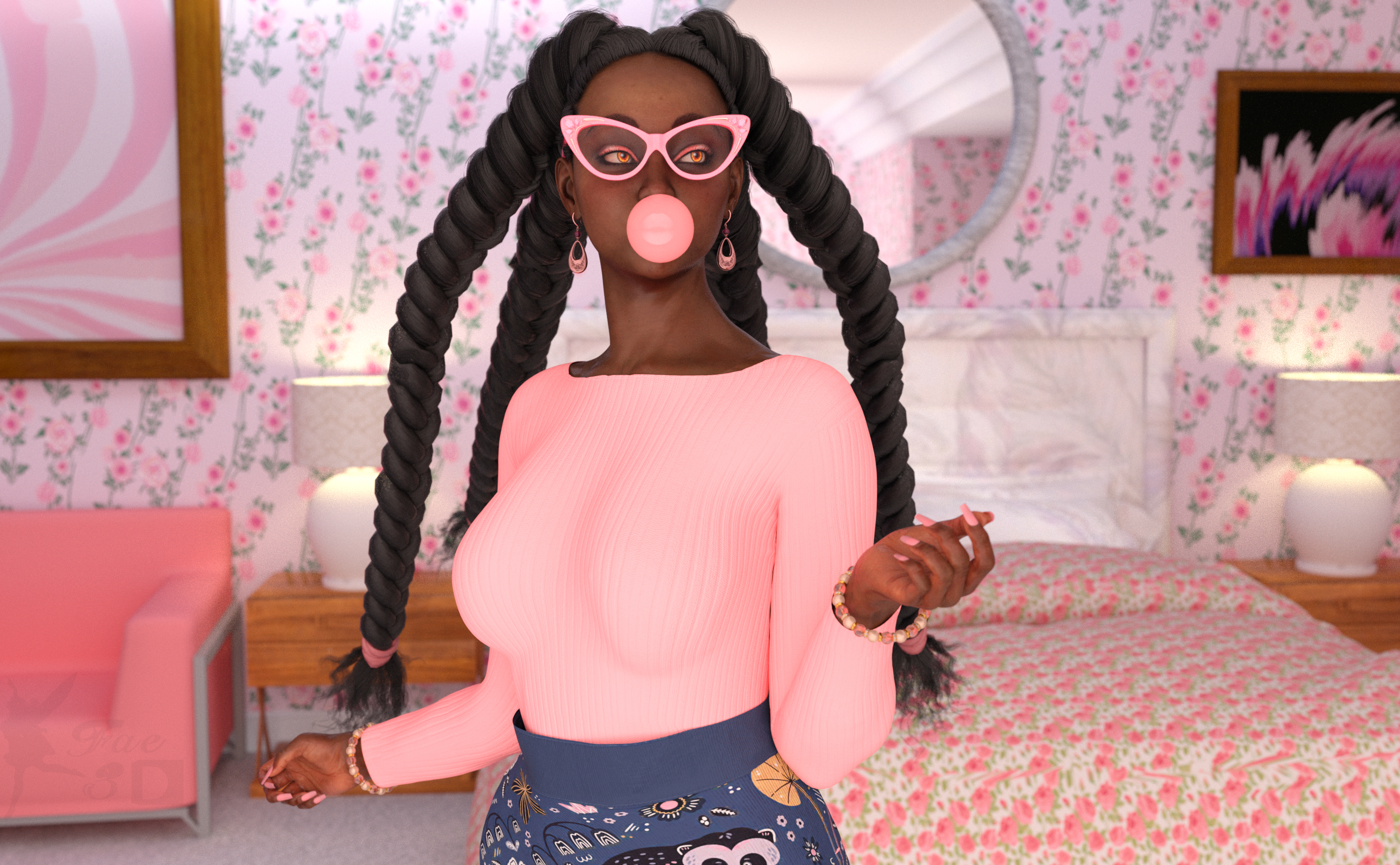
Freebies:
Kimberly Jackson G9 (Skin, Hair, Head Morph at 25% Only) - https://www.patreon.com/posts/86341322
Laura for Genesis 9 (Shape) - https://www.renderosity.com/freestuff/items/95644/laura-for-genesis-9
SY 200 Free Morphs Merchant Resource G9 (Adjust Body Shape and Nail Length) - https://sharecg.com/v/99782/favorite/21/DAZ-Studio/SY-200-Free-Morphs-Merchant-Resource-G9
Eyes by Sir Maverick (Not sure which pack, since when you install them they all go in one file together) - https://www.renderosity.com/users/SirMaverick/freestuff
G9 Female Normal Make-Up - https://www.renderosity.com/freestuff/items/93530/g9-female-normal-make-up
Mixable Pitchi for Genesis 9 (Outfit) - https://3dshards.com/product/mixable-pitchi-for-genesis-9/
Big Bead Bracelet - https://www.renderosity.com/freestuff/items/93587/big-bead-bracelet
Fat Drop Loop Earrings G9 - https://www.renderosity.com/freestuff/items/93588/fat-drop-loop-earrings-g9
Glitzy Catrims Eyeglasses G9 - https://www.renderosity.com/freestuff/items/93850/glitzy-catrim-eyeglasses-g9
CRP Standing Cute Poses 1-8 - https://www.renderosity.com/freestuff/items/93477/crp-standing-cute-poses-1-8
Sunflowers HDRI - https://hdrihaven.com/hdri/?h=sunflowers
B&B Bedroom for Daz - https://sharecg.com/v/98910/favorite/21/DAZ-Studio/BB-Bedroom-for-DAZ
One Bedroom House (Loveseat) - https://www.sharecg.com/v/88378/related/21/DAZ-Studio/One-Bedroom-House-update
Pink and white abstract painting (1) - https://unsplash.com/photos/B0jaWEt6a24
Pink and white abstract painting (2) - https://unsplash.com/photos/O9SoTdFD1gA
Flowers and Hearts for Mothers Day Shaders (Wallpaper and Comforter) - https://www.renderosity.com/mod/freestuff/flower-amp-heart-shader-set-for-mothers-day/85162
No Count:
Genesis 9 Expressions - https://www.daz3d.com/genesis-9-expressions
Sphere Primitive (Bubble)
Paid:
SY InvisiLights Iray - https://www.daz3d.com/sy-invisilights-iray
I tweaked the materials, the lights and the pose. Set up and rendered within Daz Studio Iray. Very minor Postwork in Pixelmator, mainly color corrections.
All freebies checked, please move to entries
hoodiesmemcneil70 said:
Have you seen the City Glitz Outfit for G9? While the pullover hoodie doesn't have a hood down morph, it comes with two versions of the hoodie, one with the hood up, the other down. It also has a tank top, pants, and sneakers. There is also a texture set for it. Don't let the name throw you, no sparkles on a serviceable outdoor set.
Thank, Ms. Mary, it's been in my wishlist since release because it's a pullover instead of front-zipped. I'll be getting it once it's on sale.
Freebie Challenge August 2023 - Fabulous Pink - Main ThreadMiss Bubblegum
All the cool girls wear pink!
Freebies:
Kimberly Jackson G9 (Skin, Hair, Head Morph at 25% Only) - https://www.patreon.com/posts/86341322
Laura for Genesis 9 (Shape) - https://www.renderosity.com/freestuff/items/95644/laura-for-genesis-9
SY 200 Free Morphs Merchant Resource G9 (Adjust Body Shape and Nail Length) - https://sharecg.com/v/99782/favorite/21/DAZ-Studio/SY-200-Free-Morphs-Merchant-Resource-G9
Eyes by Sir Maverick (Not sure which pack, since when you install them they all go in one file together) - https://www.renderosity.com/users/SirMaverick/freestuff
G9 Female Normal Make-Up - https://www.renderosity.com/freestuff/items/93530/g9-female-normal-make-up
Mixable Pitchi for Genesis 9 (Outfit) - https://3dshards.com/product/mixable-pitchi-for-genesis-9/
Big Bead Bracelet - https://www.renderosity.com/freestuff/items/93587/big-bead-bracelet
Fat Drop Loop Earrings G9 - https://www.renderosity.com/freestuff/items/93588/fat-drop-loop-earrings-g9
Glitzy Catrims Eyeglasses G9 - https://www.renderosity.com/freestuff/items/93850/glitzy-catrim-eyeglasses-g9
CRP Standing Cute Poses 1-8 - https://www.renderosity.com/freestuff/items/93477/crp-standing-cute-poses-1-8
Sunflowers HDRI - https://hdrihaven.com/hdri/?h=sunflowers
B&B Bedroom for Daz - https://sharecg.com/v/98910/favorite/21/DAZ-Studio/BB-Bedroom-for-DAZ
One Bedroom House (Loveseat) - https://www.sharecg.com/v/88378/related/21/DAZ-Studio/One-Bedroom-House-update
Pink and white abstract painting (1) - https://unsplash.com/photos/B0jaWEt6a24
Pink and white abstract painting (2) - https://unsplash.com/photos/O9SoTdFD1gA
Flowers and Hearts for Mothers Day Shaders (Wallpaper and Comforter) - https://www.renderosity.com/mod/freestuff/flower-amp-heart-shader-set-for-mothers-day/85162
No Count:
Genesis 9 Expressions - https://www.daz3d.com/genesis-9-expressions
Sphere Primitive (Bubble)
Paid:
SY InvisiLights Iray - https://www.daz3d.com/sy-invisilights-iray
I tweaked the materials, the lights and the pose. Set up and rendered within Daz Studio Iray. Very minor Postwork in Pixelmator, mainly color corrections.
Carrara Plugin DevelopmentSparrowhawke3D said:
Every thing you can see under the Instances list of your Scene has an I3DShTreeElement class which has the functions (or methods) such as GetFigureDataComponent(). This 'tree' is usually the starting place for getting down into the animation data, transforms, all the simple parameters and into the master object using the SDK classes. In the case of a figure from there you can get into the Vertex Modeler itself and from there into the morph areas however the IMorphArea class only returns one name and the pose control morphs work the joints and not the actual morphs.
If you look at a figure in DAZ studio and click on the settings for any morph you'll see loads of information and at the top or the dialog the Name: and the Label: Carrara displays the Label but doesn't give the 'internal' Name which is the one that is needed. Click on the settings for a morph in Carrara and there is very little information, only the one name and the range settings. I can only assume that when the figures are loaded into Carrara that information is somehow translated and effectivly hidden from the vertex modeler but controlled with the parameter sliders. I've gone in poking around as deep as I could but haven't found a way to directly link up the Parameters with that internal name or get the internal name from the parameter.
If I had a long loaded or coded in list for all the parameters on all the figures the correct internal name could be found as the exhaustive work around. For example taking the first pose for Genesis 2 ,which is control Arms Front-Back, in Carrara the name is "Arms Front-Back". Look at the morph setting in DAZ Studio and the (internal) Name is "CTRLArmsFrntBck" and the Label is "Arms Front-Back". The duf pose file needs to have "CTRLArmsFrntBck" for that pose control to work.
Yes. In Daz Studio, if we right-click the parameter (in Edit-Mode) and choose "Show in Property Hierarchy", we can see all of the actions (joint rotations, morphs, etc.,) by digging into that.
Optionally, if all we want is the internal name, we can remain out of Edit mode and click the gear icon for the parameter (again, in DS) and click "Properties", which will give the Label and Internal name, limits, etc.,
Will this Daz Studio function work in Carrara 8.5?WendyLuvsCatz said:
while I don't have it, like anything you could also use Alberto's morph remover to unbloat Carrara files of morphs you didn't use afterwards
That ends up confusing though. Alberto's script leaves the dials behind. They just don't work.
Genesis 9 custom morph eye issuesDoes anyone know why this could be happening? (see attached)
Im following the youtube tutorials on making g9 eye morphs but i must be missing something. Either that or everything is working as intended and i need to learn JCMs.
i exported the eyes from my custom morph to blender, resized and positioned. load my custom morph to a g9, adjust rigging with eyes and lids unticked (if i dont then the eyes do the opposite and push out the back side), i then load the eyes from blender with the same name as my custom morph. All looks ok but then i get the result shown when i move the eyes.
Is there an obvious step im missing? are the eyes simply too close to the lids? will i have to make JCMs?
Thanks in advance.
hoodiesHave you seen the City Glitz Outfit for G9? While the pullover hoodie doesn't have a hood down morph, it comes with two versions of the hoodie, one with the hood up, the other down. It also has a tank top, pants, and sneakers. There is also a texture set for it. Don't let the name throw you, no sparkles on a serviceable outdoor set.
CBS/ JCMs HelpAs for ERC controlling, 'values' come from the dials... You may check this document for better understanding -: https://www.renderosity.com/freestuff/items/81207. It's not a up-to-date one but helpful.
As for rework in MD, yes, you can transfer weight and morph targets from the old hijab to the new one after you fit new one to the figure.
CBS/ JCMs HelpI changed the texture of my hijab on Marvelous Designer, by adding some internal lines to add internal stiches. The geometry changes as the consequences.
If I exported the hijab new geometry,
can I then use transfer utility and to transfer all the weight map and morphs I've been working on the old hijab to the new one,
by using the old hijab as the source and the new one as target?
Or does it requires me to start again from the beginning ?Asian morph for Victoria 9?Thank you for your answer. I'm very curious about where they found that morph for the promos. I've been looking for it for months now. I've been posting on here, reddit, endless searching through google, still nothing.. I'm a little desperate..
[Released] Turbo Loader for Genesis 8 and 8.1 [Commercial]pixelquack said:
What happens when I disable a morph and load a scene that used it? Will I get an error or silently not have the morph in?
After disabling morphs, If you load a scene and/or figure, you would see the missing files dialog. Do NOT install the selected products! SKIP the missing files installation, and re-enable the products you need using the Turbo Loader Manager scripts.
Distorted hands and TeethHmm... if so, it seems that the culprit is Mouth Realism 8.1 HD though it's pretty strange...
Have you ever saved any morph assets including this 'Mouth Realism 8.1 HD' or ever saved Base figure asset for some reason?
Do you use Daz Connect ? ....Anyway, pls follow this clip to further check and fix it - : https://mega.nz/file/fCIVTQzR#TqJTsOUbGAhBnpHPh3YN9rp7dWeTPmeG8UNbgt0c7ac
Asian morph for Victoria 9?Hello,
I have Victoria 9 HD Intro Bundle, and that morph is not included with Victoria 9. I doubt it's in any of the other three bundles which are heavily leaning toward a medieval Europe setting.
Distorted hands and TeethCactuskim said:
crosswind said:
It's great that you got it done with 'dental issue' !
 As for the new 'ungual issue', it's annoying to have it on a default Base figure... Here're some steps for trouble-shooting -:
- Press F2, clear DSON cached files there, then reload G8.1 base figure.
- In Parameters pane, enable 'Show Hidden Properties' from Preferences, select Currently Used, then see if there's any morph dialed unexpectedly from some characters or partial head / body morph. Or from menu -: Edit - Figure - Zero - Zero Figure, then see if there's any strange dial with 0 value(s) in Currently Used.If there's some morph dialed, then we proceed... as there might be different reasons and resolutions.
Thank you Crosswind, I will try what you have sugested and let you know the results :D.
Hi Crosswind,
Thank you again for your help, I really appriciate it so much.
Well, That was interesting. I did what you sugested, and when I looked at the hidden but currently used dials in the paramiters, the only thing listed was 'Render SubD level minimum <?>, Mouth realism 8.1 HD at 100%, Mouth realism HD at 0%, and Fit to which was set to Genesis 8.1. The finger nails on the left hand were still distorted on the left hand at this point, but when I Did the Edit>Figure>Zero etc. the Mouth HD 8.1 went to 0%, and the finger nails went back to normal :D. I then deleted that figure and loaded him again, and the fingernail distortion was back. It cleared when I Zeroed him again, and I tested applying other morphs and they worked fine, but each time I load a figure, I have to zero it first. I tried the same thing with the developer's version, and same thing.... needs to be zeroed before anything else. Good to know I have a work around for the problem by using the Zero right after loading a new figure, but still scratching my head over the cause.
Cactuskim
PS... the fingernails are baked into my Hexagon converted figure now even though the teeth are fixed, *Rolls Eyes* Oh well, If I practice converting over and over and over again, I might get good at it some day ;p.
Adding clothing and hair to daz figure in blenderIt depends, in general you may want to trasfer the figure weightmaps to the outfit so it deforms with the figure, you can do it with object > link/transfer data > transfer mesh data. Then you parent the outfit to the figure with parent > armature deform.
Or you can try with a surface modifier, if the outfit is "tight" it may be enough.
Daz 3D is part of

Connect
DAZ Productions, Inc.
7533 S Center View Ct #4664
West Jordan, UT 84084Licensing Agreement | Terms of Service | Privacy Policy | EULA
© 2026 Daz Productions Inc. All Rights Reserved.