-
CBS/ JCMs Help
I would suggest taking it case by case - most eye movements should not affect the hijab, so you'd probably zero those maps,, but some facial flexions (I'd guess cheeks and maybe forehead) would and should be supported by rigging or a morph or both.
Can I create hair and clothes in blender and import them to Daz?Daz Studio will use autofollow, i.e. it will create a projected morph, based on the mroph(s) you have applied to your character.
Else you can create a specific morph for that character.
Is there any need for classic Hollywood G9 head morphs?@DoctorJellybean - I don't plan on making a morph with Frank Sinatra's likeness in the near future. I have a list of 20 leading ladies and men (10 of each) in my mind that I plan to make and that is more than plenty. Afterwards, I'll take a nice break and then I was thinking of making a couple of "character" actors for G9 such as Peter Lorre, James Cagney and Edward G. Robnson. We'll see. Life has its own plans.
 Can I create hair and clothes in blender and import them to Daz?
Yes - at a basic level make the model, ideally around the base figure shape, import it as OBJ (use the same preset for exporting the figure as an OBJ for Blender and reimporting the finished clothing/hair, that way everything will be scaled and oriented correctly), then use Edit>Figure>Transfer Utility with the original figuer as the Source and the imported OBJ as the Target. That will be very basic, but for clothing that is closde to the skin or short hair it may be good enough - in many cases, though, you will then need to adjust the weightmaps that control hoiw the model responds to bends and add morphs linked to the ebnds to improve the look. You could also just apply a dForce Modifiers to the imported clothing and use a simulation to drape it.
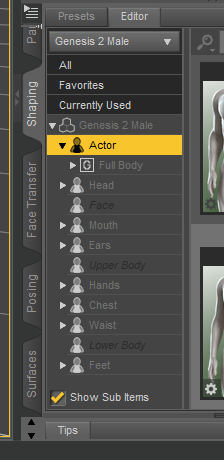
Control nose shapeYou're using G2M.. G2M has no separate nose morph in the starter package. If you've installed some shaping products incl. nose morphs, you just filter by 'Nose', then you'll see them all, and the Group / Path they belong to will be highlighted.
Strand-based hair part: do I need a hair cap?Better show us a screenshot... but as a straight-forward suggest - :
- You better make a hair cap. You may refer to some SBH hair products. It's not difficult to make a scalp as it's just a geometry fitting on the head top with a Cutout Opacity map. Use a modeling software to make one, or adopt a scalp from a product and modify it to have a 'proper edge' aliging with your SBH. Import to DS and conform it to the figure with Transfer Utility. Finally make a proper Cutout Opacity map (or modify one) and asign to the scalp.
- There's no way to make a hair cap with SBH editor but you can use it to make a 'separate layer of hair' as the hair cap, with proper 'gradient length' and 'density', etc. That'll take some time... but the cons is : the more SBH layers you have in the veiwport, the more resource it'll consume and make your Viewport laggy when Preview PR Hairs...
New to GenXOP must have it otherwise he could not open that plugin pane... The last time I used it was nearly 5 years ago... After transfer, you load G3M, in Parameters pane, there should be a group named 'Generation X' under 'Actor', all the transferred morph should be there. Could you find the baby's morph there?

Ps: Recommend a tutorial from COF if you've not seen it before - : https://www.sharecg.com/v/82334/view/3/Text-Entry-Tutorial/COF-GenX-Plugin-Tutorial
general use of dazJustPlayNoName said:
Hello all,
I have not yet fully understood the concept of daz. It would be nice if someone could give me a link to an article or answers.
Does daz work like a lego set, where I have to buy several bundles to put something together?
Yes and no. Generally characters are sold as basically the naked figure with skin, eyebrows and eyelashes. Some may come with expressions for the face, most won't. Some may come with options for different ages of the same character (particularly Daz's own characters). Clothing, hairstyles, accessories and other character related items such as makeup, skin detail modifications such as freckles tend to be sold seperately. Morphs to change the body shape are also sold separately.
Sets, such as street scenes, buildings, landscapes, come complete as you see them. Same with vehicles, animals, etc. There are also tools for creating landscapes, scattering objects, optimising renders, you name it. Daz has it's own language (Daz Script) which isn't a million miles away from javascript if you're familiar with that but it's poorly documented.
If you can model in Blender you can make anything you're capable of, export to a format like .obj or .dae and import your creations. You can make whatever you want really. Making your own clothing is a long and complex topic; if you want to do it to a high standard it will take you some time to fully understand and master this aspect.
Are there any free bundles? I found some websites on google that offer free daz art. But is that legal? Or is it only allowed to buy from the original daz shop?You can buy whatever you want from wherever you want, import whatever you want from free sites. There are no restrictions. Be aware that products from stores that don't check and validate Daz content may not work as you might want them to without a lot of additional effort. Most are fine.
To what extent can I create a bundle myself? If I design a piece of clothing in blender. I have a static object, can I simply transfer this to daz? Daz has a lot of advantages, for example that the clothing adapts to the character, which my blender design wouldn't have automatically. Or do I need the right script for this, which I can apply to my work?
There isn't really any scripting as such involved. Studio will create that for you. However, there is a learning curve in understanding how clothing models are applied to figures. A quick Google search will show up many videos on YouTube that walk you through how to create clothing from scratch in Blender, Cinema 4D, Modo, Maya, Max, Zbrush, all the usual suspects. What most of us lack is the ability to create said clothing (!) so if you have this talent, you will be happy with Daz Studio.
There are bundles to buy in which you can morph the body. From a certain
repertoire, you can create your own character (at least in terms of shape) very freely?
So would it be enough to create a character with the right 3,4 bundles, similar to MakeHumans, and then transfer it to Blender and rig and create poses yourself?Daz Studio's main function is to create. pose and render custom figures. I don't see the point of exporting this out to Blender unless you want to use the real-time renderer. You can create poses yourself by manipulating every joint in a skeleton yourself. Pose sets are also available to buy but they will need adjusting if you morph the character away from the base.
So how much do I really have to buy to finally create my own individual characters? Or is this simply not intended for this and you are supposed to buy and adopt entire art parts from other artists?This one really is 'how long is a piece of string'. If you can create morphs yourself in Blender and import them into Daz (this too can be complex - many free tutorials available) you won't need to spend anything. If you can create hairstyles and clothing yourself, you won't need to buy anything. However, the Daz store often sells items ridiculously cheaply. Really, really cheap. Look every day - there will be something for a few dollars it would take you tens if not hundreds of hours to make yourself. So cheap that it would be pointless to spend a lot of hours making your own. If you want 'instant character' - you'll have to spend something. Pick your choices carefully and it won't be a lot.
This brings me to my last question, the legal use.
With all the bundles you can pay extra for licenses. If I buy the part, can I legally use the characters or objects in my game?
And if I don't buy the licenses but create my own character from a purchased bundle by bodymorphing and using my own material, for example. Can I then call it my art and use it legally free?Yes, it's your art with no additional licenses needed as long as you don't use the actual 3D model in something like Unity or Unreal and rig it there. You'll need the interactive license for that. That useage is still really, really cheap compared to what you'd pay for a quality character in the Unity Asset Store or the Unreal Store. If you render in 2D, it's yours, you can use it in whatever you like, including commercial applications or games. For example, you can create (and we have) a complete point-and-click adventure in 2D using Daz and homebrew assets, some animations and, sadly this is the bit that puts it beyond the realm of the average hobbyist renderer, an indepth knowledge of something like Unity or Unreal and C sharp or C++.
I run a small company of 5 people. We make interactive adventure/mystery games using Daz (and a couple of other tools) on the Android and IOS stores. We make enough to support all of us very comfortably. People think of it as a hobbyist's tool but if you put the effort in, you can get successful commercial results out of it. There are people who do book covers, illustrations for books, comics, visual novels, games, all sorts of artwork.
Daz Studio is not a toy or a throwaway 'amateur's' package. It can be used like that but it offers so, so, so much more if you're prepared to learn.
Hope this helps :)
New to GenXDo you have all the necessary add-ons? I'm happy to be corrected about this, but my understanding is that you need add-ons for all the intermediate steps to transfer from one generation to another.
Hawaiian or Polynesian Characters?Yes, she is lovely and why I kept my suggestions to the characters who most closely matched her people. Morph sliders can modify them further closer to reality.
Freebie Challenge August 2023 - Fabulous Pink - Main Thread3D Art Freebie Challenge August 2023 "Fabulous Pink"
[Best watched at full size for details.]
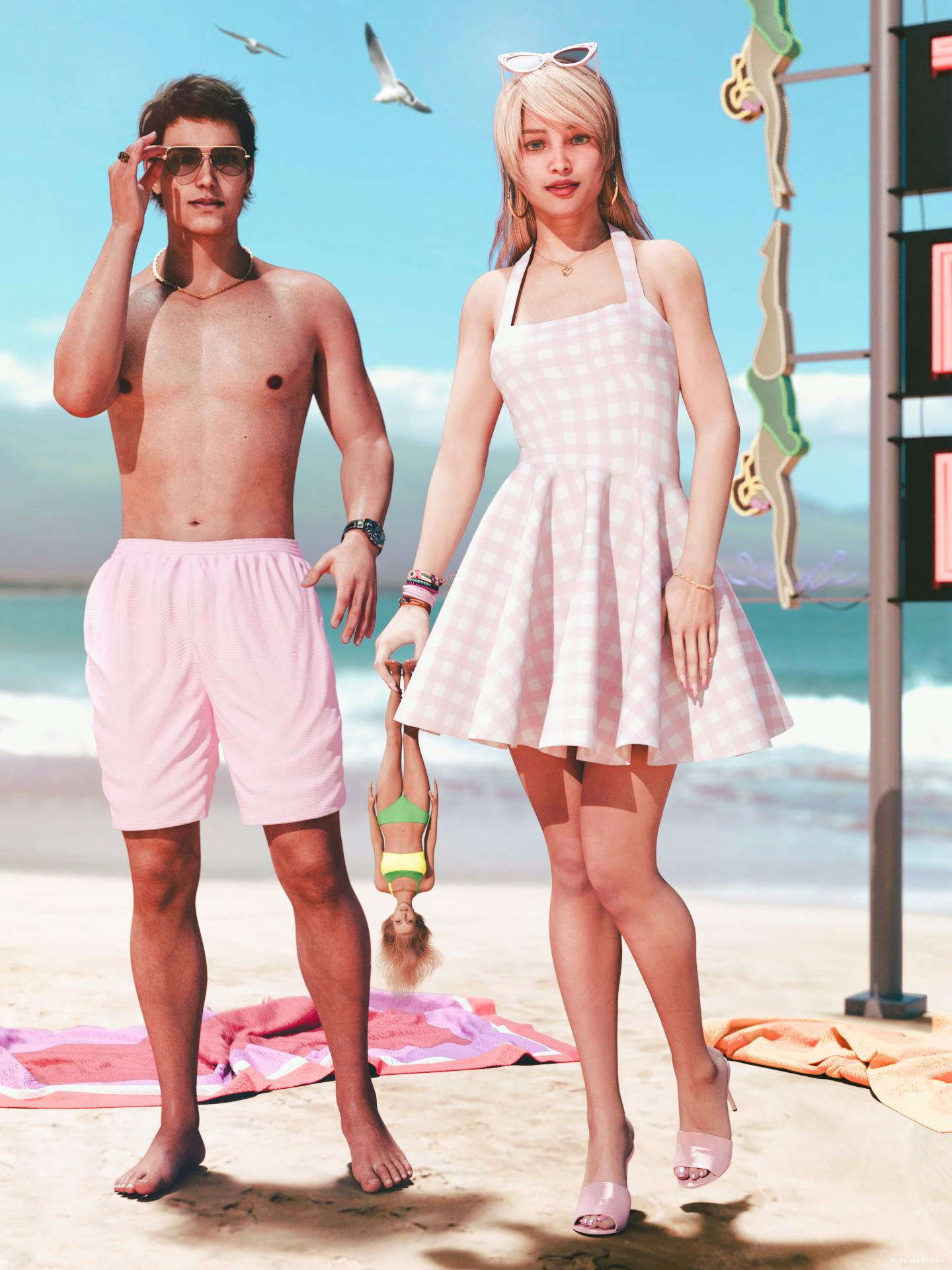
"Doll on the beach"
Starring: Ella and Walther 2.0The tale: (Entirely fictional)
It is the year 1967, 8 years after the launch of the Barbie® fashion doll...
Because Ella saw where the two little bullies threw down the doll taken from the now crying little girl, a little further on the beach, and heard her mother say that there is no time to go looking for it, she decided to pick up the doll and after having rinsed off the sand and salt water under a beach shower, to bring it back to the still crying little girl...
And when she walked past Walter (high heels on the beach are awful) he thought "Well ain't she a doll!"
Non-motion Picture Soundtrack:Cliff Richard & The Young Ones - Living Doll (© 1986) https://www.youtube.com/watch?v=gGOU0o9K89g
COUNTABLE FREEBIES: (Alphabetic order)#01! Barbie High Heel Sandals for Genesis 8/8.1 Female by Tiboza
https://www.renderosity.com/freestuff/items/95810/barbie-high-heel-sandals-for-genesis-881-female **#02! Beach Towel by Ildanach
https://www.daz3d.com/forums/discussion/206316/free-beach-towel-updated-with-morphs-and-materials
[Dropbox download link]#03! Beach Volleyball Bikini for Genesis 8 Female by amyaimei
https://www.deviantart.com/amyaimei/art/Beach-Volleyball-Bikini-for-Genesis-8-Female-704816788 **#04! Bear Ring by kalhh
https://www.deviantart.com/kalhh/art/Bear-Ring-853733610 **#05! Bracelet for genesis 8 female by Valmont59
https://www.renderosity.com/freestuff/items/86004/bracelet-for-genesis-8-female **#06! Chameleon ROse2 for Genesis 8 Female by zoro_d
https://www.renderosity.com/freestuff/items/85859/chameleon-rose2-for-genesis-8-female **
[Head and eyelashes morph]#07! Ella for Genesis 8 Female by tottallou
https://www.renderosity.com/freestuff/items/77844/ella-for-genesis-8female **#08! Flo Makeup For Genesis 8 Females by AprilYSH
https://shop.aprilsvanity.com/flo-makeup-for-genesis-8-females.html#09! G8M Walther 2.0 by Ruslanomar
https://sharecg.com/v/97276/gallery/21/DAZ-Studio/G8M-Walther-2.0 **#10! Glitzy Catrim Eyeglasses G9 by LaurieA
https://www.renderosity.com/freestuff/items/93850/glitzy-catrim-eyeglasses-g9 **#11! Golden Chain for Genesis 8 Males by Laticis Imagery
https://www.renderhub.com/laticis/li-golden-chain-for-genesis-8-males **#12! Iray car related shader presets 'megapack' by Tom2099
https://www.deviantart.com/tom2099/art/Iray-car-related-shader-presets-megapack-539622361 **#13! Iray Jewelry Shaders by AllenArt
https://sharecg.com/v/95893/gallery/21/DAZ-Studio/Iray-Jewelry-Shaders **#14! Lunafreya for G8F by Shinteo
https://www.patreon.com/posts/lunafreya-for-40600356#15! Lunafreya Summoner Outfit For Daz by Shinteo
https://www.patreon.com/posts/lunafreya-outfit-67676433
[Hair, Add-on to the previous pack]#16! My Heart Necklace for Genesis 8 Female by Amy Aimei
https://www.deviantart.com/amyaimei/art/My-Heart-Necklace-for-Genesis-8-Female-729010047 **#17! Nail Art for Genesis 8 and 8.1 Female(s) by zoro_d
https://www.renderosity.com/freestuff/items/92918/nail-art-for-genesis-8-and-81-females **#18! Neon Sign "Motel" in 3 Types (.obj) by Blackvizual
https://www.renderhub.com/blackvizual/neon-sign-motel-in-3-types **#19! New Walther 2.0 tanned skin + hair system by Ruslanomar
https://sharecg.com/v/98463/browse/21/DAZ-Studio/New-Walther-2.0-tanned-skin-%2B-hair-system **#20! OnFleek for Genesis 3 & 8 Female(s) by AprilYSH
https://aprilsvanity.com/shop/onfleek-for-genesis-3-8-female-s.html#21! Oracle for G8F by Shinteo
https://www.patreon.com/posts/oracle-for-g8f-39112022
[Bracelet]#22! Ray Glasses G8M-FREE by SdeB
https://www.sdebstore.com/collections/free-stuff/products/ray-glasses-g8m-free **#23! "STRONG" for G8M Character Morph & Pose by Mar3D
https://www.renderosity.com/mod/freestuff/strong-for-g8m-character-morph-amp-pose/82833 **#24! SuitWell Watch G8M - FREE by SdeB
https://www.sdebstore.com/collections/free-stuff/products/suitwell-watch-g8m-free **#25! Sundress for G8F (UPDATED AGAIN!) by grinch2901
https://sharecg.com/v/91663/browse/21/DAZ-Studio/UPDATED-AGAIN%21-Sundress-for-G8F **#26! SY 200 Morphs for Genesis 8 Head and Body by SickleYield
https://sharecg.com/v/91888/view/21/DAZ-Studio/SY-200-Morphs-for-Genesis-8-Head-and-Body **#27! TLOU2 Ellie for G8F by Shinteo
https://www.patreon.com/posts/tlou2-ellie-for-42575735
[Bracelet]#28! WorkOut Short G8M - FREE by SdeB
https://www.sdebstore.com/collections/free-stuff/products/workout-short-g8m-free **
NO-COUNT ITEMS:--- Casual Outfit 2 for G3M by Tab [Bracelet]
++ DAZ Studio Iray HDR Outdoor Environments by DimensionTheory [Maui used]
--- Eyes Dilate for Genesis 8 Female by felldude
--- Free Iray Outdoor Lights by Dreamlight
--- Hoop Earrings for G8F by Lully
--- Textures for Sundress by eblank99
--- Underwater Hair for G2F by MEC4D
PURCHASED/PAID FOR ITEMS: None 100% Freebies
*1 E-mail address required
** Registration required
#x! Countable Items (Bold ones are used by me for the first time I think.)
--- No longer available freebies
++ Free with DAZ Studio (or the Essentials)
$x. Purchased/Paid For Item
Rendered with DAZ Studio 4.10.0.123 (nVidia Iray®)Other free software used: GIMP v2.10.34 and Irfanview 4.62
Postwork: Used some filters that come with GIMP. Also used mcjLut by mcasual (https://sites.google.com/site/mcasualsdazscripts9/mcjlut) with the free FilterGrade Cinematic LUTs Pack (https://filtergrade.com/free-cinematic-luts-video-editing/) and the Vintage-Look Photoshop Effects Pack/Light Leaks Effect Pack by Michael Jarrott (https://creativecloud.adobe.com/discover/article/vintage-look-photoshop-effects-pack).
"Doll on the beach"
https://www.daz3d.com/gallery/user/6398906262880256#gallery=album8846472&page=1&image=1305984
This may be for the vintage crowd...sazzyazzca said:
You may have to combine multiple hairs to get the look you're going for, and you may have to make parts of some hairs invisible. You may also need to use a utility to mirror a hair. I've done it several times, even with hair made for other figures. I just parent instead of fit to.
These ones either have some "springing out" type curls or are fairly curly. You'll have to check the promos and morph listings to see if they have what you're after.
https://www.daz3d.com/harlow-hair-2
https://www.daz3d.com/fane-hair-and-character-for-genesis-8-female-s
https://www.daz3d.com/calais-hair-and-ruff
https://www.daz3d.com/stella-hair-for-genesis-3-and-8-females
https://www.daz3d.com/julius-hair-for-genesis-2
https://www.daz3d.com/nesena-hair-for-genesis-3--8-females
https://www.daz3d.com/dforce-romantic-curly-hair-for-genesis-8-and-81-females
https://www.daz3d.com/primavera-hair-with-dforce-for-genesis-8-females
https://www.daz3d.com/despoina-hair
https://www.daz3d.com/frovida-hair
https://www.daz3d.com/ursula-hair-for-genesis-3-8-and-81-females
https://www.daz3d.com/gloriana-hair-for-genesis-3-8-and-81-females
Oh thank you!
I had been mulling over the dForce Romantic Curly Hair for Genesis 8 and 8.1 Females, But it would have to be "Beehived" and not sure if it could be manipulated for that "OTT beauty queen" hair.
Ill try a few hair combos. I have a few of those so....
It may be worth a merchant thinking about making that Hair though, I could see it being popular in the "Pinup" groupModel's targetyuyu.atem said:
Ok, I understand, thank you very much!
So, when a new model is created, specific sliders are created too? How do they create?
Reshape the mesh in a modelling/sculpting applciation without chnaging the resolution or adding/removing parts, then use edit>Figure to launch one of the Morph Loaders (usually Pro) and import the new OBJ, using the same preset as the original OBJ export so thats cale/axes line up correctly, as a new morph, Using GoZ avoids the Export/Import dialogues. PAs making content for the store can bring in morphs that work on higher resolution versions of the model, for HD morphs, but that isn't available to the rest of us.
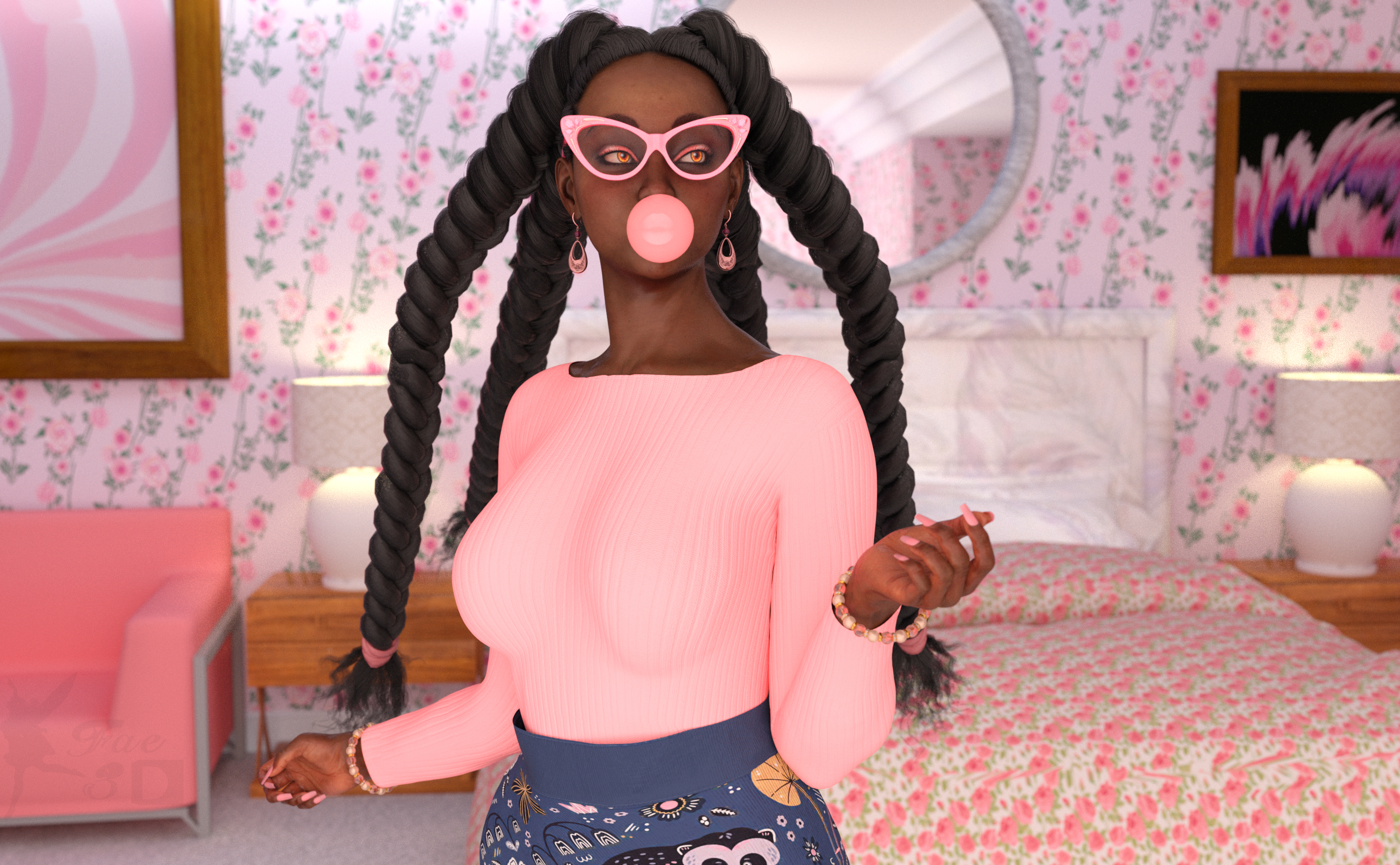
Freebie Challenge AUGUST 2023 - Fabulous Pink - Entries Thread OnlyMiss Bubblegum
All the cool girls wear pink!
Freebies:
Kimberly Jackson G9 (Skin, Hair, Head Morph at 25% Only) - https://www.patreon.com/posts/86341322
Laura for Genesis 9 (Shape) - https://www.renderosity.com/freestuff/items/95644/laura-for-genesis-9
SY 200 Free Morphs Merchant Resource G9 (Adjust Body Shape and Nail Length) - https://sharecg.com/v/99782/favorite/21/DAZ-Studio/SY-200-Free-Morphs-Merchant-Resource-G9
Eyes by Sir Maverick (Not sure which pack, since when you install them they all go in one file together) - https://www.renderosity.com/users/SirMaverick/freestuff
G9 Female Normal Make-Up - https://www.renderosity.com/freestuff/items/93530/g9-female-normal-make-up
Mixable Pitchi for Genesis 9 (Outfit) - https://3dshards.com/product/mixable-pitchi-for-genesis-9/
Big Bead Bracelet - https://www.renderosity.com/freestuff/items/93587/big-bead-bracelet
Fat Drop Loop Earrings G9 - https://www.renderosity.com/freestuff/items/93588/fat-drop-loop-earrings-g9
Glitzy Catrims Eyeglasses G9 - https://www.renderosity.com/freestuff/items/93850/glitzy-catrim-eyeglasses-g9
CRP Standing Cute Poses 1-8 - https://www.renderosity.com/freestuff/items/93477/crp-standing-cute-poses-1-8
Sunflowers HDRI - https://hdrihaven.com/hdri/?h=sunflowers
B&B Bedroom for Daz - https://sharecg.com/v/98910/favorite/21/DAZ-Studio/BB-Bedroom-for-DAZ
One Bedroom House (Loveseat) - https://www.sharecg.com/v/88378/related/21/DAZ-Studio/One-Bedroom-House-update
Pink and white abstract painting (1) - https://unsplash.com/photos/B0jaWEt6a24
Pink and white abstract painting (2) - https://unsplash.com/photos/O9SoTdFD1gA
Flowers and Hearts for Mothers Day Shaders (Wallpaper and Comforter) - https://www.renderosity.com/mod/freestuff/flower-amp-heart-shader-set-for-mothers-day/85162
No Count:
Genesis 9 Expressions - https://www.daz3d.com/genesis-9-expressions
Sphere Primitive (Bubble)
Paid:
SY InvisiLights Iray - https://www.daz3d.com/sy-invisilights-iray
I tweaked the materials, the lights and the pose. Set up and rendered within Daz Studio Iray. Very minor Postwork in Pixelmator, mainly color corrections.
Control nose shapeWhen I go into the shaping section, there is not a nose section, so I don't know how to control the morph of the nose:
 This may be for the vintage crowd...
You may have to combine multiple hairs to get the look you're going for, and you may have to make parts of some hairs invisible. You may also need to use a utility to mirror a hair. I've done it several times, even with hair made for other figures. I just parent instead of fit to.
These ones either have some "springing out" type curls or are fairly curly. You'll have to check the promos and morph listings to see if they have what you're after.
https://www.daz3d.com/harlow-hair-2
https://www.daz3d.com/fane-hair-and-character-for-genesis-8-female-s
https://www.daz3d.com/calais-hair-and-ruff
https://www.daz3d.com/stella-hair-for-genesis-3-and-8-females
https://www.daz3d.com/julius-hair-for-genesis-2
https://www.daz3d.com/nesena-hair-for-genesis-3--8-females
https://www.daz3d.com/dforce-romantic-curly-hair-for-genesis-8-and-81-females
https://www.daz3d.com/primavera-hair-with-dforce-for-genesis-8-females
https://www.daz3d.com/despoina-hair
https://www.daz3d.com/frovida-hair
https://www.daz3d.com/ursula-hair-for-genesis-3-8-and-81-females
https://www.daz3d.com/gloriana-hair-for-genesis-3-8-and-81-females
Control nose shapeNot sure of what you mean... but sliding a dial(s) of nose morph is a sort of 'control'... a nose morph is triggered by another dial is also a sort of 'control', so on and so forth. What is it that you want?
CBS/ JCMs HelpThe geoshell acts as the bonnet. That is part of the hijab set.
https://prnt.sc/JoOAf3hA90fK
Anyway, I've found solution for the bonnet poke through, by adding the value of collision offest.
Richard's suggestion seems right regarding the poke through of the cloth.
My hijab previously of has collision layer of 1. My cloth has collision layer of 21 by default.
Probably that's what keep causing the poke through.
And maybe the added value of collision offset also help in this regard.
Poketrough no moreThe hijab has implemented the morph to make it bigger to accomodate thick clothing.
This problem is solved.
Painting Daz surfaces with ZBrushI wish to modify Daz character with ZBrush.
I know in ZBrush i should not add geometry, but i wish to make morphs and also i wish to modify the painting (with polypainting) in ZBrush.
I see documentation about making morphs with ZBrush, but i don't see if is possible transfer UVs from Daz to ZBrush, then modify the painting in ZBrush and return back to Daz Studio.
CBS/ JCMs HelpNot exactly... Normally a garment with dForce can well collide with other clothing underneath. For your hijab, you could make its initial shape a bit larger (or make a unique morph) as usually there are some other clothing under it. Just reserve some space for them to drape and collide.. There'll be rarely poke-thru after simulation even with default settings on dForce engine and dynamic surfaces.
Ps -: for such a simple dforce case other than smoothing collision, you don't need a geoshell, or a static dforce modifier...
Daz 3D is part of

Connect
DAZ Productions, Inc.
7533 S Center View Ct #4664
West Jordan, UT 84084Licensing Agreement | Terms of Service | Privacy Policy | EULA
© 2026 Daz Productions Inc. All Rights Reserved.