-
The 'Eat Your Food and Like It' Complaint Thread
Complaint (as in I scared myself half to death): Opened Daz Studio and my Smart Content Products was missing! I could see it as files but not as product folders. My file structure was okay, my CMS was on, I couldn't figuer it out, my eyes were on the top of the screen. I even closed D|S and checked all connections. I was ready to do that death by metadata and log in when I looked down and realized somehow I was clicked on to the 'Pending' tab on the bottom of the window, not the 'Installed' tab. While I have absolutely no idea how that got clicked on, I thought I would note it here, just in case someone else ever has the same issue. Check those bottom tabs before you go nuclear on your database and save yourself months of work recovering your hard work setting up your files.
The exported model’s hair has too many polygons when using it in Unity.If you do not have Decimator for Daz Studio, you could export hair and reduce in Blender.
1. Export Hair from Daz:
* File → Export → OBJ (or FBX).
* Make sure to export only the hair.
2. Import into Blender:
* Use **File → Import → OBJ/FBX**.
3. Use Decimate Modifier:
* Select the hair mesh.
* Add **Modifier → Decimate**.
* Set **Ratio** so that final poly count ≈ 4000.
* Apply modifier.
4. Optional Retopology:
* For better quality, use **Quad Remesher** or Blender’s **Remesh** tool.
5. Apply Transformations in Blender:
* `Ctrl+A → Apply All Transforms` (Location, Rotation, Scale).
Use baked textures (Diffuse, Normal, Alpha).
* Save in **PNG or TGA** for transparency.
* Export as FBX:
* Use File → Export → FBX.
* **Settings**:
* Apply Modifiers: ON
* Smoothing: Face
* Scale: 1.0
* Forward: `-Z Forward`, Up: `Y Up` (Unity standard).FPE HD Dragon Scales for G9 [Commercial Thread]These are *amazing*. I love your materials. Snatched this up right away, and had to try out the iridescent shader on them just to see.
I did a quick render to show you what I got. Note: all the lights in the scene are white. The iridescent shader changed color based on angle and you can do all sorts of color combos. This is just a white base with a kind of rainbow setup.
Anyway, thank you SO much Esid and FenixPhoenix! This is just an awesome set!
For those interested, I've attached the material preset for fem and masc setup for the shell. Select the shell and apply (no metadata, sorry). For these presets to work, you'll need to have FPE HD Dragon Scales for Genesis 9 (of course) and Iridescent Shaders for Iray (by Oso3D).
I love dragon stuff if you can't tell XD
 Genesis 9 geometries don't match
DrunkMonkeyProductions said:
crosswind said:
Just a bare figure?You can directly import obj file into DS so as to compare it with the figure,and check their vertices count as well in Scene Info. pane. It should be easy to find out the culprit.
That pane, Scene Info, no longer exists with 4.24.03(possibly earlier, but not sure), it's just a sub-tab of the Scene Pane(tab) now.
Really annoying for those of us that actually used it.
Ah ~~ but it's been always there on my side which works as expected. Pls see the screen shot.
Check if you have the latest version 1.20.0.3 with DS 4.24.0.3. Or locate it on the top of Scene pane as SceneInfo pane started to be Attached to Scene pane from a certain DS version (4.23.x IIRC...) ~~
If you can locate it there, just Detach it and dock it to another pane group for easier use.
Genesis 9 geometries don't matchcrosswind said:
Just a bare figure?You can directly import obj file into DS so as to compare it with the figure,and check their vertices count as well in Scene Info. pane. It should be easy to find out the culprit.
That pane, Scene Info, no longer exists with 4.24.03(possibly earlier, but not sure), it's just a sub-tab of the Scene Pane(tab) now.
Really annoying for those of us that actually used it.
Render your buys! ALL TIME ChallengesSapphireBlue said:
Story: Pierrot and Pierrette's trick or treating is waylaid by a monster hungry for their cupcake treats!
I'm late to the party, but it looks great :)
-----
I don't think it would qualify for the other discussion when the only product I recently bought used in that render is so blurred, but I'll count it toward the #4new challenge

- Japanese Fishing Junk: blurred almost beyond any recognition, bought a couple of days ago.
- i13 Ethereal Wonder Pose Collection: gifted as a bi-weekly freebie in September 2024.
- DM's Le Sanctuaire: another freebie, but this one, it's from the 2023 Christmas sale.
- dForce Victorian Lady Outfit for Genesis 9 and the textures pack (I tweaked the surfaces setting to get the stripped white and gold look).
The vest and the textures used are freebies by Aeon Soul and I wanted an icon for the textures pack's metadata, in line with the one I made for the vest's metadata, so I re-used many of the same products including the render presets as a base and made change to fit the more fantasy look of the textures pack.
All items bought from Daz should be linked at the bottom of the gallery page.
Gardienne du Sanctuaire (Sanctuary's Warden in English, but since it's taking place in DM's Le Sanctuaire, I used French too):
 Genesis 9 geometries don't match
Just a bare figure?You can directly import obj file into DS so as to compare it with the figure,and check their vertices count as well in Scene Info. pane. It should be easy to find out the culprit.
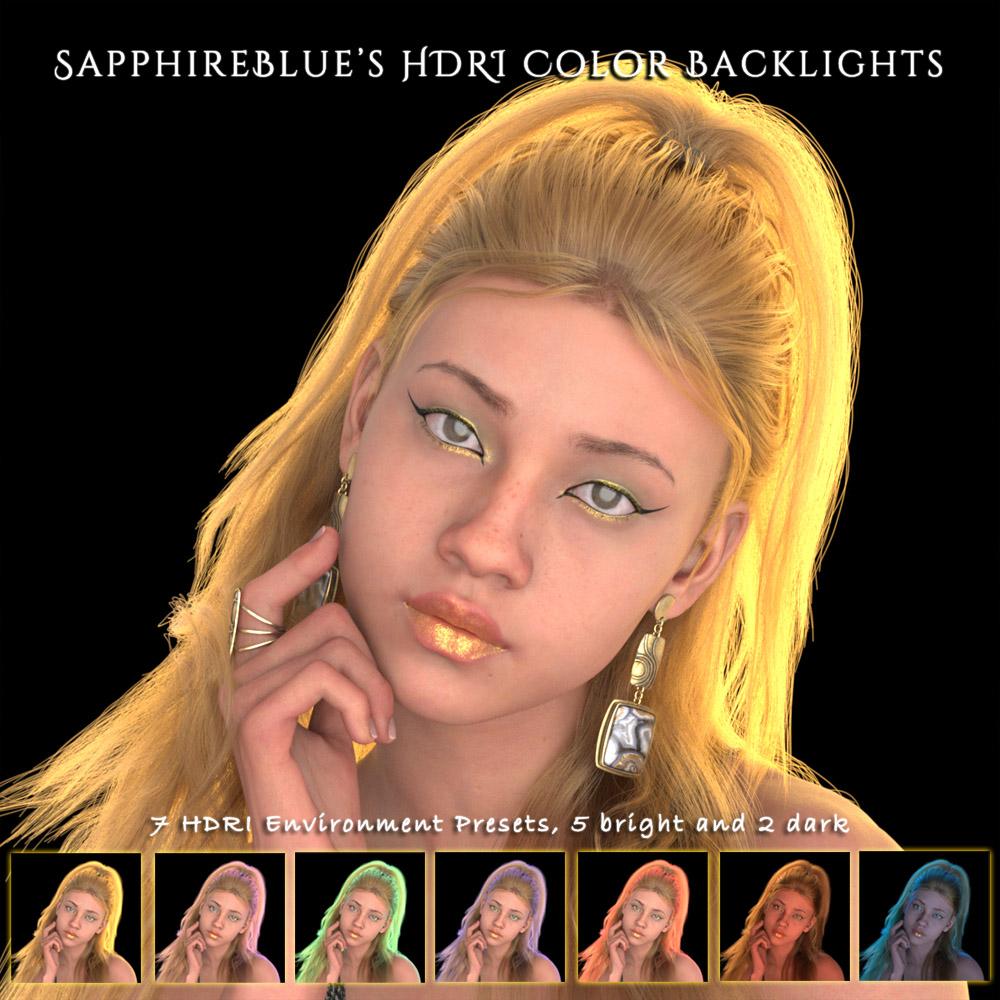
SapphireBlue's freebies: Flower Earrings for G8/8.1F and G9I was mucking around making an HDRI for some golden backlights for a render, and ended up making a few more to fill out a little freebie pack. Nothing inspired, but maybe it's useful to someone.

It's a pack of 7 HDRI environment presets that provide color backlighting. (In the Environment settings, Dome Y rotation 45 will give a more pronounced rim lighting on the left if that's more to taste.) The zip file can be downloaded on Renderhub only, as it seems too big to attach here. I have attached an installer file here to work with the zip file if anyone prefers to install that way. There should be Smart Content metadata included. The presets will be in Light Presets > SapphireBlue > HDRI Color Backlights.
(P.S. The promo images use the environment backdrop set to black to show the colors more starkly, and only use the HDRI for lighting with the default preset values.)
 SaveGuard: Ultimate Scene Saver for Daz Studio Win 64 v1.2
matew said:
Artini said:
Saxa -- SD said:
Since no Wearables Manager thread, will post this here again :)
Wearables Manager makes sending a character to Hexagon for morph-making an absolute breeze.
Just did it.
Have scripts on toolbar of your choice, select undress script, send figure to Hex, make morph in Hex, back to DAZ and save new morph, click script to dress and Viola!
Before was always a groaner removing all items inorder to send to Hex.
With this and the raw power of Hexagon (it's not perfect but pretty darn good for morphs), that program so tightly bound with DAZ, can't even imagine using DAZ GeomEditor even with it's improvements.
Anyway, just wanted to pass on how much of a time-saver this was.
Been focussed on other 3d things, so this is why just doing & posting now.
Thks Matew.Great to know, that it is working for you.
https://www.daz3d.com/wearables-manager
I was wondering what is the difference between Wearables Manager and personality in Daz Studio.
I guess you meant Personas, right?
Wearables Manager doesn’t use or replace Personas.
Personas are a very old DAZ feature that defines metadata for interactive tools (like PowerPose handles). It has nothing to do with clothing or managing outfits.
Wearables Manager is specifically for organizing, fast putting on / taking off outfits, handling materials when geografts are present, and some toggling some material states — completely separate from the Persona system.Persona prsets are a newish feature https://www.daz3d.com/forums/discussion/comment/8999416/#Comment_8999416
Genesis 9 geometries don't matchIs there any geo-grafts on the figure ?
If there is, you can either export / import OBJ with Geometry Editor tool activated, or use the Load Morph option > Primary Figure from Graft (Facet Order) in Morph Loader Pro.
DAZ to 3ds Max Bridge support for Genesis 9After exporting genesis 9 character in DAZ, using the DAZ bridge to 3ds Max, I load the DAZ bridge in 3ds Max and click auto-import and max freezes. Waiting 10 minutes, I force exited from max. Tried a few times and same issue all the time. Tried Genesis 3 and 8 no problems with the same import process.
SaveGuard: Ultimate Scene Saver for Daz Studio Win 64 v1.2Artini said:
Saxa -- SD said:
Since no Wearables Manager thread, will post this here again :)
Wearables Manager makes sending a character to Hexagon for morph-making an absolute breeze.
Just did it.
Have scripts on toolbar of your choice, select undress script, send figure to Hex, make morph in Hex, back to DAZ and save new morph, click script to dress and Viola!
Before was always a groaner removing all items inorder to send to Hex.
With this and the raw power of Hexagon (it's not perfect but pretty darn good for morphs), that program so tightly bound with DAZ, can't even imagine using DAZ GeomEditor even with it's improvements.
Anyway, just wanted to pass on how much of a time-saver this was.
Been focussed on other 3d things, so this is why just doing & posting now.
Thks Matew.Great to know, that it is working for you.
https://www.daz3d.com/wearables-manager
I was wondering what is the difference between Wearables Manager and personality in Daz Studio.
I guess you meant Personas, right?
Wearables Manager doesn’t use or replace Personas.
Personas are a very old DAZ feature that defines metadata for interactive tools (like PowerPose handles). It has nothing to do with clothing or managing outfits.
Wearables Manager is specifically for organizing, fast putting on / taking off outfits, handling materials when geografts are present, and some toggling some material states — completely separate from the Persona system.Products not being updatedRichard Haseltine said:
Do the Products have metadata? Check the list in DIM. If so, you may need to reimport metadata - Content Library option menu (the lined button at top-right of the pane, just under the PDF Manual button in your screenshot)>Content DB Maintenance, check reimport Metadata, then in the next dialogue check any of the missing products that are listed.
I tried that and it fixed the problem. Thank you. But what do I need to do to keep this from happening with new installs?
Suggestions regarding the list management function of the content libraryAs the number of loaded content paths increases, how to manage and quickly locate the desired products has become a very troublesome issue for me. I would like to put forward a few suggestions regarding functionality, and I hope they can be taken into consideration.
1. Improve the quick search function in the content library list based on SHIFT + the first letter. Why do we need to add SHIFT? Because many individual letters have already been set as shortcut keys for various panels, when these initial letters are clicked, various panels will repeatedly switch.
2. When the mouse hovers over a certain folder in the content library, the product preview image named "folder.jpg" in that folder will be automatically displayed, so that one can quickly know what is in this folder without having to navigate through one level after another to find out what is inside.
3. I know there is the "categories" function, but I can't guarantee that for each product loaded, a "categories" label will be assigned to it. Can we add a label to each folder that has already been assigned a "categories" label in the content library, so that I can know which folders have been classified and which ones haven't?
4. Allow using the right mouse button in the content library list to quickly set a preset color for the folder, so that users can quickly distinguish the product category of a folder based on their own preference for colors, for example, red represents characters, blue represents scenes, etc.
5. Allow using the left mouse button in the content library to drag folders for custom sorting.
6. Allow for convenient and quick import or export of the list of the content library, and also retain the order of these folders, which is very important. Sorting by the initial letter of the folders is often disastrous because the sorting based on product categories has been disrupted. It will be very difficult for me to find the product folder I need after clearing the entire content list.
7. Allow using the right mouse button in the content library to quickly lock certain folders that users particularly frequently use, so that after clearing the entire content list, these frequently used folders can be retained, and then other folders required for the next project can be loaded.d then other folders needed for the next project can be loaded.Products not being updatedDo the Products have metadata? Check the list in DIM. If so, you may need to reimport metadata - Content Library option menu (the lined button at top-right of the pane, just under the PDF Manual button in your screenshot)>Content DB Maintenance, check reimport Metadata, then in the next dialogue check any of the missing products that are listed.
UGH!!Window>Panes(Tabs)>Help will close it, or just load a different layout (Window>Workspace>Select Layout). If theer are other features, such as menus, that you want to keep save the layout first (Window>Workspace>Save Layout) then use the Import button at the bottom of Window>Workspace>Customise to seelctively load the elements you want, while not loading the panes.
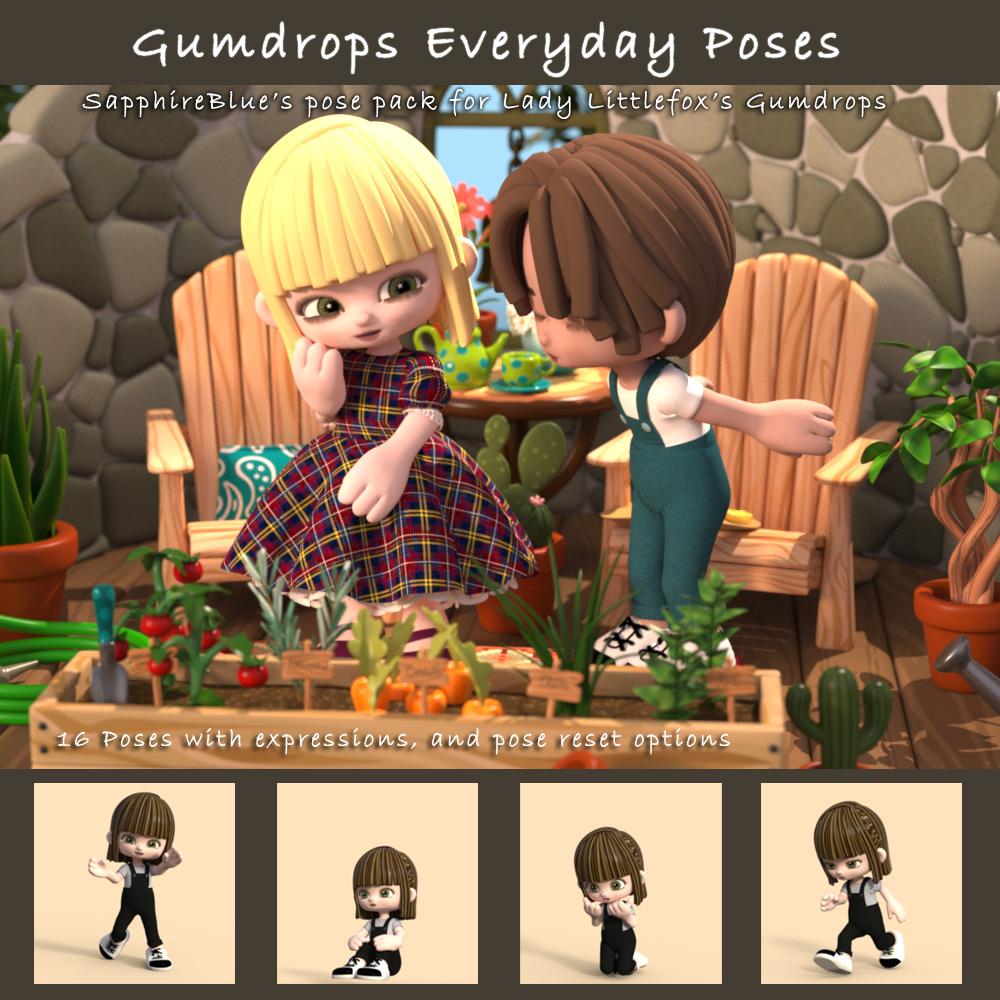
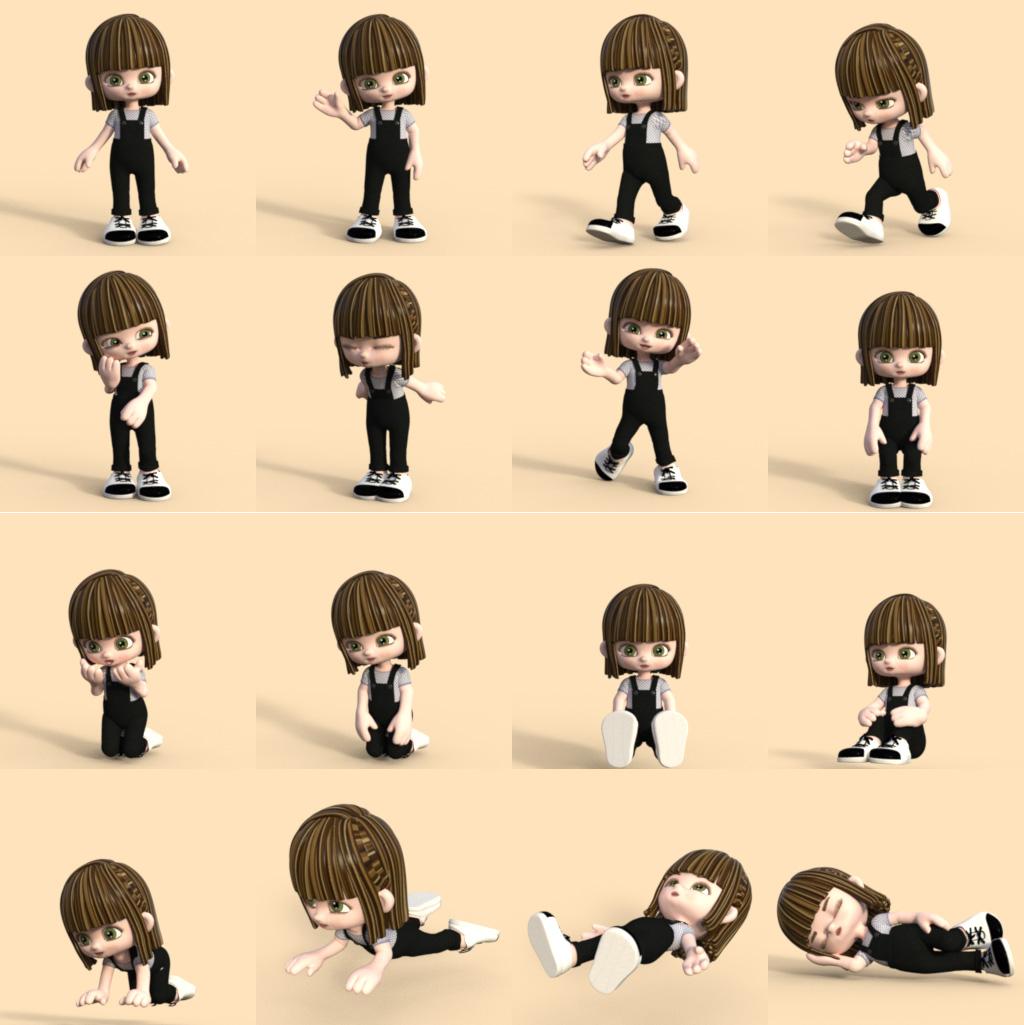
SapphireBlue's freebies: Flower Earrings for G8/8.1F and G9I'm starting with a pose pack of 16 poses (with some expressions) for Lady Littlefox's Gumdrops characters. Gumdrops Candy the Base, as well as others LLF has created from that base, are available in the DAZ store. I love working with Gumdrops and wanted to make some starting poses for myself and thought I'd turn it into a little pack. The set also includes options to reset expression only, pose only, and pose and expression.
Download at Renderhub, or the attached files here. I've included a zip file and an installer file here. If all goes to plan, it should add Smart Content metadata too.
 Importing Hands dial-ups into Blender?
Hi Padone, thanks for the explanations! Very useful.
I finally tried the import on another machine and it worked just fine. Go figure...
Must be something funky in the Diffeo settings on my other machine. I'll re-install Diffeo on it and go from there.Connecting to the CMS DatabaseWhich metadata are you expecting? User data isn't the products you installed through DIM or DS, nor new protducts you have created yourself - it is only the non-product metadata, for your own saved scenes and presets or you own additions to product data that wasn't an edit of the product itself.
Connecting to the CMS DatabaseWell, this looks more or less the same just seven years later. I got a new refurbished computer running Windows 11. I installed DS. I am trying to export the metadata for my stuff in an old Winfows 10 computer to the new refurbished computer. For that I ran the EXPORT USER DATA in the old computer, and I got two files UserData_1.dsx and UserData_2.dsx from the proper folder in the old computer. I copied these files to the Runtime/Support file of the new computer, and I ran there RE_IMPORT METADATA inside CONTENT DATABASE MAINTENANCE. This took a few minuites but I do not see that the metadata in the old computer are imported into the new computer. Either I am doing something wrong or the instructions to export metadata are wrong or... I do not see any other possibility, is there any? Any help with this?.
Daz 3D is part of

Connect
DAZ Productions, Inc.
7533 S Center View Ct #4664
West Jordan, UT 84084Licensing Agreement | Terms of Service | Privacy Policy | EULA
© 2026 Daz Productions Inc. All Rights Reserved.