-
Anime Toons and Filatoon Shader Q&A
neoman said:
I guess I'm dumb because I cannot for the life of me get this to work. I've tried adding the FilaToon base to the character, or outline, and cannot get anything to work right. I've tried Vicky9 and she's completely black. I want to turn some of my existing characters into toons but I can't get any results.
I've read through the forum here and don't see a procedure from beginning to end to get the results I need. Can someone help, starting with "I've added a character into Daz Studio.
Sorry I'm so pathetic.
Have you tried changing the viewport to Filament mode?
EDIT: Oops, someone else already answered that, my bad.
materials all black :(It needs Filament plugin enabled and an Environment light loaded from G9 Starter Essentials.Anime Toons and Filatoon Shader Q&AYou need to have "Filament" selected as your viewing option
You must have at least one light in the scene
Try this just to see it in action:
- Go to your Content Library pane
- Navigate to People and click on Genesis 9 Toon
- Load the Basic Lighting Setup
- Load either of the two (or both) Base Anime figures
You'll see it in action! :)
Daz Studio BETA - version 4.23.0.4! (*UPDATED*)josephlemons said:
Has Daz fixed the Mac version yet, been wanting to use the new Filatoon shader & the other cool stuff
Even if the Mac version is fixed, I don't believe that you'll be able to use the Filatoon shader as it's a Filament shader which isn't "scheduled" to work on Macs until DAZ Studio 5 or whatever it might be called when finally released (e.g. "DAZ Studio Pro 2026", perhaps? Maybe "DAZ Studio 2027"?).
UltraScenery - new(er) territory [Commercial]This is my days long attempt at UltraScenery2 with FilaToon. I used Pines Classic Content. Basically, I had no idea what I was doing with all those FilaToon and Filament Draw Style controls. I had a lot of crashes along the way, when I tried to raise the preview percentages too high or tried to change something else that affected the preview while it was still working on generating the preview display. I did use a layer mask to hide the preview of the area not visible and I turned on OFF the preview of some layers, like river pebbles and road pebbles. I also changed the color of some items that were too yellow or too pale with the FilaToon shader applied. I added a normal map to the water to try to make ripples. I noticed interesting differences between Mipmaps on and off. In the end, I generated both and combined them in Photoshop. Then I ran it through Krea Enhance for fun. I think USC2 is not really well suited to FilaToon, or at least not until I have a better handle on the settings.
Anime Toons and Filatoon Shader Q&AWhere can we learn about the filament draw options ?... With many of the options you can instantly see the effects but there are also many shadow options where i'm not seeing any change to shadows.
Thanks.
Edit: i was hung up on trying to finesse the shadow side of an object where as these settings effect the shadow cast by objects.
AIUTO...CHI CONOSCE L’ITALIANO? PARTE QUATTORDICICrios said:
SCusate se interrompo la faida Mac/Win, volevo chiedere una cosa,ma è possibile usare filatoon su una vecchia versione di DAZ? Dove si scarica?
E' nei pacchetti base di G9, hanno aggiunto un pacchetto numero tre. Scaricalo e provalo. Dovrebbe funzionare senza problemi sulle vecchie versioni di Filament.
Di base non hanno corretto nulla, è sempre lo stesso Filament.
UltraScenery - new(er) territory [Commercial]barbult said:
If you want more grass, turn up the Rreview Density percentage. By default only the forest is previewed at 100%. Filament uses the previews.
Thanks for that tip. I have just wondered why the grass is so sparse in filatoon.
Anime Toons and Filatoon Shader Q&ASapphireBlue said:
Decided to make my way towards attempting different styles with filatoon. I'm so loving how easy and flexible it is, especially thanks to all the helpful tips and insights in this thread. I used 3Diva's tip on transmapped hair and shadows in this one. By increasing the Shadow Map Size in filament's draw settings>environment to even just 2048, the shadows smooth out a lot.
Moonlight

That is just fabulous!
Anime Toons and Filatoon Shader Q&ADecided to make my way towards attempting different styles with filatoon. I'm so loving how easy and flexible it is, especially thanks to all the helpful tips and insights in this thread. I used 3Diva's tip on transmapped hair and shadows in this one. By increasing the Shadow Map Size in filament's draw settings>environment to even just 2048, the shadows smooth out a lot.
Moonlight
UltraScenery - new(er) territory [Commercial]If you want more grass, turn up the Rreview Density percentage. By default only the forest is previewed at 100%. Filament uses the previews.
UltraScenery - new(er) territory [Commercial]@Artini -- great renders using filament. Give Ultrascenery a much broader approach.
3D Comic Book Tips And Pictures3Diva said:
MoreTN said:
3Diva said:
I'm so excited about Filatoon! I'm planning on using it for my comic work. Here's the result of an experiment I'm doing with the Filatoon settings and the Filament Draw Options. This is a Filament render with zero post-work:
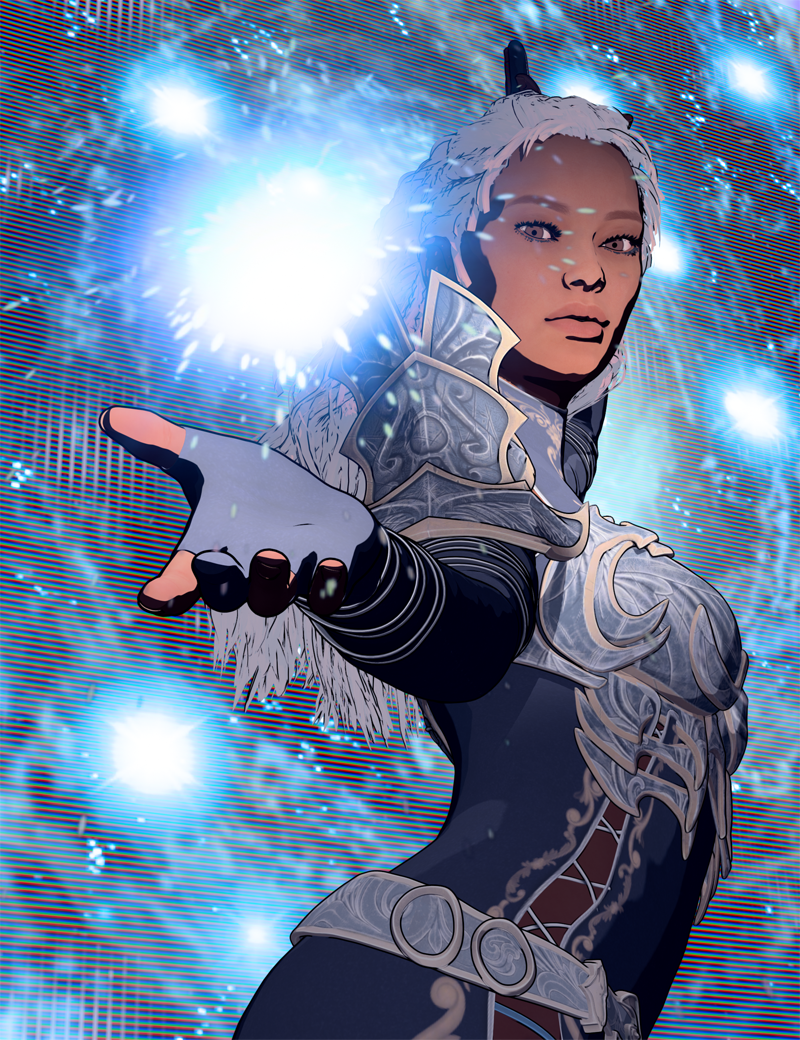
Is anyone else exploring Filatoon? One of my favorite parts is that it renders just about instantly - in about 1 second, even on my older machine! And what you see in the viewport is what you get! So cool!
Will these settings be included in your new product?
Yes, they are included. :)
Looking like an instabuy :)
Anime Toons and Filatoon Shader Q&Ajramboo082 said:
Hi, I'm using Vikcy 9 and I think something doesnt right for the toon shaders. Any advise?
Is this Filament? Haven't tried it yet, but that looks like how I imagine Filatoon shaders might render in Iray
UltraScenery - new(er) territory [Commercial]AnEye4Art said:
I have not been using daz much lately, so I am kinda out of the loop with what's new. So, where is this filatoon shader found in daz?
Please take a look at the threads dedicated to FilaToon:
https://www.daz3d.com/forums/discussion/704951/anime-toons-and-filatoon-shader-q-a#latest
https://www.daz3d.com/forums/discussion/704931/filatoon-cell-shaded-rendering-with-filament#latest
There is quite a different approach to rendering, but I like non realistic rendering (NPR) very much
and the speed of rendering in FilaToon (almost instant) is great on my computer.
I like also iray rendering, but excessive render times and unable to put more than 2 Genesis 9 or 8
in the scene (so only CPU rendering) is a very limiting factor for me.
3D Comic Book Tips And Picturesalgovincian said:
3Diva said:
I'm so excited about Filatoon! I'm planning on using it for my comic work. Here's the result of an experiment I'm doing with the Filatoon settings and the Filament Draw Options. This is a Filament render with zero post-work:
Is anyone else exploring Filatoon? One of my favorite parts is that it renders just about instantly - in about 1 second, even on my older machine! And what you see in the viewport is what you get! So cool!
Looks fantastic, @3Diva! The contrast between the smooth, flat look of the figure and the moire-like white pattern on the background was a clever way to create some separation between the 2. Very cool - cheers!
- Greg
Thank you, Greg! If I remember correctly the background and magic FX are from Jepe's Z-Bundle https://www.daz3d.com/jepe-s-z-bundle-ii I THINK it was probably from the CosmicZ pack: https://www.daz3d.com/jepe-s-cosmicz
3D Comic Book Tips And PicturesMoreTN said:
3Diva said:
I'm so excited about Filatoon! I'm planning on using it for my comic work. Here's the result of an experiment I'm doing with the Filatoon settings and the Filament Draw Options. This is a Filament render with zero post-work:
Is anyone else exploring Filatoon? One of my favorite parts is that it renders just about instantly - in about 1 second, even on my older machine! And what you see in the viewport is what you get! So cool!
Will these settings be included in your new product?
Yes, they are included. :)
3D Comic Book Tips And Pictures3Diva said:
I'm so excited about Filatoon! I'm planning on using it for my comic work. Here's the result of an experiment I'm doing with the Filatoon settings and the Filament Draw Options. This is a Filament render with zero post-work:
Is anyone else exploring Filatoon? One of my favorite parts is that it renders just about instantly - in about 1 second, even on my older machine! And what you see in the viewport is what you get! So cool!
Looks fantastic, @3Diva! The contrast between the smooth, flat look of the figure and the moire-like white pattern on the background was a clever way to create some separation between the 2. Very cool - cheers!
- Greg
3D Comic Book Tips And Pictures3Diva said:
I'm so excited about Filatoon! I'm planning on using it for my comic work. Here's the result of an experiment I'm doing with the Filatoon settings and the Filament Draw Options. This is a Filament render with zero post-work:
Is anyone else exploring Filatoon? One of my favorite parts is that it renders just about instantly - in about 1 second, even on my older machine! And what you see in the viewport is what you get! So cool!
Will these settings be included in your new product?
More Non-photorealistic Renders (NPR III)3Diva said:
Xandyr78 said:
3Diva said:
Have you guys had a chance to check out Filatoon? I'm having a blast with it!

Oh my word that looks amazing. How much tweaking did you have to do to that?
Thank you. It took a LOT of tweaking and experimenting of both the shaders as well as the Filament Draw Options settings. I'm about to submit a product to Daz3D though that has the presets (shader presets and scene settings presets). The PAs got the shaders early and, sadly, I was out of town and away from my computer so couldn't get the product made and submitted before the release of Filatoon, but I'm hoping to get it submitted to Daz3D shortly. I'm working on a tutorial to go with it.
Please please please
Daz 3D is part of

Connect
DAZ Productions, Inc.
7533 S Center View Ct #4664
West Jordan, UT 84084Licensing Agreement | Terms of Service | Privacy Policy | EULA
© 2026 Daz Productions Inc. All Rights Reserved.














