-
Simple way of fixing snaggy teeth in G8 import results from HeadShop?
Seven193 said:
Try this free tool:
Full Body Morph Fixer
https://sharecg.com/v/92305/browse/10/Software-and-Tools/Full-Body-Morph-FixerIt can reset the vertex morph deltas for different body parts. For your case, I wouldn't just reset the teeth, because the teeth are attached to the jaw, and perhaps the jaw is distorted too. So, I would reset all of these parts:
- Teeth
- LowerJaw
- UpperJaw
- TongueYou can then modify the node transforms to move or scale them so they fit better if something doesn't look right. See these nodes:
- Upper Teeth
- Lower Jaw
- Lower TeethThanks for that tip Seven193!
Natural Movements Pack for Genesis 9I mean, from the promos, the only interesting morph on that UNBM package of CBS seems to be the shoulder (armpit and scapula) morphs, so those probably look fine on males also (?). The natural movements pack seems to have more detailed and more comprehensive morphs than UNBM. I guess both are good tools to have tho.
Natural Movements Pack for Genesis 9to be fair, I don't understand the part about "needing' this or that. It's all what a person wants or doesn't want. 3D content generally is made as a starting point to build creatively from, and each successive generation of Genesis figures have been exactly that- bases to build in different ways, work in different ways. There's things I love about G8 that are easier, there's things I love about the first genesis figure... some want extreme detail, some want a figure that will work in games, avatars, animations, so on... the thing with each generation of content is learning what it can do, and do better, and how to optimize at the same time. There's definitely things about G9 that frustrate me, but there were things with G8 that drove me nuts too. Anytime the skeleton of a figure has a lot of variation its going need shape adjustment around the joints, and more varied and full sized (be it muscle or softer curves, or super long limbs or super short ones) there's going to be a lot of fixes necessary to make the shape work and bend well, and G9 encapsulates the shape spectrum.
I don't want to derail this topic about fantastic movement morphs-it really is an amazingly detailed set- but no, I don't think you NEED both morph sets to have awesome art, but I think we all WANT both morphs sets because it makes stuff look even more awesome. And with the staggering discounts and the hard work the PAs put in making both sets different and unique, I can't really see passing them up. Having extra is just a win win to me.
How to age a Genesis 9 character ?There is something I find really irritating about the 3DU Time Machine. It automatically adds 100% Base Feminine or 100% Base Masculine to your character when you enable the 3DU Time Machine. When you use it on a character that does not already include that morph (like any of the Daz Original characters like Victoria 9, Michael 9, etc.) It totally distorts the character shape. Going in and dialing Base Feminine or Base Masculine back out every time is annoying. This product really seems designed to only be used on Genesis 9 Base, although that isn't what the product page says.
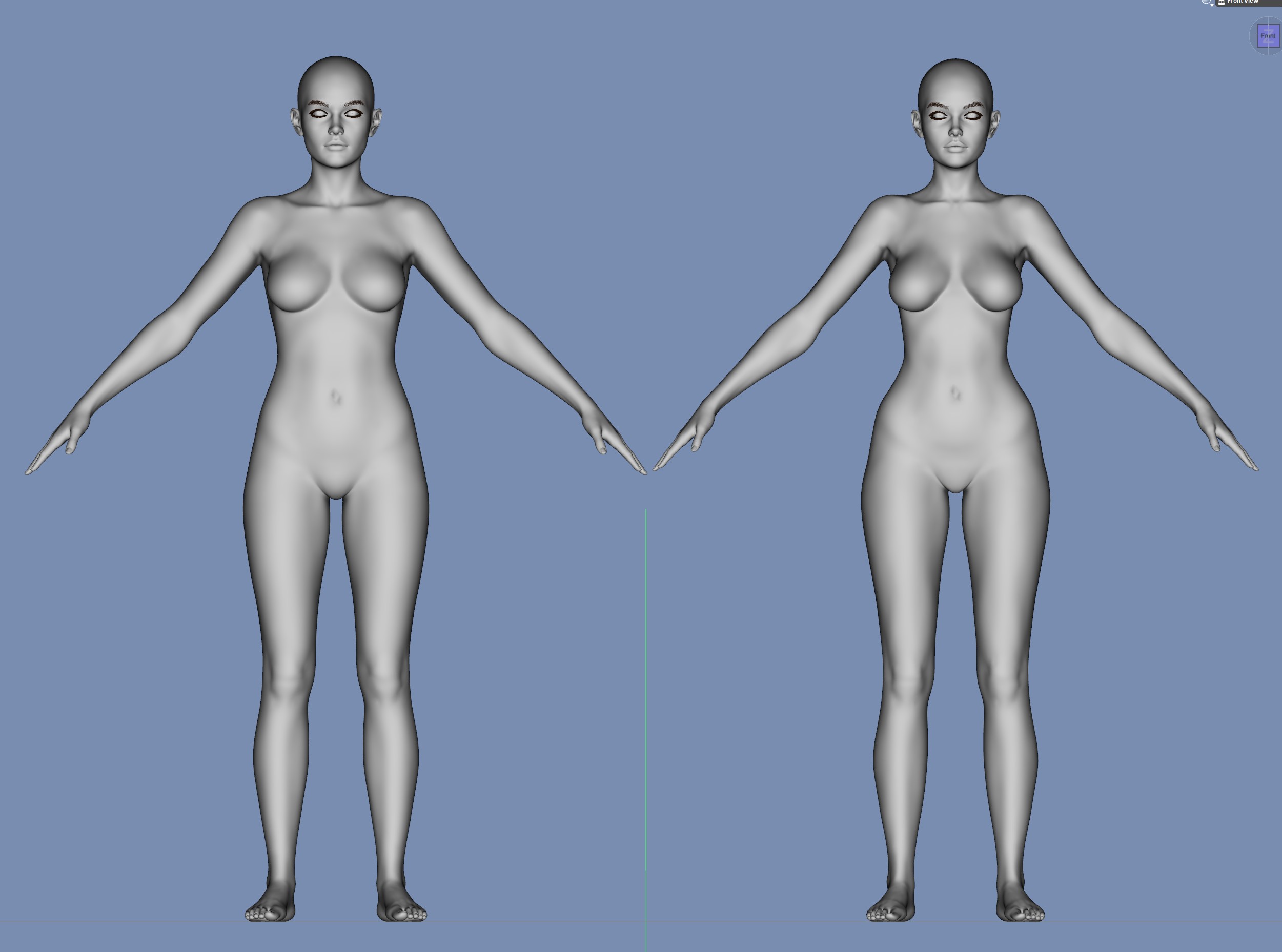
Victoria 9 default shape on the left.
Victoria 9 with "3DU Time Machine Enable Female" set to On on the right. Note how Victoria's shape is distorted by the addition of the Base Feminine morph added at 100% by the Time Machine. Victoria 9 does not need the Base Feminine shape dialed in. Her morph already has all the characteristics of a female shape.
 Daz to Blender Face Rig
Thank you so much. I also figured out how to export morph dials. so that works as well.
Simple way of fixing snaggy teeth in G8 import results from HeadShop?crosswind said:
....Thx for your FB. My next attempt with HeadShop had ok teeth. My attempt after that ended in yet another garbled results pane (with an export that will near crash your scene or worse) which means the program has turned unusable again for a long time. One may find that after a year the plugin spontaneously works again and then you can go ahead with one or two head transfers before it dies again. One thing it cannot deal with at all is make a 8.1 transfer and after that try an 8 version (et v.v.). If HeadShop was an actual shop I would suspect people would throw bricks through their windows on probably a daily basis

LOL, that creased me up ! If so, I might be the 1st one... Anyway, forget about it, let's find a way out by ourselves

Yes, using AutoSculpt morphs may result in shaggy teeth in HeadShop - but there's an easy fix. I sincerely wish people would read manuals (HeadShop has a 70 page manual with lots of illustrations). Chapter 5 is called Troubleshooting and there are ample explanations for correcting issues. Please bear in mind that 3D face creation is not straightforward and so far it is not automatric in many cases. Unlike competition HeadShop 2023 does fully support G9, but DAZ added several levels of complexity to G9 and also coupled items that earlier were separate (like teeth).
To summ it up:HeadShop: used in a simple mode HeadShop works fine without distorted teeth. Using the AutoSculpt feature has the potential of distortion, but it is fixable by counter dialing (see Manual).
Laslo
Genesis 9 eye morphs export/import and movement woescrosswind said:
Not so sure but are you fixing eyes rigging of your customized G9 head morph? There's a function - Adjust Eye Rigging in G9 Dev Tools, have you tried that?
Oh wow I was not aware such an option existed - it's pretty much hidden..thanks for the tip! I'll give it a whirl and report back.
Genesis 9 eye morphs export/import and movement woesNot so sure but are you fixing eyes rigging of your customized G9 head morph? There's a function - Adjust Eye Rigging in G9 Dev Tools, have you tried that?
Genesis 9 eye morphs export/import and movement woesHello everyone - I think I must be missing something obvious...? I fix my G9 eyes until I'm happy, export and re-import etc... but once re-imported, they do not pass the eye look side-side test... They did before my export. I have the same issue with other parts i.e. mouth.
My typical process is this :- I change the scale of the eyes if need be (on the body)
- X, Y, Z translations etc on the body's eye morph until it looks okay
- I test side-side and up-down movements for eyeball poke-through and tweak accordingly
- Once I'm happy, I re-export the body AND the eyes as base resolution OBJ's
- Re-import them as morph, with the eyes sharing the same name as the body's morph, albeit with the "Deltas Only" or "Deltas with ERC Links" (tried both.. same difference)
- Save the morphs
I modify the eye through the body because nothing seems to apply directly on the seperate eye mesh itself.. it just does crazy movements instead.
Then I delete my character, reload character, dial morph, eyes look fine.. until I move them... It seems my custom eye morph only succeeds in placing the eyes where they belong, but any hope of movement is gone.. Whereas the movements were good with my tweaks dialed in before the export.
My only working work-around has been to disregard making eye morphs entirely, and doing an ERC freeze with my dials for the eyes/mouth morphs applied so that when I dial the body morph, my manual changes are brought back on their respective dials..
What am I doing wrong? Are eye morphs meant to be done by somehow morphing the eyes obj outside of daz only? And scaling/positionning is not considered a morph ?
Here are some pics to illustrate the problem..
Importing / applying body morph

Importing / applying eye morph

Eyes looking okay after importing eye morph

Eye look side-side test fail after import

Good movements before export
Whereas before I exported the morphs etc (so with my manual fixes on the sliders) - these might be from a different character I did, but same idea


Anybody can help me? I am not sure how to solve this..
Custom Morph Question : Dialed Morphs for character preset, etc…Leana said:.......
Well you didn't post the full list of morphs, but judging from the few lines you posted above you used at least some "Evolution Head" morphs, which are from this product: https://www.daz3d.com/genesis-2-female-head-morphs (also part of the bundle).........
i could not post more because red cloud woud not let me!!! sql scared it was!
Leana said:.......Did you morph just the head or also the body? If so then you most likely used the body morphs product you linked to.
head and body . yes so those two packages will be _required_. or you get no char!
the script did not pick up that those two items were being used!
New! Novica & Forum Members Tips & Product Reviews Pt 14Daventaki said:
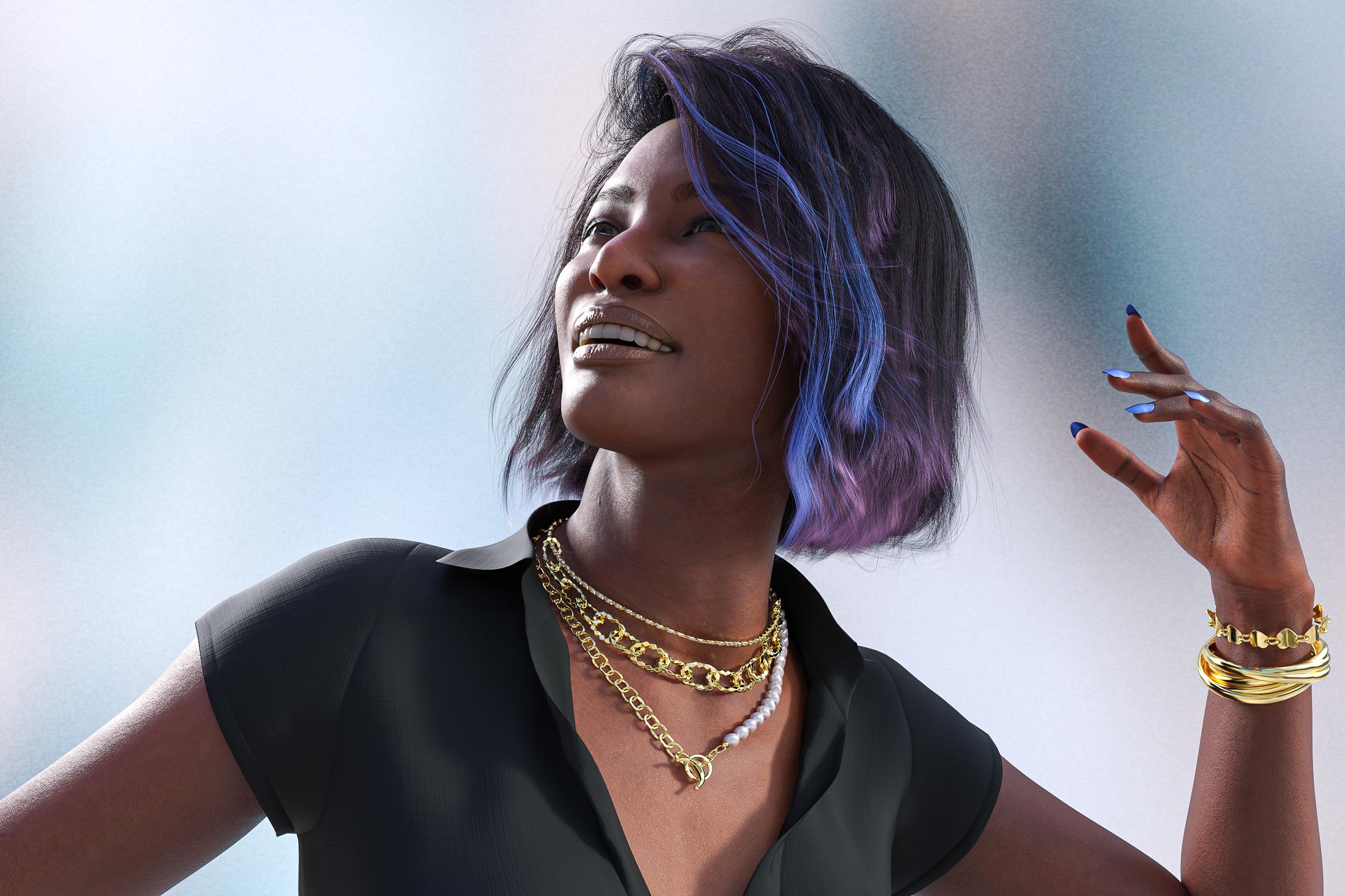
@Chevybabe25 new hair Bodacious Bob Hair on London by Faber Inc and Elvina outfit by Arryn and Onnel.
I wanted to post a review which I haven't done in awhile. This render took around 50 minutes set at 5000 max samples at 2500 px on the long side.
Bodicious Bob is a fun style. It has many color options including tips and streaks; it also renders and sims fast with the default settings. I did not see a lot of movement from the simulation but it is not an extreme pose. I like touch of color with the streak, this is the default color that it loads with. I did not tweak it at all.
London and her sibling Cairo are great characters and set to be siblings they are both well done characters my only complaint is the makeup and to me they are a little on the orange side but thats not a difficult fix for me. While there are several options the eye and lip makeup are not seperate. I know that the way the new shader is it makes it difficult. Love the characters!
Elvina Outfit comes with the dress, shoes, bracelets and necklace. They come with several morph and color options. To be honest I buy alot of there clothing because of shoes and jewelry. My biggest complaint is that the jewelry come with no adjustment options; which isn't really much of a complaint for what is all included it is well worth the purchase.
This looks like a really nice hair, but too poofy up top for me, does increasing the gravity help flatten it out?
How to enlarge or decrease a character ?Richard Haseltine said:
Which figure, and which (if any) morph sets?
Im using female in G9, no morph set for the moment i would like to "build" the character on a zero pose to re-use always the same modified base character (dont know if i'm clear...)
How to enlarge or decrease a character ?Which figure, and which (if any) morph sets?
Trying to fit Android M2 onto Genesis 8 FemaleHi,
I'm trying to fit Android M2 onto G8F to make a custom character for my library. M2 is rigged and I'm trying various options under the edit drop-down menu, but I can't get the character to fit right. Everything is fine except for the arms and hands. They take on a weird morph shape. Any suggestions?
Lahr the Lion - make him look thin instead of muscular?Elor said:
Hello,
I don't have Lahr, but I played a bit with the recently released barbarian, to tone done his body. I can't say if it's possible without buying a morph product, because I do own one (the Genesis 9 Essential Shapes Bundle) and from what I'm reading, I used morphs included in the Body shape pack. On the left, the result of my experiment, on the right, the base barbarian and despite being less muscular, the former is still a muscular man.

I don't know if it's enough for your taste or if it's possible to go further (it's mostly the body emaciated morph and some others who looked like they could reduce his musculatur a bit), it's just a fast render between two fillings of my wood storage
 , and now, it's time to get back to it…
Thank you. That morph would be perfect. I have the emaciated morph in the G8 version of that Shapes Bundle. But "emaciated" doesn't come up in parameters on G9 figures, so I guess I have to spend more money and purchase the G9 version. Ugh! LOL
Transfering Daz3D from an old computer to a new computerHello everybody! :) Yesterday, I bought a new computer with windows 11, I had the opportunity to upgrade and I took the chance. I was originally using a laptop with Daz 4.10 on Windows 8, it was a great computer and it handled Daz3D very well, but it was starting to get really slow and sometimes not responding for a long time, so I had to retire it. My question is, how do I transfer all the characters, hairs, enviroments... And everything else I've installed manually in my old Windows 98 computer to the Windows 11 computer? I want it to be that when I open Daz 4.10 on my Window 11 computer it is exactly as it was with the Daz3D in my Windows 8 computer. Is that possible?Is there any need for classic Hollywood G9 head morphs?AOBB said:
I am remaking Vivien Leigh (Scarlett G9) and she will be part of the bundle. Sophia Loren will remain separate. I am also doing a Clark Gable head morph. No points for guesing what his head morph will be named.
Oh right, Rhett! I'm looking foward to seeing the ones that haven't been announced yet.
Lahr the Lion - make him look thin instead of muscular?Hello,
I don't have Lahr, but I played a bit with the recently released barbarian, to tone done his body. I can't say if it's possible without buying a morph product, because I do own one (the Genesis 9 Essential Shapes Bundle) and from what I'm reading, I used morphs included in the Body shape pack. On the left, the result of my experiment, on the right, the base barbarian and despite being less muscular, the former is still a muscular man.
I don't know if it's enough for your taste or if it's possible to go further (it's mostly the body emaciated morph and some others who looked like they could reduce his musculatur a bit), it's just a fast render between two fillings of my wood storage
, and now, it's time to get back to it…Lahr the Lion - make him look thin instead of muscular?https://www.daz3d.com/lahr-the-lion-hd- for-genesis-9
Lahr the Lion is a heavily muscled figure for Genesis 9 Male.
I want to make him more thin or skinny, or at least not so exaggerated with the musculature.
Unfortunately I am heavily invested in Genesis 8 and all my morph products are for that generation.
I tried the Z Strong Within morph for Genesis 8 but of course it doesn't work on Genesis 9 figures. Sigh.
https://www.daz3d.com/z-strong-within-shape-and-pose-mega-set
I have not worked with much in the way of Genesis 9. But is there a set of Genesis 9 default sliders in the parameters pane to accomplish this? Or do I need to purchase a Gen 9 morph product?
Please help!
Mira is either too tall or her height is wrongHello,
According to the Mira 9 HD page, Mira is 164.7 cm (5' 5") tall, which mean she is ~5 cm shorter than Victoria (which, according to her own page, 169.4 cm --5' 6.7"-- tall) but, here's a render with, from Left to Right, Mira with the Young Adult Proportions morph fully apply, Victoria then Mira as loaded by default:

But by default, as shown by the render, Mira is actually slightly taller than Victoria and the only way for Mira to be smaller than Victoria is to apply the Mira 9 Young Adult Proportions morph, which as the name imply, is supposed to be the proportions of the younger Mira (from what I can see, it is part of the Mira 9 HD Young Adult Shape package provided as a temporary bonus with ) and I didn't see any 'proportions' morph file inside the Mira 9 HD package.
Am I missing something, is there a mistake inside Mira 9 HD package or is it just a mistake done while writting the Mira 9 HD page ?
Daz 3D is part of

Connect
DAZ Productions, Inc.
7533 S Center View Ct #4664
West Jordan, UT 84084Licensing Agreement | Terms of Service | Privacy Policy | EULA
© 2026 Daz Productions Inc. All Rights Reserved.