-
Make Human and Daz Studio
yuyu.atem said:
Thank you very much! I will look at it. I have also other questions:
- On my main character, I used the MakeHuman Yaoi Chin target asset, that is pretty important for the face of my character. Is there an equivalent in Daz? Or maybe, is it possible to convert it into a Daz asset?
- I didn't understand well what are these assets I found on this topic and an MakeHuman topic :
https://sharecg.com/v/85129/view/21/DAZ-Studio/MakeHUman-v1.1.0-A-Pose-Figure
https://sharecg.com/v/65913/browse/5/3D-Model/MakeHuman-Base-Figure-In-Genesis-Pose
https://sharecg.com/v/65999/browse/21/DAZ-Studio/MakeHuman-Rigid-Rigged-for-DAZ-Studio
With these asset, isn't there the same morphs in Daz as in MakeHuman? Isn't it possible to use them to recreate presisely my character without to have to spend a long time to do "tests" in Daz until I find the good morph values to recreate my character?Thank you in advance for your answer!
Those links are based on Genesis 1 which was release in 2012. If you'd like to follow those workflows to convert a MH to Genesis 1, you may then convert Genesis 1 to Genesis 8 with Daz tools.
BTW, if you can hardly do without MH, go for using Blender might be another straight-forward option by using MPFB 2.0 - http://static.makehumancommunity.org/mpfb/releases/release_20a3.html. In that way, nearly all Daz assets could be exported to Blender, so you can make a whole new world there with your MH figures, Daz assets and Blender itself...
Besides, there're add-ons as well for MH rigging (MHX), so you can easily rig your figure for posing / animation, etc.
Make Human and Daz StudioThank you very much! I will look at it. I have also other questions:
- On my main character, I used the MakeHuman Yaoi Chin target asset, that is pretty important for the face of my character. Is there an equivalent in Daz? Or maybe, is it possible to convert it into a Daz asset?
- I didn't understand well what are these assets I found on this topic and an MakeHuman topic :
https://sharecg.com/v/85129/view/21/DAZ-Studio/MakeHUman-v1.1.0-A-Pose-Figure
https://sharecg.com/v/65913/browse/5/3D-Model/MakeHuman-Base-Figure-In-Genesis-Pose
https://sharecg.com/v/65999/browse/21/DAZ-Studio/MakeHuman-Rigid-Rigged-for-DAZ-Studio
With these asset, isn't there the same morphs in Daz as in MakeHuman? Isn't it possible to use them to recreate presisely my character without to have to spend a long time to do "tests" in Daz until I find the good morph values to recreate my character?Thank you in advance for your answer!
Simple way of fixing snaggy teeth in G8 import results from HeadShop?Federmann said:
Andrew_C said:
Was reading about a problem with head morphs on Renderosity, and apparently the problem in that case was theres a tooth morph which you had to edit the default value to 0 rather than 100 before importing as importing some head morphs can for some reason mess things up if this value is at 100. I think its Mouth Realsm HD? Might also help here
Ok was looking and its in the comments for this script in Rendo Free Stuff https://www.renderosity.com/freestuff/items/95349/character-splitter-for-daz-studio
It might not help but cant hurt trying
Cool tip, Thx. Love tools like that, must be many dozens more like that out there but it is only in these discussions that I Iearn about them (but that's fine).
Also, there's a video about fixing shaggy teeth: https://youtu.be/83IWYL65TFs
This video applies to earlier HeadShop versions that supported Gen 8.1 morphing.
We fixed the shaggy teeth problem for Gen 9, so that will not be an issue with Gen 9
Make Human and Daz Studioyuyu.atem said:
Thank you very much for your answers! In fact, I discovered MakeHuman long before Daz, that's why my characters are in MakeHuman. I am a beginner in Daz but for now, I don't understand how I can entirely recreate my MakeHuman character in Daz. I mean, for the face, MakeHuman offers several different shapes (rond, oval, rectangle, triangle, etc...). I didn't see anything like that in Daz. So, I thought I had first to find a figure having the shape I wanted for the face, that seems not very easy... Is there a way to control the shape of the face like it is controlled in MakeHuman?
This is the perfect time to let go of make human and try daz3d characters. There is a sale right now, many products are over 80% off.
Download the genesis 8 essentials pack which is free with dazstudio.
Then buy the head morph and body morph packages.
The head morph has all those head and faces shapes you listed. The body morphs pack has all the body types. You may have to buy a skin texture later, and maybe some hair and clothes later.
Genesis 8 Female Body Morphs | Daz 3D
Celebrity Look-a-Likes for 3D figures Part 4yair said:
Does anyone know if there is any model similar to Alexis Fawx and Brandi Love.
tritiumcg on Deviantart has a Brandi Love morph for G8.
Natural Movements Pack for Genesis 9paulawp (marahzen) said:
I've been around long enough that I'm embarrassed to have total newbie questions, but how do you know if there's a conflict and what do you do about it?
Sorry, got carried away in D/S and forgot about my post; I turned both morph packs on simultaneously in order to compare the differences, the issue is with the thigh bend, specifically the side-bend morph, so the solution was to disable UNBM's leg morph, as I'm really in love with the Natural movement pack to ever turn it off! ;^)
Make Human and Daz Studioyuyu.atem said:
Thank you very much for your answers! In fact, I discovered MakeHuman long before Daz, that's why my characters are in MakeHuman. I am a beginner in Daz but for now, I don't understand how I can entirely recreate my MakeHuman character in Daz. I mean, for the face, MakeHuman offers several different shapes (rond, oval, rectangle, triangle, etc...). I didn't see anything like that in Daz. So, I thought I had first to find a figure having the shape I wanted for the face, that seems not very easy... Is there a way to control the shape of the face like it is controlled in MakeHuman?
Yes, of course. In addition to the official head morphs, there're quite a few good morph packages in the store that you may play with as a beginner. For instance, if you start from G8 -> 200 Plus for G8F, https://www.daz3d.com/200-plus-head-and-face-morphs-for-genesis-8-female-s. HSTW's head morph resource kits - https://www.daz3d.com/genesis-8-female-head-morph-resource-kit (there're Kits 1 - 3)
It's not a way of simply using 'round, oval, square' face shapes or something, these packages enable you to shape partial face morph (e.g. nearly 50+ morphs to shape figure's jaw, 70+ morphs to shape figure's cheeks, etc. etc.). So in general, it's much better than MH.
And yes, there're definitely a couple of ways for converting your MH figures to Daz Genesis figures (shape & textures) but that'll cost you money to buy the software and cost you more time to learn the techniques... So, better dive in Daz first to acquire basic knowledge and skills for making your 1st character with DS rather than aiming at some ad-hoc 'objectives' at this stage...
Simple way of fixing snaggy teeth in G8 import results from HeadShop?Andrew_C said:
Was reading about a problem with head morphs on Renderosity, and apparently the problem in that case was theres a tooth morph which you had to edit the default value to 0 rather than 100 before importing as importing some head morphs can for some reason mess things up if this value is at 100. I think its Mouth Realsm HD? Might also help here
Ok was looking and its in the comments for this script in Rendo Free Stuff https://www.renderosity.com/freestuff/items/95349/character-splitter-for-daz-studio
It might not help but cant hurt trying
Cool tip, Thx. Love tools like that, must be many dozens more like that out there but it is only in these discussions that I Iearn about them (but that's fine).
Fixing hip distortion on pelvis / thigh bendsMasterstroke said:
crosswind said:
Actually that's 'normal' ... especially when you bend figure's Pelvis + Abdomen Lower to an extreme extent (and thighs bend + side-side make it worse...), while default pJCMs cannot well fix the partial morphs, even if you use Bend Control. So ~
- try to avoid bending those joints together with high degrees..
- try not to make your figure too thin. The more it's thinner, the more 'distorted' it's gonna be...
- zev0 developed another product to fix similar issues on the abdomen to some extent, you may take a look at: https://www.daz3d.com/body-mixer-for-genesis-3-and-8-female.. (but it's not all mighty.)
- check if you use some unique partial body morph or character... some will aggravate the issue..
- the best way is to fix them with scultping software, e.g. Blender or ZB... (so far I've not seen a product can 100% fix such an issue 'cause that really depends on your figure's shape and poses...)As this is exactly true, it's even worse than that. Every character needs its own individual additional set of JCMs, in order to avoid those unwanted distortions.
Yes, as an imperfection, it's worse on G8/G3 while better on G9. There should be some 'combo pJCMs / cbs' on Base figures when multiple joints rotate around that area at the same time...
Natural Movements Pack for Genesis 9I've got both sets. Very exciting! Very affordable with the sales, even in Australian money.
Still need rib cage details for slim models if anyone knows of any going. (I think Supermassive had a nice morph for 8 but not 9)
Simple way of fixing snaggy teeth in G8 import results from HeadShop?Was reading about a problem with head morphs on Renderosity, and apparently the problem in that case was theres a tooth morph which you had to edit the default value to 0 rather than 100 before importing as importing some head morphs can for some reason mess things up if this value is at 100. I think its Mouth Realsm HD? Might also help here
Ok was looking and its in the comments for this script in Rendo Free Stuff https://www.renderosity.com/freestuff/items/95349/character-splitter-for-daz-studio
It might not help but cant hurt trying
Simple way of fixing snaggy teeth in G8 import results from HeadShop?Federmann said:
info_b3470fa520 said:
crosswind said:
....Thx for your FB. My next attempt with HeadShop had ok teeth. My attempt after that ended in yet another garbled results pane (with an export that will near crash your scene or worse) which means the program has turned unusable again for a long time. One may find that after a year the plugin spontaneously works again and then you can go ahead with one or two head transfers before it dies again. One thing it cannot deal with at all is make a 8.1 transfer and after that try an 8 version (et v.v.). If HeadShop was an actual shop I would suspect people would throw bricks through their windows on probably a daily basis

LOL, that creased me up ! If so, I might be the 1st one... Anyway, forget about it, let's find a way out by ourselves

Yes, using AutoSculpt morphs may result in shaggy teeth in HeadShop - but there's an easy fix. I sincerely wish people would read manuals (HeadShop has a 70 page manual with lots of illustrations). Chapter 5 is called Troubleshooting and there are ample explanations for correcting issues. Please bear in mind that 3D face creation is not straightforward and so far it is not automatric in many cases. Unlike competition HeadShop 2023 does fully support G9, but DAZ added several levels of complexity to G9 and also coupled items that earlier were separate (like teeth).
To summ it up:HeadShop: used in a simple mode HeadShop works fine without distorted teeth. Using the AutoSculpt feature has the potential of distortion, but it is fixable by counter dialing (see Manual).
Laslo
Unfortunately, I can't find the 70 page manual that you refer to. HeadShop 14 (via its menu) only has a 38 p. manual (https://printahead.net/wp-content/uploads/HS14-Manual.pdf) called "HeadShop14 with LoveChild, OneClick2022 For Windows User Manual". The DAZ3d documentation center for "HeadShop 14 with AutoSculpt WIN" does not offer a link to any documentation (except the Youtube video). The file list has one reference to a PDF: /General/Abalone LLC/HeadShop 14 with AutoSculpt WIN/UnzipFirst/README.pdf
When in HeadShop, have you tried to look under the Help menu Tutorials? Or in HeadShop startup screen under the "?" button? Both download the HeadShopPRO 2023 tutorial.
Or go to: https://printahead.net/wp-content/uploads/HeadShopPRO-2023.pdf
Also, there's a video about fixing shaggy teeth: https://youtu.be/83IWYL65TFs
FaceGen vs Face Transfer vs Headshop 12. Pros & Cons?Sharing for the group here, as this seems to be the latest, active thread on the subject. This was a new creation today, made with a similar general process as the one I described a few weeks ago.
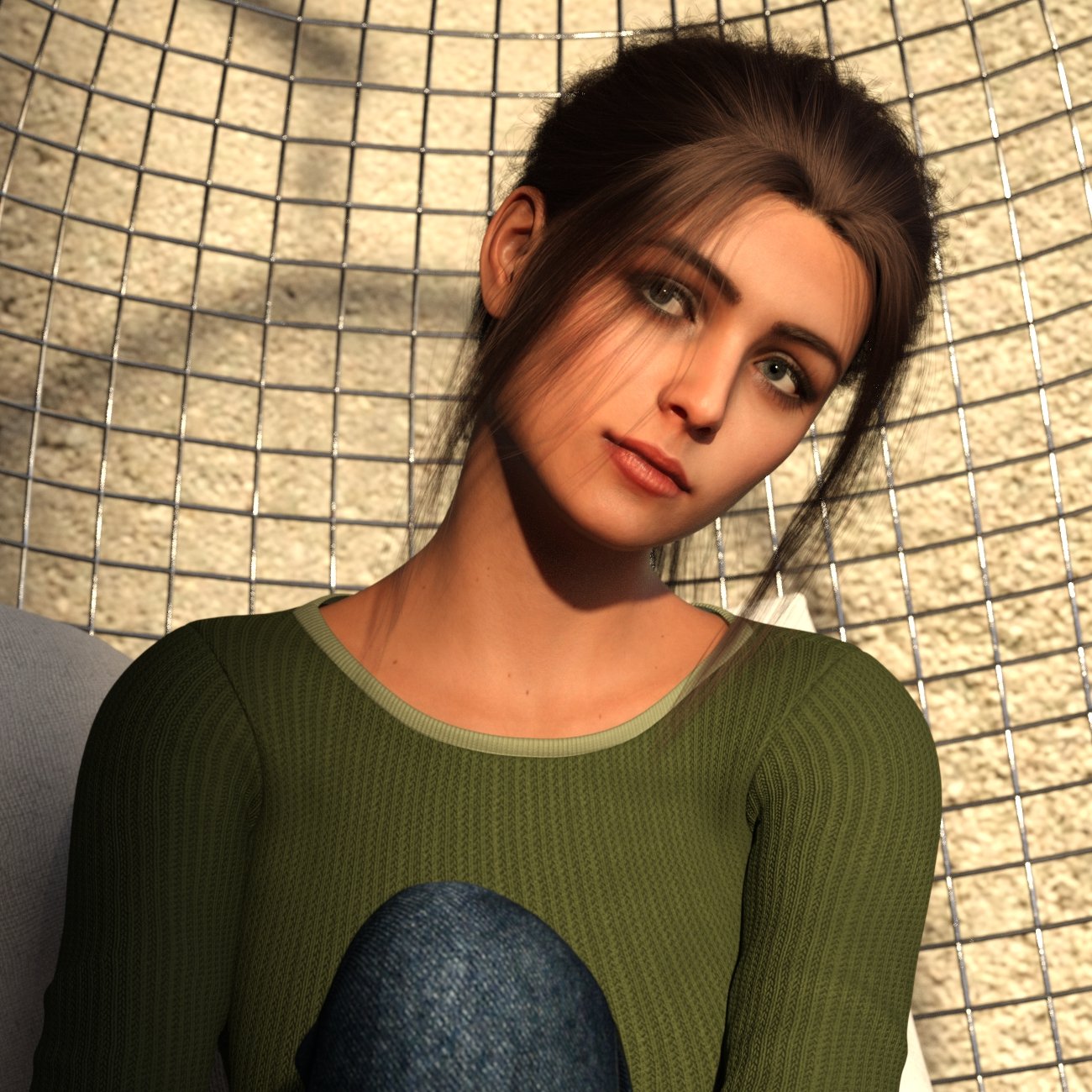
The shape here happens to be part Face Transfer, part dFace (a utility elsewhere). I have definitely have had better luck with FaceGen textures exported without the "adjust colors for Iray rendering" setting. Then I just modify the texture files to create my own SSS files.
Nonesuch00: There have been several minor releases for FaceGen since I upgraded a few weeks ago, what I believe are for minor fixes. They (the other company) sent an email with a link to the latest version to download.
Fixing hip distortion on pelvis / thigh bendscrosswind said:
Actually that's 'normal' ... especially when you bend figure's Pelvis + Abdomen Lower to an extreme extent (and thighs bend + side-side make it worse...), while default pJCMs cannot well fix the partial morphs, even if you use Bend Control. So ~
- try to avoid bending those joints together with high degrees..
- try not to make your figure too thin. The more it's thinner, the more 'distorted' it's gonna be...
- zev0 developed another product to fix similar issues on the abdomen to some extent, you may take a look at: https://www.daz3d.com/body-mixer-for-genesis-3-and-8-female.. (but it's not all mighty.)
- check if you use some unique partial body morph or character... some will aggravate the issue..
- the best way is to fix them with scultping software, e.g. Blender or ZB... (so far I've not seen a product can 100% fix such an issue 'cause that really depends on your figure's shape and poses...)As this is exactly true, it's even worse than that. Every character needs its own individual additional set of JCMs, in order to avoid those unwanted distortions.
Simple way of fixing snaggy teeth in G8 import results from HeadShop?info_b3470fa520 said:
crosswind said:
....Thx for your FB. My next attempt with HeadShop had ok teeth. My attempt after that ended in yet another garbled results pane (with an export that will near crash your scene or worse) which means the program has turned unusable again for a long time. One may find that after a year the plugin spontaneously works again and then you can go ahead with one or two head transfers before it dies again. One thing it cannot deal with at all is make a 8.1 transfer and after that try an 8 version (et v.v.). If HeadShop was an actual shop I would suspect people would throw bricks through their windows on probably a daily basis
LOL, that creased me up ! If so, I might be the 1st one... Anyway, forget about it, let's find a way out by ourselves
Yes, using AutoSculpt morphs may result in shaggy teeth in HeadShop - but there's an easy fix. I sincerely wish people would read manuals (HeadShop has a 70 page manual with lots of illustrations). Chapter 5 is called Troubleshooting and there are ample explanations for correcting issues. Please bear in mind that 3D face creation is not straightforward and so far it is not automatric in many cases. Unlike competition HeadShop 2023 does fully support G9, but DAZ added several levels of complexity to G9 and also coupled items that earlier were separate (like teeth).
To summ it up:HeadShop: used in a simple mode HeadShop works fine without distorted teeth. Using the AutoSculpt feature has the potential of distortion, but it is fixable by counter dialing (see Manual).
Laslo
Unfortunately, I can't find the 70 page manual that you refer to. HeadShop 14 (via its menu) only has a 38 p. manual (https://printahead.net/wp-content/uploads/HS14-Manual.pdf) called "HeadShop14 with LoveChild, OneClick2022 For Windows User Manual". The DAZ3d documentation center for "HeadShop 14 with AutoSculpt WIN" does not offer a link to any documentation (except the Youtube video). The file list has one reference to a PDF: /General/Abalone LLC/HeadShop 14 with AutoSculpt WIN/UnzipFirst/README.pdf
How to age a Genesis 9 character ?crosswind said:
barbult said:
I made a couple more interesting comparison images.
G9B Time Machine age 5 Female (left) vs. Growing Up age 5-6 (right)
...
G9B Time Machine age 1 Female (l;eft) vs. G8 Female Mechasar Caryna (right) Caryna is a morph for Caryn that comes in the Mechasar Mega Add-ons Pack 1.
...
 ...shape and proportion of the ones on the left seem not my preferences.
 My impression is that the Time Machine is more stylized (cartoonish) than realistic. It is a 3D Universe product. 3D Universe is the king of toons in the Daz store, so we should not be surprised, I suppose.
Converting Genesis 9 clothing to Genesis 8Using an ERC autofit clone to get the correctives is a neat idea. I haven't tried that yet as thus far I haven't gotten any overly evident issues when using G9 clothes on G8/8.1
For JCMs I just pose the original figure the clothes were created for (with it fitted to the figure) then export the result as JCM and reimport it using Morph Loader Pro (If i'm trying to convert or fix clothing converted between various figures)
How to age a Genesis 9 character ?barbult said:
I made a couple more interesting comparison images.
G9B Time Machine age 5 Female (left) vs. Growing Up age 5-6 (right)
...
G9B Time Machine age 1 Female (l;eft) vs. G8 Female Mechasar Caryna (right) Caryna is a morph for Caryn that comes in the Mechasar Mega Add-ons Pack 1.
...
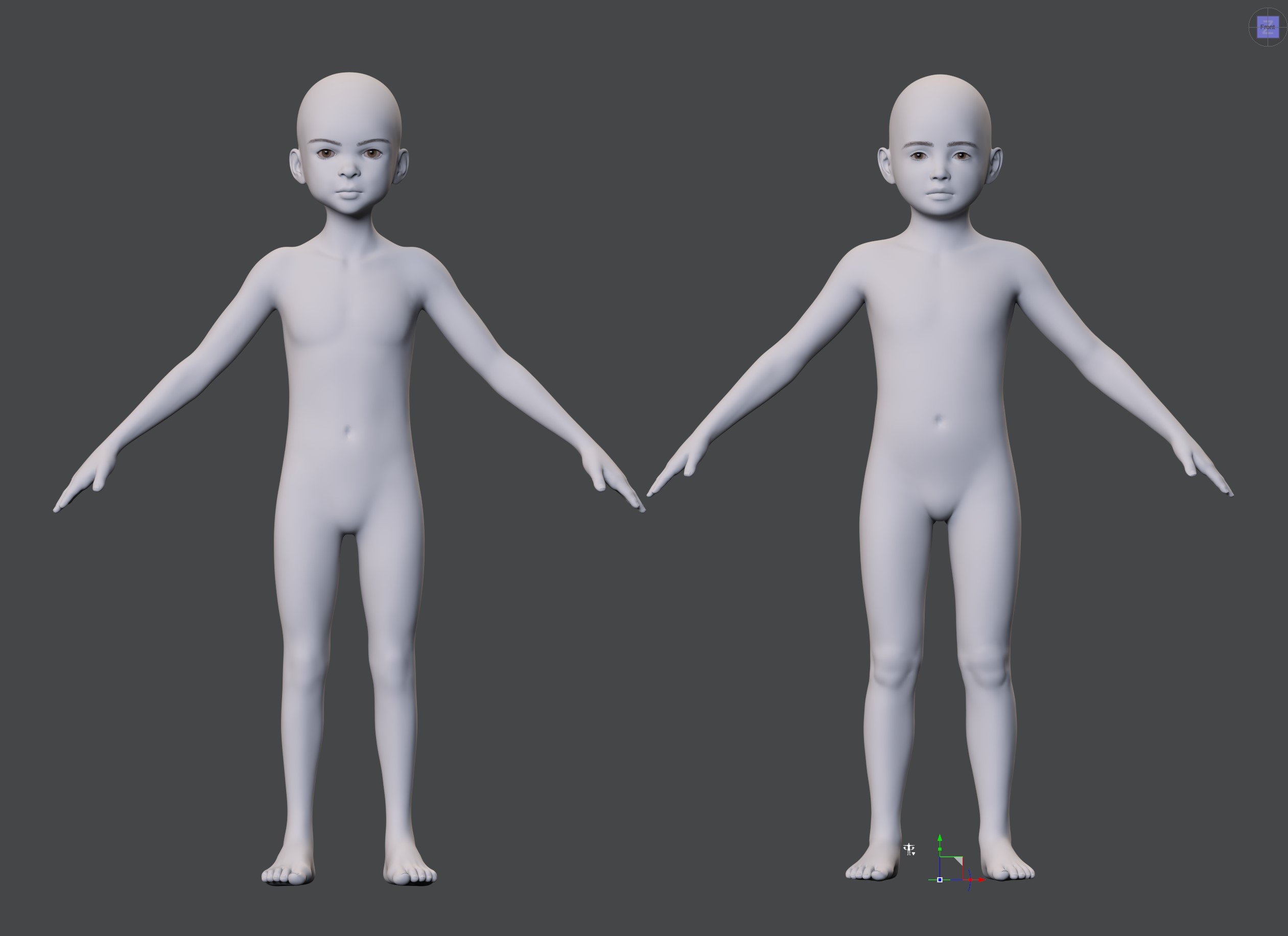
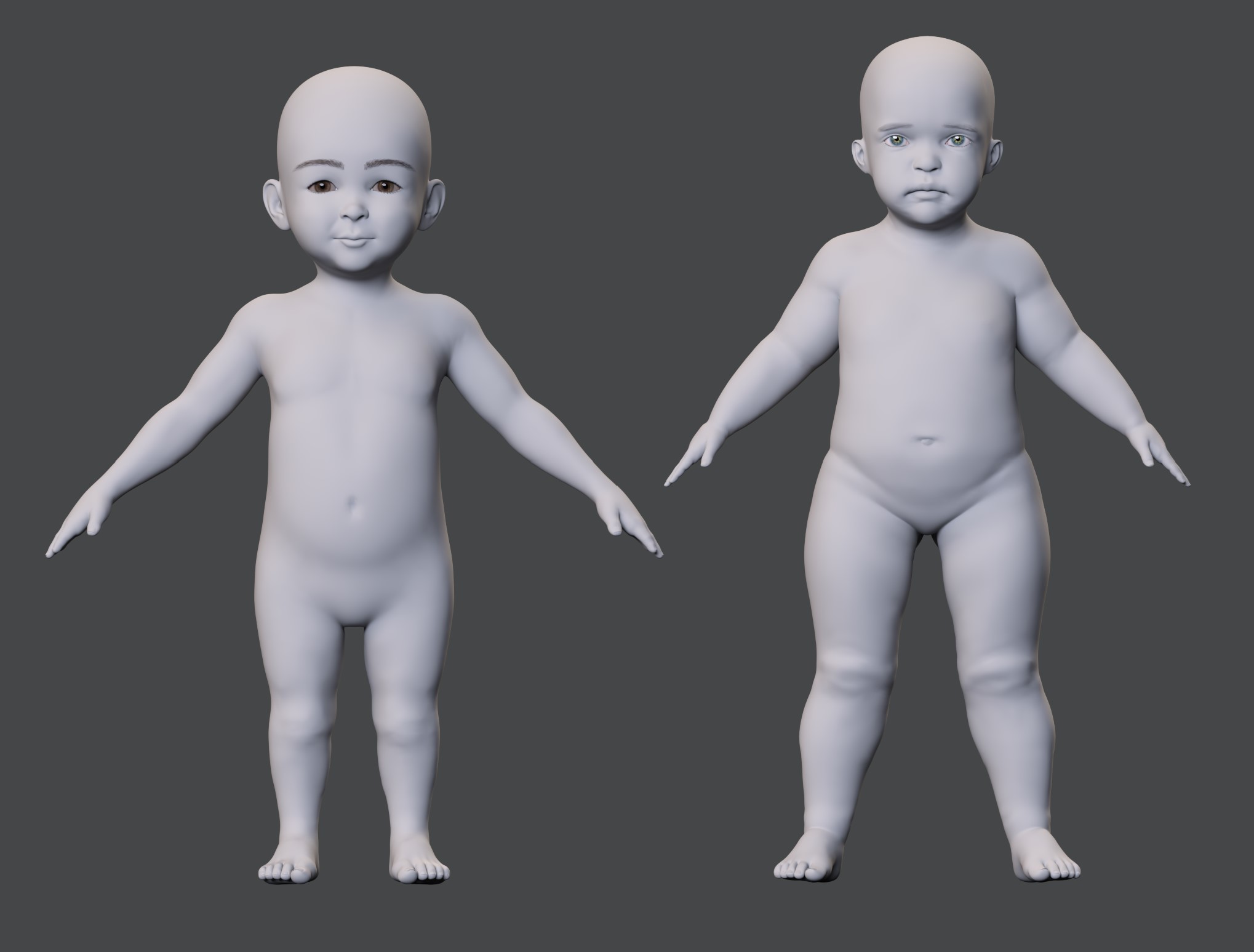
...shape and proportion of the ones on the left seem not my preferences. How to age a Genesis 9 character ?I made a couple more interesting comparison images.
G9B Time Machine age 5 Female (left) vs. Growing Up age 5-6 (right)
G9B Time Machine age 1 Female (l;eft) vs. G8 Female Mechasar Caryna (right) Caryna is a morph for Caryn that comes in the Mechasar Mega Add-ons Pack 1.
 Simple way of fixing snaggy teeth in G8 import results from HeadShop?
Seven193 said:
Try this free tool:
Full Body Morph Fixer
https://sharecg.com/v/92305/browse/10/Software-and-Tools/Full-Body-Morph-FixerIt can reset the vertex morph deltas for different body parts. For your case, I wouldn't just reset the teeth, because the teeth are attached to the jaw, and perhaps the jaw is distorted too. So, I would reset all of these parts:
- Teeth
- LowerJaw
- UpperJaw
- TongueYou can then modify the node transforms to move or scale them so they fit better if something doesn't look right. See these nodes:
- Upper Teeth
- Lower Jaw
- Lower TeethThanks for that tip Seven193!
Daz 3D is part of

Connect
DAZ Productions, Inc.
7533 S Center View Ct #4664
West Jordan, UT 84084Licensing Agreement | Terms of Service | Privacy Policy | EULA
© 2026 Daz Productions Inc. All Rights Reserved.