-
Simple way of fixing snaggy teeth in G8 import results from HeadShop?
Catherine3678ab said:
As I recall, working from G8 with no eyebrows, make the HS morph. After polishing and saving it, zero the figure, figure is selected, add a fresh pair of the default eyebrows.
Thx Catherine, "Zero figure" also resets the head morph and "Zero shape" and "Zero pose" aren't of much use in the contex of this problem; maybe I don't understand you correctly? You made me think though because zero-ed figures don't have wonky eyelashes. See my next post in this thread.
Carrara Non Photo Realistic Works 2Bunyip02 said:
Diomede said:
Bunyip02 said:
Stezza said:
great stuff...


Thanks !!!
Update on updates - got a bit more than 100 figure textures to still convert via Ultimate Unwrap. Got some more Genesis 3 morphs to convert to Genesis 9. Then big eye conversion morphs....
Keep up the great work (and try to persevere through the conversions, ugh. G9 compatibility should simplify use in Carrara.).
Thanks !!!
Woohoo - 645 skin conversions done - time for some renders !!!
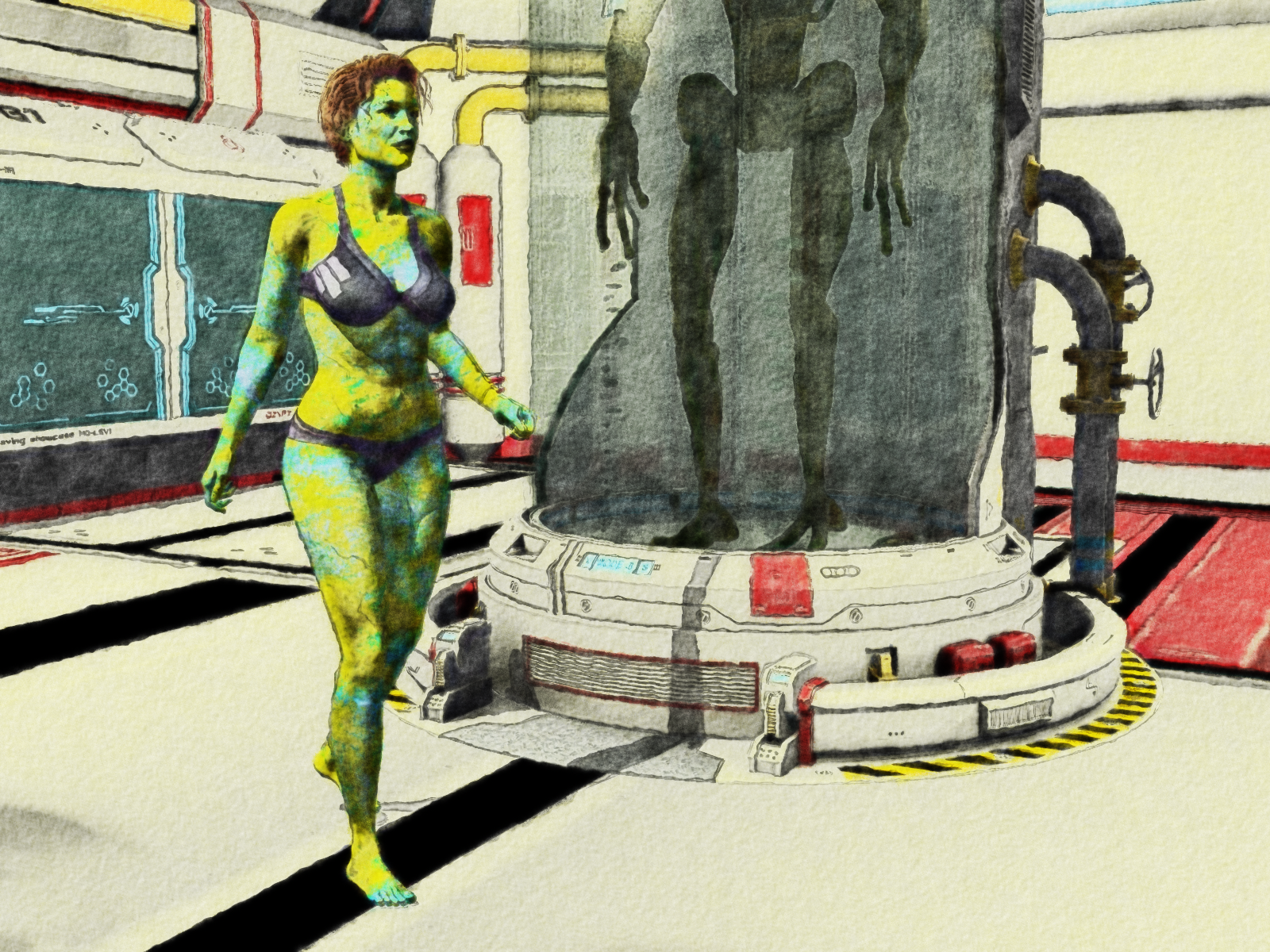
that's a terrific effect on this one :)
G9F with Olympia G8F morph and V3 skin
Natural Movements Pack for Genesis 9Elor said:
outrider42 said:
I have seen Genesis 9. Genesis 9 has World Devouring Thighs. Actual promo pic for a G9 product in this store:

It's not the base Genesis 9 figure and in a direct comparison, with Genesis 9 (with Victoria 9 mats) and Genesis 8.1 (with Victoria 8.1 mats), the difference isn't that big (I tried to reduce G8.1's height a bit but I don't know what percentage I needed to remove):

I don't get why the existence of products like Natural Movements or UNBM for Genesis 9 is seen as a defect of G9 when similar products are also available for previous generations too.
outrider42 said:
I've got Victoria 9 converted to G8 and she looks amazing...because her textures are amazing.
I didn't know it was possible and looking for it, I'm mostly finding videos and articles about the reverse process (using previous generations textures on G9).
Is it an easy process and do you have a tutorial / video explaining how to do it ?
The point being G9 is suposed to be BETTER. Why create a version 9 that can at best match what the previous version did? What is the purpose here? And if applying a fairly basic morph results in the image above, that still is not a good thing. We have a lot of examples in the forum of very funky G9 poses. Again...G9 is supposed to be better. Not equal.
Doesn't anybody get this?
I used a mesh wrapping software to match the shapes. From there the software can create new textures. The first thing to do is to use DS Texture Atlas to create a giant texture map. Sadly Texture Atlas does not recognise Iray materials beside color, bump and normal. You can convert the surfaces to DS Default and place the textures in slots that make sense.
You also save your G9 model as OBJ for the software. It is best to match the pose and morph. G9 has a legacy morph that matches G8M or F, so use it, and match the pose. It is best to have the exported models match as close as possible. It makes the resulting textures better. You can do the shapes later.
You need a default G8 for OBJ as well. This one does not need to be base, because you only doing textures. When you start converting morphs you do need base res. So you will have two different saves in this software, one for textures, one for morphs.
From there the software is reasonably easy to use. You'll want to check tutorials on it. There are different ways to do it, too. My way is probably outdated as I have been using the software for a while.
The software is expensive, but it has a 30 trial period. The trial has no limits on its feature set. That is enough time to figure it out and get some sets done. If all you want is a certain model or two, you can get them done in the trial period. If you want more, and if you have the cash, it could be worth buying. I have used it to convert other Genesis generations to G8. Once you figure it out, you can get a lot of mileage out of it, and now that Blacksmith3D Texture Transfer has seemingly closed up, IMO this is the best all round method. You can convert morphs and textures with one tool.
I also use Hexagon to help fix the eyes and teeth. That is its one weakness, the eyeballs and inner mouth can be funky. But that is not unusual for any of these converters.
This sounds pretty complicated, and it sort of is when you set it up. But once you have it set up, you can have save files all set up for the process. You get faster at it. It is possible to do a character in just a few minutes.
The software also opens up all kinds of awesome possibilities. Now that we make a 3D model of things by using something as simple as a phone's camera, you can create a 3D model of yourself or friends and use this to get your head shape on Genesis. How cool is that?
**It completely slipped my mind that Jay has covered this software in Daz's own training video series, and shows a good portion of the workflow. That is a good video to look up.
Rigging Clothing for DazMelissaGT said:
Ah ok...so even when someone makes their own clothing for Daz, they start out with the transfer utility to rig it and then tweak it...and the more tweaking, the better the result when the figure is posed. Yeah, I'd love to learn how to do that bit. Maybe even fix clothing that I've purchased and can't use because of said spaghetti problem.
Dude, im in the same boat as you, have you found a soulution. I did "transfer Utility" and it just binded the clothes to the figure, now when i move the figure the clothes deform in unnatural way. If you fixed that, How?
Thank you.
Garment import incorrectly. Garment does not follow the figure's poses correctly.Richard Haseltine said:
Even with the correct settings, the Transfer Utility is very literal - it just matches the rigging to the base figure (or another template if you choose that option). The further the outfit is from the skin the more refienment the rigging is likely to requier 9or, of course, you could use dForce to simulate and not worry about rigging).
Good news, i managed to fix "Transfer Utility" misplacing the garment, now only the rigging problem of the garment persists. You mentioned dForce, can you please walk me through that, i only know import and export in Daz Studio.
Garment import incorrectly. Garment does not follow the figure's poses correctly.The presets in export from and iumport to Daz Studio must match, so that any adjustments can be undone. From your screenshot it looks as if the figure was moved as well as reshaped, so the clothing doesn't match - you could fix that by making sure the figuer is not translated, then if the clothes still don't line up manually moving them and exporting them as OB, alone, before reimporting 9this will bake in the corrective movements).
If you are making the clothes around a morphed figure then you must set the Source Shape to the morph used, or Current if mutliple morphs were used, then in the additional options check Reverse Source Shape from Target - otherwise DS will rig relative to the base shape, which is not what you want here.
Even with the correct settings, the Transfer Utility is very literal - it just matches the rigging to the base figure (or another template if you choose that option). The further the outfit is from the skin the more refienment the rigging is likely to requier 9or, of course, you could use dForce to simulate and not worry about rigging).
Garment import incorrectly. Garment does not follow the figure's poses correctly.Hello guys, i hope this finds you well. So i've been working on creating a garment for a figure that i have inside of Daz Studio. The process i took is this:
1- Add the figure from the Daz Library into Daz Studio. I did some adjustments like; shortening the torso, lenghtening the legs and adding a pair of shoes.
2- Export the modified figure as .OBJ, and import it into Clo 3d.
3- Make the garment using Clo 3d.Now, since i've finished making the garment in Clo 3d, i want to import it into Daz Studio and bind it to the figure's skeleton so it can follow the figure's mouvement nicely. Here is the process:
1- Select every piece of the garment, click "export (selected)" and export it as .OBJ.
2- Import it into Daz Studio with base setting.====>*The problem i find here: https://ibb.co/zmr8zqv
3- Select the Garment and go to "Edit" "Object" "Transfer Utility..."
4- Set the "Scene Item" under "Source" to my figure's name. Set the "Scene Item" under "Target" to my garment.====>*The problem i find here: https://ibb.co/JmYzSgMAs you can see, bad base gives bad results, It's what's happening here, the garment is imported incorrectly so problems will follow.
TL;DR: My garment is imported incorrectly: https://ibb.co/zmr8zqv ; | My garment does not follow the figure's poses correctly: https://ibb.co/JmYzSgM
Thanks in advance guys, Would hope if someone could help me here. Thanks
Natural Movements Pack for Genesis 9Given that there are at least three G9 characters that we know of on the daz store with broken custom CBS (i.e., the CBS are active even when the characters aren't dialled in and therefore ruining G9 for any customer who has them installed), I wonder how many "G9 has bad bends" complaints are because they have installed a product made by a questionable PA.
When i see something so grotesquely deformed like what Outrider42 showed, my thought is that problem is due to a bad PA rather than Genesis 9 base. For example, either the PA didn't make sufficient corrective blendshapes for their character morph or they made CBS that are firing when they shouldnt be.
(And no I am not in denial about nor evangelising for G9. I am just not in denial that PA's are blameless)
Natural Movements Pack for Genesis 9Timbales said:
Bunyip02 said:
Timbales said:
I'd be interested in a JCM set for G9 Masculine. This one says it's for Feminine, I assume that it works only on feminine shapes and isn't a universal product.
Works on male as well.
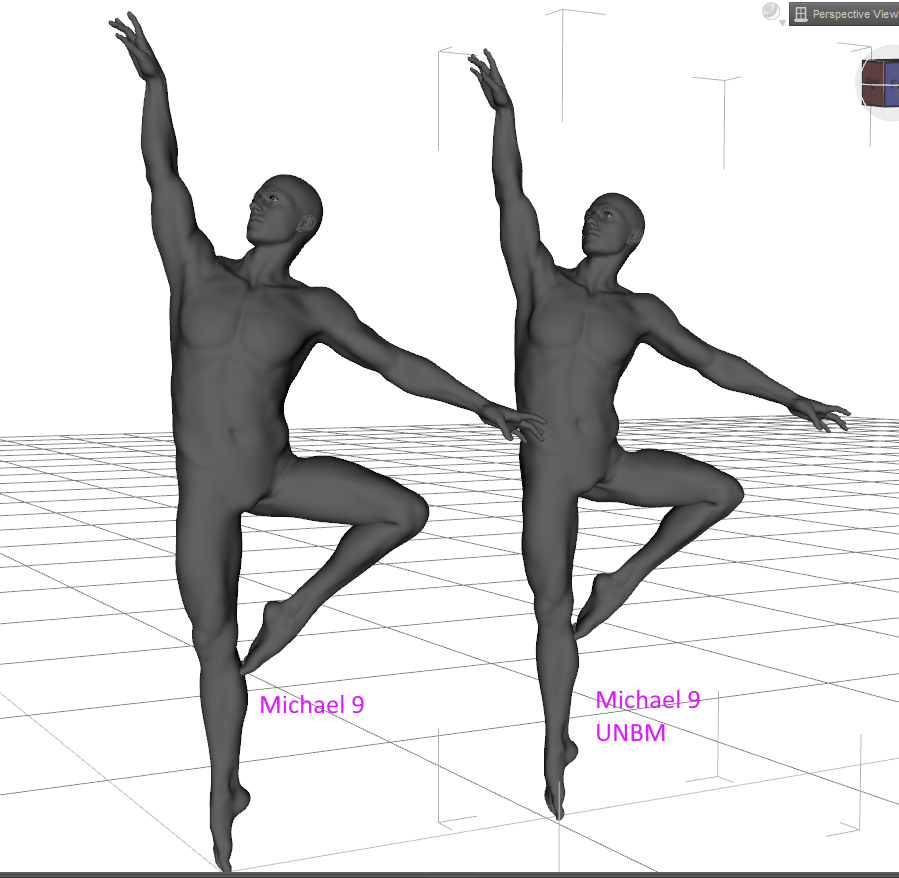
Screenshot does not show them very well, but noticeable changes in the armpit & thighs
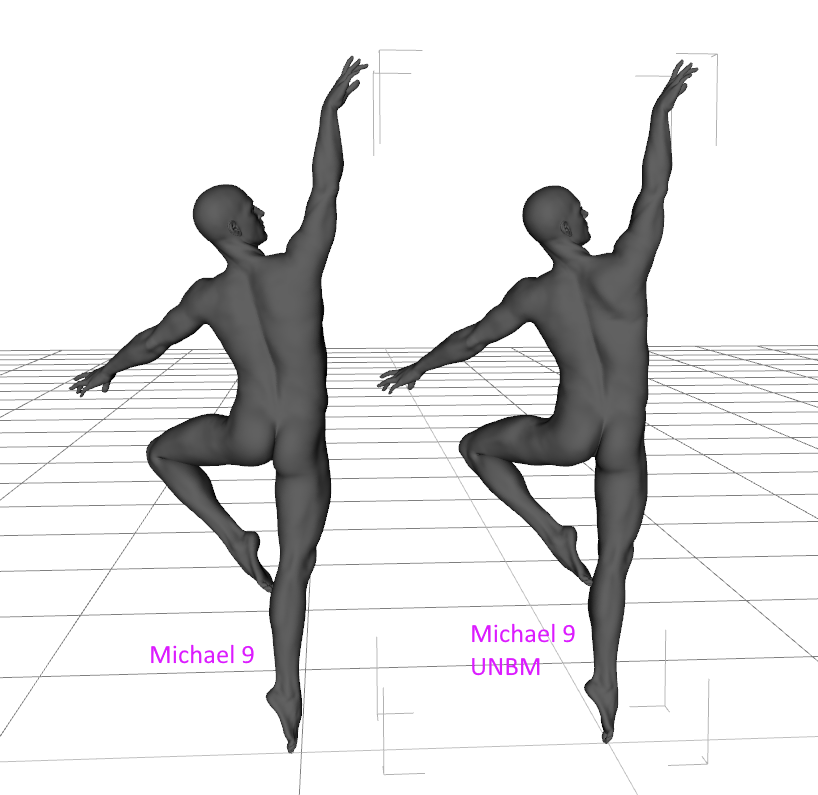
Noticeable changes in shoulder blade, also changes to thigh.
Based on the hip with it applied, I'd say it doesn'tIt "works" in the sense that the morphs can be dialed in, but whether they look good when dialed in on characters they were not designed for is another thing. In this case, I agree that the hip does not look right with this morph combination.
Is there any need for classic Hollywood G9 head morphs?nabob21 said:
AOBB,
Have you released your G9 Elizabeth Taylor morph? I looked in your freebie thread and didn't see it there.
She is going to release them all as a bundle when she is finished. You know how artists are: they like to step away after what they think is a complete work and reevaluate it later for possible more work.
Simple way of fixing snaggy teeth in G8 import results from HeadShop?As I recall, working from G8 with no eyebrows, make the HS morph. After polishing and saving it, zero the figure, figure is selected, add a fresh pair of the default eyebrows.
Simple way of fixing snaggy teeth in G8 import results from HeadShop?info_b3470fa520 said:
Federmann said:
Andrew_C said:
Was reading about a problem with head morphs on Renderosity, and apparently the problem in that case was theres a tooth morph which you had to edit the default value to 0 rather than 100 before importing as importing some head morphs can for some reason mess things up if this value is at 100. I think its Mouth Realsm HD? Might also help here
Ok was looking and its in the comments for this script in Rendo Free Stuff https://www.renderosity.com/freestuff/items/95349/character-splitter-for-daz-studio
It might not help but cant hurt trying
Cool tip, Thx. Love tools like that, must be many dozens more like that out there but it is only in these discussions that I Iearn about them (but that's fine).
Also, there's a video about fixing shaggy teeth: https://youtu.be/83IWYL65TFs
This video applies to earlier HeadShop versions that supported Gen 8.1 morphing.
We fixed the shaggy teeth problem for Gen 9, so that will not be an issue with Gen 9
Thanks for that more comprehensive manual, obviously it is focused on the latest HeadShop version but a lot is also applicable for HS14. The snaggy teeth may be under control at this point but now I notice that the eyelashes are never where they are supposed to be. This is a consistent problem for 8 and 8.1 (and YES I unparented the Eyelashes for 8 exactly as the manual prescribes). To some extent this fault can be attenuated by making a perfect guess what the top of the head should be in the first screen (green slider top of skull), but whatever height I choose, the eyelashes never come out well. The HS morph end result doesn't seem to have eyelashes and when you add them from another figure, the position is off, as if the entire upper face anatomy (including eyebrows) is a little bit off (even though the face seems anatomically ok). Standard 8.1 eyelashes from the essentials library also don't work. For hours I have tried to get eyelashes in a normal position making 10+ HeadShop projects or so, changing head heights in the first project pane etc., but the eyelashes are always some distance away from the eyelids. The eyebrows (once added from another figure) often (not always) are lower than they are supposed to be often below the 'eye ridge' (that boney ridge above the eye).
Here are some examples:
How do I make the bra too small?Richard Haseltine said:
crosswind said:
I have them but haven't found any problem from the underband or underwires.. (if you meant those parts...) . First make sure you have the latest update of the products. There're quite a few adjustment morphs like Adjust Breast Size / Outer / Inner/ Under, etc. try to tweak them according to your figure's breasts shape.
And better post a screenshot if the problem sustains...
Thenproblem, as I understand it, is that some of the images show the bra cups and linkage being forward of the ribs - they are styled as too smal for the contents - rather than unwanted poke-through.
Ah... I misunderstood, trying...
Then... I guess the 'smaller shape' might've been with the body morph of Sayble 8.1, as Sayble 8.1's FBM with the bra just pushes the cups forward, however, I don't own this character...
Is there any need for classic Hollywood G9 head morphs?AOBB,
Have you released your G9 Elizabeth Taylor morph? I looked in your freebie thread and didn't see it there.
Make Human and Daz Studioyuyu.atem said:
Thank you very much! I will look at it. I have also other questions:
- On my main character, I used the MakeHuman Yaoi Chin target asset, that is pretty important for the face of my character. Is there an equivalent in Daz? Or maybe, is it possible to convert it into a Daz asset?
- I didn't understand well what are these assets I found on this topic and an MakeHuman topic :
https://sharecg.com/v/85129/view/21/DAZ-Studio/MakeHUman-v1.1.0-A-Pose-Figure
https://sharecg.com/v/65913/browse/5/3D-Model/MakeHuman-Base-Figure-In-Genesis-Pose
https://sharecg.com/v/65999/browse/21/DAZ-Studio/MakeHuman-Rigid-Rigged-for-DAZ-Studio
With these asset, isn't there the same morphs in Daz as in MakeHuman? Isn't it possible to use them to recreate presisely my character without to have to spend a long time to do "tests" in Daz until I find the good morph values to recreate my character?Thank you in advance for your answer!
Those links are based on Genesis 1 which was release in 2012. If you'd like to follow those workflows to convert a MH to Genesis 1, you may then convert Genesis 1 to Genesis 8 with Daz tools.
BTW, if you can hardly do without MH, go for using Blender might be another straight-forward option by using MPFB 2.0 - http://static.makehumancommunity.org/mpfb/releases/release_20a3.html. In that way, nearly all Daz assets could be exported to Blender, so you can make a whole new world there with your MH figures, Daz assets and Blender itself...
Besides, there're add-ons as well for MH rigging (MHX), so you can easily rig your figure for posing / animation, etc.
Make Human and Daz StudioThank you very much! I will look at it. I have also other questions:
- On my main character, I used the MakeHuman Yaoi Chin target asset, that is pretty important for the face of my character. Is there an equivalent in Daz? Or maybe, is it possible to convert it into a Daz asset?
- I didn't understand well what are these assets I found on this topic and an MakeHuman topic :
https://sharecg.com/v/85129/view/21/DAZ-Studio/MakeHUman-v1.1.0-A-Pose-Figure
https://sharecg.com/v/65913/browse/5/3D-Model/MakeHuman-Base-Figure-In-Genesis-Pose
https://sharecg.com/v/65999/browse/21/DAZ-Studio/MakeHuman-Rigid-Rigged-for-DAZ-Studio
With these asset, isn't there the same morphs in Daz as in MakeHuman? Isn't it possible to use them to recreate presisely my character without to have to spend a long time to do "tests" in Daz until I find the good morph values to recreate my character?Thank you in advance for your answer!
Simple way of fixing snaggy teeth in G8 import results from HeadShop?Federmann said:
Andrew_C said:
Was reading about a problem with head morphs on Renderosity, and apparently the problem in that case was theres a tooth morph which you had to edit the default value to 0 rather than 100 before importing as importing some head morphs can for some reason mess things up if this value is at 100. I think its Mouth Realsm HD? Might also help here
Ok was looking and its in the comments for this script in Rendo Free Stuff https://www.renderosity.com/freestuff/items/95349/character-splitter-for-daz-studio
It might not help but cant hurt trying
Cool tip, Thx. Love tools like that, must be many dozens more like that out there but it is only in these discussions that I Iearn about them (but that's fine).
Also, there's a video about fixing shaggy teeth: https://youtu.be/83IWYL65TFs
This video applies to earlier HeadShop versions that supported Gen 8.1 morphing.
We fixed the shaggy teeth problem for Gen 9, so that will not be an issue with Gen 9
Make Human and Daz Studioyuyu.atem said:
Thank you very much for your answers! In fact, I discovered MakeHuman long before Daz, that's why my characters are in MakeHuman. I am a beginner in Daz but for now, I don't understand how I can entirely recreate my MakeHuman character in Daz. I mean, for the face, MakeHuman offers several different shapes (rond, oval, rectangle, triangle, etc...). I didn't see anything like that in Daz. So, I thought I had first to find a figure having the shape I wanted for the face, that seems not very easy... Is there a way to control the shape of the face like it is controlled in MakeHuman?
This is the perfect time to let go of make human and try daz3d characters. There is a sale right now, many products are over 80% off.
Download the genesis 8 essentials pack which is free with dazstudio.
Then buy the head morph and body morph packages.
The head morph has all those head and faces shapes you listed. The body morphs pack has all the body types. You may have to buy a skin texture later, and maybe some hair and clothes later.
Genesis 8 Female Body Morphs | Daz 3D
Celebrity Look-a-Likes for 3D figures Part 4yair said:
Does anyone know if there is any model similar to Alexis Fawx and Brandi Love.
tritiumcg on Deviantart has a Brandi Love morph for G8.
Natural Movements Pack for Genesis 9paulawp (marahzen) said:
I've been around long enough that I'm embarrassed to have total newbie questions, but how do you know if there's a conflict and what do you do about it?
Sorry, got carried away in D/S and forgot about my post; I turned both morph packs on simultaneously in order to compare the differences, the issue is with the thigh bend, specifically the side-bend morph, so the solution was to disable UNBM's leg morph, as I'm really in love with the Natural movement pack to ever turn it off! ;^)
Daz 3D is part of

Connect
DAZ Productions, Inc.
7533 S Center View Ct #4664
West Jordan, UT 84084Licensing Agreement | Terms of Service | Privacy Policy | EULA
© 2026 Daz Productions Inc. All Rights Reserved.